

Email Validation Rules: What the RFC Says, What Providers Accept, and What to Actually Implement
Someone on your team just pushed a validation update to production. Within an hour, a paying customer can't log in because their derek+billing@company.com address gets flagged as invalid. Support tickets pile up. The fix takes three minutes - but the trust damage takes months.
We've debugged this exact scenario more times than we can count. It happens when email validation rules are treated as a regex problem instead of an engineering decision, and it reveals a deeper confusion: most teams don't distinguish between validation (does this address follow the rules?) and verification (does this mailbox actually exist and receive mail?). Conflating the two produces systems that do neither well.
Let's separate what the spec actually requires from what works in the real world.
The Short Version
If you're pressed for time, here's the layered approach that works:
- Don't write your own regex. An RFC-compliant regex exceeds 6,000 characters. Use a validation library.
- Check the MX record. Confirming the domain accepts mail catches typos and fake domains that syntax checks miss entirely.
- Send a confirmation email. It's the only real proof of mailbox ownership. Everything else is inference.
- For prospect lists, start with pre-verified data. Prospeo delivers emails that have already passed a 5-step verification process at 98% accuracy on a 7-day refresh cycle - so you skip building validation infrastructure for outbound lists altogether.
That's the framework. Now the details.
RFC 5322 Format Rules Explained
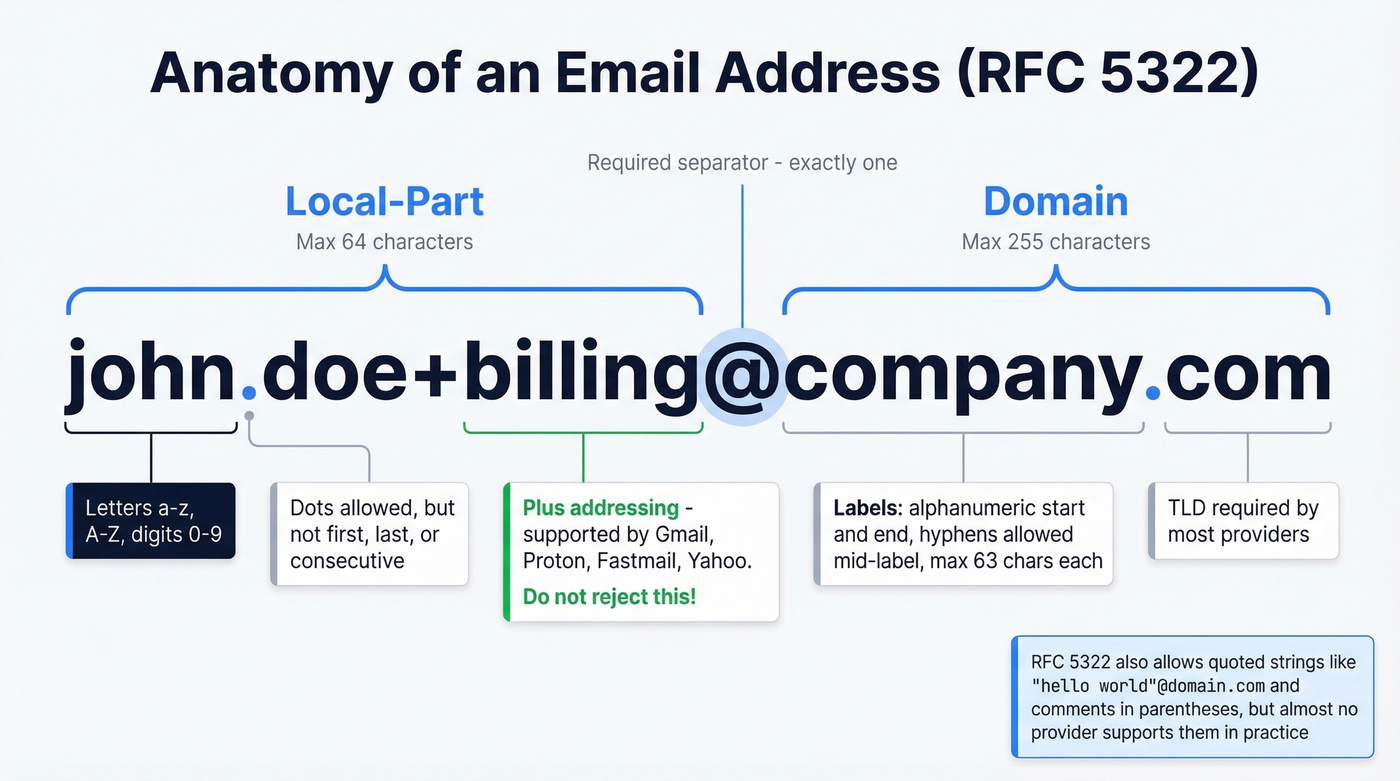
[RFC 5322 Section 3.4](https://datatracker.ietf.org/doc/html/rfc5322#section-3.4) defines the email address format as local-part@domain. Every email address you've ever sent follows this structure. The rules governing each side of the @ are more permissive than most developers realize.
Local-Part Rules
The local-part - everything before the @ - has a maximum length of 64 octets. In its unquoted form, it allows a surprisingly broad set of characters:
| Category | Allowed Characters |
|---|---|
| Letters | A-Z, a-z |
| Digits | 0-9 |
| Special chars | ! # $ % & ' * + - / = ? ^ _ \ { | } ~` |
| Dot | . (with restrictions) |
The dot rules trip people up most often. A dot can't be the first or last character, and consecutive dots (..) aren't allowed in unquoted form. So john.doe@example.com is fine, but .john@example.com and john..doe@example.com aren't.
When the local-part is wrapped in double quotes, the rules loosen dramatically. "john..doe"@example.com and " "@example.com - yes, a space - are both technically valid. Quoted local-parts can contain spaces, tabs, and most ASCII printable characters. Nobody uses them. But they're legal.
Domain Rules
The domain portion maxes out at 255 octets. Each label (the segments between dots) can be up to 63 characters and must start and end with an alphanumeric character. Hyphens are allowed mid-label but not at the start or end.
Most sign-up forms and consumer providers require a public domain with a TLD - user@localhost is typically only usable inside a local network. IP-literal domains like user@[192.168.1.1] are also RFC-valid but commonly rejected by consumer providers.
Edge Cases Nobody Mentions
RFC 5322 allows comments in parentheses within addresses. john.smith(comment)@example.com is equivalent to john.smith@example.com. The spec also includes an "Obsolete Syntax" section covering legacy constructs that are technically parseable but shouldn't appear in new messages. Email predates the web by over a decade - the spec accumulated quirks from ARPANET-era systems that no modern provider supports.
RFC Spec vs. Provider Reality
RFC compliance and real-world deliverability are two different conversations. The spec allows quoted strings, comments, and a wide range of special characters. Most providers ignore half of it.
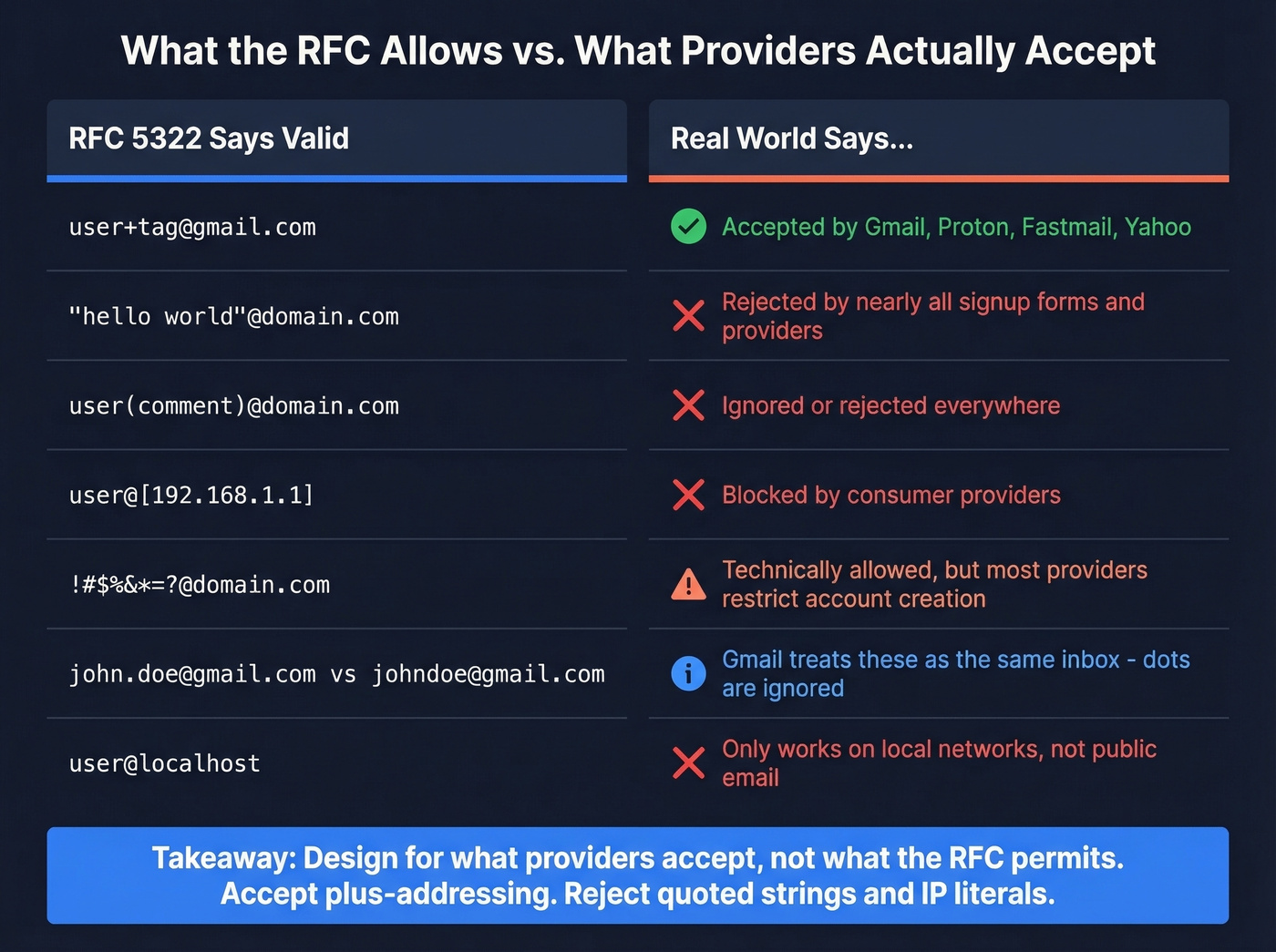
Here's the practical reality you should design around:
- Gmail ignores dots in the local-part for Gmail addresses -
john.doe@gmail.comandjohndoe@gmail.comreach the same inbox. - Quoted strings and comments are rarely accepted by real-world sign-up forms and consumer email systems, even though they're RFC-valid.
- Many providers restrict which special characters they allow in account creation, regardless of what RFC 5322 permits.
Quoted strings are the biggest gap between spec and reality. "hello world"@example.com is valid per RFC 5322. Try using that in most consumer sign-up flows. You can't.
Plus-Addressing Compatibility
Plus-addressing (user+tag@domain.com) is where validation logic most commonly breaks real users. We've seen it happen at companies that should know better - a single + rejection in a regex pattern, and suddenly a chunk of your power users are locked out.
| Provider | Plus-Addressing |
|---|---|
| Gmail | Supported |
| Proton Mail | Supported |
| Fastmail | Supported |
| Yahoo Mail | Supported |
| Outlook.com | No ad-hoc plus addressing (manual aliases only) |
| iCloud Mail | No ad-hoc plus addressing |
| AOL Mail | No ad-hoc plus addressing |
If your validation regex rejects the + character, you're blocking every Gmail, Proton, Fastmail, and Yahoo user who uses plus-addressing for filtering. That's a well-documented problem. It still happens constantly.
Why Regex Alone Fails
A fully RFC-compliant regex exceeds 6,000 characters. Nobody should maintain that in production.
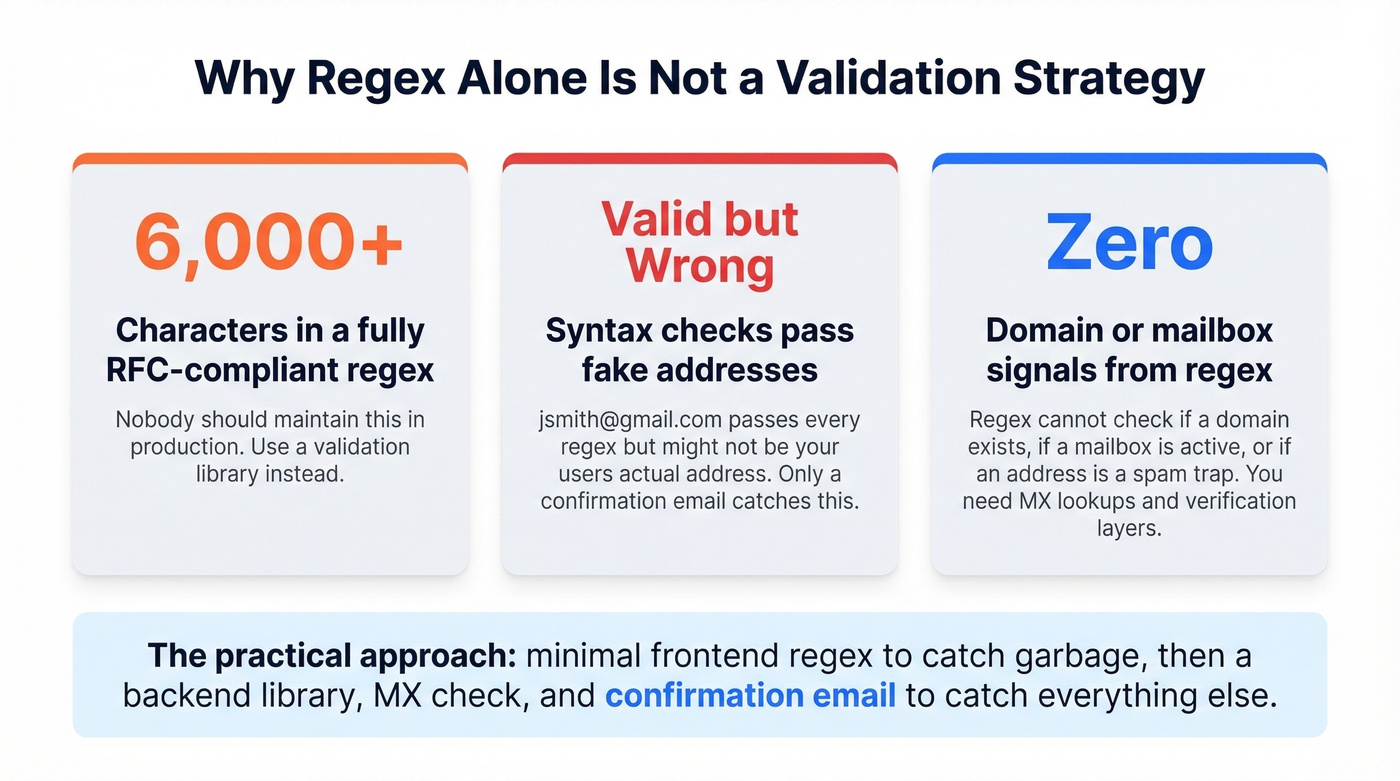
But the real problem isn't length - it's that regex can only check syntax. It can't tell you whether a domain exists, whether a mailbox is active, or whether the address is a spam trap. Even among popular validation libraries, there's no consensus on edge cases. Test a quoted local-part like "hi@you"@example.com across multiple validators and you'll get different answers. Some accept it because it's RFC-valid. Others reject it because no provider supports it. Both positions are defensible, which is exactly why regex alone isn't a strategy.
Here's the bigger problem most articles miss: users more often enter a syntactically valid but incorrect address than an invalid one. jsmith@gmail.com passes every syntax check but might not be your user's actual address. Only a confirmation email catches this.
For frontend validation, this simple pattern catches obvious garbage without rejecting legitimate addresses:
^[^\s@]+@[^\s@]+\.[^\s@]+$
It checks for no spaces, at least one @, and at least one dot in the domain. That's it. It won't catch user@nonexistent-domain.xyz, but that's what the next layers handle.

You're reading about layered validation because bad emails break things - bounced outreach, burned domains, wasted engineering hours. Prospeo eliminates the problem at the source: 143M+ emails verified through a 5-step process with catch-all handling, spam-trap removal, and honeypot filtering. 98% accuracy. Refreshed every 7 days.
Stop validating emails yourself. Start with ones that are already verified.
The Layered Validation Strategy
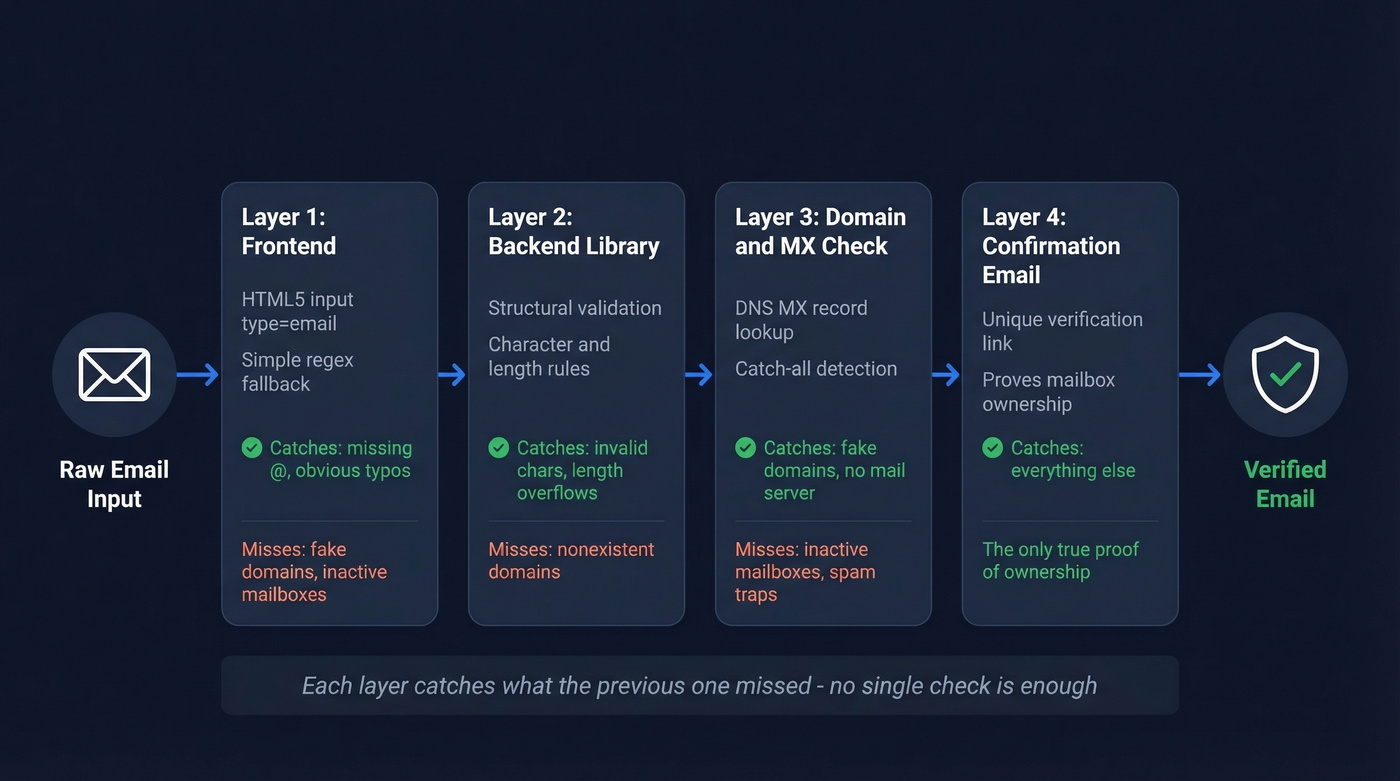
No single check validates an email address. You need layers, each catching what the previous one missed.
Layer 1: Frontend Checks
Start with <input type="email"> in your forms. Browsers handle basic format validation natively - no JavaScript required. Pair it with the simple regex above as a fallback for older browsers or custom UIs. This layer exists purely for UX speed: it catches typos like user@ or user@@domain.com before the form submits.
Layer 2: Backend Library Validation
Server-side, use a proper validation library. This catches structural issues the frontend missed - invalid characters, domain label violations, length overflows. The library should be configurable for strictness, because you'll want to accept plus-addressing and reject quoted strings.
Layer 3: Domain and MX Verification
Query the domain's MX records. If the domain doesn't have mail servers configured, the address can't receive email regardless of whether the syntax is perfect. This single check eliminates a huge percentage of fake and mistyped addresses. For production prospect lists, starting with pre-verified data from a platform like Prospeo eliminates most validation headaches before they start - catch-all detection, spam-trap removal, and honeypot filtering are already handled. If you're building outbound at scale, it also helps to understand email deliverability basics so your validation choices don't create downstream sending issues.
If you're verifying lists yourself, use a dedicated email verification tool that combines syntax checks with MX and mailbox-level signals. If you’re comparing vendors, see Bouncer alternatives for 2026 picks.
Layer 4: Confirmation Email
Send a verification email with a unique link. It's the only method that proves mailbox ownership. Every other check is inference. If you're running a SaaS product, this isn't optional - it's table stakes. If you need to generate or localize these messages, a verification email generator can speed up iteration.
What SMTP Verification Can't Tell You
SMTP-level verification sounds definitive. It isn't. Greylisting temporarily rejects unknown senders on first attempt. Catch-all domains accept mail for any address, returning 250 OK for literally-anything@catch-all-domain.com. Most servers have disabled the VRFY command entirely. And aggressive SMTP probing can get your IP blocklisted.
Keep your bounce rate under ~2%. That's the threshold where email deliverability starts degrading and providers like AWS SES start flagging your account. If you want benchmarks and remediation steps, use this email bounce rate guide.
Choosing a Validation Library
The library you pick matters more than the regex you write.
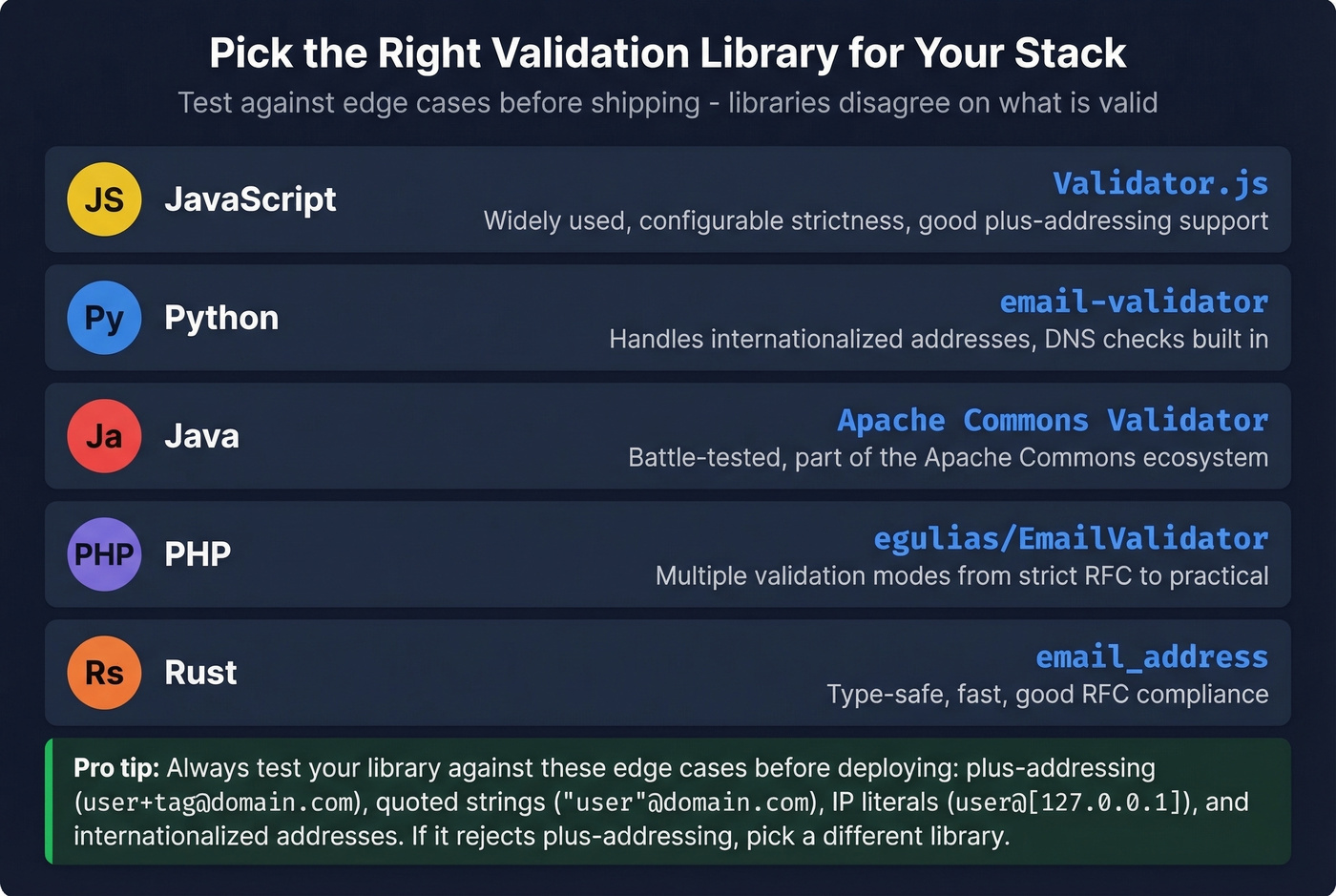
| Language | Library |
|---|---|
| JavaScript | Validator.js |
| Python | email-validator |
| Java | Apache Commons Validator |
| PHP | egulias/EmailValidator |
| Rust | email_address |
We've seen teams pick a library, deploy it, and then discover it rejects plus-addressing or accepts IP-literal domains they don't want. Test your chosen library against a corpus of edge cases before shipping. The comparative analysis by Jonas Neubert shows just how wildly libraries disagree - it's worth reviewing before you commit.
The practical rule: do a minimal format check, then send a confirmation email. If you need more than a signup form check, pick your strictness level intentionally. Building a consumer signup form? Reject quoted strings and IP literals - no real user has those. Building email infrastructure? You need to accept them.
Many teams also embed email code validation on the server side to return specific error codes - distinguishing a malformed local-part from an unreachable domain - so the frontend can display targeted guidance instead of a generic "invalid email" error. If you’re going deeper on mailbox checks, see how to check if an email exists.
International Email Addresses
EAI (Email Address Internationalization), defined by RFCs 6530-6533, allows Unicode characters in both the local-part and domain. An address like 我買@屋企.香港 is valid under EAI. This matters if you serve markets where Latin characters aren't the default.
The catch: HTML5's <input type="email"> is ASCII-only. It'll reject internationalized addresses outright. If you need to support EAI, you'll need custom client-side validation using Unicode property escapes like /(\p{L}|\p{N})+/u in JavaScript and server-side handling that understands IDN/Punycode for domains.
The structural rules from RFC 5322 still apply - one @ separator, local-part length limits, domain label constraints. EAI extends the character set, not the architecture. Server support remains inconsistent, so test before you promise support.
Suggest, Don't Reject
The best validation UX doesn't reject - it suggests. When someone types derek@gmial.com, don't show a red error. Show "Did you mean gmail.com?" and let them confirm or override.
Strict validation causes more data quality problems than it solves. Every address you wrongly reject is a lost user. Every address you wrongly accept can be caught by a confirmation email. The asymmetry is massive - err on the side of acceptance.
Domain typos fall into predictable categories: wrong letter (gnail), extra letter (gmaill), missing letter (gmal), and swapped letters (gmial). Building detection for the top 10 email domains covers the vast majority of consumer typos. For B2B, mine your own bounce logs. You'll find organization-specific patterns - maybe your users consistently misspell a partner company's domain, or there's a common .co vs .com confusion for a specific vendor. The Mailcheck.js library handles this well for JavaScript projects. If you’re cleaning outbound lists, pair this with spam trap removal to avoid deliverability landmines.
This approach catches more errors than strict email validation rules ever will, and it doesn't alienate users with legitimate but unusual addresses.
Regex catches syntax errors. MX lookups catch dead domains. But neither tells you if a mailbox is real and active. Prospeo's proprietary verification infrastructure runs 5 checks per email - including catch-all detection and spam-trap removal - so your lists arrive clean at 98% accuracy for about $0.01 per email.
Get emails that already passed every validation layer you'd build yourself.
FAQ
Is email validation case-sensitive?
No. RFC 5321 specifies the domain is case-insensitive, and while the local-part is technically case-sensitive per spec, virtually every major provider treats it as case-insensitive. Normalize the entire address to lowercase in your code and storage to avoid duplicate-matching issues.
What's the maximum email address length?
254 characters total per RFC 5321's path length limit. The local-part caps at 64 octets and the domain at 255 octets. Your validation logic should enforce the 254-character combined limit - addresses exceeding it will fail on most mail servers regardless of syntax.
Should I use regex for email validation?
Only as a first-pass filter. A simple pattern like ^[^\s@]+@[^\s@]+\.[^\s@]+$ catches obvious garbage without rejecting valid addresses. For real validation, use a library for structural checks and verify the domain's MX record. Regex alone can't confirm deliverability.
What's the difference between validation and verification?
Validation checks whether an address could exist based on format and syntax rules. Verification confirms whether the mailbox actually exists and can receive mail. Production systems need both - validation catches structural errors, verification catches abandoned mailboxes, spam traps, and catch-all domains.
How do I get pre-verified emails instead of validating manually?
Prospeo delivers emails that have already passed a 5-step verification process - catch-all handling, spam-trap removal, honeypot filtering - at 98% accuracy across 143M+ verified addresses. You skip building validation infrastructure entirely and start with clean data on a 7-day refresh cycle.