

How to Find a Company by Email Address: Free Methods, Tools, and Bulk Workflows
An inbound lead fills out your demo form with just an email - no company name, no domain, nothing. Or you're staring at 500 badge scans from a trade show and need to route every one to the right AE by company size before Monday. Either way, you need to find a company by email address, fast.
Here's the thing: most guides show you how to find emails from companies. We're doing the opposite. This covers every method that works, from a 10-second domain check to bulk enrichment workflows that handle hundreds of emails without breaking a sweat. If your deal sizes are modest and you're only looking up a handful of emails per week, the free methods here will get you 80% of the way. For anything at scale, you'll need a tool.
Pick Your Approach by Volume
- One email, need the company now - Check the domain portion and Google it. Free, takes 10 seconds.
- One-off lookup with richer data - Use Mailmeteor's free reverse lookup with no signup required, or a Chrome extension with a free tier.
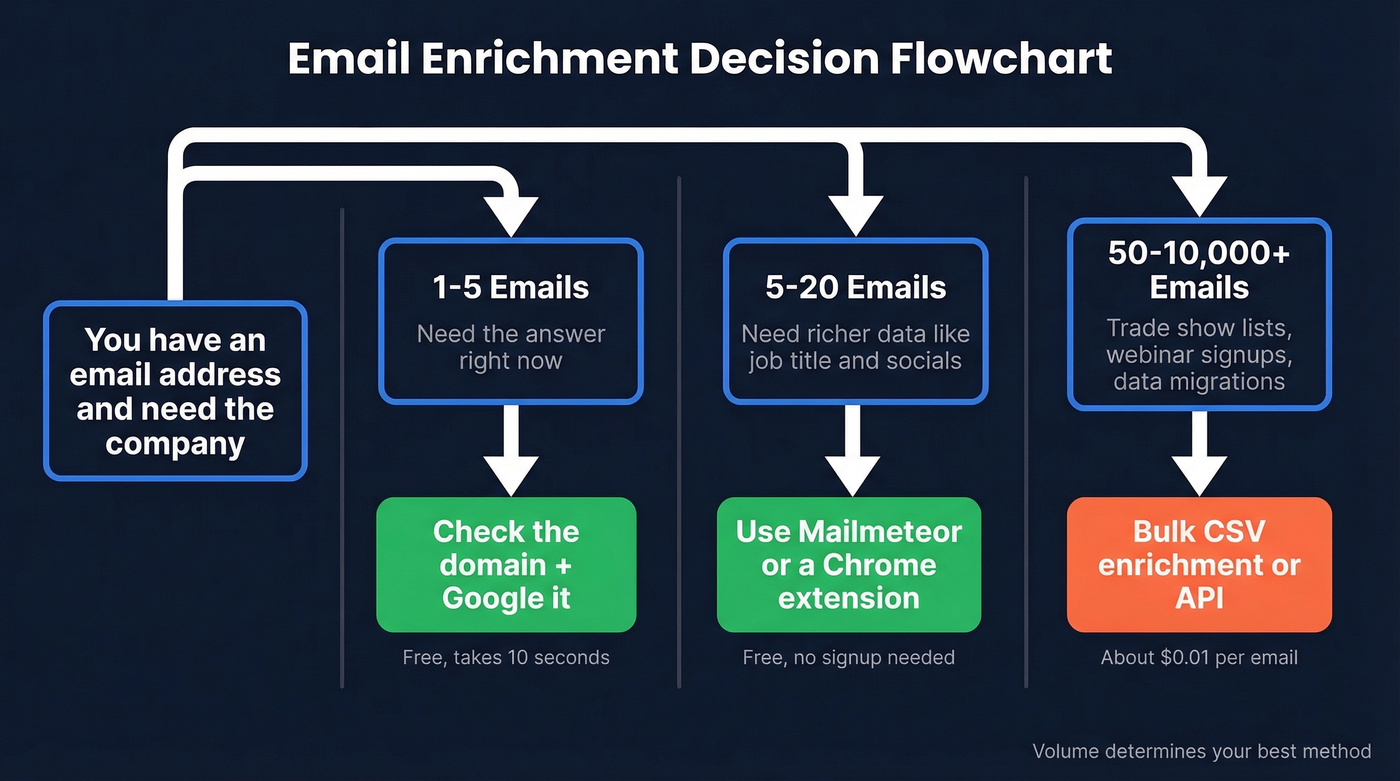
Free Methods to Identify a Company
Check the Email Domain
This is the obvious first step, and it works more often than people expect. Take the portion after the @ symbol - john@acmecorp.io becomes acmecorp.io - and type it into your browser or Google it.
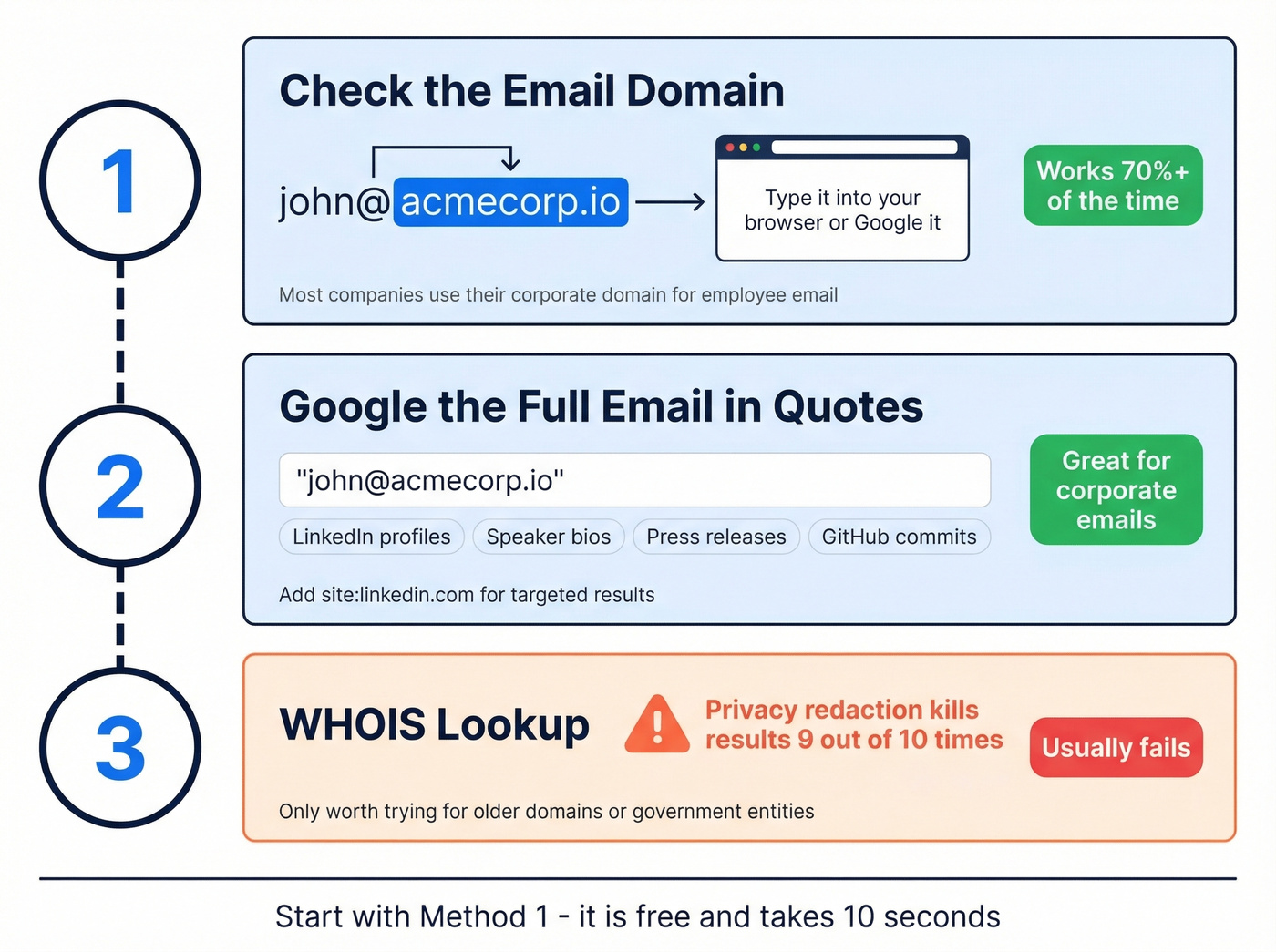
Most companies use their corporate domain for employee email. If the domain resolves to a company website, you're done. Even if it doesn't load directly, Googling the domain usually surfaces the company name, a professional profile page, or a Crunchbase listing within the first few results. One extra trick worth knowing: email format patterns reveal a lot. An address like j.smith@acmecorp.io suggests a structured corporate email system, which almost always means a real company domain rather than a personal alias.
Google the Email Address
Drop the full email address into Google wrapped in quotes: "john@acmecorp.io". The quotes force an exact-match search, surfacing pages where that specific address appears - conference speaker bios, press releases, regulatory filings, GitHub commits, you name it.
For a more targeted approach, combine the email with a site operator. Searching "john@acmecorp.io" site:linkedin.com often pulls up the person's profile directly. You can also try site:acmecorp.io contact to find company pages listing employee emails, confirming the domain belongs to a real organization.
If the email uses a common domain like Gmail, these searches become less useful. But for corporate emails, Google is surprisingly effective. We've resolved company identities in under 30 seconds this way more times than we can count.
WHOIS Lookup (and Why It Usually Fails)
WHOIS lookups query the registration database for a domain, potentially revealing who registered it. You can run one through DomainTools or any free WHOIS service.
Stop wasting time on this method. Most registrars now enable privacy protection by default. Instead of seeing "Registered to: Acme Corp," you'll see "REDACTED FOR PRIVACY" across every field. GDPR and similar regulations pushed registrars to hide personal details, and in our experience, privacy redaction kills the result 9 times out of 10. A 15-second check won't hurt for older domains or government entities. But it's a supplement, not a strategy.
Free Reverse Email Lookup Tools
Mailmeteor is the standout free option for one-off reverse lookups. No signup, no credit card, no bait-and-switch into a paid report - which is refreshing, because a common complaint on r/OSINT and similar communities about free reverse email tools is exactly that bait-and-switch pattern.
Mailmeteor pulls from publicly available OSINT sources and returns the person's full name, company, job title, company domain, and social profiles. It's GDPR-compliant and doesn't store your search queries.
Use this if you need a quick answer for a single professional email address. Skip this if you're working with personal Gmail/Yahoo addresses or need to process more than a handful of lookups - there's no bulk capability or API.

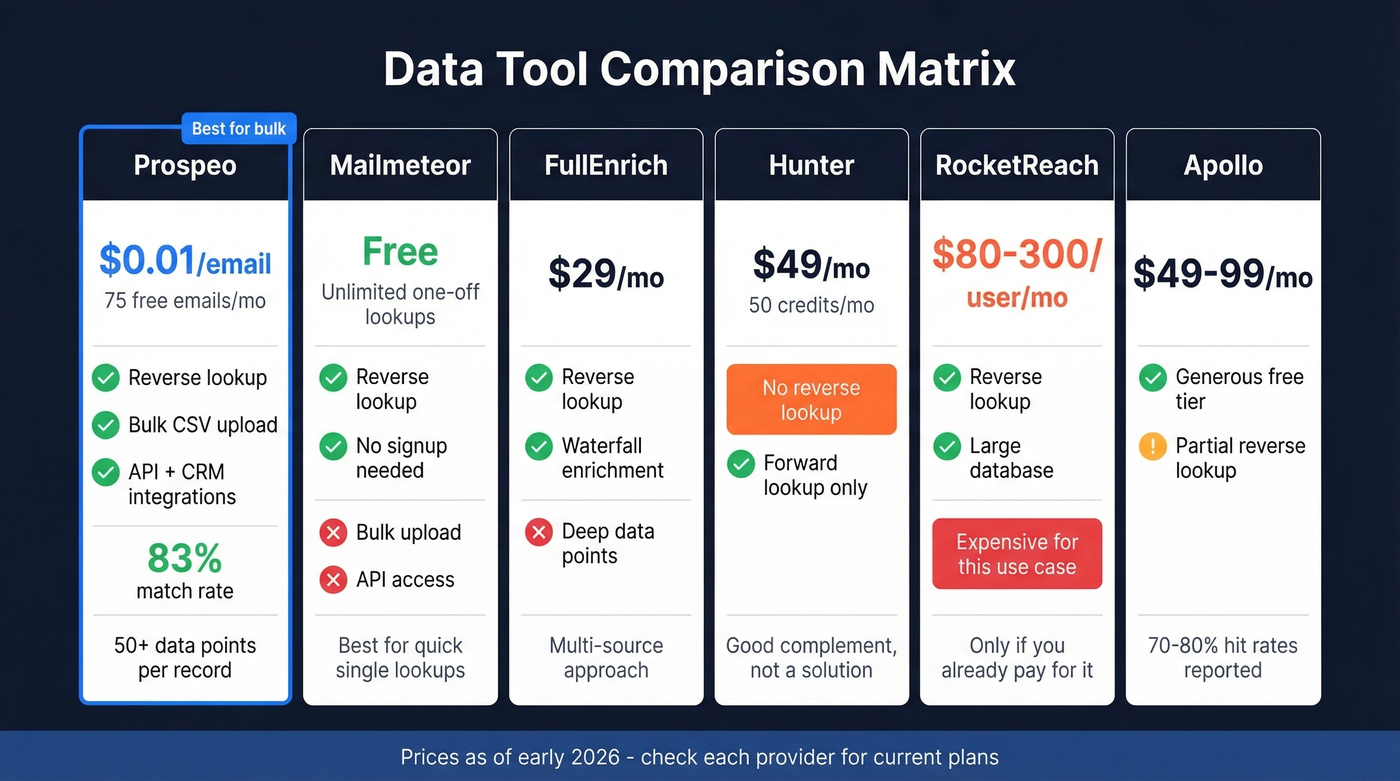
Free methods work for one-off lookups. But when you're staring at 500 trade show emails that need company data by Monday, you need bulk enrichment. Prospeo returns company name, size, industry, funding stage, and 50+ data points per record - with an 83% match rate and 98% email accuracy.
Upload your email list and get company data back in minutes.
Reverse Email Lookup at Scale
Prospeo - Best for Bulk Enrichment
When you've got a spreadsheet of emails and need company data for all of them, Prospeo's enrichment tool is the fastest path we've found. Upload a CSV or hit the enrichment API, and you get back 50+ data points per record - company name, job title, phone number, company size, industry, funding stage, and more.

What matters most: an 83% enrichment match rate, 98% email accuracy on verified addresses, and a 7-day data refresh cycle. The industry average is about six weeks, which means a lot of tools serve stale data by default. We ran the 83% match rate against messy trade-show lists with typos and duplicates, and it held up.
Pricing runs about $0.01 per email with a free tier of 75 emails and 100 Chrome extension credits per month. No contracts, no annual commitments. For RevOps teams running automated workflows, the API delivers a 92% match rate and integrates with Salesforce, HubSpot, Clay, Zapier, and Make.
FullEnrich - Waterfall Enrichment
The concept behind FullEnrich is simple: instead of querying one data source, it checks multiple sources sequentially until it finds a match. This waterfall approach tends to produce higher match rates than single-source tools. Practitioners in enrichment forums report 85%+ hit rates, which tracks with what we've seen from multi-source approaches generally.
Pricing sits around $29/month with rollover credits - accessible for smaller teams. The tradeoff is less control over which source your data comes from, and you won't get the same depth of data points per record as a dedicated data enrichment platform.
Hunter - Forward Lookup Only
Here's what Hunter doesn't do: reverse email lookup. Hunter is a forward lookup tool - give it a company domain, it gives you emails. That's the opposite direction.
So why mention it? Because it's a useful complement. Once you've identified a company via domain check, Hunter can find additional contacts there. The free plan includes 50 credits/month, and paid plans start at $49/month - $34/month billed annually - with unlimited users on all tiers. Don't buy it expecting reverse lookup. You'll be disappointed.
RocketReach - Expensive for This Use Case
$80 to $300 per user per month. That's what RocketReach costs, with team plans starting at $83/user/month on annual billing and extra lookups running $0.30-$0.45 each. Mobile numbers are only included in higher tiers.
It handles both forward and reverse lookups with a large database, and Reddit threads on r/sales frequently mention it alongside Apollo as a "good but pricey" option. If you're already paying for RocketReach for outbound prospecting, use it for reverse lookups too. If you're buying a tool specifically to identify companies from emails, skip it - there are options above at a fraction of the cost.
Apollo, Anymail Finder, Clearbit
Apollo offers a generous free tier and paid plans from ~$49-$99/mo. A common practitioner benchmark is 70-80% hit rates for email enrichment. It's a strong all-in-one for sales prospecting and sequences, but accuracy isn't its strongest suit for pure reverse lookup - and community discussions often flag frustrations with data transparency and long contract terms.
Anymail Finder starts at $14/month and only charges for valid emails. For teams on a tight budget that only need basic company identification at low volumes, it's worth a look.
Breeze Intelligence (Clearbit-powered) auto-enriches company records inside HubSpot, but contacts only get enriched when they have a business email domain or they're associated with a company record. Personal emails won't trigger enrichment. Pricing is enterprise-oriented, typically $30,000-$100,000/year bundled with HubSpot contracts.
Pricing Comparison

| Tool | Free Tier | Paid From | Best For | Reverse Lookup? |
|---|---|---|---|---|
| Mailmeteor | Free | Free only | Quick one-off lookups | Yes (basic) |
| Hunter | 50 credits/mo | $49/mo | Forward lookup complement | No |
| FullEnrich | Limited | ~$29/mo | Multi-source waterfall | Yes |
| RocketReach | Limited | $80/user/mo | Teams already paying for it | Yes |
| Anymail Finder | Limited | $14/mo | Tight budgets, low volume | Partial |
| Apollo | Generous | ~$49/mo | All-in-one prospecting | Partial |
Why Personal Emails Are Harder
If the email you're investigating is a Gmail, Yahoo, or Outlook address, your options shrink dramatically. These domains don't map to any company - john.smith@gmail.com could be anyone, anywhere. Enrichment tools rely on matching email domains to corporate entities, and when the domain is a consumer email provider, there's nothing to match against.
Your best workaround is Googling the full email address in quotes and checking for social profiles, forum posts, or public directories where the person used that address. It's manual, it's slow, and it doesn't always work. But it's the only reliable path when you're dealing with personal domains.
Bulk Reverse Lookup Workflow
Let's say you've got 500 emails from a trade show, a webinar registration list, or a data migration. Checking domains one by one doesn't scale. Here's the workflow that does.
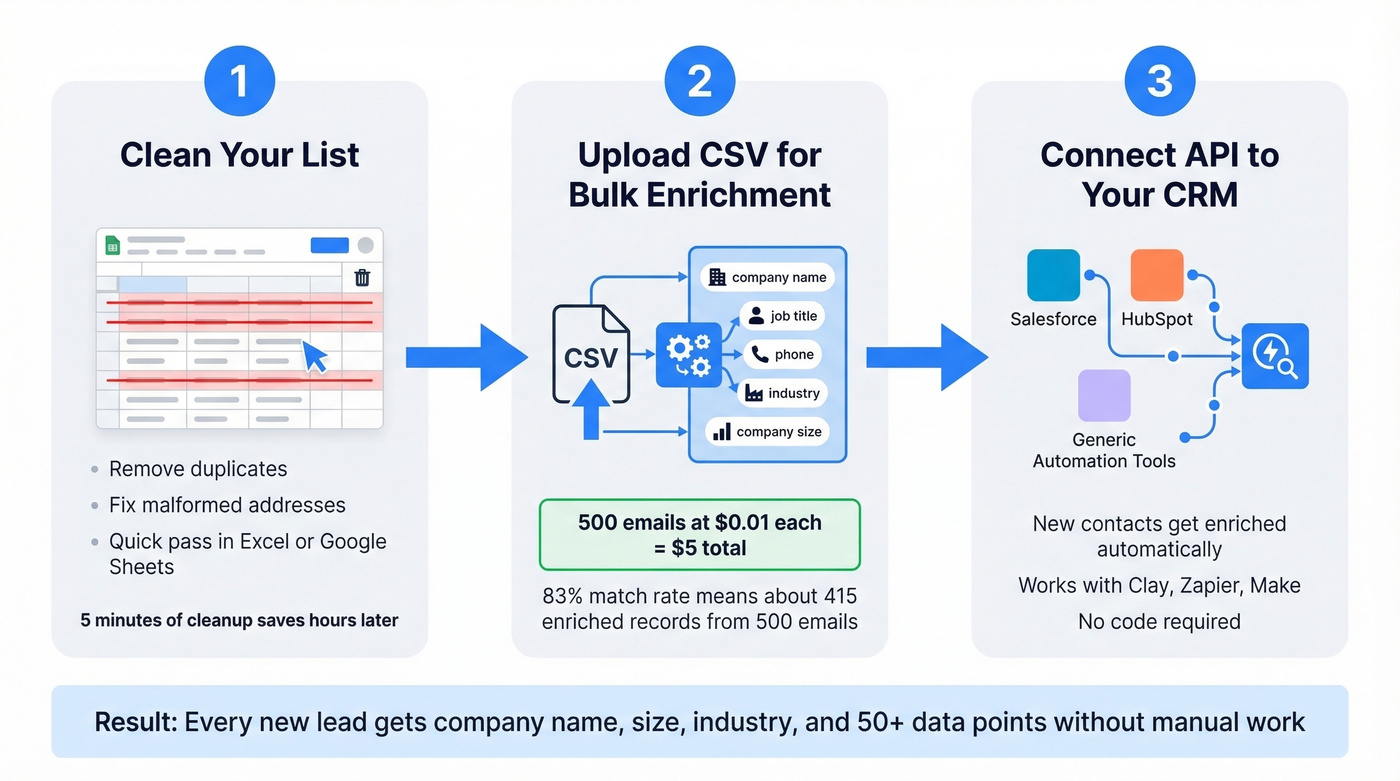
Step 1: Clean your list. Remove obvious duplicates and malformed addresses. A quick pass in Excel or Google Sheets handles this in minutes.
Step 2: Upload the CSV to a bulk enrichment tool. The platform matches each email against professional profile databases and returns company name, job title, phone, company size, industry, and dozens of other fields. At an 83% match rate, a 500-email list typically returns 415+ enriched records.
Step 3: For ongoing workflows, connect the enrichment API to your CRM. New contacts entering Salesforce or HubSpot get enriched automatically. Teams running Clay, Zapier, or Make can build this into broader automation sequences without touching code.

The cost math is straightforward. 500 emails at $0.01 each is $5. Compare that to the hours you'd spend Googling domains manually, and the ROI case makes itself. The Dropcontact email finder benchmark is worth reviewing if you want to compare enrichment tools head-to-head before committing.
Whether you need to find a company by email address for a single inbound lead or enrich thousands of records overnight, the right approach depends on volume. Free methods handle one-offs. Bulk enrichment tools handle everything else - and the cost per lookup is low enough that manual research rarely makes sense past a dozen emails.
Manual domain checks don't scale. Prospeo's enrichment API processes email-to-company lookups at a 92% match rate, refreshes data every 7 days, and plugs directly into Salesforce, HubSpot, Clay, and Zapier. All at roughly $0.01 per email - no contracts, no annual lock-in.
Stop Googling emails one by one. Automate the entire workflow.
FAQ
Can you find a company from a Gmail address?
Rarely. Gmail, Yahoo, and Outlook don't map to any corporate entity, so enrichment tools have nothing to match against. Your best option is Googling the full address in quotes to surface public mentions, social profiles, or forum posts tied to that person.
Is reverse email lookup legal?
Yes, when using publicly available data. Tools like Mailmeteor and Prospeo rely on OSINT and GDPR-compliant sources. Avoid services that scrape private databases. Standard due diligence applies - don't use data for purposes the person wouldn't reasonably expect.
What's the most accurate reverse email lookup tool?
For one-off lookups, Mailmeteor is free and reliable. For bulk enrichment, Prospeo returns 50+ data points per email at an 83% match rate and 98% email accuracy - the highest combination of depth and precision at this price point.
How do I verify an email is still active?
Use a verification tool with multi-step deliverability checks, spam-trap removal, and catch-all domain handling. Prospeo's 5-step verification process covers all three. Hunter also offers verification at 0.5 credits per check on any plan.
Email lookup vs. email enrichment - what's the difference?
Lookup returns one data point - usually a name or company. Enrichment returns a full profile: company, title, phone, headcount, industry, and more. If you need anything beyond a company name, enrichment is the better choice. The price difference is minimal, and the extra data makes downstream routing and outreach far more effective.