

How to Find Out If an Email Address Is Valid (2026)
You're about to launch a 500-person cold email sequence. Five percent bounce. That's 25 hard bounces on day one - enough for your ESP to throttle you and enough for Gmail to start side-eyeing your domain. The fix isn't better copy or warmer subject lines. It's learning how to find out if an email address is valid before you hit send.
What You Need (Quick Version)
Three paths, depending on where you are right now:
Check one email right now. Use a free verifier like Hunter (50 credits/month, verification costs 0.5 credit - effectively 100 verifications if you spend all credits on verification) or Prospeo's email finder (75 free emails/month with built-in verification).
Clean an existing list. NeverBounce or Clearout ($40/10k in the LaGrowthMachine benchmark) will scrub a CSV fast.
Avoid the problem entirely. Source emails from a pre-verified database so you're starting with clean data instead of cleaning dirty data after the fact.
Let's get into how all of this actually works.
How Email Verification Works, Step by Step
Every email verification tool - free or paid - runs the same fundamental process under the hood. It's a partial SMTP handshake: your verifier talks to the recipient's mail server just enough to ask "does this mailbox exist?" and then hangs up before actually delivering anything.
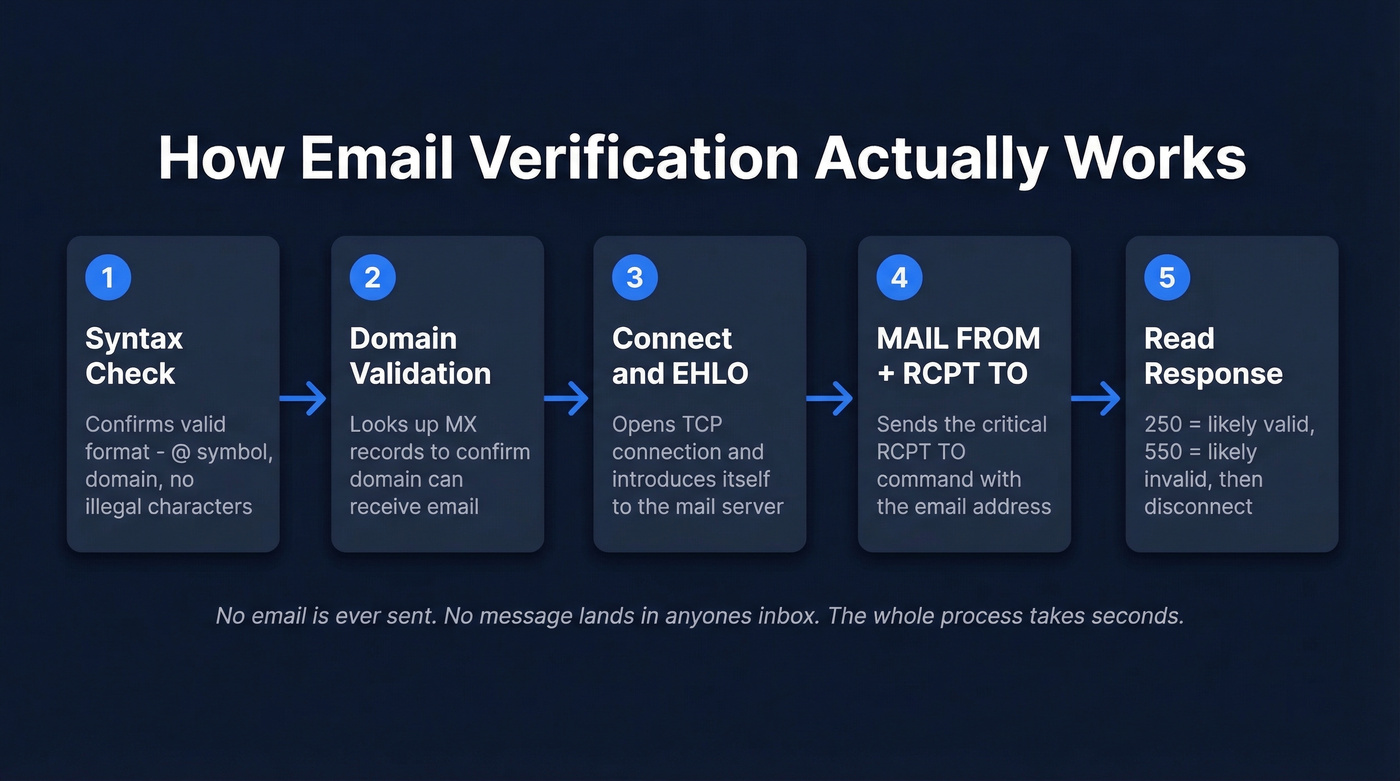
Here's the sequence:
Step 1: Syntax check. The tool confirms the address follows valid formatting rules - an @ symbol, a domain, no illegal characters. This catches typos like "john@@company.com" but proves absolutely nothing about whether the mailbox exists.
Step 2: Domain validation. The tool looks up the domain's MX records (not A records - a common misconception). MX records tell you which server handles email for that domain. No MX record means the domain can't receive email. Full stop.
Step 3: Connect and EHLO. The verifier opens a TCP connection to the mail server and introduces itself with an EHLO command. The digital equivalent of knocking on the door.
Step 4: MAIL FROM + RCPT TO. The verifier sends a MAIL FROM command identifying a sender, then the critical RCPT TO command with the email address you're checking. The server responds with a status code.
Step 5: Read the response and disconnect. A 250 response typically means the server will accept mail for that address. A 550 typically means it won't. The verifier disconnects without ever sending actual content.

No email gets sent. No message lands in anyone's inbox. The entire process takes seconds per address, and it's the same protocol mail servers use to talk to each other every day.
Why Results Aren't Always Clear
If verification were as simple as "250 = valid, 550 = invalid," we wouldn't need this article. Real-world mail servers are messier than that.
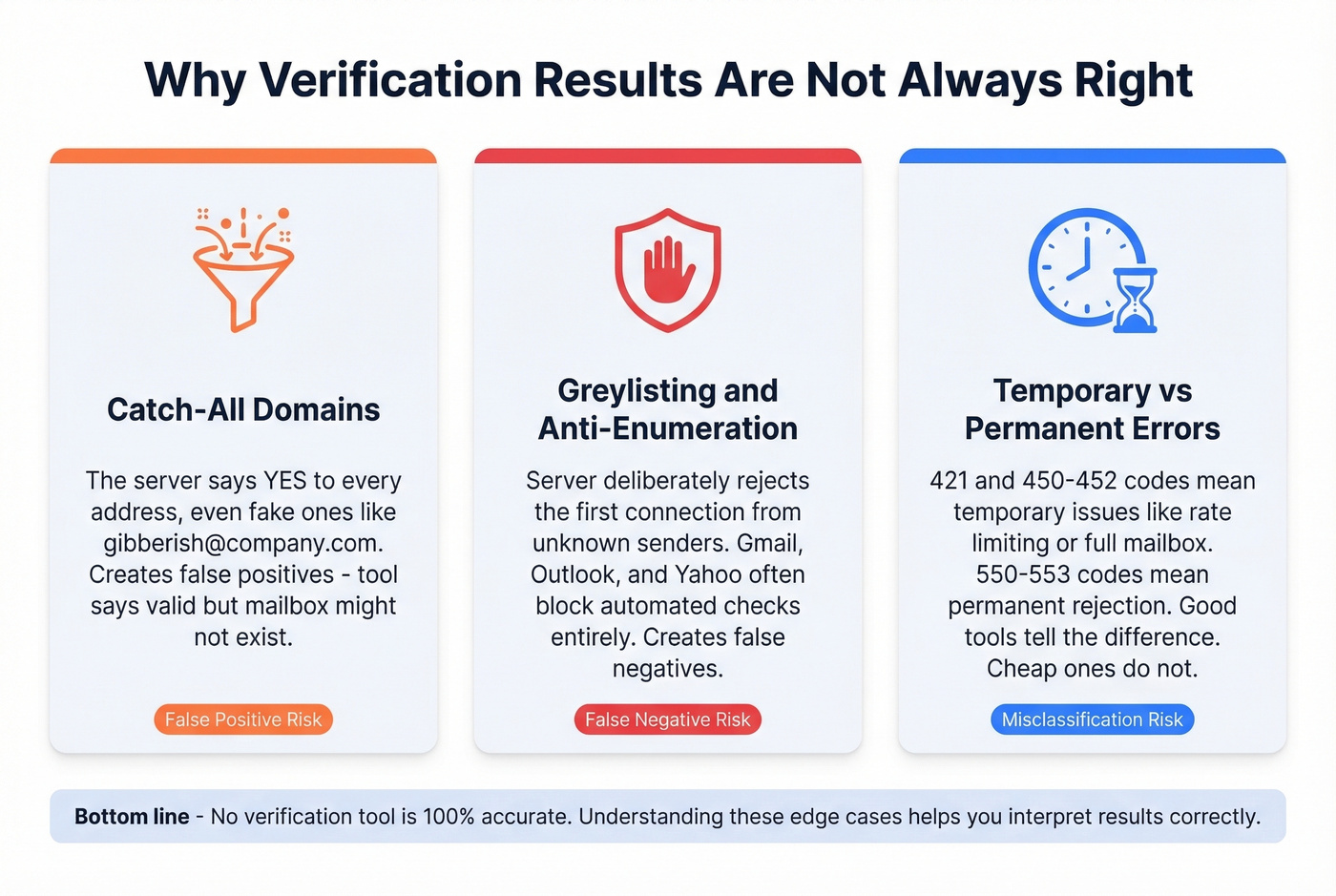
Catch-All Domains
Some domains accept mail for any address - even ones that don't exist. Send to john@company.com, jane@company.com, or gibberish@company.com, and the server responds 250 to all of them. This creates false positives: the verification tool says "valid," but the mailbox might not be real. Catch-all domains are the single biggest verification pain point because SMTP checks simply can't confirm whether a specific inbox exists when the domain accepts everything.
Greylisting and Anti-Enumeration
On the flip side, some servers deliberately reject the first connection attempt from unknown senders, then accept retries. This is greylisting - a spam-prevention technique that creates false negatives. Your verifier asks "does this mailbox exist?" and the server says no, even though it does.
Large providers like Gmail, Outlook, and Yahoo often throttle or block automated SMTP checks entirely. The result: more "unknown" statuses.
Temporary vs. Permanent Errors
Not every rejection is final. Codes in the 421 and 450-452 range signal temporary issues - the server is busy, the connection was rate-limited, or the mailbox is full. Codes 550-553 are permanent: the mailbox doesn't exist, the domain has blocked you, or the address has been disabled. Good verification tools distinguish between these. Cheap ones don't.
How to Interpret Your Results
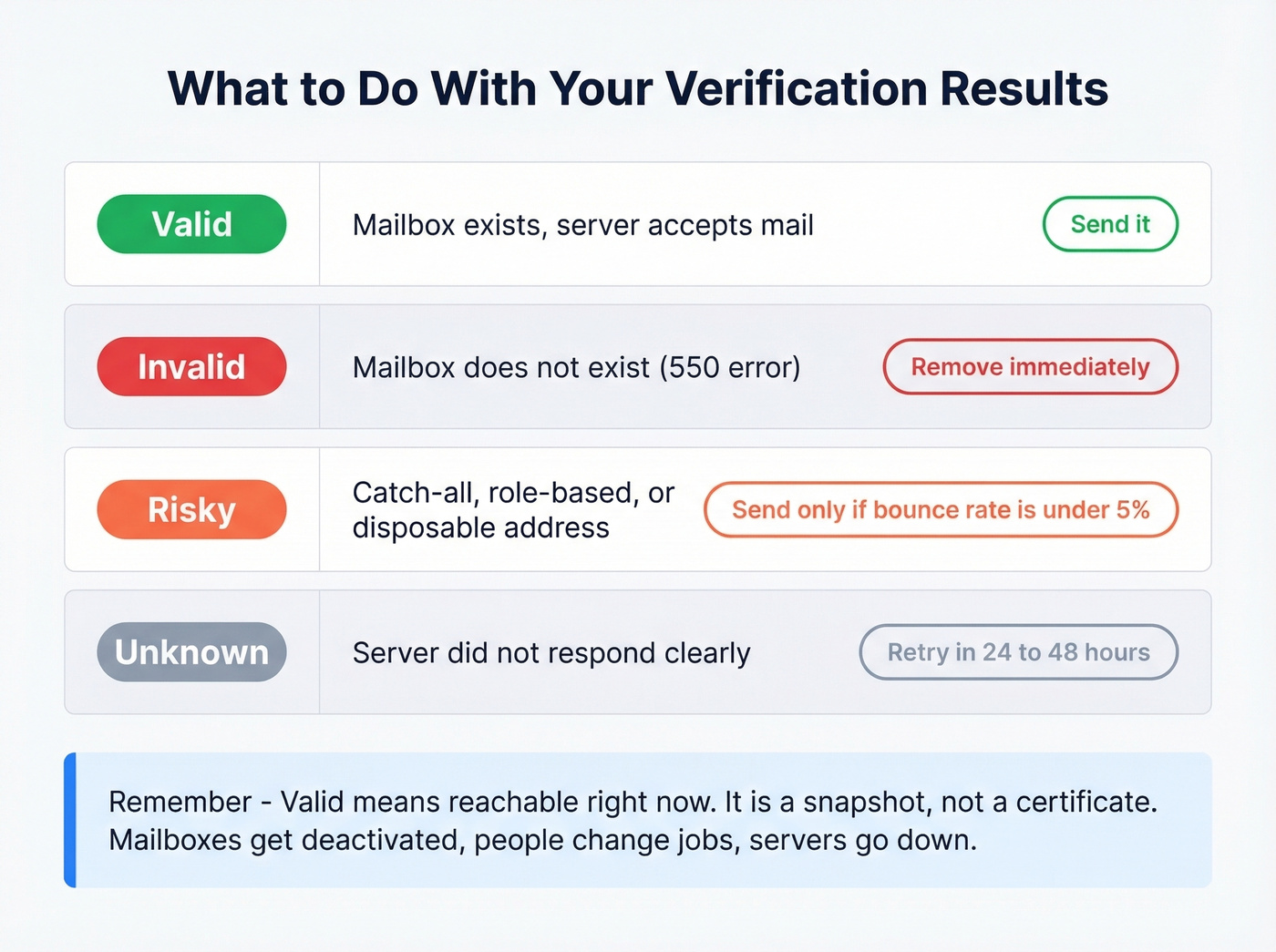
Most verification tools return one of four statuses:
| Status | What It Means | Action |
|---|---|---|
| Valid | Mailbox exists, server accepts mail | Send |
| Invalid | Mailbox doesn't exist (550) | Remove immediately |
| Risky | Catch-all, role-based, or disposable | Send only if bounce rate is under 5% |
| Unknown | Server didn't respond clearly | Retry in 24-48 hrs |
This framework is adapted from Clearout's "Safe to Send" taxonomy, and it's the most practical way to think about results. The critical thing to remember: "valid" means reachable at the moment of the check. It's a snapshot, not a certificate. Mailboxes get deactivated, people change jobs, servers go down.
For your risky bucket, the decision depends on your current email bounce rate. Running under 2% bounces? You've got room to include some risky addresses. Already at 3-4%? Leave them out.

Why clean a dirty list when you can start with a clean one? Prospeo's 5-step verification - catch-all handling, spam-trap removal, honeypot filtering - runs before you ever see an email. 98% accuracy. 7-day refresh. Teams like Snyk dropped bounce rates from 35-40% to under 5% across 50 AEs.
Skip the verification step. Start with emails that actually work.
Best Tools to Check Email Validity
The market for email verification is surprisingly crowded. Expect to pay $24-$80 per 10,000 verifications, and most tools offer 10-250 free monthly checks. Here's how the top options compare:
| Tool | Free Credits | Price/10K | Accuracy | Best For |
|---|---|---|---|---|
| Prospeo | 75/mo | ~$0.01/email | 98% | Pre-verified data |
| NeverBounce | 10 | ~$80 | 99.1% | List cleaning |
| Clearout | 100/mo | $40 | 98.4% | Value per 10k |
| Hunter | ~100 verifications/mo | $149/mo (10K credits) | 70%* | Finder + verifier |
| ZeroBounce | 100/mo | ~$64-$80 | 96.5% | Non-expiring credits |
| Bouncer | 100 | ~$45-$49 | 97.8% | Mid-price accuracy |
| EmailListVerify | Limited free | ~$24 | Not independently tested | Cheapest bulk |
| Emailable | 250 | ~$50-$69 | 97.2% | Speed |
| Verifalia | Free checker | - | Not independently tested | Quick one-offs |
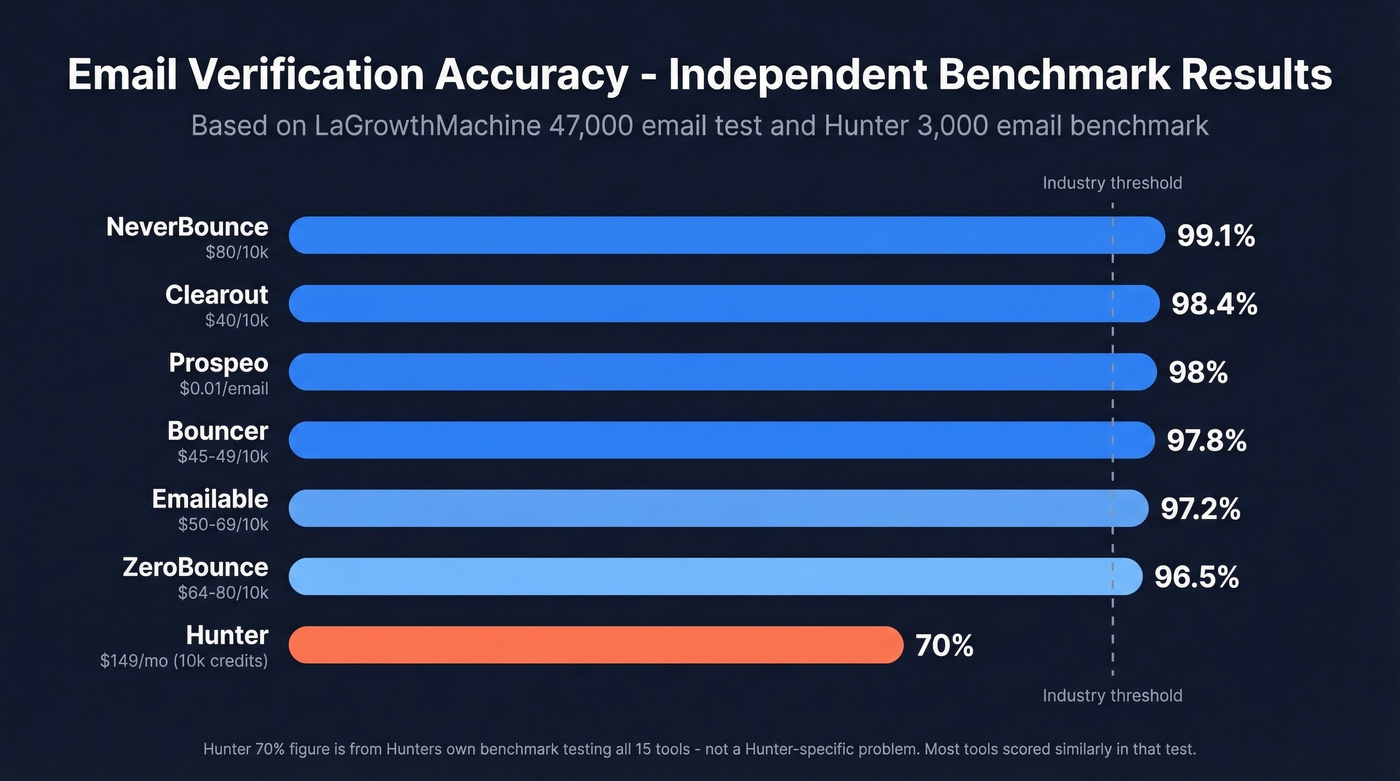
Hunter's 70% is from Hunter's own benchmark. Other accuracy figures are from LaGrowthMachine's 47,000-email test.
Prospeo
Prospeo takes a different approach: instead of cleaning dirty data after the fact, it gives you pre-verified emails from 300M+ professional profiles. Its proprietary 5-step verification process includes catch-all handling, spam-trap removal, and honeypot filtering - delivering 98% email accuracy. The 7-day data refresh cycle means contacts stay current without manual re-verification. At ~$0.01 per email with 75 free emails/month, it's the most cost-effective option for teams that want to skip the verification step entirely.
Real numbers from teams using it: Meritt saw bounce rates drop from 35% to under 4%, and Snyk's 50-person AE team went from 35-40% bounces to under 5%.
NeverBounce
NeverBounce is the tool to beat for pure list cleaning. In a LaGrowthMachine test that ran 47,000 emails across 12 services over 90 days, NeverBounce hit 99.1% accuracy - the highest of any tool tested. Its catch-all detection accuracy came in at 94%, which is genuinely impressive given how hard catch-all domains are to handle.
The tradeoff? It's one of the most expensive mainstream options at around $80/10k, and the free tier is tiny - just 10 verifications. If you're cleaning a large list and accuracy matters more than cost, NeverBounce is the pick.
Clearout
Use this if you want near-NeverBounce accuracy at a much lower price. Clearout scored 98.4% in the same LaGrowthMachine test at $40/10k. Its "Safe to Send" status framework is the clearest result taxonomy we've seen, and it handles catch-all domains better than most.
Skip this if you need a single tool that also does email finding and prospecting.

Hunter
Hunter is the Swiss Army knife: email finder, domain search, and verifier in one package. The free plan gives you 50 credits/month, and since verification costs 0.5 credits, that's effectively 100 free verifications if you use credits only for verification.
Here's the accuracy story, and it's a humbling one for the entire industry. In Hunter's own benchmark of 15 tools using 3,000 real business emails segmented by company size plus 300 known-invalid addresses, the best overall score across all tools was 70%. That means the entire field underperformed the "99%+" marketing numbers in that particular test - it's not a Hunter-specific problem. Hunter also acknowledges a limitation: the dataset's validity classification relied on recent outreach activity observed on their platform, which gives them a potential advantage.
Hunter works best when you need to find and verify emails in one workflow. For pure verification, there are better options.
ZeroBounce
ZeroBounce's killer feature: credits never expire. Buy a block, use them over months - no pressure. Unknown results don't cost credits either, which is a nice touch when you're dealing with greylisting-heavy domains. Accuracy came in at 96.5% in the LaGrowthMachine test. The 100 free monthly verifications require a business or premium domain email to sign up.
Bouncer, EmailListVerify, Emailable, and Verifalia
Bouncer delivers 97.8% accuracy at around $45-$49 per 10k. Straightforward verification without the finder or enrichment features of larger platforms. Solid middle ground.
EmailListVerify is the cheapest bulk option at around $24/10k. If you're cleaning a massive list on a tight budget, EmailListVerify gets the job done - just know it hasn't been independently tested in the major benchmarks.
Emailable offers 250 free verifications - the most generous free tier in the group. Accuracy tested at 97.2% in the LaGrowthMachine benchmark, and it processed at 0.012s per email.
Verifalia is a free online single-email checker. Useful for quick one-off checks when you need to confirm an address before firing off an important message, but not built for bulk work.
How Accurate Are These Tools, Really?
Look, every verification vendor claims 99%+ accuracy on their website. Those numbers are meaningless without independent benchmarking.
Two benchmarks worth knowing about. Hunter tested 15 verifiers using 3,000 real business emails plus 300 known-invalid addresses - over 40,000 total verifications. The top tools only hit 65-70% overall accuracy. That's a sobering gap from the 99% claims. The LaGrowthMachine benchmark is more encouraging: 47,000 emails across 12 services over 90 days, with top tools hitting 97-99%. The difference likely comes down to email mix - aged CRM records and scraped data test differently than segmented business emails.
We've tested enough of these tools to have a strong opinion: vendor-claimed accuracy is marketing, benchmarks are directional, and the only number that matters is your bounce rate after you send. Test any tool with a 1,000-email sample before committing budget.
One more thing: if your average deal size is under $10k, you probably don't need 99.1% verification accuracy. The difference between 97% and 99% on a 5,000-person list is 100 extra bounces - annoying, but not domain-killing. Spend the savings on better targeting instead.
Why Verified Emails Still Bounce
Even a perfectly verified list will produce some bounces. Verification confirms reachability at the moment of the check - nothing more.
Server downtime catches you off guard first. The recipient's mail server was up during verification but down when your email arrived. Temporary, but it still counts as a bounce. Full mailboxes are another common culprit - the address existed but can't accept new messages, especially with neglected accounts. Then there are DNS and authentication changes: the recipient's domain updated SPF, DKIM, or DMARC settings, and your email now fails checks it would've passed yesterday.
Recipient-side filters are getting more aggressive too. The mailbox exists, but the server rejects unknown senders or bulk-pattern emails. And disposable or abandoned accounts round out the list - the address was valid when checked but gets deactivated days later.
A bounce rate under 2% is good; under 1% is ideal. If you're consistently above 2%, your list hygiene process has a gap somewhere.
How Often to Re-Verify
Average professional turnover runs around 41% annually. Think about what that means for your CRM. Export 2,000 contacts that are 18 months old, and roughly 1,200 of those people have changed jobs. Their email addresses are dead.
Re-verify every 3-4 months at minimum. If you're running high-volume outbound, monthly isn't overkill. The cost of verification ($40-$80 per 10k) is trivial compared to the cost of domain reputation damage from a 5%+ bounce rate.
The most efficient workflow for outbound teams: source from a pre-verified database where contacts are refreshed automatically on a weekly cycle, then run any supplemental addresses - referrals, event leads, inbound form fills - through a dedicated verifier as a second pass. That two-layer approach keeps your bounce rate well under 2% without manual re-verification cycles.
If you're building lists from scratch, pair verification with better sales prospecting techniques so you're not validating low-fit leads.
FAQ
Can I verify an email without sending a message?
Yes. SMTP verification simulates delivery up to the RCPT TO step, then disconnects before sending any content. No message reaches the recipient's inbox. Every tool in this guide uses this method.
Is email verification legal?
Yes. Checking whether a mailbox exists doesn't involve accessing private data. SMTP verification uses the same public protocol mail servers rely on daily. GDPR applies to how you use the contact data, not to the verification check itself.
What does "catch-all" mean in verification results?
A catch-all domain accepts mail for any address, even nonexistent ones. The server responds "250 OK" to everything, so verifiers can't confirm a specific mailbox is real. Treat catch-all results as "risky" - only send if your overall bounce rate is under 3%.
How many free email verifications can I get?
Emailable offers the most generous free tier at 250 checks/month. Prospeo provides 75 free emails/month with built-in verification. For bulk cleaning, expect $24-$80 per 10,000 verifications. Free tiers work for small prospecting lists, but serious volume requires a paid plan.
What's the difference between email verification and email validation?
They're used interchangeably in practice. Technically, "validation" refers to syntax and format checking, while "verification" includes the SMTP mailbox existence check. Every serious tool does both - don't worry about the terminology.
Every tool on that comparison table charges you to fix a problem that shouldn't exist. Prospeo gives you pre-verified emails from 300M+ profiles at ~$0.01 each - 90% cheaper than ZoomInfo, with 98% accuracy baked in. Meritt cut bounce rates from 35% to under 4% without ever running a separate verification tool.
Don't pay twice - once to find emails and again to verify them.