

FindThatLead vs SuperSend: Different Tools, Different Jobs
Your SDR asks whether the team should buy FindThatLead or SuperSend. You pause, because the question itself reveals the problem - these tools do completely different things. FindThatLead finds email addresses. SuperSend sends cold outreach sequences. Comparing them is like comparing a fishing rod to a frying pan. Both involve fish, but they're different steps in the process entirely, and buying the wrong one won't get you closer to dinner.
30-Second Verdict
Pick FindThatLead if you need cheap bulk email lookups and already have a sending tool. Starts at $37/mo on annual billing (or $49/mo monthly).
Pick SuperSend if you already have verified contact data and need multichannel sequences across email, LinkedIn, and Twitter/X. Starts at $99/mo.
Here's the thing: most teams asking this question actually have a data quality problem, not a tooling problem. If your bounce rate is above 10%, neither tool fixes that.
Side-by-Side Comparison
| Category | FindThatLead | SuperSend | Edge |
|---|---|---|---|
| Primary function | Email finding | Outbound sequencing | Depends on need |
| G2 rating | 4.0/5 (93 reviews) | 4.6/5 (18 reviews) | SuperSend |
| Starting price | $37/mo (annual) or $49/mo (monthly) | $99/mo | FindThatLead |
| Real monthly cost | ~$37-75/mo annual; $49-99/mo monthly | ~$357/mo with add-ons | FindThatLead |
| Best for | Cheap bulk lookups | Multichannel campaigns | Different categories |
| Key limitation | Stale data | Rough feature releases | SuperSend (less severe) |
The pricing gap looks dramatic until you realize these tools sit at different points in the funnel. FindThatLead is a sourcing cost; SuperSend is an execution cost. You might need both. Or neither.
FindThatLead - What It Does
FindThatLead is a credit-based email finder with a built-in sequencer called Sender. It also includes email verification, list generation, enrichment, and cold email campaigns. A credit equals one search inside the tool.
On annual billing, the Starter plan runs $37/mo and Ultimate is $75/mo with "unlimited" email credits under fair use. Monthly billing bumps those to $49/mo and $99/mo respectively.
Pros:
- Bulk lookups run roughly $0.01/lead - hard to beat on raw cost
- Simple UI, minimal learning curve
- Includes basic email sequencing via Sender, so you can find and send from one tool
Cons:
- G2 reviewers consistently flag outdated data as a recurring issue
- The "unlimited" Ultimate plan is fair-use, and heavy usage still runs into limits
- One Reddit user noted that bulk exports often miss first names and company fields, forcing manual cleanup before you can actually use the data
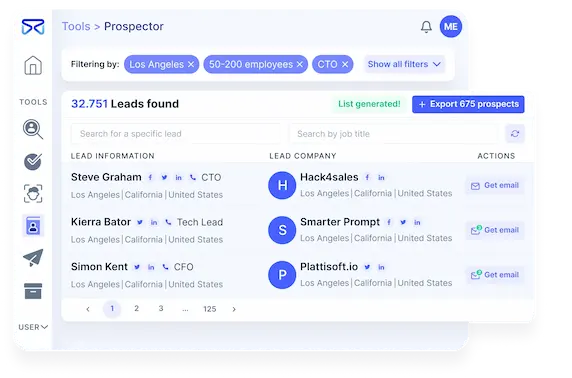
We've tested tools like this before, and the pattern is always the same: cheap per-lookup cost looks great on paper, but if 20% of those emails bounce, you're paying twice - once for the data, and again in domain reputation damage.

FindThatLead's cheap lookups don't help when 20% bounce. Prospeo's 5-step verification and 7-day data refresh keep bounce rates under 4% - at the same $0.01/email. 143M+ verified emails, no stale data, no domain damage.
Fix your data layer before you pick a sequencer.
SuperSend - What It Does
SuperSend is a cold outreach sequencing platform built around deliverability. The Growth plan runs $99/mo for 50,000 emails; Scale is $319/mo for 200,000. But that base price is misleading.
Budget for the real number from day one: most teams spend closer to $357/mo once inboxes ($5/mo each), domains ($13/yr each), and LinkedIn senders ($69/mo each) are factored in. Mid-quarter budget surprises aren't fun.
Pros:
- True multichannel - email, LinkedIn, and Twitter/X in one sequence
- Built-in warmup, inbox placement testing, and domain health monitoring
- Full REST API with dashboard parity, so everything you do in the UI you can do programmatically
Cons:
- Real-world cost is 3-4x the sticker price once add-ons stack up
- Feature releases ship fast but sometimes rough - shared inbox reliability has been flagged in third-party reviews
- LinkedIn automation still needs work
The Gap Neither Tool Fills
You can pick the perfect finder and the perfect sequencer and still tank your outbound. We've watched teams export 5,000 emails from a sourcing tool, load them into a sequencer, and watch 40% bounce on the first send. Domain reputation craters. Warmup progress evaporates. Months of inbox warming, gone in a single campaign.
Which Tool Fits Your Stack?
You need to send sequences. SuperSend, paired with a verified data source. The deliverability tooling is solid, but it can't fix bad inputs. Garbage in, bounces out.
You need both. Use a verified data source for sourcing, then push clean lists into SuperSend or any sequencer via CSV or native integrations with Smartlead, Instantly, Lemlist, and more.
Let's be honest - the consensus on r/sales is that most outbound failures aren't tool failures. They're data failures. Get the data right first, then worry about which sequencer has the prettiest UI.
The gap between finding and sending is where outbound dies. Prospeo fills it with 98% email accuracy, native integrations with Smartlead, Instantly, and Lemlist, and data refreshed every 7 days - not every 6 weeks.
Clean data in, booked meetings out. No contracts, cancel anytime.
FAQ
Can I use FindThatLead and SuperSend together?
Yes - FindThatLead finds emails and SuperSend sends sequences, so they sit at different stages of your pipeline. The critical step most teams skip is verifying data between the two. Run your exported list through a verification tool before loading it into any sequencer, or you'll burn domain reputation on bounces.
Is SuperSend really $99/month?
The base Growth plan is $99/mo, but most teams spend closer to $357/mo once inboxes, domains, and LinkedIn senders are added. Budget for add-ons from day one.
What if my main problem is email bounce rates?
Skip both of these tools for now. If your bounce rate is above 10%, the problem is your data source - not your sequencer. Switching sending tools won't fix stale emails. A dedicated verification layer with a short refresh cycle is the fastest way to get bounce rates under 4% without overhauling your entire stack.