


GetProspect vs Mail Merge for Gmail: Which Do You Actually Need?
Comparing GetProspect to Mail Merge for Gmail is like comparing a fishing rod to a frying pan. Both involve fish, but they solve completely different problems. GetProspect finds B2B email addresses; Mail Merge for Gmail sends personalized emails from your inbox. They don't compete - they operate at opposite ends of the outreach workflow, and the real question isn't which is better. It's which one you're actually missing.
30-Second Verdict
- Need to find B2B emails? GetProspect.
- Need to send personalized emails from Gmail? Mail Merge for Gmail.
- Need both without cobbling two tools together? Prospeo finds, verifies, and exports clean data to any sending tool - no manual bridging required.
What Each Tool Does
GetProspect
GetProspect is a lead-sourcing platform with 200M+ business contacts and a Chrome extension for pulling emails while you browse professional profiles. It covers the full top-of-funnel: find contacts, verify emails, enrich with company data, and run cold email sequences with follow-ups and A/B testing.

The free tier gives you 50 valid emails per month and 200 sends from one email account. Starter runs $49/mo for 1,000 valid emails and 5,000 sends across unlimited accounts. On G2, it sits at 4.0/5 across 41 reviews, with a 4.5 on Capterra. The recurring criticism? Inconsistent accuracy - occasional bounces - and more limited coverage compared to larger databases like ZoomInfo or Apollo.
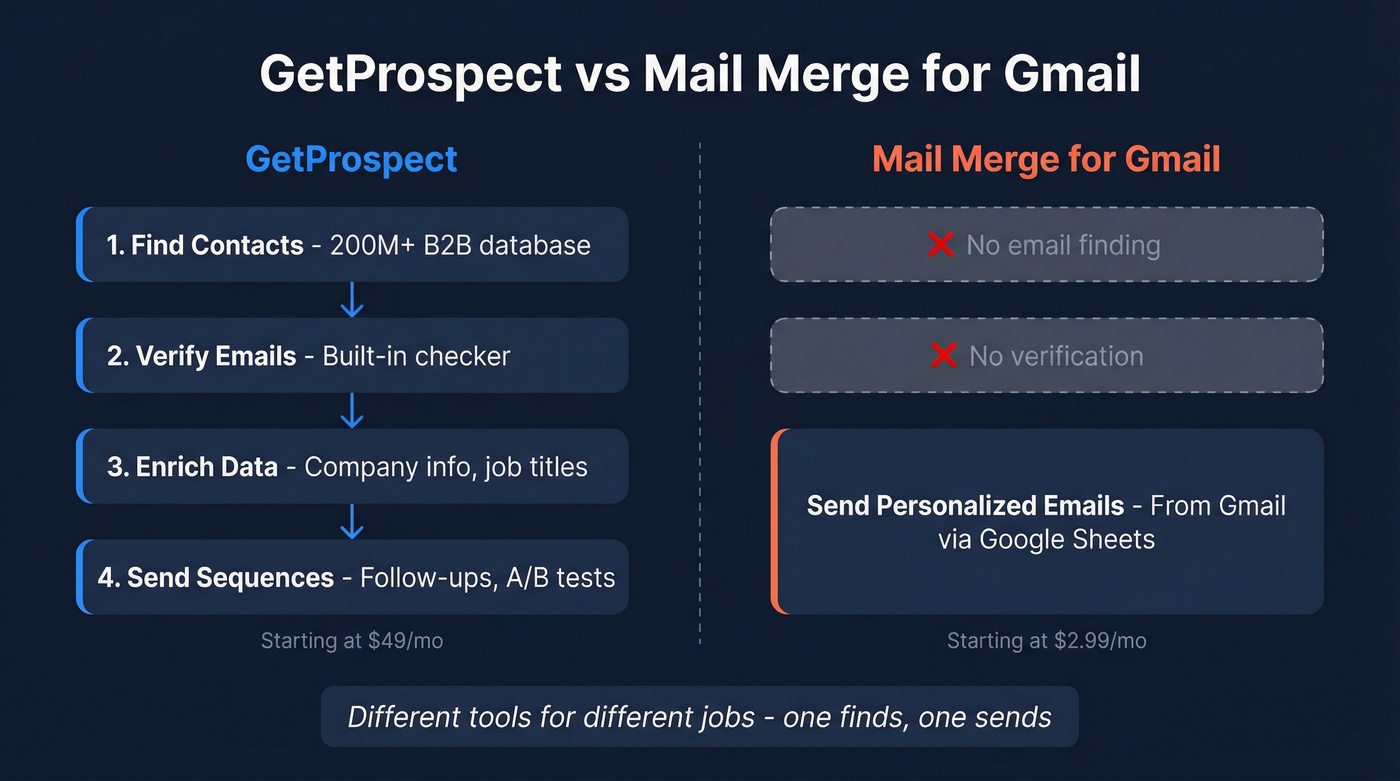
Use this if you need an all-in-one prospecting tool that finds emails and sends sequences without leaving the platform. Skip this if you already have a clean list and just need a cheap way to send personalized emails from Gmail.
Mail Merge for Gmail
Mail Merge for Gmail (merge.email) is a Google Sheets add-on that does exactly one thing well: send personalized emails from your Gmail account. Build your recipient list in a spreadsheet, map dynamic fields into your template, hit send. It supports open tracking, delayed sending, personalized attachments, and custom subject lines - all features Gmail's built-in mail merge lacks.

It works on free Gmail accounts (not just Workspace) and is ISO 27001 and CASA Tier 3 certified. At $2.99-$3.99/mo on annual billing, it's a fraction of what dedicated cold email tools charge. GMass, for example, runs about $30/mo. The free tier covers 50 emails per day. It holds a 4.9 rating on the Google Workspace Marketplace with 5,000+ reviews.
The tradeoffs are real, though: no automated follow-up sequences, no click tracking (opens only), and no way to source contacts. You need every address in your sheet before you start. For context, Gmail's built-in mail merge is even more limited - only 4 merge tags, no subject line personalization, no scheduling, no open or click tracking, and it isn't included in Google Workspace Business Starter.
Use this if you have a clean list in Google Sheets and want the simplest, cheapest way to send personalized emails from Gmail. Skip this if you need automated follow-ups, click tracking, or any kind of lead sourcing.
Feature Comparison
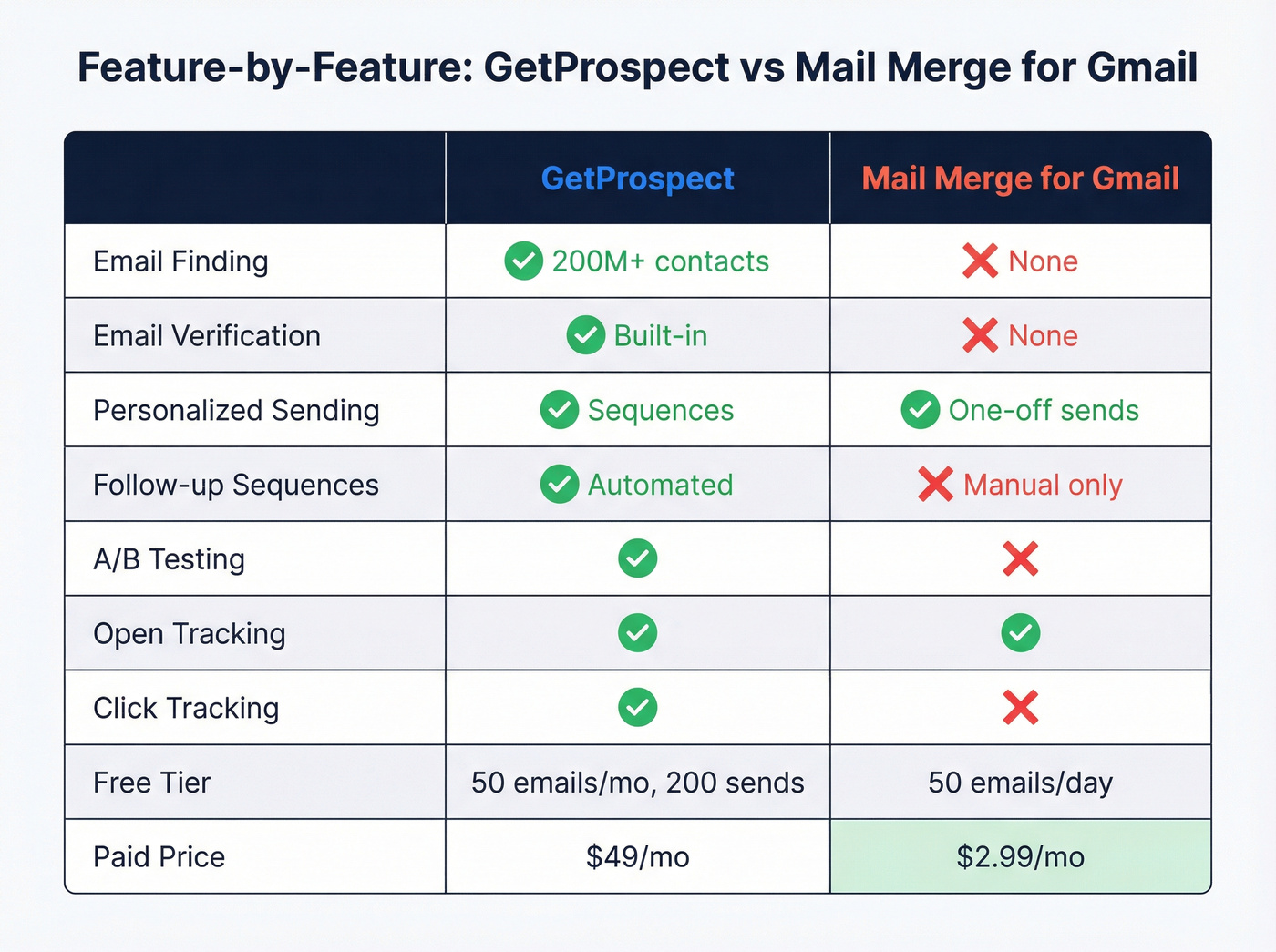
| Feature | GetProspect | Mail Merge for Gmail |
|---|---|---|
| Primary function | Find + verify + send | Send only |
| Email finding | 200M+ database | No |
| Email verification | Built-in | No |
| Personalized sending | Yes (sequences) | Yes (one-off) |
| Follow-up sequences | Yes, automated | No |
| A/B testing | Yes | No |
| Open tracking | Yes | Yes |
| Click tracking | Yes | No |
| CRM | Built-in | Google Sheets add-on |
| Free tier | 50 emails/mo, 200 sends/mo | 50 emails/day |
| Paid starting price | $49/mo | $2.99/mo (annual) |
| G2 rating | 4.0/5 (41 reviews) | 5.0/5 (3 reviews) |
A quick note on both tools' open tracking: it relies on tracking pixels, and modern email clients increasingly block them. Apple Mail Privacy Protection pre-loads images, inflating open rates across the board. Don't build your outreach strategy around open rates alone.

GetProspect finds emails but can't guarantee they're valid. Mail Merge sends them but can't check first. Prospeo's 143M+ verified emails at 98% accuracy close the gap - with a 7-day refresh cycle so your data never goes stale. No duct-taping two tools together.
Find, verify, and export clean lists - all for about $0.01/email.
Using Them Together (and Why It Breaks)
People do combine these tools. There's a documented workflow on GitHub that walks through the exact steps: export emails from GetProspect's Chrome extension, paste them into a Google Sheet, then send via a Gmail mail merge script. It works. Barely.
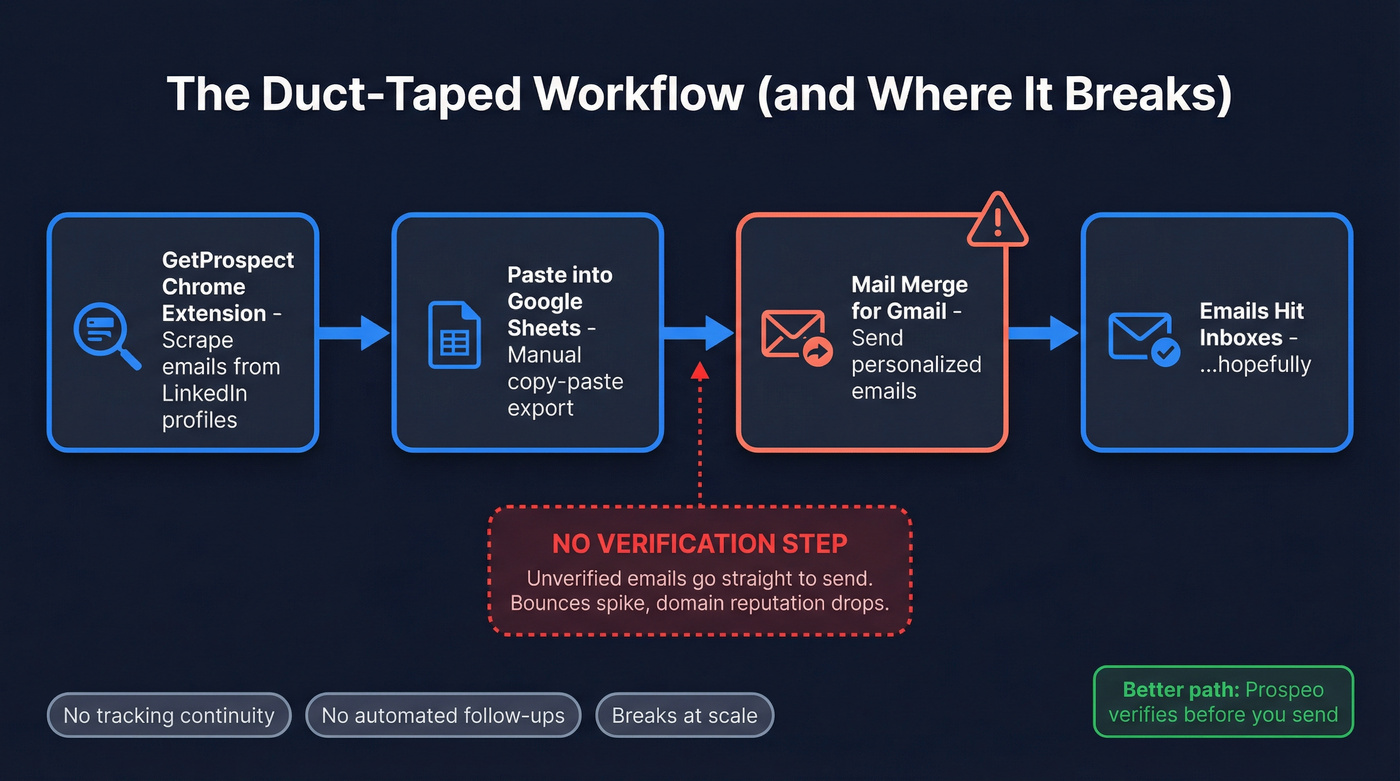
Here's the thing - there's no built-in verification step in that workflow unless you add one. GetProspect's accuracy isn't perfect, and Mail Merge for Gmail doesn't check whether addresses are valid before you send. You lose tracking continuity between the two tools, everything's manual, and one bad batch can spike your bounce rate.
We've seen this workflow break down most often at scale. Threads in r/coldemail show users hitting the 50 emails/day wall on free tiers and wanting follow-ups that neither free plan supports - the exact pain point this duct-taped setup can't solve.
Other Gmail sending options worth knowing: GMass (~$29.95/mo) adds follow-up sequences, deliverability tools, and campaign analytics on top of Gmail. YAMM (from $36/year) is another popular Sheets-based alternative with higher daily limits. Both cost more than Mail Merge for Gmail but fill some of its gaps.
The Missing Piece: Verification
Sending to unverified lists is how you torch your domain reputation. Bounces spike, Gmail throttles your sending, and your sender score drops. In our experience, the gap between "I found these emails" and "I'm safe to send" is where most outreach workflows quietly fail.

Prospeo closes that gap with 143M+ verified emails at 98% accuracy and a 5-step verification process that catches spam traps and honeypots. Data refreshes every 7 days - compared to the 6-week industry average. The free tier gives you 75 emails and 100 Chrome extension credits per month, and paid plans run about $0.01 per email with no contracts.
That GitHub workflow of exporting from GetProspect and pasting into Google Sheets breaks at scale - no verification, no tracking continuity, and one bad batch tanks your domain. Prospeo's 5-step verification catches spam traps and honeypots before you hit send.
Stop risking your sender reputation on unverified exports.
Which Should You Choose?
Let's be honest: most teams agonizing over GetProspect vs Mail Merge for Gmail don't actually need to choose between them. They're solving different problems. If your average deal size is under $5k, you probably don't need GetProspect's full platform. A cheap sender plus verified data gets you 90% of the way there at a tenth of the cost.
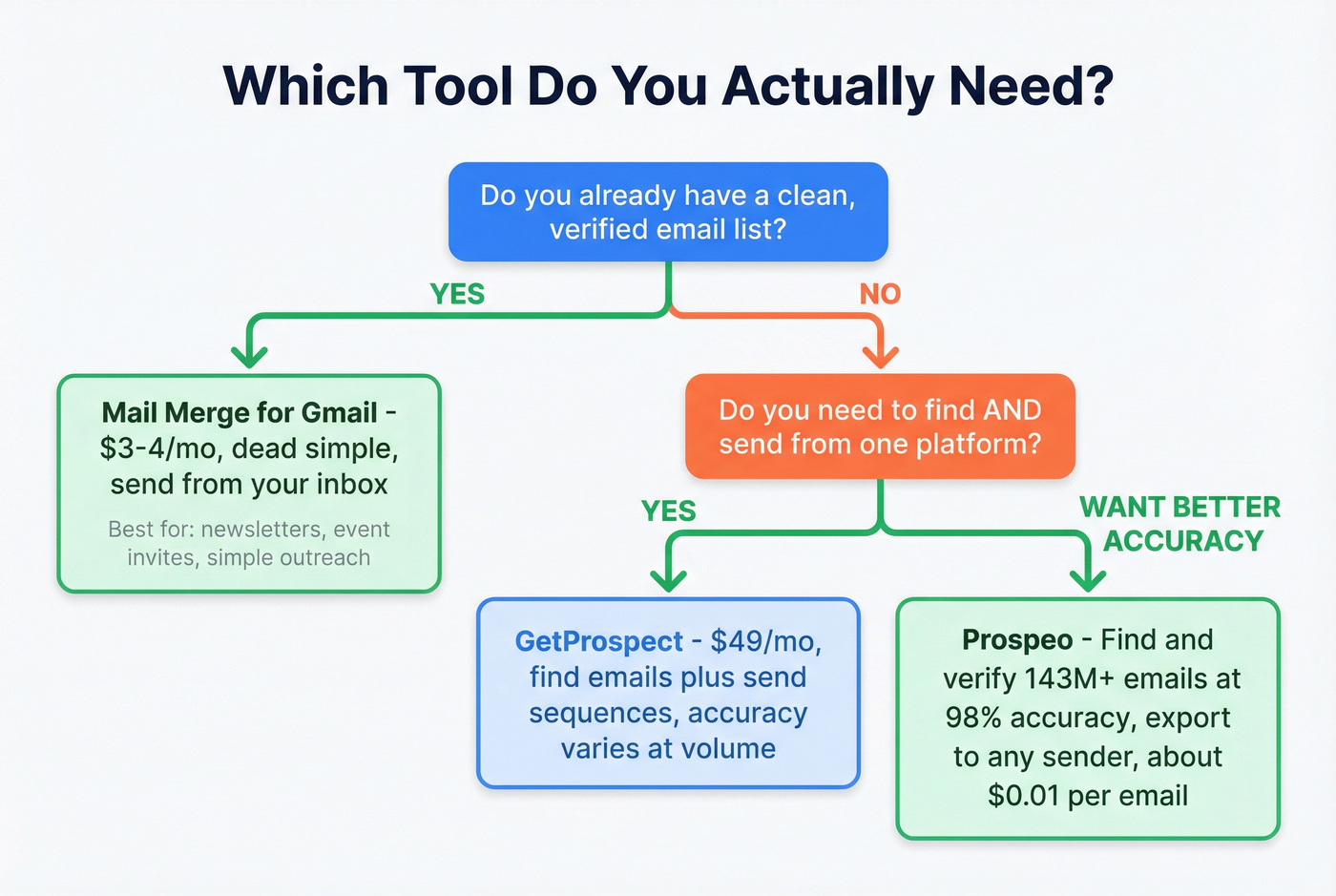
Three paths, depending on where you are:
You already have a clean, verified list. Mail Merge for Gmail. It's $3-4/mo and dead simple.
You need to find B2B emails and run sequences. GetProspect handles sourcing through sending in one platform, though accuracy can be inconsistent at volume.
FAQ
Can GetProspect send emails through Gmail?
Yes. GetProspect has built-in cold email sequences with follow-ups, A/B testing, and tracking. The free plan allows 200 sends per month from one account. Paid plans starting at $49/mo unlock 5,000 sends across unlimited email accounts.
Does Mail Merge for Gmail find email addresses?
No. It only sends to addresses already in your Google Sheet. You need a separate finder to source contacts first.
What happens when you send unverified emails through Gmail?
Bounces spike, Gmail throttles your daily sending, and your domain reputation drops. Free gmail.com accounts cap at roughly 500 recipients per day; paid Google Workspace accounts allow up to 2,000. Always verify emails before sending to protect those limits.