


GetProspect vs SuperSend: Which Do You Need? (2026)
You loaded 500 contacts from GetProspect into SuperSend, hit send, and your bounce rate came back at 15%. Sound familiar? The GetProspect vs SuperSend comparison misses the point - these tools don't compete. One finds data, the other sends emails, and there's a critical gap between them that's wrecking your deliverability.
30-Second Verdict
GetProspect finds contact data. SuperSend sends outreach sequences. They're different categories entirely.
Need contacts? GetProspect works, but independent testing shows a 65% verified match rate. That means roughly 35% of your list won't come back as verified - a problem that compounds fast at scale.
Need outreach at scale? SuperSend handles email + LinkedIn sequences with conditional routing and A/B/C/D variants. It's a solid sequencer rated around 4.7/5, though from a small review base.
Skip both if your real problem is data quality. A verification layer with 98% email accuracy is the difference between sequences that land and sequences that bounce.
Side-by-Side Comparison
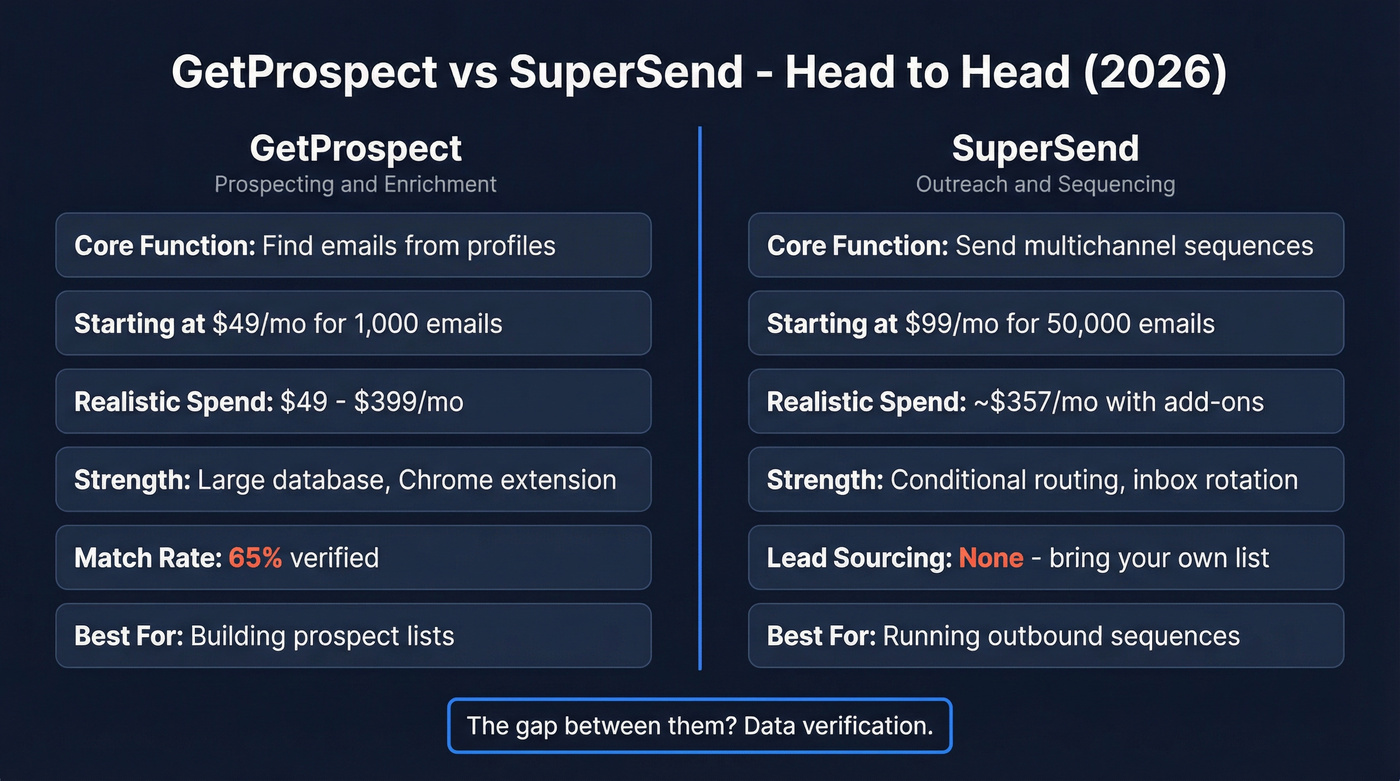
| Dimension | GetProspect | SuperSend |
|---|---|---|
| Category | Prospecting & enrichment | Outreach & sequencing |
| Core function | Find emails from profiles | Send multichannel sequences |
| Starting price | $49/mo (1,000 emails) | $99/mo (50,000 emails/month) |
| Realistic spend | $49-$399/mo | ~$357/mo with add-ons |
| Strength | Large database, Chrome extension | Conditional routing, inbox rotation |
| Key limitation | 65% verified match rate | No lead sourcing - BYOL |
| Best for | Building prospect lists | Running outbound sequences |
What GetProspect Does
Use this if you need a quick way to build prospect lists from professional profiles and company domains, and you're okay running verification afterward. The Chrome extension is genuinely useful for grabbing contacts while you browse, and the free tier (50 emails/month) lets you test without commitment. Paid plans run $49 to $399/mo depending on volume.
Here's the thing: a PhantomBuster test measured GetProspect at a 65% verified match rate - well below the 95%+ accuracy GetProspect advertises. Evaboot's analysis also flagged slow exports and data-cleaning issues like all-caps names and juridical suffixes left in company fields. Evaboot found that roughly 30% of Sales Navigator results don't even match the filters you set, which compounds GetProspect's accuracy problem when you're sourcing from those same profiles. Skip this if you need high-accuracy data out of the box.

A 65% match rate means 35% of your list is dead weight - or worse, spam traps. Prospeo's 5-step verification and proprietary email infrastructure deliver 98% accuracy at $0.01/email. Teams that switch cut bounce rates from double digits to under 4%.
Stop feeding bad data into your sequencer. Fix the source.
What SuperSend Does
SuperSend is a multichannel outbound tool that combines email and LinkedIn sequences in one workflow builder. The conditional routing, A/B/C/D variant testing, and smart timing features are legitimately strong for this price point - and the workflow mode with if/switch conditions gives you real flexibility that cheaper sequencers don't offer. SuperSend also has a Relay tier for teams sending 1M+ emails/month with managed infrastructure.
Now let's talk about the cost reality most people miss. The Growth plan starts at $99/mo for 50,000 emails, with overage at $0.004/email. The Scale plan jumps to $319/mo for 200,000 emails and 8,000 global credits. But once you add inboxes ($5/mo each), domains ($13/yr each), and a LinkedIn sender ($69/mo), most teams land around $357/mo on Growth alone. We've seen critiques in SuperSend competitor roundups that focus on scaling add-ons and deliverability workflow overhead. The shared inbox doesn't always work as intended, and LinkedIn onboarding has friction. Budget for add-ons, not just the sticker price.
The Missing Layer
Here's the gap nobody talks about when comparing GetProspect vs SuperSend: GetProspect finds contacts at a 65% verified match rate. SuperSend sends sequences. Load unverified data into a sequencer and you're torching your sender reputation.
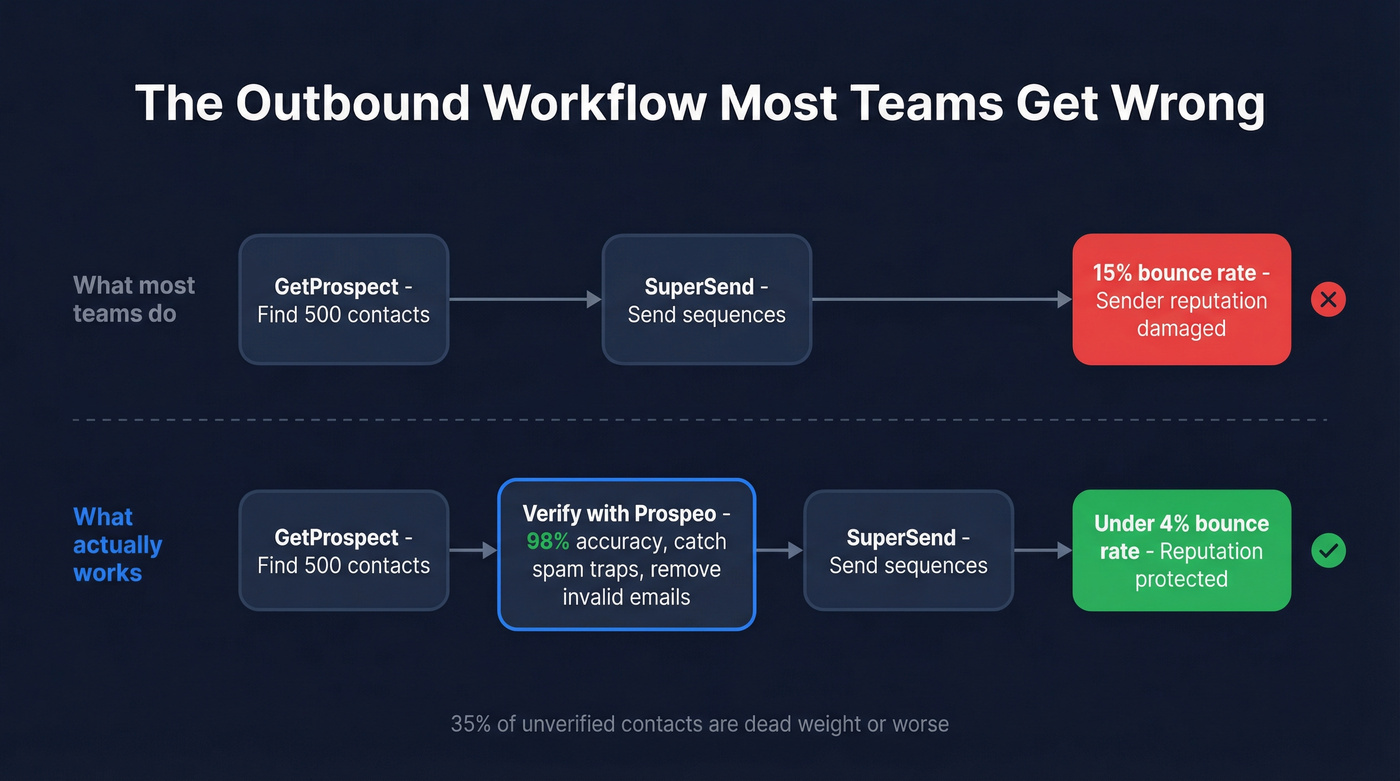
Most teams don't need a better prospecting tool or a better sequencer. They need cleaner data between the two tools they already have. Fix the data layer and your existing stack performs dramatically better.

You don't need to replace GetProspect or SuperSend. You need the layer between them. Prospeo catches invalid addresses, spam traps, and catch-all domains with a 7-day data refresh - so every contact hitting your sequencer is verified and current.
75 free verified emails per month. See the difference in your first send.
Which One Do You Need?
You need contacts. Use a data tool with built-in verification so you're not cleaning lists manually. GetProspect works if you're already invested in their workflow, but verify everything before sending.
If you're building lists from scratch, start with a repeatable lead generation workflow and add verification before you push anything into outreach.
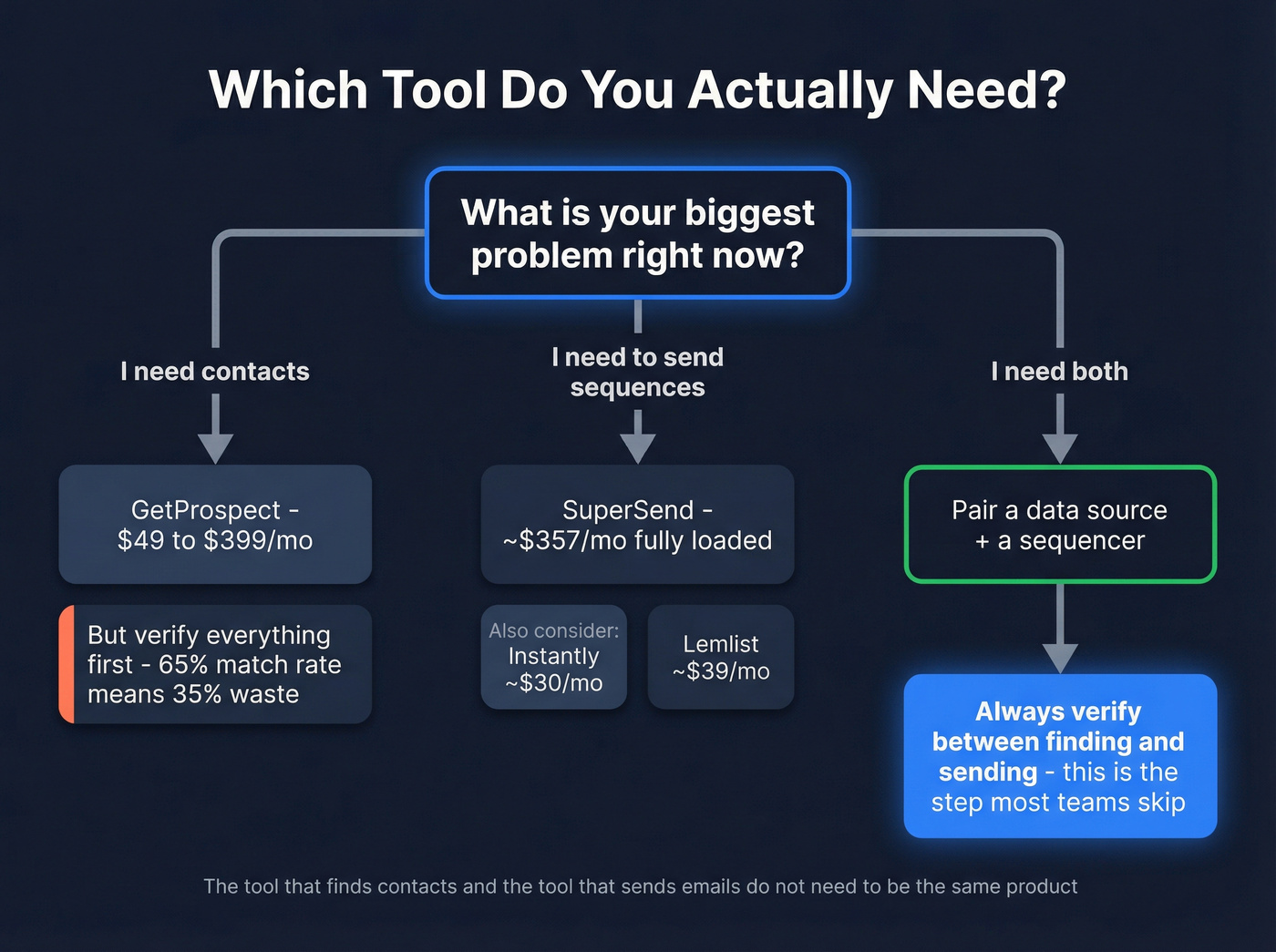
You need to send sequences. SuperSend handles this well at ~$357/mo fully loaded. Instantly (starting around $30/mo) and Lemlist (starting around $39/mo) are worth evaluating if you want different pricing models or tighter integrations. Apollo ($59/mo+ for paid plans, generous free tier) is the all-in-one option, but its email accuracy runs around 79% - lower than dedicated tools.
If deliverability is the bottleneck, use an email deliverability guide to audit your stack before you scale volume.
You need both. Pair a data source with a sequencer, and always verify in between. The stack that makes the most sense: a high-accuracy source for finding and verifying contacts, then SuperSend or your preferred sequencer for sending. The tool that finds your contacts and the tool that sends your emails don't need to be the same product - they just need clean data flowing between them.
To keep lists clean over time, add a process for data enrichment and ongoing list hygiene.
FAQ
Can GetProspect and SuperSend replace each other?
No. GetProspect finds contact data; SuperSend sends outreach sequences. They solve different problems, and most outbound teams need both categories. Buying one expecting it to do the other's job will leave critical gaps in your workflow.
How much does SuperSend actually cost per month?
Most teams spend ~$357/mo after adding inboxes ($5/mo each), domains ($13/yr each), and LinkedIn senders ($69/mo) on top of the $99/mo Growth base. The Scale plan runs $319/mo base for higher volume. Budget for add-ons, not just the sticker price.
How do I avoid high bounce rates when combining these tools?
Run GetProspect exports through a dedicated verification tool before loading them into SuperSend. Prospeo's 5-step verification catches invalid addresses, spam traps, and catch-all domains - cutting bounce rates from double digits to under 4%. The free tier (75 emails/month) lets you test the difference immediately.
Is there a single tool that handles both prospecting and outreach?
Apollo.io combines both, but its email accuracy sits around 79% - meaning you'll still face deliverability issues at scale. A cleaner approach is pairing a high-accuracy data source with a dedicated sequencer like SuperSend or Instantly for better results across both steps.