

Gmail Email Tracking in 2026: What Works, What's Broken, and What Tools Won't Tell You
That VP of Engineering you've been chasing for three weeks? Your tracker says she opened your email six times last Tuesday. She didn't. Apple Mail preloaded the tracking pixel while the email sat unread in her inbox. You followed up based on phantom engagement, and now you look desperate.
That's Gmail email tracking in 2026 - the data lies to your face and most tools won't admit it.
What You Need (Quick Version)
Open tracking is unreliable. Apple Mail Privacy Protection and Gmail's image proxy have gutted pixel-based accuracy. If you still want it - and there are reasons you might - here's the short version:
- Truly free: Snov.io (unlimited tracking, no branding)
- Free + CRM built in: Streak (tracking free forever, CRM from $49/user/mo)
- Privacy-first: Boomerang (visible receipt, recipient opt-out)
- Best metric to actually track: Clicks and replies, not opens
- Before you track anything: Verify your list. Bounced emails produce zero data. Prospeo checks addresses with 98% accuracy, and the free tier gives you 75 emails/month to start.
How Tracking Pixels Work in Gmail
Every Gmail tracking tool uses the same fundamental trick: a 1x1 invisible image embedded in your HTML email. When the recipient opens the email and their client renders images, it fetches that tiny pixel from the tracking server. The server logs the request - timestamp, user agent, device and OS info, and IP address - then sends you a notification.
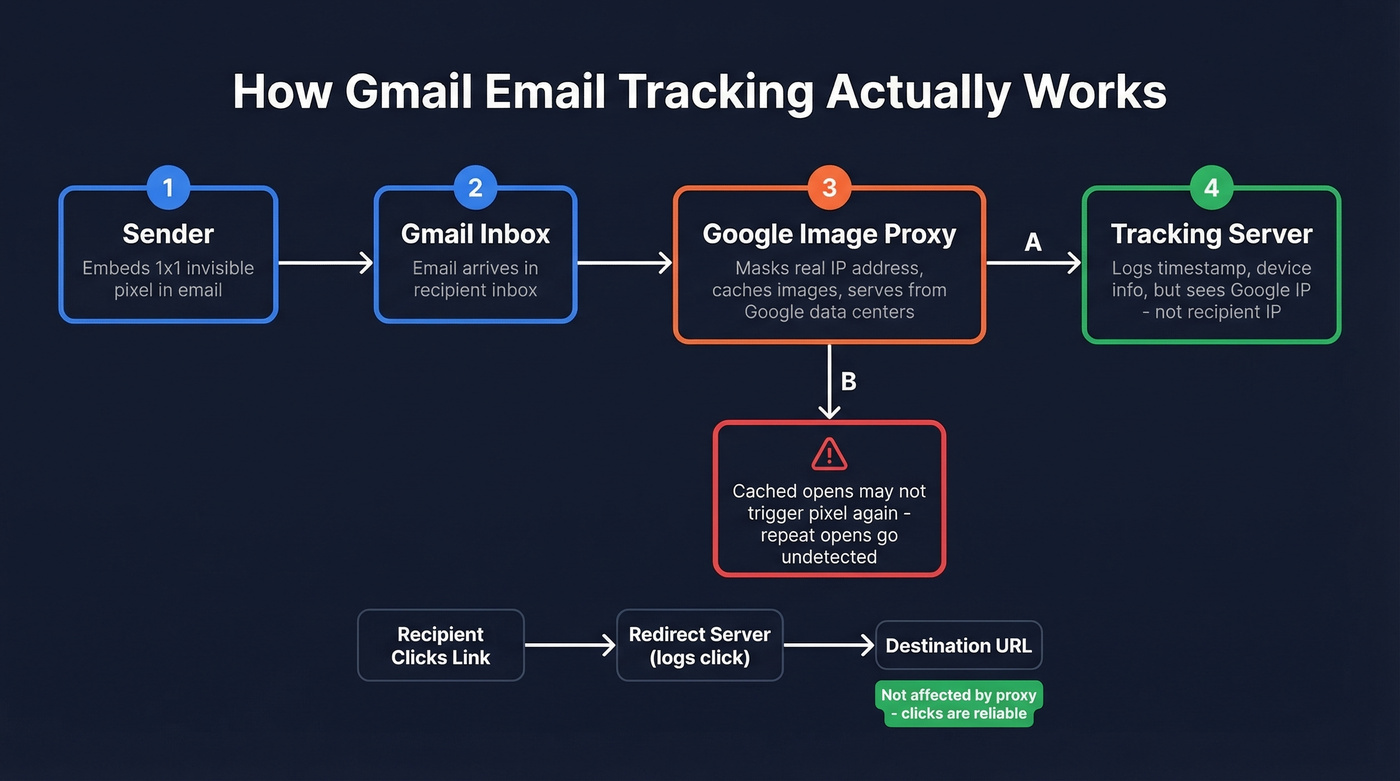
Here's what the pixel looks like under the hood:
<img src="https://analytics.company.com/track/user123.gif" width="1" height="1">
Simple. It was, anyway - until Gmail changed the rules.
Since 2013, Gmail routes all images through Google's own proxy servers. Your tracking pixel still fires, but the request comes from Google's infrastructure, not the recipient's device. The recipient's real IP address and location are masked - you'll see a Google data center IP, not a home office in Denver. The proxy also caches images, which means if your recipient opens the email three times, the pixel might only fire once because subsequent opens serve the cached version without pinging your server. Your "opened 1 time" might actually be "opened 5 times," and you'd never know.
Click tracking works differently and isn't affected by the proxy. When you track a link, the tool wraps it in a redirect URL. The recipient clicks, hits the redirect server (which logs the click), then gets forwarded to the destination. Gmail's proxy doesn't intercept link clicks. This distinction matters enormously.
Why Your Open Rates Are Lying
Gmail's proxy was the first blow. Apple Mail Privacy Protection was the knockout.
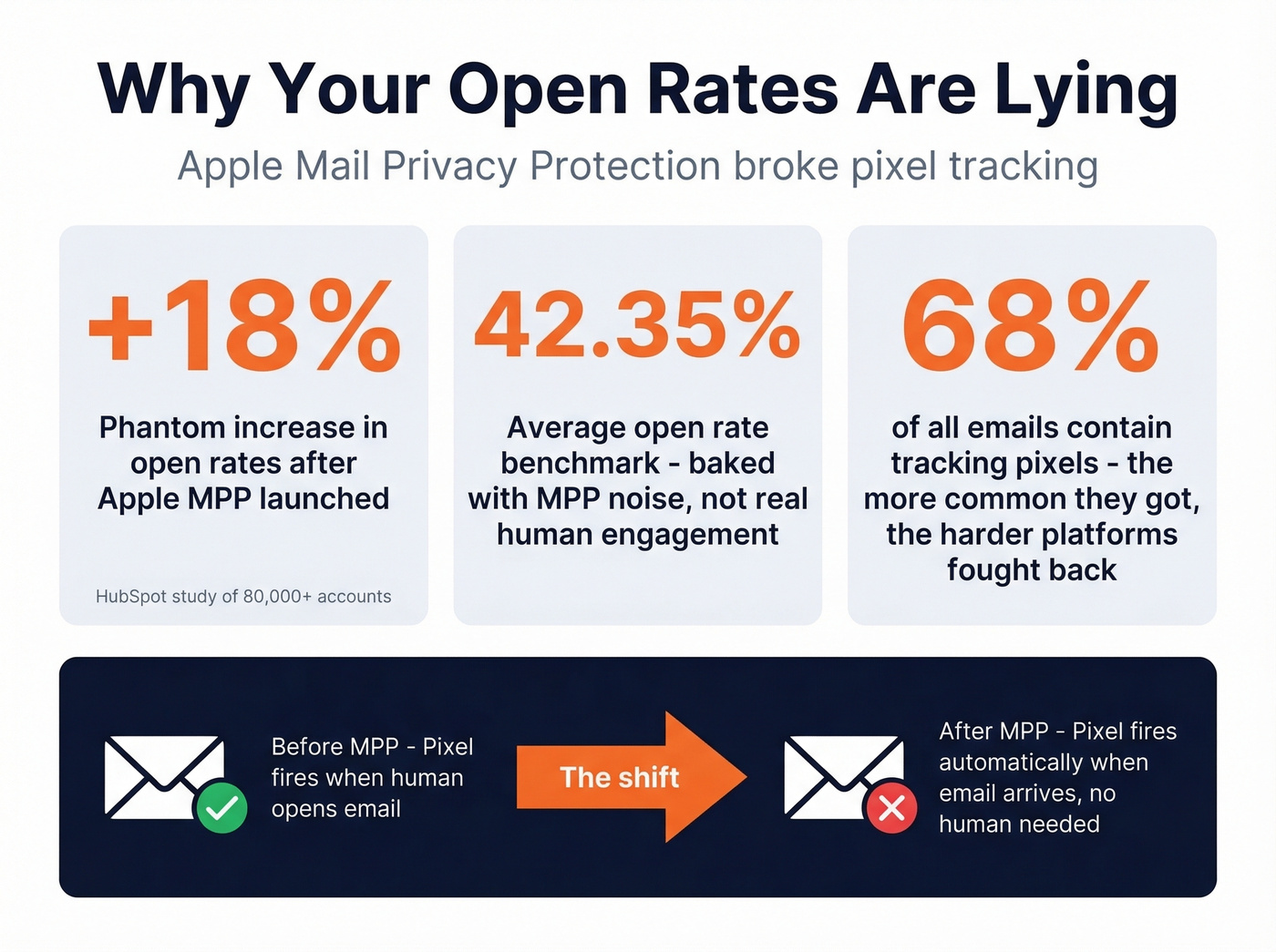
Apple MPP, available on iPhones, iPads, and Macs, preloads all email images - including tracking pixels - through Apple's proxy servers the moment an email arrives. The pixel fires whether or not a human ever reads the message. Your tracking tool records an "open" that never happened.
The scale of the problem is staggering. A HubSpot study of 80,000+ email marketing accounts found that open rates jumped 18 percentage points in the six months after MPP launched. That's not more people reading emails - that's Apple inflating the numbers with phantom opens. The widely cited 42.35% average open rate benchmark from the same study? Baked with MPP noise.
Here's the part that trips people up: MPP doesn't just affect Apple Mail users with iCloud addresses. If someone reads their Gmail in the Apple Mail app on their iPhone - which millions of people do - MPP still preloads the pixel. Your tracking data is contaminated regardless of the recipient's email provider. Roughly 68% of emails contain tracking pixels. The irony is that the more ubiquitous tracking became, the harder platforms worked to break it.
We've seen this frustration echoed across Reddit - the consensus on r/b2bmarketing is that marketers are walking away from open rates entirely, treating them as machine noise rather than human signal.
Hard Limits of Pixel Tracking
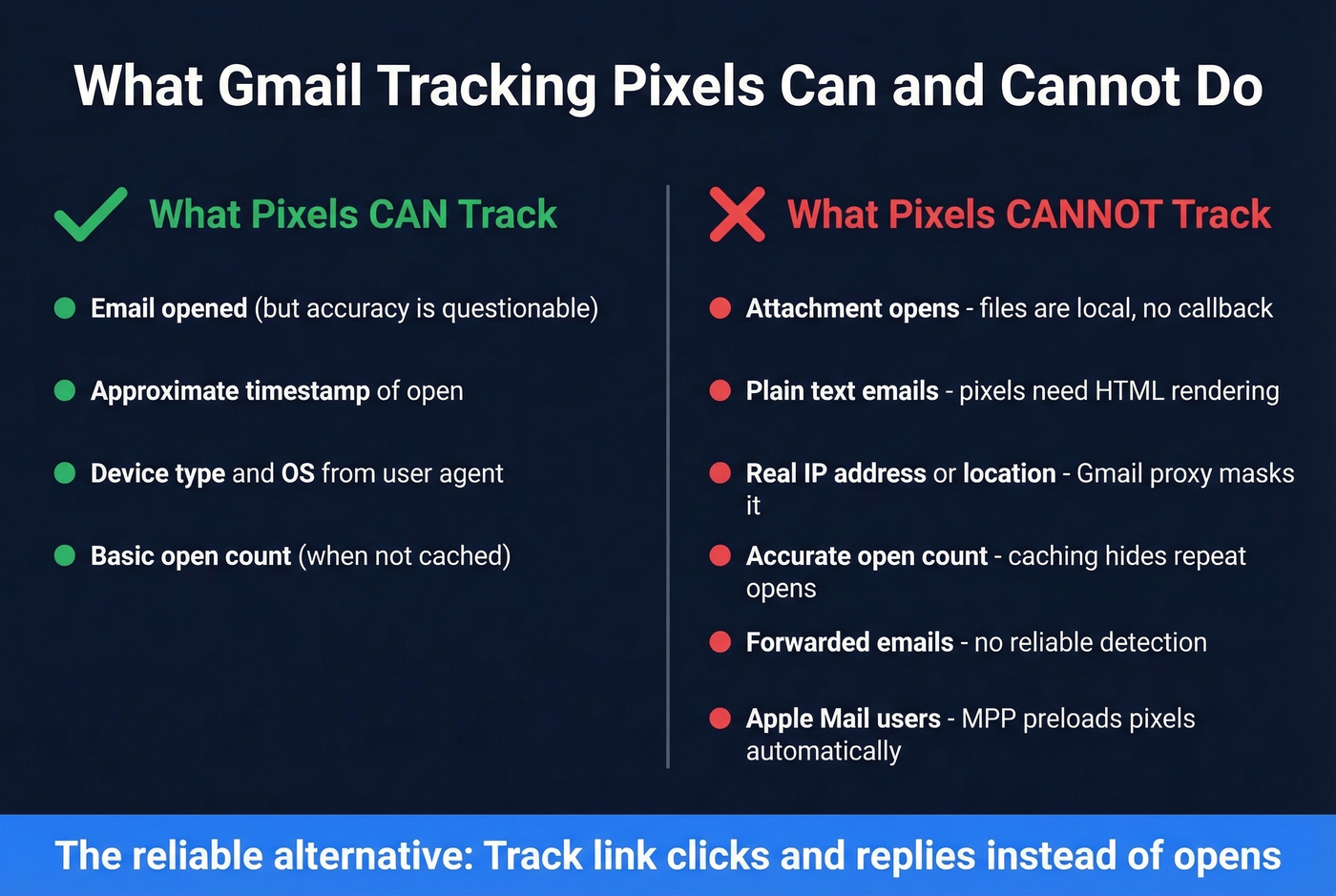
Even without MPP and proxy issues, tracking pixels have architectural constraints. They can't track attachment opens - once an attachment downloads, it's a local file with no callback. They can't track plain-text emails because pixels require HTML rendering. They can't reliably detect forwards, and they can't give accurate location data thanks to Gmail's proxy masking the real IP.
7 Best Gmail Tracking Tools in 2026
We've organized these by what they're best at, not just feature lists.
Snov.io - Best Free Tracker, Period
Use this if: You want open and click tracking without paying anything, ever. No branding on your emails, no credit card, no "free trial that expires." Snov.io's tracker is free and unlimited - a genuine rarity in a space where "free" usually means "crippled."
The extension has 100K+ users, 8,000+ five-star reviews, and a 4.9 rating in the Chrome Web Store. It covers open tracking, link click tracking, real-time desktop notifications, and open history. For a zero-dollar tool, the feature set is surprisingly complete.
Skip this if: You need CRM functionality, team-level reporting, or Salesforce integration. Snov.io's tracker is a standalone extension - it doesn't manage your pipeline.
Pricing: Free. Actually free.
Streak - Best If You Need a CRM Too

Use this if: You live in Gmail and want tracking plus pipeline management without leaving your inbox. Streak's email and link tracking is free forever - no trial, no expiration. The CRM layers on top: pipelines, deal stages, collaboration, and reporting.
Streak shows city-level location and device data for opens, though the Gmail proxy limits location accuracy significantly. The real value is the CRM integration - seeing tracking data alongside deal context in the same Gmail sidebar.
Skip this if: You already have a CRM. Paying $49/user/mo for Streak Pro when you're already in HubSpot or Salesforce creates redundancy, not efficiency.
Pricing: Tracking free forever. CRM plans: Pro $49/user/mo (annual), Pro+ $69, Enterprise $129.
Boomerang - Best for Recipient Trust
Most tracking tools hide the pixel and hope nobody notices. Boomerang takes the opposite approach: it places a fully visible image in your email body that says, essentially, "a read receipt has been requested." The recipient gets a one-click opt-out.
This sounds like a disadvantage until you think about it from the buyer's perspective. Privacy-savvy prospects running extensions like Ugly Email or PixelBlock can spot and block invisible trackers. Boomerang's transparency actually builds trust. We've seen this work particularly well in enterprise sales where the buyer is a security or legal team - the visible receipt signals respect rather than surveillance. Boomerang doesn't store or read your email, and recipients are always notified when tracking is requested.
Pricing: Free after trial with 10 message credits/mo, Personal $4.98/mo, Pro $14.98/mo, Premium $49.98/mo (all annual). 30-day free trial, no credit card.
Mailsuite - Good, but the Free Plan Lies
Mailsuite (formerly Mailtrack) looks generous on paper: unlimited tracked emails on the free plan, a clean interface, and a lightweight Chrome extension. The Advanced plan at $11.99/user/mo unlocks unlimited open details, click tracking, and 60K campaign emails/month. Paid users also get useful alert types like Open Spike Alerts and Email Revival Alerts that flag when a cold thread suddenly gets attention.
Here's the thing - that "unlimited tracked emails" on the free plan is misleading. You can send unlimited tracked emails, but you can only see open details for 10 emails and click tracking for 10 emails. After that, the data is locked behind the paywall. I watched an SDR team install this thinking they had full visibility, only to realize a week later they were flying blind on 90% of their sends.
Pricing: Free (with the limits above), Advanced $11.99/user/mo.
Yesware - Solid for Teams, Sneaky on Free
Yesware shines for sales teams that need shared reporting and multi-channel tracking. The Pro plan at $15/seat/mo is reasonable, and the Enterprise tier at $65/seat/mo adds Salesforce integration.
But the free plan has a brutal hidden limit: tracking data disappears after 24 hours. You send a tracked email Monday morning, and by Tuesday morning the open data is gone. This isn't prominently disclosed on the pricing page, and it makes the free tier essentially useless for any real workflow.
Pricing: Free (24-hour lookback), Pro $15/seat/mo, Premium $35, Enterprise $65 (all annual).
Mixmax - Overkill for Tracking Alone
Mixmax is a full sales engagement platform that happens to include email tracking. At $89/user/mo for the Suite plan, you're paying for sequences, scheduling, and workflow automation - not just open notifications. The Inbox Copilot tier starts at $29/user/mo, but that's still pricey for tracking alone. The free tier after trial stamps "Sent with Mixmax" on every email, which costs $9/mo to remove.
If you just need tracking, this is like buying a pickup truck to carry groceries.
Pricing: Inbox Copilot $29/user/mo, Engagement Copilot $49/user/mo, Suite $89/user/mo (all annual). Free tier adds branding.
Mailtrack (Legacy)
Mailtrack rebranded as Mailsuite, covered above. The old Mailtrack Premium still exists at $2.99/user/mo billed yearly for basic tracking. If you're searching for "Mailtrack," you're looking for Mailsuite now.

Open tracking is broken. Bounced emails produce nothing at all. Before you obsess over pixels, make sure your emails actually land. Prospeo verifies addresses with 98% accuracy at $0.01/email - so every send generates real data.
Stop tracking phantom opens. Start reaching real inboxes.
Side-by-Side Comparison
The "Best For" column is our honest recommendation - not a hedge.
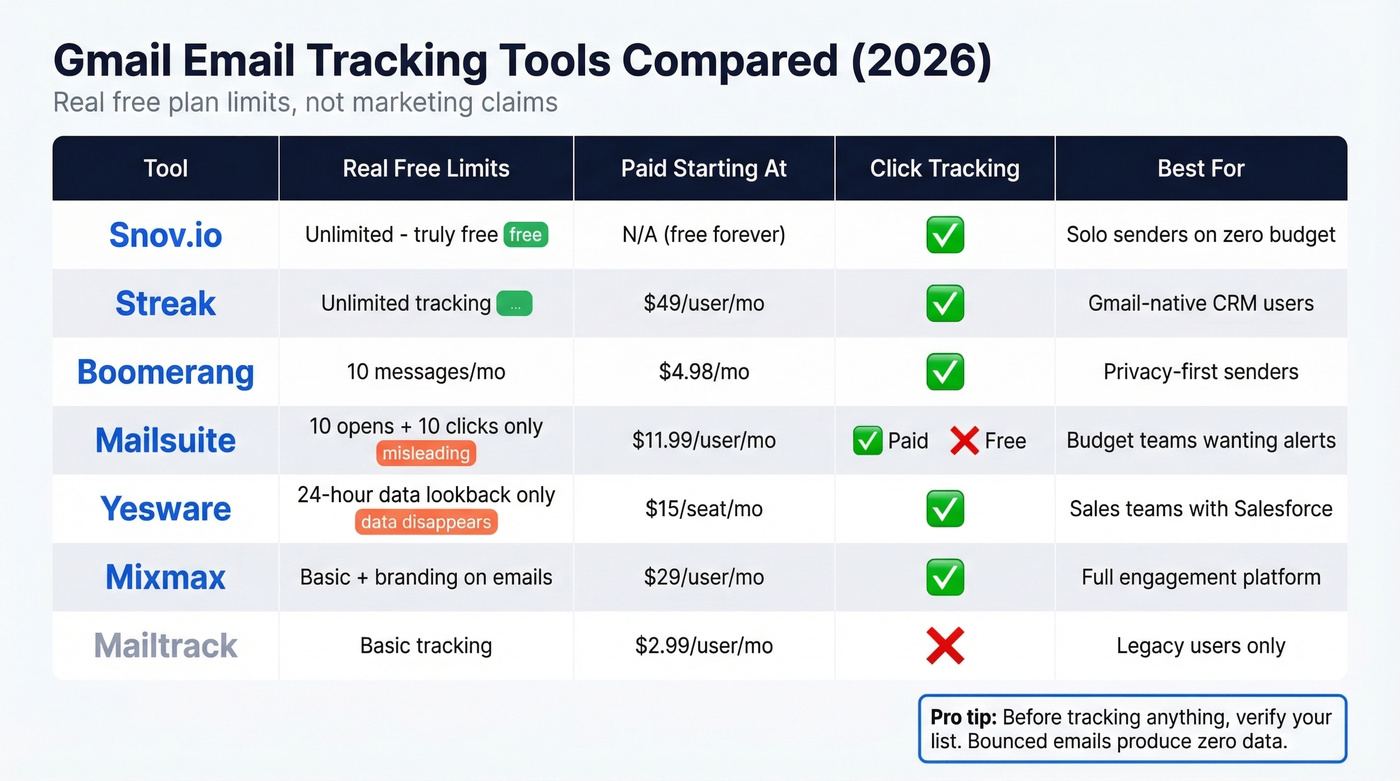
| Tool | Free Plan (Real Limits) | Paid From | Click Tracking | Best For |
|---|---|---|---|---|
| Snov.io | Unlimited tracking | N/A (free) | Yes | Solo senders, zero budget |
| Streak | Unlimited tracking | $49/user/mo | Yes | Gmail-native CRM users |
| Boomerang | 10 message credits/mo | $4.98/mo | Yes | Privacy-first senders |
| Mailsuite | 10 opens, 10 clicks | $11.99/user/mo | Yes (paid) | Budget teams needing alerts |
| Yesware | 24-hour lookback | $15/seat/mo | Yes | Sales teams + Salesforce |
| Mixmax | Basic + branding | $29/user/mo | Yes | Full engagement platform |
| Mailtrack | Basic tracking | $2.99/user/mo | No | Legacy users only |
How to Choose the Right Tracker
Your pick depends on who you are and what you're actually trying to accomplish. In our experience, the recurring priorities across sales teams are: lightweight setup, no branding on emails, and no feature bloat.
Freelancer or solopreneur: Snov.io is the no-brainer. Free, unlimited, no branding. If you also want lightweight deal tracking, Streak gives you a CRM without leaving Gmail.
Sales team (5+ reps): Yesware Pro at $15/seat/mo gives you team reporting and enough tracking depth to be useful. If you need Salesforce integration, budget for Yesware Enterprise at $65/seat. Mailsuite Advanced at $11.99/user/mo is the budget alternative when you don't need CRM sync.
Privacy-conscious sender: Boomerang. Full stop. The visible receipt approach is the only one that respects the recipient's autonomy.
Beyond the tool itself, pay attention to deliverability. Many tracking extensions wrap your links through shared tracking domains - and shared domains mean shared reputation. If another user on that same domain gets flagged for spam, your deliverability suffers too. The practical fix: look for tools that offer personalized subdomains or multiple tracking domains. A tracker that lands your email in spam is worse than no tracker at all.
Let's be honest: if your average deal size is under $5,000, you probably don't need email tracking at all. The time you spend interpreting noisy open data would be better spent writing a second follow-up. Tracking is a power tool for high-stakes outreach - for everything else, just send more emails.
Legal and Privacy Considerations
Tracking pixels sit in a legal gray zone that's getting grayer every year.
In the U.S., CAN-SPAM is opt-out - you don't need prior consent to send commercial email or embed tracking pixels. But violations carry fines of up to $51,744 per email, so getting the basics wrong is expensive. The bigger complication is the state-level patchwork: California's CPRA, Virginia's CDPA, and a growing list of state privacy laws each have their own thresholds. If you're tracking individuals across states, the compliance surface area is expanding fast.
In the EU, the rules are clearer and stricter. GDPR treats individual-level open tracking as personal data processing, which requires explicit, informed consent. You can't bury tracking disclosure in a privacy policy footer and call it compliant. The French data authority CNIL published draft guidance that draws a useful line: tracking which specific person opened an email requires consent, while anonymized campaign-level metrics may be permissible without it. Boomerang's visible-receipt approach - where the recipient sees the tracking and can opt out - is the closest any tool comes to meeting the spirit of GDPR by default.
Look, most sales teams using Gmail trackers aren't thinking about GDPR compliance. If you're sending tracked emails to EU recipients, you should be.
What to Track Instead of Opens
Stop obsessing over opens. They're a vanity metric in 2026.
Clicks are unaffected by Gmail's proxy or Apple MPP. If someone clicked your link, a human made a decision. Replies are the ultimate engagement signal - no proxy can fake a reply. Conversions - booked meetings, demo requests, purchases - are the metrics that connect to revenue. And poll votes or micro-commitments, interactive elements that require intentional action, tell you more about interest than a hundred phantom opens ever will.
Most tracking tools still lead with open rates on their marketing pages without disclosing how badly MPP has degraded that data. They know. They just don't want to undermine their own value proposition.
But none of these metrics matter if your emails bounce before reaching an inbox.
Clean Data Before Tracking
A bounced email produces exactly zero tracking data. Worse, it damages your sender reputation, which means your next batch of emails is more likely to land in spam - where tracking pixels never fire either. It's a downward spiral that compounds with every bad send.
This is where list verification earns its keep. Prospeo runs every address through a 5-step verification process - catch-all handling, spam-trap removal, honeypot filtering - and delivers 98% email accuracy. The database refreshes every 7 days, which matters because people change jobs and emails go stale faster than most teams realize. The free tier gives you 75 email verifications and 100 Chrome extension credits per month, and paid plans work out to roughly $0.01 per email.

Clicks and replies beat open rates - but only if your contacts are real people at valid addresses. Prospeo's 5-step verification catches spam traps, honeypots, and catch-all domains before they wreck your deliverability and your tracking data.
Clean data in, reliable signals out. 75 free verifications to prove it.
FAQ
Can you track emails in Gmail without an extension?
Google Workspace has native read receipts, but recipients can decline them. For automatic pixel-based tracking with open history and click data, you need a Chrome extension like Snov.io or Streak. There's no built-in Gmail feature that tracks opens silently.
Does Gmail email tracking work on mobile?
Most trackers detect opens regardless of the recipient's device - the pixel fires from any email client that renders images. But you need the Chrome desktop extension to send tracked emails. Mobile Gmail apps don't support extensions, so you can't initiate tracking from your phone.
Can recipients tell I'm tracking their email?
Standard invisible pixel tracking is undetectable to most people. Tech-savvy users running privacy extensions like Ugly Email or PixelBlock can spot and block tracking pixels. Boomerang is the only major tool that makes tracking visible by design, with an in-email image and opt-out link.
Is email tracking in Gmail legal?
In the U.S., yes - CAN-SPAM is opt-out, so prior consent isn't required for commercial email or embedded pixels. In the EU, individual-level open tracking requires explicit consent under GDPR. Check local regulations before tracking internationally, especially when sending to European recipients.
How do I make sure tracked emails actually reach inboxes?
Start with a verified email list. Run your contacts through a verification tool before sending - catching spam traps, honeypots, and stale addresses before they damage your sender reputation. You're only getting useful tracking data from emails that reach real people, not bounces wrecking your domain.