

Gmail SMTP Limits in 2026: Quotas, Blocks, and Workarounds
A Workspace user ran a cold outreach campaign last month - 50 emails, nothing crazy. Gmail blocked them at email number 28. No warning, no grace period, just "You have reached a limit for sending mail." The published Gmail SMTP limits say 2,000/day. They hit a wall at 28. That's the gap between what Google documents and what Google actually enforces.
The Numbers That Matter
Free Gmail gives you 500 recipients per day. Workspace bumps that to 2,000, with a total ceiling of 10,000 through the relay server. But Gmail also enforces invisible behavioral limits - we've seen accounts get blocked at 12 emails on a bad day.
If you're pushing more than ~100 emails/day through Gmail SMTP, it's time to graduate to a dedicated ESP. They start at $10-20/month.
Google SMTP Quotas at a Glance
Gmail's sending limits are recipient-based, not message-based. One email to 10 people counts as 10 against your daily quota. Everything runs on a rolling 24-hour window, so there's no midnight reset.
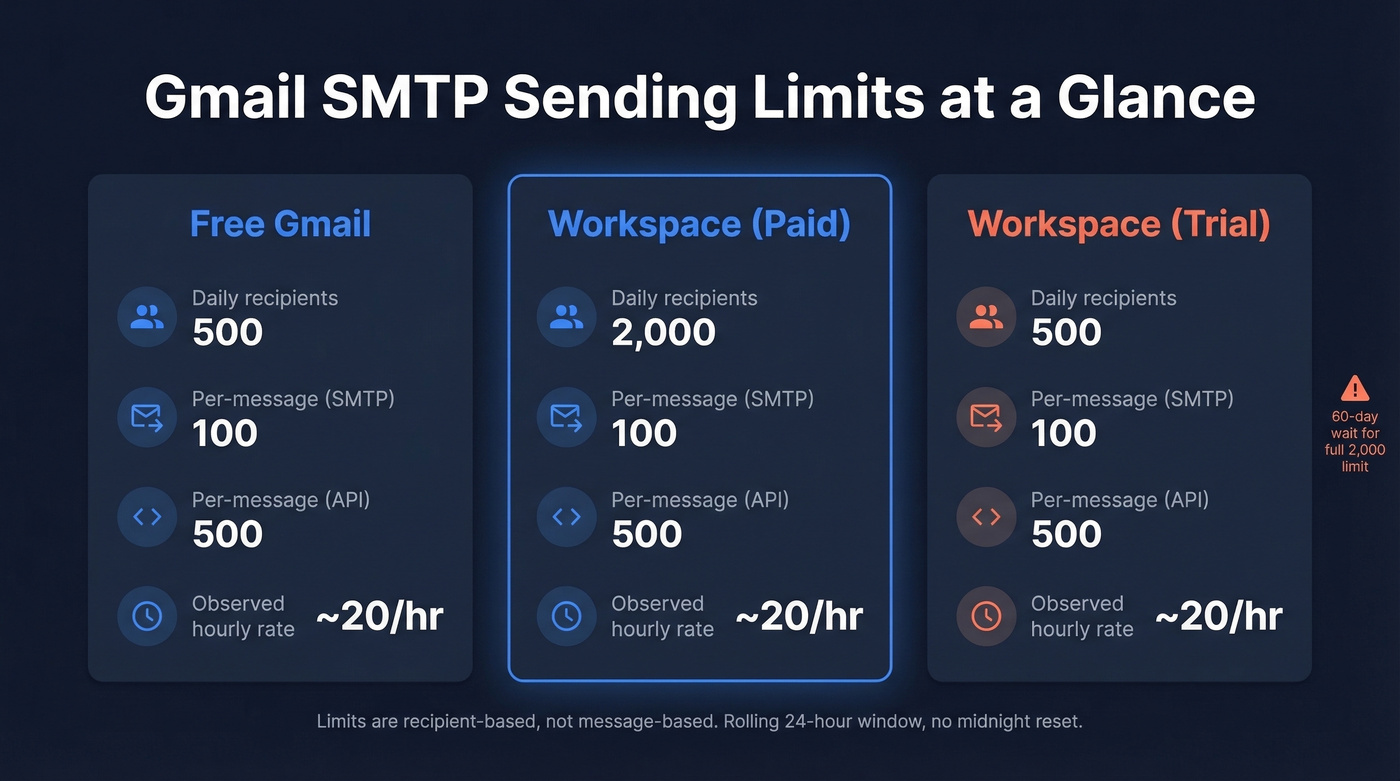
| Limit Type | Free Gmail | Workspace (paid) | Workspace (trial) |
|---|---|---|---|
| Daily sending limit (recipients/day) | 500 | 2,000 | 500 |
| Per-message recipients via SMTP (smtp.gmail.com) | 100 | 100 | 100 |
| Per-message recipients via Gmail API | 500 | 500 | 500 |
| Rate limit (commonly observed) | ~20 emails/hour | ~20 emails/hour | ~20 emails/hour |
Workspace trial accounts are capped at 500/day - same as free Gmail - and Google enforces a 60-day waiting period before new Workspace accounts get the full 2,000 allocation. The ~20 emails/hour throttle isn't officially documented by Google, but we've confirmed it in our own testing and it's consistent with what GMass reports.
Per-message recipient limits vary by method. SMTP caps you at 100 recipients per message, the Gmail API allows up to 500, and the Gmail web interface on Workspace supports up to 2,000 per message.
smtp.gmail.com vs smtp-relay.gmail.com
Two different servers, two very different use cases. Mixing them up is one of the most common configuration mistakes we see.
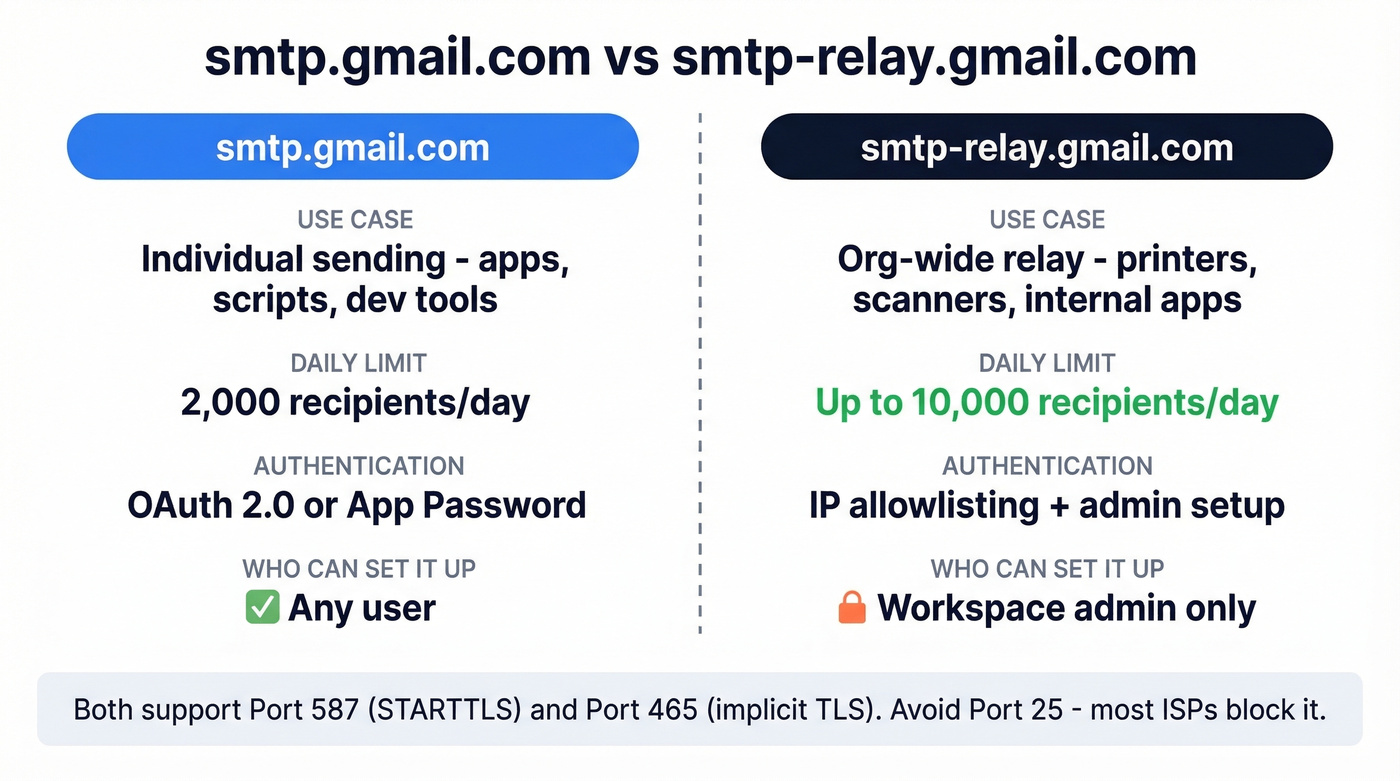
| smtp.gmail.com | smtp-relay.gmail.com | |
|---|---|---|
| Use case | Individual sending | Org-wide relay |
| Daily limit | 2,000 recipients/day (Workspace) | Up to 10,000 recipients/day |
| Auth required | OAuth 2.0 or App Password | IP allowlisting + admin setup |
| Best for | Apps, scripts, dev tools | Printers, scanners, internal apps |
Both support port 587 with STARTTLS and port 465 with implicit TLS. Port 25 is blocked by most ISPs, so 587 is the safe default for legacy devices or scripts.
The relay server requires a Workspace admin to configure allowed senders and IP ranges in the Google Admin console. Individual users can't set it up on their own.
Hidden Behavioral Limits
Here's the thing: the published quotas are ceilings, not guarantees. Gmail runs behavioral anti-spam heuristics that can shut you down well below the documented daily cap.
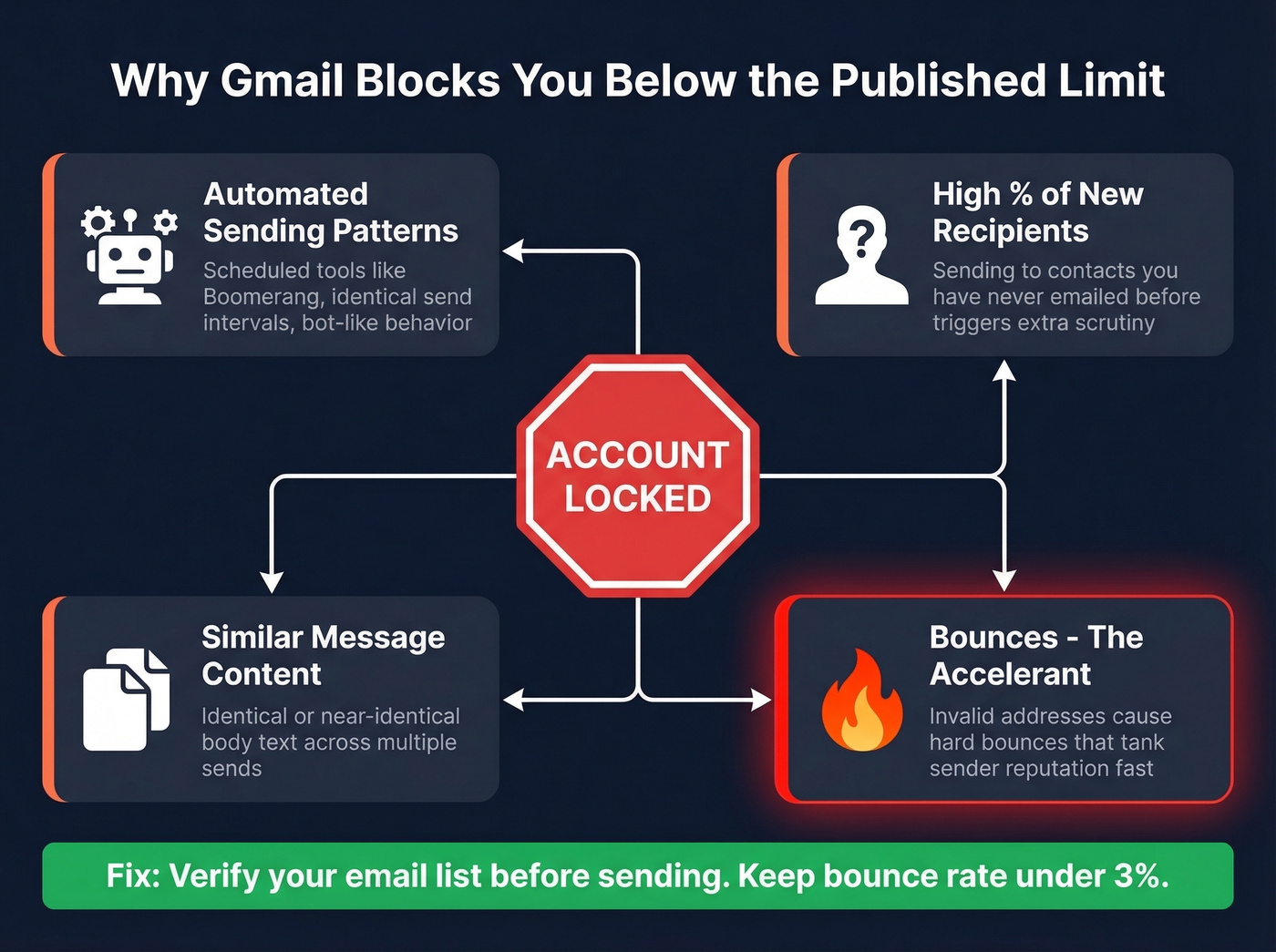
One user running Boomerang reported on Reddit getting blocked at 12-15 emails per day - on random days, with the block lifting the next morning. Gmail's message included "recurrent email was blocked," suggesting the automated pattern itself triggered enforcement. Another Workspace user doing cold outreach posted their exact error: nine "Message rejected" responses before Gmail locked them out entirely at email #28.

Three factors work together to trigger these invisible limits: automated sending patterns, high percentages of new recipients, and similar message content across sends. But the accelerant is bounces. Sending to invalid addresses generates hard bounces that tank your sender reputation, and a damaged reputation makes Gmail's heuristics far more aggressive. We've seen accounts get locked at under 30 sends when bounce rates spike. Verifying your list before sending is the simplest way to stay below Gmail's radar - Prospeo's 5-step verification catches invalid addresses, spam traps, and catch-all domains before a single email leaves your outbox.

Bounces are the accelerant behind Gmail's behavioral blocks. Prospeo's 5-step verification eliminates invalid addresses, spam traps, and catch-all risks before you send - keeping your bounce rate under 3% and your Gmail account unlocked.
Stop losing your sending quota to bad data. Verify before you send.
Authentication After LSA Deprecation
Google killed Less Secure Apps access. The transition is fully complete as of 2026:
- June 15, 2024 - LSA settings removed from the admin console
- September 30, 2024 - LSA access turned off for existing connections
- May 1, 2025 - Final shutdown, no exceptions
OAuth 2.0 is now the primary authentication method. For most people running SMTP through scripts, cron jobs, or home lab setups, the practical fix is simpler: enable 2FA on your Google account, then generate a 16-character App Password. That replaces your regular password in any SMTP configuration.
The confusion on r/homelab was real - plenty of admins thought Google had killed password-based SMTP entirely. If your SMTP integration broke last year, this is almost certainly why.
Gmail SMTP Error Codes
When Gmail blocks you, the error messages range from helpful to cryptic. Gmail sometimes returns plain-text errors without standard SMTP codes - those are listed with a dash below.
| Code | Message | What It Means | Action |
|---|---|---|---|
| 421 | 4.7.0 Temporary System Problem | Concurrency/temp throttle | Wait 1-2 hrs, retry |
| 452 | 4.2.2 Over quota | Recipient mailbox full | Skip this recipient |
| 535 | 5.7.8 Username and Password not accepted | Auth failure | Switch to App Password or OAuth |
| 550 | Relay access denied | SMTP relay/auth not permitted | Fix auth/relay settings |
| - | "You have reached a limit for sending mail" | Behavioral or quota block | Stop sending, wait 1-24 hrs |
| - | "Daily user sending quota exceeded" | Hard daily cap reached | Wait for rolling window to clear |
A 421 temporary error usually clears in an hour or two. A behavioral block after cold outreach can lock you out for the full 24 hours. Seeing 535 errors? That's almost always the LSA shutdown fallout - switch to an App Password and you're back in business.
Mistakes That Burn Your Quota
Aliases and delegated senders count toward your primary account's quota. Sending from sales@company.com via your personal Workspace account? Those emails eat your 2,000.
Vacation auto-responders count too. Every auto-reply is a sent message. If you're on PTO and getting 200 emails a day, that's 200 sends you didn't plan for.
The rolling 24-hour window also trips people up. If you sent 400 emails at 3 PM yesterday, that capacity frees up around 3 PM today - not at midnight. And attachment size limits are misleading: Gmail says 25 MB, but Base64 encoding inflates attachments by ~33%, so your real ceiling is closer to ~18-19 MB of raw file size.
When to Outgrow Gmail SMTP
Let's be honest: Gmail SMTP is a notification delivery tool that people keep trying to use as an outreach platform. Cold outreach through Gmail is a lockout waiting to happen.
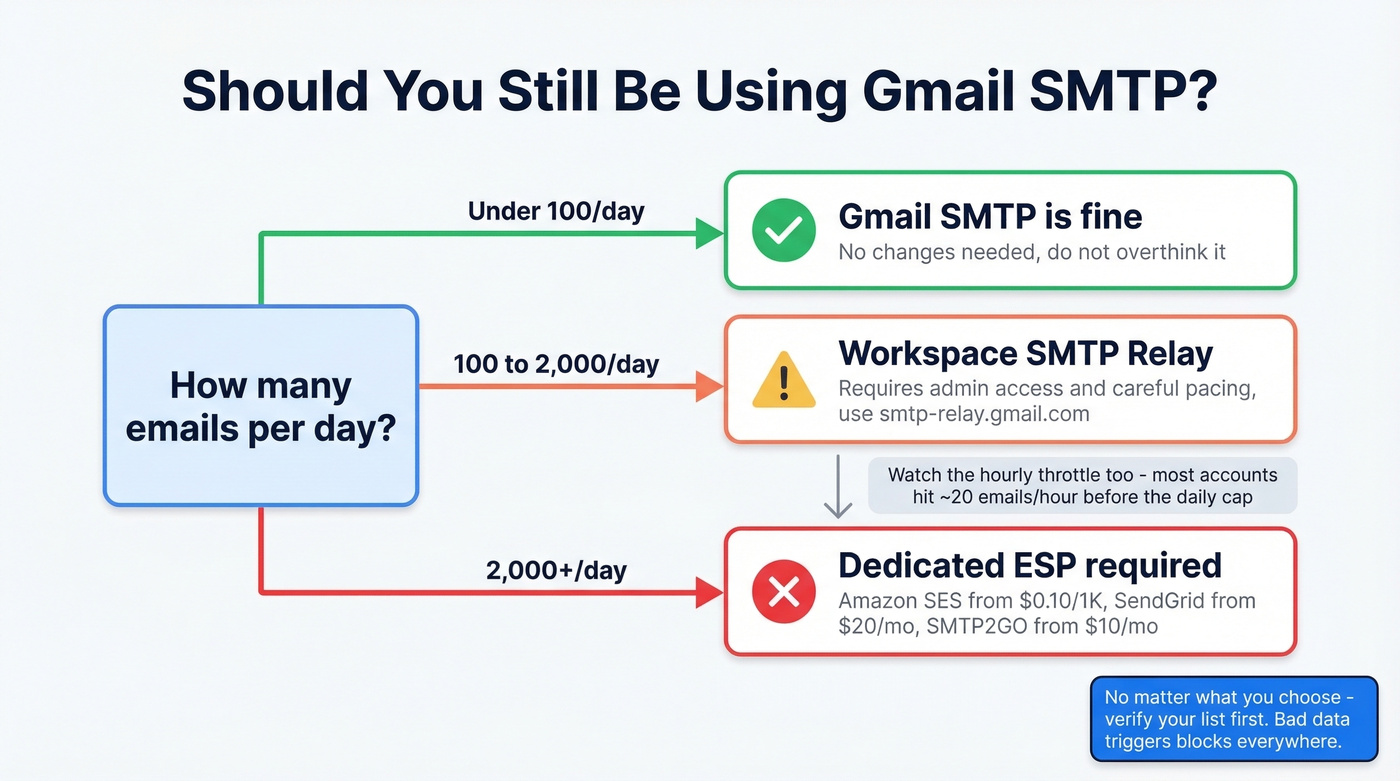
- Under 100 emails/day - Gmail SMTP works fine. Don't overthink it.
- 100-2,000/day - Workspace with the SMTP relay can handle this, but you'll need admin access and careful pacing.
- 2,000+/day - Dedicated ESP. Full stop.
Understanding the hourly rate limit (~20 emails for most accounts) matters just as much as the daily cap. Many users hit the hourly throttle first and assume they've been banned. If you want a safer pacing model, use an email velocity framework instead of guessing.
| Service | Free Tier | Paid Starting At | Best For |
|---|---|---|---|
| Prospeo | 75 verifications/mo | ~$0.01/email | List verification before any send |
| Amazon SES | 62K/mo (from EC2) | $0.10/1,000 emails | High-volume dev teams |
| SendGrid | Free tier available | ~$20/mo | Marketing + transactional combo |
| Postmark | None | $15/mo for 10K | Transactional-only reliability |
| SMTP2GO | Free tier available | ~$10/mo | Drop-in Gmail relay replacement |
| Mailgun | Limited-time free trial | ~$35/mo | API-first automation teams |
At $0.10 per 1,000 emails, Amazon SES is unbeatable on price - but you'll need a developer to set it up and manage bounces yourself. SMTP2GO is the tool Reddit admins consistently recommend when Gmail SMTP breaks. Skip Mailgun if you're budget-conscious; the free tier is time-limited and the paid plans jump quickly.
None of these ESPs will save you from bad data. Invalid addresses trigger blocks on dedicated infrastructure just as fast as they do on Gmail. If you're troubleshooting deliverability, start with email bounce rate benchmarks and a proper email deliverability guide before you change tools.
If you're hitting Gmail SMTP limits running cold outreach, the real problem isn't volume - it's data quality. Prospeo delivers 98% accurate emails from 300M+ verified profiles, so every send counts and nothing bounces.
Send fewer emails that actually land instead of burning your quota on ghosts.
FAQ
Does Gmail reset sending limits at midnight?
No. Gmail uses a rolling 24-hour window. If you sent 400 emails at 3 PM, that quota frees up around 3 PM the next day - not at midnight.
Can I increase the Gmail SMTP limit beyond 2,000/day?
Upgrading from free Gmail to Google Workspace raises the cap from 500 to 2,000. The SMTP relay server supports up to 10,000 recipients/day with admin configuration. Beyond that, switch to Amazon SES or SendGrid.
Why did Gmail block me after only a few emails?
Gmail enforces behavioral heuristics on top of published quotas. Automated patterns, new recipients, similar content, and high bounce rates all trigger blocks well below the daily cap. Verifying your list before sending reduces bounces and keeps your sender reputation intact.
What port should I use for Gmail SMTP?
Port 587 with STARTTLS. It's the most widely supported option. Port 465 with implicit TLS also works. Avoid port 25 - most ISPs block it.