


GrowMeOrganic vs MailMerge365: Honest Comparison (2026)
GrowMeOrganic vs MailMerge365 isn't a fair fight - because they aren't fighting. One is a Swiss Army knife trying to handle lead sourcing, enrichment, cold email, warm-up, and CRM in a single platform. The other is a bottle opener: it sends personalized mass emails from your Outlook inbox, and that's about it. Picking the wrong one wastes your money in completely different ways.
30-Second Verdict
- Use MailMerge365 if you already have a contact list and want personalized campaigns sent straight from Outlook. Simple, cheap, purpose-built.
- Use GrowMeOrganic if you need lead sourcing and outreach in one platform - but a 1.6/5 on Trustpilot across 118 reviews isn't noise you can ignore.
- Skip both if your real bottleneck is finding verified B2B emails that don't bounce. Get the data right first, then send through whatever tool you want.
What Is GrowMeOrganic?
GrowMeOrganic positions itself as an all-in-one outbound sales platform: a B2B database with 300M+ professional profiles, email finder, cold email sequences with automated follow-ups, built-in CRM, email warm-up, and lead scoring. Three pricing tiers - Starter at $39/mo, Growth at $79/mo, and Pro at $159/mo - with Growth and Pro offering unlimited credits.

Everything living in one platform is genuinely convenient, and the 14-day free trial (no credit card) lowers the barrier. G2 gives it a 4.0/5, which looks respectable.
But Trustpilot tells a different story. Across 118 reviews, the score sits at 1.6/5. Recurring complaints center on undeliverable emails - one reviewer reported "95% of the emails are undeliverable." Others flag refund issues and unresponsive support. The browser extension doesn't work reliably either, according to multiple threads.
Here's the thing: unlimited credits don't matter if the data bounces. The industry baseline for undelivered email runs around 9-10%. If users are seeing bounce rates multiples higher than that, it's not a data quirk - it's a domain reputation risk. We've watched teams torch a perfectly good sending domain in a single afternoon with bad data, and recovering from that takes weeks.
What Is MailMerge365?
MailMerge365 is an Outlook add-in. No database, no lead finder, no CRM. You install it inside Microsoft 365, upload a spreadsheet of contacts, insert personalization tokens, and send campaigns directly from your Outlook inbox. Emails land as personal messages, not mass blasts from a platform.

It covers open/click tracking, bounce detection, unsubscribe management (including API access to unsubscriber lists for third-party automation), scheduling, follow-ups to non-responders, and send-as/alias sending for teams with multiple sender identities. The team ships updates consistently - Entra ID authentication landed in 2025, with tracking fixes rolling into 2026. That kind of enterprise-readiness matters if you're in a regulated environment.
It works across Outlook on the Web, Windows, and Mac, and carries a 4.3/5 on G2 - though that's based on only 2 reviews, so take it accordingly. Microsoft caps sending at 5,000 emails per mailbox per day. Expect around $10-20/user/month based on comparable Outlook add-ins like SecureMailMerge. A free trial covers 100 recipients; pay-as-you-go gets you 1,000 recipients as a one-time send.
MailMerge365 doesn't find contacts or verify emails. It sends what you give it - and that's a feature, not a bug, if you already have clean data.

Unlimited credits mean nothing when emails bounce. Prospeo delivers 98% email accuracy across 300M+ profiles, refreshed every 7 days - not every 6 weeks. Export clean contacts to MailMerge365, Instantly, or any sequencer you want.
Stop gambling your domain reputation on bad data.
Feature-by-Feature Comparison
| Feature | GrowMeOrganic | MailMerge365 |
|---|---|---|
| Category | Outbound sales platform | Outlook mail merge add-in |
| Best for | Lead sourcing + cold outreach | Personalized mass email |
| Email finding | Yes (quality concerns) | No |
| Sending method | Built-in sender + warm-up | Your Outlook inbox |
| Daily send limit | Platform-dependent | 5,000 (M365 limit) |
| Open/click tracking | Yes | Yes |
| Pricing | $39-$159/mo | ~$10-20/user/mo |
| Trustpilot | 1.6/5 (118 reviews) | N/A |
| G2 | 4.0/5 | 4.3/5 (2 reviews) |
| Free option | 14-day trial | 100 recipients trial |
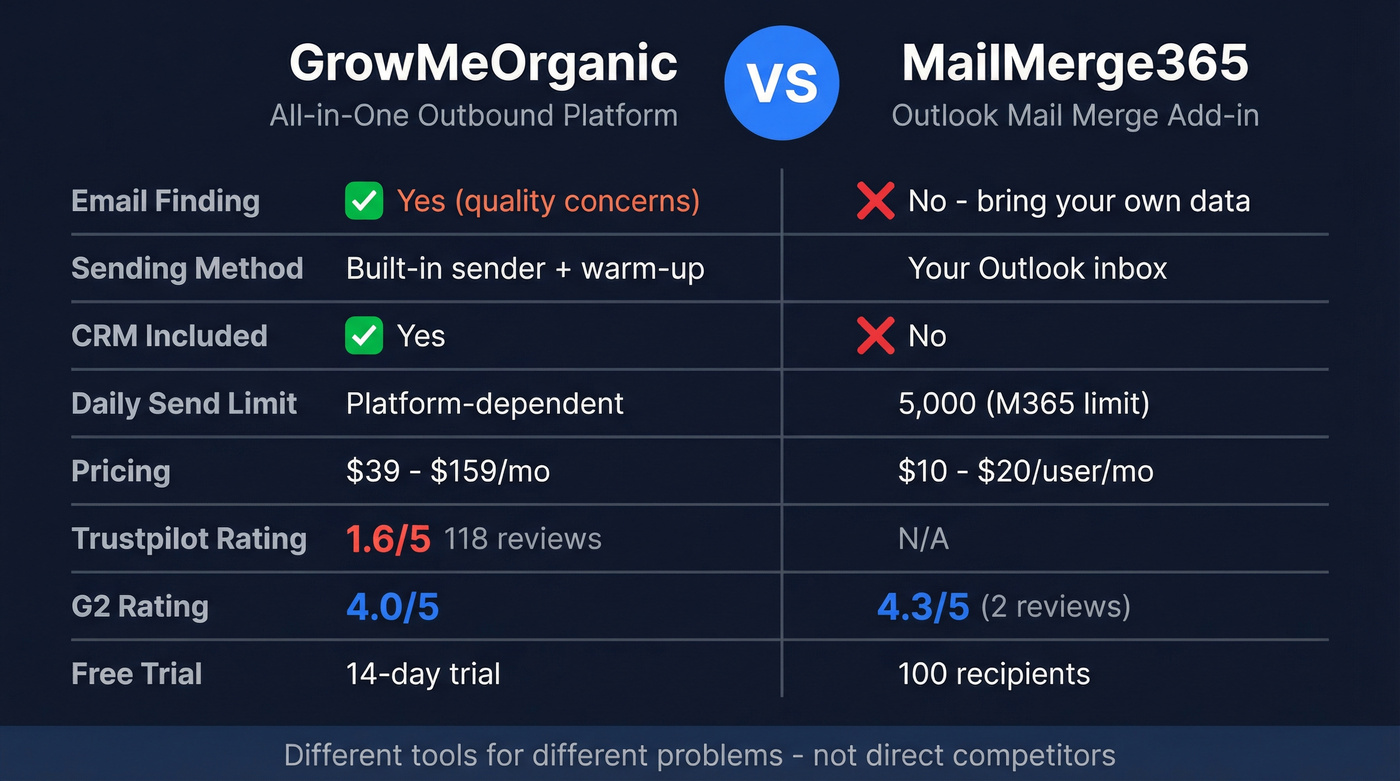
The category gap is obvious. GrowMeOrganic tries to be your entire outbound stack. MailMerge365 is a sending layer that plugs into Outlook. Comparing their pricing head-to-head doesn't make sense because they don't replace each other.
Which Do You Actually Need?
You have a clean contact list and use Outlook. MailMerge365. You'll be sending personalized emails from your own inbox within an hour. No learning curve, no platform migration.
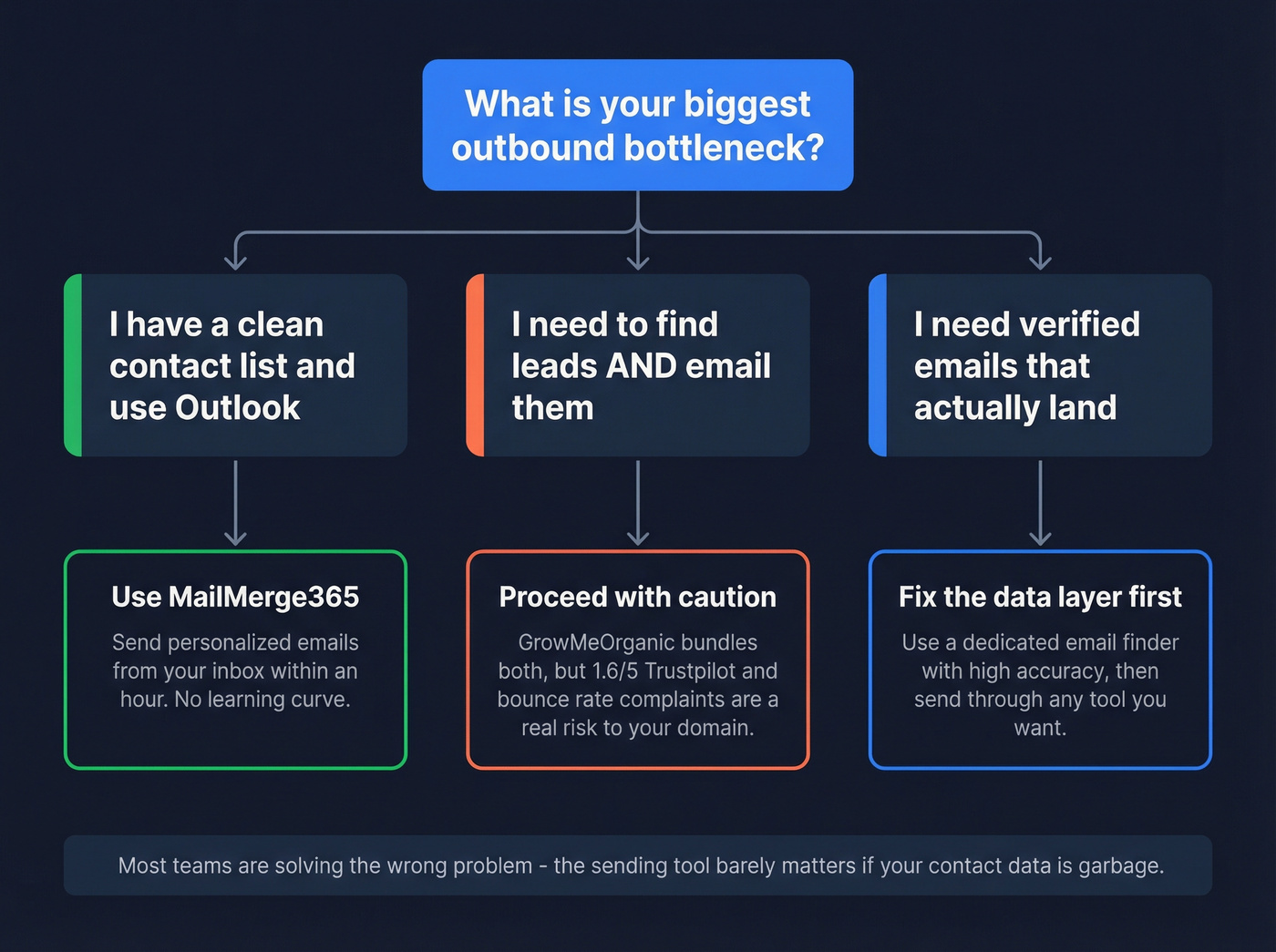
You need to find leads AND email them. GrowMeOrganic handles both, but the data quality complaints are real and severe enough that we'd hesitate to recommend it without a thorough test run first. The industry baseline for inbox placement sits around 83-85%, and the average for undelivered email is 9-10%. If users are reporting bounce rates far above that, you're risking your sending domain - and domain reputation damage compounds fast.

Your bottleneck is verified emails that actually land. Neither tool solves this well. GrowMeOrganic's data quality is the number-one complaint. MailMerge365 doesn't find emails at all. You need a dedicated data layer.
Let's be honest: most teams comparing these two tools are solving the wrong problem. The sending tool barely matters if your contact data is garbage. Fix the data first, and the sending part becomes almost trivial.
The Data Layer That Makes Either Tool Work
If data quality is the bottleneck - and for most outbound teams, it is - you want a dedicated provider that does one thing well rather than a platform that bundles mediocre data with a decent sequencer.
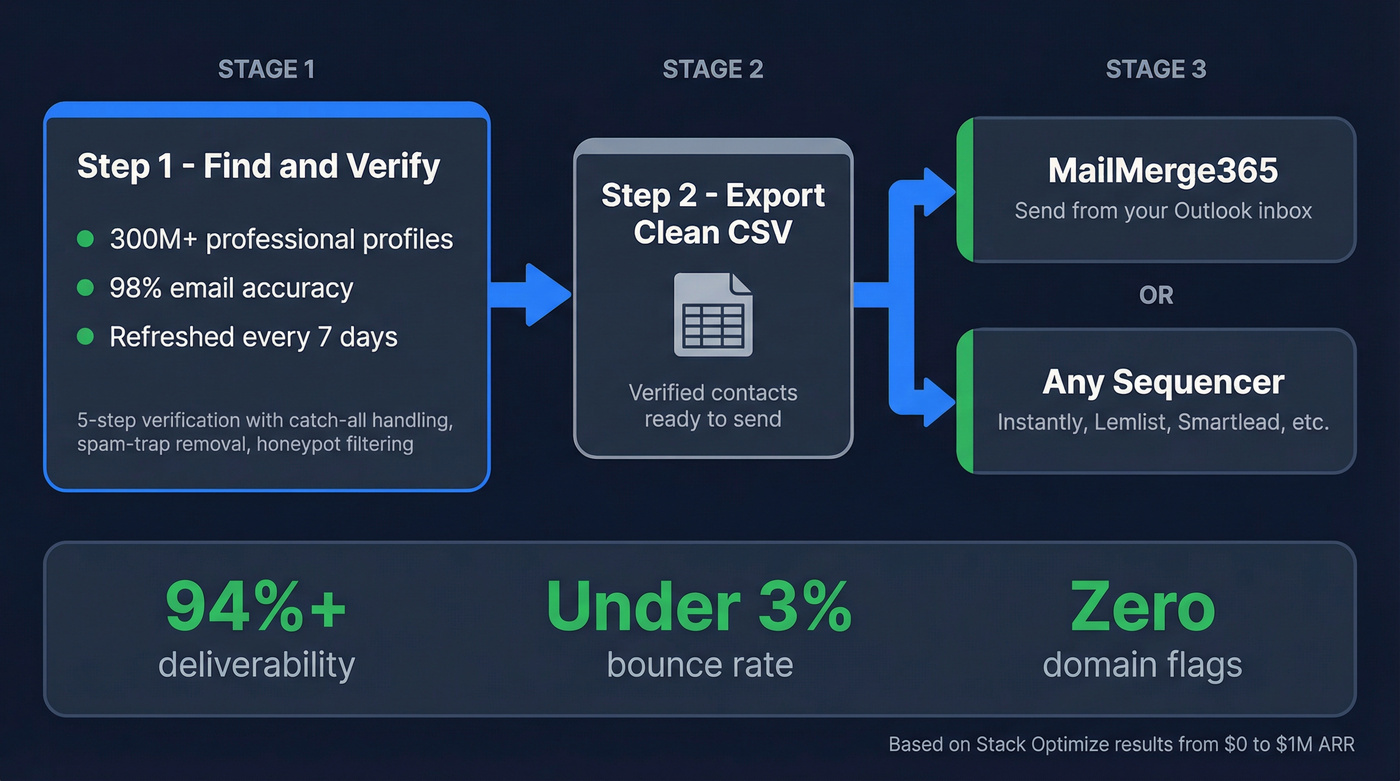
Prospeo covers 300M+ professional profiles with 98% email accuracy, refreshed every 7 days versus the 6-week industry average. Stale data is bounced data, and weekly refresh eliminates that. A 5-step verification process with catch-all handling, spam-trap removal, and honeypot filtering means you're not gambling with your sender reputation every time you hit send.
In our testing, the cleanest workflow for Outlook-native teams is straightforward: find verified contacts in Prospeo, export to CSV, import into MailMerge365, send. Done. The data also works with any other sending tool - push directly to Instantly, Lemlist, Smartlead, or whatever sequencer you prefer via native integrations.
Stack Optimize built from $0 to $1M ARR using this approach, maintaining 94%+ deliverability and under 3% bounce rates across all clients with zero domain flags. That's the difference clean data makes versus rolling the dice on bundled databases.
Stack Optimize hit $1M ARR with under 3% bounce rates and zero domain flags using Prospeo's verified data. Whether you send through Outlook or a sequencer, 5-step verification with spam-trap and honeypot removal keeps your sender reputation intact.
75 free verified emails per month - no credit card, no contract.
FAQ
Can MailMerge365 find email addresses?
No. MailMerge365 is purely a sending tool - it delivers what you give it. You need a separate data source to build your contact list first. MailMerge365 handles delivery from your Outlook inbox, nothing more.
Is GrowMeOrganic's email data reliable?
Mixed at best. G2 reviews lean positive at 4.0/5, but Trustpilot paints a different picture: 1.6/5 across 118 reviews with recurring complaints about undeliverable emails and bounce rates far above the 9-10% industry average. Refund issues are another common theme.
What's the best workflow for Outlook cold email?
Find verified emails using a dedicated data tool with high accuracy, export to CSV, and import into MailMerge365. You get the deliverability of sending from your own Outlook mailbox combined with data that won't wreck your domain reputation. That separation of concerns - data quality handled independently from sending - keeps bounce rates under 5%.
Should I choose GrowMeOrganic or MailMerge365 for outbound?
It depends on what you're missing. If you have no contact list, GrowMeOrganic bundles sourcing and sending - but data quality complaints are severe. If you already have verified contacts and use Microsoft 365, MailMerge365 at $10-20/user/month is cheaper and sends from your real inbox. Most teams get better results pairing a dedicated data provider with a lightweight sender than trusting an all-in-one platform to do everything adequately.