

Gumloop vs Lindy: The Only Comparison With Correct 2026 Pricing
Most comparisons still show Lindy at $29/month and Gumloop at $97/month. Those numbers are wrong. Gumloop restructured its pricing and merged its old Solo and Team plans into a single Pro tier, while Lindy's self-serve plan now starts at $49.99/month. If you've been comparing based on outdated info, you're working with the wrong math.
30-Second Verdict
Pick Gumloop if you need a visual workflow canvas for data pipelines and AI-powered automations - and you want more credits per dollar.
Pick Lindy if you want a persistent AI assistant that monitors your inbox, handles scheduling, and runs always-on agents with minimal setup.
Skip both if your real bottleneck is contact data quality, not automation logic. Neither tool verifies emails or refreshes prospect data.
Side-by-Side Feature Comparison
| Feature | Gumloop | Lindy |
|---|---|---|
| Starting price | $37/mo (Pro) | $49.99/mo (Plus) |
| Free plan credits | 5,000/mo | 400/mo |
| Paid plan credits | 20,000+/mo | 5,000/mo |
| G2 rating | 4.8/5 (6 reviews) | 4.9/5 (170 reviews) |
| Best for | Visual workflows | Always-on assistants |
| Compliance | SOC-2 Type 2, GDPR, HIPAA | Enterprise HIPAA + signed BAA |
| Integrations | 125+ | Thousands via connectors |
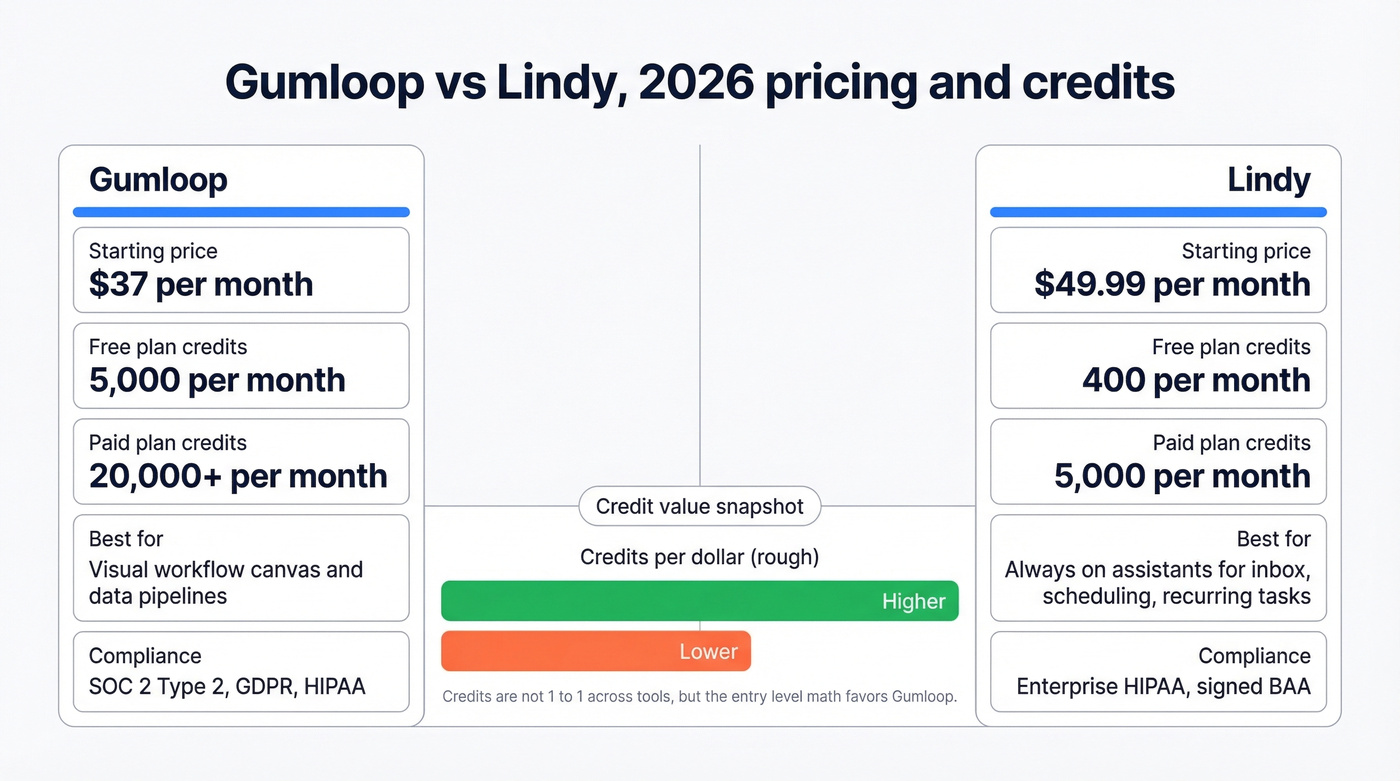
Lindy's own pricing page labels the $49.99 tier "Plus" - some third-party reviews use different names, so we're sticking with Lindy's label throughout.
The credit math tells the real story. Gumloop gives you 20,000+ credits at $37/month. Lindy gives you 5,000 at $49.99. That's roughly 4x the credits at a lower price. Now, credits aren't apples-to-apples - Gumloop credits fuel workflow nodes while Lindy credits power agent tasks - but we'd give the value edge to Gumloop for most teams, especially those still experimenting with what to automate.
Gumloop - The Workflow Canvas
Gumloop's drag-and-drop builder is genuinely intuitive. You can have a working automation - pulling form data, running it through GPT, pushing output to Slack - in about an hour. The Gummie assistant helps you build and debug flows, which is a nice touch for non-technical users who hit a wall mid-build.

When Gumloop merged its old plans, existing users on the $37/month Solo plan saw their credits jump from 10,000 to 20,000 at the same price. Free plan credits also went from 2,000 to 5,000. That's a legitimately better deal than what existed six months ago.
If you're building outbound automations, pair this with solid sales prospecting techniques so you’re not just scaling noise.
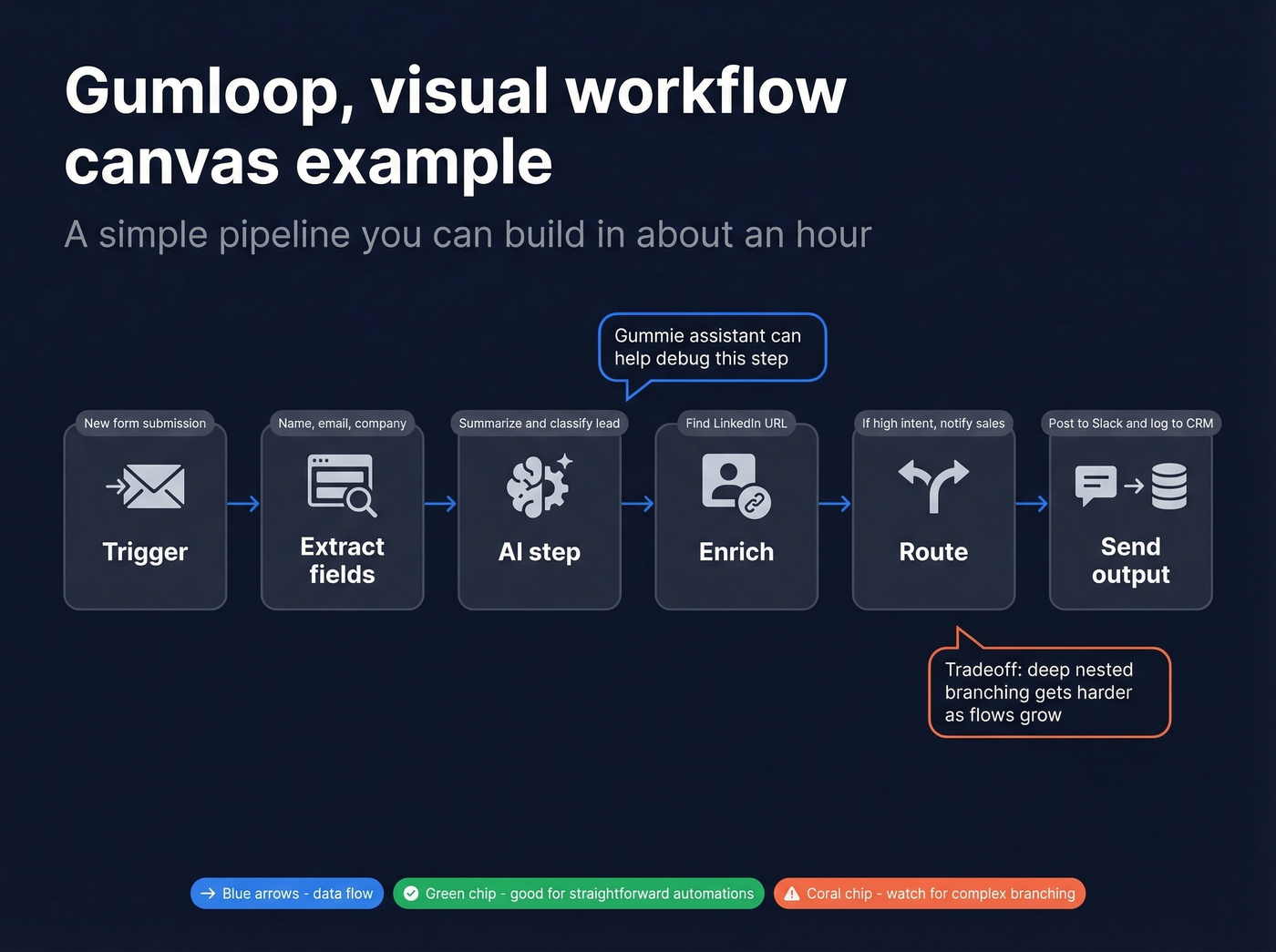
One underrated feature: the Chrome extension lets you automate websites that don't have APIs. If you're scraping data from a portal or triggering actions on a site with no integration, this fills the gap. SOC-2 Type 2, GDPR, and HIPAA compliance make it viable for regulated industries, and enterprise plans add RBAC, SAML, audit logs, and VPC deployment.
The tradeoff? As workflows grow complex, deeper branching logic gets harder to express. This comes up consistently in user discussions - Gumloop is great for straightforward automations but starts feeling limiting once you need heavy conditional logic with nested branches. The consensus on r/nocode threads echoes this: fantastic for the first 80%, frustrating for the last 20%.

You're comparing automation tools - but automation only scales what you feed it. Stale contacts mean burned credits on both Gumloop and Lindy. Prospeo's 143M+ verified emails refresh every 7 days, so your workflows start with 98% accurate data instead of 15% bounce rates.
Fix your data before you automate it. Start free with 75 emails.
Lindy - Credit Anxiety Is the Real Story
Here's the thing about Lindy: forget the feature list for a second. The most important detail is that credits burn fast, and users feel it. Across 170 G2 reviews, "expensive" appears 42 times and "limited credits" shows up 14 times. One detailed review captures the core frustration well - credits drain during building and testing, which discourages the very experimentation you need to get value from the tool. The free plan's 400 credits translate to roughly 40 tasks. That's not enough to evaluate anything meaningfully.
If your Lindy agents are supporting outbound, you’ll still need a repeatable sales follow-up system to convert the meetings they help book.
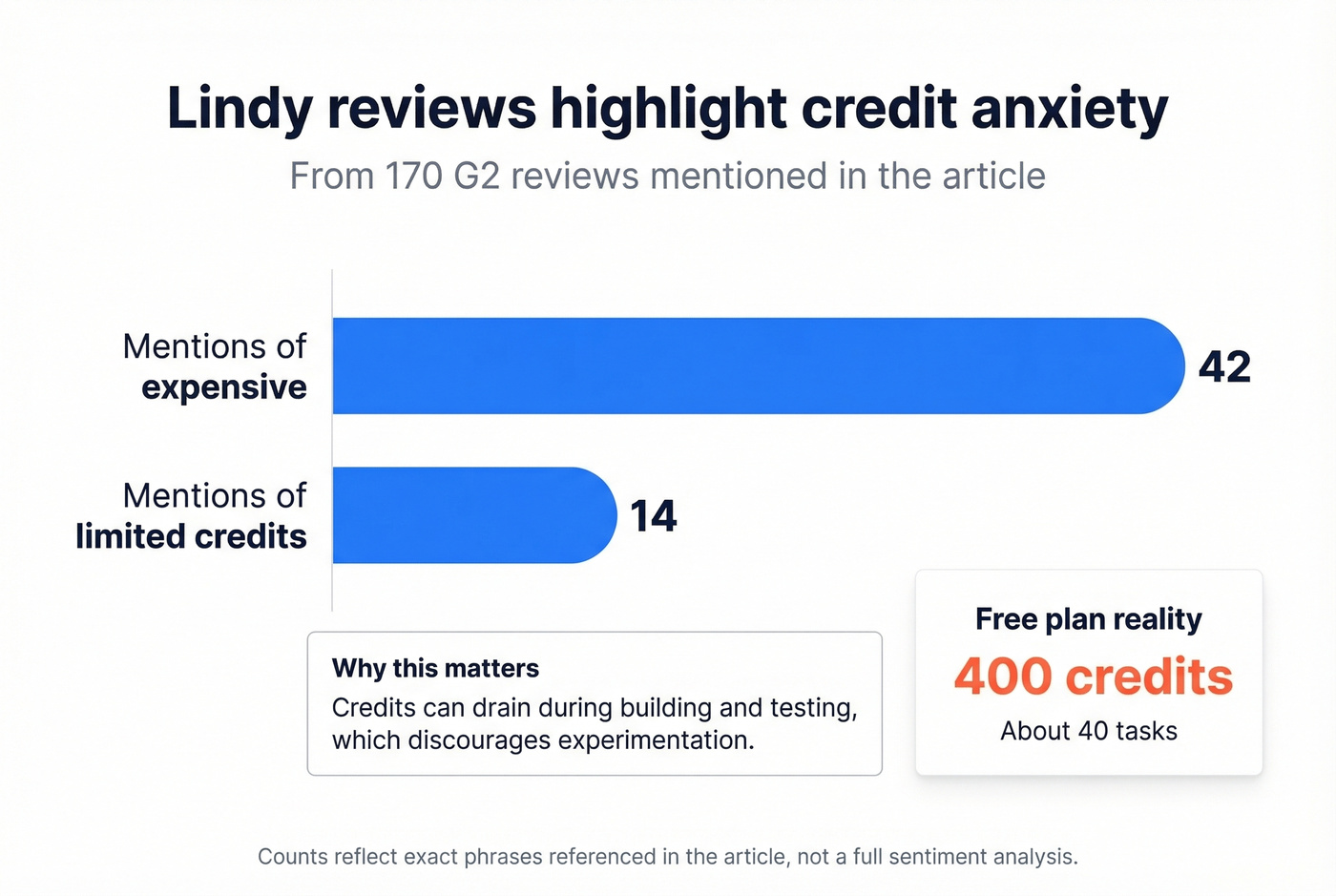
When Lindy works, though, it works well. You spin up agents from 100+ templates - inbox triage, meeting prep, scheduling coordination, sales call research - and they run persistently in the background. That "always-on" model is Lindy's core differentiator, and it's genuinely useful for recurring tasks you'd otherwise forget about. G2 reviewers mention easy setup 125 times, and templates do work out of the box.
One friction point worth flagging: Lindy leans heavily on Google's ecosystem. Users repeatedly call out that it's Google-centric and requests extensive Google permissions early in setup. If you're not a Google Workspace shop, expect some headaches.
Which Tool Should Most Teams Pick?
Let's be honest: if your average deal size is under $25k and you're a team of fewer than 10, Gumloop is the better starting point. The credit-to-dollar ratio is dramatically better, the learning curve is shorter, and you can always graduate to Lindy's agent model once you've identified recurring tasks worth automating persistently. Lindy's strength is "set it and forget it" - but you need to know exactly what to set before that model pays off, and burning credits to figure that out gets expensive.
We've seen this pattern with no-code tools broadly. They're brilliant for the first 80% of use cases and painful for the last 20%. Both platforms fit that mold, just for different types of work. For complex deterministic workflows with heavy branching, skip both and look at Make.com or n8n - they're purpose-built for that kind of logic.
If you’re evaluating tools for a sales team specifically, it’s also worth comparing against dedicated SDR tools rather than general automation platforms.
The Data Problem Neither Tool Solves
Both tools automate workflows. Neither verifies the data flowing through them.
If you’re trying to fix this systematically, start with data enrichment services so your automations have complete, current fields to work with.
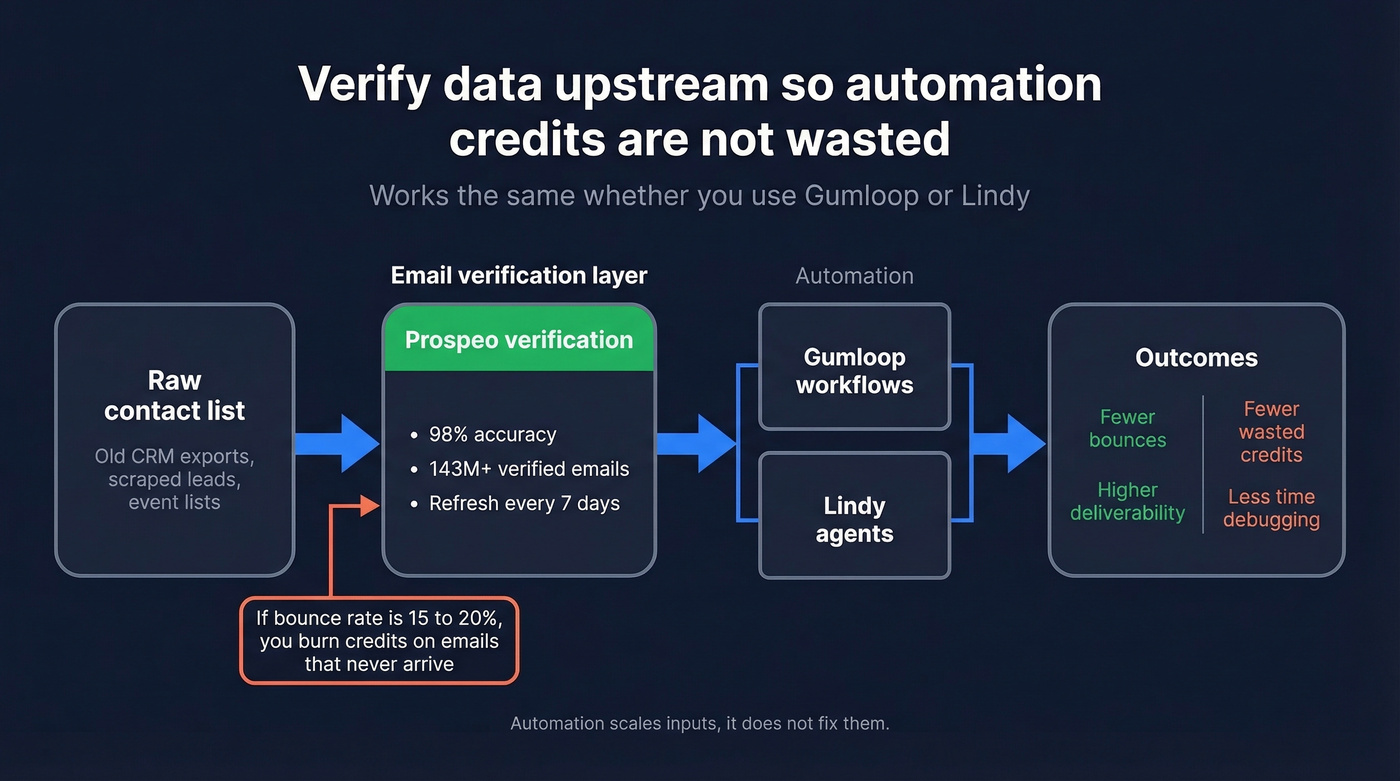
If your contact list has a 15-20% bounce rate, you're burning credits on emails that never arrive - regardless of which tool does the sending. We've watched teams spend hours perfecting their Gumloop flows only to realize half their contact records were stale. Automation doesn't fix bad inputs; it just processes them faster.
Prospeo fixes this upstream with 143M+ verified emails, 98% accuracy, and a 7-day data refresh cycle. Verify contacts before they enter your automation flows. It starts free with 75 emails per month, and paid plans run from ~$39/month with no contracts. If you want to benchmark verifiers, see our roundup of Bouncer alternatives.

Credits are precious on both platforms - Lindy gives you 5,000, Gumloop gives you 20,000. Don't waste a single one on bounced emails. Prospeo verifies contacts at 98% accuracy for ~$0.01 each, so every credit you spend actually reaches a real person.
Stop automating bad data. Verify every contact at $0.01 each.
Final Verdict
Pick Gumloop if you're building visual data pipelines or AI-powered workflows where you want to see and control every step. The credit-to-dollar ratio is unbeatable at $37/month.
Pick Lindy if you want persistent AI assistants handling recurring tasks - inbox monitoring, scheduling, meeting prep - and you're comfortable budgeting $49.99/month minimum for the Plus plan.
When weighing Gumloop vs Lindy, remember that neither platform validates your underlying data. Automated garbage is still garbage.
FAQ
Is Gumloop cheaper than Lindy?
Yes, at the entry level. Gumloop's Pro plan delivers 20,000+ credits for $37/month versus Lindy's $49.99/month Plus plan with 5,000 credits. But they solve fundamentally different problems - Gumloop builds visual workflows while Lindy runs persistent AI assistants - so price alone shouldn't decide it.
Can Lindy handle complex multi-step workflows?
Templates work well for standard tasks like inbox triage and meeting prep. Independent reviews flag limitations with custom branching logic and deeply nested processes. For complex deterministic workflows, Make or n8n are stronger fits.
How do I keep my automation workflows from burning credits on bad data?
Use a verified data source upstream. Prospeo verifies emails at 98% accuracy with a 7-day refresh cycle, so your workflows aren't wasting credits on bounced addresses. The free tier covers 75 verifications per month - enough to test the difference clean data makes.
Are there free alternatives to both platforms?
Gumloop's free plan at 5,000 credits/month is generous enough for light testing. Lindy's free tier at 400 credits is far more limited. For open-source options, n8n offers self-hosted workflow automation at no cost, though it requires more technical setup than either tool.