

How to Check If an Email Address Exists Without Sending an Email
You found a prospect's email on a conference badge, scraped it from a website, or got it from a colleague's spreadsheet. Before you drop it into a sequence, you need to know: is this thing real?
The worst move is sending a test email and hoping for the best. That "test" counts against your sender reputation, and if the address bounces, you've just told Gmail you send mail to bad addresses - which tanks deliverability for every future campaign you run from that domain.
Here's the good news: you can verify an email without delivering a single message. You can run it through a verification tool, query MX records manually, or perform an SMTP handshake. The most reliable method for non-technical users is a dedicated verification tool, which checks syntax, domain records, and mailbox deliverability in about 1-2.5 seconds. At least 23% of any email list degrades every year, and only 62% of emails submitted for verification turn out to be valid. Sending test emails to validate addresses damages your sending reputation - and the results you get back are tainted by that reputation anyway.
Quick Version: Three Paths
Pick the one that fits your situation:
- Check one email fast - Use a free verification tool. ZeroBounce gives you 100 free checks per month, Hunter offers 25. Paste the address, get a result in seconds.
- Clean a bulk list - Use a paid verifier like NeverBounce (~$8 per 1,000 emails) or MillionVerifier (~$0.30 per 1,000 if you're on a tight budget and can tolerate slightly lower accuracy).
5 Ways to Verify an Email Address
1. Use an Email Verification Tool
This is the right approach for 95% of people reading this. Verification tools check multiple layers in sequence: syntax validation, DNS/MX record lookup, SMTP mailbox ping, catch-all detection, and disposable/role-based filtering. The whole process takes about 1-2.5 seconds per email, and most tools can process 100,000 emails in under an hour.
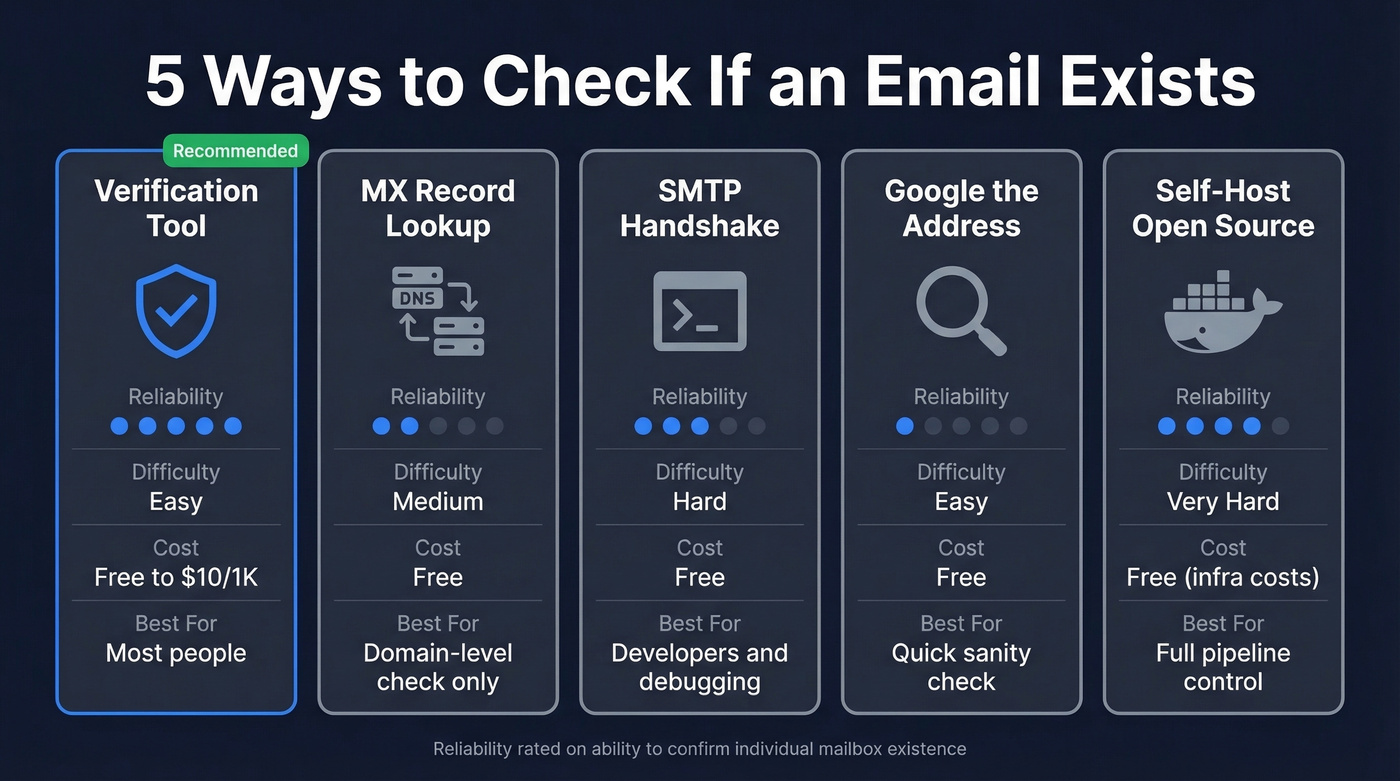
Use this if: You need reliable results without touching a command line - cleaning a list before a campaign, validating form submissions in real time, or spot-checking addresses one at a time.
Skip this if: You're a developer who wants full control over the verification logic, or you're checking fewer than 5 emails and don't want to create an account.
2. Look Up MX Records Manually
This confirms whether a domain can receive email at all - but it won't tell you if a specific mailbox exists.
Open your terminal and run:
nslookup -q=mx example.com
If you get back MX records like mail.example.com with a priority number, the domain is configured to receive email. No results means the domain doesn't accept mail and any address at that domain is dead. That's as far as this method goes. A valid MX record for example.com doesn't mean john@example.com exists.
3. Run an SMTP Handshake via Telnet
This is the manual version of what verification tools automate. You connect directly to the mail server and ask if it'll accept mail for a specific address. Don't bother with the VRFY command - it's disabled on virtually every modern mail server.
telnet mail.example.com 25
HELO verify.test
MAIL FROM:<test@yourdomain.com>
RCPT TO:<john@example.com>
QUIT
What the responses mean:
250 2.1.5 OKafter the RCPT TO line means the server accepted the recipient. The address likely exists, or the domain is catch-all.550 5.1.1 User unknownmeans the mailbox doesn't exist. Clear invalid.450or451means a temporary rejection - often greylisting.
Here's the thing: this method breaks down fast. Major providers and many corporate mail systems use anti-enumeration protections that prevent reliable mailbox-level confirmation over SMTP. You'll also get rate-limited or blocked quickly if you do too many checks from the same IP. The Stack Overflow consensus is clear - acceptance doesn't prove existence, because servers can accept and silently discard.
4. Google the Email Address
Sometimes the simplest approach works. Search the email address in quotes: "john.smith@example.com". If it appears on company pages, conference speaker lists, GitHub profiles, or directory sites, it's almost certainly real. This won't catch recently created addresses, but it's a zero-cost sanity check before reaching out.
5. Self-Host an Open-Source Verifier
Reacher is the go-to open-source option. It runs as a Docker container and returns detailed JSON covering syntax validation, MX acceptance, SMTP deliverability, catch-all detection, disposable domain flagging, and role-account identification. You need outbound port 25 open (most cloud providers block it by default) and SMTP proxy servers at any real volume. This is a developer tool, not a marketing tool - but if you want full control over the verification pipeline, it's solid.
SMTP Response Code Cheat Sheet
When you're running manual checks or debugging verification results, these are the codes that matter:
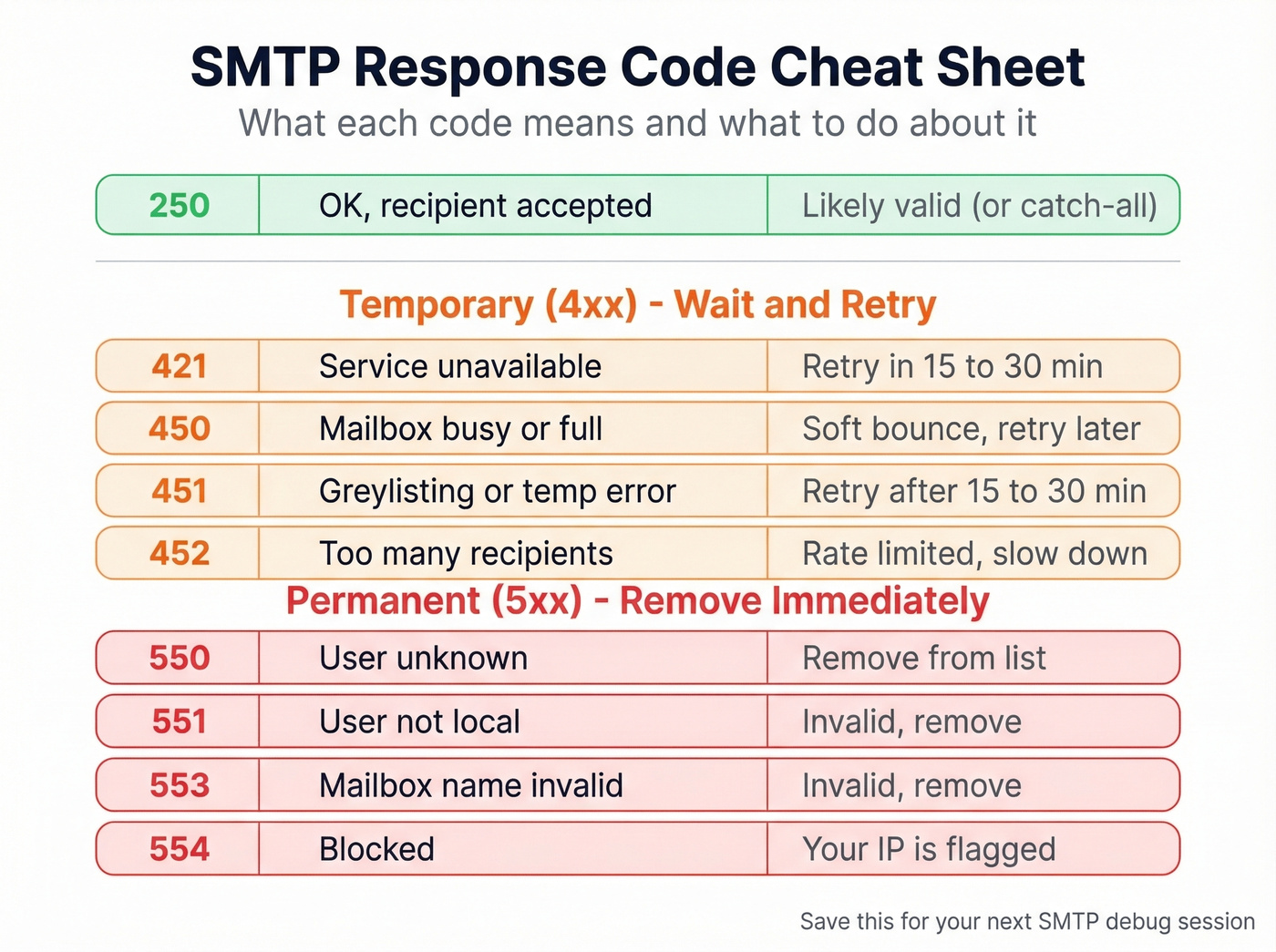
| Code | What It Means | What to Do |
|---|---|---|
| 250 | OK - recipient accepted | Likely valid (or catch-all) |
| 421 | Service unavailable | Retry in 15-30 min |
| 450 | Mailbox busy or full | Soft bounce - retry later |
| 451 | Greylisting / temp error | Retry after 15-30 min |
| 452 | Too many recipients | Rate limited - slow down |
| 550 | User unknown | Remove from list |
| 551 | User not local | Invalid - remove |
| 553 | Mailbox name invalid | Invalid - remove |
| 554 | Blocked | Your IP is flagged |
Simple rule: 4xx codes are temporary - wait and retry. 5xx codes are permanent - remove the address.

Why verify emails after the fact when you can start with clean data? Prospeo's 143M+ emails are pre-verified through a 5-step process - catch-all handling, spam-trap removal, and honeypot filtering included. 98% accuracy at $0.01 per email.
Stop cleaning bad lists. Start with emails that are already verified.
Why No Verification Method Is 100% Accurate
Let's be honest about the limits here. We've tested dozens of verification tools across thousands of addresses, and every method has blind spots.
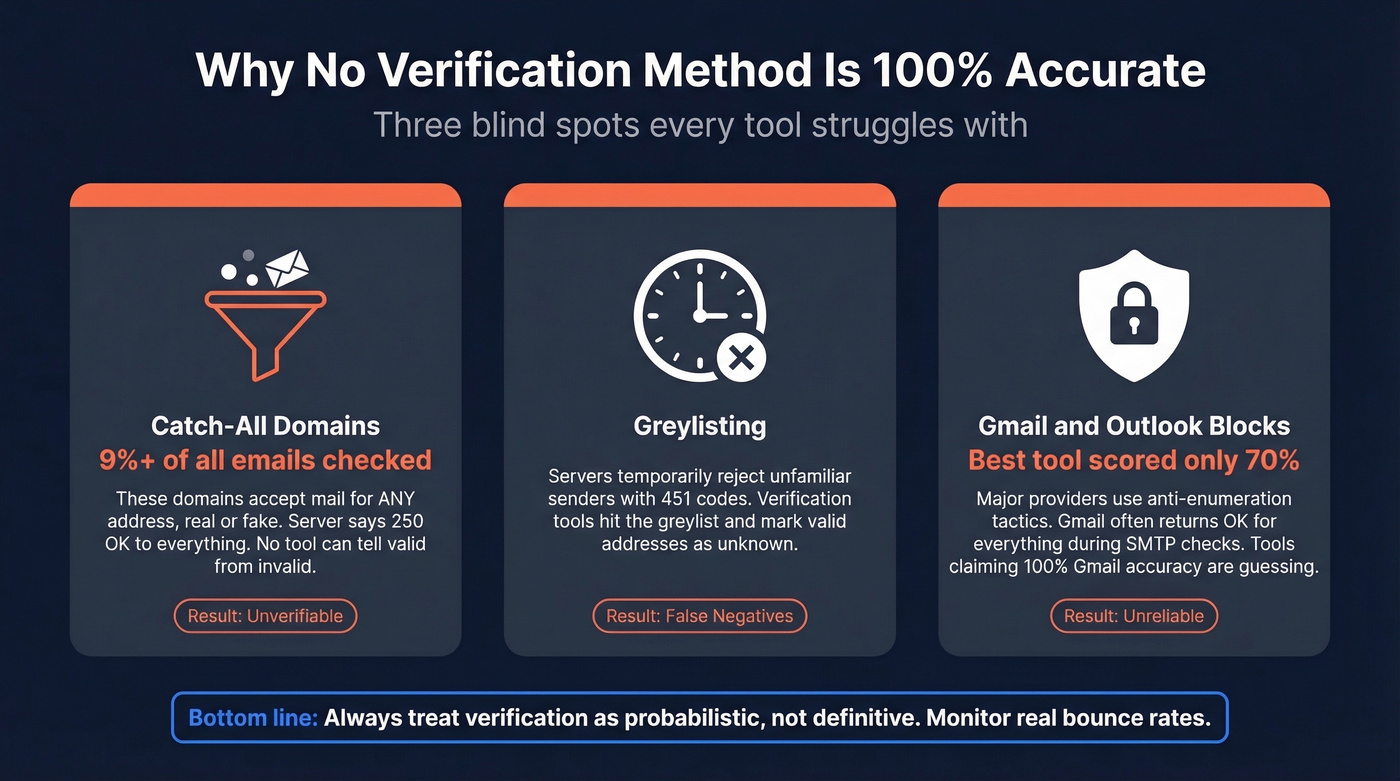
Catch-All Domains Accept Everything
About 9%+ of all emails checked are catch-all. These domains accept mail for any address - real or completely made up. The server returns 250 OK whether you send to ceo@company.com or asdfghjkl@company.com. No verification tool can distinguish valid from invalid on these domains. The best they can do is flag the result as "accept-all" and let you decide.
Greylisting Creates False Negatives
Greylisting is an anti-spam tactic where servers temporarily reject unfamiliar senders with a 451 or 421 code. Legitimate mail servers retry after 15-30 minutes; spam scripts usually don't. The problem for verification tools is that a real-time check hits the greylist, gets a temporary rejection, and classifies a perfectly valid address as "unknown." Good tools handle this with retry logic and distributed infrastructure. Cheap ones just mark it unknown and move on.
Gmail and Outlook Block Verification
This is where the whole system gets messy. Many large providers use anti-enumeration tactics that make SMTP "does this mailbox exist?" checks unreliable. Hunter's own benchmark - testing 15 tools across 3,000 emails - found even the top scorer (Hunter itself, at 70%) couldn't crack three-quarters accuracy, and they acknowledged their dataset may have given them an edge.
Tools that claim 100% Gmail accuracy are guessing. The Reddit threads on r/AskProgramming echo this - users consistently point out that Gmail often returns OK responses during SMTP checks and suspect vendors are bluffing. When you see a verification result for a Gmail address, treat it with skepticism. If your list is Gmail-heavy, the only real validation is monitoring bounces on a small test send.
What to Do with Your Results
Not every verification result is clean. We've found this framework works well in practice:

Valid - Send normally. These addresses passed all checks.
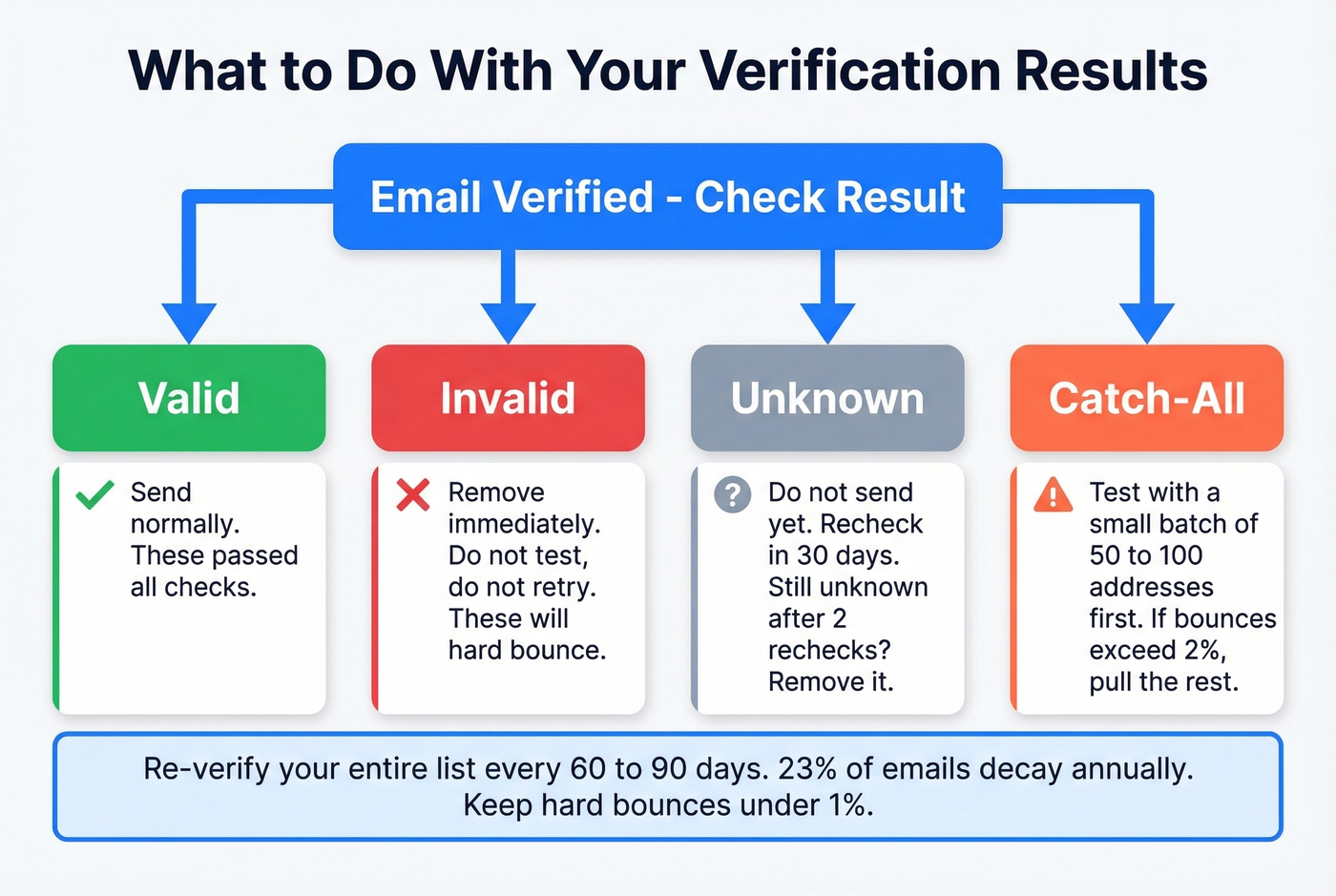
Invalid - Remove immediately. Don't test, don't retry, don't hope. These will hard bounce.
Unknown - Don't send yet. Recheck in 30 days. If it's still unknown after two rechecks, remove it.
Catch-all - Test with a small batch of 50-100 addresses before sending to the full segment. Monitor bounce rates closely. If bounces exceed 2%, pull the rest.
Re-verify your entire list every 60-90 days. With 23% annual decay, a list that was clean in January is already degrading by April. The industry threshold is 2% total bounce rate - go above that and ESPs start throttling your deliverability. Top-performing teams target hard bounces under 1%.
Best Email Verification Tools Compared
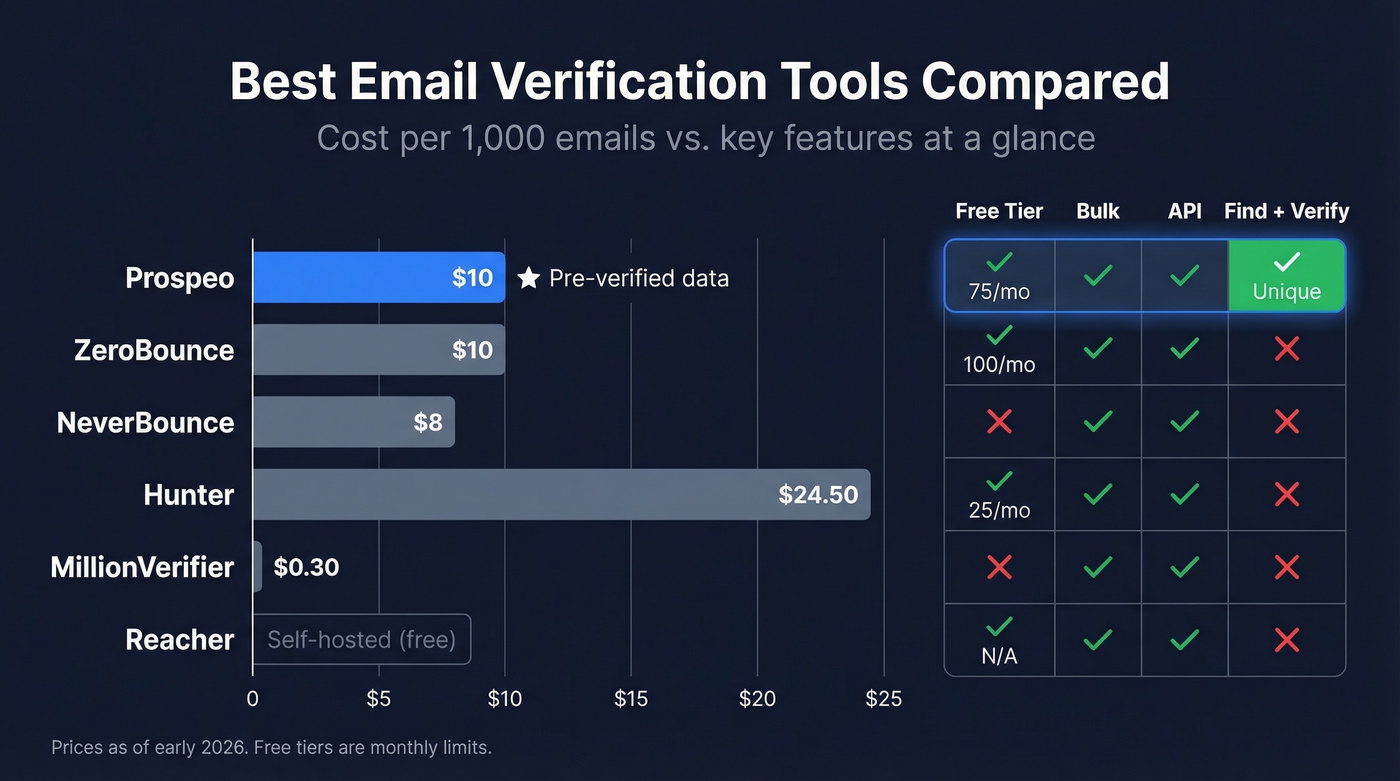
In our testing across multiple client campaigns, the "best" tool depends entirely on where you are in the workflow. If you already have a list, you need a verifier. If you're still building the list, you need a source that doesn't produce bad data in the first place.
| Tool | Free Tier | Cost per 1K | Best For | Key Limitation |
|---|---|---|---|---|
| Prospeo | 75 emails + 100 Chrome credits/mo | ~$10 | Pre-verified B2B emails (find + verify in one step) | B2B focus - not for consumer list cleaning |
| ZeroBounce | 100/mo | ~$10 | All-around verification | Pricey above 10K/mo |
| NeverBounce | None (PAYG) | ~$8 | Bulk list cleaning | Verification only |
| Hunter | 25/mo | ~$24.50 | Quick single checks | Expensive at scale |
| MillionVerifier | None | ~$0.30 | Massive bulk lists | Lower enterprise accuracy |
| Reacher | Self-hosted | $0 | Developer full control | Needs port 25 + proxies |
Prospeo - The Pre-Verified Approach
The smartest way to handle email existence checks is to never need them in the first place. Prospeo's email finder runs a 5-step verification process - including catch-all detection, spam-trap removal, and honeypot filtering - before returning results. You're getting pre-verified data from a database of 143M+ verified emails across 300M+ professional profiles, refreshed every 7 days compared to the 6-week industry average.

Snyk's sales team saw their bounce rate drop from 35-40% to under 5% after switching - that's the difference between data verified at the source versus data you're scrambling to verify after the fact. Free tier gives you 75 emails and 100 Chrome extension credits per month. Paid plans start around $39/mo with no annual contracts.
ZeroBounce - Best All-Around Verifier
ZeroBounce is the tool most teams reach for when they need standalone verification. The free tier of 100 emails per month is enough to test the product, and their deliverability toolkit goes beyond basic valid/invalid - you get spam-trap detection, abuse email flagging, and an email scoring API. At ~$10 per 1,000 emails, pricing is reasonable for mid-volume teams but gets expensive above 10K per month.

NeverBounce - Best for Bulk List Cleaning
Use this when you already have your list and just need it scrubbed before a campaign. Skip it when you need email finding, enrichment, or anything beyond pass/fail verification.
NeverBounce runs pay-as-you-go at ~$8 per 1,000 emails with no subscription required. Upload a CSV, get results, move on. No frills, no upsells, no learning curve.
Hunter - Single Checks Without Overhead
Hunter's free tier gives you 25 verifications per month - less than a third of what ZeroBounce offers for free. But Hunter's interface feels faster for one-off lookups. For checking a handful of addresses before targeted outreach, the free tier does the job. At ~$24.50 per 1,000 on paid plans, we wouldn't recommend it for bulk work.
MillionVerifier - The Budget Option
At ~$0.30 per 1,000 emails, MillionVerifier is about 26x cheaper than most competitors. The tradeoff is real: we've seen lower precision on enterprise domains with strict SMTP configurations. For teams cleaning a massive list of SMB contacts who can tolerate a slightly higher unknown rate, the math works in your favor. For enterprise-heavy lists, spend more on ZeroBounce.
Reacher - Best Self-Hosted Option
Open-source under AGPL, self-hosted, and free if you can handle the infrastructure. Requires port 25 access and SMTP proxies at volume. Best for engineering teams who want verification baked into their own stack.
Catch-all domains, greylisting, Gmail blocks - every method in this article has blind spots. Prospeo's proprietary verification infrastructure handles all of it on a 7-day refresh cycle, so you're never working with stale data.
Get emails that survive every deliverability check, every time.
GDPR and CCPA Compliance
Email addresses are personal data under both GDPR and CCPA. Verification counts as processing. Here's what that means in practice:
Use compliant providers. Your verification vendor is a data processor. Sign a DPA with them.
Minimize retention. Don't store verification results longer than you need them. If an address is invalid, delete it - don't archive it.
Document your lawful basis. For B2B outreach, legitimate interest is the most common basis, but you need to document it before you start processing, not after someone complains.
Remember extraterritorial scope. GDPR applies if you're processing EU residents' data, regardless of where your company is based. GDPR fines can reach EUR 20 million or 4% of global annual turnover. CCPA penalties run $2,500 per unintentional violation and $7,500 per intentional one. These aren't reasons to avoid verification - they're reasons to do it with compliant tools rather than DIY scripts that log everything.
FAQ
How can I check if an email address exists without sending a message?
Use a dedicated verification tool like ZeroBounce or Prospeo, which checks syntax, DNS records, and mailbox deliverability in under 3 seconds. For a manual route, run an MX record lookup followed by an SMTP handshake via telnet - though this is less reliable against major providers that block enumeration attempts.
Can I verify an email address for free?
Yes. ZeroBounce gives you 100 free checks per month, Hunter offers 25, and Email Hippo provides 100 per day. Prospeo's free tier includes 75 email credits with full 5-step verification. For unlimited free verification, Reacher is open-source but requires technical setup and port 25 access.
Can you verify a Gmail address without sending an email?
Not reliably. Gmail uses anti-enumeration tactics that make mailbox-level SMTP verification inconsistent. Honest verification tools return "unknown" or "accept-all" for many consumer-provider addresses rather than guessing. Any tool claiming 100% Gmail verification accuracy is bluffing.
How often should I re-verify my email list?
Every 60-90 days. Email lists degrade by roughly 23% per year based on analysis of 11+ billion verified emails, so quarterly verification keeps bounce rates below the 2% threshold that ESPs use to evaluate sender reputation.
What does "catch-all" mean in verification results?
The domain accepts mail for any address, real or fake - the server returns 250 OK for everything. About 9%+ of all emails fall into this category. Verification tools can't distinguish valid from invalid on these domains. Send a small test batch of 50-100 addresses and monitor bounces before mailing the full segment.