

How Long Does Email Warm-Up Take in 2026?
A RevOps lead we work with warmed a fresh domain for two weeks, launched a 500-person sequence, and watched 23% bounce. The domain's reputation cratered in 48 hours. Warm-up worked fine - the list didn't.
So how long does email warm-up take when you do it right? Depends on your starting point, but the real variable isn't time. It's data quality.
The Quick Answer
Email warm-up takes 2-4 weeks for most mailboxes. New domains need 4-6 weeks. Damaged reputations? Budget 8+ weeks.
Here's what most people miss: your bounce rate matters more than your warm-up tool. A pristine ramp schedule means nothing if 5% of your list is invalid. The week-by-week schedule below gives you exact volume targets, pause triggers, and the engagement thresholds that actually matter.
What Affects Your Warm-Up Timeline
Not every warm-up takes the same amount of time. These five factors determine whether you're done in two weeks or still grinding at six.
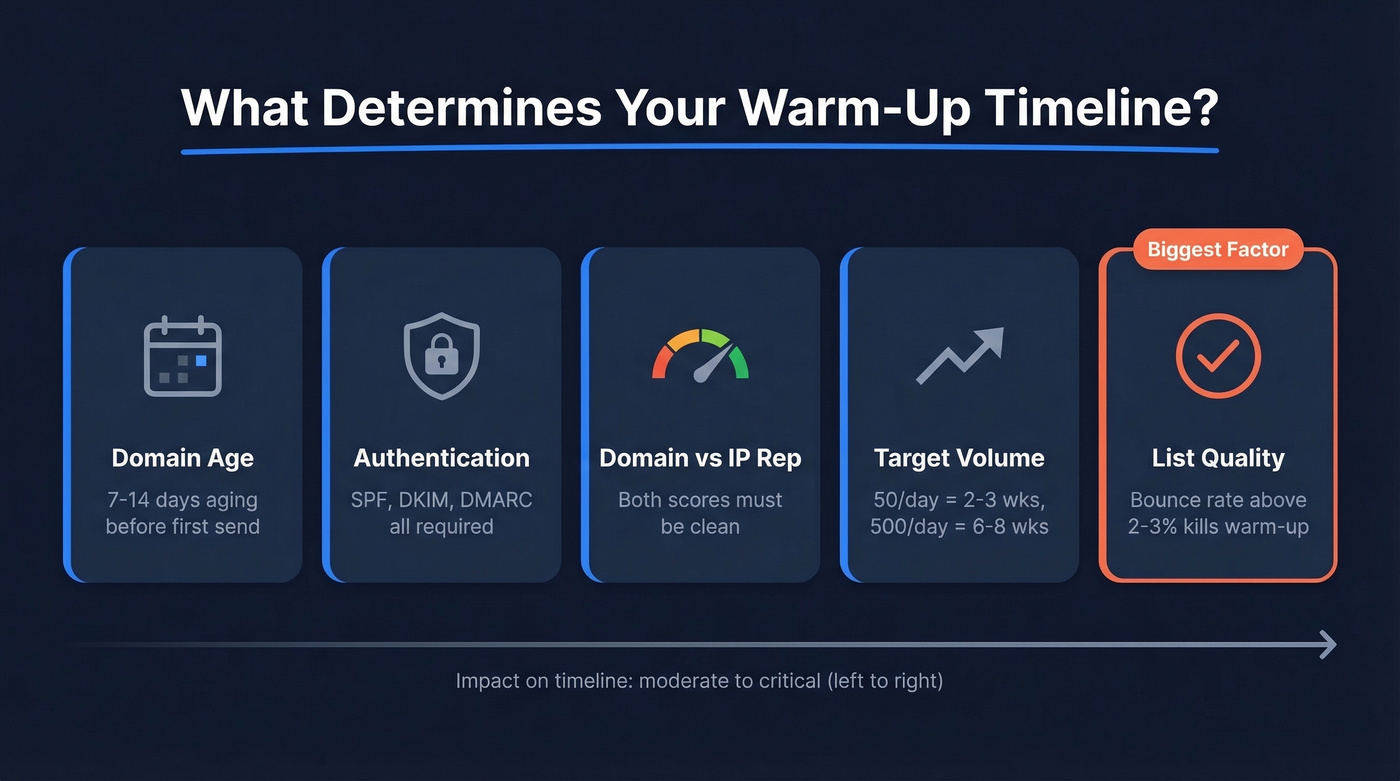
Domain age. Let a new domain sit for 7-14 days before sending anything. ISPs treat brand-new domains sending email on day one as suspicious by default.
Authentication setup. SPF, DKIM, and DMARC aren't optional - they're prerequisites. Missing authentication can get you blacklisted before warm-up even starts. If you need a deeper breakdown of alignment rules, start with DMARC alignment.
Domain vs. IP reputation. These are separate scores. Warming an IP doesn't fix a burned domain, and a clean domain on a poor-reputation shared IP still lands in spam. You need both clean. If you're troubleshooting reputation signals, use a few email reputation tools to pinpoint the issue.
Target daily volume. Reaching 50/day takes 2-3 weeks. Reaching 500/day takes 6-8 weeks. Your warm-up duration is a direct function of where you're trying to end up. (More on safe ramping and limits in our guide to email velocity.)
List quality. A bounce rate above 2-3% can land you in spam for weeks. No warm-up schedule survives bad data. In our experience, this is the single biggest warm-up killer - and the one most guides barely mention. If you want benchmarks and bounce-code context, see email bounce rate.
Week-by-Week Warmup Schedule
| Week | Daily Volume | Engagement Targets | Key Actions |
|---|---|---|---|
| 1 | 5-25/day | 90%+ opens, 50%+ replies | Send to known engagers only |
| 2 | 25-50/day | Hold 40%+ opens | Pause if opens drop or complaints appear |
| 3 | 50-100/day | 30-40% opens | Introduce cold prospects alongside warm-up |
| 4+ | Maintain | 30-40% warm-up volume | Scale real sends, keep warm-up running |
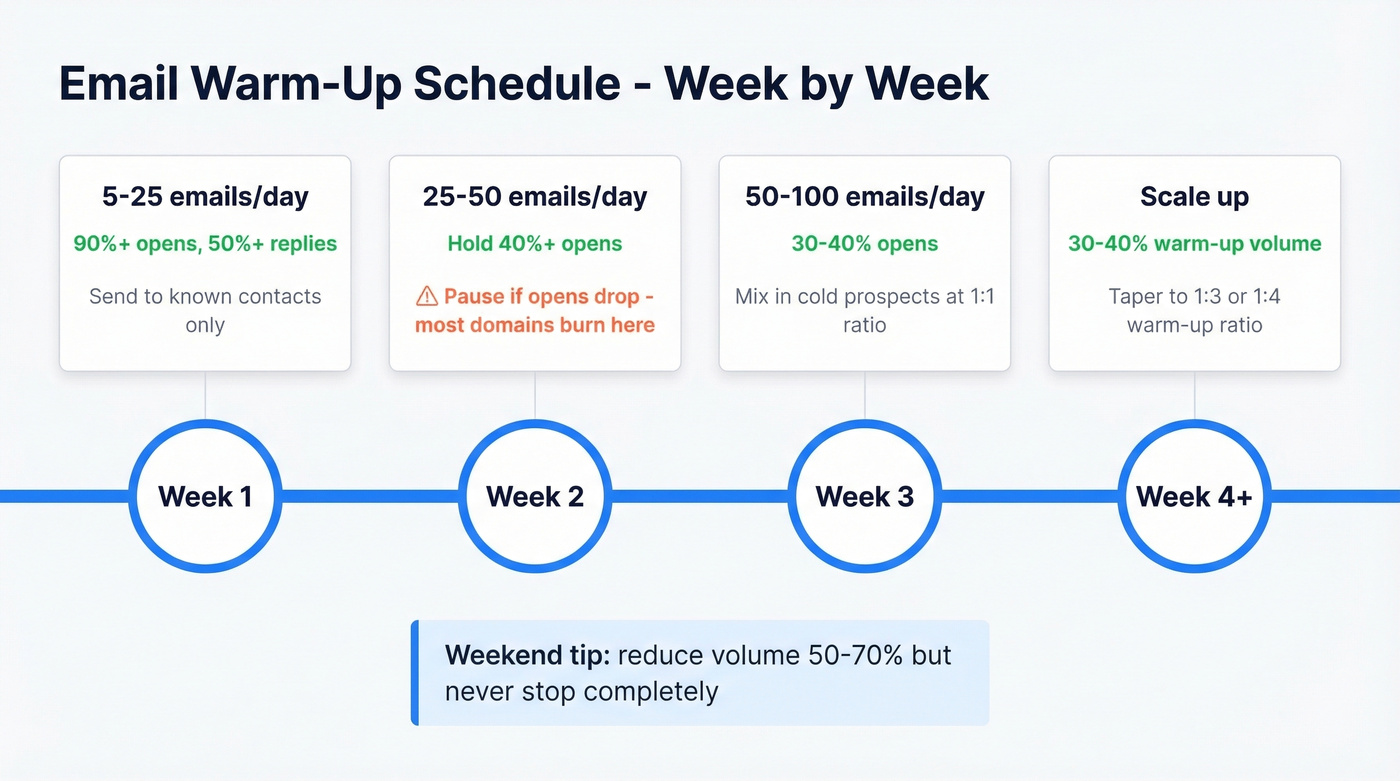
Week 1 builds baseline trust. Send only to people who'll open and reply - colleagues, existing contacts, warm-up network addresses. Zero complaints is the goal, not volume.
Week 2 is where most people get impatient. If opens drop below 40%, don't increase volume. Hold steady or pull back. This single week separates successful warm-ups from burned domains.
Week 3 is when you can start mixing in cold prospects, but keep warm-up emails running alongside real campaigns at roughly a 1:1 ratio. If you’re building sequences at the same time, borrow structure from a proven B2B cold email sequence.
Week 4 and beyond, taper the ratio. At 50-200 real sends per day, aim for 1 warm-up email per 2 real sends. At 200-400/day, shift to 1:3 or 1:4. Never drop warm-up to zero entirely. On weekends, reduce volume by 50-70% but don't stop - ISPs notice gaps.

A 3% bounce rate can undo weeks of warm-up in a single send. Prospeo's 5-step verification catches invalid addresses, spam traps, and honeypots before they reach your mailbox - 98% accuracy across 143M+ verified emails. Stack Optimize runs under 3% bounce across every client using this data.
Protect your warm-up investment with data that doesn't bounce.
When to Pause or Roll Back
These are your hard stops. Ignore them and you'll undo weeks of progress in a single afternoon.
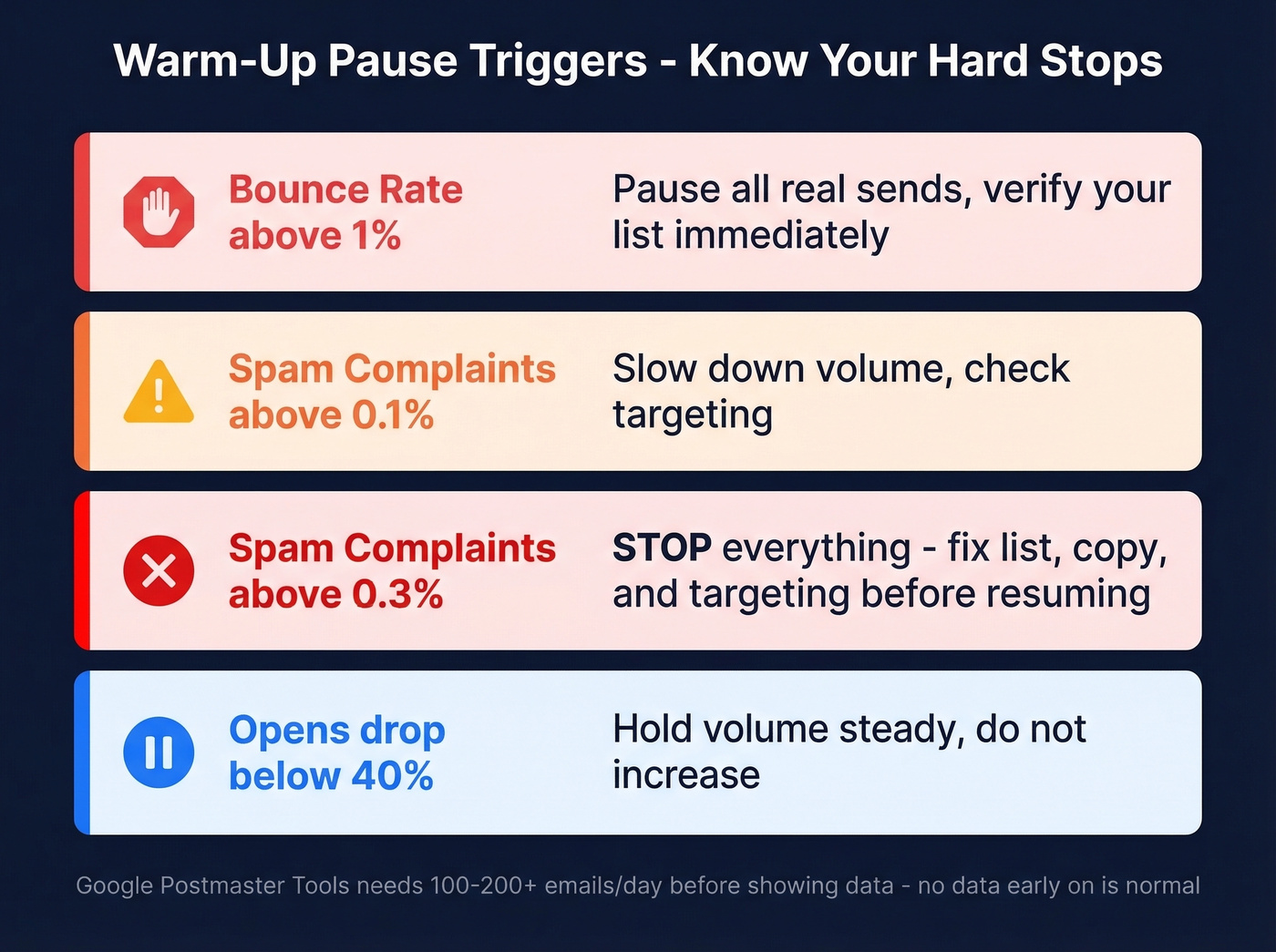
- Bounce rate above 1% - pause all real sends and verify your list immediately
- Spam complaints above 0.1% (one complaint per thousand sends) - slow down volume
- Spam complaints above 0.3% - stop everything, fix your list, copy, or targeting before resuming
- Opens drop below 40% - hold volume, don't increase until engagement recovers
- Google Postmaster Tools showing no data - you're likely under 100-200 emails/day, which is normal early on; Postmaster needs volume to display metrics
Why List Quality Matters More Than Tool Choice
Let's be honest: most warm-up guides obsess over tool selection. After reviewing data from hundreds of thousands of sends, the hierarchy is clear. List quality comes first, then infrastructure, then copy, then warm-up tool. In that order. For the full framework, see our email deliverability guide.
One operator tracked 464K emails and found that warm-up tools get way too much credit. Their biggest deliverability gains came from reducing bounces - 7-9% down to under 2% via validation - and spreading volume across 34 domains at 75/day each. They targeted 65-80% open rates and considered anything under 50% a sign of spam-like behavior.
That doesn't mean you should skip warm-up. Another practitioner reported awful open rates and immediate spam filtering on a fresh domain without any ramp. And some Klaviyo community members argue third-party warm-up services create artificial engagement that ISPs can detect - another reason organic engagement and clean data matter more than tool choice.

The inbox placement numbers tell the story. Gmail delivers 87.2% to inbox, Microsoft only 75.6%, Yahoo 86.0%. Even with perfect warm-up, roughly one in six emails never reaches the inbox. Every bounce and spam complaint makes those numbers worse.
Warm-up builds reputation. Bad data destroys it. A 3% bounce rate can undo weeks of careful ramping in a single batch. Prospeo's 5-step verification catches invalid addresses, spam traps, and honeypots before they become bounces - 98% email accuracy across 143M+ verified addresses. Stack Optimize maintains 94%+ deliverability with under 3% bounce across all clients using this approach.
You just spent 4-6 weeks building domain reputation. Don't blow it on unverified contacts. Prospeo refreshes every record on a 7-day cycle - so the emails that were valid last month still are today. At $0.01 per email, list hygiene costs less than a single burned domain.
Clean data is the cheapest warm-up insurance you'll ever buy.
Scaling Beyond 100 Emails/Day
Once you're past the initial warm-up period and consistently hitting 50/day, a single mailbox can sustain 150-400 real sends per day. To reach 1,000/day, you need multiple mailboxes - 4 mailboxes at 250/day, or 5-6 at 170-200/day for more headroom.
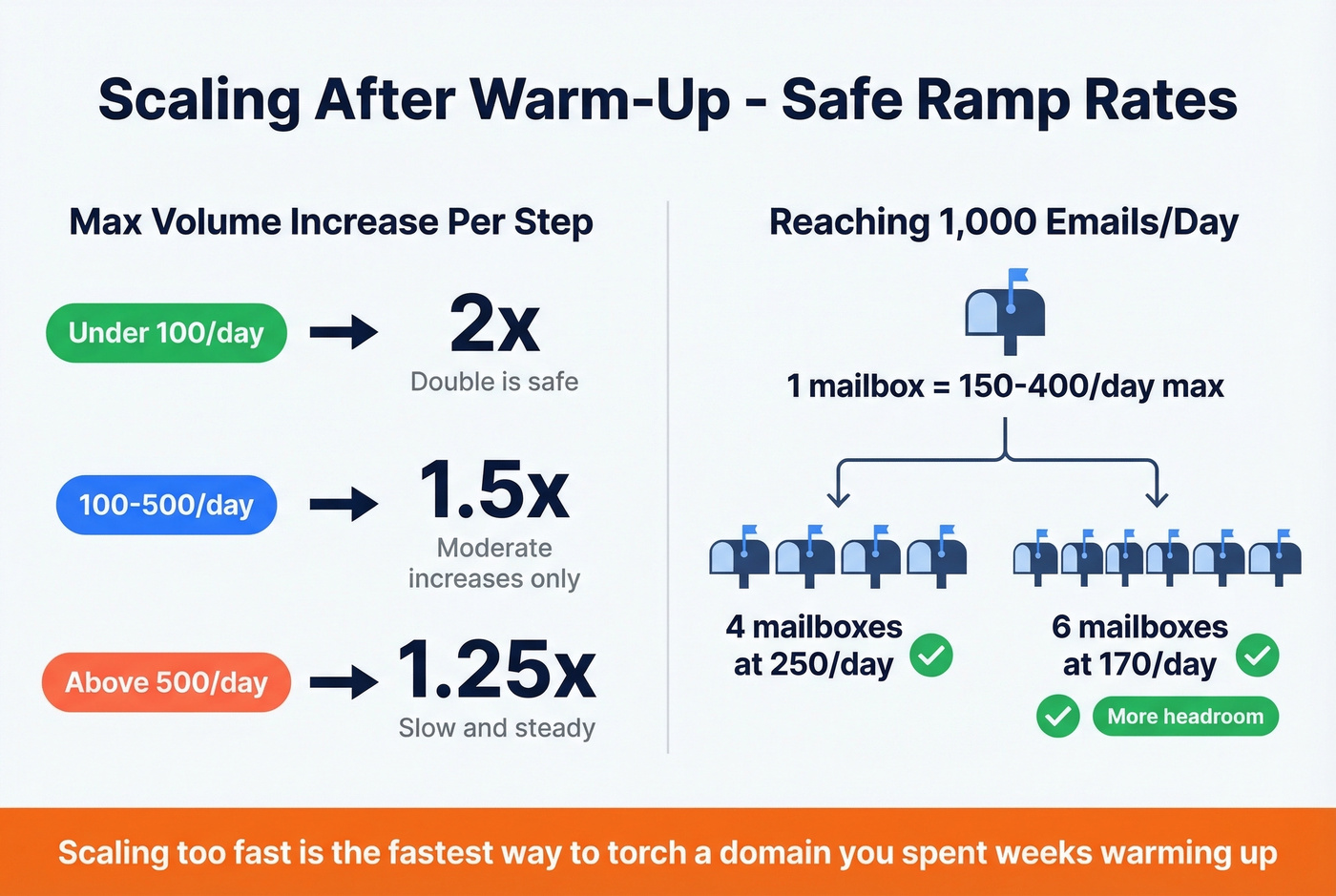
Post-warm-up scaling ramp rates matter too:
- Under 100/day: you can handle 2x increases
- 100-500/day: cap increases at 1.5x
- Above 500/day: keep it to 1.25x
Aggressive scaling is the fastest way to torch a domain you spent weeks warming up. We've watched teams blow past these limits because they were "behind on pipeline" and end up restarting from scratch on a new domain. Don't be that team.
Popular Warm-Up Tools and Pricing
| Tool | Price | Notes |
|---|---|---|
| Warmbox | $15/mo (1 inbox) | Budget pick |
| Mailreach | $25/mo per inbox | Solid analytics |
| Lemwarm | $29/mo per inbox | Pairs with Lemlist |
| TrulyInbox | $29/mo unlimited | Best value at scale |
| Instantly | Starts at $30/mo (bundled) | Warm-up + sequencing |
| Smartlead | $39-$174/mo | Multi-inbox management |
| Warmy.io | $49-$429/mo | Enterprise analytics |
Look - we've seen teams waste money on premium warm-up tools while sending to unverified lists. A $15/month tool with clean, verified data beats a $400/month tool sending to garbage addresses every single time. Pick one that fits your budget, verify your list, and follow the schedule above. If you’re comparing options, start with best unlimited email warmup tools.
Skip Warmy.io's premium tier unless you're running 50+ inboxes and need the analytics. For most teams, Warmbox or TrulyInbox does the job.
FAQ
Can I skip email warm-up entirely?
No. Fresh domains without warm-up consistently hit spam folders. Even practitioners who downplay warm-up tools still run a 3-week ramp before real campaigns. Skipping warm-up burns a domain before you ever use it.
How long does it take to warm up an email address?
A single address on an established domain typically takes 2-3 weeks to reach safe sending volumes of 50-100/day. On a brand-new domain, expect 4-6 weeks. The timeline depends heavily on authentication setup, list quality, and your target daily volume.
Do I need to keep warming up forever?
Yes, at a reduced level. After reaching full volume, maintain 30-40% of daily sends as warm-up emails. Dropping warm-up entirely is how domains slowly drift into spam folders over weeks. The consensus on r/coldemail is that most people who stop warm-up completely see deliverability decay within 2-3 weeks.
How long does warmup take for a damaged domain?
Plan for at least 8 weeks, sometimes longer. ISPs use 30-day rolling averages, so recovering from blacklists or high complaint rates requires patience. Run warm-up-only sends for the first 2-4 weeks, verify your entire list, and scale back up slowly using the week-by-week schedule above.
What's the fastest way to ruin a warm-up?
Sending to an unverified list. A single batch with a 3%+ bounce rate can undo weeks of careful ramping. Always run your list through email verification before any campaign.