

How Sender Score Is Calculated: The Five Indices, Benchmarks, and What Validity Won't Tell You
Your bounce rate just spiked to 12%. Open rates cratered. You pull up senderscore.org and see a number that makes your stomach drop - 62. But understanding how sender score is calculated requires looking past that single digit. Most email deliverability guides wave their hands and say "it's complicated." Let's actually break it down.
The Short Version
Sender Score is a reputation metric ranging from 0 to 100 for your sending IP address, functioning as a percentile-style ranking against other IPs. It's calculated on a rolling 30-day average from five indices: Complaints, Volume, External Reputation, Unknown Users, and Rejected.
The exact weighting is proprietary - Validity doesn't publish it to prevent gaming. But complaints and unknown users are the indices you can most directly control. If you only track one metric, track your complaint rate and keep it below 0.1%.
What Sender Score Actually Is
Sender Score isn't a grade. It's a relative ranking - an email reputation metric from 0 to 100 that tells you where your IP stands compared to every other sending IP in the network. Higher is better.
It's IP-based, not domain-based. If you send from multiple IPs, each one gets its own score. And because it's a rolling 30-day average, a single bad day won't destroy you overnight - but a bad month absolutely will.
One note on branding: Validity acquired Return Path years ago. If you see references to "Return Path Sender Score" in older articles, it's the same system under a new parent company.
Where the Data Comes From
Sender Score is powered by the Validity Data Network - a collection of more than 80 mailbox providers and message security agencies, covering billions of mailboxes. The score uses reputation-affecting complaints, trap signals, and deliverability data pulled from those providers and security partners, including data from incoming SMTP logs.
Here's the thing: this is Validity's view of the world, not Gmail's or Microsoft's. Gmail uses its own internal reputation system. Microsoft has its own. Sender Score aggregates a third-party perspective across dozens of providers. It's incredibly useful as an early warning system, but it doesn't control whether your email lands in someone's inbox at any specific provider.
The Five Indices Behind the Score
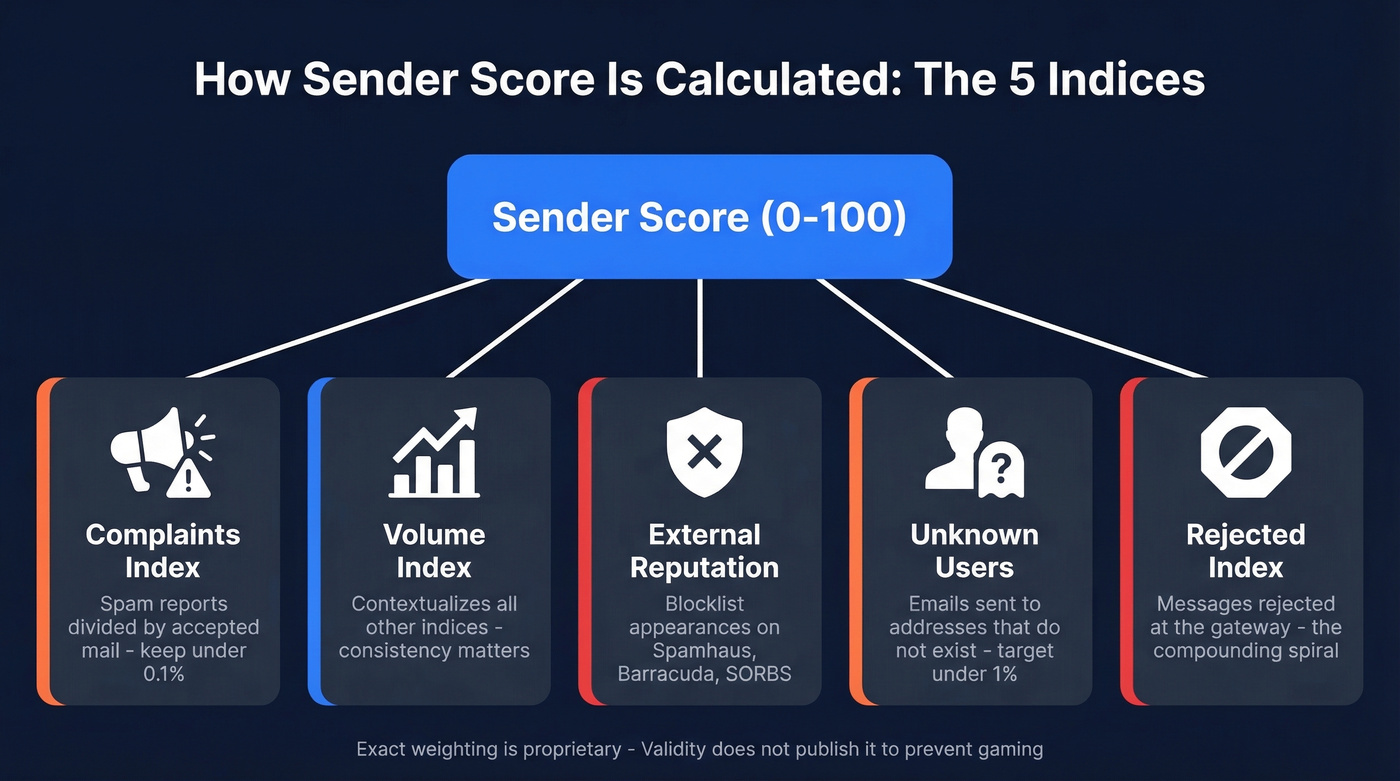
Validity discloses five indices that feed into your Sender Score. Each one ranks your IP against every other IP in the network - they're relative positions, not absolute numbers. In our experience across client accounts, the indices that move the needle fastest are Complaints and Unknown Users.
Complaints Index
This measures your complaint rate - complaints divided by accepted mail. Every time a recipient hits "Report Spam," it counts against you.
Sending to people who didn't opt in, burying your unsubscribe link, or mailing too frequently will tank this index. Even legitimate senders get complaints when they mail disengaged subscribers who forgot they signed up three years ago. Senders scoring above 90 maintain a complaint rate below 1%. Gmail's recommended ceiling is 0.1%, with a hard maximum of 0.3%. If you're anywhere near that 0.3% line, you've got problems that go well beyond your IP reputation.
Volume Index
The Volume Index doesn't directly tank your score the way complaints do. It contextualizes everything else - 99 complaints on 100 emails is catastrophic, while 99 complaints on 100,000 emails is noise. A higher score here means Validity monitors more volume from your IP, which gives the overall score more statistical confidence. Low-volume senders get less data, which means more volatility.
The key: consistent, predictable sending patterns. Sudden spikes - like importing a purchased list and blasting 50,000 emails on a Tuesday - trigger red flags across every index.
External Reputation Index
This tracks your IP's standing across external blocklists and allowlists - Spamhaus, Barracuda, SORBS, and similar services.
Landing on a blocklist usually happens after spam trap hits, high complaint rates, or sending to scraped lists. Getting listed is easy. Getting delisted can take days to weeks, sometimes longer if you're on Spamhaus. "Good" here means zero blocklist appearances, full stop.
Unknown Users Index
This measures the rate at which you're sending to email addresses that don't exist, pulled directly from participating ISPs' incoming SMTP logs.
Dirty lists are the culprit. You imported a CSV from a trade show two years ago, half the contacts have changed jobs, and now you're hammering dead addresses. Every hard bounce to a non-existent mailbox feeds this index. In Validity's benchmark data, senders above 90 average an unknown user rate of 1%. In the 81-90 band, the average jumps to 3%.
Rejected Index
This is the compounding index - and the one that spirals fastest.
It measures how often your messages get rejected at the gateway for policy reasons: filtering, blocklisting, or other reputation-based blocks. Poor authentication, blocklist presence, or consistently triggering content filters all feed it. Once providers start blocking you, your rejected rate climbs, which further damages your score, which triggers more rejections. It's a vicious cycle. If more than a few percent of your mail is getting policy-rejected, something structural is wrong with your setup.

Unknown users and complaints are the two indices that destroy your sender score fastest. Both stem from the same root cause: bad data. Prospeo's 5-step email verification and 7-day data refresh cycle keep your unknown user rate near zero - 98% accuracy means under 2% bounce rates, not the 12% spike that brought you here.
Stop feeding dead addresses into your sending infrastructure.
What Validity Won't Tell You
The five indices aren't averaged equally. Validity explicitly states that the score is derived from a proprietary formula, and "additional data elements not represented by any individual index" also contribute. They don't publish weights, and they won't - because publishing them would let spammers game the system.
You can't reverse-engineer a target score. You can't say "if I reduce complaints by X%, my score will increase by Y points." What you can do is focus on the inputs you control: complaint rate, list hygiene, and authentication. Improve those, and the score follows.
Obsessing over the number itself is a trap. Obsess over the behaviors instead.
Benchmarks by Score Band
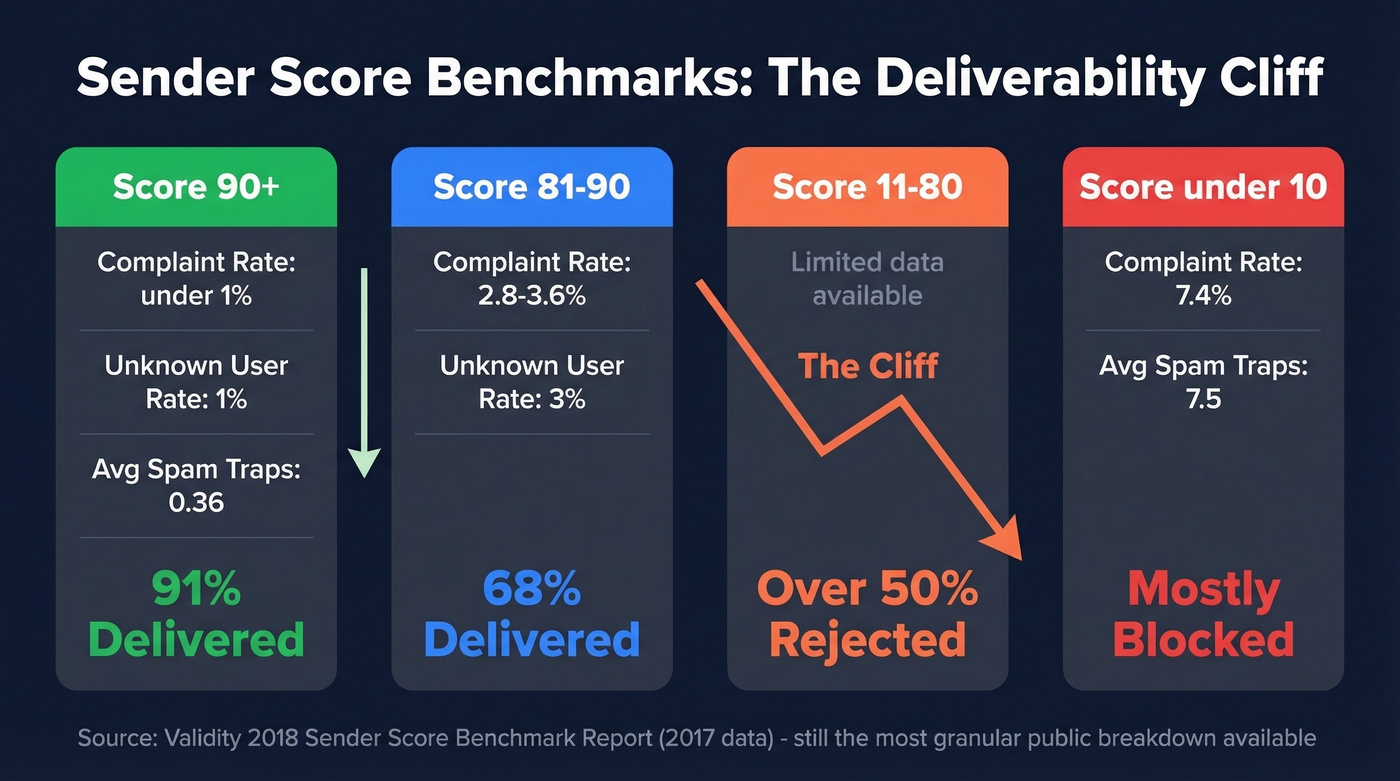
The most detailed public benchmark data comes from Validity's 2018 report using 2017 data. It's dated, but it's still the most granular breakdown the vendor has published.
| Score Band | Complaint Rate (avg) | Unknown User Rate (avg) | Avg Spam Traps | Delivered Rate (avg) |
|---|---|---|---|---|
| >90 | <1% | 1% | 0.36 | 91% |
| 81-90 | 2.8-3.6% | 3% | - | 68% |
| 11-80 | - | - | - | More than half rejected |
| <10 | 7.4% | - | 7.5 | - |
The gap between 90+ and everything else is stark. Above 90, you're getting 91% of your mail through the gateway. Drop to 81-90 and it falls to 68%. Below 80, more than half gets rejected. That's not a gradual decline - it's a cliff.
Here's a data point that puts the ecosystem in perspective: in 2012, 60% of all email messages came from senders with a score of 10 or below, while by 2017, 36% of sent mail came from senders scoring above 90. The email ecosystem has polarized - high-reputation senders dominate inbox placement while low-reputation senders get increasingly shut out.
Why Email Reputation Matters More in 2026
The 2024 Gmail/Yahoo sender requirements made reputation monitoring more relevant, not less - and 2026 enforcement has only tightened.
Gmail and Yahoo began enforcing authentication requirements in February 2024 for senders pushing 5,000+ messages/day. SPF, DKIM, and DMARC became mandatory. By April 2024, Gmail started rejecting a percentage of non-compliant bulk mail. One-click unsubscribe (RFC 8058) became mandatory for bulk senders on June 1, 2024, with unsubscribes honored within two days. Then in March 2025, Microsoft rolled out similar bulk-sender requirements for Outlook and Hotmail.
The complaint ceiling is the number that matters most. Gmail's maximum is 0.3%, but they recommend staying below 0.1%. That 0.1% target maps directly to the Complaints index.
Real talk: stop obsessing over the number and start obsessing over complaint rate. It's the single metric that feeds into both Validity's system and the mailbox providers' own reputation engines. Get complaint rate right and almost everything else improves.
Most teams don't need a perfect score. They need a complaint rate under 0.1% and a bounce rate under 2%. Hit those two numbers and the score takes care of itself.
Sender Score vs Google Postmaster vs SNDS
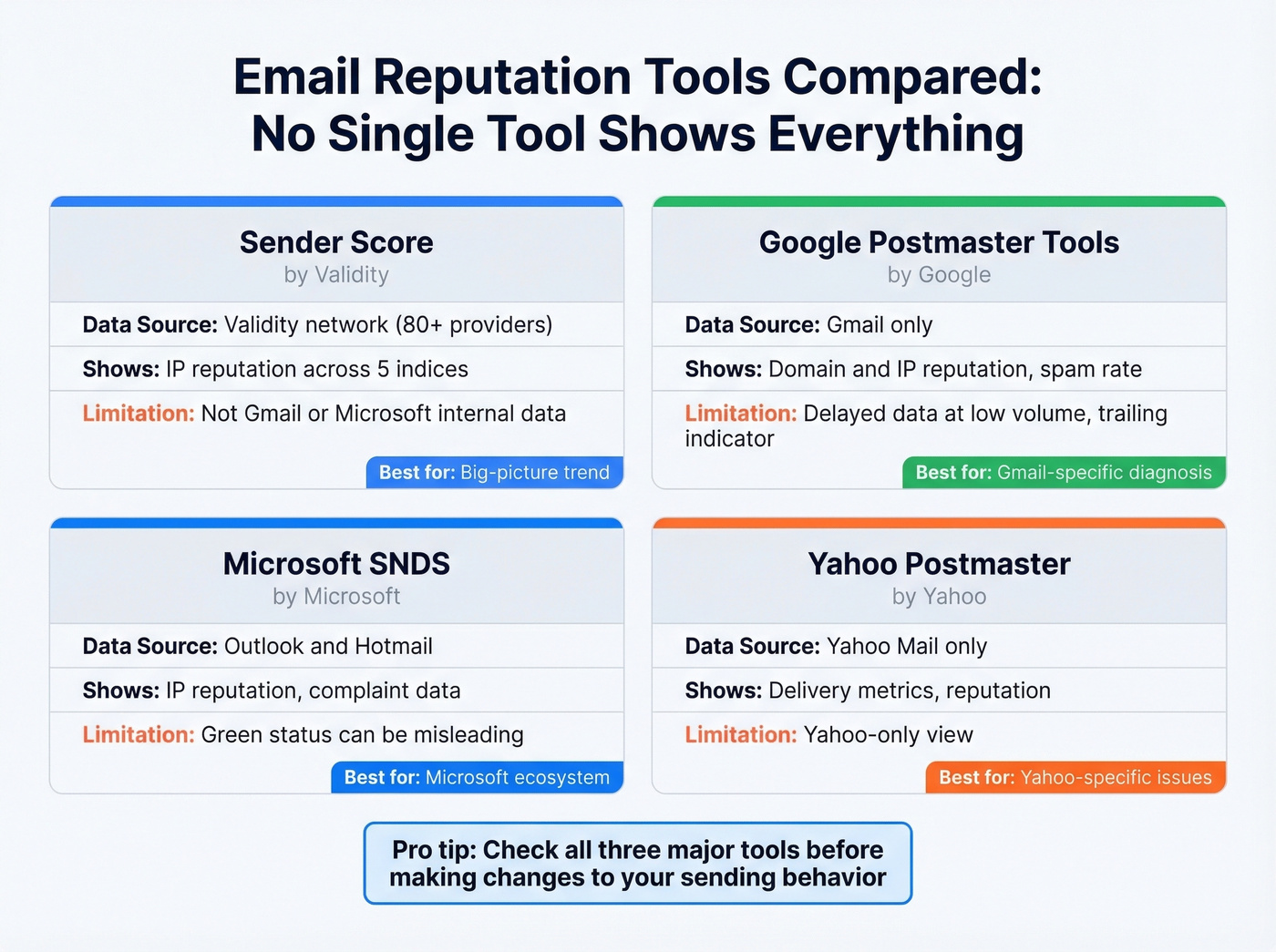
No single tool shows the complete picture.
| Tool | Whose Data | What It Shows | Limitation |
|---|---|---|---|
| Sender Score | Validity network | IP reputation across 5 indices | Not Gmail/Microsoft internal data |
| Google Postmaster | Gmail only | Domain + IP rep, spam rate | Delayed at low volume |
| Microsoft SNDS | Outlook/Hotmail | IP reputation, complaints | Green status can mislead |
| Yahoo Postmaster | Yahoo Mail | Delivery metrics, reputation | Yahoo-only view |
We've seen teams panic over a score drop while their Google Postmaster Tools dashboard shows green across the board - and vice versa. Use Sender Score for the big-picture trend, Google Postmaster Tools for Gmail-specific diagnosis, and SNDS for Microsoft. Check all three before making changes.
Deliverability practitioners on r/emaildeliverability consistently point out that SNDS green status doesn't guarantee inbox placement. And Google Postmaster Tools behaves like a trailing indicator: improvements in your sending behavior can take days or weeks to show up, while declines appear fast. Don't make reactive decisions based on a single day's data.
How to Actually Improve Your Score
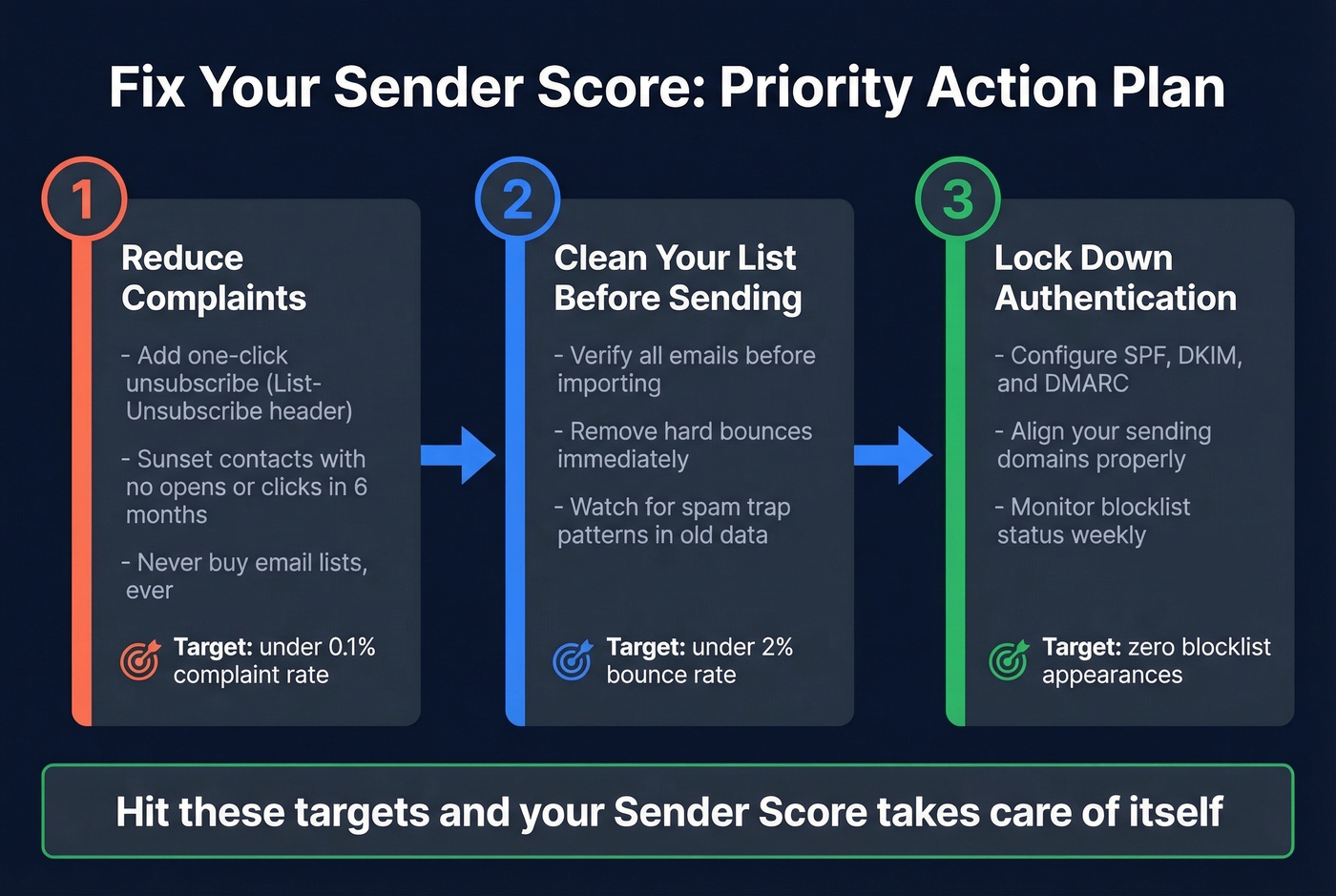
The five indices point to three priority areas. Fix these in order.
Reduce Complaints
One-click unsubscribe isn't optional anymore - it's enforced. Make sure your List-Unsubscribe header is properly configured and that opt-outs process within two days.
Beyond compliance, sunset unengaged contacts. The classic benchmark is no opens or clicks in six months. If someone hasn't interacted with your emails in half a year, they're more likely to hit "spam" than "open" the next time you show up. Remove them before they damage your Complaints index.
And never buy lists. We've watched teams import purchased lists and see complaint rates triple overnight. It's the fastest way to destroy a sending reputation.
Clean Your List Before You Send
Two of the five indices - Unknown Users and External Reputation - are directly caused by sending to bad addresses. Every hard bounce feeds Unknown Users. Every spam trap hit feeds External Reputation. The fix happens before you press send, not after.

Prospeo's 5-step verification with catch-all handling, spam-trap removal, and honeypot filtering catches these problems before they reach your sending infrastructure. At 98% email accuracy, you're eliminating the dead addresses and traps that tank your score. Customers like Meritt and Snyk saw bounce rates drop from 35-40% to under 5% after switching - that's the difference between an Unknown Users index that's dragging you down and one that's clean.
Let's be honest about how fast this can go wrong: you import a list from a sketchy data provider and your bounce rate spikes to 15%. That import just tanked your Unknown Users index, which tanked your score, which tanked your deliverability. The chain reaction is brutal. Verify before you send. Every time.
Authenticate Everything
SPF, DKIM, and DMARC alignment aren't nice-to-haves in 2026 - they're table stakes. Non-compliant messages to Gmail get rejected. Missing authentication also feeds the Rejected index directly.
Make sure your DMARC policy is at least p=quarantine (ideally p=reject), that SPF and DKIM are aligned to your sending domain, and that any forwarding scenarios use ARC. If you're sending from multiple platforms - marketing automation, transactional, outbound sequences - each one needs proper authentication under the same domain alignment. Skip this if you're only sending from a single platform with built-in authentication, but double-check it's actually passing alignment, not just passing the check.
If you need a deeper walkthrough, start with DMARC alignment and then validate your setup with a quick DKIM check.
Senders scoring above 90 maintain a complaint rate below 1% and an unknown user rate around 1%. You can't hit those benchmarks mailing stale CSVs from last year's trade show. Prospeo refreshes 300M+ profiles every 7 days - not every 6 weeks - so your lists stay clean and your IP stays off blocklists.
Clean data is the fastest fix for a damaged sender score.
FAQ
What's a good Sender Score?
Above 90 is where real performance begins - senders in that band see 91% delivered rates and maintain complaint rates below 1%. Scores between 80-90 are acceptable but deliver only 68% of mail. Below 80, more than half gets rejected at the gateway.
Does Sender Score directly affect Gmail delivery?
No. Gmail uses its own internal reputation system independent of Validity's data. Sender Score is a third-party indicator useful for spotting trends across 80+ mailbox providers, but it doesn't control inbox placement at Gmail, Microsoft, or any specific provider.
Can I improve my Sender Score quickly?
Not overnight - it's a 30-day rolling average. Fix bad data, add missing authentication, and remove unengaged contacts first, then send clean for a full month. Most teams see meaningful improvement in 4-6 weeks.
How does email verification protect my score?
Verification eliminates unknown users and spam traps - two of the five scoring indices. Cleaning your list before every send is the single highest-impact action for protecting your IP reputation, because it directly reduces the inputs that drag down your Unknown Users and External Reputation indices.