

How to Add an Unsubscribe Link to Gmail (2026 Guide)
You're sending a monthly newsletter to 500 contacts from Google Sheets. Everything looks fine - until someone replies "please remove me" and you realize there's no unsubscribe link anywhere in the email.
Gmail support threads are a maze of half-answers, and a lot of "guides" are just thinly disguised tool pitches. Let's break this down properly: the quick manual fix, the mail-merge options, and the technical setup that triggers Gmail's built-in unsubscribe button.
Quick method comparison
Pick the simplest option that matches your volume. Overengineering unsubscribe is a great way to waste an afternoon.
| Your situation | Best method | Time to set up |
|---|---|---|
| One-off emails from Gmail | Manual hyperlink | 30 seconds |
| Newsletters via Sheets + merge | YAMM or GMass | 10 minutes |
| 1,000+ emails/day | ESP like Brevo or Mailchimp | 1-2 hours |
| 5,000+/day to personal Gmail inboxes | RFC 8058 one-click headers | Half a day |
What Gmail's unsubscribe button actually does
A recurring question on r/Gmail is whether Gmail's "Unsubscribe" button really unsubscribes you or just blocks the sender. It's neither magic nor the same thing as blocking. Gmail is reacting to signals in the message, and there are three separate mechanisms people mix up.
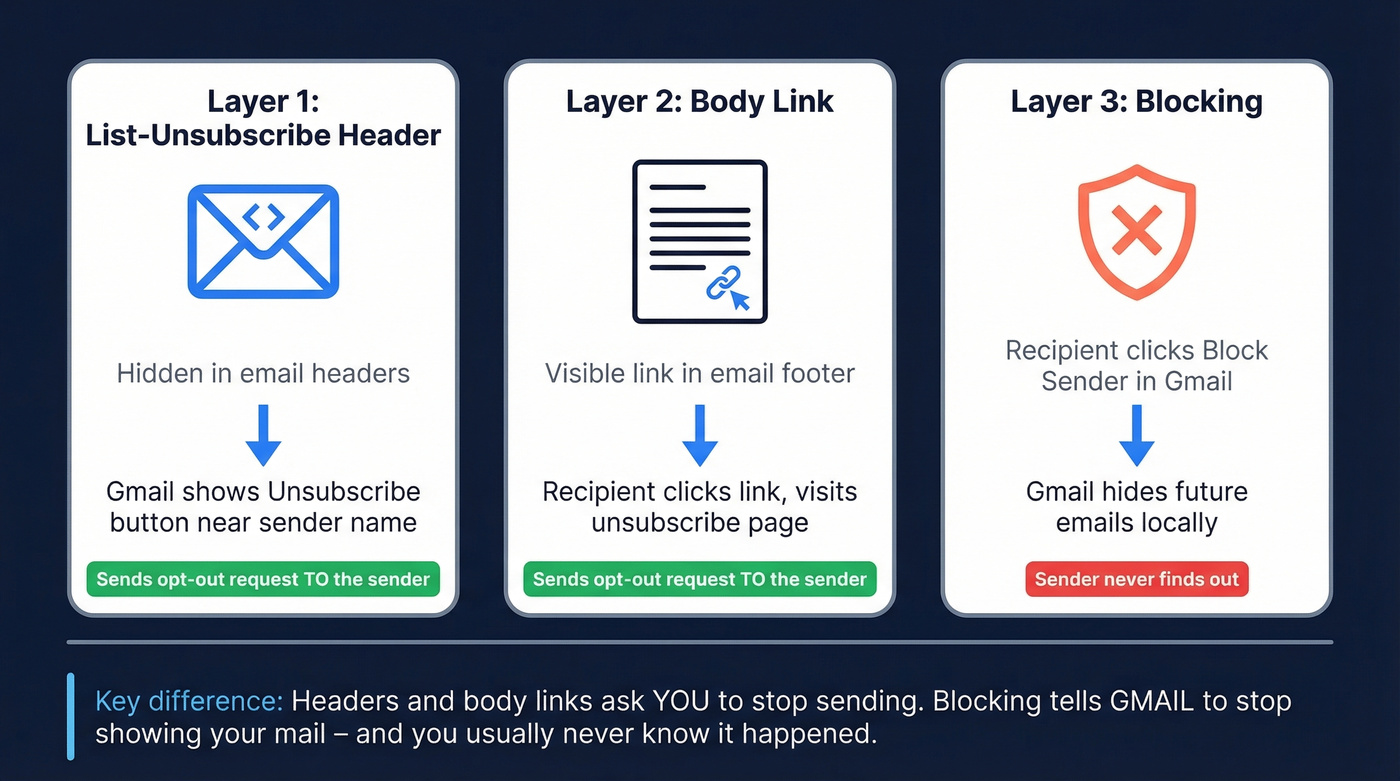
Layer 1: The List-Unsubscribe header. This is an email header defined in RFC 2369 that tells email clients how to request an opt-out. When Gmail detects it, it shows an "Unsubscribe" link near the sender name. Clicking it sends an opt-out request back to the sender's system, either via a mailto address or a URL.
Layer 2: The body link. This is the visible "unsubscribe" link in the footer of your email. It's not the same as the header, and it won't automatically create Gmail's top-of-email button. It's still required for most marketing and commercial email under CAN-SPAM.
Layer 3: Blocking. This is the recipient choosing "Block [sender]" in Gmail. That's a local inbox action. It's not an unsubscribe request, and you won't get a clean signal that it happened.
The key difference: header-based unsubscribe asks you to stop. Blocking tells Gmail to stop showing your mail, and you usually never find out.
CAN-SPAM and GDPR requirements
Look, the legal part isn't fun, but it's cheaper than learning the hard way.
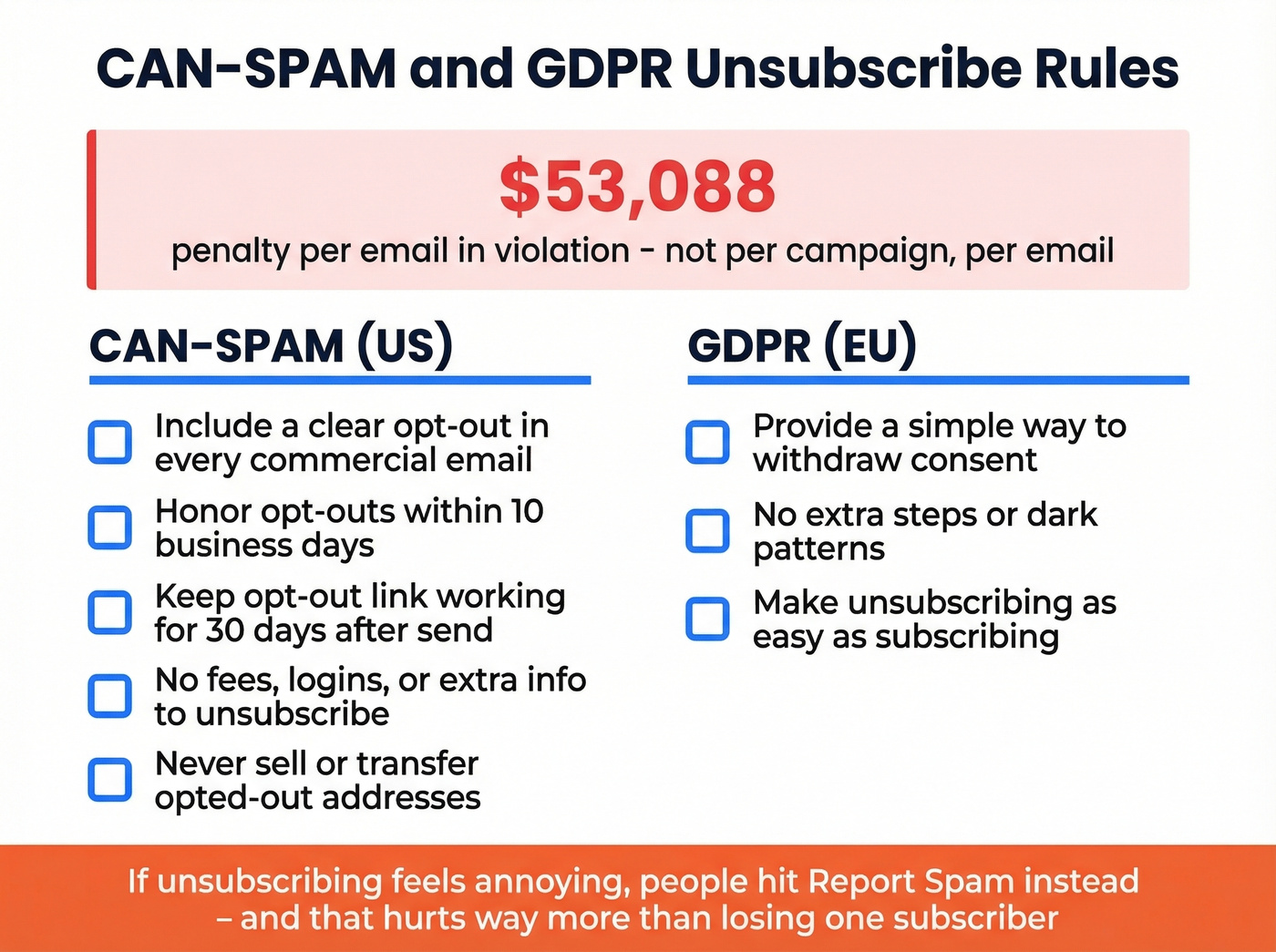
CAN-SPAM covers commercial messages, including B2B email. The FTC's CAN-SPAM compliance guide lays out the basics in plain English: https://www.ftc.gov/business-guidance/resources/can-spam-act-compliance-guide-business
The penalty ceiling is $53,088 per email in violation. Not per campaign. Per email. The practical rules most teams trip over:
- Include a clear opt-out mechanism in every commercial email
- Honor opt-out requests within 10 business days
- Keep the opt-out working for at least 30 days after you send
- Don't charge a fee, require a login, or ask for extra info beyond an email address
- Once someone opts out, don't sell or transfer their email (except to a vendor helping you comply)
GDPR adds another layer for EU recipients: marketing email needs a simple way to withdraw consent, and the unsubscribe experience can't be a trap door of extra steps. If unsubscribing feels annoying, people don't "unsubscribe" - they hit "Report spam," and that hurts far more than losing one subscriber.
Gmail's bulk sender rules in 2026
If you send 5,000+ emails in a day to personal Gmail accounts (@gmail.com, @googlemail.com), Gmail treats you as a bulk sender. And no, you don't get to "go back" later by sending less for a week.
Google's sender guidelines require SPF, DKIM, and DMARC (with alignment) and a working one-click unsubscribe flow for bulk traffic. Start here: https://support.google.com/a/answer/81126 and the bulk sender requirements overview: https://support.google.com/mail/answer/81126?hl=en
One-click unsubscribe is tied to RFC 8058, and opt-outs need to be processed within 48 hours. Google also watches spam complaint rates closely; once you're consistently annoying people, Gmail doesn't "warn" you in a friendly way. It just stops trusting you, and your delivery falls off a cliff.
If you're sending at scale without authentication and one-click unsubscribe, your emails aren't "landing in spam." A chunk of them are getting rejected before they ever reach an inbox.

Spam complaints don't just come from missing unsubscribe links - they come from emailing the wrong people at bad addresses. Prospeo's 5-step verification and 98% email accuracy keep your bounce rate under control so Gmail never flags you as a bulk offender.
Clean data means fewer complaints and zero deliverability panic.
Five ways to add an unsubscribe link in Gmail
1) Manual hyperlink (fastest)
This is the simplest method and it's fine for low volume.
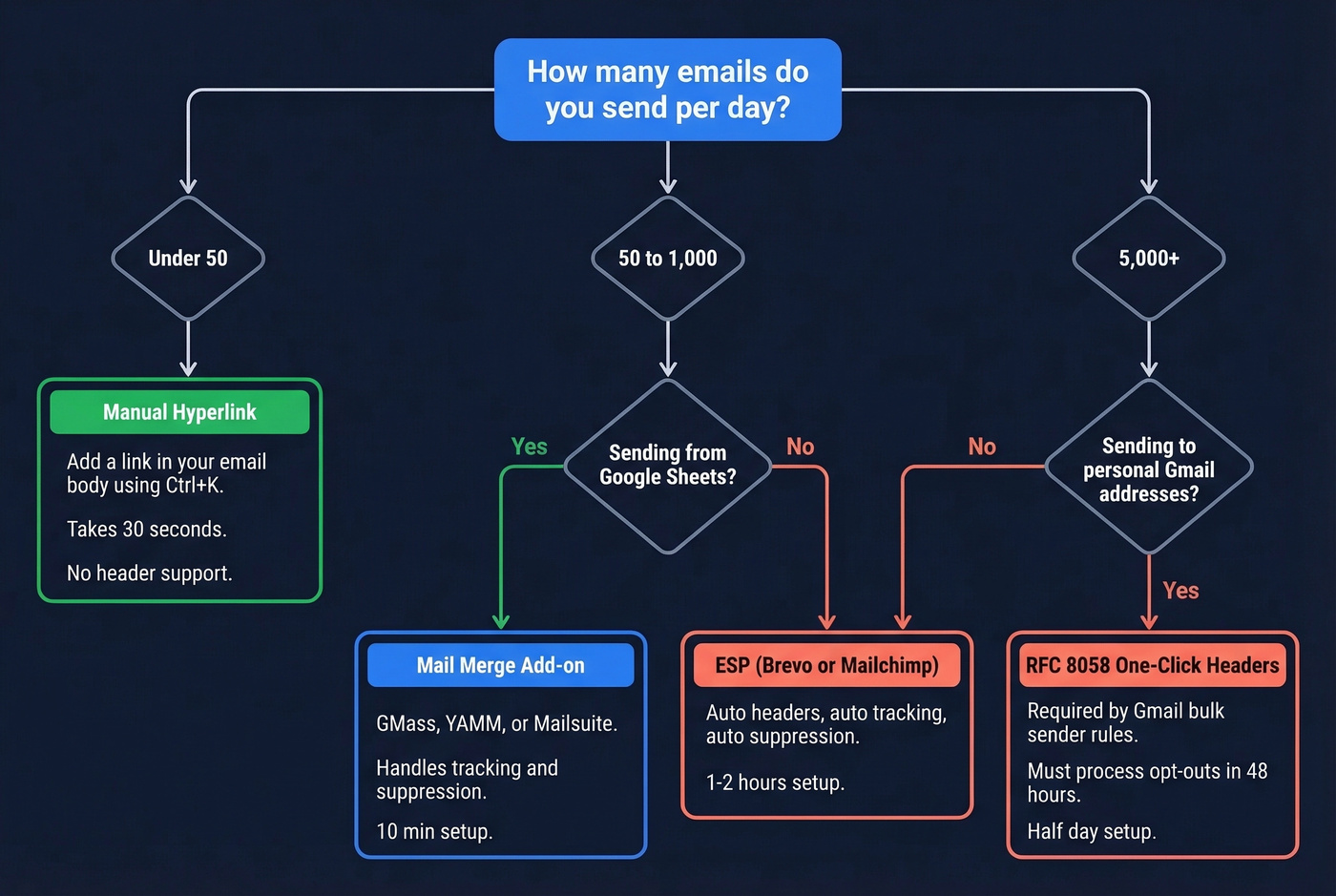
- In Gmail, click Compose
- Add your unsubscribe text at the bottom of the email
- Highlight the text and press Ctrl+K (or Cmd+K on Mac)
- Paste a URL to your unsubscribe page (or a Google Form) and save
For the link text, plain "Unsubscribe" works. In our experience, friendlier copy reduces spam reports because people use the link instead of the spam button. Try something like "Manage preferences" or "Not a fit? Unsubscribe in one click."
The catch is important: a body link doesn't add the List-Unsubscribe header, so Gmail usually won't show the top-of-email unsubscribe button. And if you're a bulk sender, a footer link alone won't meet the one-click requirement.
2) Mail merge add-ons (GMass, YAMM, Mailsuite)
If you're sending from Google Sheets, add-ons can handle unsubscribe tracking and suppression without moving to a full ESP.
- GMass typically runs in the ~$20-$30/month range depending on plan. It can add List-Unsubscribe headers, track opt-outs, and suppress unsubscribed contacts from future sends. It also supports one-click unsubscribe headers for bulk sender compliance.
- YAMM (Yet Another Mail Merge) records unsubscribes and can write them back to your spreadsheet so you don't accidentally re-mail people. It also provides an unsubscribe URL you can place in your template (
https://app.yamm.com/unsubscribe). - Mailsuite can add an unsubscribe link and route recipients to a confirmation page.
These tools are great when you need "Gmail, but with guardrails." They're also where teams get sloppy: they set up unsubscribes once, then spin up a second spreadsheet for a new campaign and forget to share the suppression list. That's how you end up emailing someone who opted out last month and earning a spam complaint you didn't need.
| Tool | List-Unsubscribe header | Tracks opt-outs | Free tier | Paid from |
|---|---|---|---|---|
| GMass | Yes | Yes | No | ~$20-$30/mo |
| YAMM | Depends on setup | Yes | Limited | Paid plans vary |
| Mailsuite | Depends on setup | Yes | Yes | ~$10/mo |
| Brevo (ESP) | Yes (auto) | Yes (auto) | 300/day | ~$9/mo |
| Mailchimp (ESP) | Yes (auto) | Yes (auto) | Limited | ~$13/mo |
3) List-Unsubscribe headers (what triggers Gmail's button)
This is the method that actually makes Gmail show the unsubscribe link near the sender name.
There are three common formats:
Mailto method (sends an unsubscribe email request):
List-Unsubscribe: <mailto:unsubscribe@yourdomain.com?subject=unsubscribe>
URL method (hits your unsubscribe endpoint):
List-Unsubscribe: <https://yourdomain.com/unsubscribe?id=recipient123>
Both (best compatibility):
List-Unsubscribe: <mailto:unsubscribe@yourdomain.com>, <https://yourdomain.com/unsubscribe?id=recipient123>
A lot of teams include both because different clients behave differently. Gmail handles URL well; some clients still lean on mailto.
4) RFC 8058 one-click unsubscribe (bulk sender requirement)
If you're a bulk sender, you need the one-click version. That means adding List-Unsubscribe-Post plus a URL-based List-Unsubscribe.
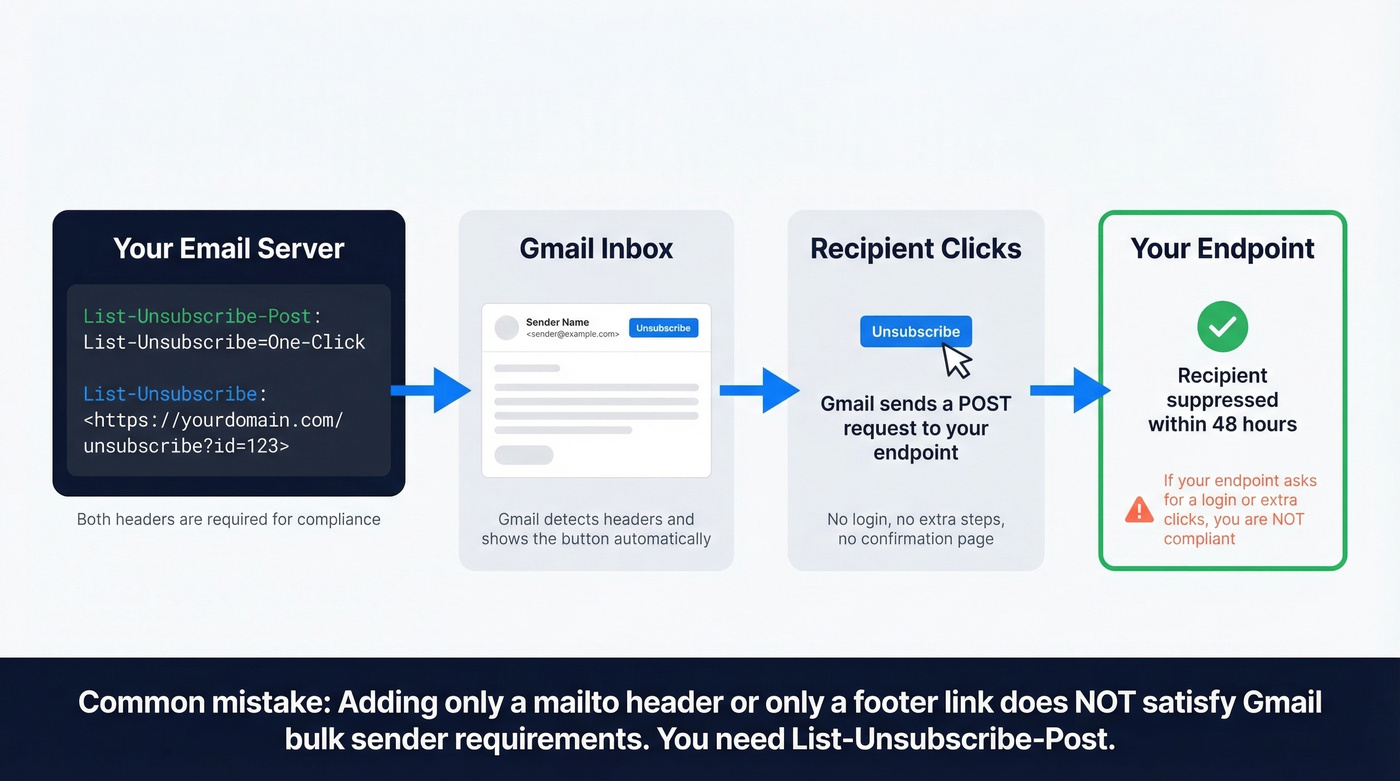
List-Unsubscribe-Post: List-Unsubscribe=One-Click

List-Unsubscribe: <https://yourdomain.com/unsubscribe?id=recipient123>
This is the part people miss. They add a footer link, or they add a mailto header, and they assume they're done. They're not.
One-click also means your endpoint has to actually remove the recipient without asking them to log in, re-enter their email, or click through three screens. One click should be enough; anything else is just you trying to be clever, and Gmail's enforcement doesn't reward clever.
5) Use an ESP (Brevo, Mailchimp)
If you're sending 1,000+ emails/day, stop trying to turn Gmail into an email marketing platform. It's frustrating, and it tends to end with a bruised domain reputation.
An ESP handles unsubscribe headers, opt-out tracking, suppression lists, and the compliance plumbing automatically. Brevo's free plan covers 300 emails/day, and Mailchimp is a common choice for small lists. You still need to write good emails, but you won't be hand-rolling headers and hoping you didn't break something.
One strong opinion from our team: most deliverability disasters aren't caused by missing unsubscribe links. They're caused by sending thousands of emails through Gmail with a spreadsheet add-on, then acting surprised when inbox placement collapses.
Build a simple unsubscribe page
Your unsubscribe link has to go somewhere. The page needs to do three jobs:
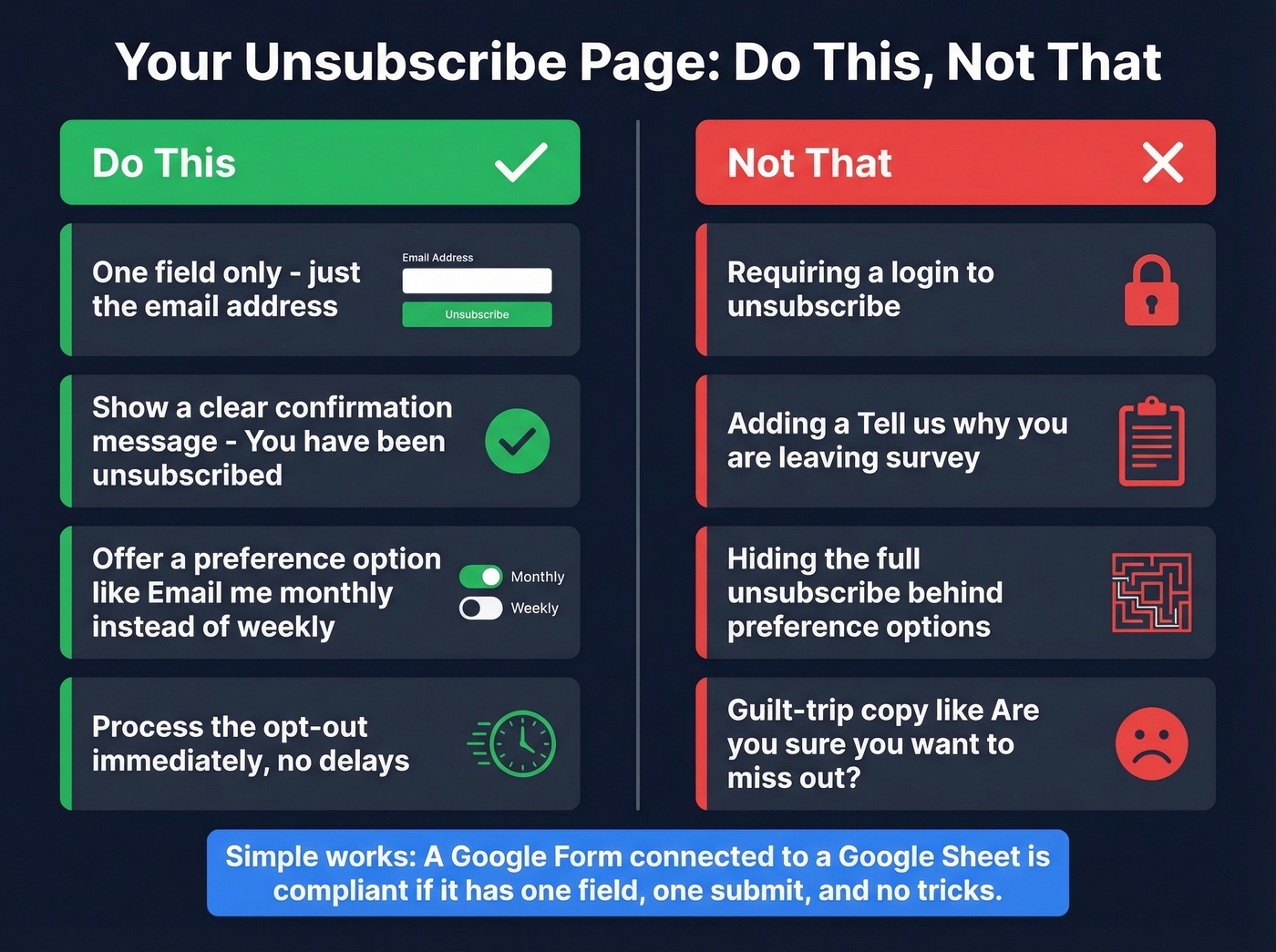
- Identify the recipient (usually via a token or ID in the URL)
- Suppress them from future sends
- Show a confirmation message
For small senders, a Google Form connected to a Google Sheet works. It's not fancy, but it's compliant if you keep it simple: one field (email), one submit, done. No login. No "tell us why." No guilt-trip copy.
If you want to be smarter about retention, add a preference option like "email me monthly instead of weekly." Just don't hide the full unsubscribe. People can smell that trick immediately.
Verify your list before sending
Unsubscribe links are the last line of defense for your sender reputation. List quality is the first.
Here's a scenario we've seen too many times: a team imports an old spreadsheet, blasts a "quick update" to the whole list, and gets slammed with bounces because half the addresses are dead or were never real in the first place. Now Gmail's suspicious, replies slow down, and even the people who wanted the email start seeing it in Promotions or Spam.
Prospeo's email verification helps you catch invalid addresses, spam traps, and catch-all domains before you send. It's built around a 5-step verification process with catch-all handling, spam-trap removal, and honeypot filtering, and it delivers 98% email accuracy. If you're auditing a small newsletter list, the free tier covers 75 verifications per month, which is enough to clean up a list in batches and avoid the "why did our bounce rate spike?" headache.
Skip verification if you're emailing 20 colleagues you know personally. For anything bigger, especially anything scraped, bought, or "found in a shared drive," verifying first saves you from a completely avoidable mess.
You're setting up unsubscribe flows because you care about deliverability. But the biggest threat to your sender reputation isn't a missing footer link - it's invalid emails triggering hard bounces. Prospeo refreshes 300M+ profiles every 7 days so you never send to dead addresses.
Protect your domain reputation before you hit send.
Troubleshooting compliance warnings
"Needs work" in Postmaster Tools
Even with correct RFC 8058 headers, Google Postmaster Tools can flag unsubscribe honoring as "Needs work." The usual cause is simple: a user unsubscribed from one stream, but you kept emailing them from another stream on the same domain. Google sees the unsubscribe, then sees more mail, and assumes you ignored it.
The fix is to separate streams with List-ID so Gmail can tell what's what:
List-ID: "Weekly offers from Example Co" <marketing.example.com>

List-ID: "Example Co order confirmations" <transactional.example.com>
Then make sure the marketing stream includes one-click unsubscribe headers, and that your suppression logic applies consistently to that stream.
SMTP rejection codes
When Gmail rejects mail, the SMTP code usually points to the real issue:
| Code | Meaning | Fix |
|---|---|---|
| 4.7.32 | SPF/DKIM alignment warning | Check authentication and alignment |
| 5.7.26 | Authentication rejection | Fix SPF/DKIM/DMARC |
| 4.7.27 | SPF fail (temporary) | Verify DNS records |
| 4.7.30 | DKIM fail (temporary) | Verify DKIM setup/keys |
| 4.7.29 / 5.7.29 | TLS issue / TLS required | Enable TLS on server |
| 5.6.0 | RFC 5322 violation | Fix message formatting |
A 4.x.x code is temporary; Gmail's giving you a chance to fix it. A 5.x.x code is a hard rejection. If you're seeing 5.7.26 repeatedly, your authentication is broken and no amount of unsubscribe tweaking will save delivery until SPF, DKIM, and DMARC are correct.
If you want a deeper playbook, start with our email deliverability guide, then check DMARC alignment and a clean SPF record example.
FAQ
Does Gmail's unsubscribe button block me as a sender?
No. Gmail's unsubscribe button sends an opt-out request back to the sender using the List-Unsubscribe header. Blocking is a separate recipient action inside Gmail.
Do I need one-click unsubscribe under 5,000 emails/day?
Gmail's bulk sender rules kick in at 5,000/day to personal Gmail inboxes, but CAN-SPAM still requires a clear opt-out in commercial email. Adding one-click headers early also cuts spam complaints, which helps deliverability even at low volume.
Does CAN-SPAM apply to B2B emails?
Yes. CAN-SPAM covers commercial messages, including B2B. There's no B2B exemption.
What about transactional emails like receipts?
Purely transactional messages are treated differently. But if you add marketing content (promos, upsells), the message starts looking commercial and needs an opt-out mechanism.
How do I clean my list before sending?
Use an email verifier to remove invalid addresses and spam traps before you send. Prospeo's free tier covers 75 verifications per month, which is enough to audit a small list in batches and keep bounce rates under control.