

How to Check the Authenticity of an Email: A Practical Guide
Your CFO gets an email from the CEO asking for an urgent wire transfer. The display name looks right. The logo's there. But the actual sender address? It's ceo@yourcompany-finance.com - a domain registered 48 hours ago.
Knowing how to check the authenticity of an email matters more than ever: phishing and spoofing scams rose 85.6% in 2025, with median losses doubling to $2,060. And that's just what gets reported.
Here's the thing most guides miss: "email authenticity" means two different things. "Is this email actually from who it claims to be?" and "Does this address I want to send to actually exist?" Different problems, different tools. We'll cover both.
Quick Visual Checks (30-Second Scan)
Before you touch any headers, run a 30-second visual scan. Most phishing fails right here.
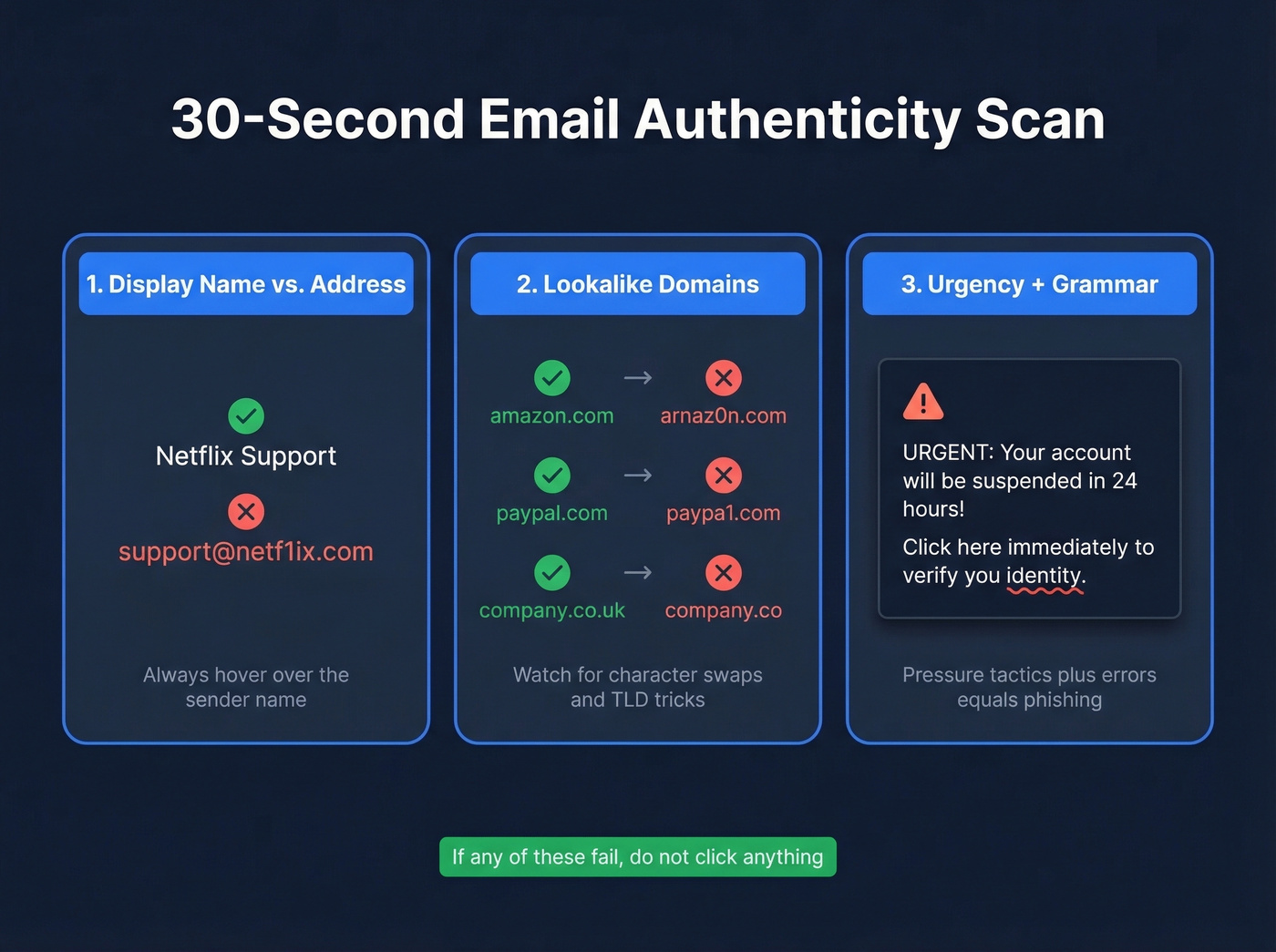
Display name vs. actual address. Hover over the sender name. "Netflix Support" means nothing if the address is support@netf1ix.com. This single check catches the majority of phishing attempts we've seen in the wild - attackers count on people never looking past the display name.
Lookalike domains. Watch for character swaps: arnaz0n.com (zero instead of "o"), paypa1.com (one instead of "l"), .co instead of .com. These cousin domains catch more people than you'd expect.
Urgency + grammar. "Your account will be suspended in 24 hours" combined with awkward phrasing is still the most common phishing template. AI has improved the grammar, but the urgency pressure hasn't changed.
How to Read Email Headers
Email clients bury authentication results behind three clicks and raw server logs. Here's how to actually find them.
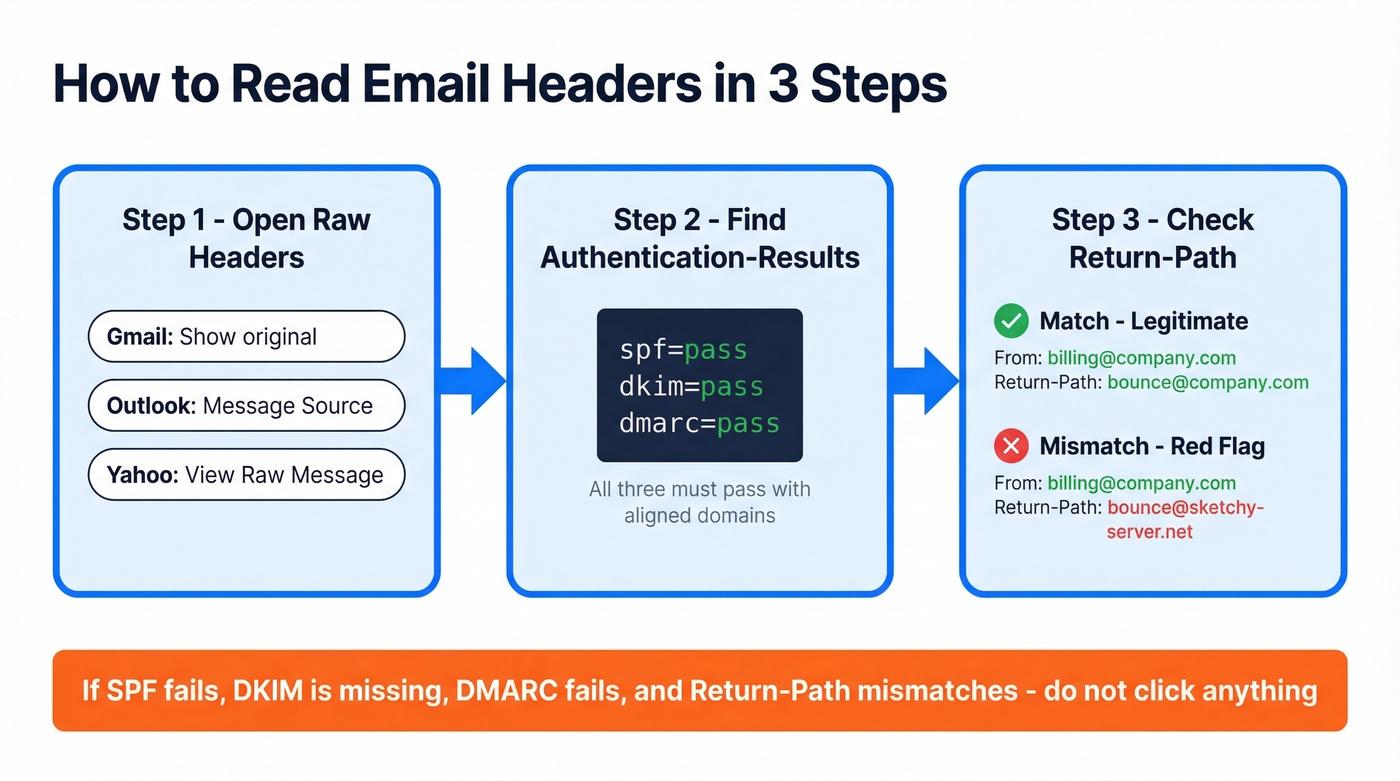
Step 1: Open the raw headers. Gmail: three dots, then Show original. Microsoft 365: Message Source. Yahoo: View Raw Message.
Step 2: Find the [Authentication-Results](https://datatracker.ietf.org/doc/html/rfc7601) header. You're looking for three values:
spf=pass
dkim=pass
dmarc=pass
All three passing with aligned domains is a strong sign the email is legitimate. Google's headers include details like dkim=pass header.i=@company.com and spf=pass smtp.mailfrom=company.com - the domains after those fields should match the From address. (If you want to go deeper on alignment rules, see DMARC alignment.)
Step 3: Check the Return-Path. If the From says billing@company.com but the Return-Path points to bounce@sketchy-server.net, that's a red flag even if SPF technically passes. A mismatch here means the reply infrastructure doesn't belong to the claimed sender, which is exactly how spoofed emails slip through basic checks while still tripping up anyone who looks one layer deeper. For a deeper technical breakdown, see Return Path Email.
If you see spf=fail, dkim=none, dmarc=fail, and a mismatched Return-Path, don't click anything.
How Attackers Fake Sender Identity
The most direct attack is exact-domain spoofing - forging the From header to show your company's real domain. DMARC enforcement with p=reject blocks most of this when receivers honor the policy, but only if the domain owner has configured it. A surprising number of companies still haven't. If you're responsible for setup, these SPF record examples help you sanity-check syntax fast.
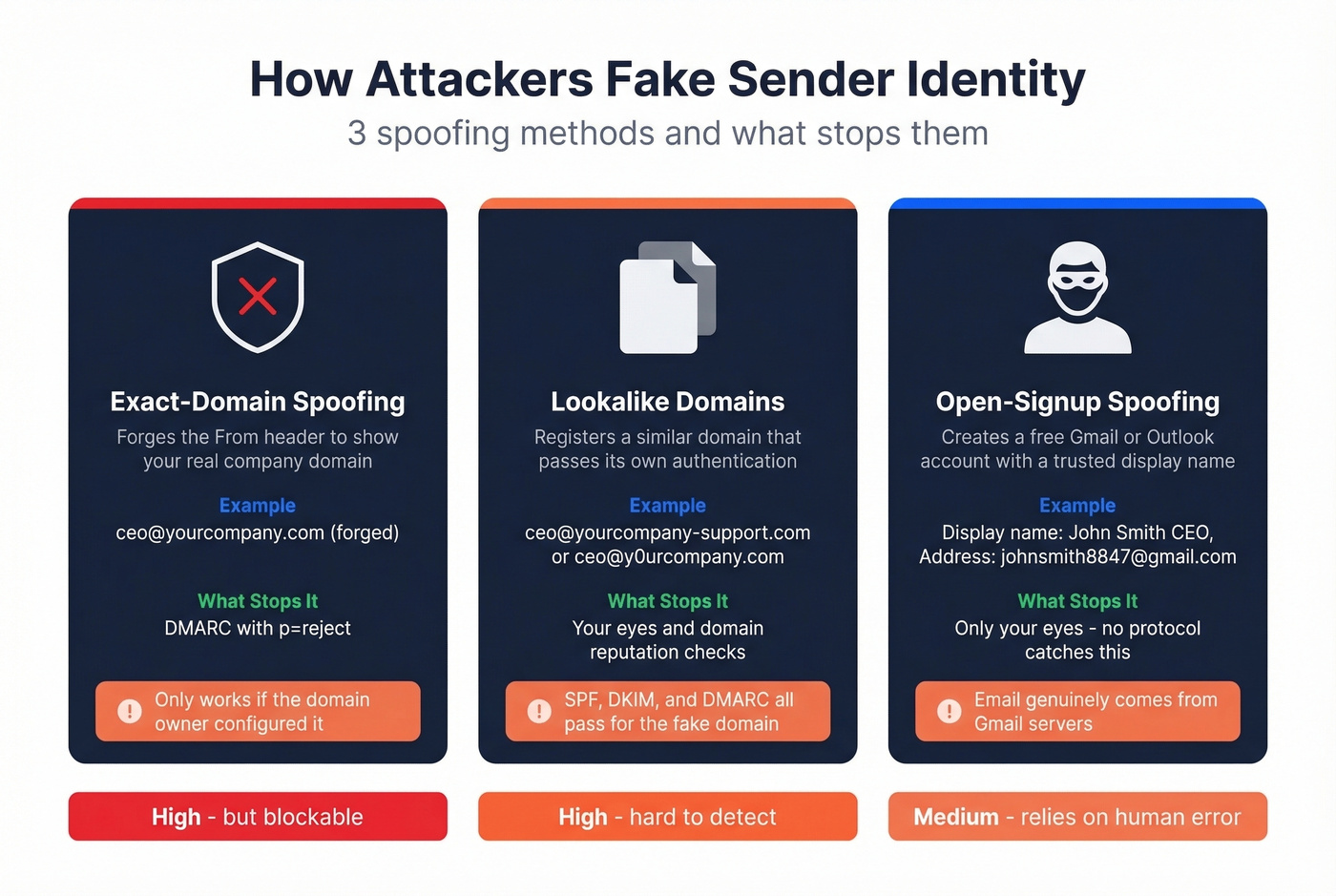
Then there are lookalike domains: yourcompany-support.com or y0urcompany.com. SPF and DKIM will pass for the attacker's domain, so DMARC won't catch it. Only your eyes and domain reputation checks help here.
The simplest trick? Open-signup spoofing - creating a free Gmail or Outlook account with a display name matching someone you trust. No authentication protocol catches this because the email genuinely comes from Gmail's servers. Your eyes are the only defense.

Spoofed senders damage trust. Bad email addresses damage your domain. Prospeo's 5-step verification - including catch-all detection and spam-trap removal - delivers 98% email accuracy so you never send to an address that shouldn't exist.
Verify before you send. 75 free checks per month, no credit card.
Modern Phishing Tactics in 2026
The phishing playbook has evolved well past "Nigerian prince" emails. APWG tracked over 1.13 million attacks in Q2 2025 alone. Let's break down the tactics worth knowing:
QR-code phishing ("quishing"). A QR code instead of a clickable link, bypassing most URL scanners. We've seen these show up in fake parking tickets, restaurant menus, and even internal HR emails.
Browser-in-the-browser (BitB). A fake SSO popup rendered inside a webpage, identical to a real Google or Microsoft login. It looks pixel-perfect. The giveaway is that you can't drag the popup outside the browser window.
MFA push-bombing. Flooding your phone with authentication prompts until you accidentally approve one. If you're getting random MFA requests you didn't initiate, someone already has your password.
Dangerous attachment types. .iso, .js, .html, and .scr files that execute code on open. If you didn't expect an attachment, don't open it. Period.
Free Tools to Verify Email Authenticity
| Tool | What It Does | Best For |
|---|---|---|
| MXToolbox Header Analyzer | Parses raw headers, flags auth failures | Fastest single-email check |
| Google Admin Toolbox | Visualizes header routing + auth | Hop-by-hop analysis |
| Mail-Tester | Scores deliverability + auth | Testing your own domain |
| Bitdefender Scamio | AI scam detection via chat | Quick mobile checks |
All four are free. In our testing, MXToolbox catches header mismatches faster than anything else - paste the raw headers and you get a verdict in seconds. Bitdefender Scamio is a solid pick for mobile-friendly scam scanning when you need a fast answer on your phone.
Gmail and Yahoo are also the most consistent inboxes for BIMI - a verified brand logo next to the sender's name that requires DMARC enforcement plus a Verified Mark Certificate from providers like DigiCert or Entrust, typically several hundred to a few thousand dollars per year. If you see one, the sender's authentication is solid.
How to Verify an Email Address Is Real
This is a different problem entirely. You're not checking whether an email you received is legitimate - you're confirming an address exists before you send to it.
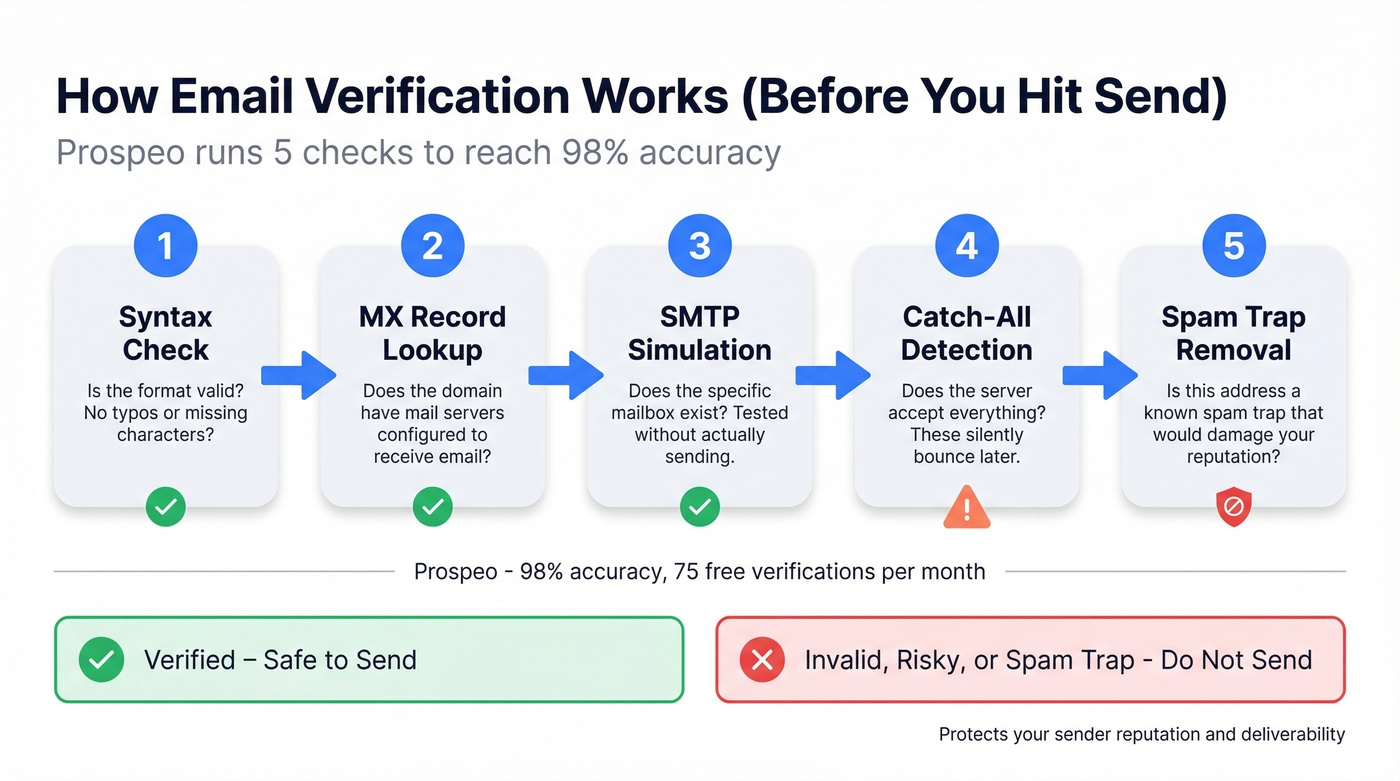
Bad addresses bounce. Bounces damage your sender reputation fast. And catch-all domains make things worse because they accept everything at the server level but silently bounce later, so you don't even know you've got a problem until your deliverability craters.
Verification tools run a multi-step process: syntax check, MX record lookup to confirm the domain can receive mail, and SMTP simulation to test whether the mailbox exists without actually sending. If you need a step-by-step walkthrough, see how to check if an email exists or (for Google-specific edge cases) how to check if a Gmail account exists. Prospeo's 5-step verification includes catch-all detection and spam-trap removal, hitting 98% accuracy. The free tier covers 75 verifications per month - enough to validate a small outreach list without paying anything.
You now know how to spot fake senders. But if you're building outreach lists, the bigger risk is sending to unverified addresses that bounce and torch your domain reputation. Prospeo verifies 143M+ emails at ~$0.01 each with catch-all handling most tools skip entirely.
Protect your sender reputation the same way you protect your inbox.
After You Spot a Phishing Email
Don't click links or download attachments. Even "unsubscribe" links can be malicious.
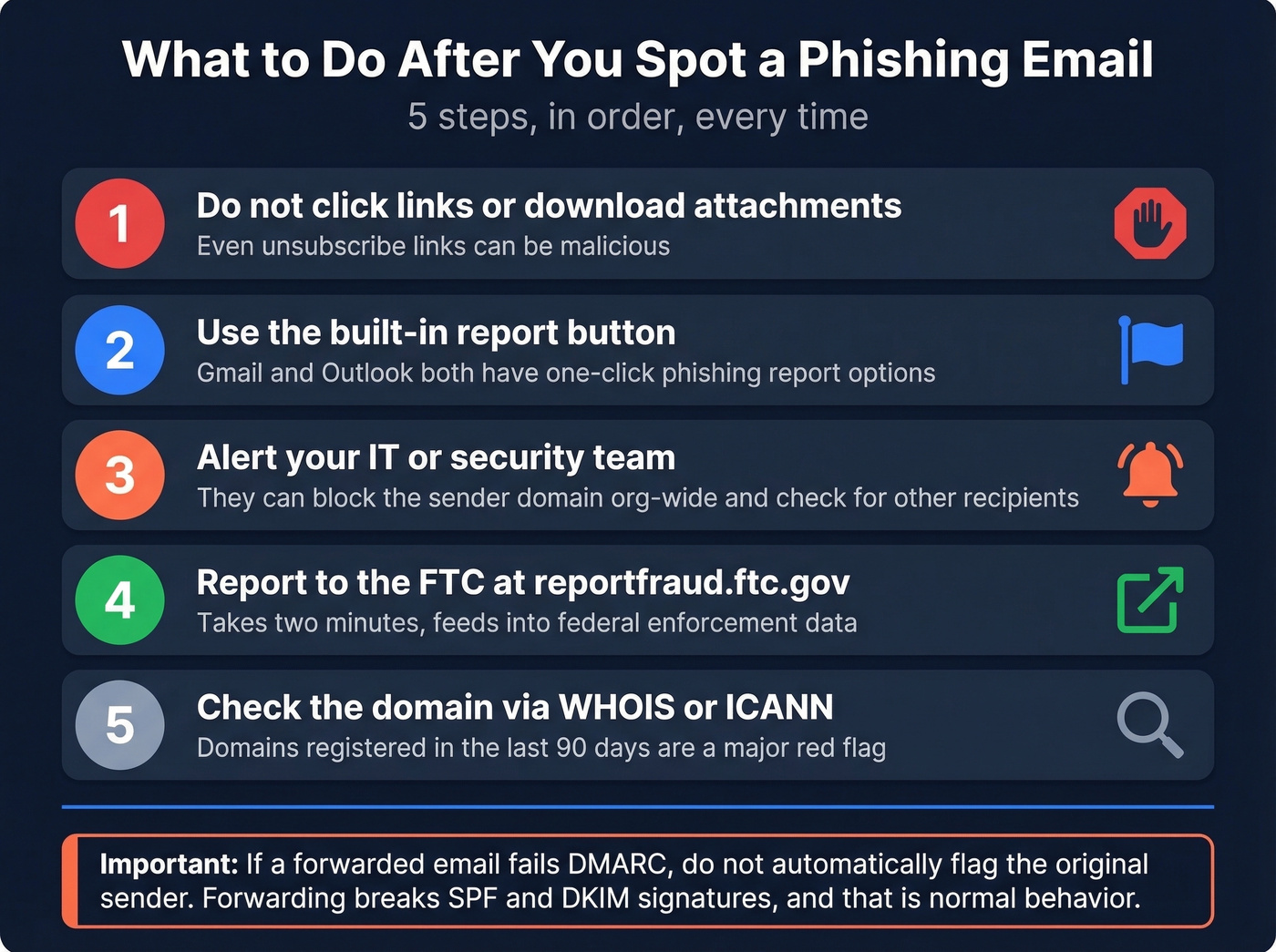
Use the built-in report button. Gmail and Outlook both have one-click phishing report options - use them. This trains the spam filter for everyone on your domain.
Alert your IT/security team. They can block the sender domain org-wide and check whether anyone else received the same message.
Report to the FTC at reportfraud.ftc.gov. It takes two minutes and feeds into federal enforcement data.
Check the domain via WHOIS/ICANN. Domains registered in the last 90 days are a major red flag. Skip this if the email clearly came from a well-known domain like gmail.com or outlook.com - focus your WHOIS checks on unfamiliar or corporate-looking domains that don't match the claimed sender.
One important caveat: if a forwarded email fails DMARC, don't automatically flag the original sender. Forwarding breaks SPF and DKIM signatures, and that's normal behavior, not evidence of spoofing.
FAQ
Can SPF or DKIM passing alone prove an email is authentic?
No. DMARC requires the authenticated domain to match the From address. An email can pass SPF through a different domain and still be spoofed. Always confirm all three protocols pass and the domains align before trusting a message.
Why do legitimate forwarded emails sometimes fail authentication?
Forwarding servers aren't the original sender, so SPF fails and DKIM signatures can break in transit. ARC was designed to fix this, but adoption remains inconsistent. Check the original sender's domain reputation before escalating.
What's the fastest way to verify an email address before sending outreach?
Use a real-time verification tool that runs syntax checks, MX lookups, and SMTP simulation in one pass. Prospeo does this with 98% accuracy and includes catch-all detection and spam-trap removal. The free tier covers 75 verifications per month.