

How to Check DMARC Records: 3 Methods, Every Tag Explained
Your open rates cratered overnight. Mailchimp says everything's configured correctly. Every DMARC checker you try gives you a text box, zero explanation, and a sales pitch for a $500/month monitoring tool. Meanwhile, 87% of domains lack adequate DMARC protection, and bulk senders hitting 5,000+ emails/day to Google and Yahoo accounts are now required to have DMARC. If you don't know how to check DMARC records - or haven't checked yours recently - you're risking spam placement, outright rejection, and zero reporting visibility to diagnose the problem.
What You Need (Quick Version)
Fastest way: Paste your domain into dmarcian's free inspector - it catches issues other tools miss, including invisible whitespace that breaks records. Most reliable way: Run dig TXT _dmarc.yourdomain.com in your terminal. If you get no result, you're probably querying the wrong subdomain. Read on.
What Is a DMARC Record?
DMARC is a TXT record published at _dmarc.yourdomain.com - not at the root domain like SPF. It tells receiving mail servers what to do when an email claiming to be from your domain fails authentication. Here's the part most guides skip: DMARC passes if either SPF or DKIM passes and aligns with the From domain. Both don't need to pass.
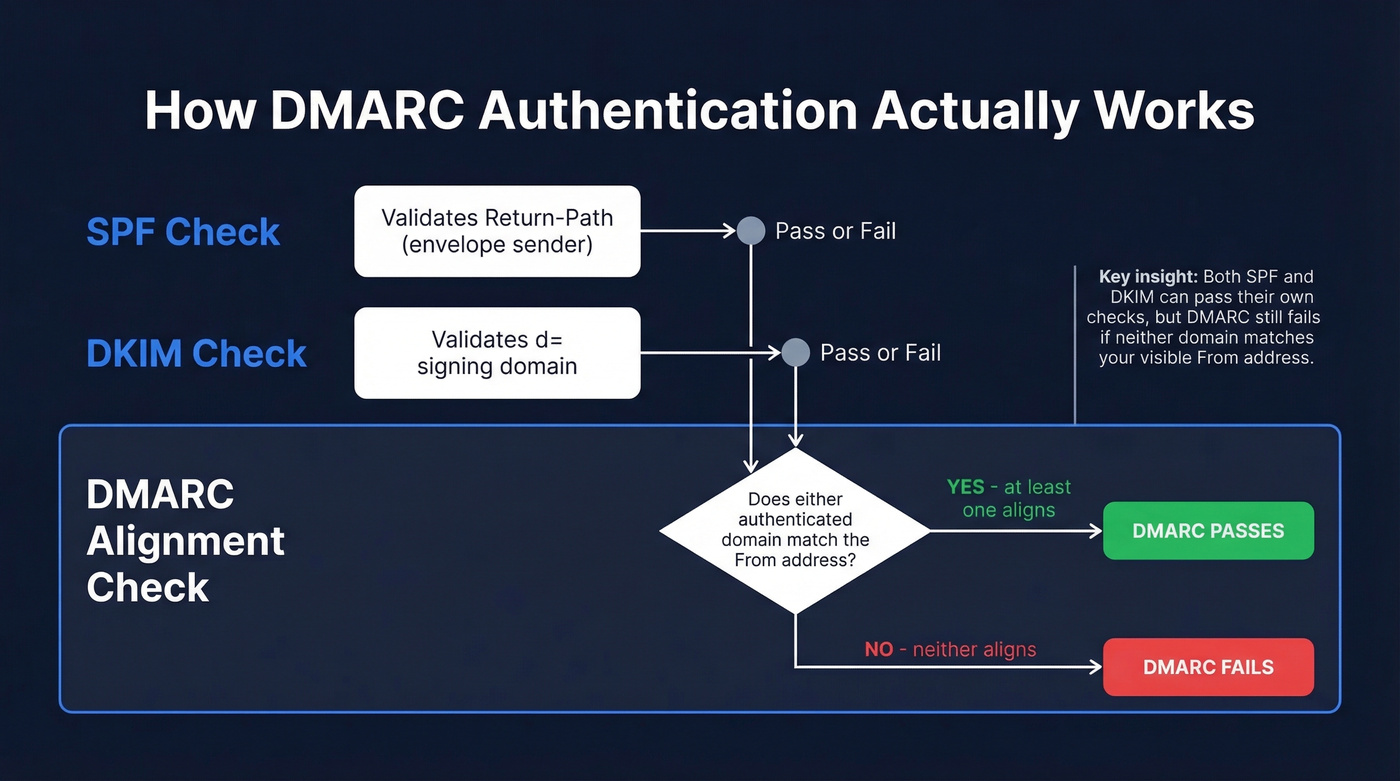
SPF validates the Return-Path (the envelope sender). DKIM validates the d= signing domain. DMARC sits on top and checks whether either of those authenticated domains actually matches the From address your recipient sees. That matching step - alignment - is where most failures happen, and we'll get to it.
Check DMARC With Online Lookup Tools
This is the fastest path for most people. Three steps:
- Go to dmarcian's DMARC Inspector. Type your domain. Hit check.
- Cross-reference with a second tool - MxToolbox is the most popular, and EasyDMARC's lookup tool has the best tag glossary if you want each value explained inline.
- For a quick pass/fail, DNSChecker.org's DMARC validator is free and fast.
Why two tools? Because they disagree more often than you'd think. One Reddit user had a DMARC record that passed in most checkers but failed in others. Dmarcian's inspector was the only tool - out of roughly a dozen tested - that flagged extra whitespace in the name column. Removing the whitespace fixed everything. We've seen this exact issue on three client domains in the last six months, so always validate with at least two tools and make dmarcian one of them.
Check DMARC via Command Line
Online tools are convenient. The command line is more reliable, especially when a domain has multiple TXT records. If you want to verify DMARC authentication at the source without relying on third-party services, this is the method to learn.
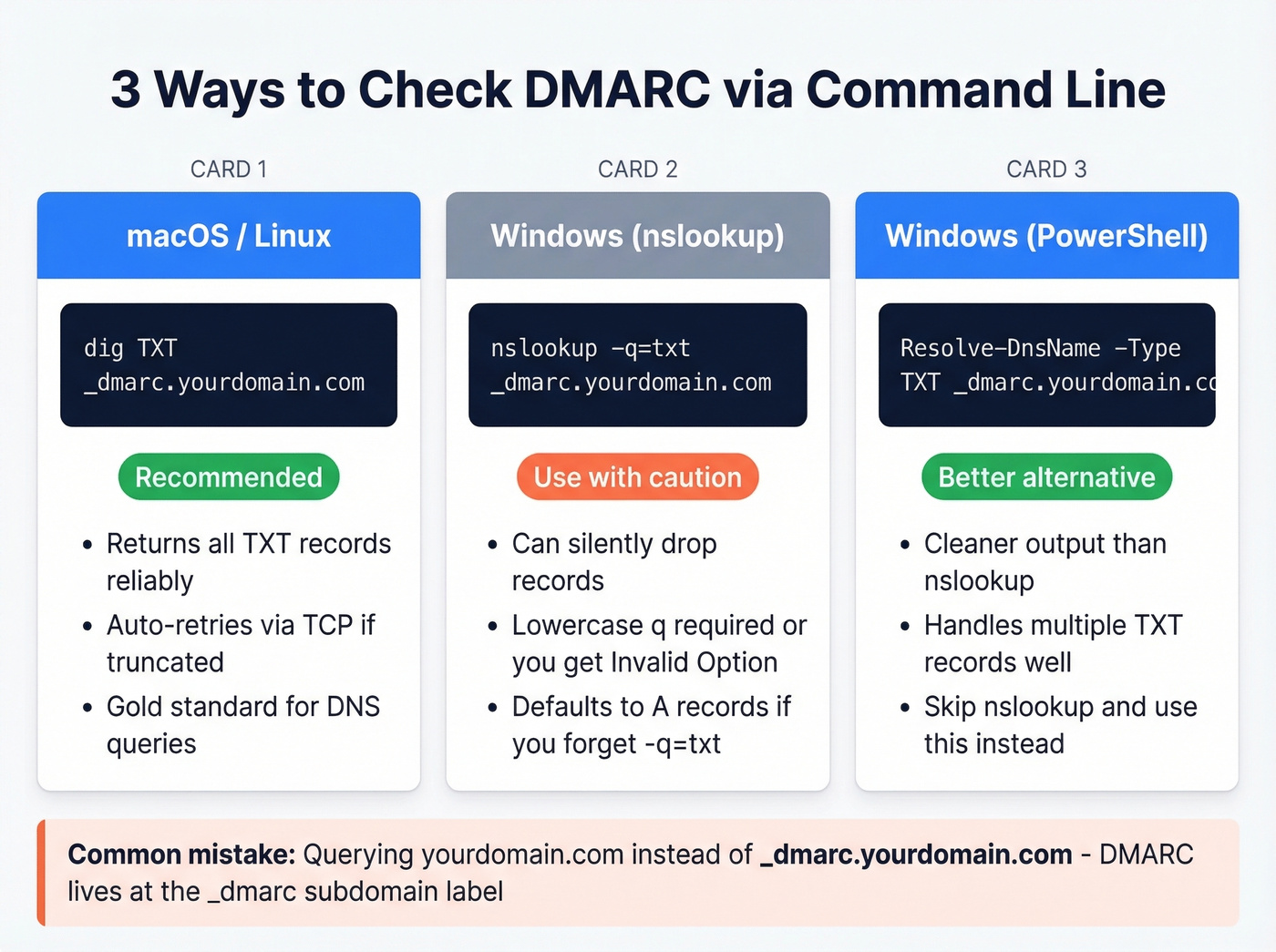
macOS / Linux (dig)
dig TXT _dmarc.yourdomain.com
dig is the gold standard. When a domain has multiple TXT records, nslookup can silently drop records while dig returns all of them. If the UDP response is truncated, dig retries in TCP mode - you'll see "Truncated, retrying in TCP mode" in the output. That's normal.
Windows (nslookup)
nslookup -q=txt _dmarc.yourdomain.com
Two gotchas here. First, if you get "Invalid Option," make sure the q in q=txt is lowercase - a classic Windows nslookup quirk. Second, if you don't specify TXT, nslookup defaults to A and AAAA lookups and won't return TXT records at all.
Windows (PowerShell)
Resolve-DnsName -Type TXT _dmarc.yourdomain.com
PowerShell's Resolve-DnsName is cleaner than nslookup and handles multiple TXT records more gracefully. If you're on a modern Windows machine, skip nslookup entirely and use this.
The #1 Mistake
Querying yourdomain.com instead of _dmarc.yourdomain.com. DMARC records live at the _dmarc subdomain label. Query the root and you'll get SPF records, Google Workspace verification strings, and everything except what you're looking for.
Check DMARC in Your DNS Dashboard
This method shows you the raw record but doesn't validate syntax - useful for confirming the record exists and editing it, not for catching errors.
Cloudflare
Dashboard, select your account and domain, then Email then DMARC Management, and click View records in the Email record overview panel. Cloudflare's DMARC Management feature also lets you set up SPF, DKIM, and DMARC from the same screen, which is genuinely convenient if you're already hosting DNS there.
GoDaddy, Namecheap, Route 53
The path is similar across providers: DNS Management, TXT Records, look for a record with the _dmarc prefix in the hostname column. If you don't see one, you don't have a DMARC record published. GoDaddy buries it under "DNS Management" in the domain settings, Namecheap puts it under "Advanced DNS," and Route 53 uses hosted zones. In all cases, you're looking for a TXT record where the name starts with _dmarc.

DMARC keeps your domain safe, but bad data burns it down. Prospeo's 5-step email verification - with catch-all handling, spam-trap removal, and honeypot filtering - delivers 98% accuracy and under 4% bounce rates.
Stop fixing deliverability problems your data provider caused.
Every DMARC Tag Explained
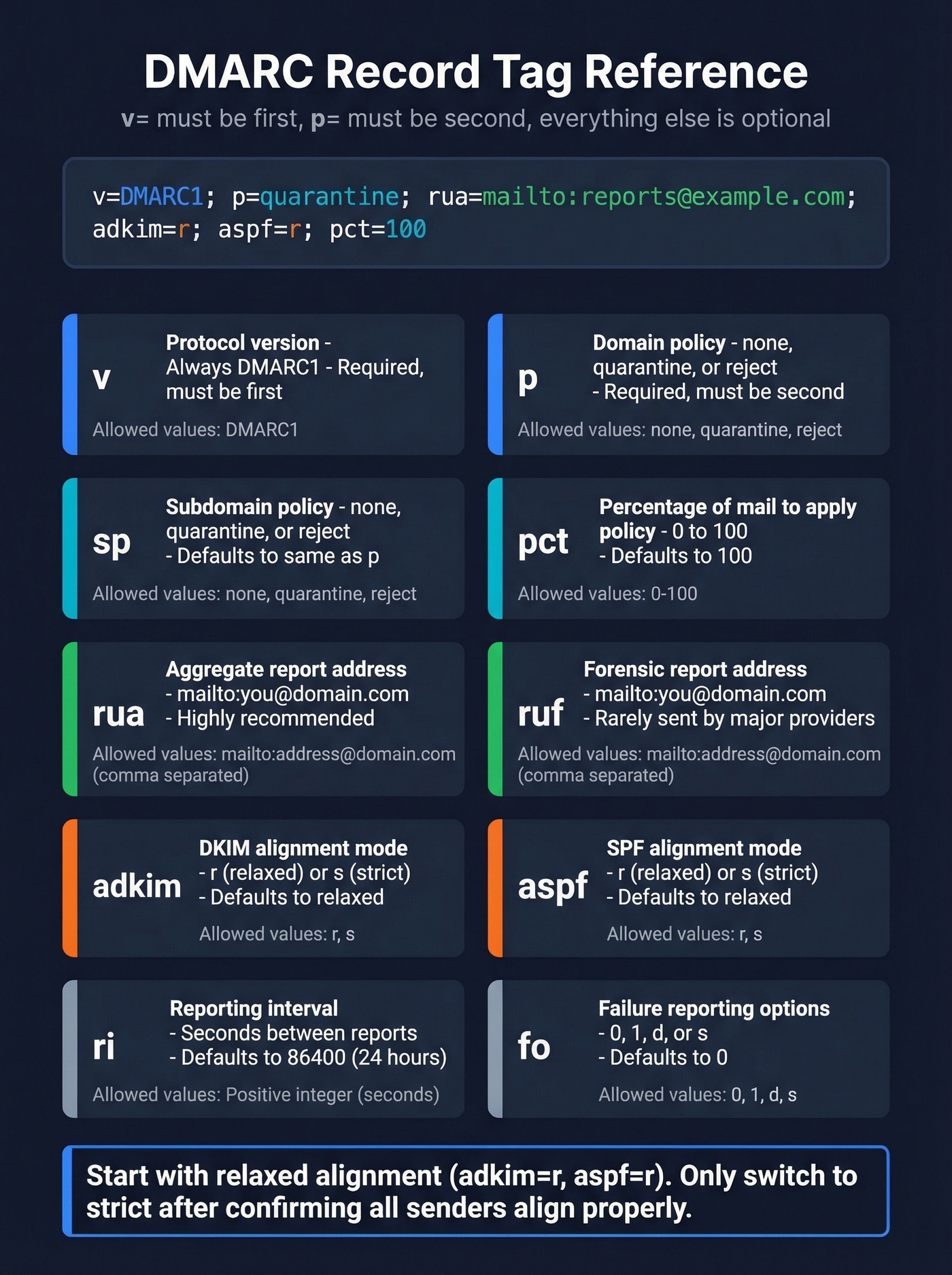
The v tag must appear first, p must appear second. Everything else is optional but matters.
| Tag | Description | Allowed Values | Default |
|---|---|---|---|
| v | Protocol version | DMARC1 (required) | - |
| p | Policy for domain | none, quarantine, reject | none |
| sp | Policy for subdomains | none, quarantine, reject | Same as p |
| rua | Aggregate report URI | mailto:address | None |
| ruf | Forensic report URI | mailto:address | None |
| adkim | DKIM alignment mode | r (relaxed), s (strict) | r |
| aspf | SPF alignment mode | r (relaxed), s (strict) | r |
| pct | % of messages to apply policy | 0-100 | 100 |
| ri | Reporting interval (seconds) | Integer | 86400 |
| fo | Failure reporting options | 0, 1, d, s | 0 |
| rf | Report format | afrf, iodef | afrf |
The alignment tags (adkim and aspf) trip people up the most. Relaxed means the authenticated domain can be the same as or a child of the From domain - so if your From is company.com and DKIM signs with mail.company.com, relaxed alignment passes. Strict means exact match only. Start with relaxed and only tighten to strict once you've confirmed all legitimate sending sources align properly.
If your rua address is on a different domain than the one being monitored, the receiving domain needs an External Destination Verification record - a TXT record at yourdomain.com._report._dmarc.receivingdomain.com - to authorize cross-domain reporting. Miss this and receivers won't send aggregate reports to that external address.
Common DMARC Errors and Fixes
We've seen these eight errors account for the vast majority of DMARC misconfigurations.
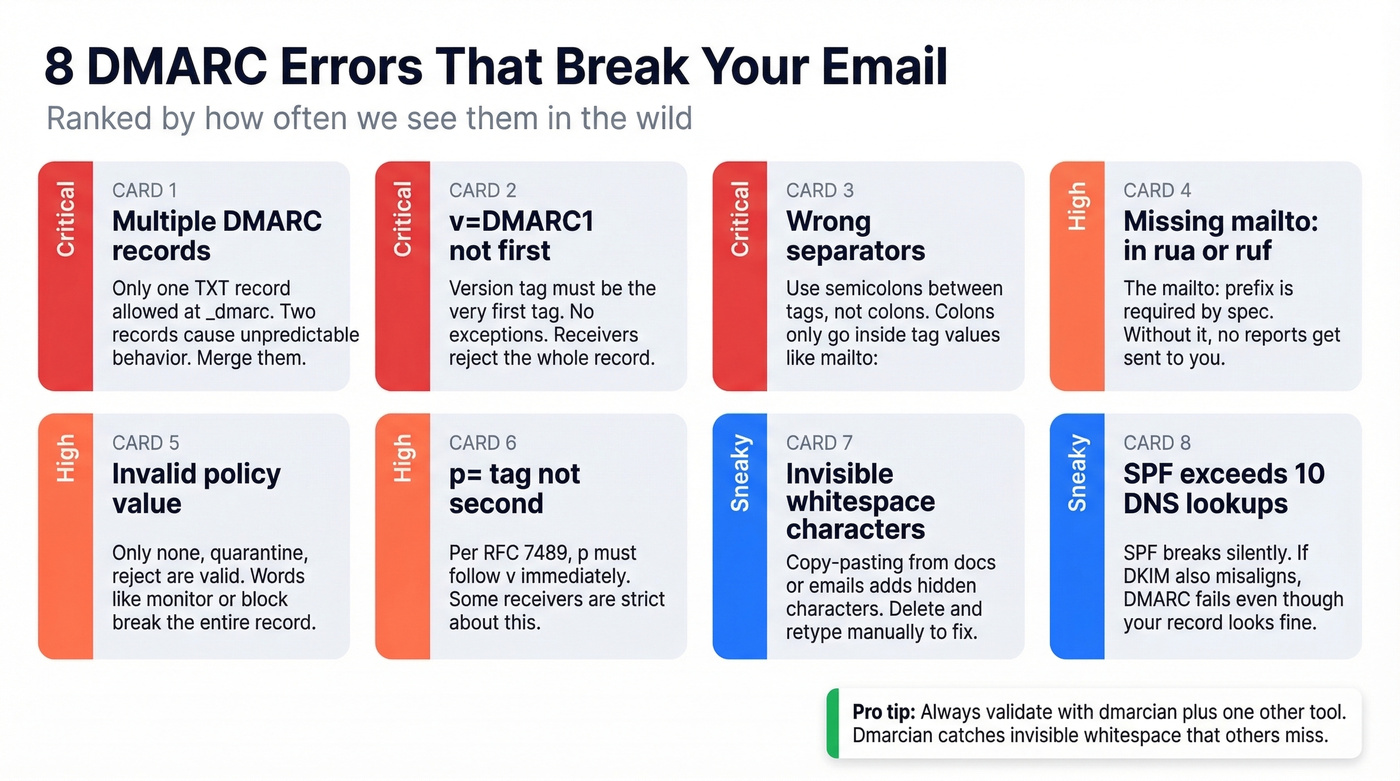
1. Multiple DMARC records. The spec requires exactly one TXT record at _dmarc.yourdomain.com. Two records cause unpredictable behavior. Merge them into one.
2. Missing or misplaced v=DMARC1. The version tag must be first. No exceptions.
❌ p=reject; v=DMARC1; rua=mailto:dmarc@example.com
✅ v=DMARC1; p=reject; rua=mailto:dmarc@example.com
3. Wrong separators. Tags are separated by semicolons, not colons. Colons only appear within tag values.
❌ v=DMARC1: p=reject: rua=mailto:dmarc@example.com
✅ v=DMARC1; p=reject; rua=mailto:dmarc@example.com
4. Missing mailto: in report URIs. The prefix is required by the spec. Without it, receivers ignore the reporting address entirely.
❌ rua=dmarc@example.com
✅ rua=mailto:dmarc@example.com
5. Invalid policy value. Only three policy values exist: none, quarantine, and reject. Anything else - monitor, block, allow - is invalid and the entire record gets ignored.
6. p= tag not immediately after v=. Per RFC 7489, p must be the second tag. Some receivers are lenient about this. Others aren't. Don't gamble.
7. Invisible whitespace or formatting characters. This is the sneaky one. Copy-pasting a DMARC record from a web UI, email, or document can introduce invisible characters - non-breaking spaces, zero-width joiners, or trailing whitespace in the hostname field. Your record looks perfect but fails validation. The fix: delete the record, retype it manually in your DNS dashboard, and recheck. Dmarcian's inspector is the best tool for catching this specific issue, and the consensus on r/DMARC backs that up.
8. SPF exceeds the 10-DNS-lookup limit. Your SPF record can include a maximum of 10 DNS-querying mechanisms (include, a, mx, redirect, exists). Exceed that and SPF returns a permanent error. If DKIM also doesn't align with your From domain, DMARC fails - even though your SPF record looks syntactically correct. Flatten your SPF includes or use an SPF macro service to stay under the limit.
Why SPF and DKIM Pass But DMARC Fails
This is the single most frustrating DMARC scenario. The answer is almost always alignment.
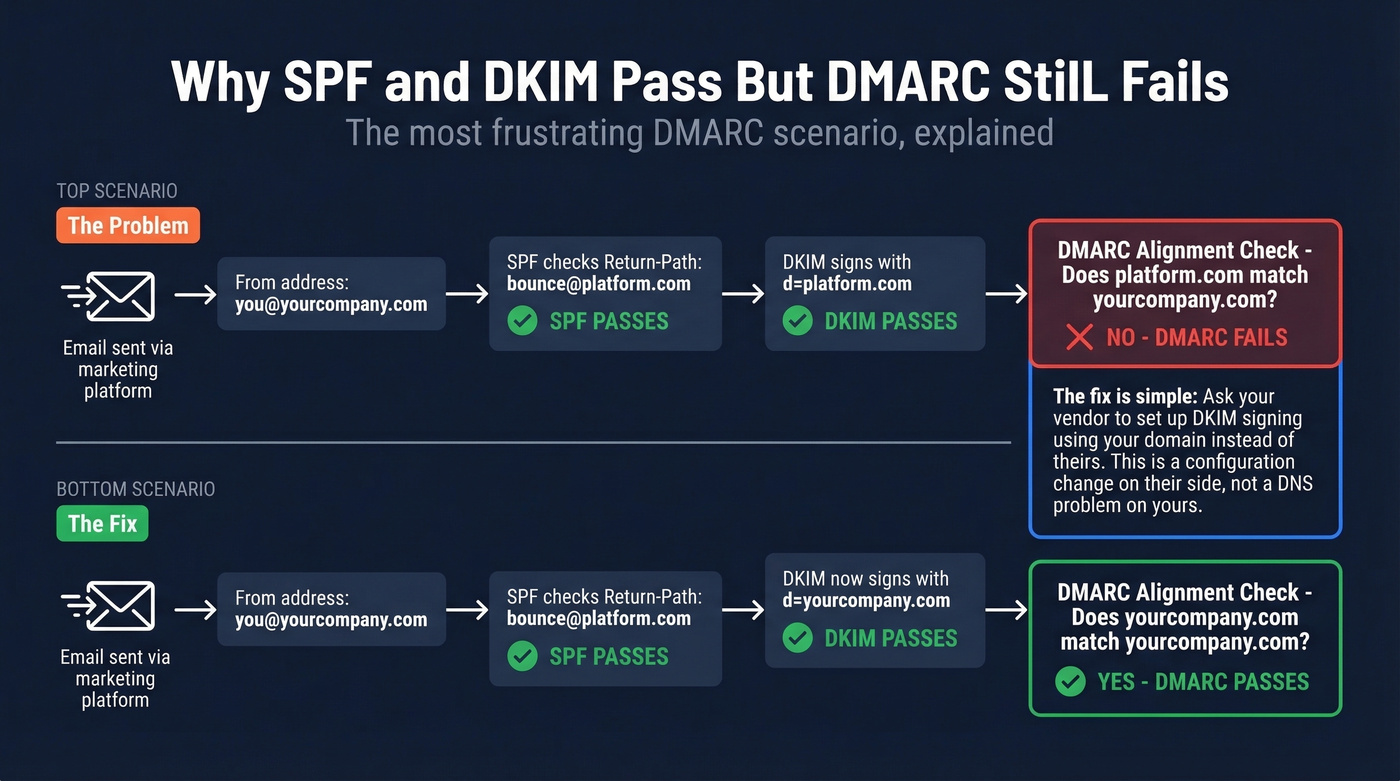
SPF checks the Return-Path domain. DKIM checks the d= signing domain. Both can pass their respective checks while neither domain matches your visible From address. When that happens, DMARC fails - because DMARC requires that at least one of those authenticated domains aligns with the From domain.
Here's the real-world version. You use a marketing automation platform to send emails on behalf of yourcompany.com. The platform's servers pass SPF because their IPs are in your SPF record. But DKIM signs with d=platform.com, not d=yourcompany.com. SPF passes, DKIM passes, DMARC fails. The fix: ask the vendor to create a DKIM signing configuration using your domain. Once they publish the key and sign with d=yourcompany.com, DMARC alignment passes.
Let's be honest - we've spent hours debugging this exact scenario for teams who were convinced their DNS was broken when the real problem was a vendor's default DKIM configuration. It's always alignment.
If two different DMARC checkers give you different results for the same domain, it's usually DNS caching or propagation delays - not a bug. Wait 30-60 minutes and recheck. If the discrepancy persists, look for the whitespace issue from the errors section above.
What to Do After Checking
Read Your Reports
The rua tag sends you aggregate reports - XML files that arrive daily from every receiver that processed mail from your domain. Key fields to watch: source_ip (who's sending as you), count (volume), policy_evaluated (what the receiver did), and auth_results (SPF/DKIM pass/fail per source).
Forensic reports (ruf) give per-message failure details, but Gmail and Outlook largely don't send them due to privacy concerns. Don't rely on ruf for visibility. Use a dedicated mailbox or a parsing tool - raw XML flooding your inbox in 2026 is inexcusable when dmarcian starts at $19.99/month and PowerDMARC starts at $8/month.
Enforce Gradually
If you're still on p=none, you're monitoring - not protected. The enforcement path: p=none, then p=quarantine with pct=10, then increase pct to 25, 50, 100, then p=reject. At each step, watch your aggregate reports for legitimate senders that fail alignment. Fix those before tightening further. Once you reach p=reject, you're eligible for BIMI - a standard that displays your brand logo next to your emails in supported inboxes.
Here's the thing: most teams obsess over DMARC policy but ignore the data feeding their outbound campaigns. A perfect p=reject record doesn't help if 15% of your list bounces and mailbox providers flag you as a spammer anyway. Authentication and data quality are two sides of the same deliverability coin.
Fix the Data Problem Authentication Can't Solve
A valid DMARC record doesn't fix a high bounce rate. If you're sending to stale or invalid addresses, sender reputation degrades regardless of authentication. Bounces are the signal mailbox providers use to decide whether you're a legitimate sender or a spammer - and no amount of SPF/DKIM/DMARC configuration changes that math. Prospeo's real-time email verification catches bad addresses before they generate the bounces that tank your domain reputation, with 98% email accuracy and a 5-step verification process that includes catch-all handling and spam-trap removal.
Skip this section if your bounce rate is already under 3%. For everyone else, authentication without list hygiene is like locking the front door while the back door is wide open.
You just locked down DMARC. Now make sure every email you send actually reaches a real inbox. Prospeo refreshes 300M+ contacts every 7 days - not every 6 weeks - so your outbound never hits stale addresses that trigger bounces.
Protect the domain reputation you just worked so hard to configure.
FAQ
How long does a DMARC record take to propagate?
Most DNS changes propagate within 15-60 minutes, but some providers cache TXT records for up to 48 hours. Check with both dig and an online tool after 30 minutes - if results match, propagation is complete.
Can I have multiple DMARC records?
No. RFC 7489 requires exactly one TXT record at _dmarc.yourdomain.com. Multiple records cause unpredictable behavior - some receivers pick the first, others fail the lookup entirely. Merge all tags into a single record.
What happens if I don't have a DMARC record?
Receiving servers treat your domain as having no DMARC policy - emails may still deliver, but you get zero visibility into spoofing attempts. You'll also fail Google and Yahoo's bulk sender requirements if you exceed 5,000 messages/day.
Do I need DMARC if I use Google Workspace or Microsoft 365?
Yes. Both platforms handle SPF and DKIM for their own sending infrastructure, but DMARC is a DNS record you must publish yourself. Neither provider creates it automatically - you need to add the TXT record at _dmarc.yourdomain.com.
How do I prevent bounces from damaging sender reputation?
DMARC doesn't measure bounce rates, but high bounces destroy sender reputation and cascade into deliverability failures that mimic authentication problems. Verify contact data before sending - tools like Prospeo catch invalid addresses before they hit your sending infrastructure, keeping bounce rates under 4% for teams running high-volume outbound.