

How to Check If an Email Domain Is Legit
APWG phishing totals exceeded 1 million in Q1 2025 and 1.13 million in Q2 2025, and the emails behind them keep getting harder to spot. Over 80% of phishing sites now use HTTPS, so that padlock icon means nothing anymore. Knowing how to check if an email domain is legit is a baseline security skill - for individuals and sales teams alike.
Most guides focus on email deliverability: whether a message can arrive. This one's about whether the domain sending it deserves your trust.
Here's the thing: if you only do one thing from this article, check the Authentication-Results header. Everything else is secondary.
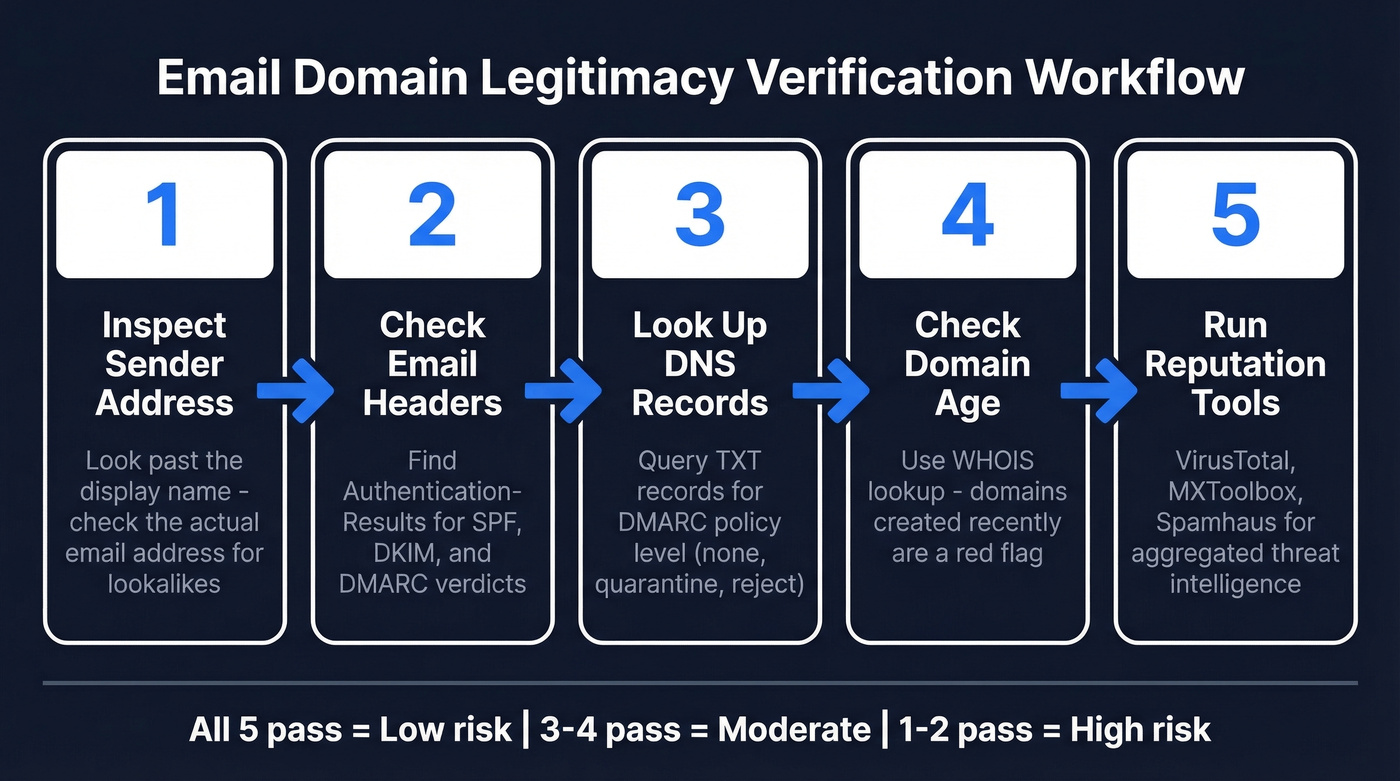
Five-Step Workflow
- Inspect the actual sender address - not the display name.
- Check email headers for SPF, DKIM, and DMARC verdicts.
- Look up DNS records for authentication policies.
- Check domain age via WHOIS - new domains are a red flag.
- Run the domain through reputation tools like VirusTotal or Spamhaus.
Quick Red Flags
Before touching headers or DNS, catch the obvious stuff:
- Display name doesn't match the address. "PayPal Support" sending from
billing@paypa1-secure.xyzis a dead giveaway. - Domain misspellings or odd TLDs. Swapped letters, added numbers,
.xyzor.topwhere you'd expect.com. - Link hover mismatch. Text says "login.paypal.com" but the URL points somewhere else entirely.
- Urgency and pressure language. "Your account will be suspended in 24 hours" - classic manipulation.
- Risky attachments.
.zip,.exe, and macro-enabled Office docs should trigger immediate suspicion.
Domain Checks Step by Step
Verify the Sender Address
The display name is cosmetic - anyone can set it to "Amazon Support." Click the sender field to reveal the actual email address.
Watch for lookalike domains where the number "1" replaces the letter "l" in paypa1-secure.xyz, or a zero replaces "o" in amaz0n-security.com. The subdomain trick is sneakier: paypal.secure-login.xyz looks legitimate at a glance, but the real domain is secure-login.xyz, and everything before it is a subdomain the attacker controls. We've seen this pattern trip up experienced security professionals, not just casual users.
Attackers fake identity three ways: exact-domain spoofing that forges the real company's From address, lookalike/cousin domains, and "friendly-from" abuse using a generic mailbox provider with a trustworthy display name.
Inspect Email Headers
This is the single most valuable step. Email headers contain the authentication verdict for every message.
How to find them:
- Gmail: Three dots → "Show original"
- Outlook: File → Properties
- Apple Mail: View → Message → All Headers
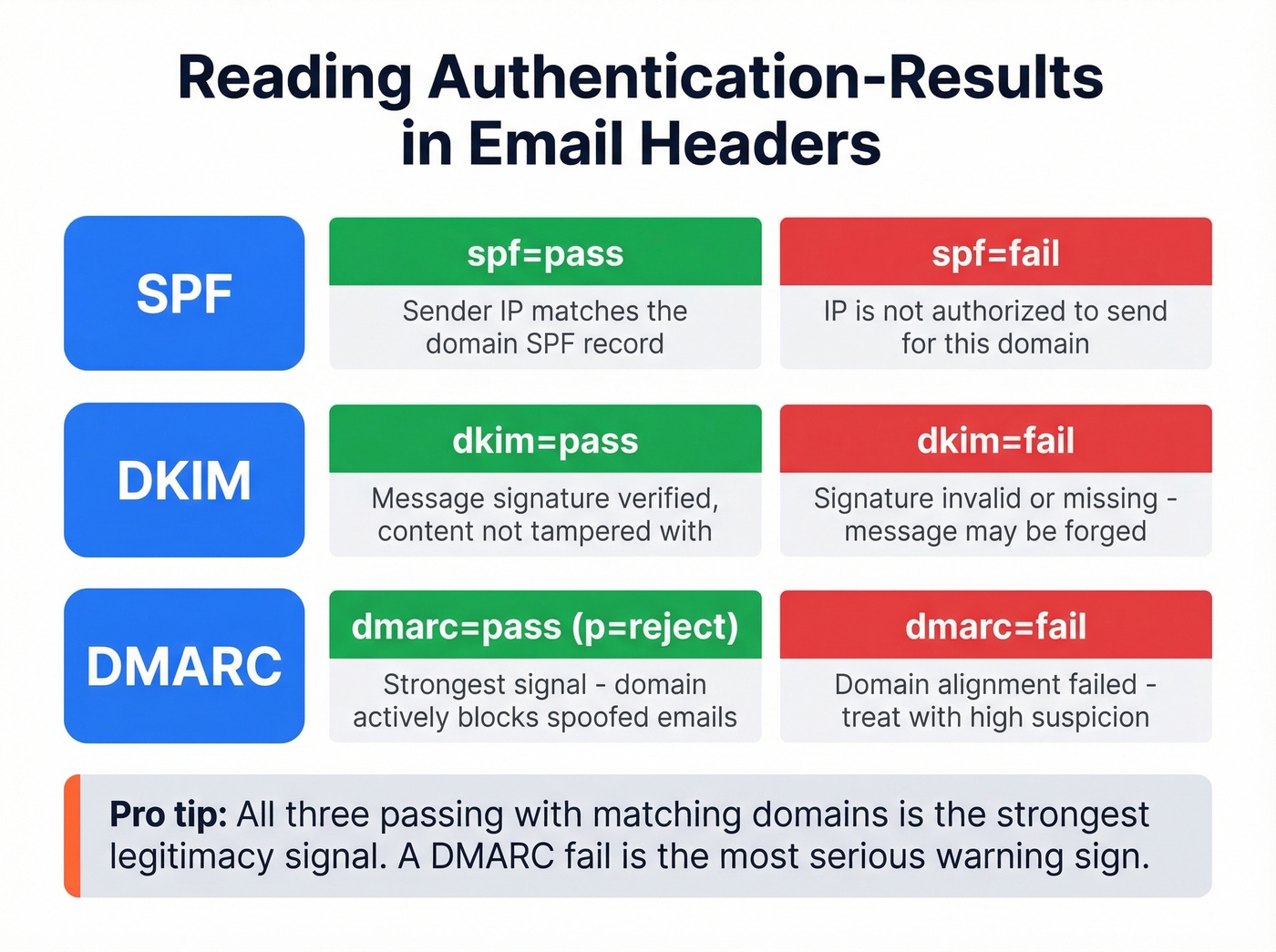
Search for Authentication-Results. You'll see verdicts for SPF, DKIM, and DMARC. Here's what a passing result looks like:
Authentication-Results: mx.google.com;
  spf=pass (sender IP matches) smtp.mailfrom=company.com;
  dkim=pass header.d=company.com;
  dmarc=pass (p=REJECT) header.from=company.com
A pass on all three with matching domains is the strongest signal you can get. A fail on any - especially DMARC - is a serious warning. Without DMARC enforcement, spoofed emails can still reach your inbox even if SPF or DKIM records exist. I've seen perfectly formatted phishing emails sail past SPF checks because the target domain published no DMARC policy at all.
Look Up DNS Records
SPF, DKIM, and DMARC records live in DNS as TXT records. Query them with MXToolbox or dig commands if you're comfortable with the terminal. DMARC lives at _dmarc.yourdomain.com.
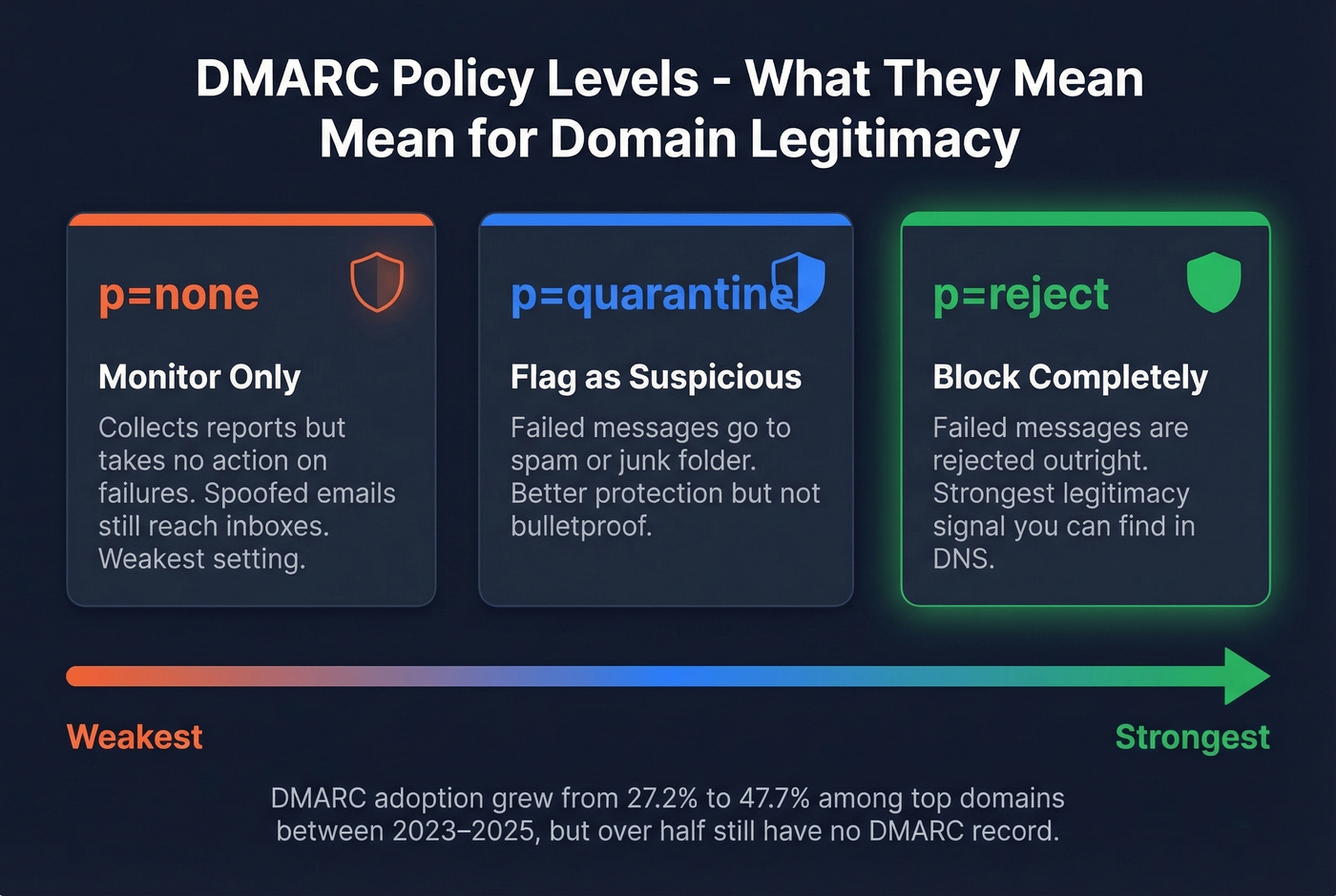
DMARC has three policy levels:
p=none- monitors only, the weakest settingp=quarantine- treats failures as suspiciousp=reject- blocks failures outright
A domain running p=reject is the strongest legitimacy signal you'll find in DNS.
DMARC adoption rose from 27.2% to 47.7% among the top 1.8 million domains between 2023 and 2025. That still means over half of domains have no DMARC record. Absence isn't proof of fraud, but it's a yellow flag worth noting alongside your other checks.
If you want to go deeper on alignment (the part most people miss), see DMARC alignment.
Check Domain Age via WHOIS
Phishing domains are disposable. Attackers register them, run campaigns for a few weeks or months, then abandon them.
Let's be honest: WHOIS checks are overrated as a standalone signal. But they're a useful data point alongside everything else. Use ICANN Lookup or whois.domaintools.com. If the domain was created last month and it's sending "urgent account notifications," you've got your answer.
Reputation Tools
Manual checks are thorough, but reputation tools aggregate intelligence from multiple sources at once. Think of each tool as a different angle on the same question - no single engine catches everything.
| Tool | What It Checks | Best For |
|---|---|---|
| VirusTotal | Aggregated security-engine results | Fastest single-domain verdict |
| MXToolbox | DNS + blacklist status | Full authentication health check |
| Google Safe Browsing | URL safety verdict | Checking links before clicking |
| Spamhaus | Industry blacklists | Known spam sources |
| PhishTank | Community-reported phishing URLs | Crowdsourced phishing confirmation |
| Cisco Talos | Historical email traffic patterns | Deeper traffic context |

One thing that trips people up: domain reputation and IP reputation aren't the same. Mailbox providers evaluate three separate domain identities - the From address, the Return-Path, and the DKIM signing domain. A domain can have a clean IP but a trashed domain reputation, or vice versa. (If you're troubleshooting this in outbound, start with Return Path and your tracking domain.)

You just learned five steps to check if an email domain is legit. Now imagine running all five - DNS checks, MX validation, catch-all handling, spam-trap removal, and honeypot filtering - automatically on every email in your pipeline. Prospeo does exactly that at 98% accuracy for ~$0.01 per email.
Stop eyeballing headers. Let 5-step verification do it at scale.
Score the Risk
After running through the five steps, tally your results:
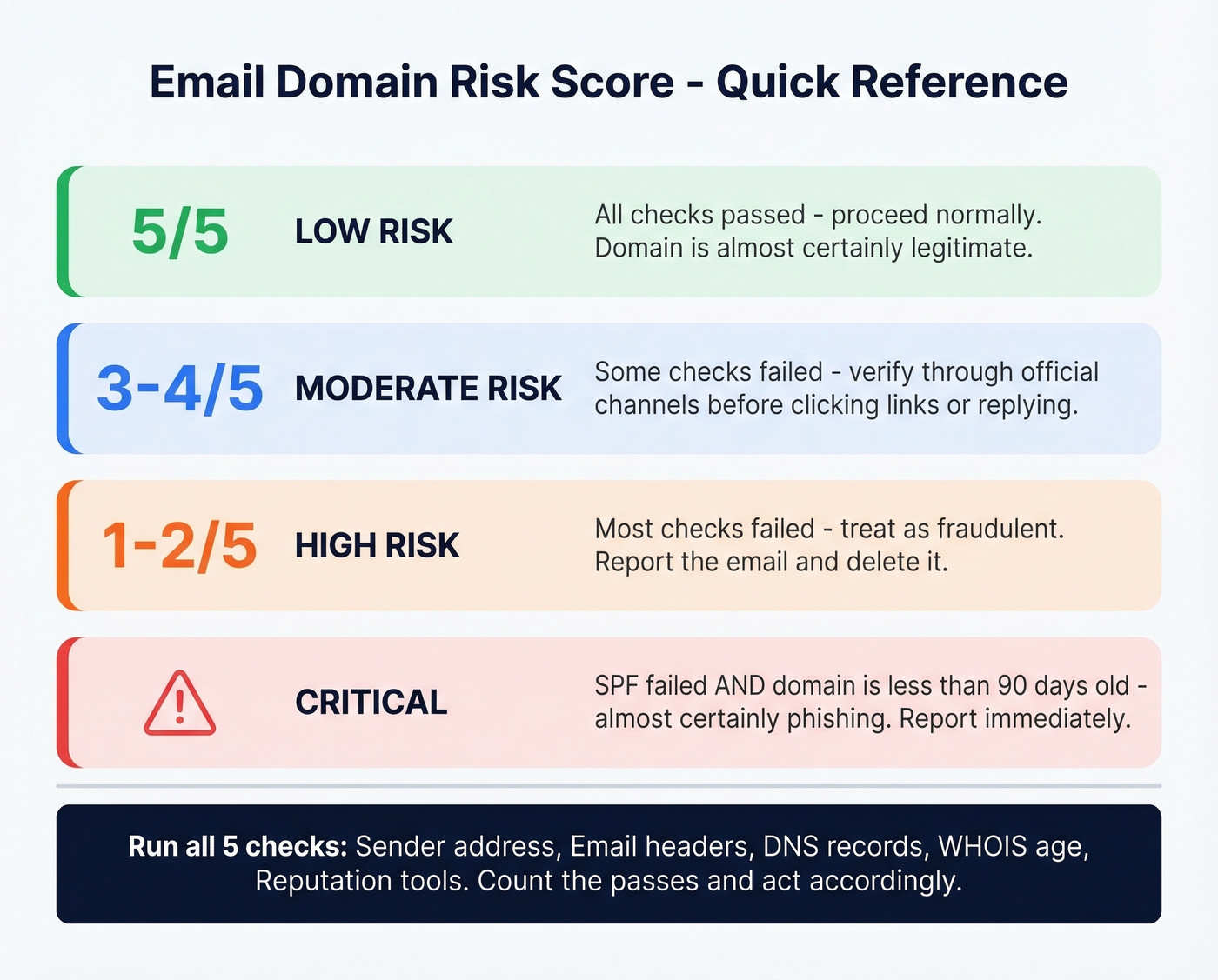
| Checks Passed | Risk Level | Action |
|---|---|---|
| 5 of 5 | Low | Likely legitimate - proceed normally |
| 3-4 of 5 | Moderate | Verify through official channels before engaging |
| 1-2 of 5 | High | Treat as fraudulent - report and delete |
| SPF fail + domain age < 90 days | Critical | Almost certainly phishing - report immediately |
A question that comes up regularly on r/phishing is whether there's a simple way to verify domain legitimacy without being a security expert. This scoring table is that simple way. Run the checks, count the passes, act accordingly.
B2B Teams: Verify Before Outreach
Everything above works for checking a single suspicious email. But if you're an SDR team uploading thousands of prospect leads, you can't WHOIS-check every domain manually. We've watched teams tank their sender reputation in a single afternoon by skipping domain verification on a bulk import.
Prospeo runs every email through a 5-step verification process covering DNS checks, MX validation, catch-all handling, spam-trap removal, and honeypot filtering - delivering 98% email accuracy before a single message leaves your outbox. The free tier covers 75 emails per month, and paid plans run about $0.01 per email.
If you're doing this for outbound, it's also worth monitoring email bounce rate and using dedicated email reputation tools to catch issues early.
One bad domain in a bulk import can torch your sender reputation overnight. Prospeo's proprietary verification infrastructure checks every email against spam traps, honeypots, and catch-all domains before you hit send - with data refreshed every 7 days, not the 6-week industry average.
Protect your domain reputation before your next campaign goes out.
If the Domain Is Fake
If your checks confirm a fraudulent domain, act fast:
- Don't click any links or download attachments. If you already did, disconnect from the network.
- Report it using your email client's "Report phishing" button - this trains spam filters for everyone.
- Verify through official channels. Type the company's URL manually into your browser. Don't trust any link in the suspicious email.
- Change passwords if you entered credentials on a phishing page, starting with the compromised account.
- Enable 2FA on every account that supports it. Even compromised passwords become useless with a second factor.
Skip the "freeze your credit" panic unless you actually entered financial information. Focus on the accounts you know were exposed.
FAQ
Can you tell if a domain is legit just from the email address?
Not reliably. The sender address can be spoofed through exact-domain forgery or lookalike domains. You need to check email headers for SPF/DKIM/DMARC results and run the domain through reputation tools like VirusTotal or Spamhaus to confirm legitimacy.
What's the fastest way to check domain reputation?
Paste the domain into VirusTotal - it queries 70+ security engines and returns a verdict in seconds. For DNS-level authentication checks, MXToolbox covers blacklists, MX records, and SPF/DKIM/DMARC health in a single scan.
How do B2B teams verify email domains at scale?
Most teams use a verification platform that checks DNS, MX, and mailbox data automatically - catching bad domains, spam traps, and catch-all addresses before they damage sender reputation. Prospeo handles this with 98% accuracy at roughly $0.01 per email, with a free tier of 75 emails per month.