

How to Find Corporate Email Addresses Without Burning Your Domain
You send 500 cold emails on Monday. By Wednesday, 180 have bounced, your domain reputation is in the gutter, and your sequences are landing in spam. That's not a hypothetical - it's what happens when you skip verification and trust a tool advertising 95% accuracy when benchmarks show roughly 17-80%.
Learning how to find corporate email addresses the right way isn't about finding a better list. It's about fixing the workflow.
What You Actually Need
Three things. That's it.
One workflow, not fifteen tools. Company domain, decision-maker, email pattern, finder, verification. That's the whole chain. Never send unverified emails. A bounce rate above 5% tanks your domain reputation, and one in six emails never reaches the inbox - don't make it worse. A tool that handles finding and verification in a single step saves you from the CSV-cleanup purgatory most teams get stuck in.
The 5-Step Workflow to Find Work Emails
Most guides list nine different methods and leave you more confused than when you started. You don't need nine methods. You need one reliable workflow and a verification step.
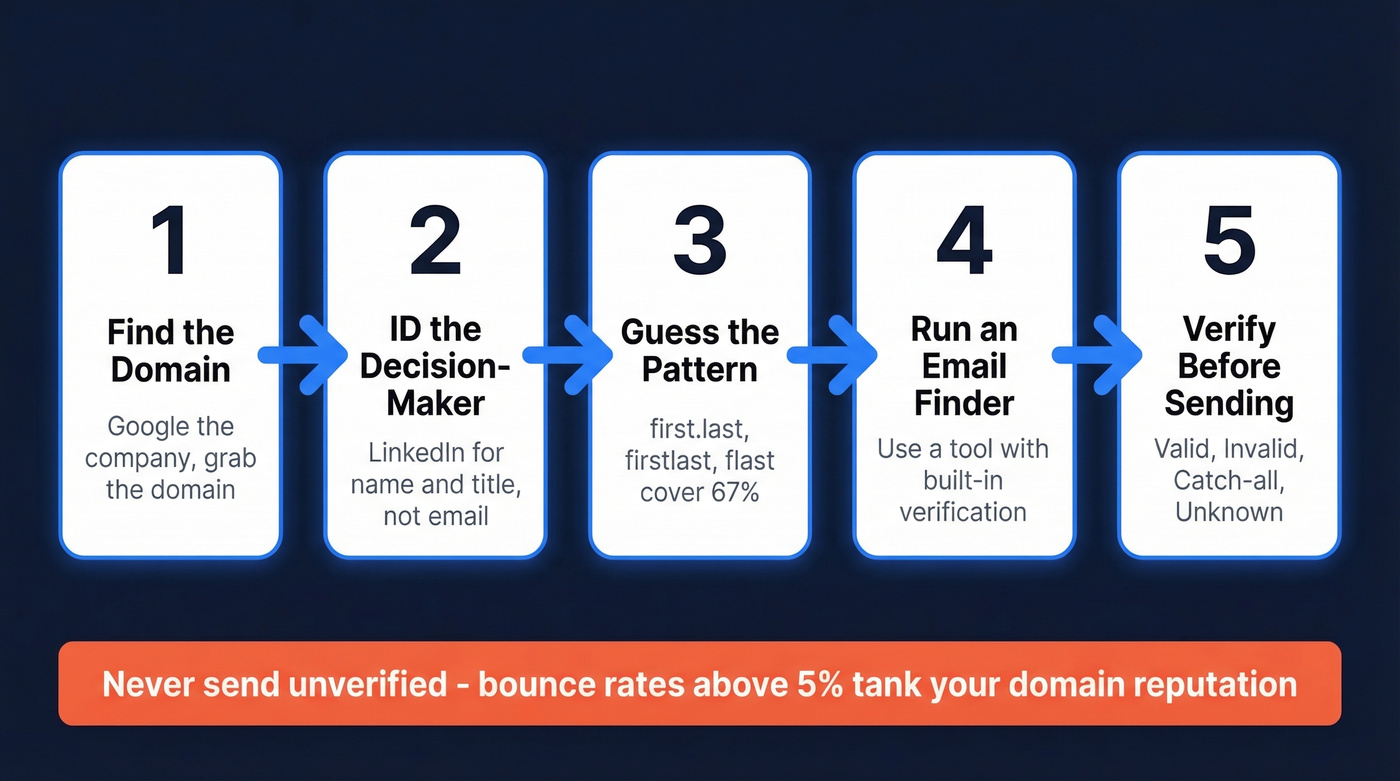
1. Find the Company Domain
Google the company name, visit their website, grab the domain. For companies with multiple domains or subsidiaries, use the site:companyname.com Google operator to confirm which domain their team actually uses for email. Takes thirty seconds.
If you only have a company name and no domain, most email finder tools can resolve a company name to a domain automatically through their company search feature. Don't waste time hunting manually.
2. Identify the Decision-Maker
LinkedIn only shows an email on about 2-3% of profiles. You're there for the person's name and title, not their inbox. It's great for finding the right people, but you still need a separate enrichment step to get emails.
Browse in Private Mode so you don't tip off your prospect before you're ready to reach out. For hospitality, local services, or SMB targets, check review sites like TripAdvisor or Yelp - owner and manager names surface regularly in responses to reviews.
3. Guess the Email Pattern
Before you reach for a tool, understand what you're looking for. Corporate email formats follow predictable patterns:
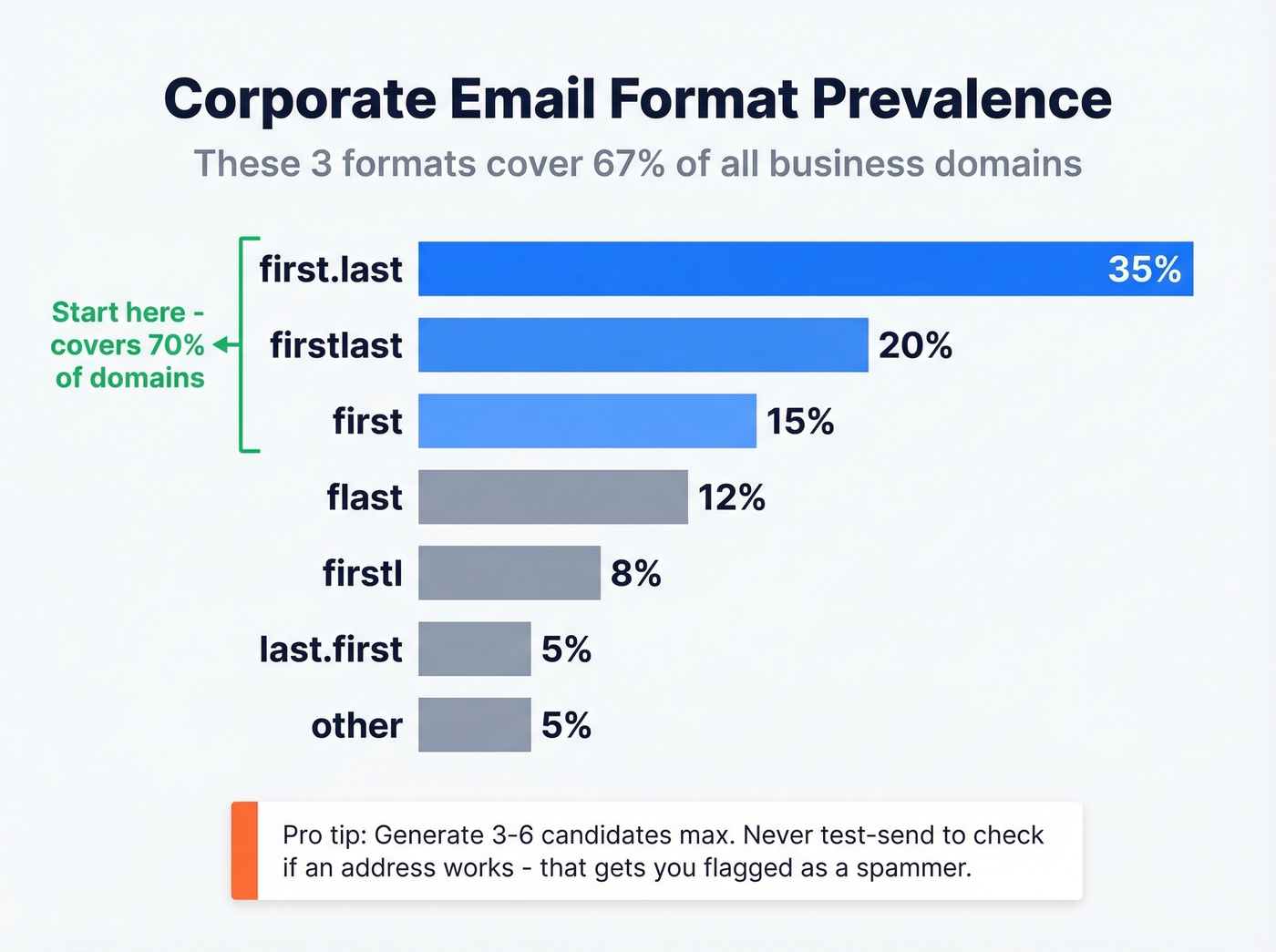
| Format | Prevalence |
|---|---|
| first.last | 35% |
| firstlast | 20% |
| first | 15% |
| flast | 12% |
| firstl | 8% |
| last.first | 5% |
| other | 5% |
Generate 3-6 candidates max. first.last, firstlast, and flast cover roughly 67% of all corporate domains. Never test-send to check if an address works - that's how you get flagged as a spammer.
4. Use an Email Finder Tool
This is where the workflow either works or falls apart. The difference between tools isn't database size - it's whether verification is built into the finding step or bolted on after.
| Tool | Free Tier | Starter Price | Best For |
|---|---|---|---|
| Hunter | 50 searches/mo | $49/mo (500) | Domain-level pattern search |
| Snov.io | 50 credits/mo | $39/mo (1,000) | Teams wanting bundled outreach features |
| Anymail Finder | 100 credits | From $14/mo | Budget-conscious - pay only for verified |
| Findymail | - | $49/mo (1,000) | Enrichment-heavy workflows |
We've tested most of these extensively. Prospeo runs 5-step verification with catch-all handling, spam-trap removal , and honeypot filtering built into every lookup - not a separate step you bolt on later. Data refreshes every 7 days versus the 6-week industry average, and the platform draws from 300M+ professional profiles with 98% email accuracy.
Here's a number worth knowing: in Hunter's own verification benchmark of 15 tools and 3,000 emails, the top performer hit just 70% overall accuracy. Marketing pages claiming 95%+ are everywhere. Treat them with skepticism.
If your average deal size is under $10k and you're sending fewer than 500 emails a month, you don't need a $15k/year data platform. A focused finder with built-in verification will outperform a bloated database you'll never fully use.
5. Verify Before You Send
Even with a good finder, you need a decision framework for what comes back:
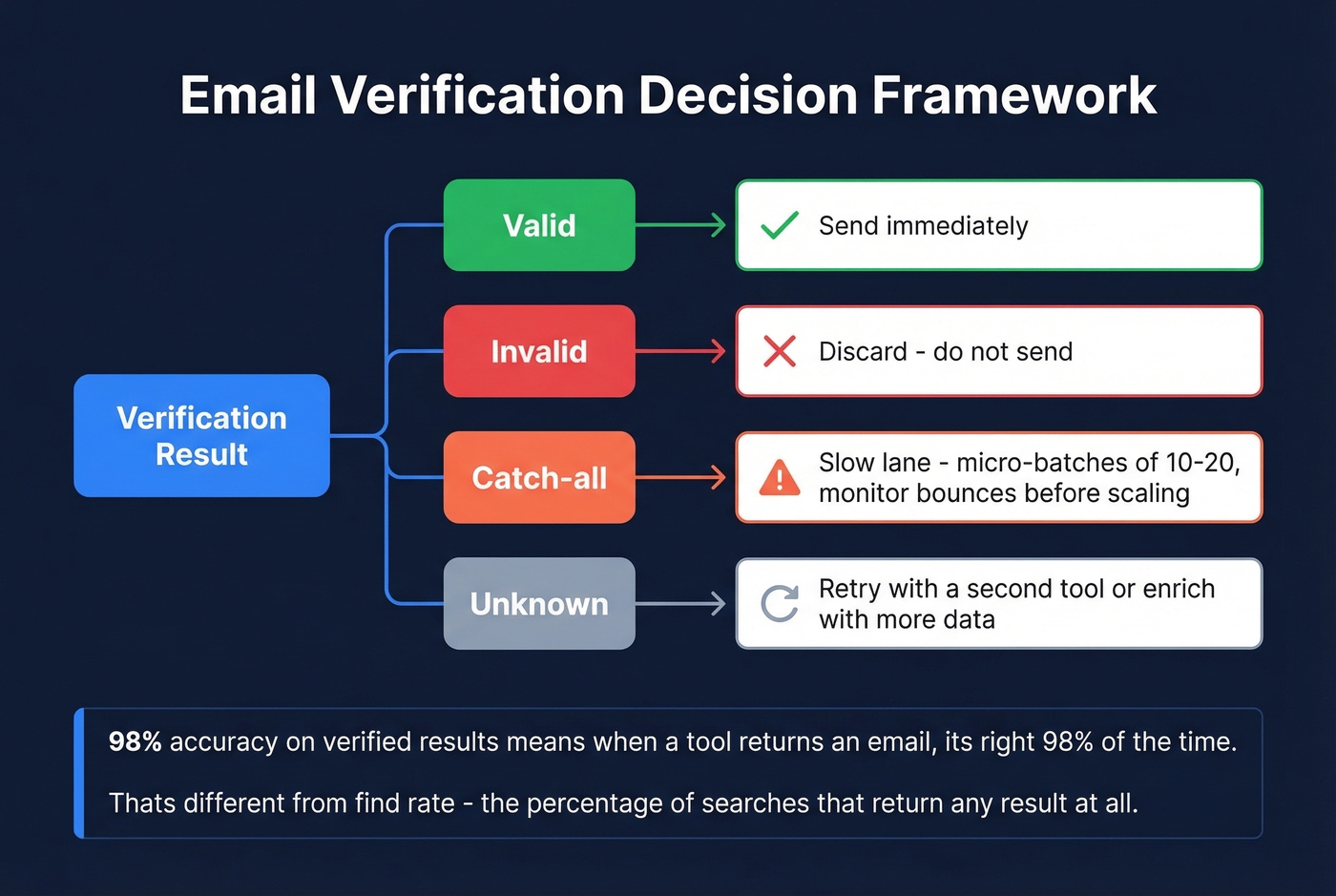
- Valid - send.
- Invalid - discard immediately.
- Catch-all - slow lane. Send in micro-batches of 10-20 and monitor bounces before scaling.
- Unknown - retry with a second tool or enrich with additional data points.
One thing that trips people up: "98% accuracy on verified results" means when a tool returns an email, it's right 98% of the time. That's different from find rate - the percentage of searches that return any result at all. Find rate varies by domain type and search method. Don't confuse the two metrics when comparing tools.
Gmail delivers to the inbox 87.2% of the time, but Microsoft sits at just 75.6%. Your verification step matters more than your subject line.

Most teams lose deals before they start - bouncing off bad emails, burning domain reputation, stitching together finders and verifiers. Prospeo runs 5-step verification with catch-all handling and spam-trap removal built into every lookup. 300M+ profiles, 98% email accuracy, data refreshed every 7 days. At $0.01 per email, you stop paying for guesswork.
Find corporate emails that actually land - 75 free lookups, no card required.
Benchmarks That Actually Matter
Cold email benchmarks paint a clear picture: open rates run 27-35%, reply rates hover at 5-6%, and the bounce rate threshold you need to stay under is 5%. Go above that and you're damaging deliverability for every future campaign.
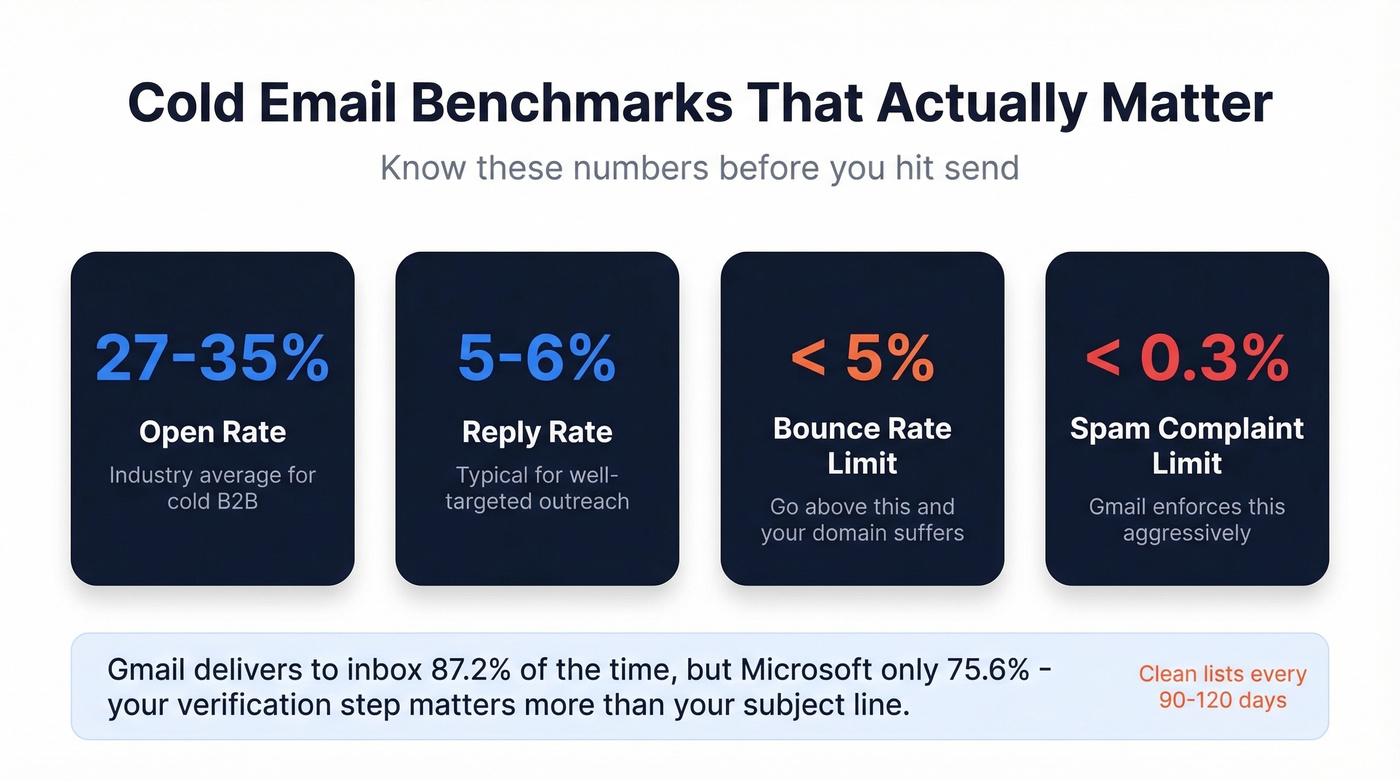
Spam complaint rates above ~0.3% reduce inbox placement fast - Gmail enforces this aggressively. In our experience, teams that skip list hygiene for even one quarter see bounce rates creep back above 5%. Clean your lists every 90-120 days. Remove inactive contacts, re-verify aging emails, and treat hygiene like infrastructure, not a one-time task.
If you're trying to fix deliverability end-to-end, start with an email deliverability guide and a dedicated email reputation monitor.
Compliance in 60 Seconds
The fines are real, and ignorance isn't a defense.
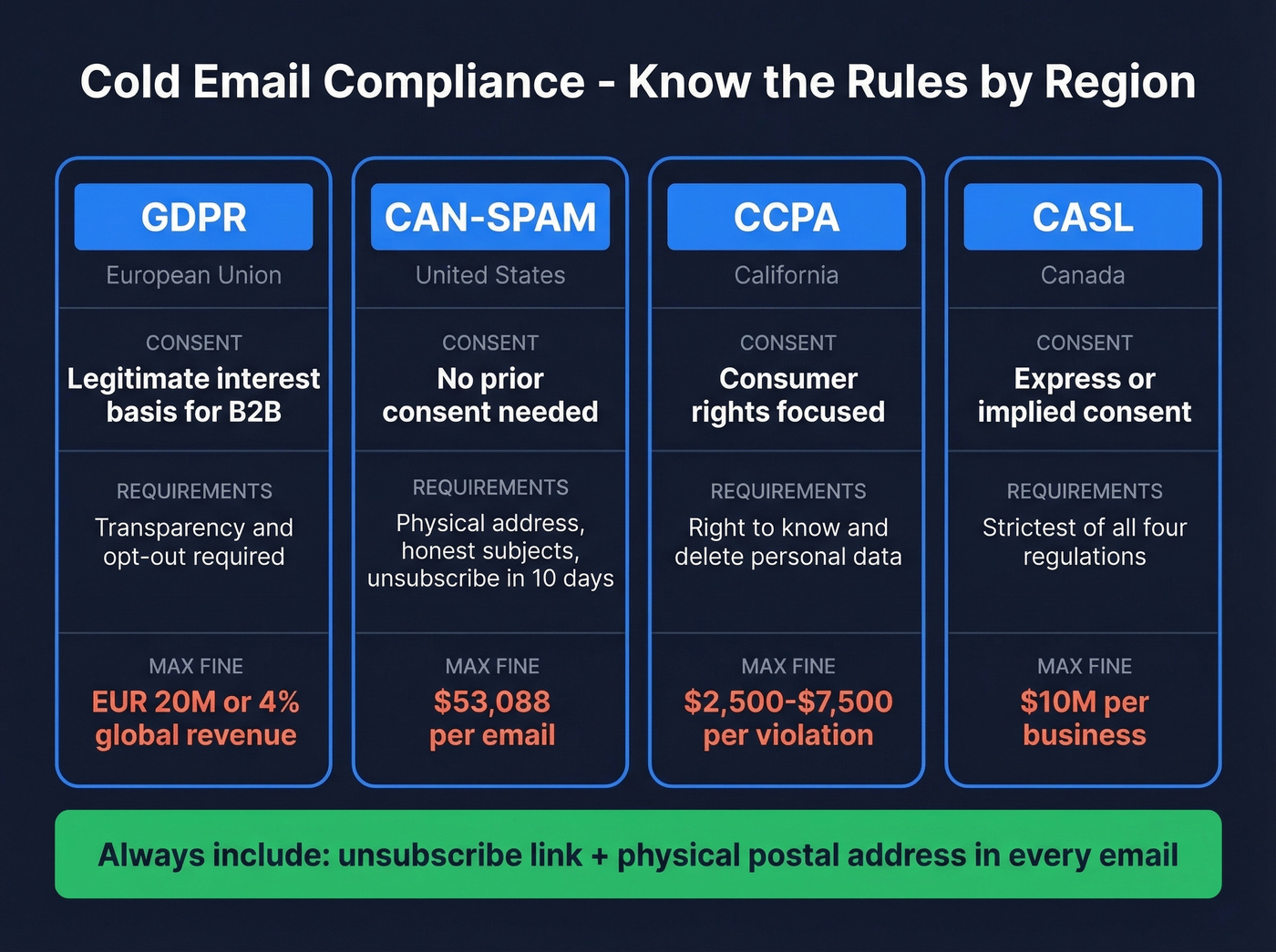
GDPR (EU): Legitimate interest basis for B2B. Transparency and opt-out required. Up to EUR 20M or 4% of global revenue. CAN-SPAM (US): No prior consent needed. Requires physical address, honest subjects, unsubscribe within 10 business days. Up to $53,088 per email. CCPA (California): $2,500-$7,500 per violation. CASL (Canada): Up to $10M for businesses.
Always include an unsubscribe link and your physical postal address. Skip this if you want to learn about compliance the expensive way.
You just read that the top email verifier in Hunter's benchmark hit only 70% accuracy. Prospeo's proprietary infrastructure delivers 98% on verified results - no third-party email providers, no bolted-on verification. One step: find, verify, send. Teams using Prospeo book 35% more meetings than Apollo users and keep bounce rates under 4%.
Replace your entire find-verify-clean stack with one tool that actually works.
FAQ
Is cold emailing corporate addresses legal?
Yes, in most B2B contexts. CAN-SPAM allows opt-out-based outreach without prior consent. GDPR requires legitimate interest, which typically applies when contacting someone in their professional capacity about something relevant to their role. Always include an unsubscribe link and physical address.
How accurate are email finder tools?
Independent benchmarks show 17-80% accuracy across tools - a wide range. The gap between "found" and "verified" is where domains get burned. Prospeo's 5-step verification delivers 98% accuracy on returned results; most competitors sit below 70% in third-party tests.
Can I find corporate email addresses for free?
Yes, with volume limits. Prospeo offers 75 free email lookups plus 100 Chrome extension credits monthly - enough for small campaigns. Hunter gives 50 searches, Snov.io 50 credits. For 500+ lookups per month, expect to pay $39-$99 depending on the tool.
How do I find someone's business email with only their name?
Start with LinkedIn to confirm their current company and title, then use an email finder tool with the person's full name and company domain. The tool cross-references known email patterns for that domain and returns a verified result - the most reliable method without guessing.
How do I reach a specific department at a company?
Use a domain search tool to pull all known addresses at that company, then filter by title or department keywords. Most finder tools let you search by role - like "Head of Marketing" - so you can target the right team without scraping entire org charts.