

How to Send Email Without Showing Recipients in 2026
You CC'd the whole department. Karen in accounting hit Reply All to say "thanks." Then Dave replied all to ask Karen to stop replying all. Then someone looped in HR. What should've been a simple announcement turned into a 47-message thread that haunted your inbox for three days.
With 361.6 billion emails sent and received every day across 4.4 billion users, this kind of chaos plays out constantly. If you need to send email without showing recipients, BCC is the answer. But there's more to it than clicking a button.
The Short Version
- Use BCC in your email client. Put your own address in the "To" field, everyone else in BCC. Done.
- Beyond ~50 recipients, switch to mail merge (Mailmeteor, GMass). BCC blasts at that size trip spam filters and violate policy limits.
- Verify your list first. Bounces from invalid addresses kill your sender reputation. Run your list through a verification tool before you hit send.
BCC Setup: Gmail, Outlook, Yahoo, and Apple Mail
The mechanics are nearly identical across clients. The only difference is where the BCC field hides.
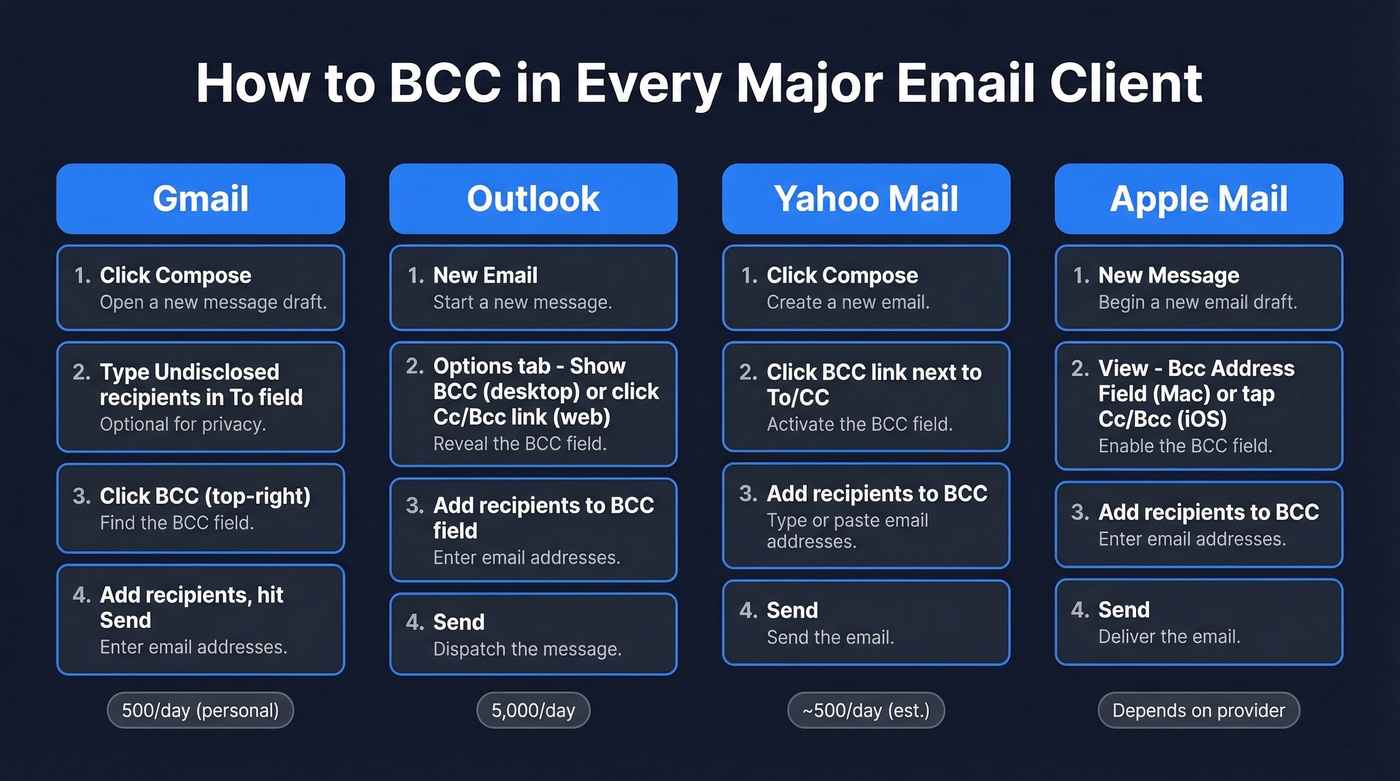
Gmail (Web + Mobile)
- Click Compose.
- In the "To" field, type
Undisclosed recipients <your@email.com>. This is a display convention, not a feature - it just keeps recipients from seeing you addressed the email to yourself. - Click BCC (top-right of the compose window).
- Paste or type your recipient addresses. If you're pasting from a spreadsheet, make sure addresses are comma-separated.
- Send.
Gmail caps you at 100 recipients per message regardless of account type. Personal accounts max out at 500 emails per day; Google Workspace accounts get 2,000 per day. These limits run on a rolling 24-hour window, not a midnight reset.
On mobile: Open the Gmail app, tap Compose, tap the small down arrow next to "To," and the BCC field appears.
Outlook (Desktop + Web + Mobile)
Desktop (classic): Open a new email. Go to the Options tab and click Show BCC. The field appears below CC - add your recipients there.
Outlook on the web: Click New Message, then click the Cc/Bcc link to the right of the "To" field. The BCC field drops down.
Mobile app: Tap the down arrow or Cc/Bcc toggle next to the "To" field in a new message.
Put your own address in "To" if you want to keep the recipient list completely hidden. Outlook.com allows up to 500 recipients per message and 5,000 daily recipients, with a separate cap of 1,000 non-relationship recipients daily.
Yahoo Mail
- Click Compose.
- Click the BCC link next to the "To" and "CC" fields.
- Add recipients in the BCC field. Put your own address in "To."
- Send.
Yahoo's sending limits aren't well-documented. Expect roughly 500 emails per day and ~100 recipients per message, though the exact numbers shift based on account age and standing.
Apple Mail (macOS + iOS)
macOS: Open a new message. Go to View > Bcc Address Field in the menu bar. The BCC field appears in your compose window and stays visible for future emails until you toggle it off.
iOS (iPhone/iPad): Tap the Cc/Bcc field in a new message to expand it. Add recipients to BCC. Apple Mail uses your email provider's sending limits, so Gmail or Outlook accounts follow their respective caps.
"Undisclosed Recipients" Isn't a Feature
Half the internet treats "undisclosed recipients" like it's a button you click. It's not.
BCC is the mechanism that hides recipients. "Undisclosed recipients" is just a display label - a text string you type into the "To" field so the email doesn't look like you sent it to yourself. Some email clients show it automatically when all recipients are in BCC. Others don't. Either way, the hiding happens because of BCC, not because of the label.
Sending Limits by Provider
Every provider enforces daily and per-message caps. CC, BCC, and even auto-replies all count toward these limits. If you're trying to stay under caps while still reaching a list, it helps to understand email velocity and how providers throttle sends.
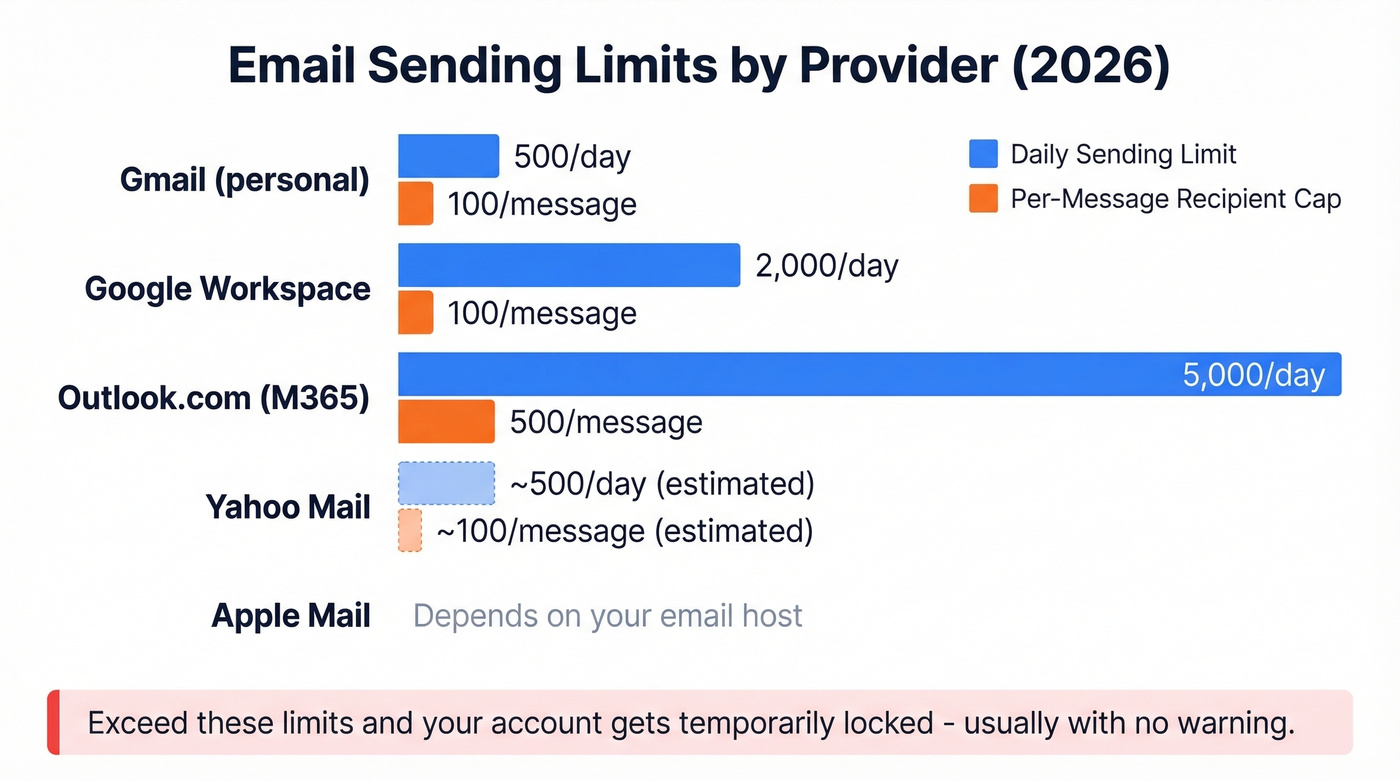
| Provider | Daily Limit | Per-Message Cap | Notes |
|---|---|---|---|
| Gmail (personal) | 500 | 100 | Rolling 24-hr window |
| Google Workspace | 2,000 | 100 | Rolling 24-hr window |
| Outlook.com (M365) | 5,000 daily recipients | 500 | 1,000 non-relationship/day |
| Yahoo Mail | ~500 (est.) | ~100 (est.) | Varies by account age |
| Apple Mail | Provider-dependent | Provider-dependent | Uses your email host's limits |
Exceed these and your account gets temporarily restricted from sending. There's usually no warning before the lockout kicks in.

BCC blasts over 50 recipients tank your sender reputation - but bad email addresses make it worse. Every bounce from an invalid address signals spam filters to throttle you. Prospeo verifies emails at 98% accuracy with a 5-step process that catches spam traps and honeypots before you hit send.
Clean your list before you BCC it. Start with 75 free verifications.
Common BCC Problems (and Fixes)
Outlook 365 shows your address in "To" instead of "undisclosed recipients." This isn't a bug. When you put your own address in the "To" field and everyone else in BCC, Outlook 365 recipients see your address as the "To" recipient. It looks slightly odd but functions correctly - BCC recipients stay hidden. There's no way to force "undisclosed recipients" as the display text in Outlook 365.
BCC emails with PDF attachments get rejected as spam. Some Outlook users report that BCC'd messages with PDF attachments bounce immediately - they don't even leave the server. The workaround: send individually, use a file-sharing link (OneDrive, Google Drive) instead of an attachment, or switch to mail merge.
Pasting a list of addresses doesn't work cleanly. Gmail needs commas between each address. Outlook is more forgiving with semicolons. The safest approach: format your list as comma-separated values before pasting. No email client will auto-format a raw column of addresses for you.
When to Stop Using BCC
BCC works fine for 5, 10, even 20 recipients. Beyond that, you're playing with fire.
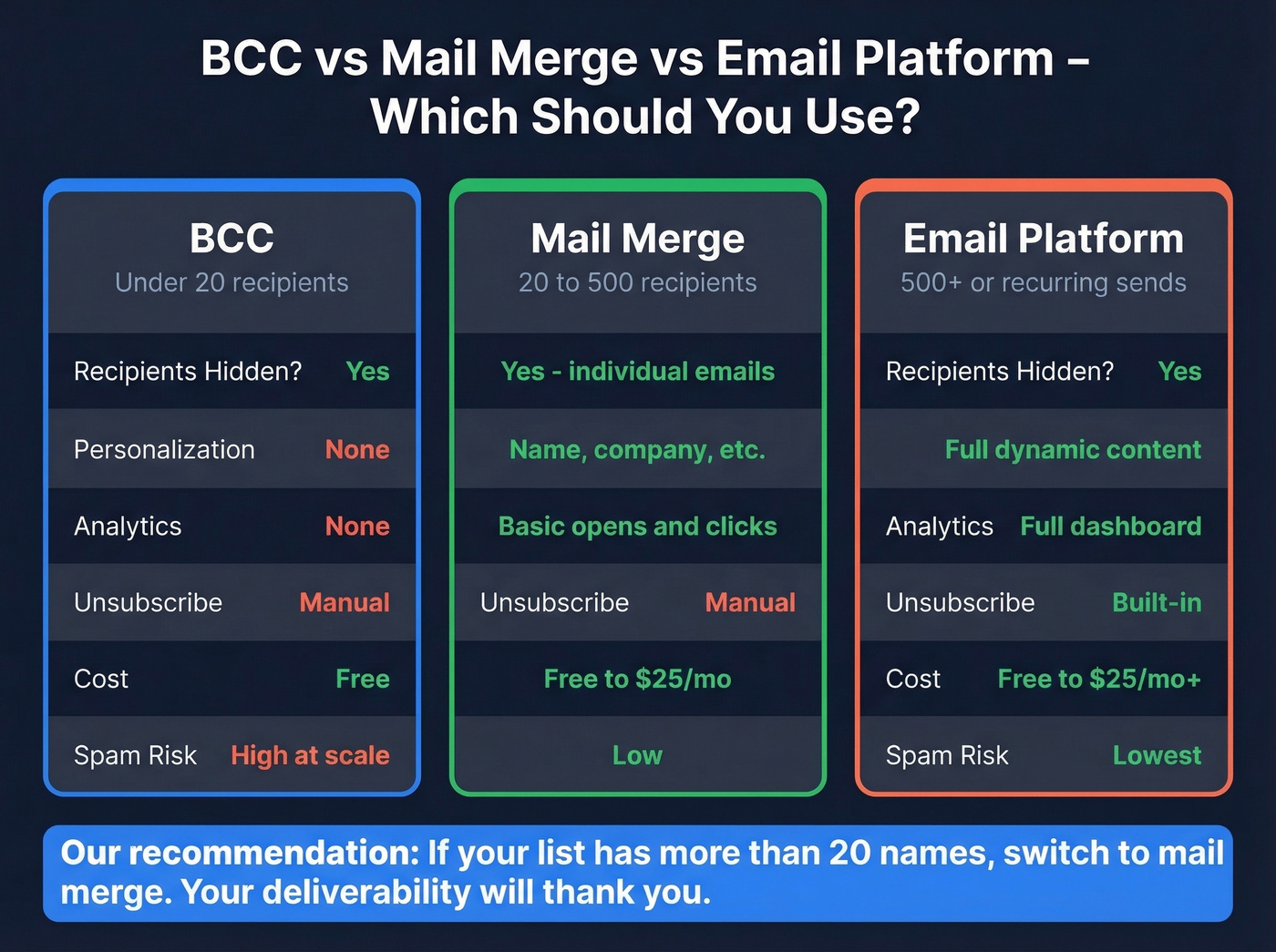
Here's the thing: most people searching for ways to hide email recipients shouldn't be using BCC at all. If your list has more than 20 names on it, you've outgrown BCC. You just haven't admitted it yet.
The reason is mechanical. When you BCC 50+ people, your email server sends one identical message to dozens of recipients from a single IP with no engagement signals. BCC blasts at that size trip spam filters and land in junk more often, even if your content is perfectly fine. You also get zero analytics - no open tracking, no click tracking, and messy bounce handling compared to mail merge or a proper email platform. And there's no built-in unsubscribe link, which CAN-SPAM requires for commercial email.
Mail merge tools solve all of this. They send individual copies of each email, so recipients can't tell it was a group send, and you get basic tracking. We've tested several of these tools across client campaigns, and the deliverability difference between a 50-person BCC blast and 50 individual mail-merge sends is night and day.
| BCC | Mail Merge | Email Platform | |
|---|---|---|---|
| Best for | Under 20 recipients | 20-500 recipients | 500+ / recurring |
| Recipients hidden? | Yes | Yes (individual emails) | Yes |
| Personalization | None | Yes (name, company) | Yes |
| Analytics | None | Basic | Full |
| Unsubscribe | Manual | Manual | Built-in |
| Cost | Free | Free-$25/mo | Free-$25/mo+ |
Good mail merge options: Mailmeteor (free tier: 50 emails/day), GMass (~$25/mo), Mailchimp (free plan available), Brevo (free plan available). If you're doing this for outbound, compare options in our guide to AI bulk email senders.
Verify Before You Send
Invalid addresses bounce. Bounces compound BCC's already-suspicious nature. Spam filters flag your domain.
This is where people get burned. We've seen teams send a 40-person BCC email with 8 bad addresses, watch the bounces pile up, and then wonder why their next perfectly legitimate email to a client landed in spam. Your sender reputation is fragile, and BCC gives it zero protection.
Prospeo's email verification catches spam traps and honeypots before they damage your domain, with 98% accuracy across 143M+ verified emails. The free tier covers 75 verifications per month - enough for most one-off BCC sends - and beyond that, verifying 100 addresses costs about a dollar. If you want to go deeper on bounce mechanics and benchmarks, see our guide to email bounce rate and how to reduce it.
CAN-SPAM and GDPR Compliance
CAN-SPAM applies to all commercial email - including B2B. There's no exception for "it's just a quick update to clients." The requirements:
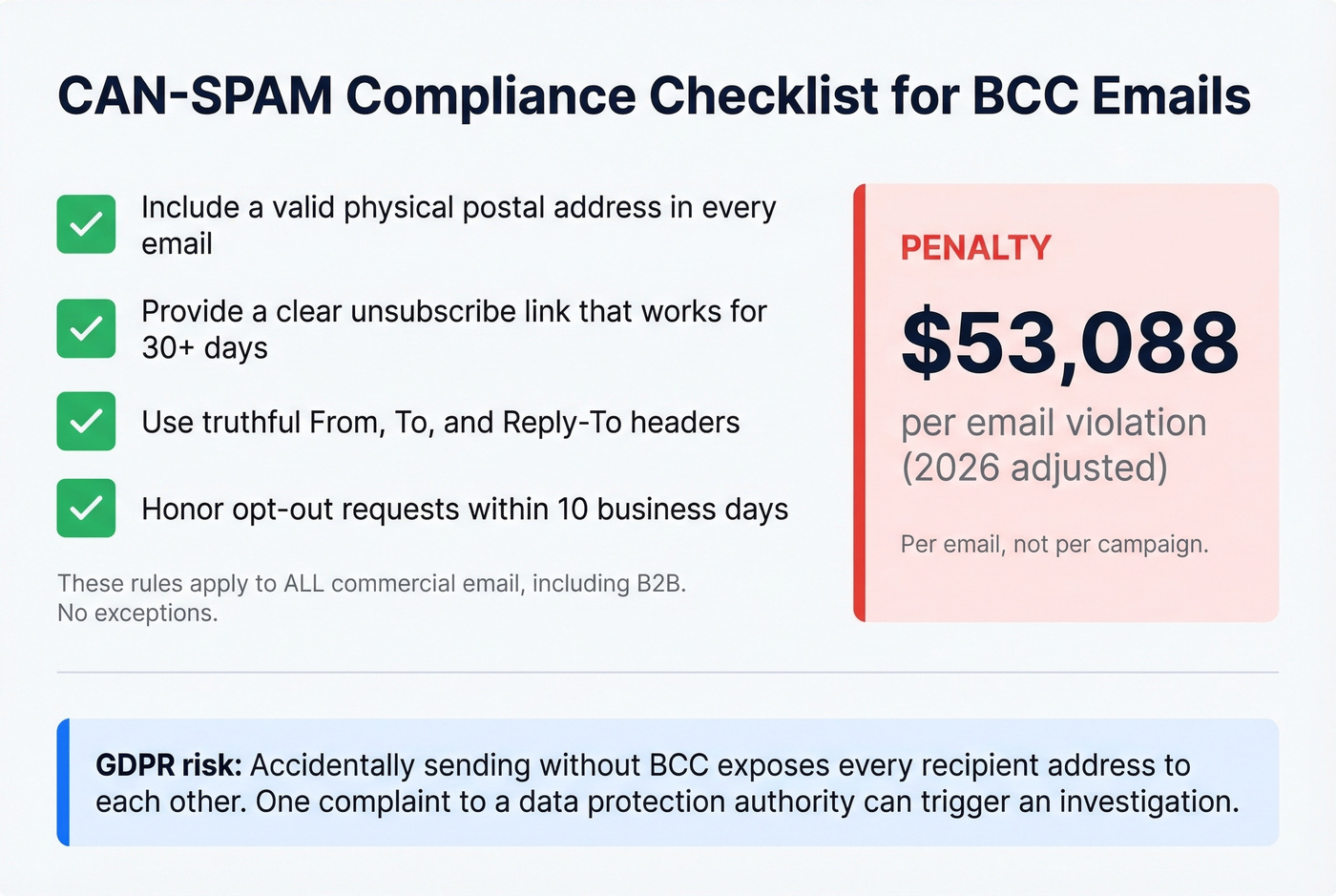
- A valid physical postal address in the email
- A clear unsubscribe mechanism that works for at least 30 days after sending
- Truthful "From," "To," and "Reply-To" headers
- Honor opt-outs within 10 business days
The penalty? Up to $53,088 per email (2026 adjusted figure). Per email, not per campaign.
On the GDPR side, the risk is equally real. One Reddit user reported accidentally sending a mass email without BCC, exposing every recipient's address. A recipient filed a complaint with the ICO. That's an entirely avoidable headache.
Let's be honest: if you're sending commercial email to more than a handful of people, BCC alone doesn't meet compliance requirements. You need an unsubscribe mechanism at minimum. Skip BCC entirely for anything resembling a marketing campaign and use a proper email platform instead. For a deeper deliverability playbook, read our email deliverability guide.
FAQ
How do I send email without showing recipients?
Put your own address in the "To" field and add all recipients to the BCC (blind carbon copy) field. Every major email client - Gmail, Outlook, Yahoo, Apple Mail - supports this. Beyond 20-50 recipients, switch to mail merge for better deliverability.
What's the difference between BCC and CC?
CC (carbon copy) shows all recipients to each other. BCC (blind carbon copy) hides them - each person only sees their own address. Use BCC when recipients shouldn't know who else received the email.
Can BCC recipients see each other?
No. Each BCC recipient sees only their own address. If someone in the To or CC field hits Reply All, BCC recipients may see that reply thread, but their own addresses stay hidden from the group.
How many people can I BCC at once?
Gmail caps you at 100 per message, Outlook.com allows up to 500. Beyond 50 recipients, use mail merge instead - BCC at scale triggers spam filters and gives you zero visibility into engagement. Verify addresses first to avoid bounces that hurt deliverability.