

How to Set Up DKIM: The Only Guide That Doesn't Waste Your Time
You're doing this at 11 PM because your campaign just bounced, your DMARC report is a wall of red, and the r/sysadmin consensus is brutal: "Everything I read is cryptic." Here's the thing - learning how to set up DKIM is usually a 15-minute job on most platforms. The problem isn't complexity. It's that the steps always get buried under 2,000 words of theory you don't need right now.
What You Need Before Starting
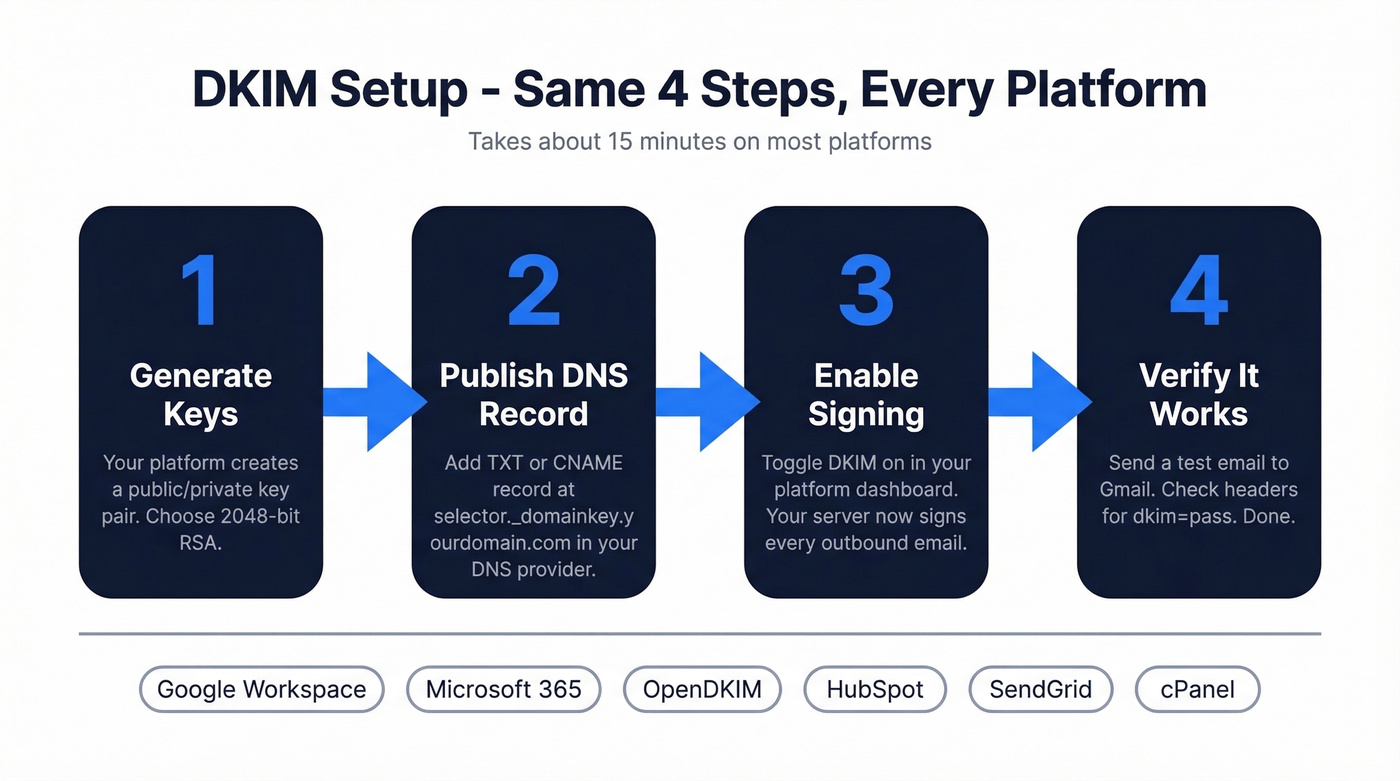
DKIM is a DNS record plus a signing config on your mail server or ESP. The setup is platform-specific but always follows the same pattern: generate keys, publish DNS record, enable signing, verify. Jump to your platform: Google Workspace | Microsoft 365 | Self-Hosted | [HubSpot & SendGrid](#third-party-esps-hubspot - sendgrid).
What DKIM Is (and Why It Matters)
DKIM - DomainKeys Identified Mail - associates a domain name with an email message via a cryptographic signature verified through DNS. The receiving server confirms your email wasn't tampered with in transit and actually came from your domain.
It's one leg of a three-part system. SPF verifies which servers can send on your behalf. DKIM verifies message integrity. DMARC tells receivers what to do when either fails. You need all three.
This isn't optional for serious sending. Google and Yahoo's bulk sender requirements mandate DKIM for high-volume senders - commonly summarized as 5,000+ emails per day. Even below that threshold, missing authentication can hurt inbox placement. We've seen deliverability drop fast after a DNS migration breaks a signing record.
How DKIM Works
Your mail server holds a private key. When it sends an email, it generates a cryptographic signature of the message headers and body, then attaches it as a DKIM-Signature header.
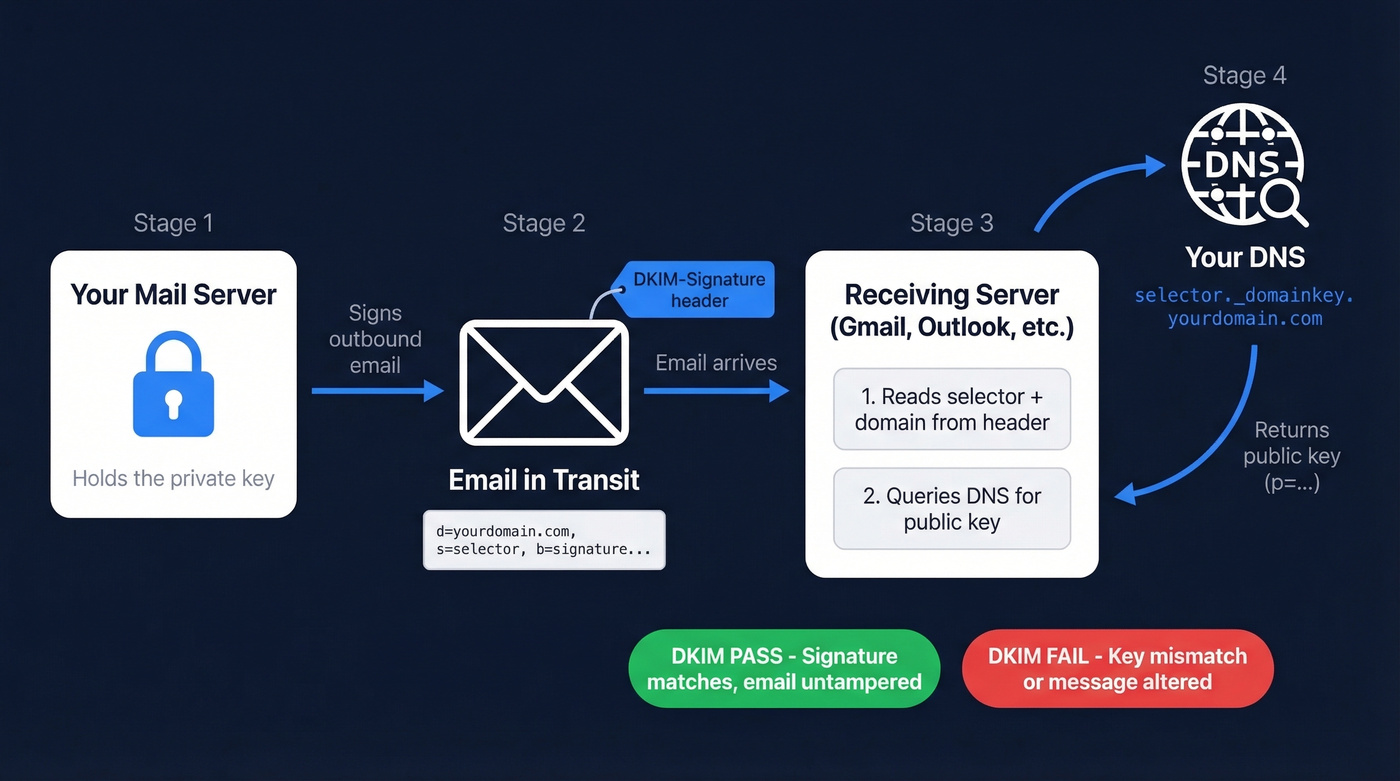
The receiving server reads the signature, extracts the selector and domain, then looks up the public key at selector._domainkey.yourdomain.com in DNS. If the public key verifies the signature and it matches the message content, DKIM passes. If anything was altered - or the keys don't match - it fails.
Private key signs, public key verifies. Everything else is implementation detail.
DKIM Record Anatomy
Two sets of tags matter: the DNS TXT record (your public key) and the DKIM-Signature header on each email.
DNS TXT Record Tags:
| Tag | Purpose |
|---|---|
v= |
Version - always DKIM1 |
k= |
Key type, typically rsa |
p= |
Public key in base64 |
t= |
Flags - y means testing mode |
DKIM-Signature Header Tags:
| Tag | Purpose |
|---|---|
d= |
Signing domain |
s= |
Selector name |
a= |
Algorithm, typically rsa-sha256 |
h= |
Signed header fields |
bh= |
Body hash in base64 |
b= |
Signature in base64 |
How to Set Up DKIM for Your Platform
Google Workspace
- Open the Admin Console, then go to Apps > Google Workspace > Gmail > Authenticate Email.
- Select your domain. Click Generate New Record. Choose 2048-bit key length.
- Google gives you a TXT record. Add it to your DNS at
google._domainkey.yourdomain.comwith the value startingv=DKIM1; k=rsa; p=... - Wait for DNS propagation - typically 10-70 minutes - then return to the Admin Console and click Start Authentication.
- While you're in DNS, confirm your SPF record includes
include:_spf.google.com. Without it, SPF fails even when DKIM passes. (If you want examples and provider-specific syntax, see our SPF record guide.)
Google's official DKIM setup guide covers edge cases if you're running multiple domains.
Microsoft 365
Microsoft doesn't enable DKIM by default for custom domains - and doesn't tell you.
- Open the Defender portal, then navigate to Email & Collaboration > Policies > Email Authentication > DKIM.
- Select your domain. Click Enable. Microsoft prompts you to create two CNAME records:
selector1._domainkeypointing toselector1-<yourdomain>._domainkey.<tenant>.onmicrosoft.comselector2._domainkeypointing toselector2-<yourdomain>._domainkey.<tenant>.onmicrosoft.com
- Add both CNAMEs in your DNS provider. Wait for propagation.
- Return to Defender and toggle DKIM on. If it fails, the CNAMEs haven't propagated - give it an hour and retry.
The two-selector pattern is designed to support key rotation. Microsoft's DKIM documentation walks through tenant-specific details.
Self-Hosted (OpenDKIM)
A self-hosted environment requires generating your own key pair and configuring your MTA to sign outbound messages. This is where things get tricky, so take it step by step.
- Generate a 2048-bit RSA key pair:
openssl genrsa -out dkim_private.pem 2048 openssl rsa -in dkim_private.pem -pubout -out dkim_public.pem - Extract the public key, strip headers and footers, join into one line, and publish it as a TXT record at
yourselector._domainkey.yourdomain.comwith valuev=DKIM1; k=rsa; p=<base64-public-key>. - Configure OpenDKIM's
KeyTableandSigningTableto map your domain to the private key and selector. A mismatch between the selector in DNS and the selector in your signing config means instant failure - this is where most self-hosted setups break. - Restart OpenDKIM and your MTA. Send a test email and check headers.
If you're running Postfix, the OpenDKIM README has config examples that'll save you a lot of guesswork.
Third-Party ESPs (HubSpot & SendGrid)
Your marketing team set up HubSpot six months ago and nobody configured DKIM. You know this because outbound emails show "via hubspot.com" next to your sender address. Sound familiar?
HubSpot: Go to Settings > Domain & URLs > Connect a Domain > Email Sending. HubSpot provides two CNAME records for DKIM. Add them to your DNS.
SendGrid: Navigate to Settings > Sender Authentication > Authenticate Domain. Choose your DNS host, enter your domain, and SendGrid generates CNAME records. Add them, then verify in the SendGrid UI.
Cloudflare Users: Turn off CNAME flattening and disable the proxy (orange cloud to grey cloud) for your email sending domain's DNS records. Cloudflare proxying and CNAME flattening can break CNAME-based authentication. This catches people constantly.
DKIM in cPanel
If you're on shared hosting, cPanel simplifies things. Navigate to Email Deliverability in your cPanel dashboard, select your domain, and cPanel shows you whether a record already exists. If it doesn't, click Manage and then Install the suggested record - cPanel generates the key pair and publishes the DNS record automatically.
Verify the record is live by checking the status indicator on the same page. Done in two minutes.

Setting up DKIM keeps your domain off blocklists. But authentication only matters if the addresses you're sending to are real. Prospeo's 5-step verification delivers 98% email accuracy - so your freshly authenticated domain stays clean.
Don't burn your DKIM-signed reputation on bad data.
How to Verify Your Record
Send an email to a Gmail account, open it, click the three dots, and select Show original. Search for dkim=pass. If you see it, you're done. (If you want a deeper walkthrough, see how to verify DKIM is working.)
For command-line verification, run dig TXT selector._domainkey.yourdomain.com and confirm the response contains your public key. Online tools like MxToolbox DKIM Lookup work too - enter your selector and domain, look for "valid DKIM key record."
Don't troubleshoot until at least two hours have passed. Most "broken" setups are just slow DNS propagation.
The duplicated domain pitfall: Many DNS providers auto-append your root domain to the record name. If you enter selector._domainkey.yourdomain.com, it becomes selector._domainkey.yourdomain.com.yourdomain.com. Enter just selector._domainkey and let the provider append the domain. We've debugged this exact issue more times than we can count.
Common Configuration Mistakes
- Publishing the private key instead of the public key. The
p=value in DNS must be the public key only. If you've published the private key, revoke immediately and generate a new pair. This isn't a "fix it later" situation.
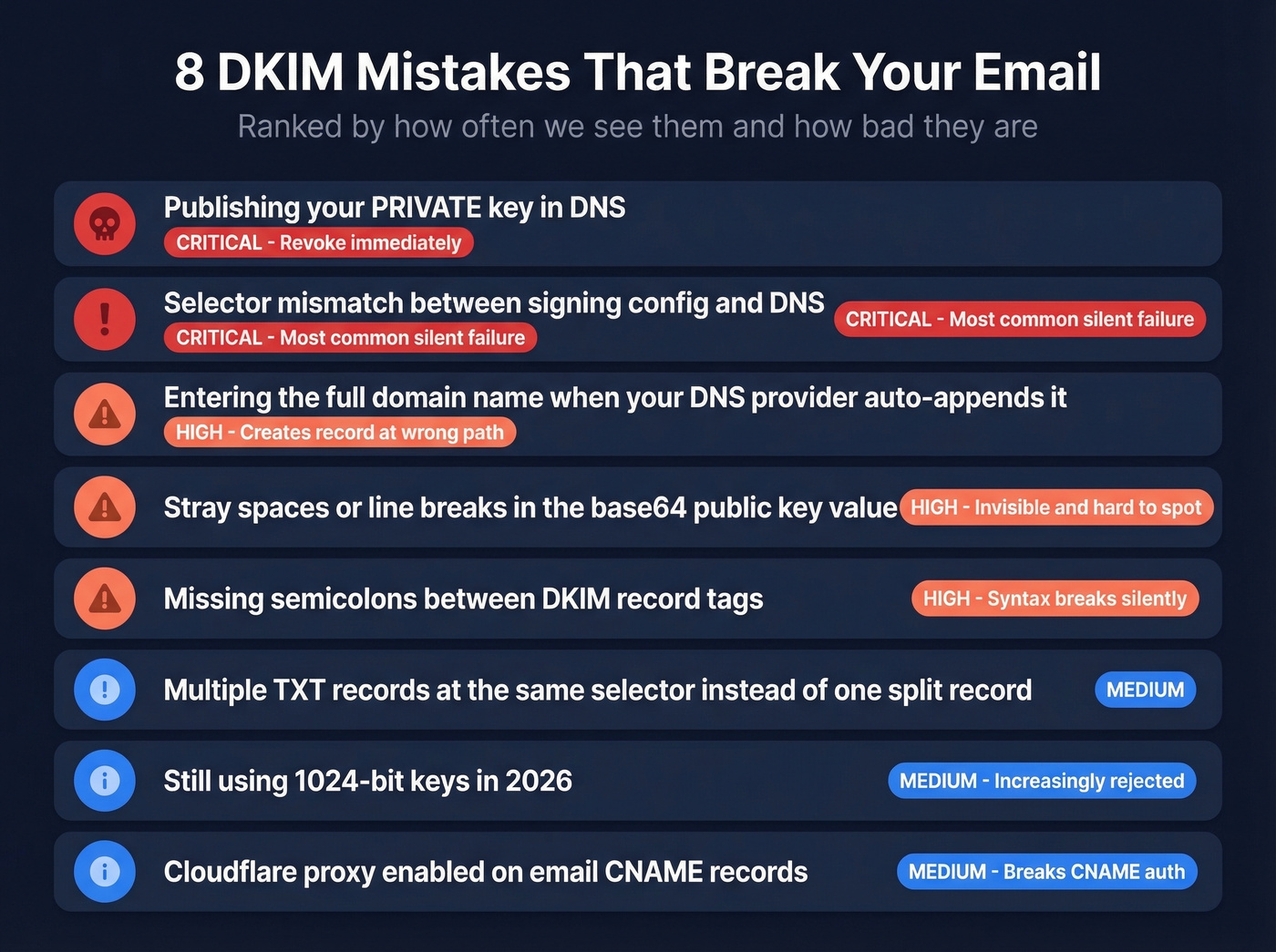
Stray spaces in the base64
p=value. Copy-paste from a terminal introduces invisible whitespace. The entire base64 string must be continuous.Missing semicolons between tags.
v=DKIM1 k=rsafails. It must bev=DKIM1; k=rsa;.Selector mismatch. In our experience, this causes more failures than any other single issue. Check your
DKIM-Signatureheader'ss=value against what's in DNS. The r/sysadmin consensus: if authentication fails silently, check your selector first.Entering the full FQDN when your provider auto-appends the domain. This creates a broken record at the wrong path.
Multiple TXT records at the same selector. If your key is too long for one TXT record, don't create two separate records. Split the value into multiple quoted strings within a single TXT record.
Still using 1024-bit keys. Weak and increasingly rejected. Rotate to 2048-bit RSA now.
Cloudflare proxy breaking CNAME-based authentication. See the Cloudflare callout in the ESP section above.
Troubleshooting Failures
When DKIM fails and you don't know why, work through this in order:
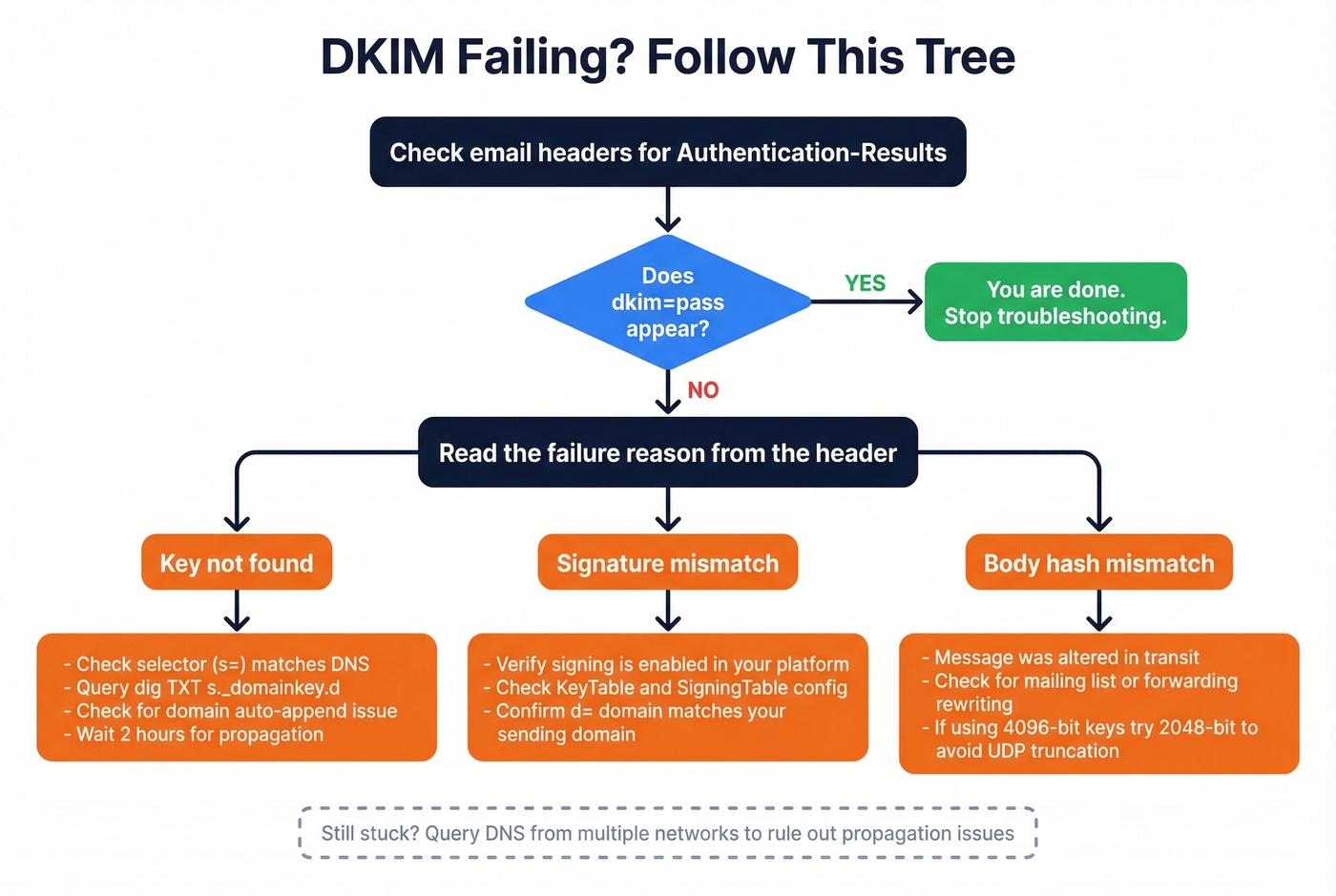
Pull full headers. Find the
Authentication-Resultsheader. Note the result code and reason string - signature mismatch, body hash mismatch, or key not found.Check
d=ands=values from theDKIM-Signatureheader. These tell you exactly where the receiver looked for your public key.Query DNS from multiple resolvers. Run
dig TXT s._domainkey.dfrom at least two different networks to catch propagation issues and broken CNAME chains.Validate syntax. Look for smart quotes copied from a Word doc, truncated base64, or missing semicolons. If you're using 4096-bit keys and seeing intermittent failures, drop to 2048-bit - 4096-bit can cause UDP truncation in DNS responses.
Confirm the sending system is signing. For OpenDKIM, check
KeyTableandSigningTablemappings. For ESPs, verify domain authentication status in their dashboard.
Skip this whole section if dkim=pass shows up in your headers. You're good.
DKIM Key Rotation
Rotate at least every 12 months. Generate a new key pair under a new selector, publish the new public key, configure signing with the new selector, then run both selectors in parallel for 2-7 days before retiring the old key. If you use multiple ESPs, each needs its own key and selector - don't share keys across platforms. (If you're also tightening policy, make sure you understand DMARC alignment.)
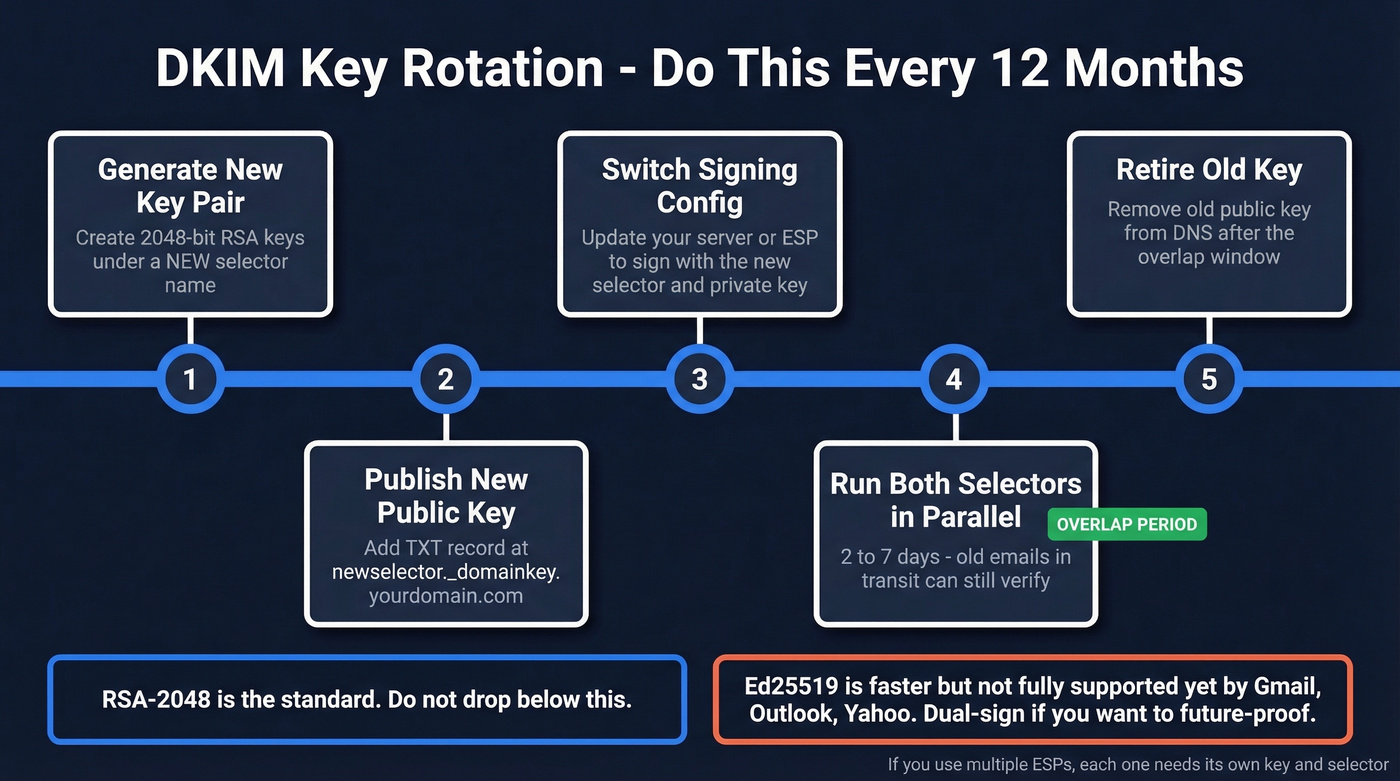
Ed25519 keys (RFC 8463) are shorter and faster than RSA, but don't drop RSA-2048 until Gmail, Outlook, and Yahoo fully support Ed25519 verification. Dual-sign if you want to future-proof.
Beyond DKIM: Protecting Domain Reputation
DKIM gets your emails authenticated. But authentication is only half the deliverability equation. If 15% of your list is dead addresses, your domain reputation tanks anyway - bounces undo everything your signing record protects. (If you’re diagnosing inboxing issues end-to-end, start with an email deliverability guide.)
We've watched teams nail their SPF/DKIM/DMARC setup and still land in spam because their contact data was garbage. Let's be honest: a perfect DKIM config means nothing if you're blasting emails to addresses that haven't existed since 2022.
Before you launch any outbound campaign, verify your list. Prospeo's 5-step email verification catches invalid addresses, spam traps, and honeypots before you hit send, keeping bounce rates under the 4% threshold that triggers mailbox provider penalties. (For benchmarks and what “good” looks like, see email bounce rate.)

You just spent 15 minutes protecting your sender reputation with DKIM. One bad list can undo all of it. Prospeo refreshes 300M+ profiles every 7 days and removes spam traps and honeypots automatically - bounce rates under 4% across 15,000+ companies.
Protect the domain you just authenticated - send to verified contacts only.
FAQ
How long does DKIM take to work?
DNS propagation typically takes 10-70 minutes, though some providers need up to 48 hours. Don't troubleshoot until at least two hours have passed - most "broken" setups are just slow propagation, not misconfiguration.
TXT record or CNAME - which should I use?
Use TXT for self-hosted setups and Google Workspace, where you control the key directly. Use CNAME when your ESP specifically instructs it - they host and rotate the key on their own DNS infrastructure.
What key length should I use?
2048-bit RSA minimum. 1024-bit keys are weak and may be rejected by major providers. Avoid 4096-bit unless you've confirmed your DNS handles large TXT records without UDP truncation issues.
Do I need SPF and DMARC too?
You need all three. SPF verifies the sending server, DKIM verifies message integrity, and DMARC tells receivers what to do when either fails. Running only one protocol leaves significant gaps in your email authentication.
Can bad contact data hurt reputation even with DKIM?
Absolutely. High bounce rates damage sender reputation regardless of authentication. Cleaning your list before every campaign is the single most effective thing you can do to protect the domain you just spent 15 minutes authenticating.