

How to Start an Email to a Client (2026 Guide)
You've got a new client, a blinking cursor, and zero confidence in your opening line. We've all been there. Knowing how to start an email to a client shouldn't require a 20-minute spiral through blog posts that all say the same thing - you need the data on what actually gets replies, plus templates you can steal right now.
The Short Answer
Use "Hi [Name]," as your greeting. A 300K-email study by Boomerang found informal greetings pull more replies than formal ones.
But here's the thing: your opening line matters 10x more than your greeting. Hyper-personalized first lines earn 8.7x more replies than generic ones (18.3% vs. 2.1%). That's not a marginal improvement - it's a different category of performance.
And none of it matters if the email bounces. Verify the address before you send. One bounced email to a new client is a terrible first impression.
What 300K Emails Reveal About Greetings
Boomerang's analysis found two things worth knowing: emails that open with a greeting get more responses than emails that jump straight into the message, and informal greetings outperform formal ones.
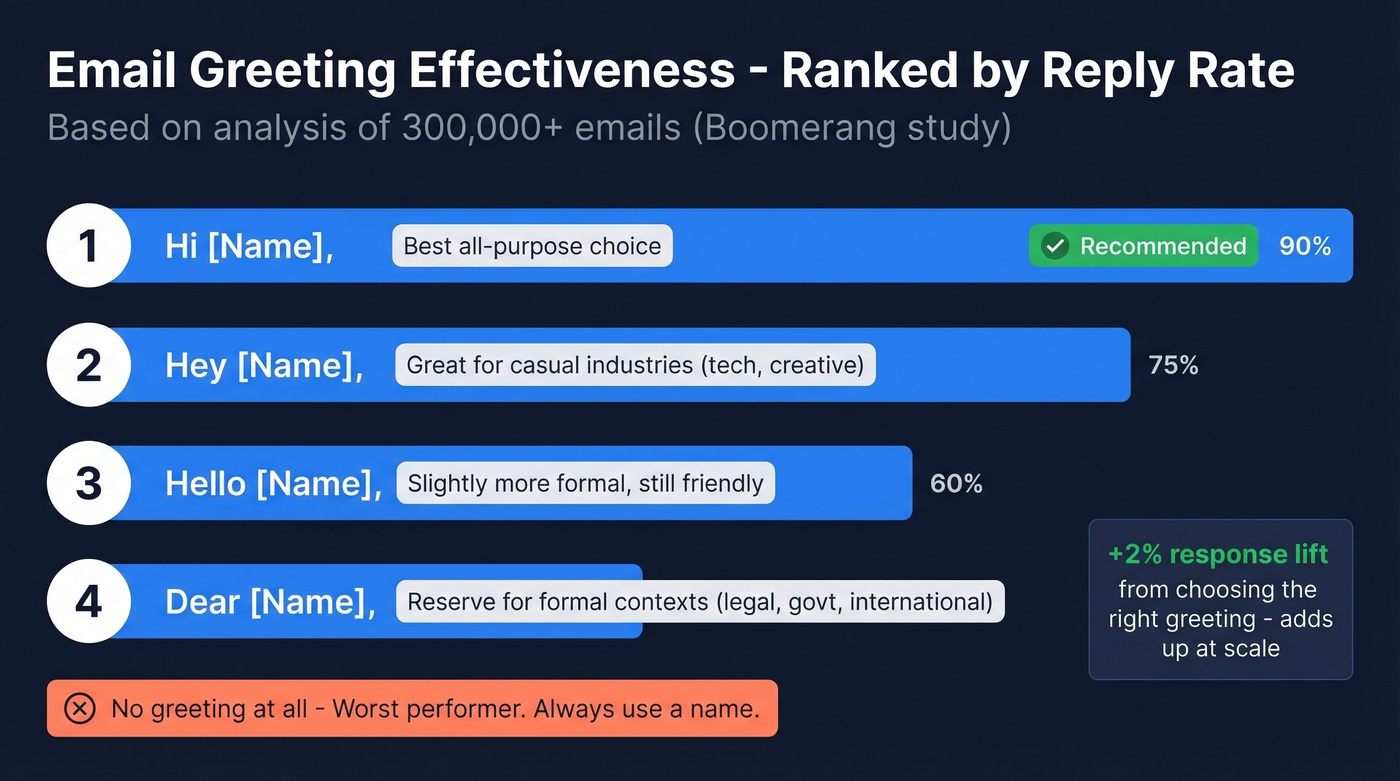
Here's a practical safe order for most client emails:
- Hi [Name], - the safest all-purpose choice
- Hey [Name], - strong for modern business contexts where the relationship or industry skews casual
- Hello [Name], - slightly more formal, still friendly
- Dear [Name], - best for very formal contexts, or when you're using a title
Skip the greeting entirely? Bad bet. Use one every time.
Boomerang also notes that choosing the right greeting can increase your odds of a favorable response by about 2%. That sounds small until you're sending 500 emails a month - then it's meaningful lift you'd otherwise leave on the table.
If you're emailing a doctor, lawyer, judge, or similarly formal contact, default to "Dear [Title] [Last Name],". In tech and creative industries, "Hi [First Name]," is the cleanest default. When in doubt, mirror whatever formality the client used in their last email to you. And skip "Hi guys" for mixed groups - "Hi team" or "Hi everyone" works better and avoids misgendering.
Your Opening Line Does the Real Work
The greeting gets you in the door. The opening line determines whether they keep reading.
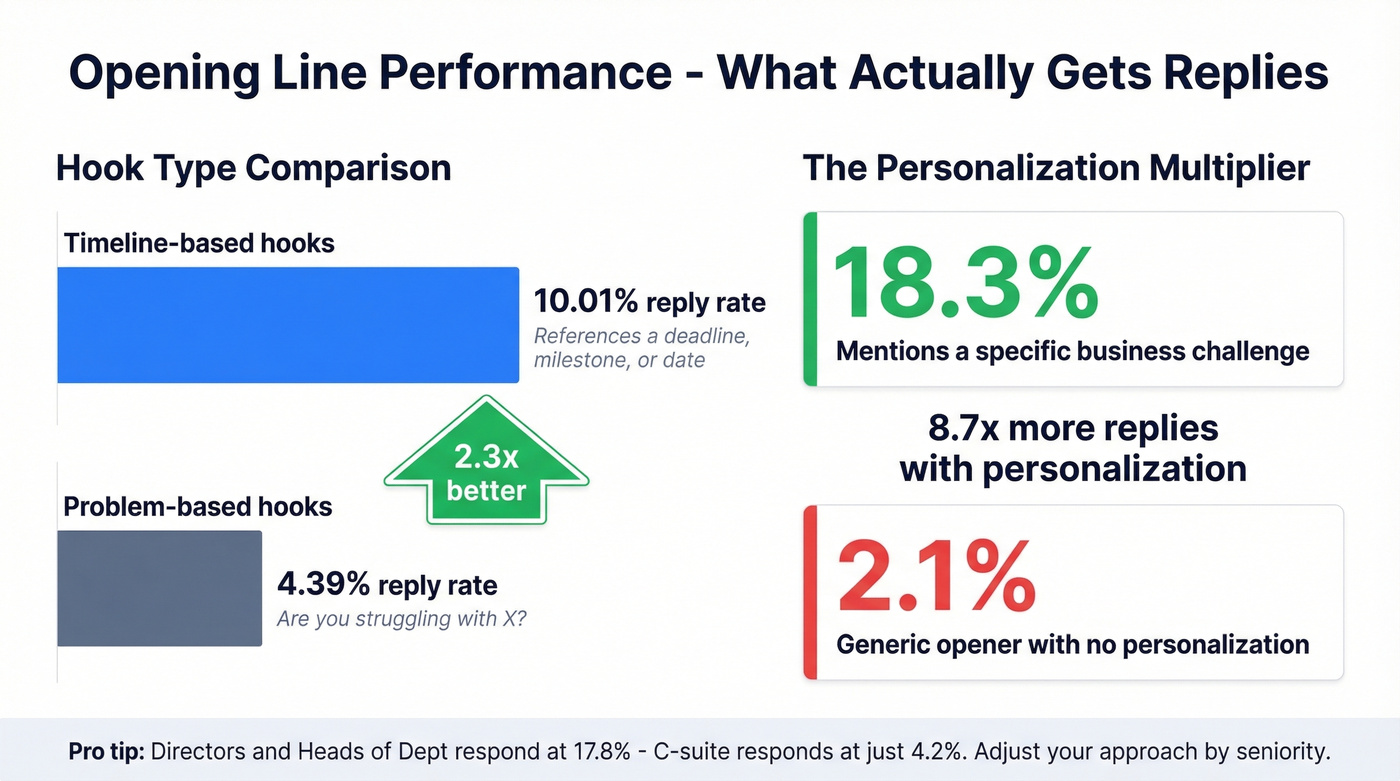
Timeline-based hooks - openers that reference a deadline, milestone, or date - pull a 10.01% reply rate. Problem-based hooks ("Are you struggling with X?") land at 4.39%. Timeline hooks outperform problem-based openers by about 2.3x, and the reason is simple: they signal that you've done your homework and that there's urgency baked into the conversation.
Personalization amplifies everything. Emails mentioning a specific business challenge get an 18.3% reply rate vs. 2.1% for generic openers. That's the single biggest lever you can pull.
Your opening line needs to work in the first ~140 characters. Put your reason for writing in the first sentence, not the third paragraph. Drop in a quick warmth signal - "Thanks for the quick turnaround on the contract" - before your ask. It stops the email from reading as purely transactional. Asking for a small piece of input ("Would love your take on X") builds rapport faster than any compliment.
One data point most guides miss: Directors and Heads of Department respond at 17.8%, while C-suite executives respond at just 4.2%. Senior executives want you to get to the point faster, not slower.

You just learned that personalized openers get 8.7x more replies. But none of that matters if your email never arrives. Prospeo verifies addresses at 98% accuracy - so your carefully crafted first line actually reaches the client's inbox, not the void.
Verify 75 client emails free every month. No bounces, no burned reputation.
5 Templates for Real Client Situations
If you only use one, make it the new-client introduction. It sets the tone for everything that follows.
New Client Introduction
Hi [Name],
Great to officially kick things off. I'll be your main point of contact, and my goal is to make this as smooth as possible for your team.
Here's what happens next: I'll send over our onboarding doc by [day], and we'll schedule a 30-minute alignment call for [timeframe]. If anything comes up before then, reply here.
Project Kickoff
Hi [Name],
We're set to start [project name] on [date]. I've attached the timeline and deliverables doc - take a look when you get a chance.
Two things I need from your side by [date]: [item 1] and [item 2]. Happy to jump on a quick call if any milestones need adjusting.
Proposal Follow-Up
Most follow-ups fail because they're generic. This one works because it proves you listened.
Open with: "Hi [Name], following up on the proposal we walked through on [date]." Then reference their exact concern: "You'd mentioned [specific priority they raised] - I've added a section addressing that on page 3." Close with a deadline and a low-friction ask: "Our team can start as early as [date] if we lock in scope by [deadline]. Worth a 15-minute call this week?"
Onboarding Welcome
Hi [Name],
Welcome aboard. Your dashboard login: [link]. Getting-started guide: [link]. Support channel: [email/Slack/phone].
I'll check in next [day] to see how setup is going. If you hit any snags before then, [support contact] responds within 2 hours.
Re-Engagement After Silence
What most people send: "Hi [Name], just checking in to see how things are going."
What actually gets replies: "Hi [Name], it's been a few weeks since we last connected on [project]. I wanted to flag that [relevant trigger - a deadline approaching, a new resource, or a market change]. If priorities have shifted, totally understand - just let me know and I'll adjust. Otherwise, does [specific day] work for a quick sync?"
The difference is the trigger. Give them a reason to respond beyond guilt.
Openers That Get You Deleted
Let's be honest - we've all sent at least one of these. Replace them immediately:
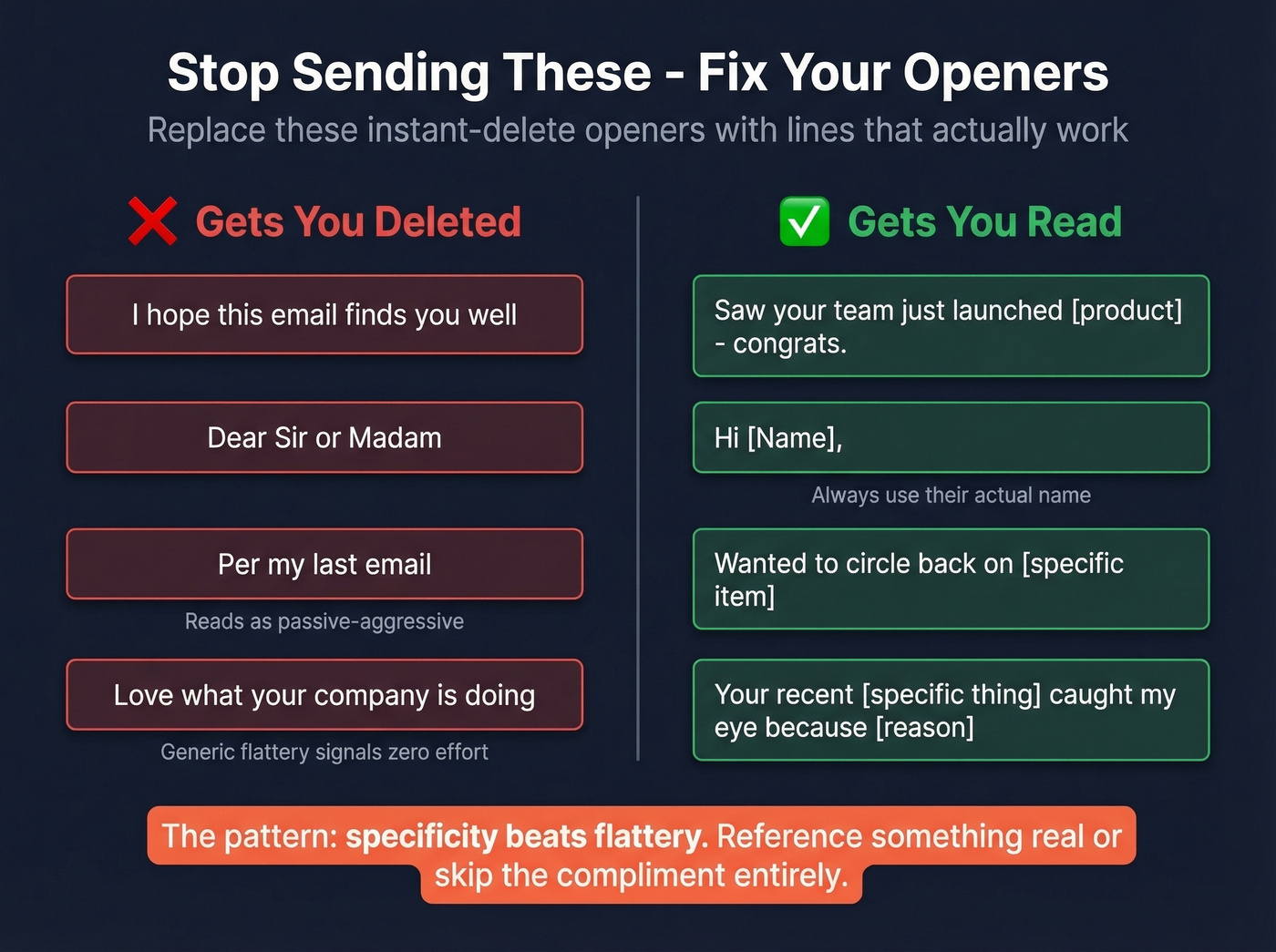
- "I hope this email finds you well" - Replace with a specific reference. "Saw your team just launched [product] - congrats." The generic version signals zero effort. As one r/sales thread put it, pairing "Dear Sir or Madam" with "I hope this finds you well" is a fast track to the trash folder.
- "Dear Sir or Madam" - It's dated and can read as non-inclusive.
- "Per my last email" - This reads as passive-aggressive. Try "Wanted to circle back on [specific item]."
- "Love what your company is doing" - Generic flattery without specifics signals you Googled them for 10 seconds. Name the specific thing, or skip the compliment entirely.
- No greeting at all - Always open with a name.
- Emails over 150 words for cold outreach - Trim ruthlessly. Cold emails that read like essays get archived, not answered.
Before You Hit Send
A perfectly crafted opener is worthless if it bounces. We've seen teams lose entire domain reputations because they skipped address verification on a new client list. Prospeo's free tier lets you verify 75 addresses a month with 98% accuracy - enough to validate any client list before you send that first email.
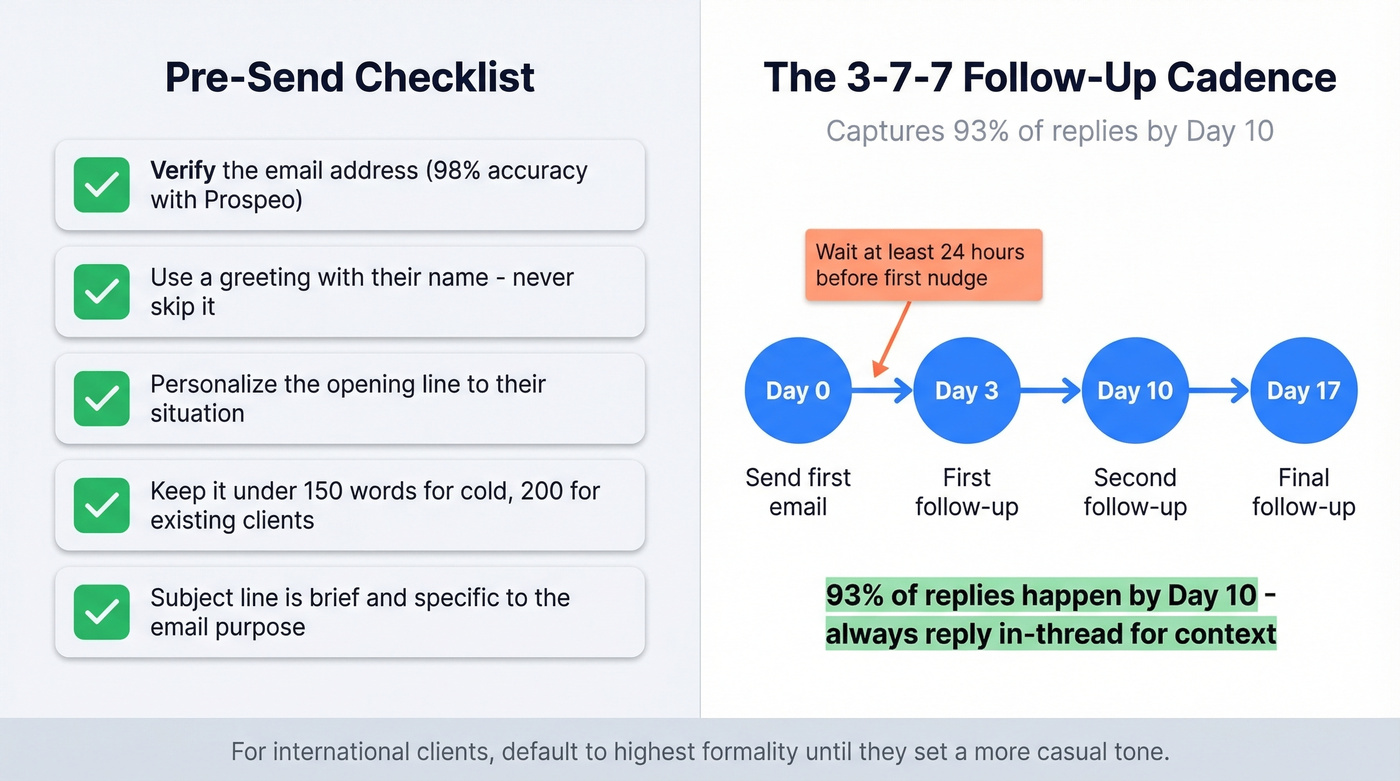
Plan your follow-up cadence before you send the first email. The 3-7-7 cadence - follow up at 3 days, 7 days, then 7 days - captures 93% of replies by Day 10. Wait at least 24 hours before your first nudge, and always reply in-thread so the recipient has context. If you need more options, use these follow-up templates to keep nudges specific.
Your subject line is technically the first thing they read - keep it brief and specific to the email's purpose. If you're stuck, borrow from these email subject line examples and customize to the client.
For international clients, default to the highest level of formality until the other person mirrors something more casual. In some cultures, jumping to "Hey [First Name]" in a first email reads as disrespectful. Let them set the tone, then match it.
Here's my honest take after years of watching outreach data: most people obsess over the greeting when the opening line does 90% of the work. Get the personalization right, verify the address, and "Hi [Name]" will outperform any clever salutation you spend 20 minutes crafting. Nail the substance, not the ceremony. If you're building a repeatable system, this email copywriting guide pairs well with the templates above.
Sending a first email to a new client? One bounce destroys more trust than a bad opening line ever could. Prospeo's 5-step verification catches invalid addresses, spam traps, and catch-all domains before you hit send - at $0.01 per email.
Protect your domain reputation before that first impression goes out.
FAQ
Is "Dear" too formal for client emails?
For most business contexts - tech, SaaS, creative industries - "Hi [Name]" gets equal or better response rates and feels more natural. Reserve "Dear [Title] [Last Name]" for legal, financial, or government correspondence, or when emailing international contacts for the first time.
How long should a first email to a client be?
Under 150 words for cold outreach; under 200 words for existing clients. Shorter emails consistently earn more replies. Put your key message and any ask in the first two sentences - everything after that is supporting detail most recipients won't read.
What's the best opening line for a cold email?
Timeline-based hooks pull a 10.01% reply rate - about 2.3x higher than problem-based openers. Reference a specific trigger event like a funding round, new hire, or product launch in your first sentence. Specificity beats flattery every time.
How do I make sure my email actually reaches the client?
Verify the address before sending. Bounced emails damage your sender reputation and reduce future deliverability across your entire domain. Prospeo's 5-step verification catches invalid addresses, spam traps, and catch-all domains - the free tier handles 75 verifications a month with 98% accuracy.