

How to Use an Outreach Platform (Step-by-Step in 2026)
Sales reps spend just 29% of their time actually selling - the other 71% gets eaten by admin, coordination, and manual prospecting. Learning how to use an outreach platform the right way fixes that, but only if you set it up correctly. Most teams don't.
The difference between 12% reply rates and 1% isn't the platform. It's the setup. Deliverability, data quality, sequence design, and measurement - nail those four and the tool almost doesn't matter. Get them wrong and you'll blame the software for problems you created.
Here's the order that matters:
- Choose your platform category
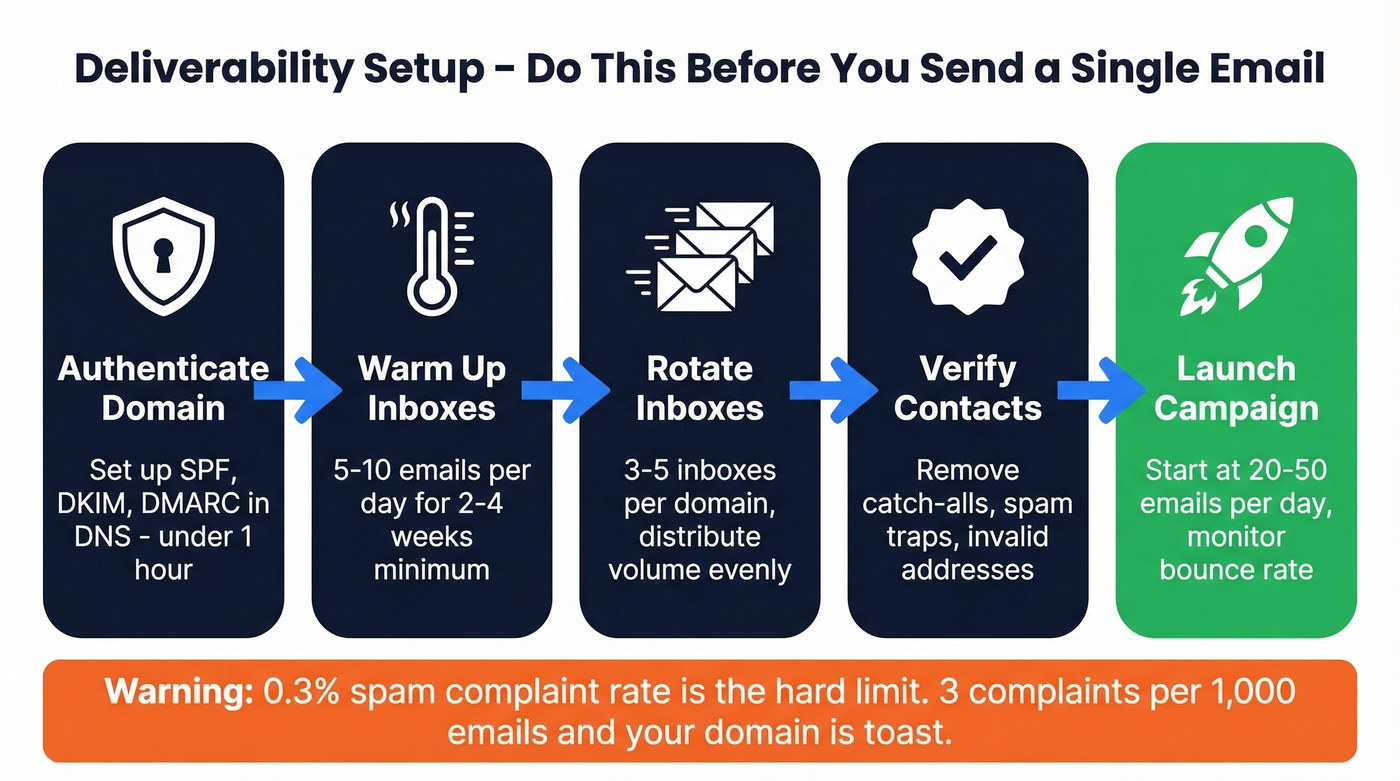
- Authenticate your domain - SPF, DKIM, DMARC
- Warm up inboxes - 2-4 weeks minimum
- Verify every contact before importing
- Build a multi-channel sequence - no more than 50% email steps
- Measure and A/B test - one variable at a time
SPF/DKIM/DMARC and warm-up ramp must happen before you send a single prospecting email. Every contact list gets verified before it touches your sequencer. Everything else is optimization.
Why Most Outreach Campaigns Fail
The tool isn't the problem. The inputs are.
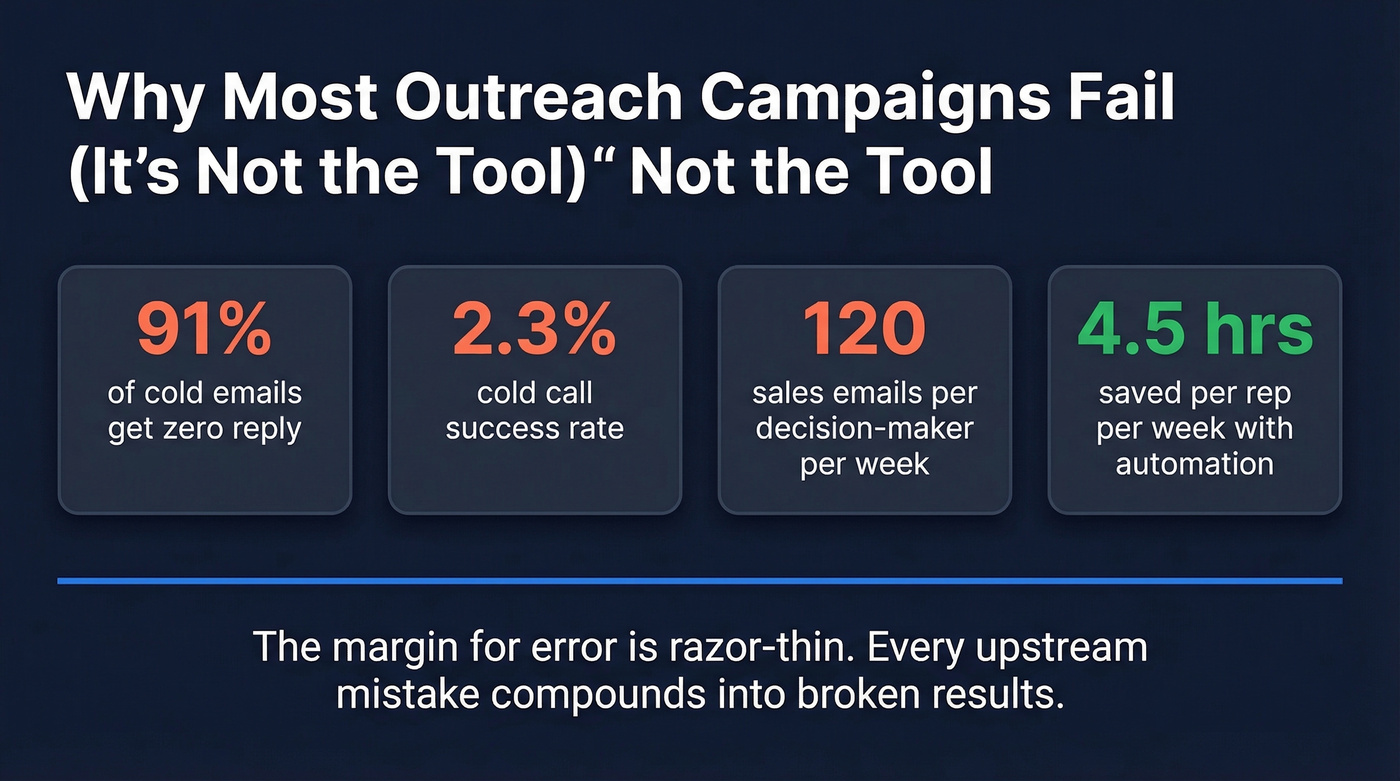
When campaigns underperform, teams blame the platform, the messaging, or "the market." But the failure happens upstream - before the first email sends. 91% of cold emails get no reply. Cold call success rates sit around 2.3%. The margin for error is razor-thin, and every upstream mistake - unverified contacts, no warm-up, single-channel sequences - compounds into results that make the whole motion look broken when it was the setup that was broken.

Sales automation saves an average of 4.5 hours per week per rep. That's real. But it only works on clean rails. A rep sending emails to invalid addresses or spam-filtered inboxes hasn't saved time - they've wasted it at scale. Decision-makers receive around 120 sales-related emails per week, and every bounced email and every "mark as spam" click pushes you closer to the threshold where email providers stop delivering your messages entirely.
What These Platforms Actually Do
An outreach platform automates the repetitive mechanics of prospecting so reps focus on conversations that close deals.
There's a distinction most vendors blur: automation vs. AI. Automation is rules-based - "If prospect opens email twice, move to call step." AI is decision-based - "Based on engagement signals, prioritize a call over a third email." Most platforms in 2026 offer both, but you'll configure the automation layer first.
A modern sales engagement platform handles contact enrichment, email sequencing with conditional branching, follow-up scheduling, multi-channel orchestration across email, calls, and social, CRM sync, reporting, and A/B testing. It doesn't replace your judgment on messaging or targeting. It replaces the manual labor of executing those decisions across thousands of prospects at once.
Pick the Right Platform
Not every tool solves the same problem. The market breaks into categories, and picking the wrong one wastes months.
| Category | Best For | Examples | Typical Price |
|---|---|---|---|
| Enterprise SEP | 20+ person sales floors needing manager visibility | Outreach, Salesloft | $100-200+/user/mo |
| CRM-native | Teams already living in HubSpot | HubSpot Sales Hub | $45-150/user/mo |
| Data + sequencing | SDR teams needing database and sequencer in one tool | Prospeo, Apollo, ZoomInfo | $49-119/user/mo (Apollo); $15-40K/yr (ZoomInfo) |
| High-volume cold email | Agencies and outbound-first teams | Lemlist, Smartlead, GMass, Mailshake, Woodpecker | $25-85/mo |
| Multi-channel sequencer | Mid-market teams wanting email + calls + social | Reply.io | $60-90/user/mo |
Enterprise SEPs: Outreach and SalesLoft
These are the heavyweights. Outreach sells modular packages - Engage, Call, Meet, Deal, Forecast, Amplify - so every team gets a custom quote. Salesloft runs a similar model at roughly $100+/user/month. Both shine when you need enterprise-grade reporting, sentiment analysis, and deep pipeline visibility; Outreach's data shows teams using their Success Plans see 26% improved win rates. Skip them if you're a 3-person team. You'll pay for features you'll never configure.
CRM-Native: HubSpot Sales Hub
If your team already lives in HubSpot, Sales Hub sequences are the path of least resistance. No integration headaches, no duplicate data. The tradeoff is flexibility - HubSpot's sequencing is simpler than dedicated SEPs. For teams running inbound-heavy motions with some outbound layered on, it's often enough.
High-Volume Cold Email
These tools are built for volume. Inbox rotation, warm-up, sending limit enforcement - the infrastructure that keeps you out of spam at scale. GMass starts at $25/mo and works inside Gmail; it's earned a 4.9/5 on Capterra from 775+ reviews and 4.7/5 on G2 from 750+ reviews, which tells you something about reliability. Lemlist starts at $59+/mo with strong personalization features. Smartlead runs ~$39+/mo with aggressive inbox rotation. Mailshake covers $25-85/mo depending on tier. Woodpecker starts around $30/mo and is popular with smaller agencies. Reply.io ($60-90/user/mo) bridges the gap between cold email and multi-channel sequencing.
Here's the thing: if your average deal size is under $10K, you probably don't need an enterprise SEP. A data platform paired with a cold email tool will get you 90% of the results at 20% of the cost.
Set Up Deliverability First
This is the step everyone wants to skip and the one that matters most. Your outreach platform is useless if your emails land in spam.
Authenticate Your Domain
SPF, DKIM, and DMARC aren't optional. They're DNS records that prove to email providers you're a legitimate sender, not a spammer spoofing your domain. Your IT team or domain registrar can handle this in under an hour. There's no excuse to skip it.
Warm-Up Ramp
New domains and inboxes have zero reputation. Email providers treat them as suspicious until proven otherwise.
| Week | Daily Volume | What's Happening |
|---|---|---|
| Weeks 1-2 | 5-10 emails/day | Building initial reputation |
| Weeks 3-4 | 15-25 emails/day | Establishing consistency |
| Weeks 5-6 | 30-50 emails/day | Scaling toward target |
| Week 7+ | Up to 100/day | Full capacity (20-50 optimal) |
The consensus on r/coldemail is blunt: skipping warm-up wrecks your domain. One practitioner described launching on a fresh domain without warm-up and watching open rates crater as emails went straight to spam. Budget 2-4 weeks before any real campaign sends. Distribute volume across 3-5 inboxes per domain - most high-volume tools handle rotation automatically.
The 0.3% Spam Complaint Threshold
Google and Yahoo enforce a hard line: 0.3% spam complaint rate. That's 3 complaints per 1,000 emails. Cross it and your deliverability tanks - sometimes permanently for that domain. Sending to invalid addresses, spam traps, or people who never opted in pushes you toward that threshold fast.

The article says it clearly: bad data upstream kills every campaign downstream. Prospeo's 5-step verification delivers 98% email accuracy - meaning bounce rates under 4% instead of the 35%+ that wrecks your domain reputation. At $0.01 per email, cleaning your list costs less than a single wasted send.
Fix your data before it fixes your deliverability - permanently.
Build a List That Won't Bounce
Benchmarks from 16.5 million cold emails show an average sequence bounce rate around 2.8%. If yours is above 5%, you've got a data problem no amount of copywriting will fix.
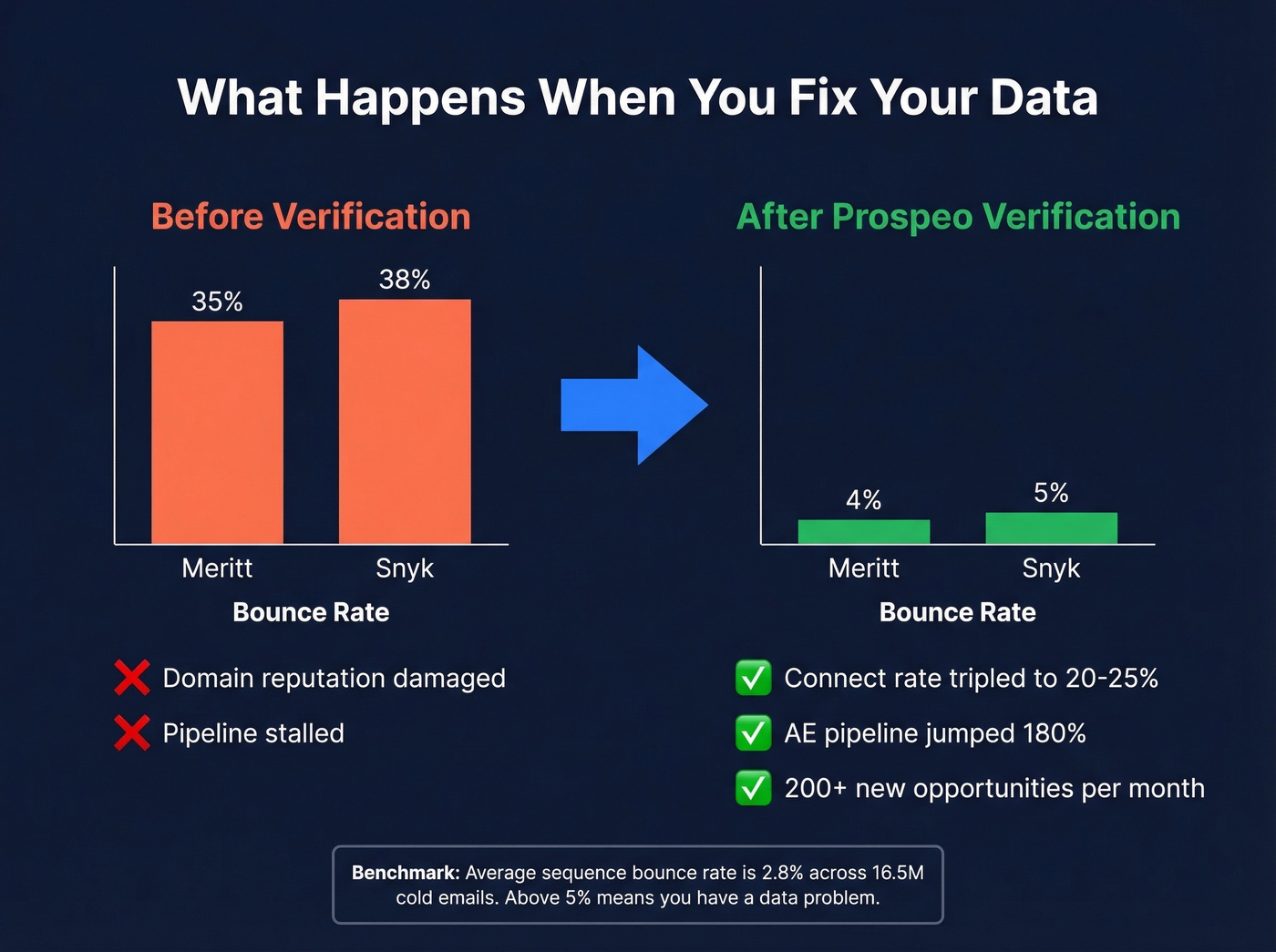
Meritt, an outbound agency, was running a 35% bounce rate before overhauling their verification workflow. After switching to Prospeo's 5-step verification, they dropped to under 4% - and their connect rate tripled to 20-25%. Snyk saw similar results across 50 AEs: bounce rates fell from 35-40% to under 5%, AE-sourced pipeline jumped 180%, and the team generated 200+ new opportunities per month. These aren't marginal improvements. They're the difference between campaigns that work and ones that destroy your domain.
The workflow that prevents this:
- Build your target list using your database tool - filter by buyer intent, technographics, headcount growth, and other signals that indicate fit
- Verify every email before importing to your sequencer
- Remove catch-all domains, spam traps, and honeypots (see spam traps)
- Push clean contacts to your outreach platform
- Monitor bounce rates after launch - if they creep above 2%, pause and re-verify (use bounce rate as your guardrail)
A 7-day data refresh cycle matters more than most teams realize. People change jobs, companies shut down inboxes, domains expire. A contact verified 5 weeks ago on a platform with a 6-week refresh cycle might bounce today.
How to Build Effective Sequences
A sequence is a series of touchpoints - emails, calls, social touches - delivered on a schedule with conditional logic. The 50% rule is your guardrail: no more than half your steps should be emails.
| Segment | Total Steps | Duration | Max Email Steps |
|---|---|---|---|
| SMB | 5-8 | ~30 days | 2-4 |
| Mid-market | 7-12 | 30-45 days | 3-6 |
| Enterprise | 10-18 | 30-60+ days | 5-9 |
21-Day Multi-Channel Example
- Day 1: Personalized email referencing a specific trigger - funding, hiring, leadership change
- Day 3: Social connection request with a note
- Day 5: Call + voicemail referencing the email
- Day 7: Video email or case study share
- Day 10: Follow-up email with a new angle, not "just checking in"
- Day 14: Social message commenting on their content
- Day 17: Final call attempt
- Day 21: Breakup email
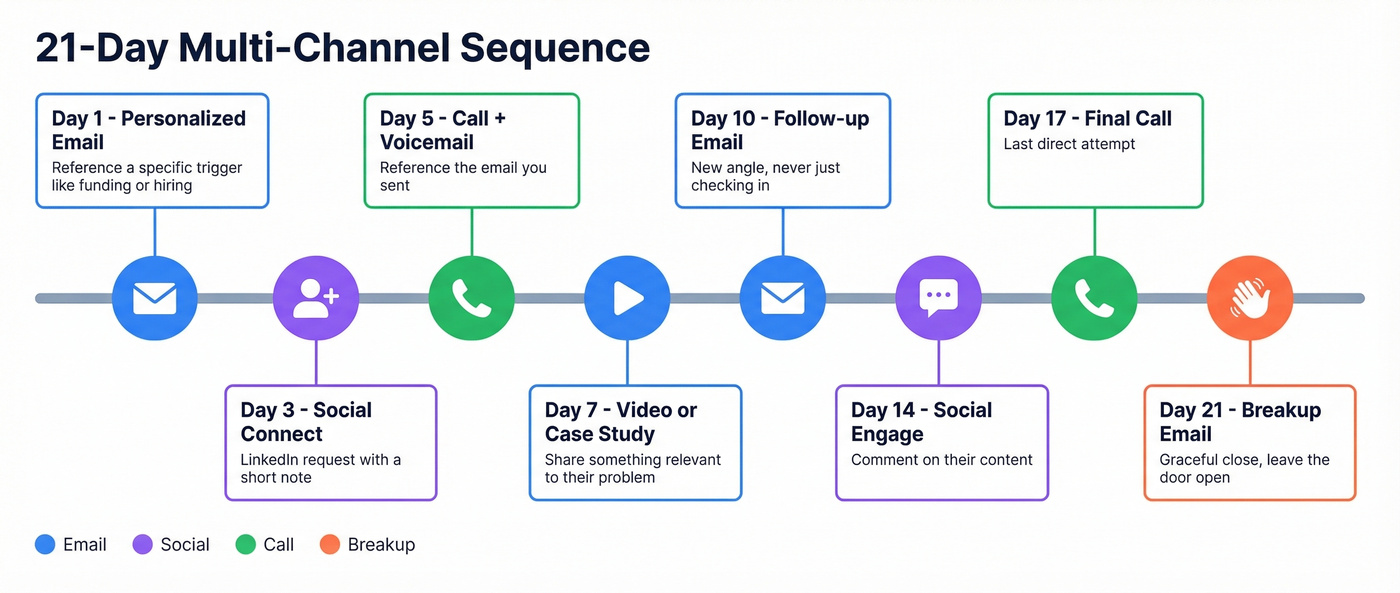
The call-within-24-hours tactic is underrated. When you send an email and call the next morning, "I sent you a note yesterday about [specific thing]" is a dramatically better opener than starting from zero.
Not every prospect gets the same sequence. Build a persona matrix: buyer personas on one axis, high-touch vs. low-touch on the other. A VP of Engineering at a Series B company gets a different cadence than a Director of IT at a Fortune 500. Build at least 2-3 variants before you launch.
Write Messages People Reply To
Subject lines under 7 words perform best. "Quick question about [specific thing]" outperforms "Revolutionizing Your Sales Pipeline with AI-Powered Solutions" every single time.
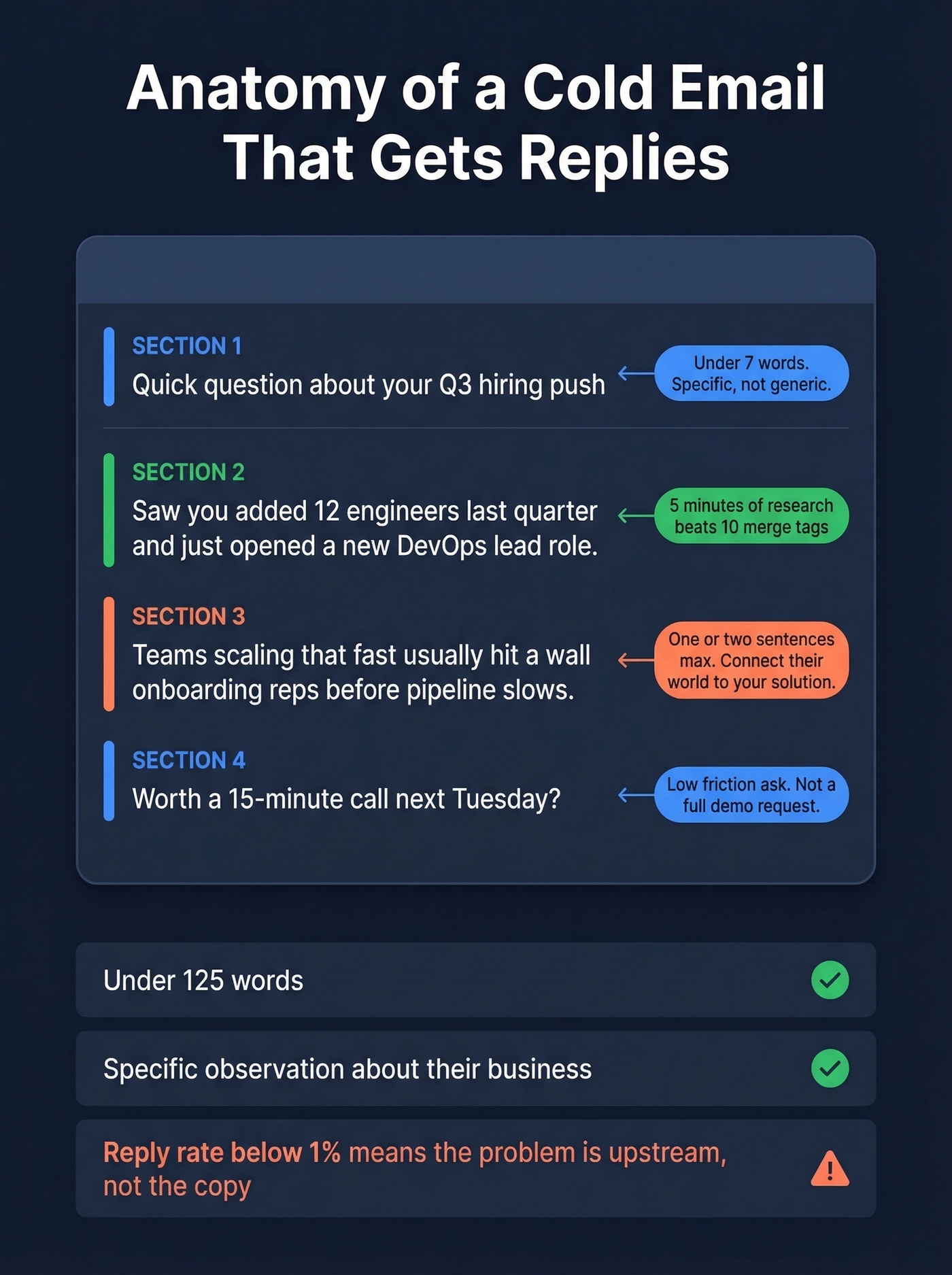
Keep the body under 125 words. We've seen teams obsess over email copy for weeks, writing 300-word essays nobody reads. Short emails that demonstrate 5 minutes of research outperform long generic emails every time - and that 5 minutes of research is the highest-leverage activity in outbound. Look for leadership changes, earnings commentary, hiring patterns, funding rounds, or strategic initiatives. One specific observation about their business is worth more than ten merge tags.
Structure it simply: start with a specific observation about their company, connect it to a problem you solve in one or two sentences, then close with a clear, low-friction ask - a 15-minute call, not a full demo.
If your reply rate is below 1%, the problem is almost always targeting or data quality, not copy. You're either reaching the wrong people or reaching the right people at wrong addresses.
Measure, Test, Improve
Here are the benchmarks that matter:
| Metric | Benchmark | If Below, Change... |
|---|---|---|
| Open rate | 27.2% | Subject lines, send times |
| Reply rate | 2.9% (12% for strong-fit) | Messaging, targeting, list quality |
| Bounce rate | 2.8% | Data source, verification |
| Opt-out rate | 1.1% | Frequency, relevance |
That 12% reply rate is the baseline for well-targeted cold prospecting sequences. If you're hitting 2.9% across all sequences including nurture, that's average. For net-new outbound to strong-fit accounts, aim higher.
A/B testing method: Change one variable at a time. Subject line, opening line, CTA, send time - pick one. Run each variant to a few hundred prospects before drawing conclusions. Anything less and you're reading noise.
Track weekly, not monthly. Deliverability problems compound fast - a bounce rate creeping from 3% to 6% over two weeks can damage your domain before you notice. Set alerts if bounce rates exceed 3% or spam complaints approach 0.3%.
Mistakes That Kill Results
Tool sprawl. The #1 complaint on Reddit about outreach stacks: juggling multiple tools, integrations, and edge cases like reply tracking and timing makes everything feel like a management burden. The fix is ruthless simplicity - one data source, one verification layer, one sequencer, one CRM. Four tools max.
Skipping warm-up. We've watched teams launch on fresh domains and wonder why open rates are 4%. Warm-up takes 2-4 weeks. There's no shortcut.
Single-channel dependence. Email-only sequences leave money on the table. Multi-channel cadences that coordinate email, calls, and social consistently outperform. The key word is "coordinate" - random touches without a shared narrative feel disjointed to the prospect.
Sending to unverified lists. This is the most expensive mistake because it damages everything downstream. Bad emails bounce, bounces hurt reputation, reputation loss means even good emails go to spam. A bulk verification step takes minutes and protects months of domain-building work.
Disconnected channel narratives. Your email, call script, and social message should tell one coherent story. If the email talks about hiring challenges and the call script pitches cost savings, you've lost the thread.
FAQ
What's the difference between a sales engagement platform and a cold email tool?
A sales engagement platform like Outreach or Salesloft orchestrates multi-channel sequences with CRM integration and team management at $100-200+/user/month. A cold email tool like Smartlead or GMass focuses on high-volume email sending with deliverability features at $25-85/month. Choose based on team size and channel mix.
How many emails can I send daily from a new domain?
Start with 5-10/day during weeks 1-2 of warm-up, scale to 15-25 in weeks 3-4, then 30-50 in weeks 5-6. After week 7, you can push to 100/day per inbox, but 20-50/day is the sweet spot for sustained deliverability. Spread volume across 3-5 inboxes.
What bounce rate is too high for cold outreach?
Anything above 5% is a red flag - pause the campaign and re-verify immediately. Above 3%, investigate your data source. A proper 5-step verification process with catch-all handling and spam-trap removal keeps bounce rates under 2% for most teams, compared to 4-6% on unverified lists.
Which metrics should I track first?
Reply rate and bounce rate. Reply rate tells you if targeting and messaging work - aim for 2.9% minimum, 12% for strong-fit prospects. Bounce rate tells you if data is clean - stay under 2.8%. Open rates matter less in 2026 due to privacy features inflating numbers.
You just learned that every bounced email pushes you closer to the 0.3% spam complaint threshold. Prospeo refreshes all 300M+ profiles every 7 days - not the 6-week industry average - so the contacts you import into your sequencer are current, verified, and safe to send. Teams using Prospeo data see bounce rates drop from 35% to under 4%.
Stop feeding stale data into your outreach platform.