

HubSpot Lead Scoring: The Practitioner's Guide to Getting It Right
You've opened HubSpot's migration banner for the third time this week. August 31, 2025 already passed, your legacy scores stopped updating, and you're staring at a new scoring tool that somehow feels both more powerful and less intuitive than the one it replaced. The consensus on r/hubspot is that building HubSpot lead scoring still feels like "starting from zero" - lots of guesswork, not enough documentation, and zero alignment with Sales on what "qualified" actually means.
Let's fix that.
The Short Version
Still on legacy scoring? Your old scores already stopped updating. Use the audit checklist in Section 3 to migrate now. Building from scratch? Start with the copy-paste template in Section 6, not the HubSpot UI - design in a spreadsheet first. And if your CRM data is incomplete, fix that before you touch scoring. Scores built on empty job title and industry fields are fiction.
What Is HubSpot Lead Scoring?
HubSpot's scoring tool assigns a numerical value to contacts, companies, and deals based on how well they match your ideal customer profile and how actively they're engaging with your content and sales touchpoints. The goal: help reps focus on the people most likely to buy, instead of working a list alphabetically.
One clarification that trips people up - "lead scoring" is a misnomer in HubSpot's world. The scoring tool applies to contacts, companies, and deals, not the Leads object HubSpot introduced in 2024. You can't score Leads directly. You're scoring the underlying contact or company record.
HubSpot breaks scoring into three flavors. Fit scoring measures demographic and firmographic alignment - job title, company size, industry. Engagement scoring tracks behavioral signals - page views, form fills, email clicks, meetings booked. Combined scoring merges both into a single score, but that's Enterprise-only.
Plan gating matters here: you need Marketing Hub Professional (from $800/mo) minimum. Free and Starter plans don't get scoring at all. Enterprise (from $3,600/mo) unlocks combined scores, combined thresholds, and AI-based scoring.
What Changed in the 2025 Overhaul
HubSpot rebuilt its scoring engine from the ground up. The new tool is genuinely more capable, but the migration wasn't automatic, and the old system has been forcibly retired.
New Tool vs. Legacy
| Capability | Legacy Scoring | New Scoring Tool |
|---|---|---|
| Score ceiling | Not enforced the same way | Pro: 100 / Ent: 500 |
| Score decay | - | Built-in per group |
| Threshold property | Manual workaround | Auto-created |
| Distribution preview | - | Built-in |
| Association scoring | - | Supported |
| Custom event scoring | - | Supported |
| AI scoring | - | Enterprise only |
| Fit + engagement combined | Manual workaround | Enterprise only |
| Max scores allowed | Less constrained | Pro: 5 / Ent: 25 |
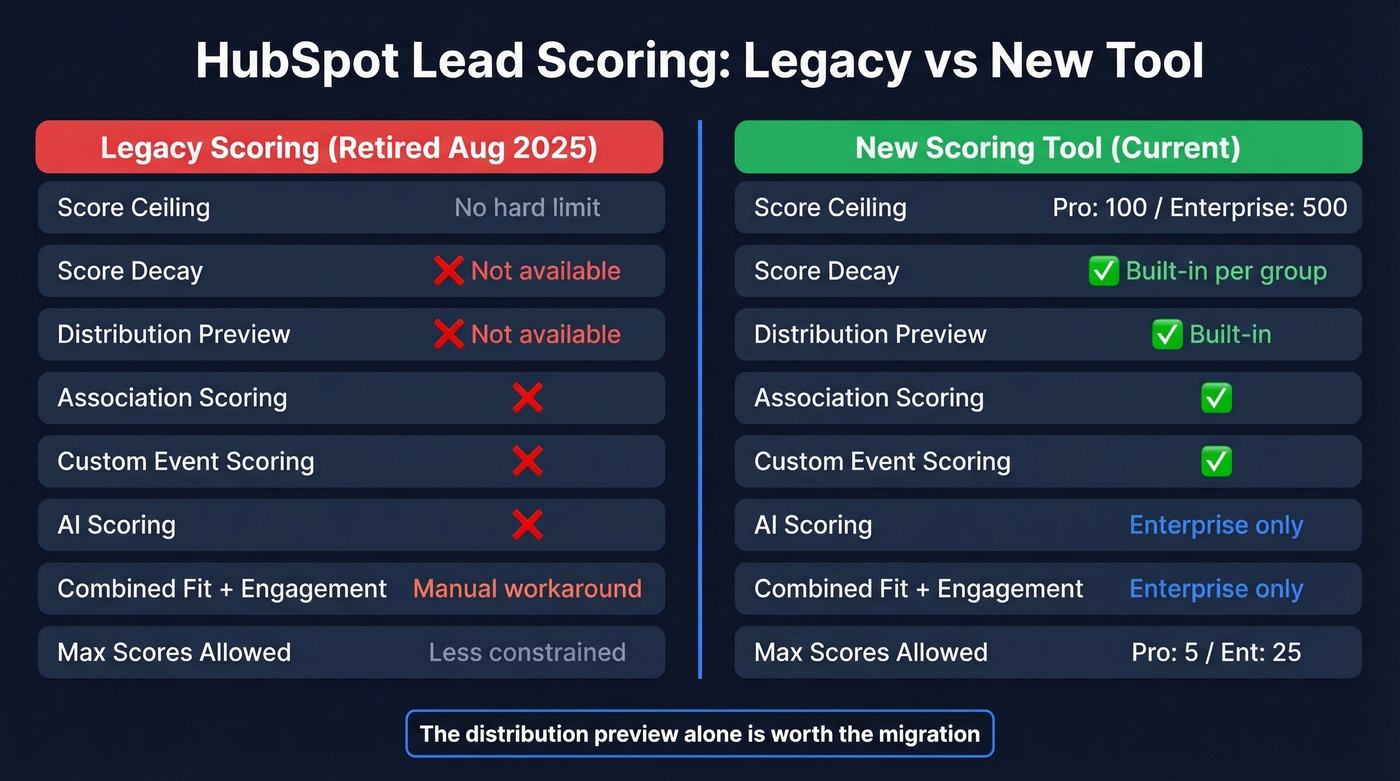
The distribution preview alone is worth the migration - you can actually see how your scores distribute across your database before going live, instead of guessing and checking a week later.
But Reddit users aren't wrong that the new tool feels less customizable in some ways. The enforced group limits and one-event-type-per-group constraint take getting used to.
Migration Timeline
Here's what already happened and what's still coming:
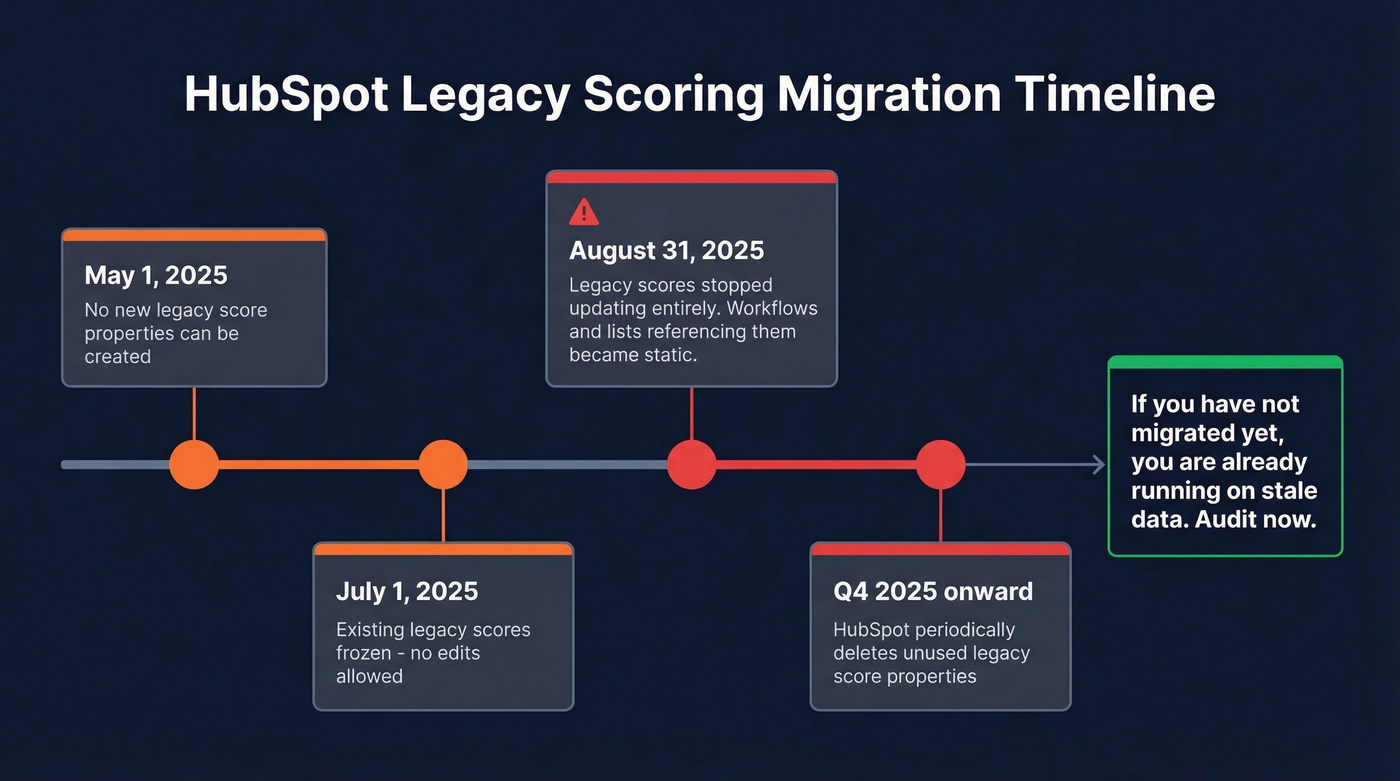
- May 1, 2025: Can't create new legacy score properties.
- July 1, 2025: Can't edit existing legacy score properties. Frozen.
- August 31, 2025: Legacy scores stopped updating entirely. Workflows, lists, and reports referencing them became static.
- Q4 2025 onward: HubSpot periodically deletes unused legacy score properties.
If you haven't migrated yet, you're already running on stale data.
Audit checklist:
- Go to Settings -> Properties -> Contact Properties
- Filter Field Types by "Score"
- Check the "Used In" column for every score property
- Document every workflow, list, and report that references a legacy score
- Rebuild those dependencies in the new tool immediately
One gotcha we've hit directly: if you're running an Apollo -> Salesforce -> HubSpot workflow where Salesforce activities surface as To-Do tasks in HubSpot, those To-Do tasks can't be scored in the new system. That's a real gap for teams using multi-platform activity tracking.
Professional vs. Enterprise
| Feature | Professional (from $800/mo) | Enterprise (from $3,600/mo) |
|---|---|---|
| Max score ceiling | 100 points | 500 points |
| Max scoring models | 5 | 25 |
| Fit scoring | Yes | Yes |
| Engagement scoring | Yes | Yes |
| Combined fit + engagement | No | Yes |
| Combined thresholds | No | Yes |
| AI scoring | No | Yes |
| Score decay | Yes | Yes |
| Distribution preview | Yes | Yes |
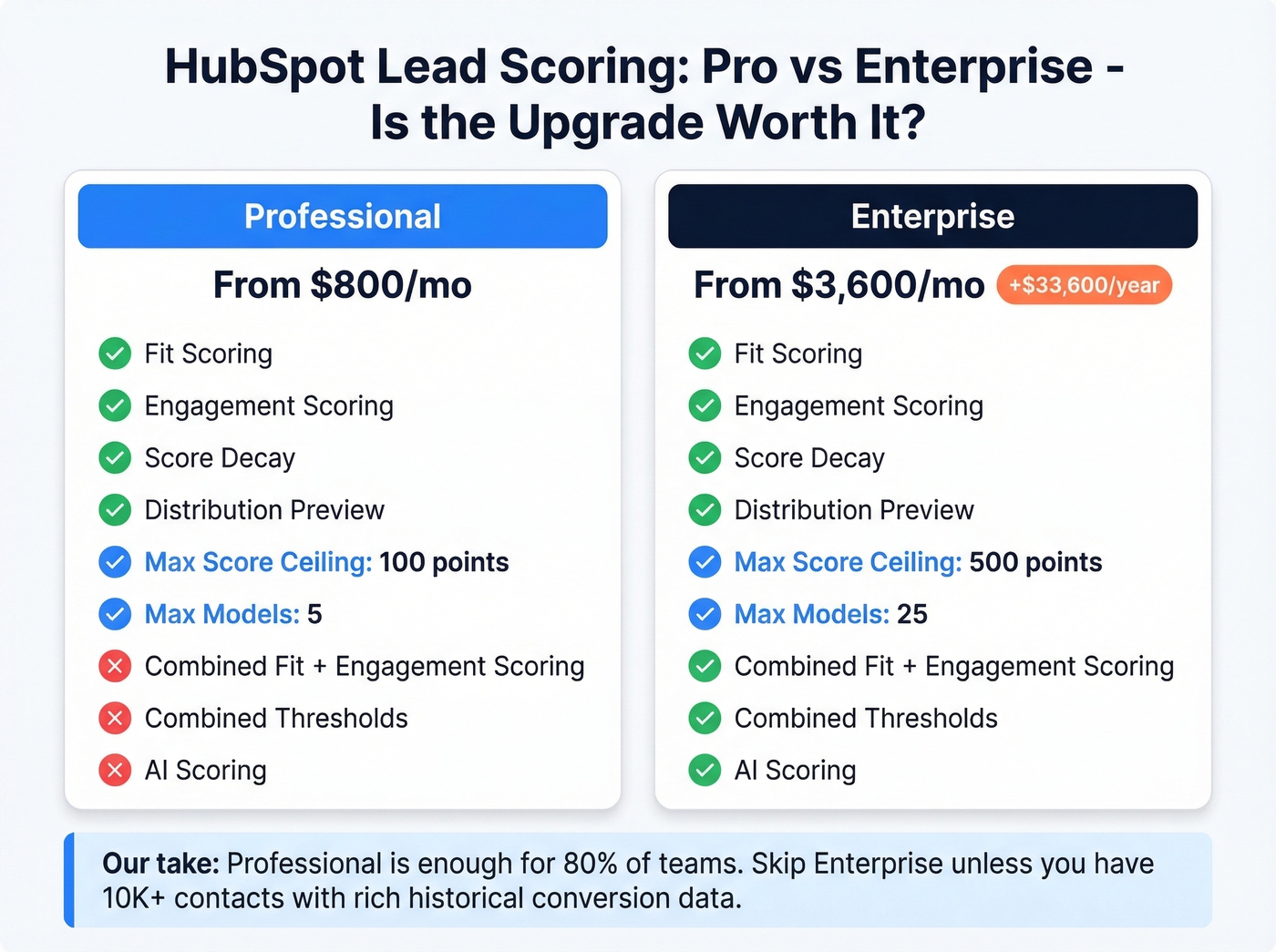
Professional is sufficient for 80% of teams. The 100-point ceiling and five-model limit sound restrictive, but most companies don't need more than two or three scoring models, and 100 points is plenty if you're disciplined about what you score.
The jump to Enterprise is about $33,600/year in additional cost. Combined scoring is nice, but you can approximate it on Pro by creating a fit-based target list and running engagement-only scoring against that list. We cover that workaround below.
Skip Enterprise unless you have 10K+ contacts with rich historical conversion data and genuinely need AI scoring or combined thresholds. For everyone else, save the money.
How to Build Your Scoring Model
Design in a Spreadsheet First
Here's the thing: don't start in HubSpot's UI. Every scoring model that works in production was designed offline first.
Create four columns - demographic fit signals, engagement behaviors, buying intent signals, and negative signals. For each attribute, assign a point value based on how strongly it correlates with closed-won deals. Then validate by pulling your last six months of closed-won deals and checking whether your proposed scoring would have ranked those contacts highly. If your best customers would've scored in the bottom third, your model is wrong before you've built it. This step takes an afternoon and saves weeks of rework.
Configure in HubSpot
The new scoring tool uses a layered architecture: total score limit -> group limits -> rules -> criteria.
Each score you create generates two properties automatically - the score value and a threshold property. You can apply a score to all records or limit it to specific inclusion/exclusion lists, up to five. Each scoring group can contain only one event type, and group limits must add up to your total score ceiling.
Walk through it methodically:
- Create your score in Marketing -> Lead Scoring
- Set your total score limit (100 on Pro, up to 500 on Enterprise)
- Add scoring groups - one per event type
- Set group-level max limits that sum to your total
- Define rules and criteria within each group
- Use the distribution preview to validate before going live
Pro Tier Workarounds
Professional's constraints are real, but workable. The most effective workaround: create a single group with a max of 100 and put all your criteria there. Community users report this produces better score distribution than splitting across multiple groups with tiny limits. In our testing, we saw the same thing - a single group avoids the awkward ceiling collisions you get when splitting 100 points across four groups of 25.
For the combined fit + engagement gap, create a target list based on fit criteria - right industry, right company size, right title - and then build an engagement-only score that applies only to contacts in that list. Not as elegant as Enterprise's combined scoring, but it gets you 80% of the way there.
One UI quirk to watch: adding another event of the same type within a group can overwrite your previous setup. Group your event types carefully and don't duplicate within a group.

Your HubSpot lead scores are only as reliable as the data behind them. Empty job title, industry, and company size fields turn fit scoring into guesswork. Prospeo's CRM enrichment fills in 50+ data points per contact with an 83% match rate - so your scoring model actually reflects reality.
Fix your HubSpot data before you score it.
Scoring Template You Can Copy
Don't overthink your first model. Start with these values, run them for 30 days, then adjust based on actual conversion data.
Fit Scoring (out of 50 points)
| Attribute | Value | Points |
|---|---|---|
| Job title | CEO / Owner | +10 |
| Job title | VP / Head of | +7 |
| Job title | Manager | +4 |
| Job title | Student / HR | -5 |
| Company size | 50-500 employees | +8 |
| Company size | 500-5,000 | +10 |
| Industry | Target industry match | +8 |
| Industry | Non-target | 0 |
Engagement Scoring (out of 50 points)
| Action | Points | Notes |
|---|---|---|
| Demo form submitted | +30 to +40 | Highest intent signal |
| Meeting booked | +35 to +50 | Route to Sales immediately |
| Pricing page viewed | +15 | Strong buying signal |
| CTA clicked | +10 | Cap at 3 occurrences |
| Marketing email clicked | +5 | Low signal individually |
| Webinar attended | +15 | Registered only: +7 |
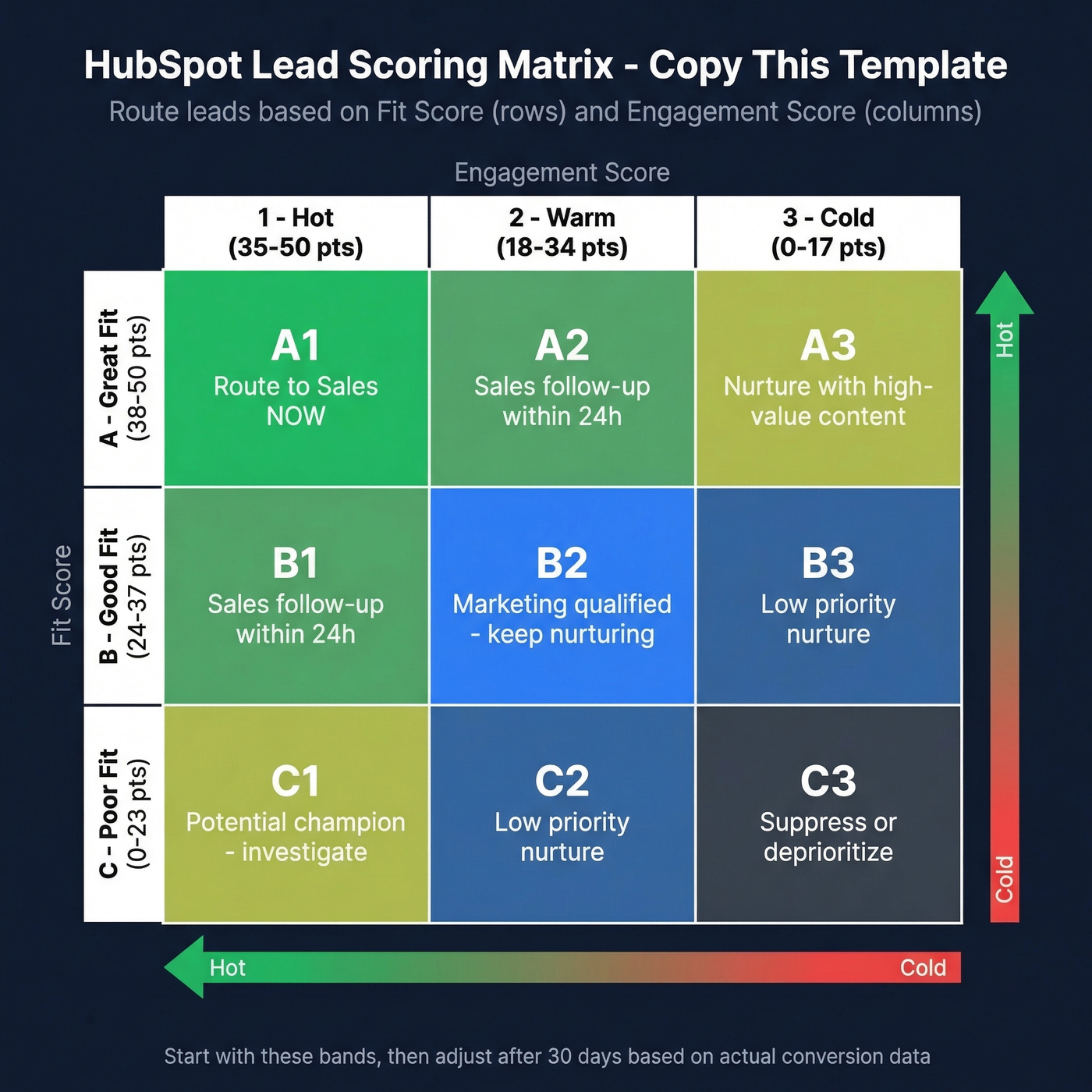
Threshold Bands (out of 50 per dimension)
| Band | Fit Score | Engagement Score |
|---|---|---|
| A / 1 (hot) | 38-50 | 35-50 |
| B / 2 (warm) | 24-37 | 18-34 |
| C / 3 (cold) | 0-23 | 0-17 |
This gives you a classic A1/B2/C3 matrix. An A1 contact is a perfect-fit, highly-engaged prospect - route them to Sales immediately. A C3 is either a bad fit or completely disengaged - keep them in nurture or suppress them.
These are starting values. Your actual point allocations should reflect your conversion data, not a template from the internet. Run this for a quarter, then pull conversion rates by band and adjust.
Advanced Scoring Rules and Gotchas
The new scoring tool has powerful features that are easy to misconfigure. These constraints trip people up most:
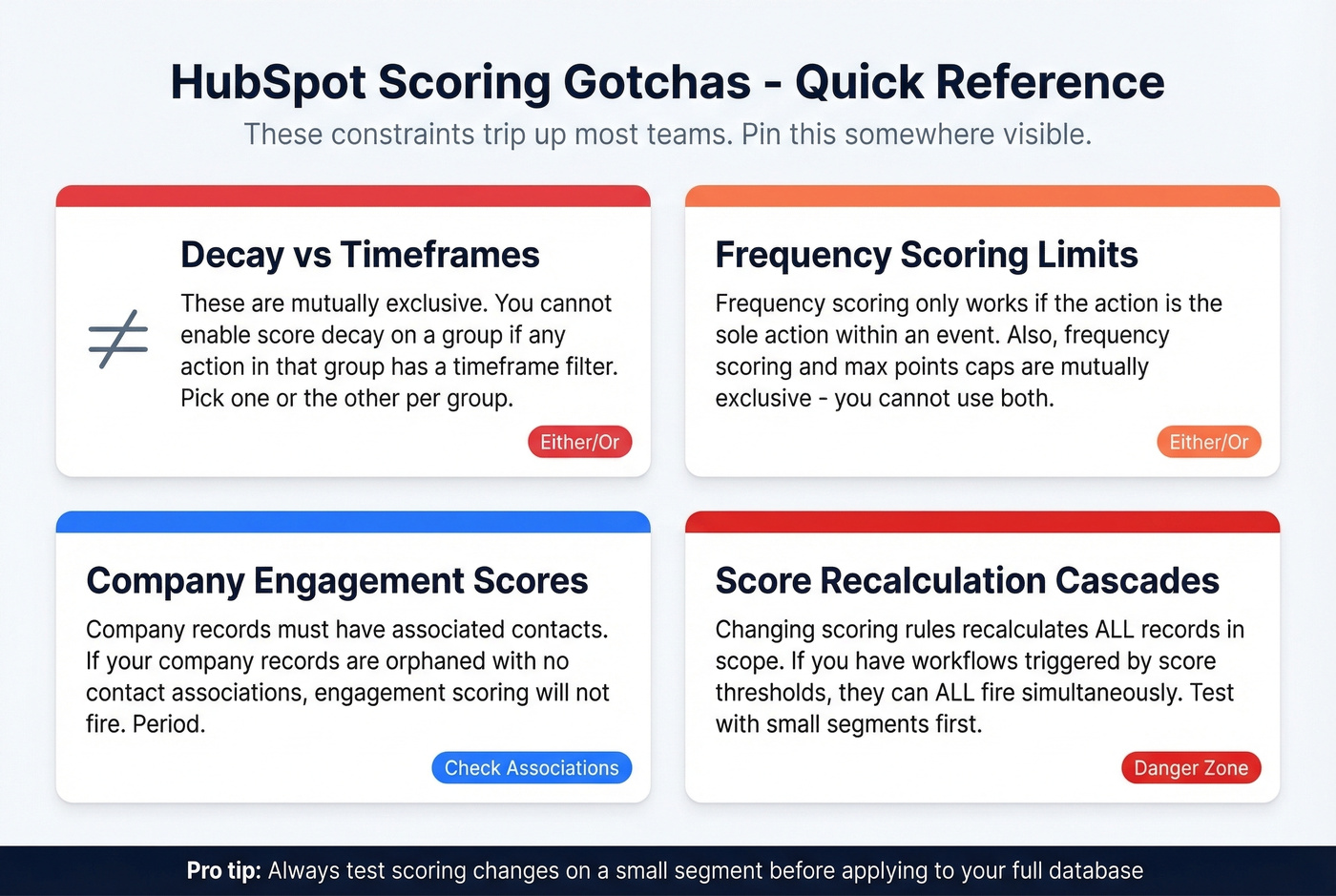
Decay vs. timeframes are mutually exclusive. You can't enable score decay on a group if any action in that group has a timeframe filter. Pick one or the other per group.
Frequency scoring can only be added to an action if it's the sole action within an event. You can't stack frequency on a multi-action event. And an event with frequency scoring can't have a max points cap - these two features are mutually exclusive.
Company engagement scores require associated contacts. If your company records are orphaned, engagement scoring won't fire. Period.
Score recalculation cascades are the scariest gotcha. When you change scoring rules, HubSpot recalculates scores for every record in scope. If you have workflows triggered by score thresholds, this recalculation can fire all of them simultaneously. We've seen teams with 100+ workflows accidentally trigger a cascade of enrollment emails, task assignments, and Slack notifications in a single batch - thousands of messages going out in minutes because someone tweaked a point value. Test rule changes on a small inclusion list first, then expand.
Use inclusion/exclusion lists (up to five) to filter which records get scored. Suppress competitors, partners, and internal contacts. And check the score history and distribution preview weekly during your first month - if 90% of contacts cluster at zero, your criteria are too narrow.
Should You Use Predictive Scoring?
Probably not.
HubSpot's AI-based scoring is Enterprise-only and operates as a black box. You can't see the weights, you can't validate the logic, and you can't customize which signals matter. The model ingests your HubSpot data and outputs a score.
The core criticism is fair: if you can't explain to your Sales team why a lead scored high, the score is useless. Reps don't trust numbers they can't interrogate. Predictive models need thousands of historical conversions with known outcomes to stabilize - expect several weeks to a few months before scores become meaningful. Salesforce Einstein has the same problem: enterprise-tier gating, similar opacity, similar data volume requirements.
If your average deal size is under $20k and you have fewer than 10K contacts, you don't need predictive scoring. You need a manual model with documented rules and Sales buy-in. You know your business better than an algorithm that's seen 500 conversions. Build the manual model, get Sales to sign off, and revisit predictive when you have the data volume to feed it.
Scoring Mistakes That Wreck Pipelines
Seven mistakes we see repeatedly:
Scoring email opens. Spam filters and security software auto-open and auto-click emails. An "open" is noise, not engagement. Score replies and form fills instead.
Scoring on data you don't have. If 40% of your contacts have empty Industry or Job Title fields, fix the data first. More on this below.
Not involving Sales. If Sales doesn't agree on what "qualified" means, your scoring model is an academic exercise. Get their input before you build, not after.
Needless complexity. Start with 5-7 high-signal attributes, not 30. You can always add complexity later. You can't easily debug a model with 40 rules.
Set-and-forget. Market conditions change, your ICP evolves, new products launch. Review your model quarterly at minimum.
Demanding perfect job titles. Job titles are free-text fields with infinite variance. "VP of Sales," "Vice President, Sales," and "Head of Revenue" could all be the same person. Use contains-matching, not exact-matching.
Letting scoring block demo requests. Look - if someone fills out a demo form, route them to Sales. Full stop. Don't let a low fit score delay a hand-raise. Scoring is for prioritization, not gatekeeping.
Fix Your Data Before You Score
This is the mistake that undermines everything above, and it's simpler than you'd think.
We've watched teams spend months perfecting point values and threshold bands, then wonder why the scores don't correlate with revenue. The answer is almost always upstream data quality. A CEO at a target account scores the same as an unknown contact at an unknown company - zero fit points for both - because neither record has the data your model needs.
Enrichment isn't an afterthought. It's the prerequisite. Prospeo's native HubSpot integration enriches contacts with 50+ verified data points at a 98% email accuracy rate on a 7-day refresh cycle, so the job titles, company sizes, and industry fields your scoring model depends on stay complete and current. For technographic data specifically, tools like Clearbit can supplement with tech stack signals. But for the core contact and company data that scoring models rely on, start with enrichment.
If you’re evaluating vendors, start with a shortlist of data enrichment services and map them to your required fields.

Building scoring models on stale records? Prospeo refreshes all 300M+ profiles every 7 days - not the 6-week industry average. Pipe enriched, verified contacts directly into HubSpot so your fit and engagement scores reflect who buyers are today, not who they were last quarter.
Stop scoring contacts with outdated data at $0.01 per verified email.
Maintaining Your Scoring Model
A scoring model isn't a project. It's a process.
Monthly: Glance at score distribution. If scores are clustering at extremes - everyone's a 90 or everyone's a 5 - your criteria need rebalancing.
Quarterly: Pull conversion rates by score band. Compare MQL-to-SQL and SQL-to-Closed-Won rates across your A/B/C and 1/2/3 bands. If B2 contacts convert at the same rate as A1 contacts, your thresholds are wrong. Then ask Sales directly: are the "hot" leads actually hot? Are reps ignoring scores entirely? If they don't trust the scores, the model is failing regardless of the math.
Ongoing: Adjust point values for any attribute that doesn't correlate with revenue. If webinar attendance isn't predicting closed deals, lower the points or remove it. And for most teams, stick with a single model - multiple models create confusion about which score to trust and make reporting harder. Only split if you have genuinely distinct product lines with different ICPs.
If you want a broader framework beyond HubSpot, our full lead scoring guide covers common models and calibration.
FAQ
Can I use lead scoring on HubSpot Free or Starter?
No. Scoring requires Marketing Hub Professional (from $800/mo) or Enterprise (from $3,600/mo). Free and Starter plans don't include any scoring functionality - there's no workaround, it's a hard plan gate.
What happens if I haven't migrated from legacy scores?
Legacy score properties stopped updating on August 31, 2025. Workflows, lists, and reports referencing those properties are now static - workflows won't fire for new contacts, list membership is frozen, and reports show stale data. Migrate immediately.
How many scoring models can I create on Professional?
Up to five scores, each capped at 100 points. You can't combine fit and engagement into a single score on Professional - that requires Enterprise. Use the target-list workaround described above to approximate combined scoring.
How often should I recalibrate my model?
Quarterly at minimum. Pull conversion rates by score band, compare MQL-to-SQL and SQL-to-Closed-Won rates, and adjust point values for any attribute that isn't correlating with revenue. A model that worked six months ago is likely stale.
How do I fix incomplete CRM data before scoring?
Use a CRM enrichment tool to fill gaps in job titles, company size, and industry before you build your scoring model. If your underlying data is incomplete, even a perfectly designed model produces unreliable results. We've covered the specifics in the data section above.