

HubSpot vs Pipedrive: The Comparison That Actually Does the Math
You're either the ops lead at a 10-person team watching Pipedrive's simplicity crack under marketing's demands, or you're the founder staring at a HubSpot renewal quote wondering why a CRM costs more than two full-time SDRs. Every HubSpot vs Pipedrive comparison you've read was written by one of these vendors or a partner agency angling for implementation fees.
Let's do the actual math instead.
30-Second Verdict
Pick Pipedrive if your team only sells and you want reps to actually log their deals. It's simpler, cheaper, and faster to deploy for sales-only orgs under 20 people.
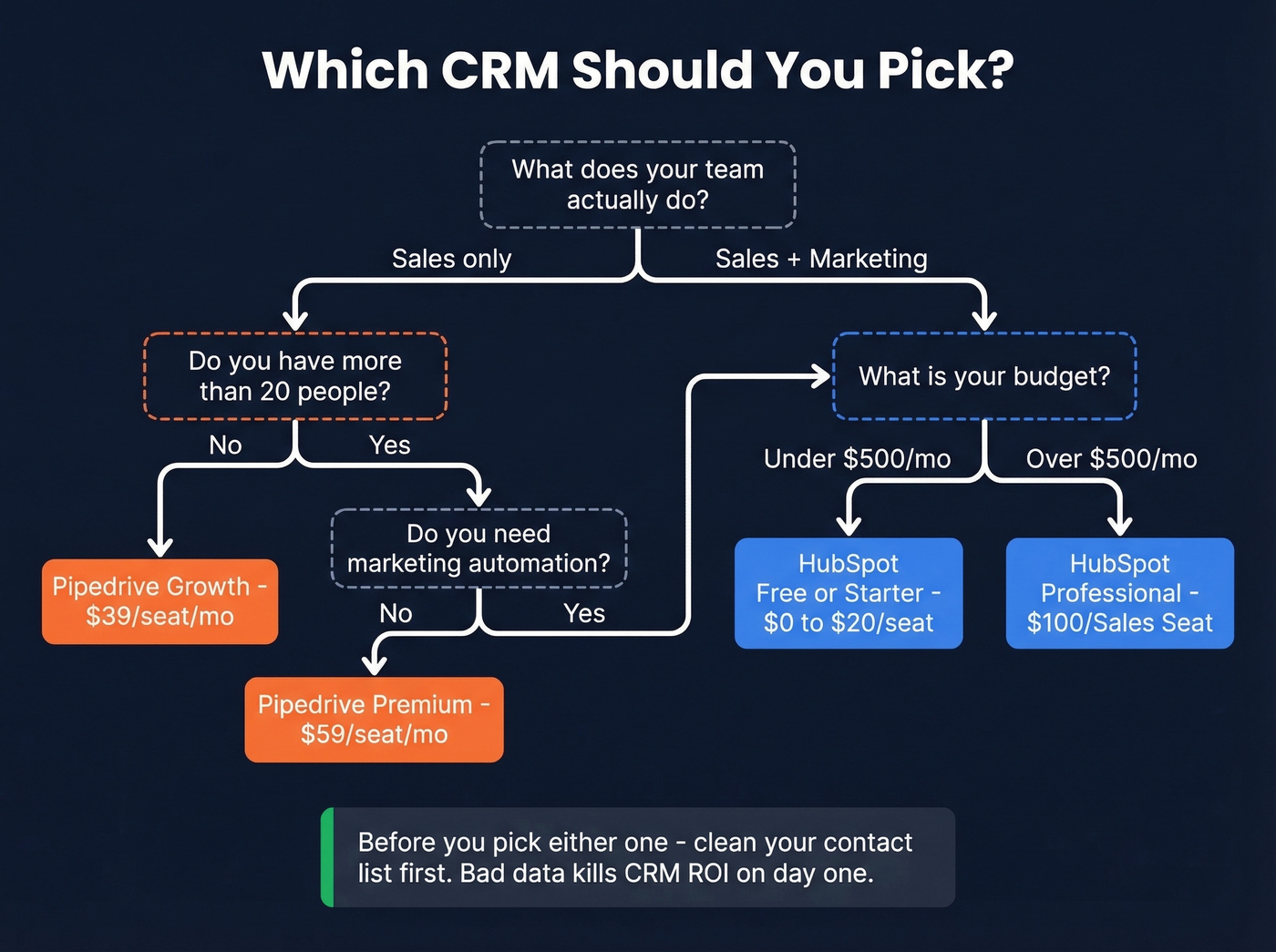
Pick HubSpot if you need marketing automation, multi-touch attribution, and sales workflows living in one platform. The free tier is genuinely useful for bootstrapped teams; the paid tiers are genuinely expensive for everyone else.
Here's the thing most comparisons skip: teams agonize over this CRM decision for months, then import a contact list with a 25% bounce rate on day one. Neither CRM fixes bad data. Clean your list first, then pick whichever CRM your reps will actually use.
Feature Comparison at a Glance
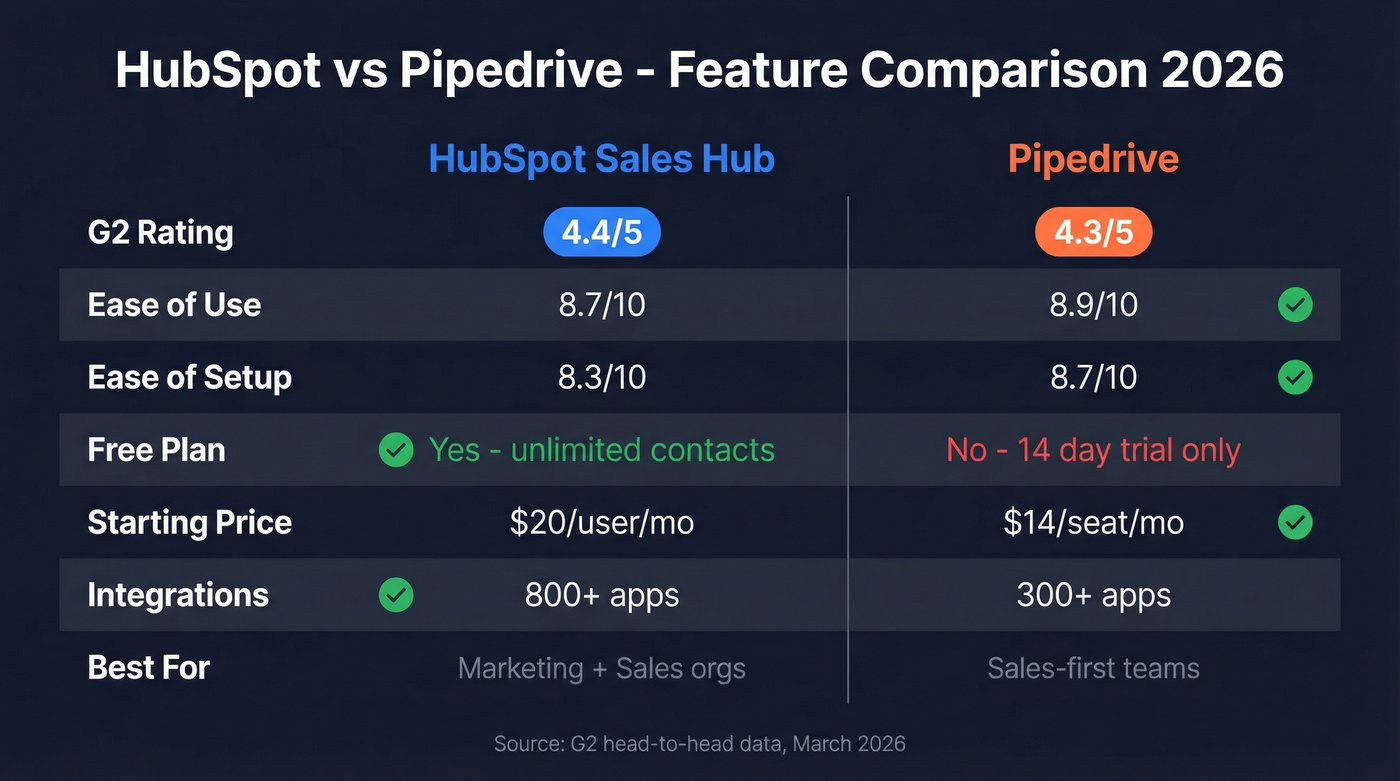
The G2 scores are close enough to be meaningless on their own. The differences show up in category scores and, more importantly, in what each platform is actually trying to be.
| Dimension | HubSpot Sales Hub | Pipedrive | Edge |
|---|---|---|---|
| G2 Rating | 4.4/5 (13,564 reviews) | 4.3/5 (2,953 reviews) | HubSpot (barely) |
| Ease of Use | 8.7/10 | 8.9/10 | Pipedrive |
| Ease of Setup | 8.3/10 | 8.7/10 | Pipedrive |
| Support Quality | 8.6/10 | 8.4/10 | HubSpot |
| Free Plan | Yes (unlimited contacts) | No (14-day trial) | HubSpot |
| Starting Price | $20/user/mo (Sales Hub Starter) | $14/seat/mo (Lite) | Pipedrive |
| Integrations | 800+ apps | 300+ apps | HubSpot |
| Best For | Marketing + sales orgs | Sales-first teams | - |
Source: G2 head-to-head comparison.
HubSpot's higher review count reflects its larger install base, not necessarily higher satisfaction. Pipedrive wins on ease of use and setup - which matters more than most buyers realize. A CRM nobody uses is a CRM that generates zero ROI.
Core Features Compared
Pipeline Management
Pipedrive's visual pipeline is the product. It's the first thing you see, and everything else orbits around it. Deals sit as cards in a drag-and-drop board, so reps can update stages in seconds without hunting through tabs or navigating nested menus that feel like they were designed by a committee of product managers who've never cold-called anyone.
HubSpot's pipeline is one module among dozens. It's capable, but opening it means navigating a left-nav sidebar that sprawls across Sales, Marketing, Service, and CMS sections. For a rep who lives in pipeline view eight hours a day, that extra friction compounds. HubSpot catches up when you need pipelines connected to marketing touchpoints and service tickets, but for pure deal tracking, Pipedrive is faster to configure and easier for reps to adopt.

Automation & Workflows
This is where the gap starts to widen.
Pipedrive now offers if/else branching, changeable workflow triggers, and webhook actions inside workflows. For sales-focused automation - move deal, send email, update field - Pipedrive handles it cleanly at the Growth tier ($39/seat).
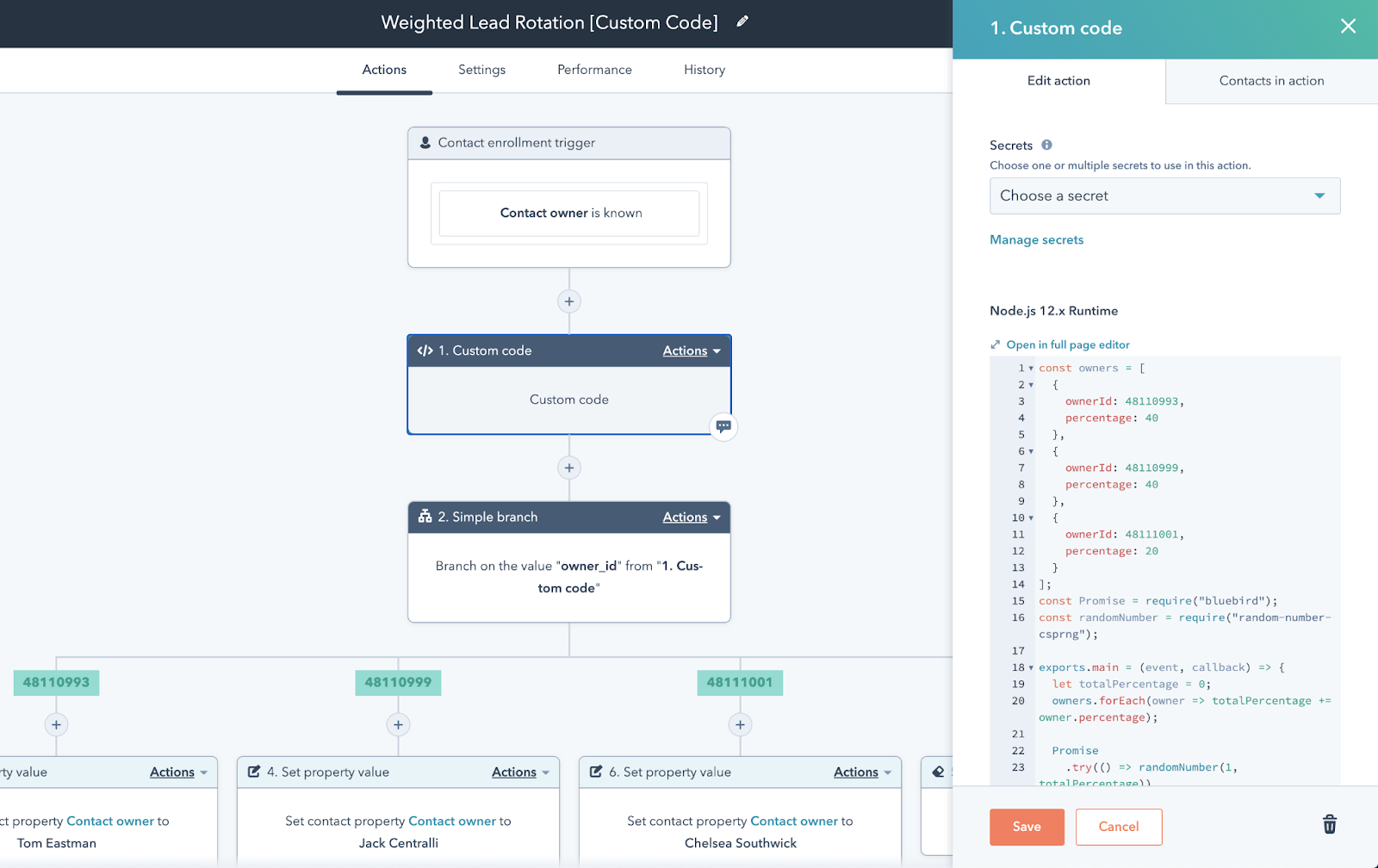
HubSpot's workflow engine goes deeper: multi-step automations with branching logic, delays, and enrollment triggers across marketing and sales. But most of that power lives behind the Professional tier at $100 per Sales Seat/month. Starter gives you far less automation than Professional, and the jump between those two tiers is one of the steepest in SaaS.
| Capability | Pipedrive (Growth, $39/seat) | HubSpot (tier needed) |
|---|---|---|
| If/else branching | ✅ | Professional ($100/Sales Seat) |
| Webhook actions | ✅ | Professional ($100/Sales Seat) |
| Multi-object workflows | ❌ | Professional ($100/Sales Seat) |
| Cross-hub automations | ❌ | Professional ($100/Sales Seat) |
Reporting & Analytics
Zapier's hands-on comparison nails this one: Pipedrive's reporting is more accessible at lower tiers. You get useful dashboards on Growth without fighting through menus. HubSpot's analytics run deeper with custom report builders, attribution models, and revenue analytics, but they're scattered across different hub sections and gated behind Professional.
For a sales manager who wants pipeline velocity and rep activity reports, Pipedrive delivers faster. For a VP of Marketing who needs multi-touch attribution, HubSpot is the only real option between these two.
AI Features in 2026
HubSpot went big on AI: a copilot experience, AI agents, and generative AI across the platform. The credit system is the wrinkle. Starter plans get 500 monthly credits, Professional gets 3,000, Enterprise gets 5,000. Credits reset monthly and don't roll over. If you're running AI agents for lead qualification or content generation, you'll burn through credits faster than you expect.
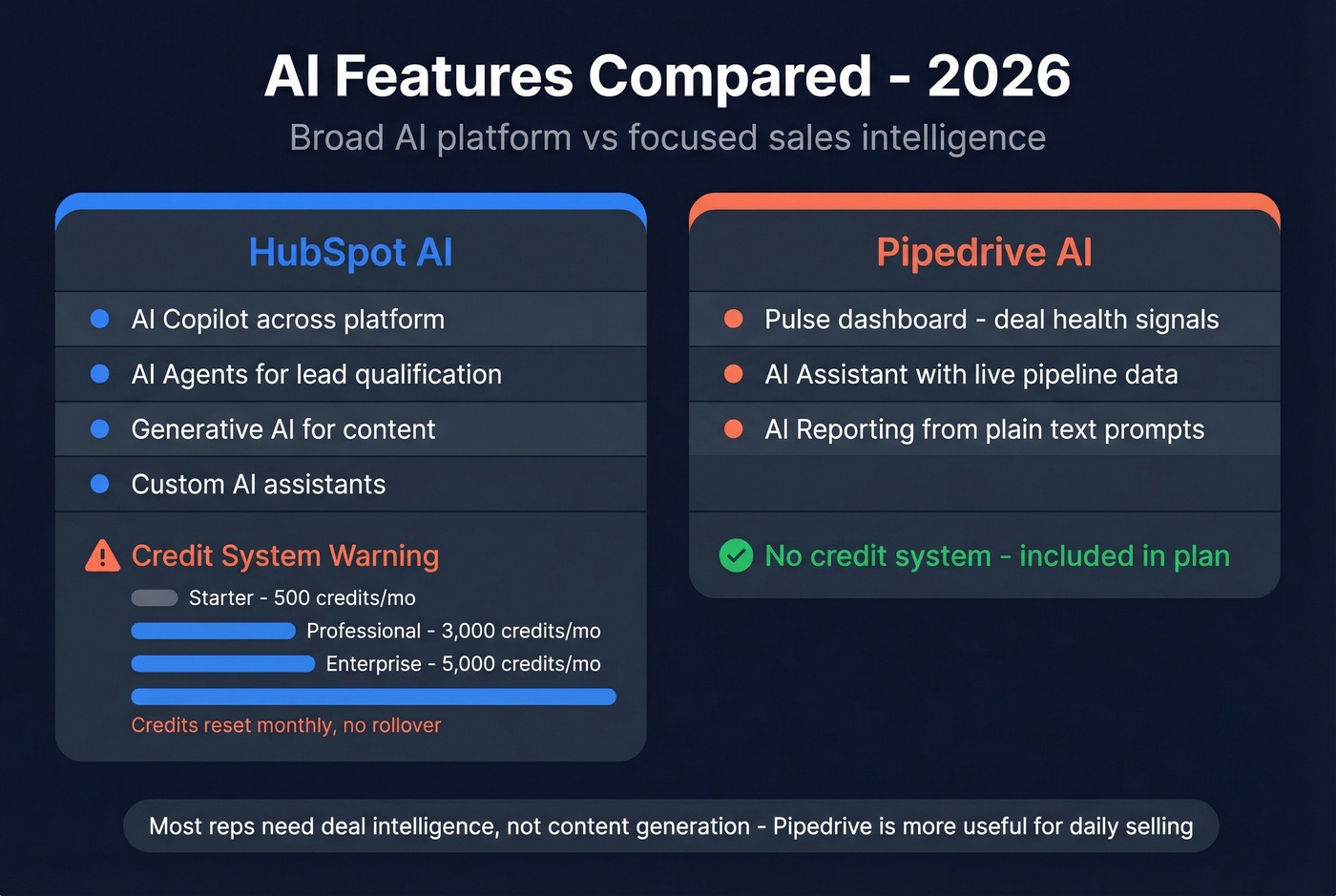
Pipedrive's AI is more targeted. The Pulse dashboard surfaces deal health signals and next-best-action recommendations. The AI Assistant has access to live Pipedrive data, so it can answer questions about your pipeline in natural language. AI Reporting generates custom reports from plain-text prompts.
Most reps don't need an AI content generator inside their CRM. They need something that tells them which deal is going cold. Pipedrive's AI is more immediately useful for daily selling; HubSpot's is broader but costs more to actually use.
Email Marketing
HubSpot has a native Marketing Hub - a full email marketing and automation platform baked into the same system. That's the core value proposition for marketing-and-sales alignment, and it's the clear winner here.
Pipedrive's Campaigns add-on works for basic sends, but it's a bolt-on that scales with subscribers: $16/mo at 1,000 subscribers up to $417/mo at 100,000. If email marketing is central to your growth motion, HubSpot wins this category decisively.
Integrations
HubSpot connects to 800+ apps and supports bi-directional sync via Operations Hub. Pipedrive integrates with 300+ apps and can extend anything else via Zapier or Make. In practice, the integration gap matters less than it looks - most teams use 5-10 integrations, and the critical ones (Slack, Google Workspace, Outlook, Zoom) are covered by both.
Pricing Deep Dive
HubSpot Pricing
HubSpot's pricing is the most confusing in the CRM space. That's not hyperbole.
The seat model has three types that matter: Core Seats, Sales Seats, and View-Only Seats (free). Core Seats give you CRM access. Sales Seats unlock the full Sales Hub Professional and Enterprise features - sequences, forecasting, lead rotation, calling. You can't just buy Core Seats and get Sales Hub Pro functionality.
The repricing trap: Core Seats are priced at your highest subscription level across all purchased products. If you own Marketing Hub Professional and Sales Hub Starter, your Core Seats are priced at the Professional rate - not Starter. This catches a lot of buyers off guard and can double your expected bill overnight.
Here's the hub-by-hub breakdown:
| Hub | Starter | Professional | Enterprise |
|---|---|---|---|
| Sales Hub | $20/Core Seat | $100/Sales Seat | $150/Sales Seat |
| Marketing Hub | $20/Core Seat | $890/mo (3 seats incl.) | $3,600/mo (5 seats incl.) |
| Service Hub | $20/Core Seat | $100/Service Seat | $150/Service Seat |
AI credits: 500/month on Starter, 3,000 on Professional, 5,000 on Enterprise. They reset monthly and don't roll over.
Professional plans require an annual contract and a one-time onboarding fee starting at $1,500 - and it can run to $3,500+ depending on the hub and complexity.

Pipedrive Pricing
Pipedrive keeps it simple. Four tiers, per seat, billed annually:
| Plan | Price/Seat/Month | Annual Cost/Seat |
|---|---|---|
| Lite | $14 | $168 |
| Growth | $39 | $468 |
| Premium | $59 | $708 |
| Ultimate | $79 | $948 |
Add-ons are priced per company, not per user: LeadBooster at $32.50/mo, Campaigns from $13.33/mo, Web Visitors from $41/mo, Smart Docs from $32.50/mo. No free plan - just a 14-day trial. No onboarding fees.
Real TCO: 5-Person Team
This is where the math gets interesting.
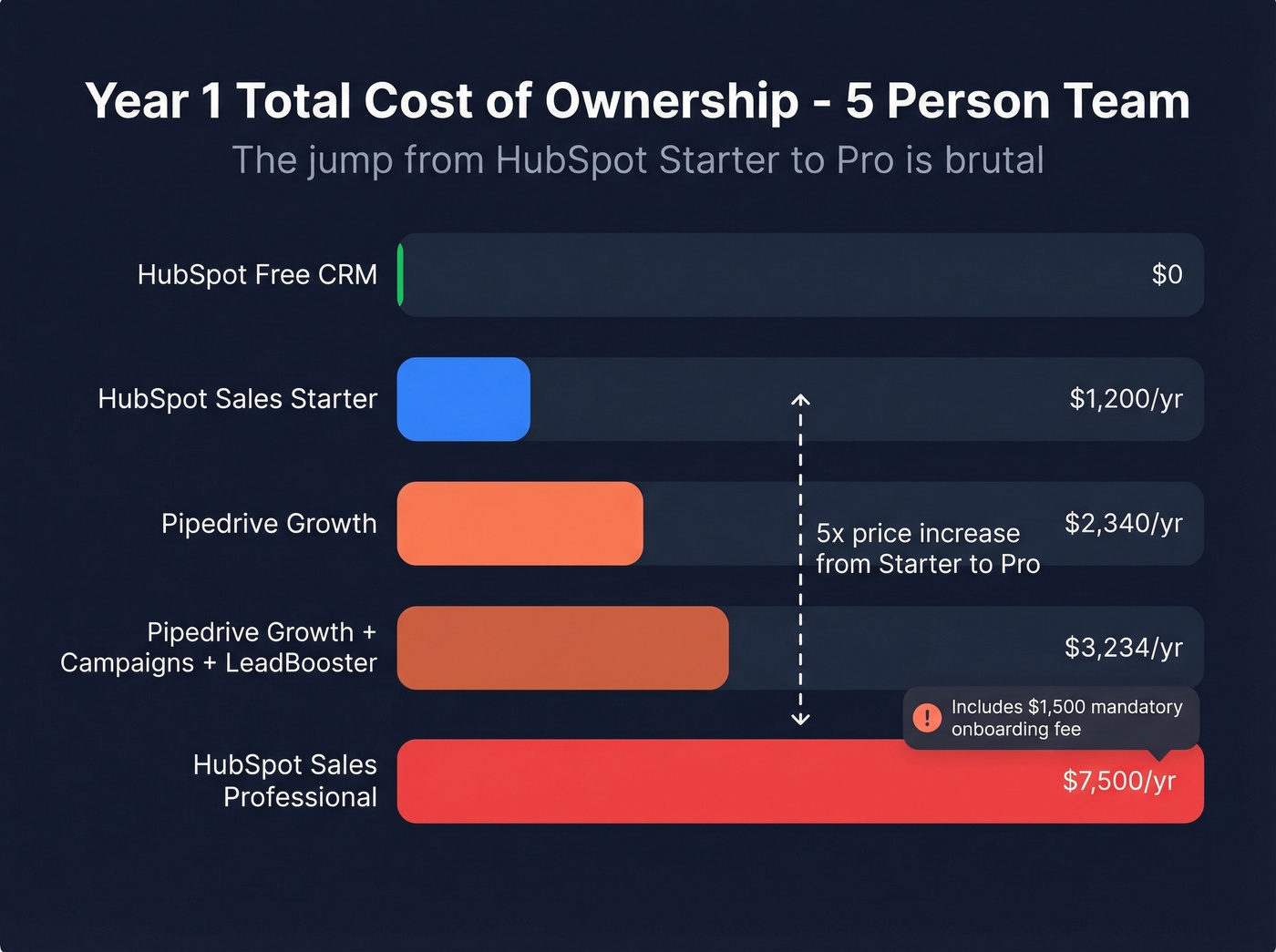
| Configuration | Monthly | Year 1 |
|---|---|---|
| Pipedrive Growth | $195 | $2,340 |
| Pipedrive Growth + Campaigns (5k) + LeadBooster | ~$269.50 | ~$3,234 |
| HubSpot Free CRM | $0 | $0 |
| HubSpot Sales Starter (5 Core Seats) | $100 | $1,200 |
| HubSpot Sales Pro (5 Sales Seats) | $500 + $1,500 onboarding | $7,500 |
The jump from HubSpot Starter to Professional is brutal - $100/mo to $500/mo plus a $1,500 onboarding fee. That's a 5x increase in monthly cost. Pipedrive Growth gives you strong sales automation and reporting at $195/mo total, and nobody asks you to pay $1,500 for the privilege of getting started.
Real TCO: 20-Person Team
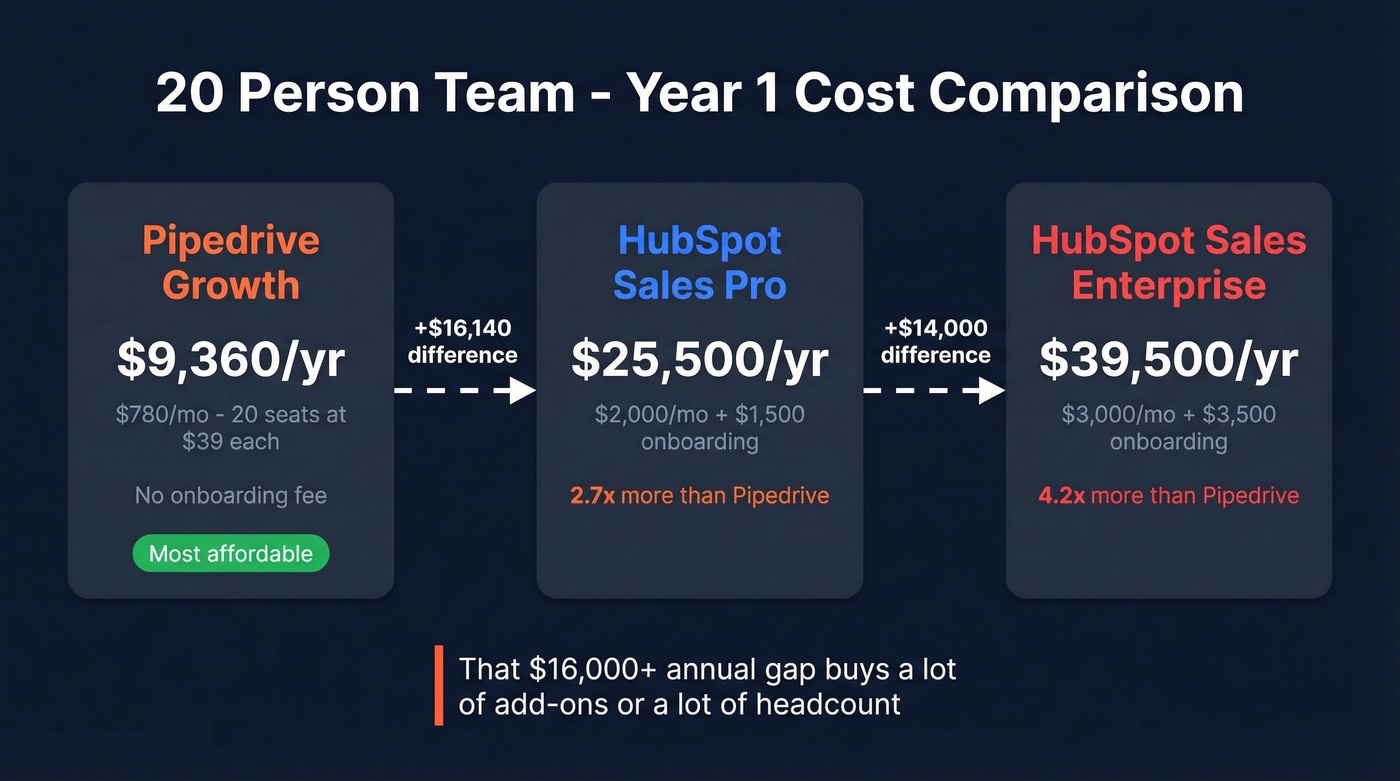
Scale the math and the gap widens dramatically:
| Configuration | Monthly | Year 1 |
|---|---|---|
| Pipedrive Growth (20 seats) | $780 | $9,360 |
| HubSpot Sales Pro (20 Sales Seats) | $2,000 + $1,500 onboarding | $25,500 |
| HubSpot Sales Enterprise (20 Sales Seats) | $3,000 + ~$3,500 onboarding | ~$39,500 |
A 20-person team on HubSpot Sales Professional pays nearly 3x what the same team pays on Pipedrive Growth. That $16,000+ annual difference buys a lot of add-ons - or a lot of headcount.

Neither HubSpot nor Pipedrive fixes a contact list with a 25% bounce rate. Prospeo delivers 98% email accuracy with a 7-day refresh cycle - so the data you import on day one actually connects you to real buyers, not dead inboxes.
Import clean data into your CRM from the start - at $0.01 per verified email.
What Real Users Say
The Reddit sentiment on this matchup is remarkably consistent. A user running an ~80-person company with 7 sales reps on Pipedrive put it bluntly: HubSpot "felt more like overkill." Their salespeople "actually like Pipedrive" - which, if you've ever tried to get reps to use a CRM, you know is the highest praise a platform can get.
On the other side, a small agency owner on r/smallbusiness chose HubSpot because the free tier covers contacts, deals, and basic marketing. Setup was straightforward, and they felt "more organized" and "spending less time juggling tools."
There's a persistent myth on r/sales that you should use Pipedrive until you hit 20 people, then switch to HubSpot. That's wrong. The trigger for switching isn't headcount - it's marketing automation needs. A 50-person sales-only org can run Pipedrive happily. A 12-person team that needs lead scoring, email nurture sequences, and attribution reporting will outgrow Pipedrive fast.
One strategy worth considering: some teams run both platforms simultaneously - HubSpot for marketing automation and Pipedrive for sales pipeline management - synced via Zapier or Make. It sounds redundant, but if your marketing team lives in HubSpot and your reps refuse to leave Pipedrive, a synced dual-CRM setup costs less than forcing a migration nobody wants. We've seen this work well for teams in the 15-30 person range where the marketing and sales motions are genuinely different.
The G2 category scores back up the broader pattern: Pipedrive wins on ease of use (8.9 vs 8.7) and ease of setup (8.7 vs 8.3). HubSpot edges ahead on support quality (8.6 vs 8.4). Neither platform has a meaningful advantage in overall satisfaction.
When to Pick HubSpot
HubSpot is the right call when you need marketing and sales in one platform - lead scoring, email nurture, attribution, and deal tracking without stitching tools together. It's also the better choice when multiple departments (sales, marketing, service) need to share a single customer record, or when you're a bootstrapped startup that needs a free CRM to get started and can grow into paid tiers later.
Your budget needs to support $500+/month for the Professional features that actually differentiate HubSpot. If enterprise reporting and custom objects are non-negotiable for your RevOps team, that's another point in HubSpot's favor.
Skip HubSpot if you're a sales-only team that'll never use Marketing Hub. You'll pay premium prices for a platform where 60% of the features collect dust.
When to Pick Pipedrive
Pipedrive is the right call when your team sells and that's it - no marketing automation, no service ticketing, no content management. Rep adoption matters more than feature depth, and Pipedrive's simplicity means reps actually use it. For teams under 50 people who want useful automation (if/else branching, webhooks) without paying Professional-tier prices, the value is hard to beat.
Skip Pipedrive if you need native email marketing at scale or multi-touch attribution. The Campaigns add-on works for basic sends, but it's not a marketing platform.
What Matters More Than Your CRM
Let's be honest about something we've watched happen over and over: teams spend three months picking between HubSpot and Pipedrive, import their contact list on day one, and watch 25% of emails bounce before lunch. Neither platform fixes bad data. They're containers. The quality of what you put in them determines your ROI.
Dead phone numbers waste rep hours. Bounced emails tank your domain reputation. Duplicate records pollute your pipeline reporting. These problems exist regardless of which CRM logo is in your browser tab.
Prospeo handles this layer with 98% email accuracy, 125M+ verified mobile numbers, and a 7-day data refresh cycle. It integrates natively with HubSpot and connects to Pipedrive via Zapier or Make - verify your contacts before they hit the CRM, enrich existing records with 50+ data points, and stop burning sequences on invalid addresses. One of our customers, Snyk, dropped their bounce rate from 35-40% to under 5% after switching their enrichment workflow, and their AE-sourced pipeline jumped 180%.

You'll spend weeks choosing between HubSpot and Pipedrive, then hours enriching contacts manually. Prospeo's CRM enrichment returns 50+ data points per contact at a 92% match rate - and integrates natively with both HubSpot and Pipedrive.
Enrich your CRM in bulk instead of researching leads one by one.
FAQ
Can I migrate from Pipedrive to HubSpot (or vice versa)?
Yes - for a small team with clean data, budget 1-3 weeks. Export contacts, companies, and deals as CSVs, map custom fields to the new platform's schema, test with 50 records, then run the full import. Rebuild automations and dashboards afterward. Complex workflow migrations take 4-8 weeks, and we'd recommend running both platforms in parallel via Zapier during the transition so nothing falls through the cracks.
Is HubSpot's free CRM actually usable?
Yes. You get unlimited contacts, basic deal tracking, email tracking, and lightweight marketing tools at zero cost. The cliff between free and Professional is steep: Starter ($20/Core Seat) adds lighter functionality, but sequences, forecasting, and custom reporting require Professional at $100/Sales Seat plus a $1,500 onboarding fee.
Does Pipedrive have a free plan?
No. Pipedrive offers a 14-day trial, then paid plans start at $14/seat/month (Lite). HubSpot's free tier is a genuine competitive advantage here, especially for founders testing CRM workflows before committing budget.
Which CRM has better AI in 2026?
HubSpot has broader AI coverage - copilot, agents, and generative AI across hubs - but it's gated behind a credit system (500-5,000 monthly credits, non-rolling). Pipedrive's Pulse, AI Assistant, and AI Reporting are more focused on daily sales workflows. For most sales teams, Pipedrive's AI delivers more immediate value per dollar.
How do I keep my CRM data accurate after import?
Verify contacts before importing them. Bulk-upload your CSV to Prospeo, flag invalid emails and dead numbers, and only push verified records into your CRM. The 7-day data refresh cycle keeps records current post-import. The free tier gives you 75 email verifications plus 100 Chrome extension credits per month - enough to see the difference clean data makes before you commit.