

Inbox Radar Alternatives: Best Tools for Deliverability Testing & Email Intelligence
"Inbox Radar" means two different things depending on who you ask, and that confusion is probably why you're here. Saleshandy's Inbox Radar is a deliverability testing feature - it monitors inbox placement across Gmail, Outlook, Yahoo, Zoho, and more, with shareable reports, CSV export, and ESP-to-ESP breakdowns. InboxRadar.com is a separate, still-in-pre-launch competitive intelligence tool for tracking competitors' email campaigns. Neither one has a clean set of alternatives unless you know which problem you're solving.
Mailcharts used to be the go-to for competitive email intelligence at $149/mo on its old Pro tier. Then it shifted under Litmus and moved to enterprise-style "contact sales" packaging. That single move scattered an entire user base looking for replacements.
Here's what's actually worth your time in 2026.
Our Picks at a Glance
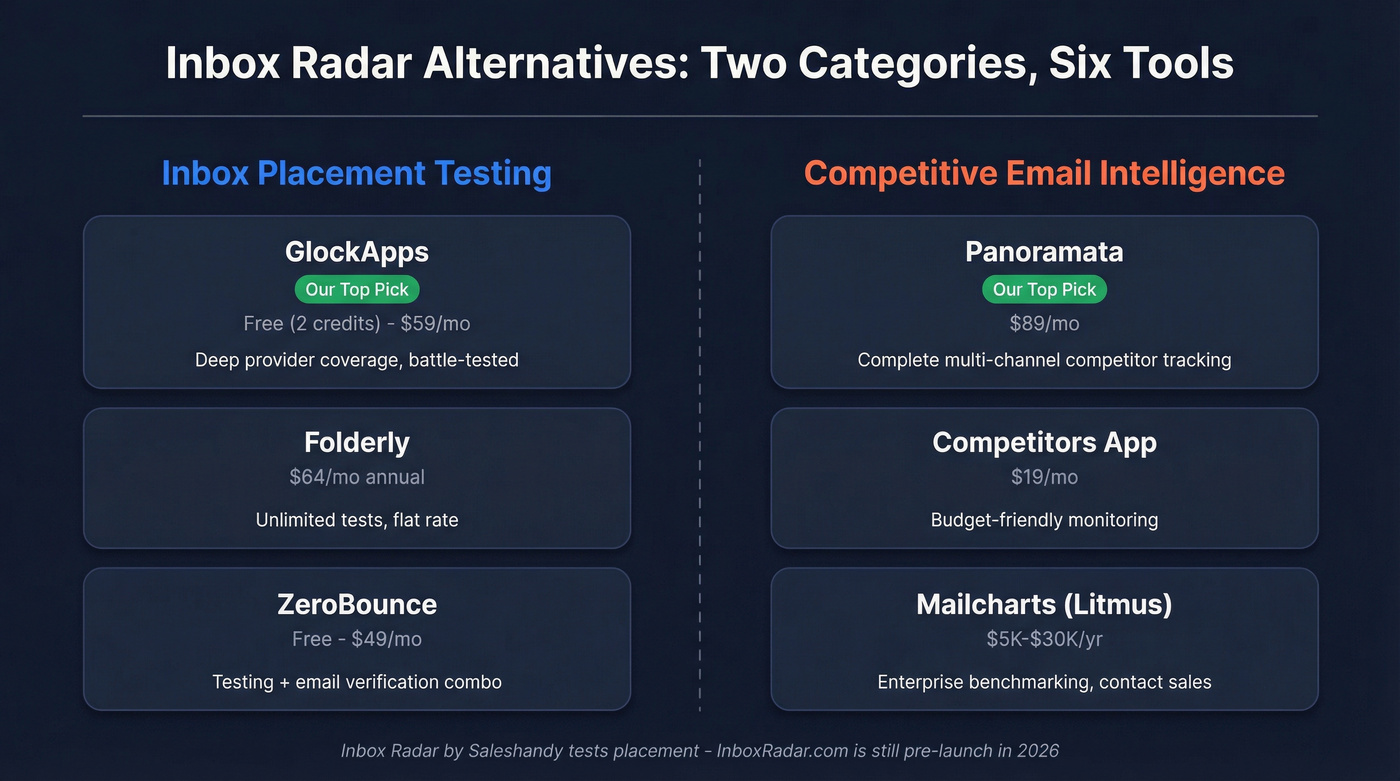
Inbox Placement Testing:
| Tool | Best For | Starting Price |
|---|---|---|
| GlockApps | Standalone testing | Free (2 credits); $59/mo |
| Folderly | Unlimited tests | $64/mo (annual) |
| ZeroBounce | Testing + verification | Free; $49/mo |
Our pick: GlockApps for most teams. Deep provider coverage, battle-tested, and the free tier lets you start today.
Competitive Email Intelligence:
| Tool | Best For | Starting Price |
|---|---|---|
| Panoramata | Complete competitor tracking | $89/mo |
| Competitors App | Budget monitoring | $19/mo |
| Mailcharts (Litmus) | Enterprise benchmarking | Contact sales (~$5K-$30K/yr) |
Our pick: Panoramata unless you're on a tight budget - then Competitors App at $19/mo punches above its weight.
Deliverability Tool Comparison
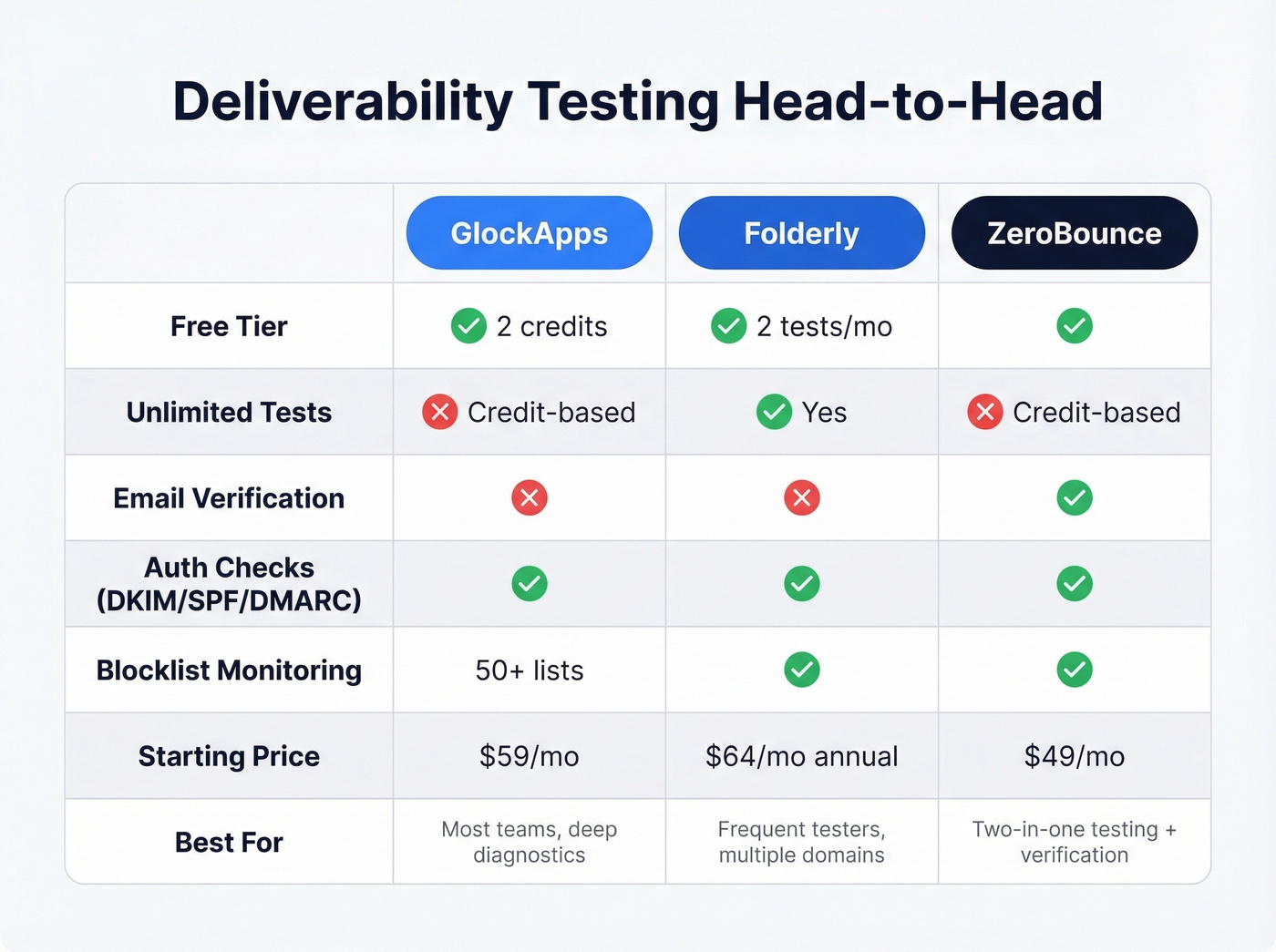
Here's how the top three inbox placement testers stack up on the features that matter most:
| Feature | GlockApps | Folderly | ZeroBounce |
|---|---|---|---|
| Free tier | Yes (2 credits) | Yes (2 tests/mo) | Yes |
| Unlimited tests | No (credit-based) | Yes | No (credit-based) |
| Verification included | No | No | Yes |
| Auth checks (DKIM/SPF/DMARC) | Yes | Yes | Yes |
| Seed list size | ~100 addresses | Not public | Not public |
| Blocklist monitoring | 50+ lists | Yes | Yes |

Inbox placement tools tell you where emails land. But if you're sending to bad addresses, no amount of testing fixes your bounce rate. Prospeo's 5-step verification and 98% email accuracy keep you under 4% bounce - the same way Snyk cut theirs from 35% to under 5%.
Fix deliverability at the source - start with data that's actually verified.
Best Inbox Placement Testing Tools
GlockApps
GlockApps is the default we recommend for inbox placement testing. You send to their seed list of around 100 addresses and get a breakdown of inbox vs. spam vs. undelivered across major providers - Gmail Workspace, Outlook, Yahoo, AOL. It also runs SpamAssassin scoring, monitors 50+ blocklists, and checks DKIM/SPF/DMARC authentication in a single pass.

The free plan includes 2 test credits, enough to diagnose a problem. Paid plans run $59/mo (Essential), $99/mo (Growth), and $129/mo (Enterprise). Reasonable for any team running cold outbound or high-volume marketing sends. We've used it ourselves when troubleshooting domain reputation issues, and the provider-level granularity is genuinely useful - you can see exactly where Gmail is flagging you while Outlook lets everything through.
Use this if you want a dedicated, no-nonsense deliverability testing tool with deep provider coverage. Skip this if you need email warmup bundled in - GlockApps focuses on diagnostics, not warmup.
Folderly
Folderly takes a different angle: unlimited inbox placement tests at a flat rate. At $64/mo on an annual plan ($79 monthly), you can test as often as you want without worrying about credit limits.
That matters more than it sounds. When you're iterating on email copy, authentication settings, or sending infrastructure, running five or six tests in a single afternoon isn't unusual. Credit-based pricing makes that expensive fast. Folderly removes the friction.
Best when you're running frequent tests across multiple domains and want predictable costs. Overkill if you only test occasionally - GlockApps' free tier or $59/mo plan will save you money.
ZeroBounce
ZeroBounce combines deliverability testing with email verification in one platform. Free tier available, Starter at $49/mo, Team at $99/mo. The deliverability toolkit includes inbox placement testing, blacklist monitoring, and email server testing alongside their core verification engine.
Let's be honest: ZeroBounce does both jobs adequately, but neither as deeply as a specialist. If you already have a verification tool like Prospeo, you're paying for overlap. If you have neither, it's a convenient two-for-one.
Warmup Inbox
Warmup-only tool at $12/mo per inbox. It gradually builds sending reputation but doesn't include inbox placement testing or diagnostics. Pair it with GlockApps if you need both warmup and testing - the combined $71/mo still undercuts most all-in-one platforms. (If you want more options, see our guide to unlimited email warmup.)
Best Competitive Email Intelligence Tools
Panoramata
Since Mailcharts went enterprise-only, Panoramata has become the top pick for competitive email intelligence. It tracks newsletters, automated flows, ads, landing pages, website changes, SMS, and social - all in one dashboard. The AI insights surface patterns you'd miss manually, and G2 reviewers call it the "most complete" tool in the category with a 5.0/5 rating.
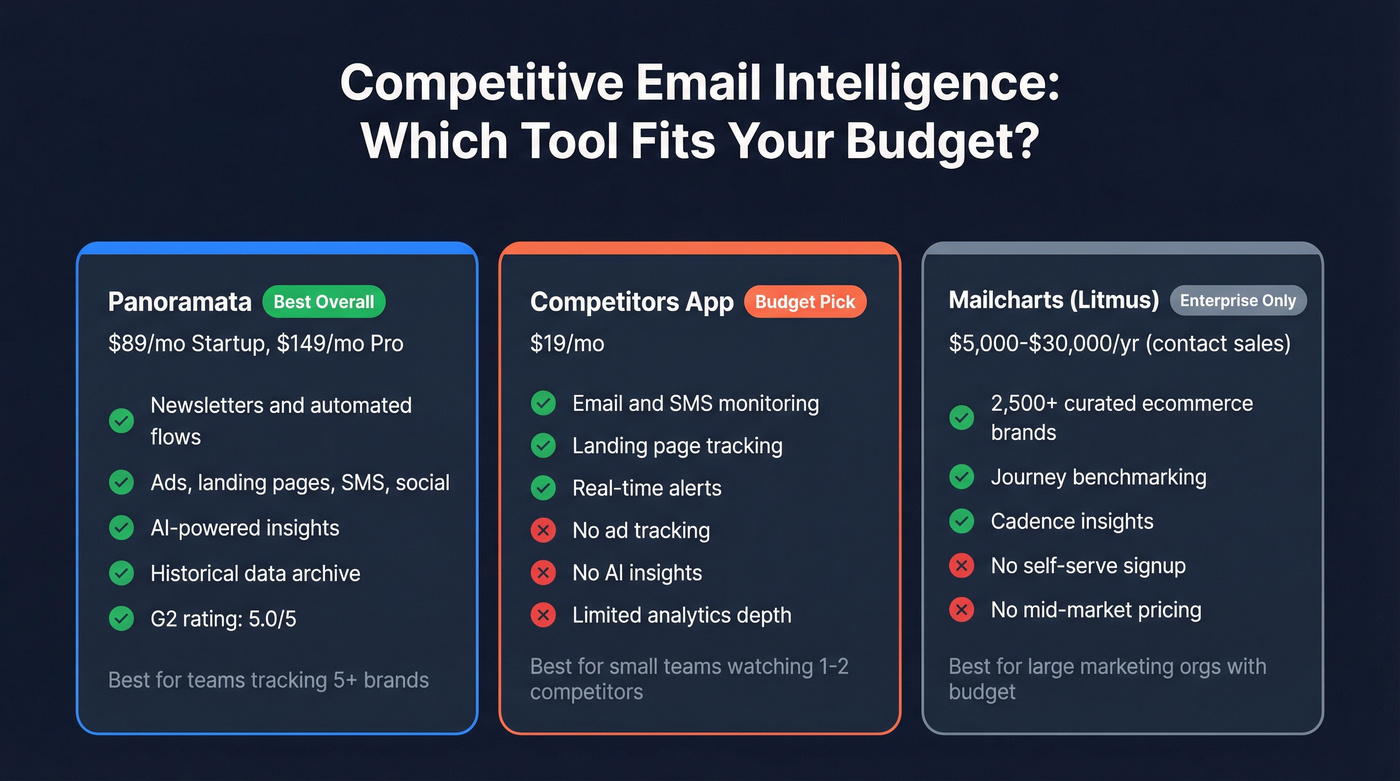
Pricing is straightforward: $89/mo for Startup (3 users), $149/mo for Professional (10 users). Panoramata positions itself around saving 20+ hours per month, which tracks if competitive research is currently spread across inboxes, spreadsheets, and bookmarks.
Here's the thing, though: if your deal sizes are small and you're only watching one or two competitors, just subscribe to their newsletters with a burner email. It's free. Panoramata earns its price when you're tracking five or more brands across multiple channels and need the historical data.
Competitors App
The budget pick. Starting at $19/mo, Competitors App covers email, SMS, and landing page monitoring with real-time alerts. Email marketing returns $36 for every $1 spent according to Litmus benchmarks - knowing what competitors send is worth the $19.
It won't match Panoramata's depth on ad tracking or AI-powered insights, but for teams that just need to know what competitors are sending and when, it gets the job done.
Use this if you want multi-channel competitor monitoring without spending $89+/mo. Skip this if you need deep analytics on send cadence, subject line trends, or journey mapping - you'll outgrow it fast.
Mailcharts (Litmus)
Mailcharts discontinued its old $149/mo Pro plan and now lives under Litmus as an enterprise upgrade. There's no simple self-serve pricing anymore - you're talking to sales. Expect $5,000-$30,000/year depending on seats and add-ons. The data is still excellent (2,500+ curated ecommerce brands, journey benchmarking, cadence insights), but it's priced out for anyone who isn't a large marketing org. The r/emailmarketing consensus is that Panoramata fills the gap Mailcharts left for mid-market teams.
Owletter & Milled
Owletter starts at $29/mo and gives you full HTML export of competitor emails - useful if you need the actual code, not just screenshots. Milled is retail-focused with free browsing of brand email archives, more of an inspiration library than a monitoring tool. Neither replaces a proper competitive intelligence platform, but they're handy supplements.
Fix Your Data Before You Test
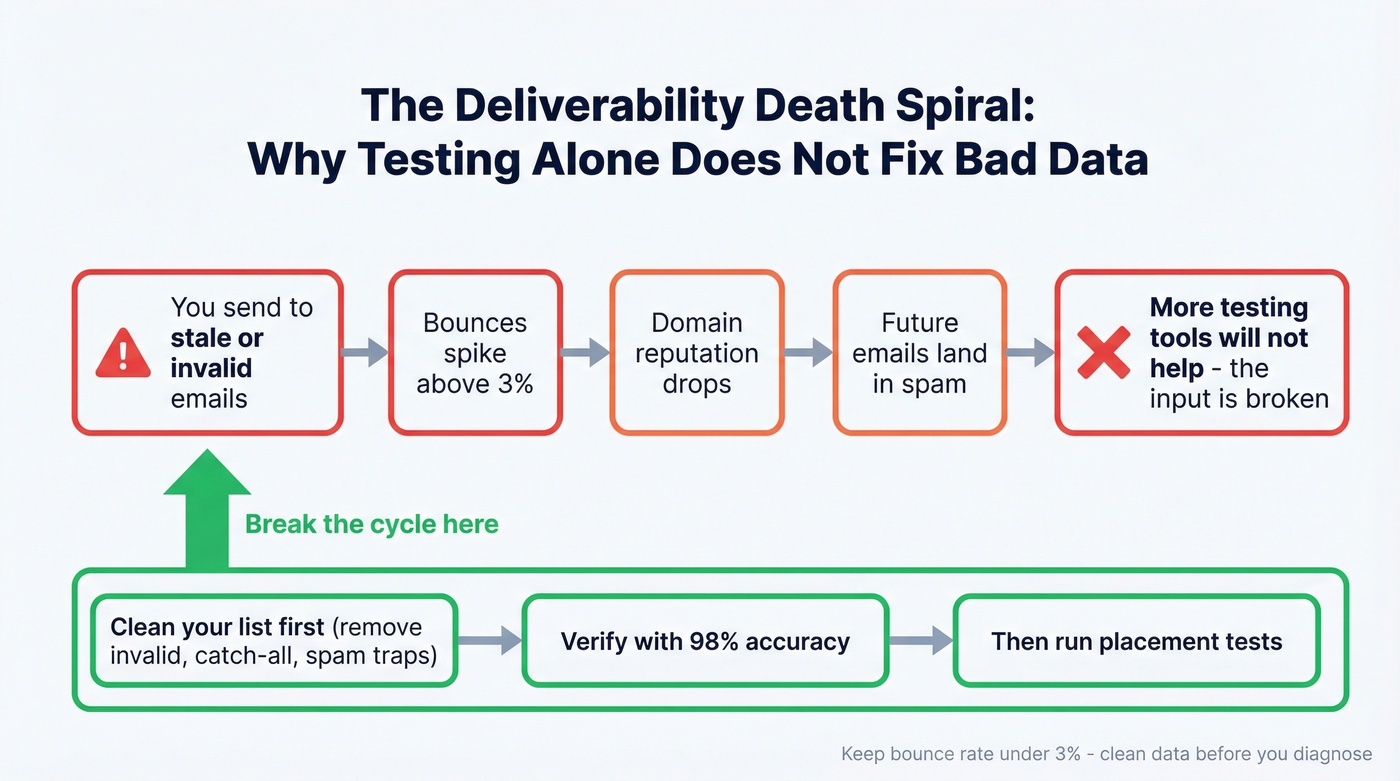
Most inbox placement problems don't start with your sending reputation. They start with bad email data. You send to invalid addresses, those bounce, and bounces tank your domain reputation. A common benchmark is keeping bounce rate under 3% - go above that and you're already in trouble. (If you want the deeper breakdown, see our email bounce rate guide.)

We've seen teams waste months on deliverability diagnostics when the real problem was a 15% bounce rate from stale data. One agency we talked to spent $200/mo on testing tools before realizing their list hadn't been cleaned in six months. Before you invest in any testing tool, fix the input. Prospeo's 5-step email verification - with catch-all handling, spam-trap removal, and honeypot filtering - delivers 98% email accuracy on a 7-day data refresh cycle. The free tier covers 75 emails/month, enough to test whether your list quality is the actual problem.
You're comparing GlockApps, Folderly, and ZeroBounce to protect your domain reputation. Smart. But the fastest way to tank deliverability is sending to stale contacts. Prospeo refreshes all 300M+ profiles every 7 days - not every 6 weeks like most providers.
Stop diagnosing bad data. Start with clean data at $0.01 per email.
FAQ
Is InboxRadar.com free?
InboxRadar.com is still in pre-launch mode as of 2026 with no public pricing or working product. If you need a tool today, GlockApps offers a free tier for placement testing and Panoramata provides competitive email intelligence starting at $89/month.
What's the difference between placement testing and warmup?
Inbox placement testing checks where your emails land - inbox, spam, or undelivered - across providers like Gmail and Outlook. Email warmup gradually builds your sending reputation by exchanging emails with real inboxes. Testing diagnoses the problem; warmup is one fix. Most teams need both.
Can bad email data cause deliverability problems?
Absolutely. Sending to invalid addresses causes bounces, which damage your domain reputation and push future emails to spam. Keep bounce rates under 3%. Cleaning your list before running placement tests saves you from chasing a symptom when the disease is bad data.
Which alternative is best for small teams?
GlockApps' free tier (2 test credits) handles basic placement diagnostics, and Competitors App ($19/mo) covers competitive email monitoring. Together they cost under $20/mo and cover both sides of what people are looking for when exploring inbox radar alternatives.