

InboxFlow Pricing, Reviews, Pros & Cons (2026)
Most of what you'll read about InboxFlow is wrong. Competitor blogs describe it as an inbox setup and provisioning tool with CSV exports and a 15-inbox minimum. That was the old product. InboxFlow has quietly pivoted to an infrastructure monitoring and auto-swap platform - and almost nobody writing about it has caught up.
We reviewed InboxFlow's current site and dug through every directory listing, Trustpilot page, and Reddit thread we could find. The 30-second verdict: if you need inbox provisioning, InboxFlow isn't that product anymore. If you need automated monitoring that swaps underperforming inboxes inside Smartlead or Instantly, it's worth a look - but you're betting on a product with virtually zero public review data. For provisioning, Maildoso or Mailforge are safer bets with transparent pricing and actual user feedback.
What Is InboxFlow in 2026?
InboxFlow's current homepage positions the product as a cold email infrastructure monitor. The workflow is straightforward: connect your sequencer via API key, tag your backup inboxes, and let InboxFlow watch performance around the clock. When an inbox underperforms, it auto-swaps in a backup to recover reply rates.
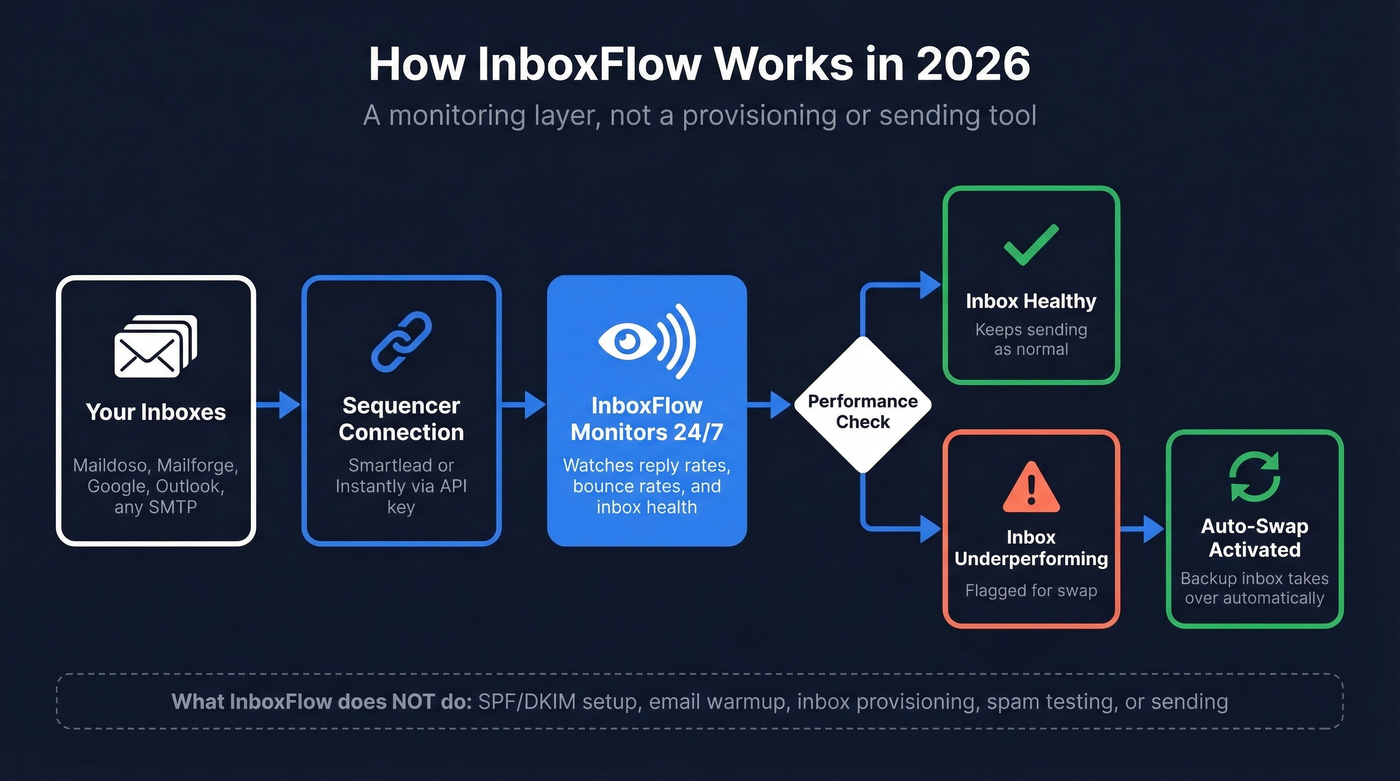
Supported sequencers are Smartlead and Instantly. Because InboxFlow monitors at the sequencer level, it's provider-agnostic - it works with Maildoso, Mailforge, Inframail, Google, Outlook/Microsoft, Hypertide, Scaledmail, or any SMTP setup. What it explicitly doesn't do: SPF/DKIM/DMARC setup, email warmup, inbox provisioning, spam testing, or sending. It's a monitoring layer, not an all-in-one infrastructure platform. That distinction matters, because competitor reviews still describe the legacy product as if it's the current one.
InboxFlow Pricing Breakdown
InboxFlow's legacy setup product was $45/mo for 15 inboxes, with yearly billing saving $189 and domains purchased separately.
The current monitoring product doesn't publish pricing on the homepage. Directory listings show tiers: Starter at $49/month, Pro at $99/month, and Enterprise with custom pricing. You'll likely need to contact their team for the exact quote and limits tied to your inbox count - which makes comparison shopping harder than tools with fully transparent pricing pages.
Use this if: You're already running 15+ inboxes across Smartlead or Instantly and want automated monitoring without manually checking deliverability dashboards every morning.
Skip this if: You need published, self-serve pricing before committing, or you're looking for provisioning, warmup, or spam testing. InboxFlow doesn't do any of those.
Pros and Cons
Pros:
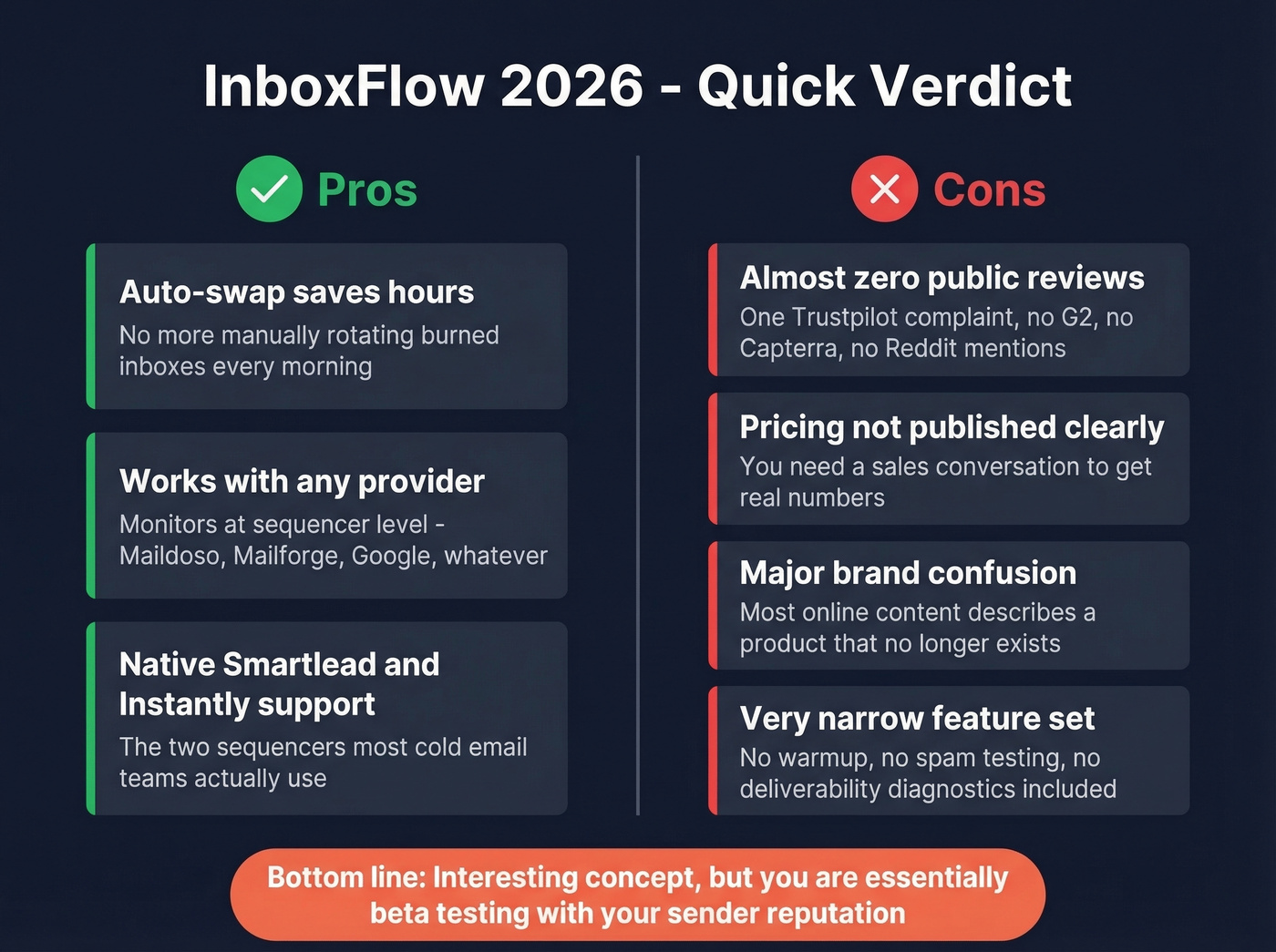
- The automated monitoring plus auto-swap concept is genuinely useful for scaled outbound. Manually rotating burned inboxes is tedious and slow - automating it saves real operational hours.
- Provider-agnostic design. Because it monitors at the sequencer level, you're not locked into one mailbox vendor.
- Native Smartlead and Instantly support via API - the two sequencers most cold email teams actually use.
Cons:
- Near-zero public reviews. One Trustpilot complaint, no meaningful G2 or Capterra footprint. You're evaluating this product almost blind.
- Pricing isn't clearly published on the product site, so you can't fully comparison shop without a sales conversation.
- Significant brand confusion between the legacy setup tool and the current monitoring product - most online content describes a product that no longer exists.
- No warmup, no deliverability diagnostics, no spam testing included. It's a narrow tool, and you'll need other products to fill the gaps.

InboxFlow monitors inboxes after they underperform. But most inbox burns start with bad contact data - bounces tank your sender reputation before any monitoring tool can react. Prospeo's 98% email accuracy and 5-step verification keep bounce rates under 4%, so you spend less time swapping inboxes and more time booking meetings.
Fix the root cause of burned inboxes - start with data that doesn't bounce.
What Users Actually Say
Here's the thing: InboxFlow has one of the thinnest review footprints in the entire cold email infrastructure category. Trustpilot shows a single review - a 3.2 rating based on one complaint from October 2023 alleging unsolicited emails, a broken opt-out link, and GDPR non-compliance. There's no meaningful G2 presence. No Capterra listing. Reddit's cold email communities discuss infrastructure stacks extensively, but InboxFlow doesn't come up in those conversations.
That's not unusual for a niche product that recently pivoted. But it means you're making a buying decision with almost no independent validation. Proceed with eyes open.
How InboxFlow Compares
It helps to understand the four types of cold email infrastructure that exist today. Reddit's cold email community breaks them down clearly: Google Workspace/Microsoft 365 resellers ($2.50-$3.50/mailbox), Azure-based setups, shared SMTP pools, and dedicated SMTP with unique IPs. InboxFlow's monitoring layer sits on top of all four - it doesn't care which type you use, only whether your inboxes are performing. Most operators warm new inboxes for at least 14 days before sending 15-25 emails per day per inbox, and InboxFlow's value kicks in after that warmup phase when performance starts to drift.
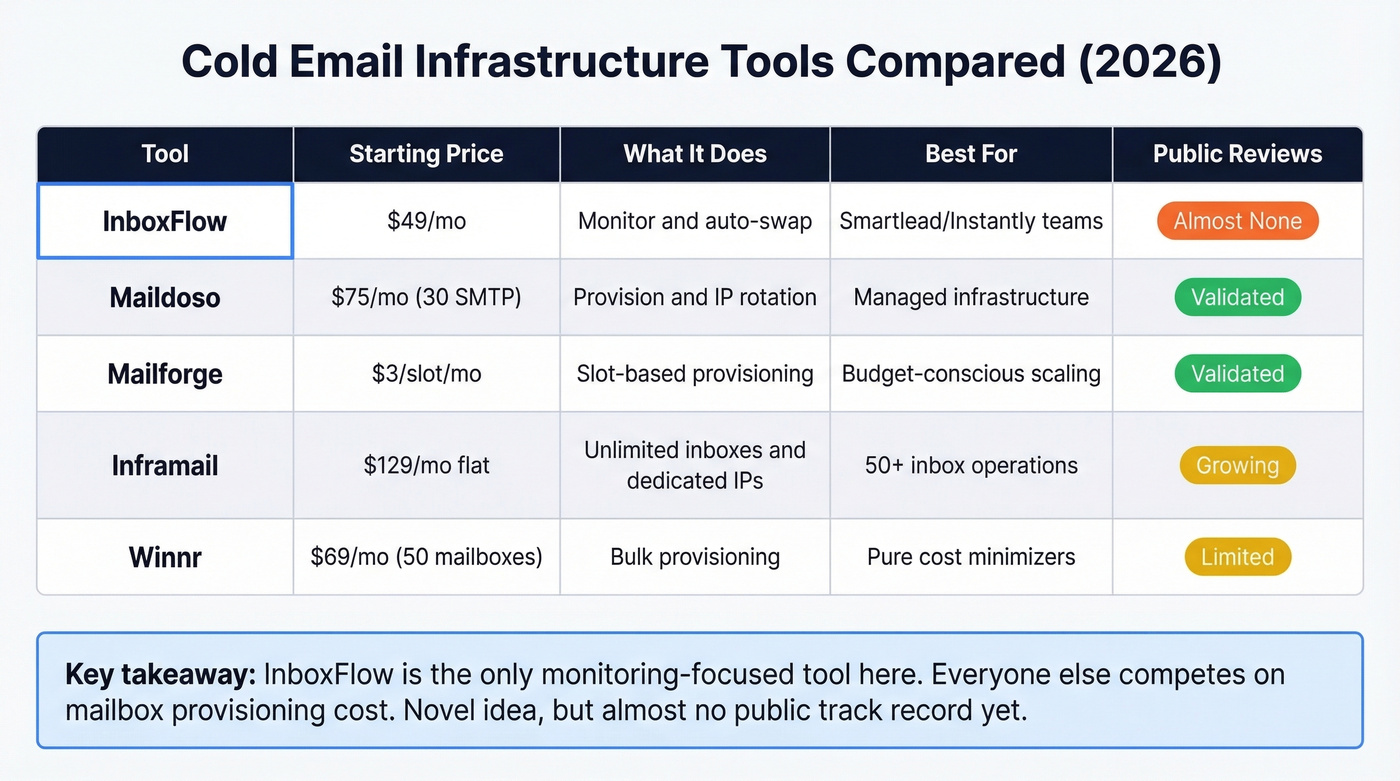
| Tool | Starting Price | Model | Key Strength | Best For |
|---|---|---|---|---|
| InboxFlow (legacy) | $45/mo (15 inboxes) | Setup + CSV export | Automated SPF/DKIM/DMARC setup | Legacy users only |
| InboxFlow (current) | $49/mo (Starter) | Monitor + auto-swap | Inbox rotation | Smartlead/Instantly teams |
| Maildoso | $75/mo (30 SMTP) | Provision + IP rotation | Self-healing mailboxes | Managed provisioning |
| Mailforge | $3/slot/mo (min 10) | Slot-based provision | Low per-mailbox cost | Budget-conscious scaling |
| Inframail | $129/mo (unlimited) | Flat-fee + dedicated IPs | Unlimited inboxes | 50+ inbox operations |
| Winnr | $69/mo (50 mailboxes) | Bulk provision | Lowest per-mailbox cost | Pure cost minimizers |
Maildoso makes the most sense when you want someone else to manage the infrastructure headaches. Say you're spinning up a new outbound motion with 30 inboxes: at $75/mo you get SMTP mailboxes with IP rotation and self-healing, where paused inboxes return after 14 days. Quarterly billing lowers the effective per-mailbox price, but it locks you into a 3-month cycle. They also offer a quarterly starter at $99/3 months covering 3 domains and 12 accounts for smaller operations.
Mailforge wins a pure cost comparison. On yearly billing, the model is $3 per slot per month - so 50 slots runs $150/mo. Monthly billing is higher, around $3.75/slot. Add $14/year per .com domain plus optional SSL masking at $6/domain/year. In our analysis, Mailforge's slot-based model is the cleanest for teams that want granular control over exactly how many inboxes they're running. No bundles, no tiers, just math.
Inframail is built for scale economics. At $129/mo flat for unlimited inboxes, a dedicated US IP, and 10 free domains, the economics flip in your favor the moment you cross roughly 40 inboxes. Their Agency Pack scales to $327/mo for 300K emails/month with 3 dedicated IPs and 20 domains.
Let's be honest about InboxFlow's position here: the monitoring angle is the only genuinely novel idea in this space. Everyone else is competing on mailbox cost. But novel doesn't mean proven - and with almost no public track record, you're essentially beta testing with your sender reputation on the line. For provisioning, Maildoso and Mailforge have the validation. For 50+ inboxes on a flat fee, Inframail is hard to beat.
The Real Problem Isn't Your Inboxes
Infrastructure protects your sender reputation. But bad contact data - high bounce rates - undoes that protection faster than any monitoring tool can fix it.
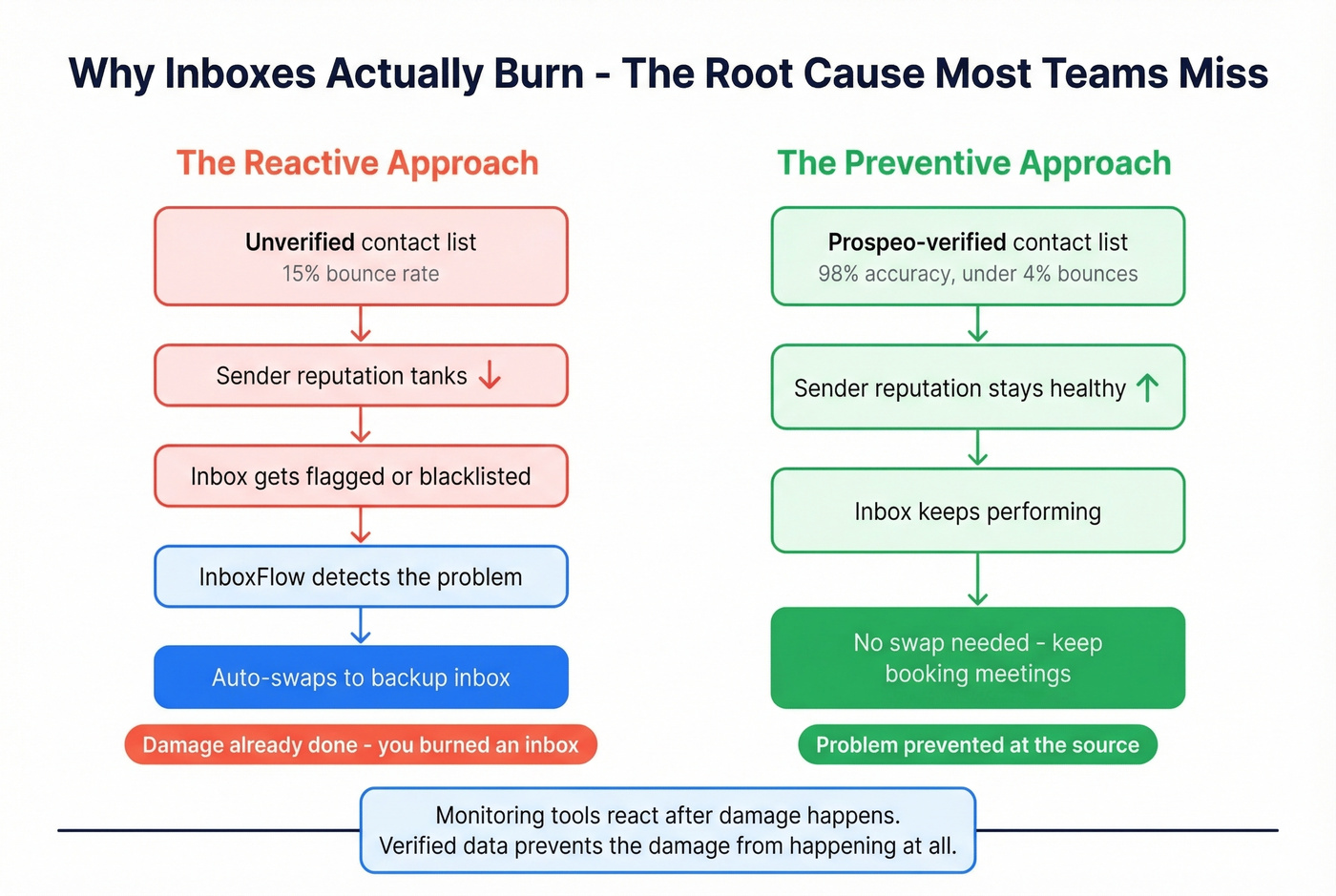
We've seen this pattern dozens of times: teams invest in infrastructure, warm their inboxes carefully, then watch deliverability crater because 15% of their list bounces. Stack Optimize, one of our customers, built from $0 to $1M ARR while keeping client deliverability above 94% and bounces under 3% - and the difference was verifying every email before it hit a sequence. Prospeo's 98% email accuracy and 7-day data refresh cycle keep bounce rates under control at the source, and it integrates natively with Smartlead and Instantly - the same sequencers InboxFlow supports.
If you want the deeper mechanics behind this, start with an email deliverability refresher, then benchmark your email bounce rate and tighten your sender reputation process.

You're already paying $49-$99/mo to monitor infrastructure. But at $0.01 per verified email, Prospeo eliminates the bad data that forces those auto-swaps in the first place. Teams using Prospeo with Smartlead and Instantly see bounce rates under 4% - with native integrations for both sequencers.
Stop patching deliverability problems. Prevent them with verified data.
FAQ
Does InboxFlow send cold emails?
No. InboxFlow monitors inbox performance and auto-swaps underperformers inside your sequencer. You still need a sending tool like Smartlead or Instantly, plus a separate provider for mailbox provisioning and verified contact data.
Is InboxFlow's $45/month pricing still accurate?
That price reflects InboxFlow's legacy setup product covering 15 inboxes. The current monitoring product is listed at $49/month for Starter and $99/month for Pro, with Enterprise custom pricing.
Is InboxFlow legit?
InboxFlow is a real product with a functioning website and API connections to Smartlead and Instantly. That said, it has virtually no public reviews - one Trustpilot rating, no meaningful G2 or Capterra footprint, and no Reddit discussion. The product pivot is confirmed, but the lack of independent validation means you should test carefully before committing production inboxes.
What's the best alternative for inbox provisioning?
Maildoso (from $75/mo for 30 SMTP mailboxes) and Mailforge ($3/slot/mo) are the most validated provisioning options. For 50+ inboxes, Inframail's $129/mo flat fee is hard to beat. If your real problem is bouncing emails rather than inbox health, fix your contact data first - Prospeo's free tier gives you 75 verified emails per month to test without risk.