

Infofree vs Saleshandy: A Database and a Sequencer Walk Into a Bar
Comparing Infofree to Saleshandy is like comparing a phonebook to a dialer. One gives you names and numbers. The other helps you call them at scale. They don't compete - they solve completely different bottlenecks, and picking between them means you've already misdiagnosed the problem.
Infofree is a lead and list database with a basic built-in CRM. You search for businesses or consumers, view contact details, and export lists. Saleshandy is cold email sequencing software - automated follow-ups, sender rotation, warm-up, deliverability tools. One fills your spreadsheet. The other empties your outbox.
Here's the thing: if you're closing deals under $15k and running outbound, you probably don't need a legacy database at all. You need verified contacts and a sequencer. Everything else is overhead.
30-Second Verdict
Pick Infofree if your bottleneck is building lead lists and you can tolerate tight export caps and some cancellation friction. Pick Saleshandy if your bottleneck is sending cold emails at scale and you already have contacts to load.
Skip both if you need verified contact data that actually protects deliverability. A dedicated data layer with real-time verification will outperform either tool's native data - and we'll get into why below.
Feature Comparison: Side-by-Side
| Feature | Infofree | Saleshandy |
|---|---|---|
| Primary job | Lead database + CRM | Cold email sequencing |
| Database size | 15M-22M businesses / 240M-245M consumers | 700M+ B2B leads via Lead Finder |
| Export/send limit | 200-1,000 exports/mo | 6K-240K emails/mo |
| Free trial | 24 hrs, no credit card, no exports | 7 days, no credit card |
| Cancellation | Call or letter required | Self-serve |
| Starting price | $150/mo + $99 setup | $36/mo ($25/mo annual) |
| G2 rating | 2.9/5 (20 reviews) | 4.6/5 |
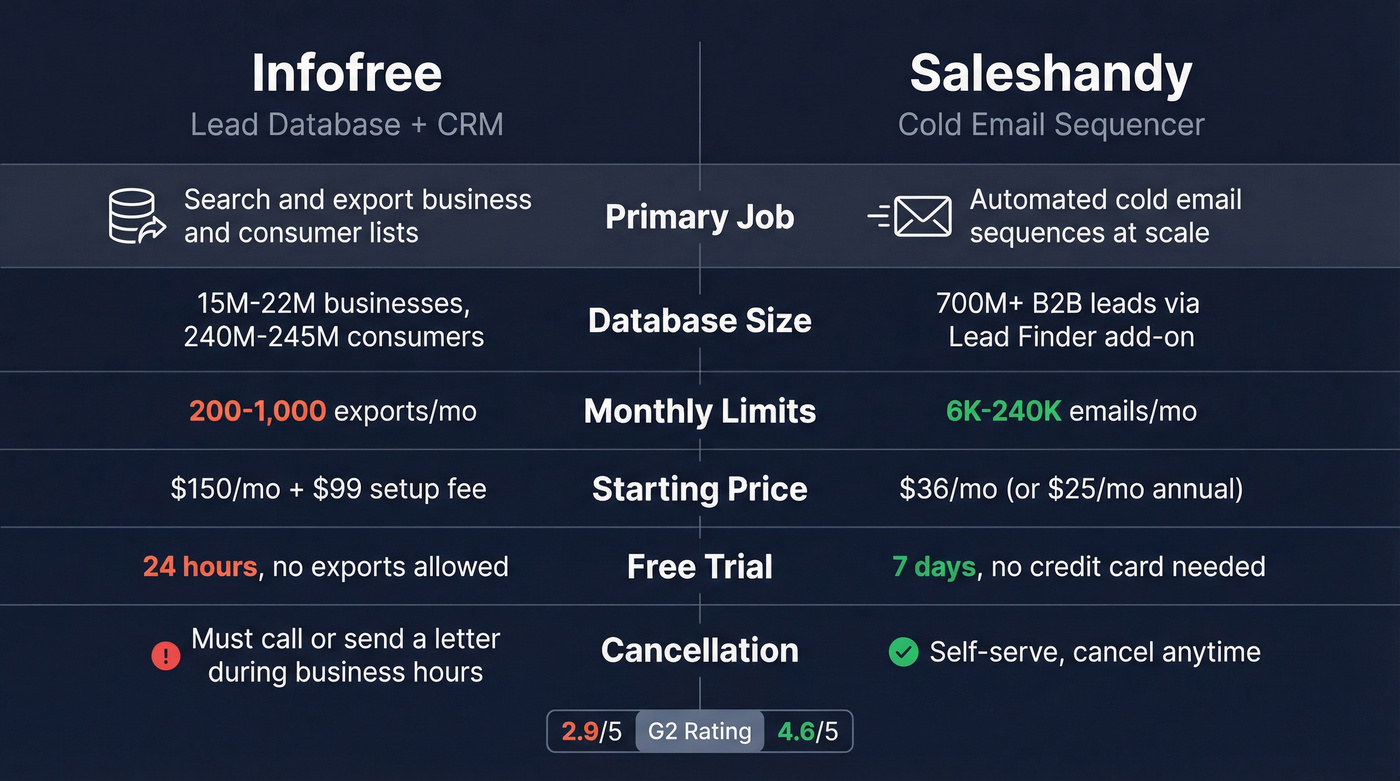
The table makes the category mismatch obvious. These aren't substitutes. If you're choosing one, you still need the other's function covered somewhere in your stack.
What Infofree Delivers
Infofree positions itself as a data compiler for SMB sales teams, pulling from 5,000+ business sources and 10,000+ consumer sources. Across its own pages, the platform lists access to 15M businesses and 240M consumers on the pricing page and 22M businesses and 245M consumers on the homepage, with 70M executives referenced in both places. They claim 95% accuracy on business records, 90% on consumer records, and 80% on their "weekly hot sales leads" like new businesses, new movers, and new homeowners.
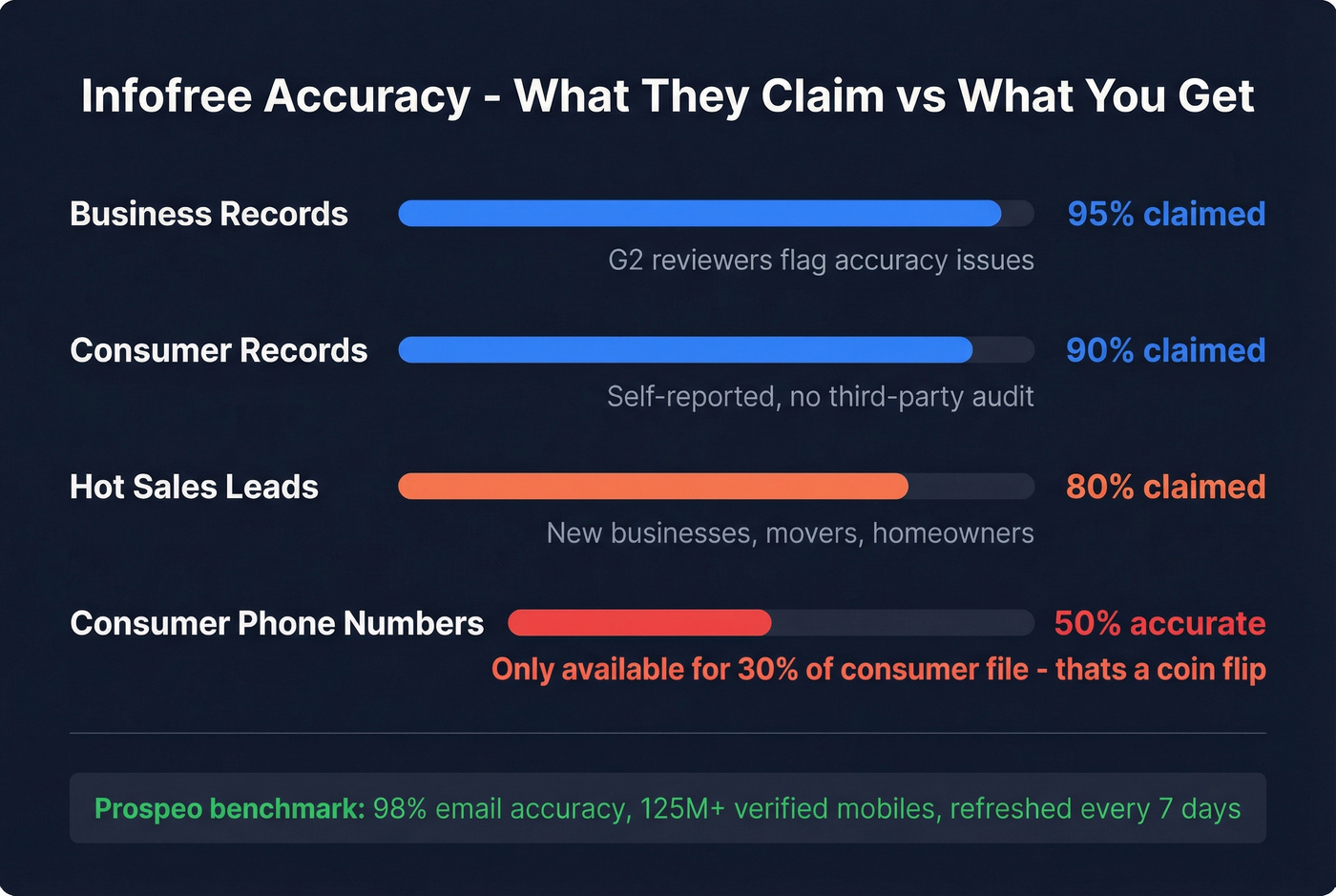
Those accuracy numbers don't hold up well in practice, though. G2 reviewers flag data accuracy as a recurring issue, and the consumer phone situation is particularly rough - Infofree's own site says phone numbers are available for only 30% of the consumer file and are 50% accurate. That's a coin flip. We tested the 24-hour free trial and found the search interface functional, but the inability to export makes it impossible to evaluate data quality before committing $150/mo.
Pricing runs $150/mo for Starter with 200 exports/mo or $275/mo for Team with 1,000 exports/mo, both carrying a $99 setup fee on monthly plans. Annual prepay options range from $1,500/year to $4,500/year depending on users and export volume.
Risk flags worth knowing about: Cancellation requires calling 877-448-0101 or sending a letter during business hours, 8 AM-5 PM CST. Saved searches and remaining credits are forfeited. One G2 reviewer notes the built-in CRM doesn't allow exporting entries. Trustpilot sits at 2.8/5 with billing complaints including "bait and switched" and unexpected charges. Community discussion around Infofree is thin - most feedback lives on G2 and Trustpilot, where billing friction dominates the conversation.

Infofree claims 95% accuracy but reviewers disagree, and their consumer phone data is a coin flip at 50%. Prospeo delivers 98% email accuracy and 125M+ verified mobiles with a 30% pickup rate - all refreshed every 7 days, not whenever a legacy compiler gets around to it.
Stop gambling on unverified lists. Get data that protects your sender reputation.
What Saleshandy Delivers
Saleshandy is a sending machine, and it's good at that job. Outreach Starter runs $36/mo or $25/mo on annual billing with 6,000 emails/mo and 2,000 active prospects. Scale up to Outreach Pro at $99/mo ($69/mo annual) for 150,000 emails, Outreach Scale at $199/mo ($139/mo annual) for 240,000, or Outreach Scale Plus at $299/mo ($209/mo annual) if you're running agency-level volume. Every plan includes unlimited email accounts, sender rotation, and warm-up via TrulyInbox. Saleshandy is SOC 2 certified, which matters if you're handling client data.
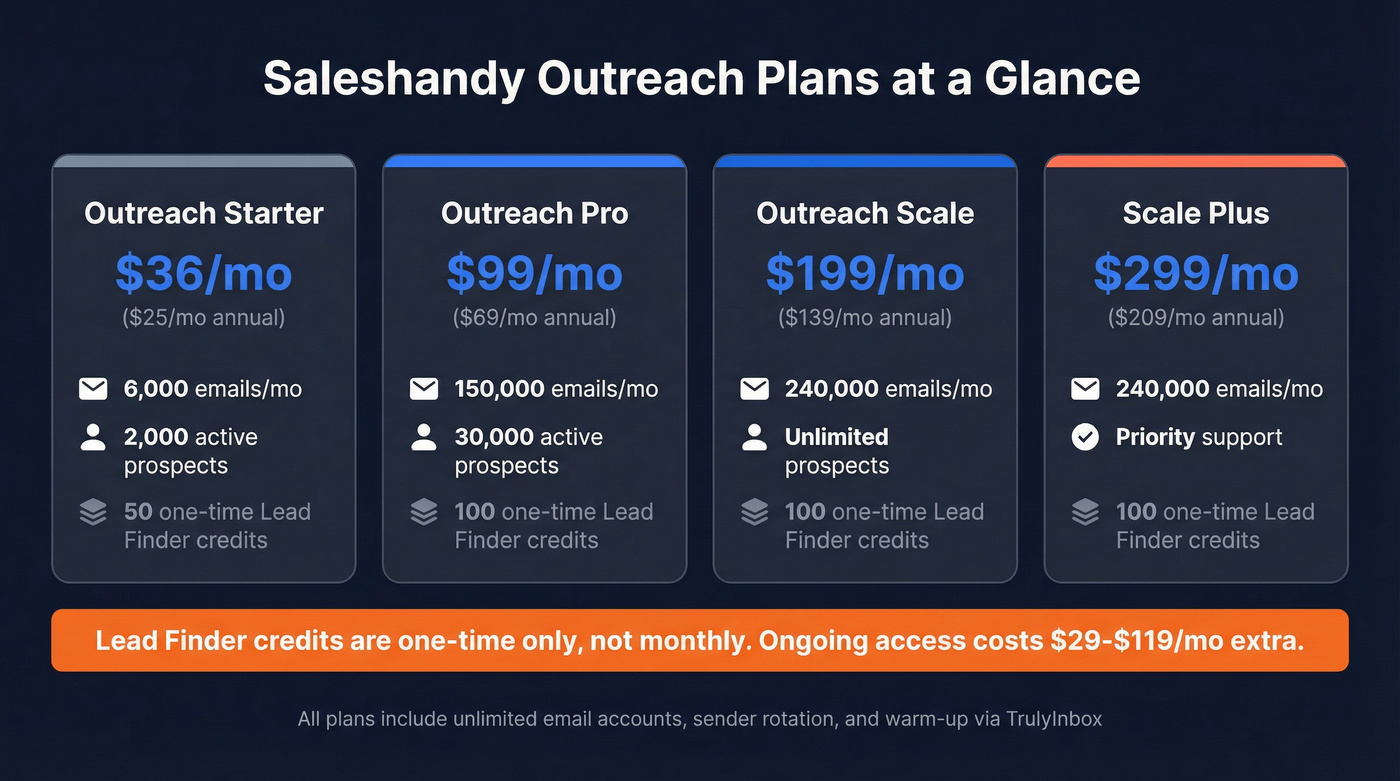
Each plan comes with one-time Lead Finder credits ranging from 50 to 100, plus verification credits from 1,000 to 10,000. But those are one-time allotments, not monthly. Ongoing Lead Finder access runs roughly $29-$119/mo as a separate add-on.
Let's be honest: Saleshandy solves sending, not sourcing. The 7-day free trial with no credit card required is genuinely generous compared to Infofree's 24-hour window, and the deliverability stack - sender rotation, warm-up, subsequences, unified inbox - helps explain the 4.6/5 G2 rating. For agencies and SMBs running volume, it's a strong sequencer. But you still need contacts to feed it.
The Missing Data Layer
Neither tool fully solves the data quality problem. Infofree gives you lists with self-reported 95% accuracy and no real-time verification. Saleshandy gives you a sending engine but limited prospecting credits. Legacy databases suffer from data decay, limited CRM sync, and zero buyer intent signals - exactly the gaps that sit between these two tools.
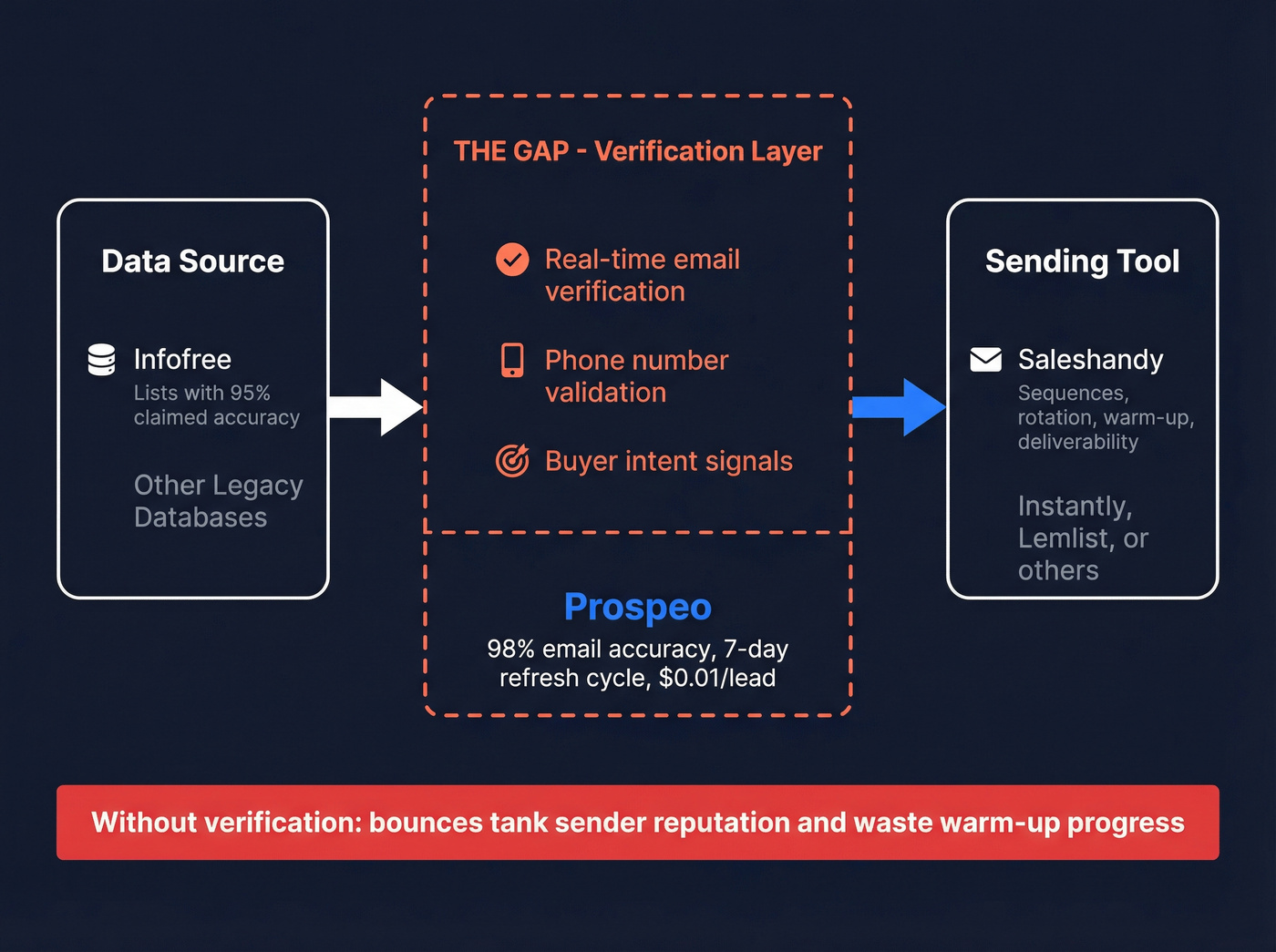
Prospeo fills that gap with 300M+ professional profiles, 143M+ verified emails at 98% accuracy, and 125M+ verified mobiles with a 30% pickup rate. Data refreshes every 7 days - not the 4-6 week cycle you'll get from legacy providers. With 30+ search filters including buyer intent signals powered by Bombora across 15,000 topics, it's a sharper prospecting tool than Infofree's basic search. Self-serve, no contracts, roughly $0.01 per lead. Pair it with Saleshandy, Instantly, Lemlist, or whatever you're sending from.
If you’re building lists from scratch, start with proven sales prospecting techniques and a dedicated sales prospecting database instead of a legacy compiler.

Saleshandy handles sending. Infofree handles lists. Neither handles verification. Prospeo bridges the gap - 300M+ profiles, 30+ filters including buyer intent across 15,000 topics, and native integrations with Saleshandy, Instantly, and Lemlist. At $0.01/email, it costs less than one Infofree export cap reset.
Feed your sequencer verified contacts instead of bounces waiting to happen.
Infofree vs Saleshandy FAQ
Can I use them together?
Yes - export lists from Infofree and import them into Saleshandy for sequencing. But Infofree's 200-1,000 monthly export cap and self-reported accuracy mean you'll need a verification step before sending. Skipping verification risks bounces that tank your sender reputation. We've seen teams burn through warm-up progress in a single campaign because they trusted unverified lists.
Does Saleshandy include a lead database?
Saleshandy includes one-time Lead Finder credits on its outreach plans, but ongoing access runs $29-$119/mo as a separate add-on. It's primarily a sending tool. For dedicated prospecting, pair it with a standalone data provider that offers real-time verification.
How hard is it to cancel Infofree?
You must call support (877-448-0101) or send a cancellation letter during business hours, 8 AM-5 PM CST. Saved searches and remaining credits are forfeited immediately. Trustpilot reviews consistently flag billing friction around this process. If that's a dealbreaker for you, it should be.
Who should skip Infofree entirely?
Teams running B2B outbound at any real volume. At 200-1,000 exports per month with no real-time verification and a phone-call cancellation policy, Infofree is built for a different era. If you're sending cold email in 2026, you need verified data with a refresh cycle measured in days, not weeks - and you need a tool that lets you leave when you want to.