

IP Spam Check: Stop Panicking - Here's What Actually Matters
You ran a blacklist check. Four lists flagged your IP. Your stomach dropped.
Before you start migrating servers or firing off panicked Slack messages, take a breath - three of those four lists probably don't matter, and the one that does has a clear fix.
The #1 complaint on r/coldemail? Most blacklist tools show you 80+ results without telling you which ones actually affect deliverability. One user ran checks on a brand-new domain and found it already "listed" on multiple blacklists, concluding that the majority are "super niche" and functionally irrelevant. They're right. Let's sort signal from noise.
What You Need (Quick Version)
You don't need to check 80 blacklists. You need to check three things:
- Spamhaus Lookup - the single blacklist that can tank your deliverability by 60%+. If you're clean here, you're probably fine.
- MxToolbox - a free multi-list checker (over 100 blacklists in one query). Good for a quick sweep.
- Google Postmaster Tools - ongoing reputation monitoring, not a one-time check. Set it up today.
If you're clean on Spamhaus, Barracuda, and SpamCop, your problem isn't a blacklist - it's your data. That's the contrarian take most articles won't give you, and it's the one that'll actually save your deliverability.
What Is an IP Spam Blacklist?
An IP spam blacklist - technically called a DNSBL (DNS-based Blackhole List) or RBL (Real-time Blackhole List) - is a database of IP addresses flagged for sending spam or exhibiting suspicious behavior. Mail servers query these lists in real time using DNS lookups. When your mail server connects to a recipient's server, that server checks your IP against one or more DNSBLs, and if you're listed, your message gets rejected or routed to spam.
The first DNSBL was created in 1997, and the ecosystem has grown messy since then. With anywhere from 45-85% of global email traffic classified as spam depending on the dataset, hundreds of blacklists now compete to filter it - each with different listing standards, retention periods, and levels of influence. Some block entire ISP ranges. Others only list IPs with direct evidence of spam. Some auto-expire listings in hours; others require manual removal requests.
This variation is exactly why a "4 out of 80 lists flagged" result doesn't mean what you think. The identity of those four lists matters far more than the count.
How to Check Your IP for Blacklist Listings
Before you check anything, make sure you're checking the right IP. This trips up a surprising number of people - Reddit threads are full of users asking whether their home router or VPN IP being blacklisted affects email deliverability. It doesn't.
Your sending IP is the IP address of your mail server, ESP, or cold email tool's outbound infrastructure. Not your laptop's IP. If you're using a tool like Instantly, Smartlead, or Lemlist, the sending IP belongs to them or to the email account's provider. If you're running your own SMTP server, it's your server's public IP. Don't know your mail server IP? Email ping@tools.mxtoolbox.com from your sending address - MxToolbox will identify it for you.
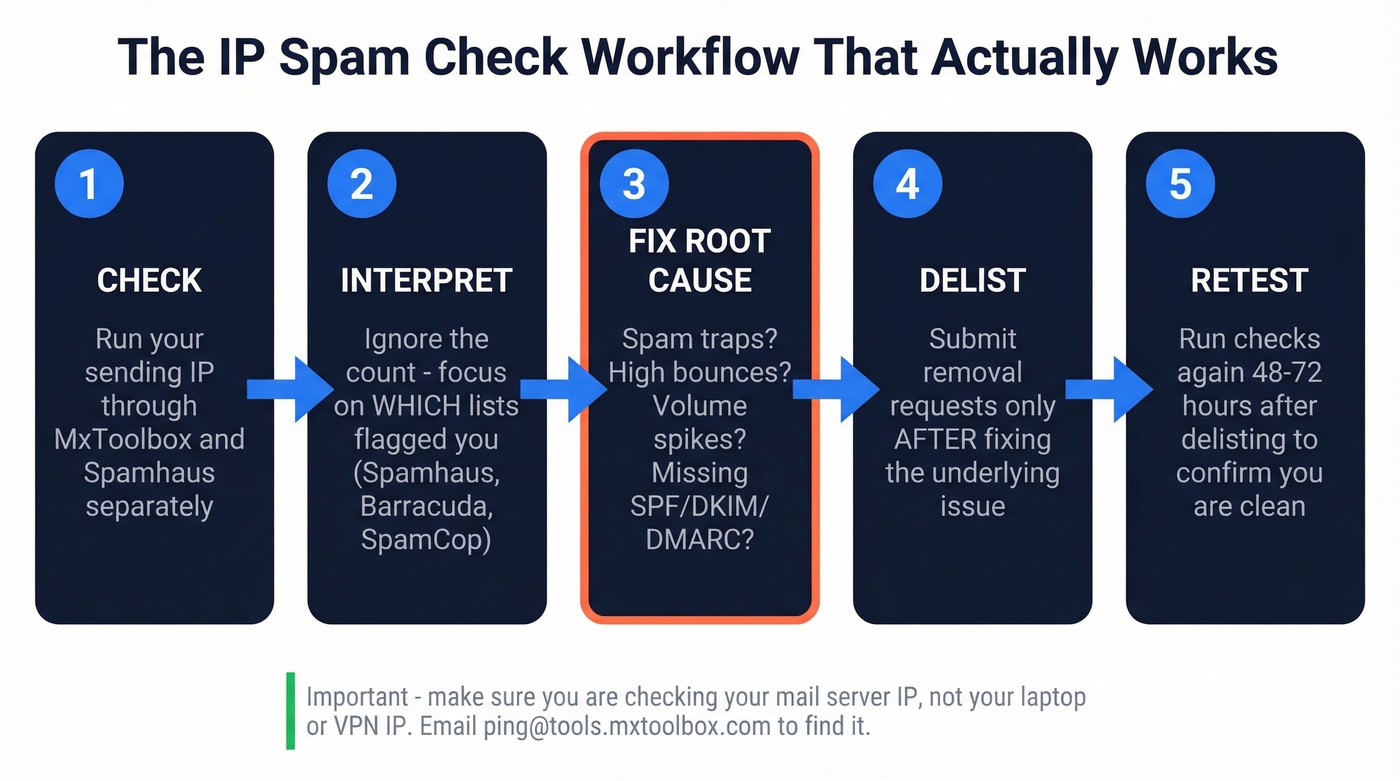
Here's the workflow that actually works:
- Check - Run your sending IP through MxToolbox and Spamhaus's lookup tool separately. MxToolbox gives breadth; Spamhaus gives depth on the list that matters most.
- Interpret - Don't panic at the count. Focus on which lists flagged you and whether they're high-impact.
- Fix the root cause - A listing is a symptom. The cause is usually spam traps, high bounce rates, volume spikes, or missing authentication (SPF, DKIM, DMARC).
- Delist - Submit removal requests only after fixing the underlying issue. Otherwise you'll just get re-listed.
- Retest - Run the check again 48-72 hours after delisting to confirm you're clean.

Best Free IP Reputation Tools
| Tool | Type | Cost | Best For |
|---|---|---|---|
| MxToolbox | Multi-list check | Free (paid: $129/mo) | Broad sweep |
| Spamhaus Lookup | Blacklist check | Free | The list that matters most |
| Cisco Talos | Reputation score | Free | Ongoing IP reputation |
| Google Postmaster | Monitoring | Free | Gmail-specific trends |
| Sender Score | Reputation score | Free | Quick reputation score |
| AbuseIPDB | Abuse reports | Free | Security-focused checks |
| CleanTalk | Blacklist check | Free | Spam activity history |
| Scamalytics | Fraud score | Free | Bot/proxy detection |
MxToolbox is the default starting point. It checks over 100 blacklists in a single query and gives you a clean pass/fail for each. The free tier handles one-off lookups; the $129/mo Delivery Center plan adds monitoring for five domains, which is useful if you're managing multiple sending domains for outbound campaigns.
Spamhaus deserves its own lookup even if you've already run MxToolbox. A listing here is often the most impactful single blacklist event you can experience. Their IP reputation page gives detailed context on why you're listed and which specific sub-list flagged you.
Cisco Talos and Sender Score aren't blacklist checkers - they're reputation scoring tools. Talos provides a reputation view based on sending patterns, while Sender Score assigns a numeric score. Both are useful for ongoing monitoring rather than one-time panic checks.
Google Postmaster Tools is the one most teams skip and shouldn't. It shows you how Gmail specifically views your domain and IP reputation over time. Set it up once, check it weekly.
For security-focused checks, AbuseIPDB and CleanTalk track abuse reports and spam activity history. They're more relevant for server admins than email marketers, but worth a glance if you suspect your IP has been compromised. Scamalytics fills a different niche entirely - it scores IPs for fraud risk, flagging proxies, VPNs, and bot traffic. It won't tell you about email blacklists directly, but it's useful if you're investigating whether your IP has been associated with suspicious non-email activity that bleeds into your sender reputation.

You just read it: most blacklist hits trace back to high bounce rates and spam traps. Prospeo's 5-step email verification - with catch-all handling, spam-trap removal, and honeypot filtering - delivers 98% accuracy. That's how teams like Snyk cut bounce rates from 35% to under 5%.
Fix the root cause. Start with data that doesn't bounce.
Which Blacklists Actually Matter
High-Impact Blacklists
Not all blacklists are created equal. We've reviewed hundreds of blacklist cases, and 90% of panicked reports turn out to be PBL hits or obscure list flags that affect nothing.
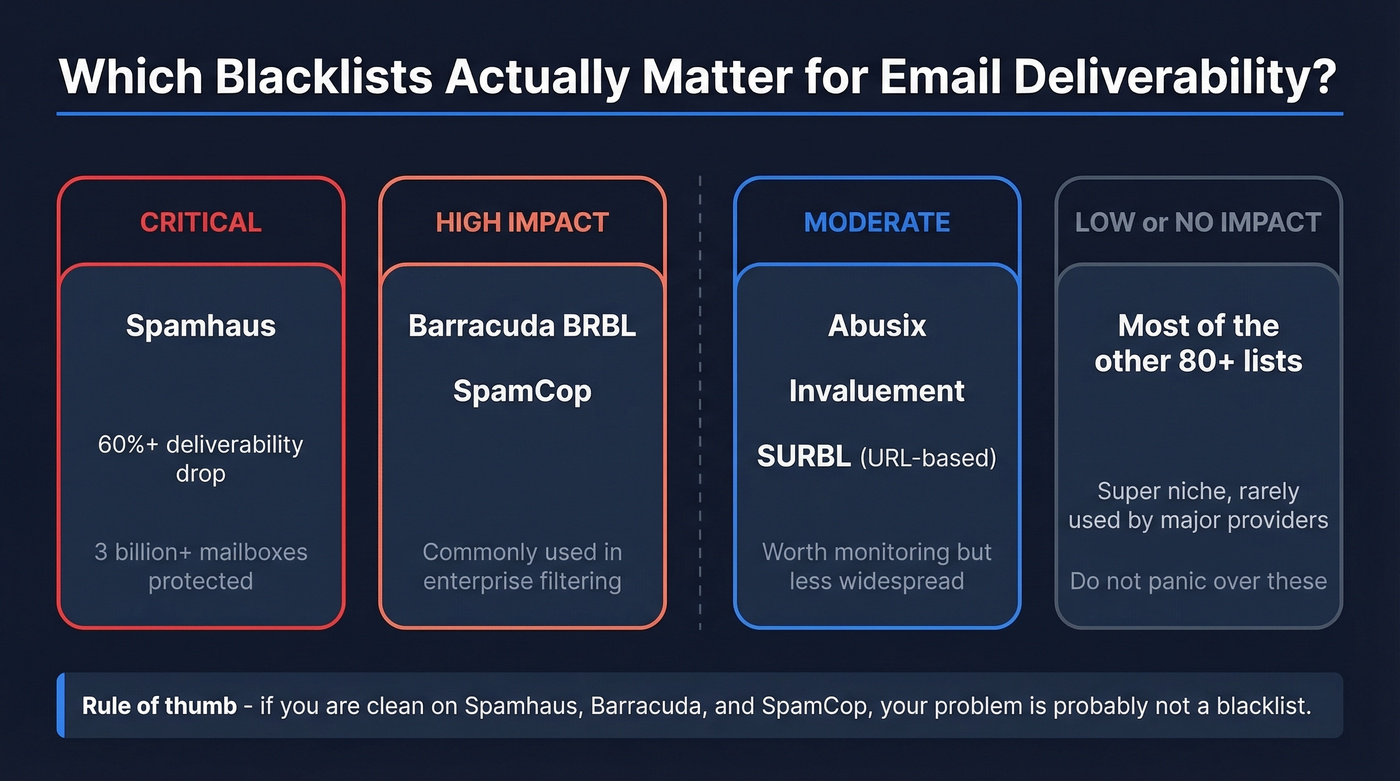
| Blacklist | Impact | Type | Publicly Queryable |
|---|---|---|---|
| Spamhaus | Critical (60%+ drop) | IP-based | Yes |
| Barracuda BRBL | Significant | IP-based | Yes |
| SpamCop | Significant | IP-based | Yes |
| Abusix | High | IP-based | Yes |
| Invaluement | Moderate-high | IP-based | Yes |
| SURBL | High | URL/domain-based | Yes |
Spamhaus is the one that can genuinely wreck your deliverability. It protects over 3 billion users' mailboxes, and a listing here can reduce inbox placement by over 60%. Barracuda and SpamCop are the next tier - commonly impactful in real-world filtering and capable of serious damage.
Here's the distinction most articles miss: there are IP-based blacklists and domain/URI-based blacklists. SURBL doesn't care about your sending IP - it flags malicious URLs in your email content. If you're listed on SURBL, the fix is in your links and content, not your server infrastructure.
Private Lists You Can't Check
The frustrating part? Some of the most impactful reputation systems aren't publicly queryable. Proofpoint Dynamic Reputation and Cloudmark CSI are significant players in filtering decisions, and you often detect these blocks through your bounce logs - look for 550-style rejection codes that reference reputation or policy blocks. If you're seeing rejections from Proofpoint-protected domains with no public blacklist hits, this is a common reason.
Understanding Spamhaus Listings
Not all Spamhaus listings mean the same thing:
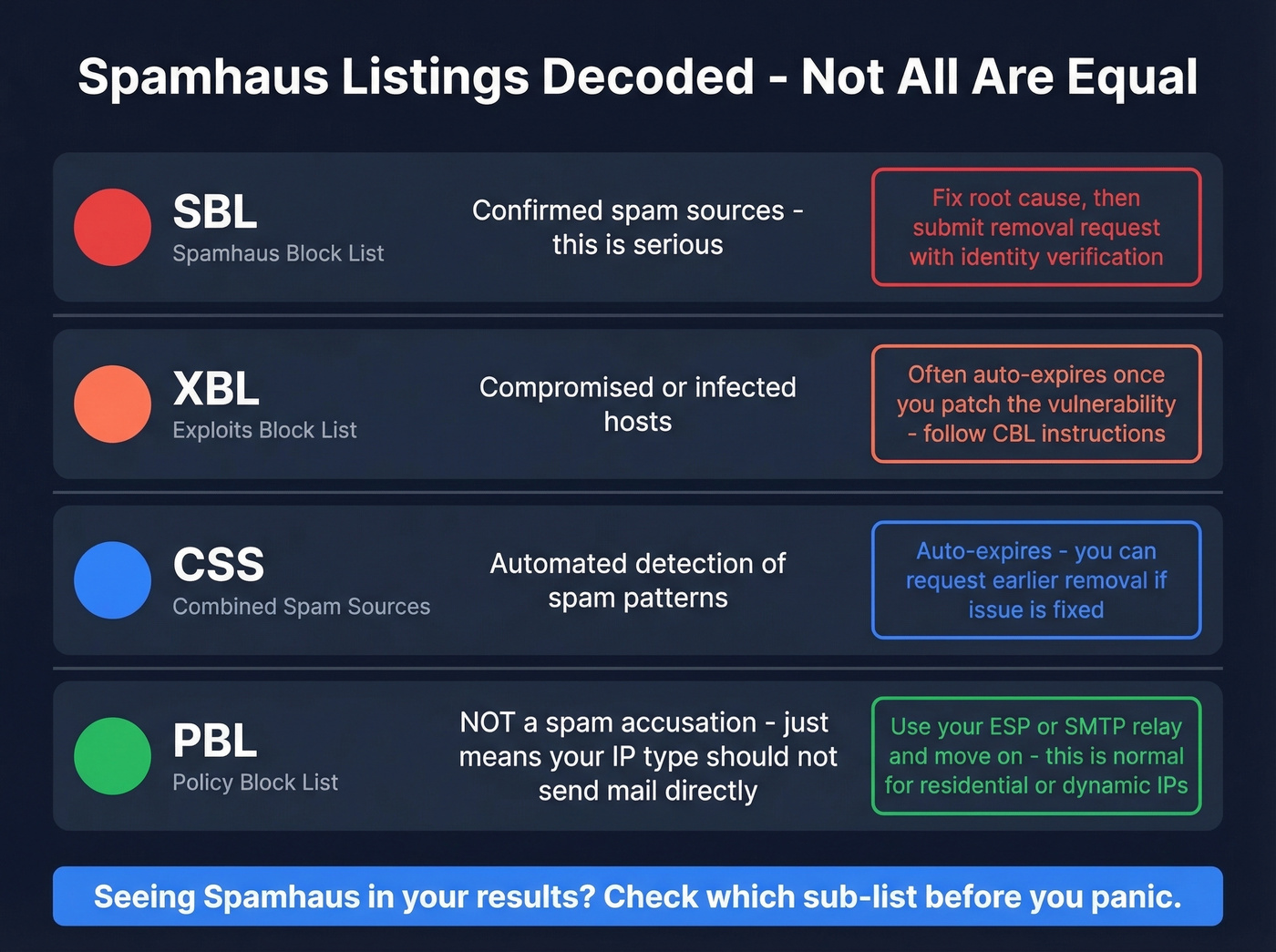
- SBL (Spamhaus Block List) - Confirmed spam sources. This is serious. Fix the root cause, then submit a removal request with identity verification and corrective measures.
- XBL (Exploits Block List) - Compromised hosts. Often auto-expires once you patch the vulnerability. Follow CBL instructions.
- CSS (Combined Spam Sources) - Auto-expires. You can request earlier removal if you've fixed the issue.
- PBL (Policy Block List) - This is NOT a spam accusation. It flags IPs that shouldn't send email directly, like dynamic or residential IPs. If you're running a legitimate mail server on a PBL-listed IP, submit a justification form. If you're not running your own server, this listing is irrelevant to you.
The PBL distinction trips people up constantly. Seeing "Spamhaus" in your results triggers panic, but a PBL listing just means your IP type isn't meant for direct mail delivery. Use your ESP or a proper SMTP relay and move on.
How to Read Your Results
SMTP error codes in your bounce logs tell you more than any blacklist checker:
| Code | Meaning | Action |
|---|---|---|
| 550 5.7.1 | Blocked by blacklist/policy | Check major blacklists |
| 554 5.7.1 | Message rejected outright | Review content + IP |
| 421 4.7.0 | Temp block on reputation | Reduce volume, wait |
| 5.7.26 | DMARC/auth failure | Fix SPF/DKIM/DMARC |
Listings fall into three categories. Technical listings happen because of misconfigured DNS, missing reverse DNS, or incorrect SMTP banners - these are infrastructure problems with straightforward fixes. Policy listings like Spamhaus PBL are based on IP type or ISP rules, not your behavior. Evidence-based listings mean someone has direct or indirect evidence of unsolicited email from your IP.
If you're listed on three obscure blacklists nobody's heard of, that's not an emergency. If you're listed on Spamhaus SBL, that's a five-alarm fire. Context matters more than count.
IP Reputation vs. Blacklisting
These are related but different concepts, and confusing them leads to wasted effort.
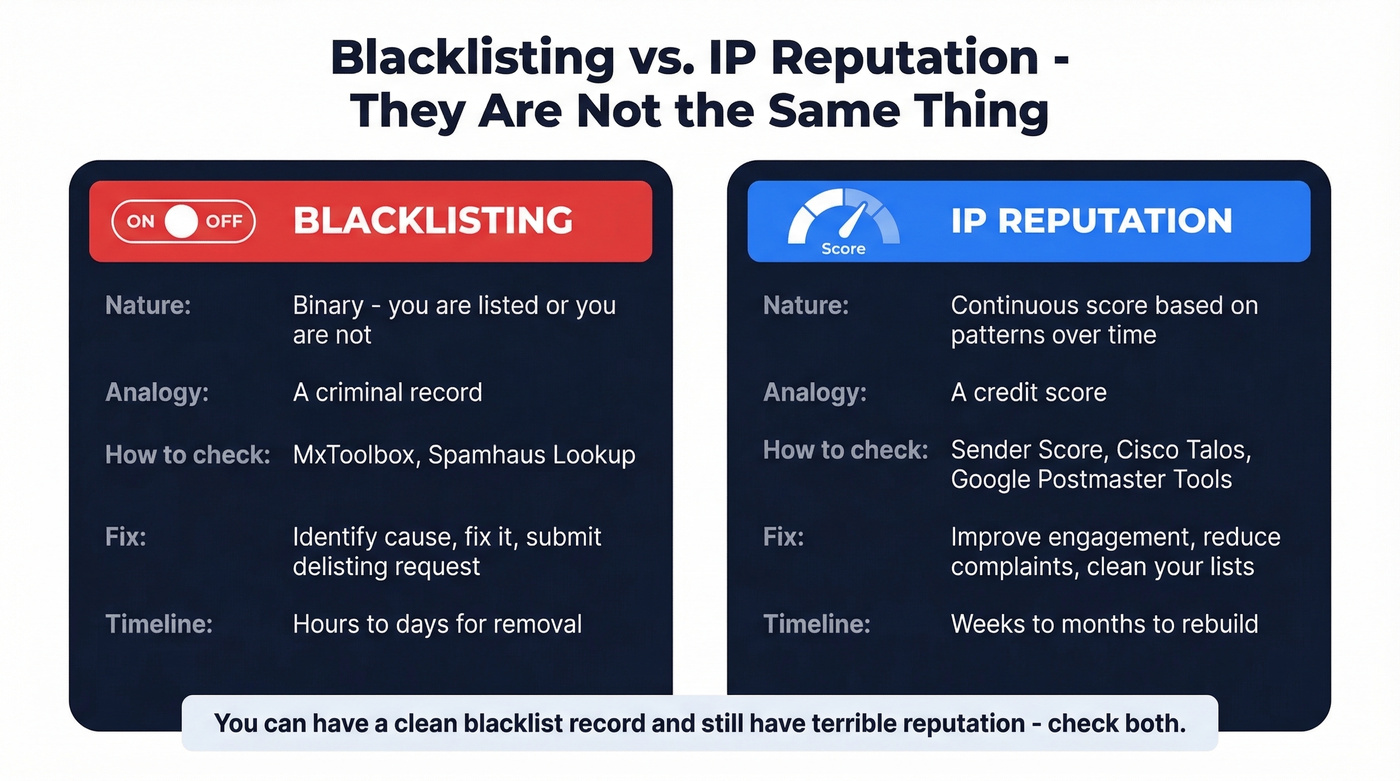
Blacklisting is binary - you're listed or you're not. It's a yes/no flag maintained by specific organizations. You check it, you fix it, you move on. IP reputation is a continuous score based on sending patterns, engagement metrics, complaint rates, and volume history. Think of it as the difference between a criminal record and a credit score - you can have a clean blacklist record and still have terrible IP reputation if your emails consistently get marked as spam or deleted unread.
Use different tools for each. MxToolbox and Spamhaus check blacklists. Sender Score, Cisco Talos, and Google Postmaster Tools measure reputation. If your deliverability is suffering and blacklist checks come back clean, the problem is almost certainly reputation - and that means looking at your sending patterns, list quality, and engagement rates.
How to Get Delisted
Delisting Timelines
| Blacklist | Timeline | Method |
|---|---|---|
| Barracuda BRBL | 12-24 hours | Self-service request |
| SpamCop | 24-48 hours | Auto-removal |
| Spamhaus SBL | 24-48 hours | Manual request |
| UCEProtect L1 | 7 days (free) | Time-based auto |
UCEProtect offers a paid "express" delisting option. Skip it - it's widely considered a cash grab, and every legitimate blacklist offers free removal once you've fixed the underlying problem.
Per-Blacklist Procedures
Spamhaus SBL: Go to the Spamhaus removal center. Submit a form that includes your identity, an explanation of what caused the listing, and corrective measures taken. Expect 24-48 hours. Don't submit until you've actually fixed the problem - failed attempts make future requests harder.
Spamhaus XBL: Follows CBL instructions. Most XBL listings auto-resolve within hours once you've patched the compromised system.
Barracuda BRBL: Look up your IP, click the removal request button, verify via confirmation email. Turnaround is typically 12-24 hours.
SpamCop: Largely automatic. Stop the behavior that triggered the listing and it clears within 24-48 hours.
How to Prevent IP Blacklisting
Most blacklisting isn't a server configuration problem. It's a data quality problem.
The root causes are predictable: sending to spam traps, hitting honeypot addresses, high bounce rates from stale lists, sudden volume spikes that trigger automated defenses, and missing SPF, DKIM, DMARC authentication. Of these, bad data is the #1 culprit for outbound sales teams. If your bounce rate is above 5%, you don't have a deliverability problem - you have a data source problem.
We've seen this pattern play out dozens of times: a team buys a list or exports contacts from a database that hasn't been refreshed in months, loads it into their sequencer, and watches their bounce rate climb past 10%. Two weeks later, they're on Spamhaus. Stack Optimize built their agency to $1M ARR using Prospeo's verified data and maintained client deliverability above 94%, bounce rates under 3%, with zero domain flags across all clients - because they verified every address before sending.
This is where data verification becomes a deliverability investment, not just a nice-to-have. Prospeo's 5-step verification catches the exact triggers that cause blacklisting - invalid addresses, spam traps, and honeypot emails get filtered out before you ever hit send. With 98% email accuracy and data refreshed every 7 days versus the 6-week industry average, you're not sending to addresses that went dead two months ago.

The authentication side matters too. Make sure SPF, DKIM, and DMARC are properly configured - these are table stakes in 2026. But authentication alone won't save you if you're sending to garbage addresses. Fix the data first. (If you want the full playbook, start with our email deliverability guide and then tighten your email velocity.)
Here's the thing: if your deal sizes are north of $5k and you're running cold outbound, the cost of a blacklisting event - lost pipeline, recovery time, domain warming - dwarfs the cost of verifying every email before you send it. The teams that treat verification as optional are the same ones filing panicked delisting requests every quarter.
Every IP spam check guide ends the same way: fix your data. Prospeo refreshes 300M+ profiles every 7 days - not the 6-week industry average - so you're never sending to stale addresses that trigger blacklistings. At $0.01 per email, protecting your domain costs less than a single delisting headache.
Stop chasing delistings. Send to emails that are verified this week.
FAQ
Does my home router IP affect email deliverability?
No. Only your mail server, ESP, or cold email tool's outbound IP gets checked against blacklists. Your home router or VPN IP address is completely irrelevant to email deliverability. Don't waste time running an IP spam check on it.
How often should I check my IP reputation?
Weekly if you're running cold outbound campaigns. Set up Google Postmaster Tools for continuous Gmail-specific monitoring so you catch reputation dips before they become blacklist listings. After any major list import or volume increase, run an immediate check through MxToolbox and Spamhaus.
Can a brand-new domain get blacklisted?
Yes. New IPs sometimes inherit reputation from previous owners, or land on policy lists like Spamhaus PBL - which isn't a spam accusation, just a flag that the IP type shouldn't send mail directly. New domains also lack sending history, making them more susceptible to automated blocks from volume spikes.
Is paying for express delisting worth it?
No. UCEProtect's paid express option is widely considered a money grab. Legitimate blacklists like Spamhaus, Barracuda, and SpamCop all offer free delisting once you fix the root cause. Save your money and fix the actual problem.
How does email verification prevent blacklisting?
Verifying emails before sending removes invalid addresses, spam traps, and honeypot addresses - the primary triggers for blacklisting. Keeping bounce rates under 3% is the single best way to stay off blacklists, and that starts with cleaning your list before you hit send.