


7 Best KarmaCRM Alternatives for Small Teams in 2026
KarmaCRM pulls a 3.8/5 from just 11 reviews on G2. Capterra is kinder - 4.5/5 from 27 reviews - but dig into the individual complaints and you'll find broken email templates, contact data that won't copy from customers to deals, a limited mobile app, and a support team that's slow to patch long-standing bugs. At $28-$55/user/mo depending on tier, several of the top competitors on G2's comparison page get rated more usable and better at meeting requirements.
Time to move on.
Our Picks (TL;DR)
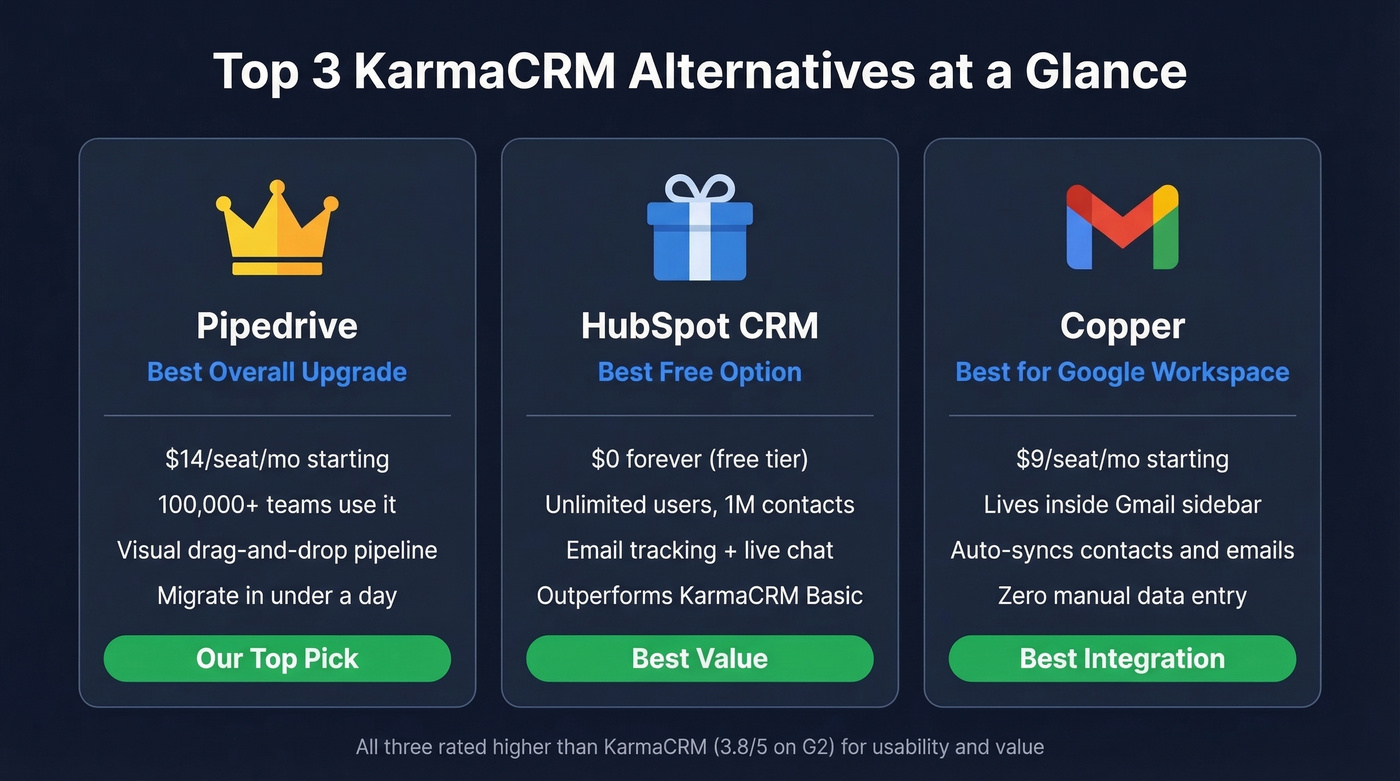
- Pipedrive - Best overall upgrade. $14/seat/mo.
- HubSpot CRM - Best free option. Does more at $0 than KarmaCRM at $28.
- Copper - Best for Google Workspace teams. $9/seat/mo.
Top CRM Alternatives Compared
Pipedrive - Best Overall Upgrade
Pipedrive's drag-and-drop pipeline is the single biggest upgrade over KarmaCRM's clunky layout. Over 100,000 sales teams run on it, and pricing starts at $14/seat/mo (Lite), scaling through Growth ($39), Premium ($59), and Ultimate ($79). At half the price of KarmaCRM Basic, it's easy to see why small teams default to it as a replacement.
We've watched teams migrate from KarmaCRM to Pipedrive in under a day - CSV export, clean the data, import, done. The visual pipeline alone makes reps faster because they stop hunting through tabs and start dragging deals. Skip Pipedrive only if you need built-in project management or a free tier. It's pure sales pipeline and nothing else, which is exactly the point.

HubSpot CRM - Best Free Option
HubSpot's free tier includes contact management, deal tracking, email tracking, and basic reporting - unlimited users, up to 1M contacts, and a live chat widget. That genuinely outperforms KarmaCRM Basic. Starter paid plans start around $9/user/mo when you're ready to scale.
The trade-off: HubSpot wants you on Marketing Hub, Service Hub, and everything else eventually. Expect weekly emails pushing upgrades. If you can ignore the upsell noise, though, the free CRM is legitimately good for a team of five or fewer.
Copper - Best for Google Workspace
Your team lives in Gmail? Copper lives there too. It's the only CRM on this list that's truly native to Google Workspace - a sidebar inside your inbox that syncs contacts and logs emails without manual effort. Starter pricing is $9/seat/mo annual ($12 monthly), though that tier caps you at 1,000 contacts. Basic ($23/seat/mo) bumps it to 2,500, Professional ($59) to 15,000, and Business ($99) goes unlimited.
Microsoft shop? Look elsewhere.

Close - Best for Outbound Sales
Close bakes a dialer and SMS directly into the CRM - no third-party integrations, no duct tape. The Solo plan starts at $9/mo for one user and 10,000 leads. Most small teams should start on Essentials ($35/seat/mo), while Growth ($99) and Scale ($139) add more automation and power dialer seats.
If your team doesn't do phone-heavy outbound, you'd be paying for infrastructure you'll never touch. But for teams that live on the phone, Close removes an entire layer of tool-stitching that KarmaCRM never solved in the first place.
Insightly - Best for CRM + Projects
Insightly converts won deals into projects without switching platforms - a real advantage for services businesses that need both. Plus starts at $29/user/mo, Professional at $49, Enterprise at $99, all with 14-day trials. The interface reflects that ambition, though. It isn't lightweight, and smaller teams sometimes find the setup overhead frustrating before they see the payoff.
Zoho CRM - Best Budget Option
Zoho CRM offers a free tier for up to three users and paid plans starting at ~$14/user/mo. It scales from micro-business to enterprise, but the sheer number of settings can overwhelm a five-person team. If you're willing to spend a weekend configuring it, the value is hard to beat. If you want something that works out of the box, keep scrolling.
Less Annoying CRM - Best for Simplicity
$15/user/mo flat - no tiers, no annual contracts. Contacts, pipelines, tasks, calendars, and a 30-day free trial. That's the whole pitch, and for teams confused by KarmaCRM's customization options, it's the antidote. We've recommended it to founders who just need a place to track deals without a two-hour onboarding session, and it delivers exactly that.
Hot take: If your average deal size is under $5,000, you almost certainly don't need anything beyond Pipedrive or Less Annoying CRM. The teams we've seen waste the most money on CRMs are the ones who buy features they'll never configure.

New CRM, same garbage data? Teams migrating from KarmaCRM lose weeks to bounced emails and stale contacts. Prospeo enriches your exported CSV with 50+ data points, returns contact data on 83% of records, and verifies every email at 98% accuracy - all at $0.01/email.
Fix the data before you import it. Your new CRM will thank you.
Pricing Comparison
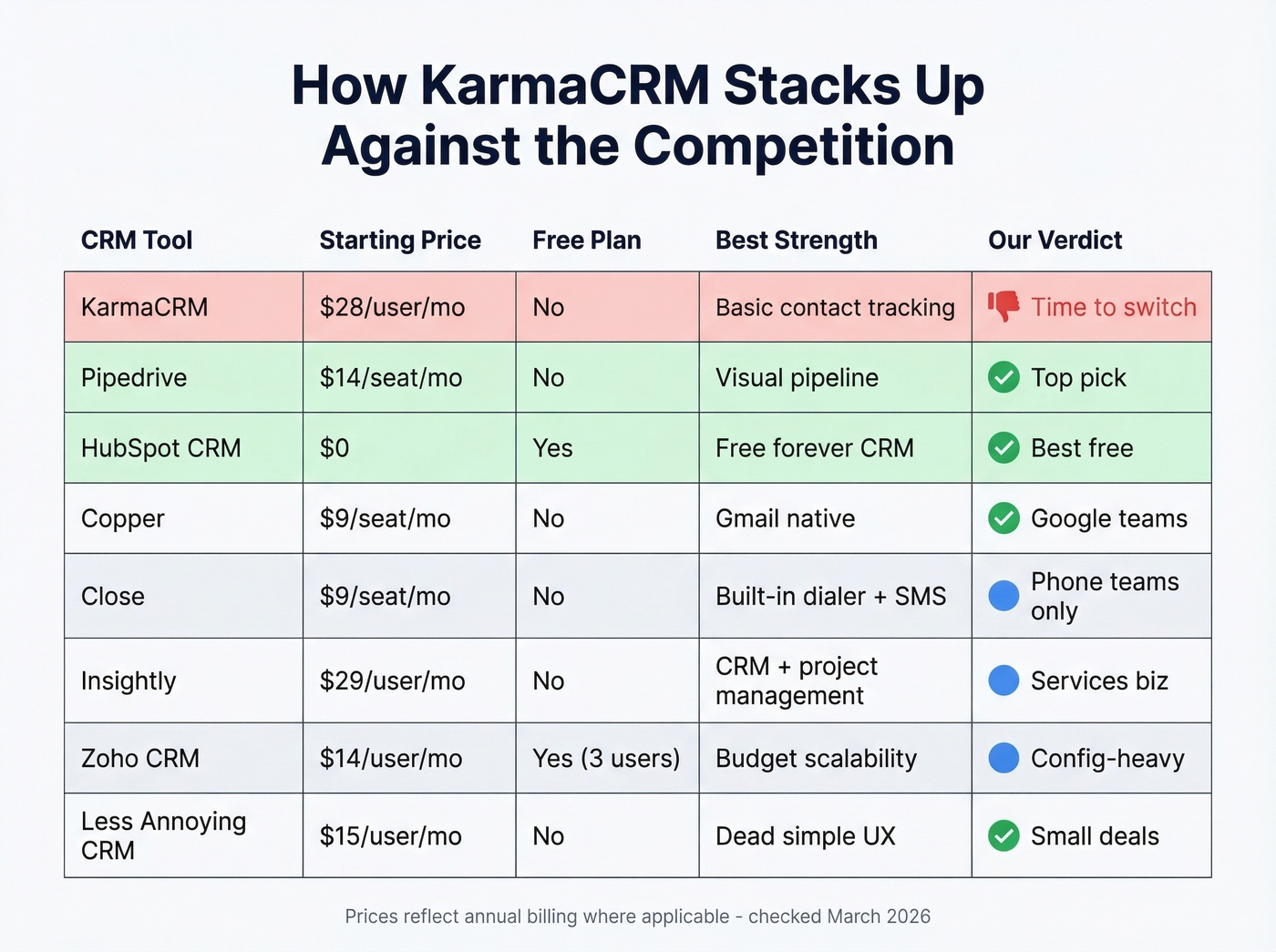
| Tool | Starting Price | Free Plan? | Free Trial | Best For |
|---|---|---|---|---|
| KarmaCRM | $28-$55/user/mo | No | 14 days | Basic contact tracking |
| Pipedrive | $14-$79/seat/mo | No | 14 days | Pipeline CRM |
| HubSpot CRM | $0 (free tier) | Yes | N/A | Free CRM |
| Copper | $9/seat/mo | No | Free trial | Google Workspace |
| Close | $9/seat/mo | No | 14 days | Outbound calling |
| Insightly | $29/user/mo | No | 14 days | CRM + projects |
| Zoho CRM | ~$14/user/mo | Yes (3 users) | 15 days | Budget scale |
| Less Annoying | $15/user/mo | No | 30 days | Simplicity |
Honorable mentions: Monday.com, Salesforce Starter, and Bitrix24 all show up in KarmaCRM comparison searches. We excluded them because Monday.com is project management first, Salesforce Starter still carries enterprise-grade complexity, and Bitrix24's free tier is generous but the UX is rough.
Clean Your Data Before You Migrate
Here's a pattern we see constantly: a team spends weeks picking the perfect CRM, migrates 20,000 contacts, and discovers half the emails bounce. One agency we spoke with lost two weeks of outbound momentum because they imported stale KarmaCRM data straight into Pipedrive without verifying anything first.
If you're doing any outbound after the switch, it helps to understand your email bounce rate and what it signals about list quality before you scale sends.
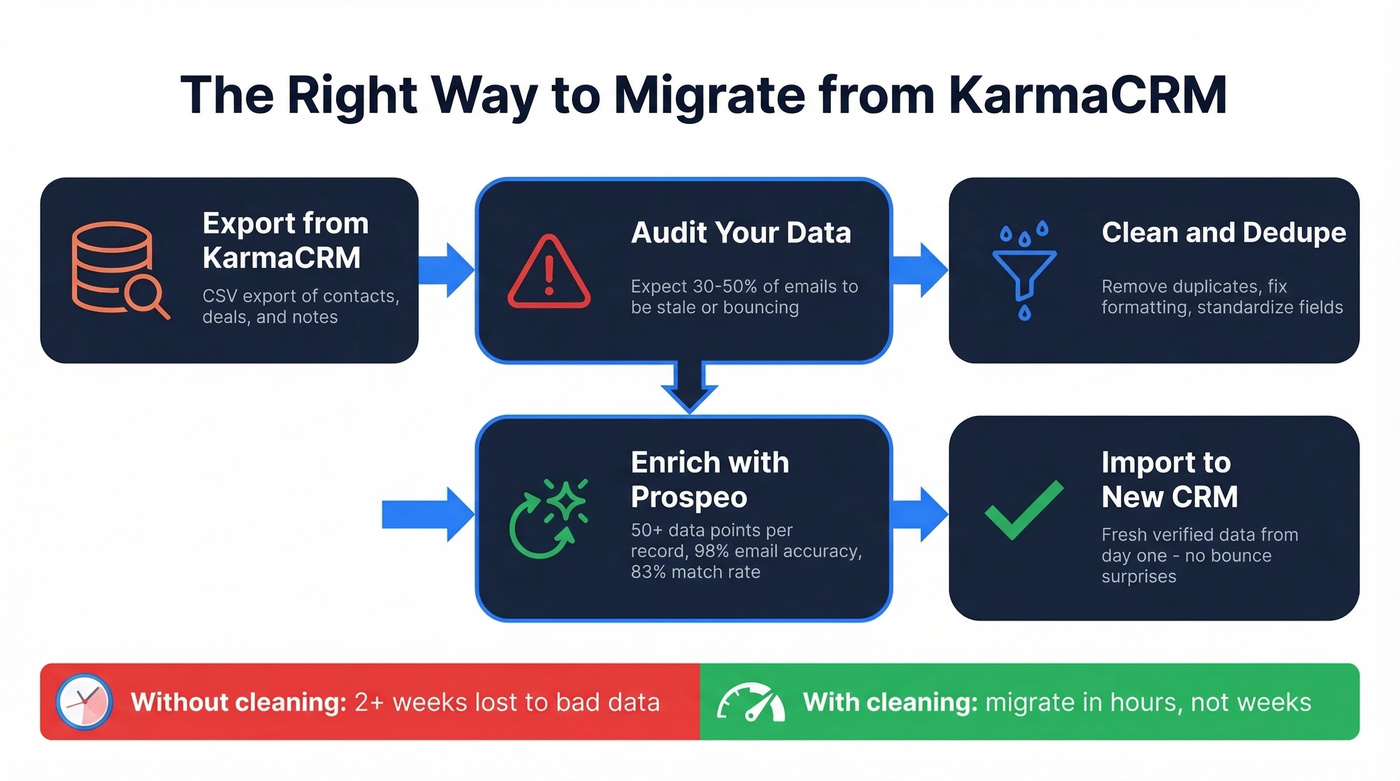
Prospeo fixes this at the migration layer. Upload your CSV or connect directly to HubSpot or Salesforce, and it enriches each record with 50+ data points, returns contact data on 83% of records, and verifies emails at 98% accuracy - all on a 7-day refresh cycle. The free tier gives you 75 email verifications per month to test before committing, which is enough to validate a sample of your export and see how much of your KarmaCRM data is actually still good.
If you want to compare options, start with data enrichment and then pick a workflow that fits your stack.

Let's be honest - most CRM migrations fail not because the new tool is wrong, but because the data going in is garbage. Fix the data first. If you're building a repeatable outbound motion, pair clean data with proven sales prospecting techniques so reps aren't spraying and praying.
Every CRM on this list is only as good as the data inside it. Prospeo's 7-day refresh cycle means your contacts stay current - not the 6-week-old records you're dragging out of KarmaCRM. Upload your CSV, enrich 83% of records, and start fresh.
Start your migration with data you can actually trust.
FAQ
Is KarmaCRM still actively developed?
The product's online presence hasn't been updated significantly in years. With 11 G2 reviews and Capterra users reporting bugs that go unfixed for months, it appears to be in maintenance mode rather than active development. Most teams are better served by alternatives that ship regular updates.
What's the cheapest KarmaCRM alternative?
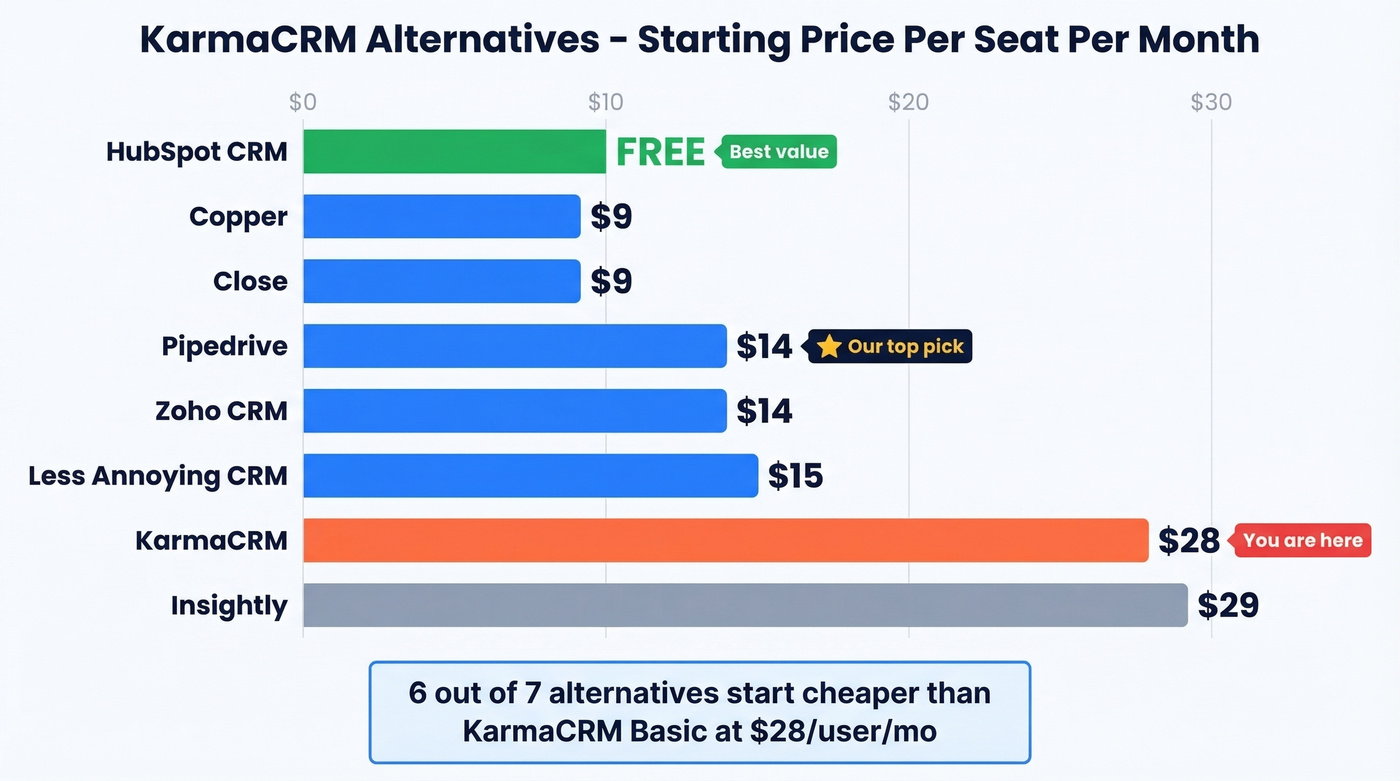
HubSpot CRM is free - genuinely free, not a trial. After that, Copper Starter and Close Solo both start at $9/seat/mo, and Less Annoying CRM runs a flat $15/user/mo with no tiers or annual commitment.
How do I keep contact data clean after switching CRMs?
Run your contact list through an enrichment tool before and after migration. Prospeo catches stale data on a 7-day refresh cycle and returns 50+ data points per contact at 98% email accuracy - with a free tier of 75 verifications/month so you can test without risk.
Can I migrate KarmaCRM data to another CRM easily?
Most CRMs on this list accept CSV imports. Export your KarmaCRM contacts, deals, and notes as CSV files, clean the data with an enrichment tool before importing, and you'll avoid bounced emails and duplicate records polluting your new system on day one. The whole process typically takes a few hours, not weeks.