

How to Build a Key Account Management Plan That Doesn't Collect Dust
Most account plans die the same way: someone builds a 20-slide deck, presents it once, and never opens it again. A key account management plan that drives revenue is short, specific, and annoying in the best way: it forces weekly decisions.
Our rule: if the plan can't be reviewed in 10 minutes on a Monday pipeline call, it's not a plan. It's a document.
Let's break this down into something your team will actually use.
What You Need (Quick Version)
- A stakeholder map, a whitespace grid, and an action plan with owners and dates. Everything else is optional.
- One page beats twenty slides. The best plan is the one your team opens every week.
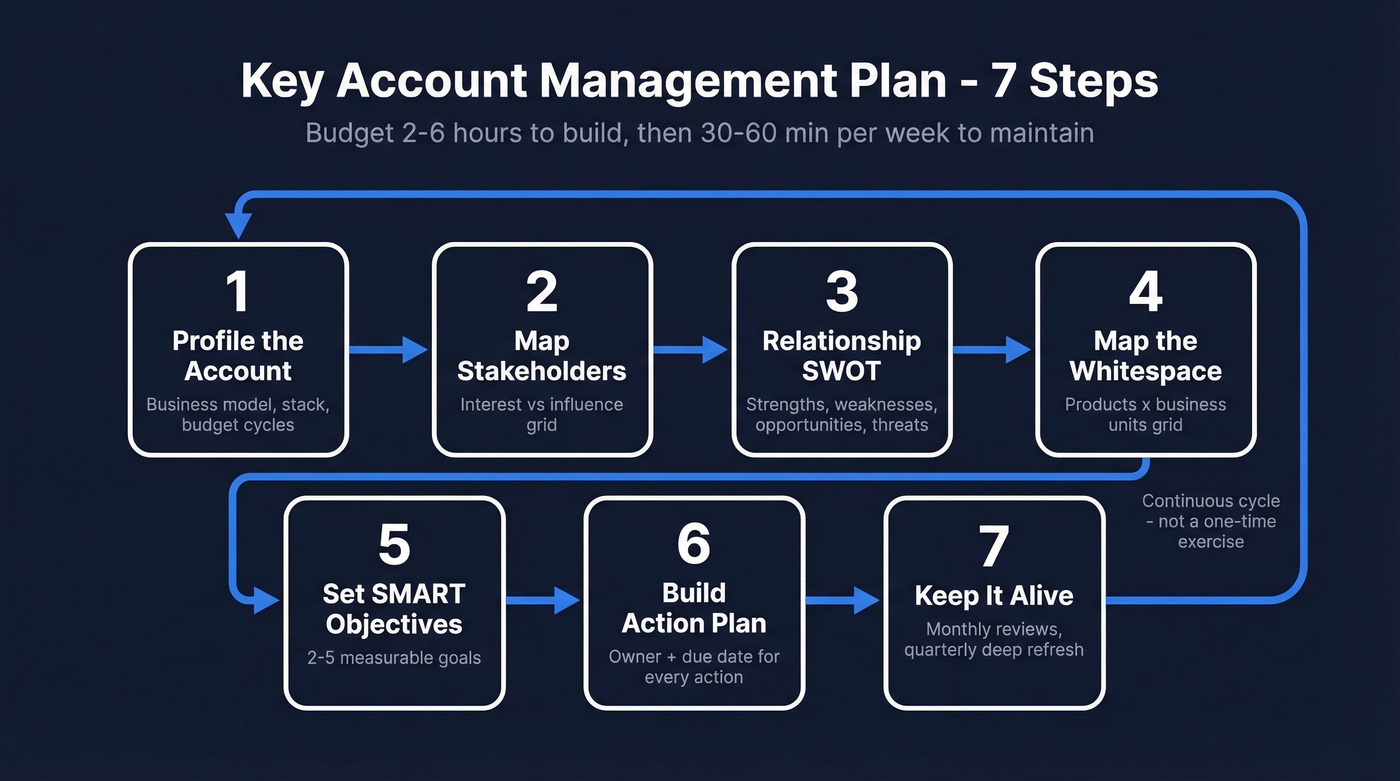
- Budget 2-6 hours to build the first plan, then 30-60 minutes per week to keep it alive.
What Is a Key Account Management Plan?
A key account management plan is a living document that captures what your team needs to grow a strategic account: the account context, the people involved, where expansion is hiding, what you're trying to achieve, and the exact actions that get you there.
Smartsheet lays out the seven core elements most solid plans share and offers free templates you can start from: https://www.smartsheet.com/content/account-planning-templates. Templates help, but they also create a common failure mode: you fill in every box once, feel productive, and then the file disappears into a folder nobody opens again.
The fix isn't "more detail." It's a tighter format and a cadence that makes the plan part of how you run the account.
Why KAM Plans Drive Revenue
A 2026 study in Industrial Marketing Management surveying 568 B2B supplier firms found that KAM orientation improves market and financial performance through stronger relational and KAM capabilities that build differentiation advantage and KAM effectiveness: https://www.sciencedirect.com/science/article/pii/S0019850124002001. Translation: teams that treat key accounts like a system (not a vibe) get better outcomes.
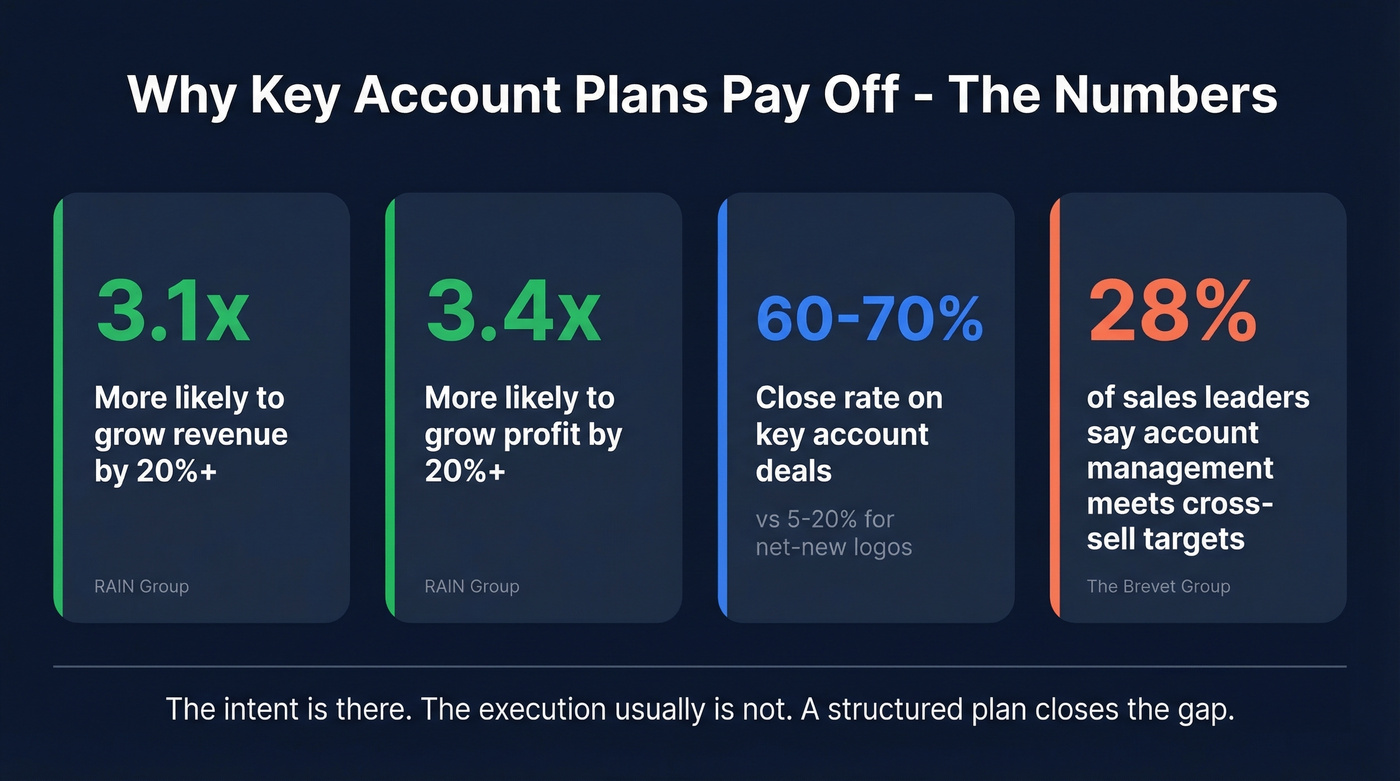
RAIN Group's benchmarks put numbers on it: top KAM performers are 3.1x more likely to grow revenue by 20%+, 3.4x more likely to grow profit by 20%+, and 4.5x more likely to see year-over-year client satisfaction improvement, and new business from key accounts closes at 60-70% vs. 5-20% for net-new logos: https://www.rainsalestraining.com/blog/what-is-key-account-management.
And yet only 28% of sales leaders believe their account management channels meet cross-sell and growth targets: https://blog.thebrevetgroup.com/top-10-account-planning-mistakes-to-avoid. That's the frustrating part. The intent is there. The execution usually isn't.

A key account plan is only as good as the contact data behind it. When you're multi-threading across 10+ stakeholders, one bounced email or wrong number kills momentum. Prospeo returns 50+ data points per contact at 98% email accuracy - refreshed every 7 days, not every 6 weeks.
Stop losing key account deals to bad contact data.
How to Build Your Account Plan in 7 Steps
Step 1 - Profile the Account
Start with the basics, then get specific:
- Business model and revenue drivers
- Org structure (who owns what, and how centralized buying is)
- Current stack and vendors (what's entrenched vs. flexible)
- Strategic initiatives for the next 6-12 months
- Commercial reality: budget cycles, procurement rules, renewal dates
Pull what you can from public signals like filings, press releases, job posts, and product updates. Then add the stuff that never shows up in a press release: what your champion complains about off the record, which team is overloaded, and what leadership is quietly pushing this quarter.
One scenario we see all the time: the rep writes "priority = efficiency" because the CEO said it on an earnings call, but the real buying trigger is that the Ops team is drowning and the CFO is tired of surprise costs. Put both in the plan. The second one is what gets deals done.
Step 2 - Map Your Stakeholders
Complex B2B deals involve multiple people with different incentives. If you only know your champion, you're one re-org away from losing the account.
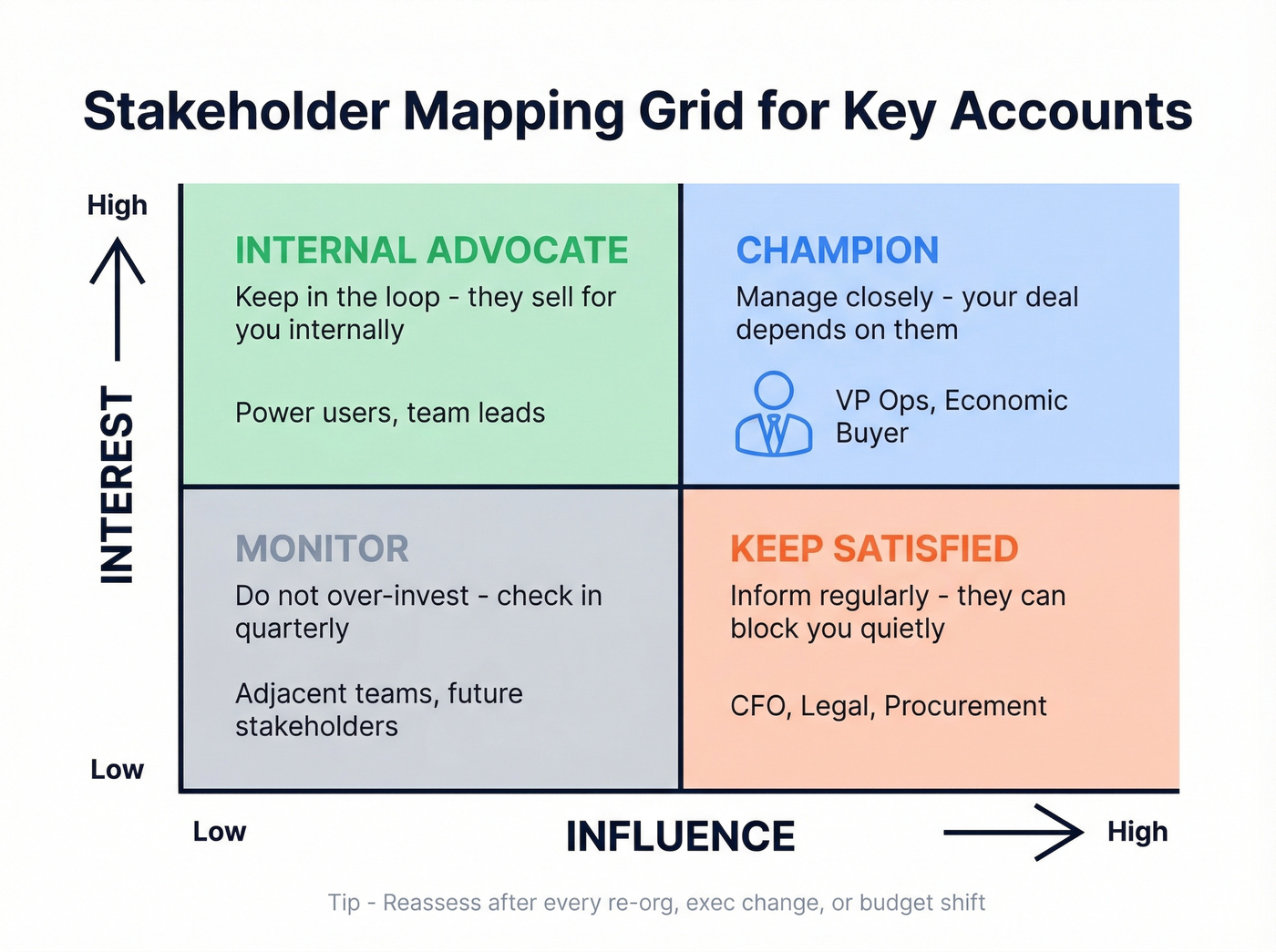
Build a simple interest vs. influence grid:
| High Influence | Low Influence | |
|---|---|---|
| High Interest | Champion - manage closely | Internal advocate - keep in the loop |
| Low Interest | Keep satisfied and informed | Monitor, don't over-invest |
Then list stakeholders as primary (direct decision power), secondary (indirect influence), or tertiary (future impact). Mural has a clean walkthrough of stakeholder mapping if you want a refresher: https://www.mural.co/blog/stakeholder-mapping.
If you run MEDDICC, this is also where you pressure-test reality: who acts like the economic buyer, who can block you quietly, and who will actually do the work after the contract is signed.
Once you've mapped the people, you need reliable contact data so the engagement plan doesn't fall apart. Prospeo returns 50+ data points per contact and verifies emails at 98% accuracy, which is exactly what you want when you're building a multi-threaded plan across a key account and can't afford bounced emails or dead numbers.
Step 3 - Run a Relationship SWOT
Do a SWOT, but keep it account-specific. You're not writing a company strategy memo.
- Strengths: relationship depth, proven outcomes, internal champions, product fit
- Weaknesses: open support issues, adoption gaps, missing integrations, thin exec coverage
- Opportunities: new teams, new geos, new use cases, upcoming initiatives
- Threats: competitor incumbency, budget freezes, exec turnover, internal "build vs buy" pushes
Some teams prefer Force Field Analysis for change readiness. That's fine. Just don't turn this into a workshop artifact. The point is to decide what you're going to do next, not to admire your framework.
Step 4 - Map the Whitespace
This is where the money is.
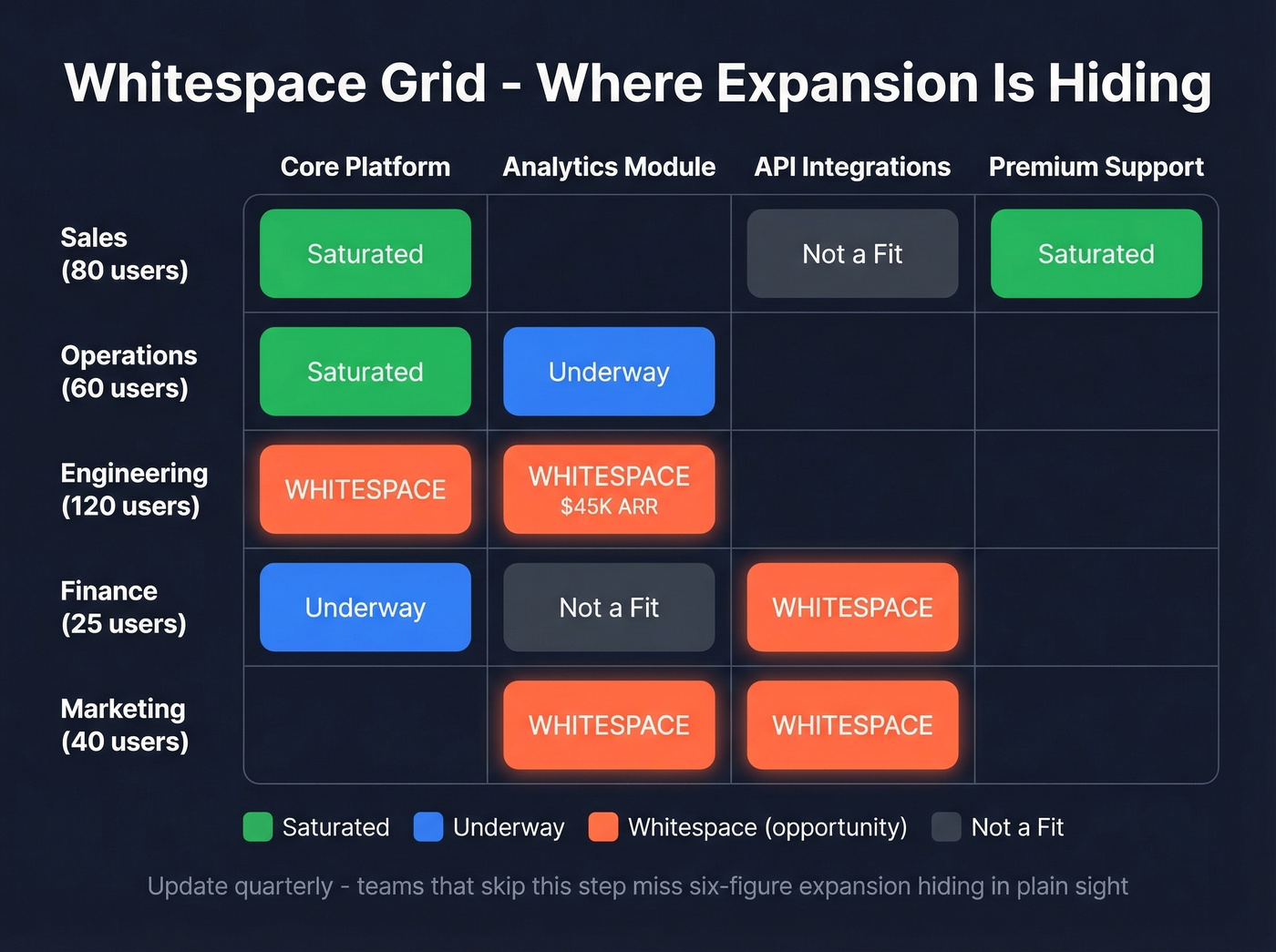
Build a whitespace grid: business units down the left, your products or use cases across the top. Mark each cell as Saturated, Underway, Not a Fit, or Whitespace. The Brevet Group calls this out as one of the simplest ways to stop guessing where expansion lives: https://blog.thebrevetgroup.com/top-10-account-planning-mistakes-to-avoid.
We've watched teams swear an account was "fully penetrated" and then find six-figure expansion because nobody had ever mapped adoption by team. The product was in the company, sure. It just wasn't in the parts of the company that had budget and urgency.
Update the grid quarterly. Monthly is overkill unless the account is in active change.
Step 5 - Set SMART Objectives
Pick 2-5 objectives. Fewer is better because you can actually execute them.
Good: "Increase ARR by 15% in Q3 2026 by expanding analytics to Engineering and adding 50 seats."
Bad: "Grow the account."
Tie each objective to a small set of KPIs you can track without a spreadsheet circus: year-over-year revenue, share of wallet, product adoption, and a customer health signal (NPS or a simple internal health score). If you can't measure it, you won't manage it, and the plan will drift back into "nice ideas."
Step 6 - Build the Action Plan
Every objective needs actions. Every action needs an owner and a due date. No owner means it won't happen.
A four-column table is enough for most teams:
| Action | Owner | Due Date | Status |
|---|---|---|---|
| Schedule QBR with Ops + Finance | CSM | Apr 10 | Not started |
| Get intro to Engineering lead | AE | Apr 18 | In progress |
| Build expansion ROI one-pager | SE | Apr 22 | Not started |
Here's the thing: if an action doesn't tie back to an objective, cut it. Teams love to keep "nice-to-have" tasks in the plan because it feels thorough, but it turns the plan into a backlog and kills urgency.
Step 7 - Keep It Alive
A plan that isn't updated monthly is a presentation, not a plan.
People complain account plans take too long and constantly need updates. They're right, and that's why the one-page format matters: you can update a single page in 30 minutes, but you can't update a 20-slide deck in 30 minutes without lying to yourself.
Set a monthly review with the account team. Then do a deeper quarterly refresh where you revisit assumptions, whitespace, and stakeholder power. XGrowth has a solid cadence and template approach you can borrow: https://xgrowth.com.au/blogs/account-planning-template/.
Between reviews, update the plan immediately when you see triggers like:
- Executive changes
- Funding rounds
- Product launches
- Regulatory shifts
The "set and forget" trap kills more account plans than bad data ever will.
Sample Plan (Filled In)
| Field | Example |
|---|---|
| Account | NovaTech (mid-market SaaS, 400 employees, $85M ARR) |
| Top 3 Stakeholders | Sarah Lin (VP Ops, champion), James Park (CFO, economic buyer), Priya Desai (IT Director, evaluator) |
| Whitespace | Engineering team (120 people) not using analytics module - $45K expansion |
| SMART Objective | Close analytics module deal with Engineering by Q3 2026, adding $45K ARR |
| Next Action | Sarah introduces us to Engineering lead by June 15 - Owner: AE |
One page. Everything your team needs to execute this week and plan for this quarter.
Mistakes That Kill Account Plans
- Treating planning as admin work. If your team sees it as a box to check, the plans will be shallow and ignored.
- Poor account prioritization. Not every account deserves a plan. Cap the number per rep. Focused effort on 5 beats diluted effort across 30.
- Inside-out planning. Building around what you want to sell instead of what the client needs to solve.
- Set-and-forget syndrome. Built in January, presented in February, forgotten by March. Monthly reviews are non-negotiable.
- Not integrating into your CRM. A plan in a disconnected doc is invisible.
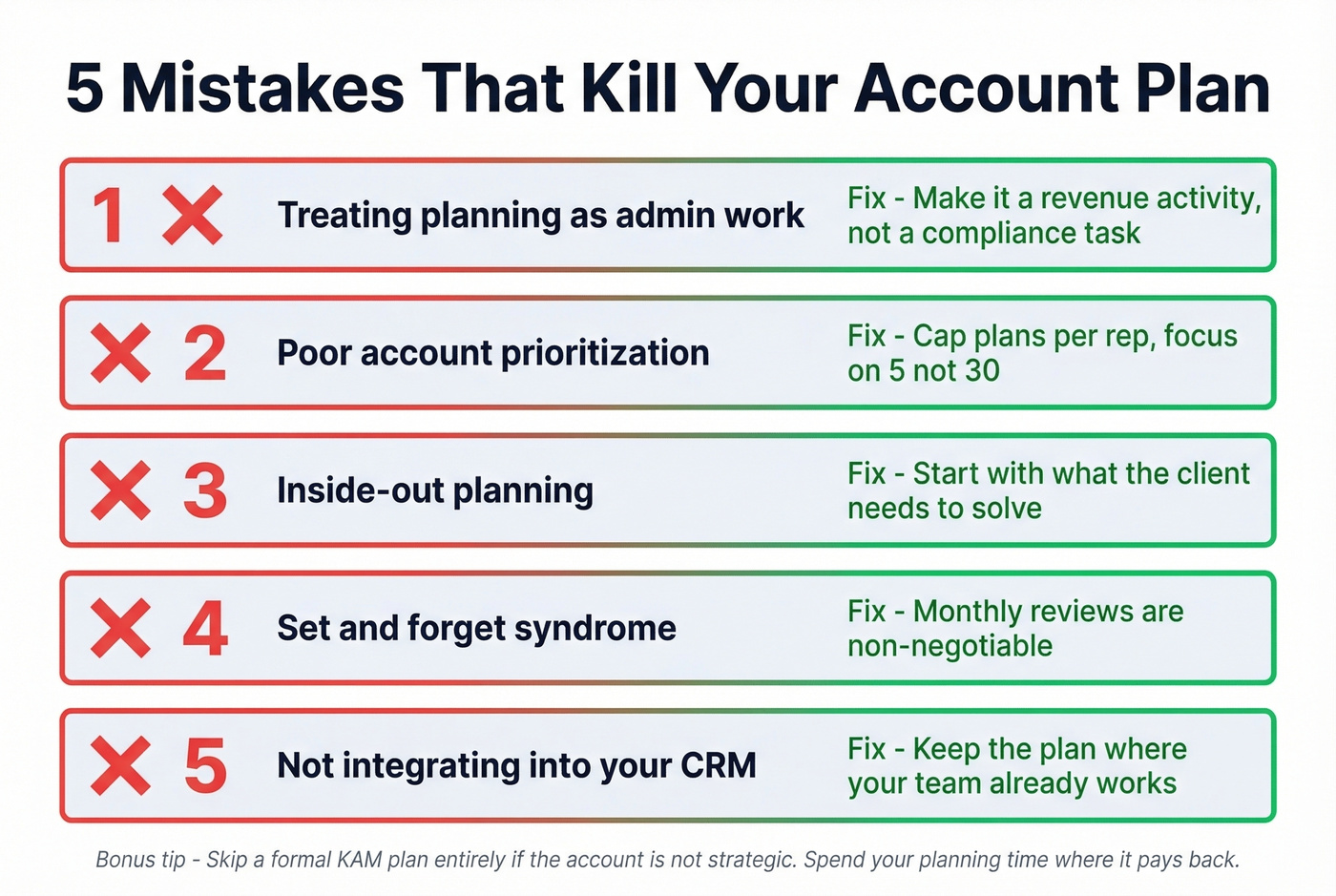
One more unpopular opinion: skip a formal KAM plan entirely if the account isn't strategic. If the customer is low-margin, high-support, and unlikely to expand, you're better off running a lightweight success plan and spending your planning time where it pays back.
Tools for Key Account Planning
Most teams don't need a dedicated account-planning platform. We've tested the "buy software first" approach, and it usually backfires: the tool becomes the work, not the account.
Start simple, then add tooling only when the process is working.
Tier 1: Spreadsheet + clean stakeholder data
Google Sheets is still the fastest way to get a one-page plan in front of a team and keep it editable. Pair it with a reliable way to enrich and verify stakeholder contact data so multi-threading doesn't stall.
Prospeo is the best option we've used for this specific job: it verifies emails at 98% accuracy, refreshes data every 7 days, and returns 50+ data points per contact via enrichment. That matters in real life because key account plans fail in boring ways: bounced emails, wrong titles, and "we should reach out to the VP" with no way to actually reach them.
CRM options (when you need governance)
If your team lives in a CRM, keep the plan there so it doesn't vanish.
Salesforce Sales Cloud is widely used, and Gartner Peer Insights has a dedicated account-planning tools category you can browse for peer feedback: https://www.gartner.com/reviews/market/account-planning-tools. Salesforce doesn't hand you a perfect account plan out of the box, so teams typically use a custom object related to the Account record or an app like GSP.
HubSpot, Pipedrive, and Salesmate can all work for lighter-weight planning. The deciding factor isn't features. It's whether your team will actually open the plan inside the system they already use every day. (If you’re standardizing your stack, it helps to align on examples of a CRM and what “good” looks like.)
Dedicated KAM platforms (only for mature programs)
Kapta and DemandFarm can make sense for enterprise KAM orgs with formal governance, enablement, and exec sponsorship. If you don't have that, you'll pay a lot to recreate a spreadsheet with prettier permissions.
| Tool | Best For | Price |
|---|---|---|
| Google Sheets | Starting out | Free |
| Prospeo | Stakeholder data | Free tier available; ~ $0.01/email |
| Salesforce | Salesforce teams | Starts at $25/user/mo |
| HubSpot Sales Hub | Mid-market | ~$15-$150 per user/mo (tiered) |
| Pipedrive | SMB simplicity | ~$14-$79/user/mo |
| Salesmate | Budget CRM | Starts at $23/user/mo |
| Kapta | Dedicated KAM | Not public (typically enterprise annual) |
| DemandFarm | Enterprise KAM | Not public (typically enterprise annual) |
| GSP (Salesforce app) | Salesforce-native plans | $350/mo, unlimited |
You just mapped the whitespace and found expansion hiding in three business units. Now you need verified emails and direct dials for every new stakeholder - fast. Prospeo gives you 125M+ verified mobiles with a 30% pickup rate and emails at $0.01 each, so your action plan actually gets executed.
Turn whitespace into pipeline with contacts that connect.
FAQ
How long does it take to build a key account management plan?
Budget 2-6 hours for the initial plan, then 30-60 minutes per week for updates. The first plan is always the slowest; after that, you reuse the same structure and just swap in account-specific details.
How often should I update my account plan?
Monthly at minimum, with a deeper strategic refresh every quarter. Update it immediately when you see trigger signals like executive changes, funding rounds, or competitor displacement because stale plans lead to missed expansion windows.
What's the best free tool for stakeholder data?
Prospeo's free tier includes 75 verified emails per month and email verification at 98% accuracy, which covers stakeholder mapping for a handful of key accounts. Use Google Sheets for the plan itself and keep the workflow simple.
What KPIs should I track for key accounts?
Track year-over-year account revenue, share of wallet, a customer health signal (NPS or an internal health score), and product adoption in the teams you care about. If cost-to-serve is rising faster than revenue, it's time for a strategy reset: revisit your whitespace grid and tighten objectives.