

Lead Capture: What Works, What Doesn't, and the Numbers Behind It
Cost per lead is up 40% across major ad platforms in 2026. Meanwhile, the average website converts just 1.7% of visitors via forms. Run the math on a site with 10,000 monthly visitors and you're looking at 170 form fills - and on demo request forms, 14.1% are unqualified. That leaves roughly 146 usable contacts. For what you're spending to drive that traffic, 146 names is brutal.
Lead capture is the specific moment you collect a prospect's contact information - the form, the popup, the chat interaction. Lead generation covers the entire process of attracting and qualifying prospects. Generation is the strategy. Capture is the mechanism. Most teams treat it as an afterthought: slap a form on a landing page, ask for five fields, wonder why the pipeline is thin.
The Short Version
Three highest-leverage moves based on the data:
- Switch to multi-step popups/forms - up to 43% more leads than one-step
- Add form scheduling for demo requests - doubles the booking rate from 30% to 66.7%
- Verify captured data before it enters your sequences - 14.1% of demo request fills are junk
Benchmarks by Capture Method
Ruler Analytics analyzed over 100 million data points across fourteen industries and found the average qualified lead conversion rate is 2.9%. Here's how individual methods stack up:
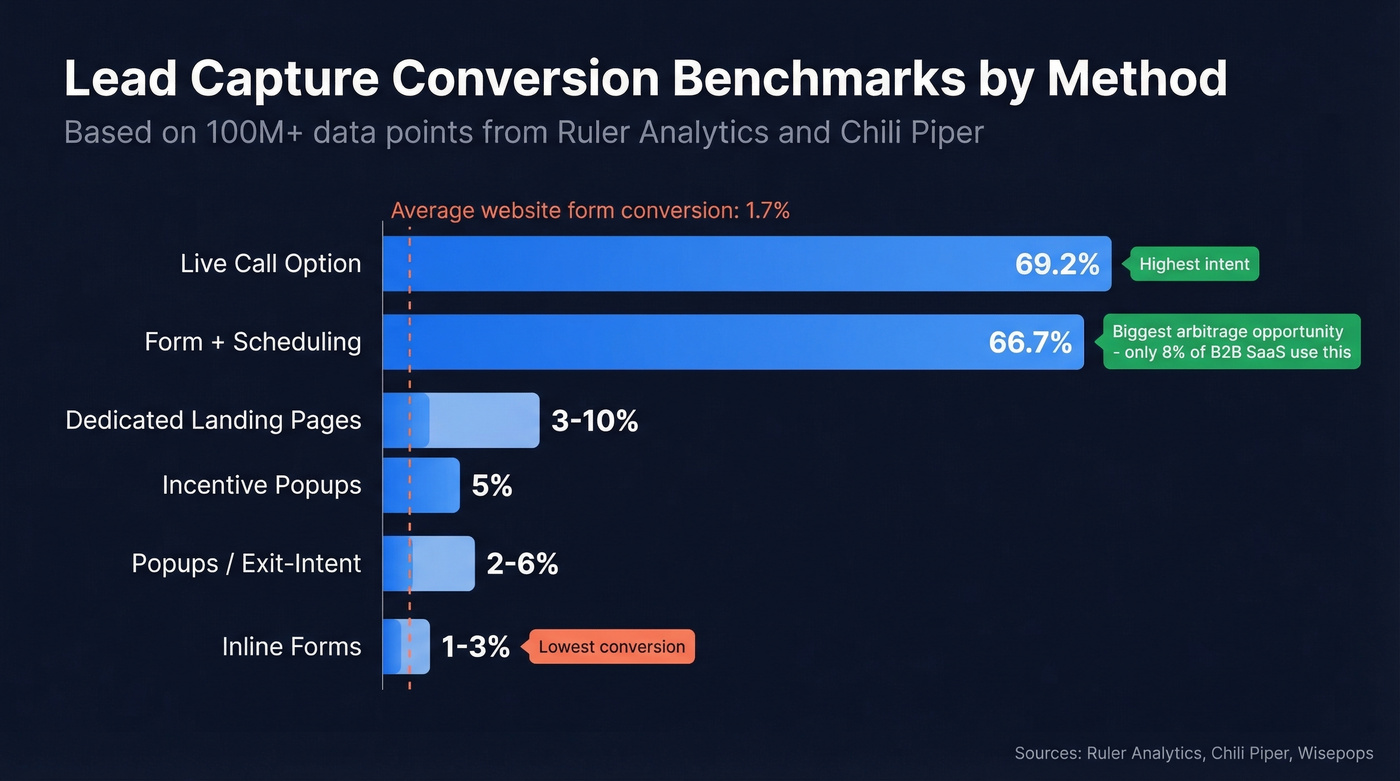
| Capture Type | Typical Conversion Range | Notes |
|---|---|---|
| Inline forms | 1-3% | Lowest friction, lowest conversion |
| Popups / exit-intent | 2-6% | Higher when timed well |
| Incentive popups (discount, etc.) | ~5% | Wisepops case data |
| Dedicated landing pages | 3-10% | Best for paid traffic |
| Form + scheduling | ~66.7% of qualified submissions book | Chili Piper benchmark |
| Live call option | 69.2% | Highest booking rate, lowest scale |
That form-plus-scheduling row deserves a closer look. Chili Piper analyzed nearly 4 million form submissions and found that adding instant scheduling to a demo request form doubles the booking rate. Yet only 8% of top B2B SaaS companies have form scheduling on their site. That's a massive arbitrage opportunity sitting in plain sight, and we've seen teams implement it in under a week with off-the-shelf tools.
Here's the thing: if your average deal size is above $5k and you don't have instant scheduling on your demo form, you're leaving more revenue on the table than any ad spend increase will recover. This is the single highest-ROI change most B2B teams can make today.
Below the 1.7% form benchmark? Start with CTA copy and form length before you touch anything else.
Website Methods That Convert
Inline Signup Forms
The workhorse. Embedded in blog posts, resource pages, or footers, inline forms capture visitors already engaged with your content. Conversion rates run 1-3%. Keep fields to email-only or email-plus-name for top-of-funnel offers. Anything more adds friction to a low-intent interaction.
Popups and Exit-Intent Offers
Popups get a bad reputation, but countdown timer popups capture 41% more leads than those without a timer. Exit-intent overlays save up to 15% of abandoning visitors. The key is timing: trigger after 30-60 seconds or on scroll depth, not on page load. Nobody wants a popup before they've read a single sentence.
Dedicated Landing Pages
Landing pages work because they eliminate distractions. One offer, one CTA, no navigation menu pulling attention elsewhere. A focused page with a clear value exchange - ebook, audit, demo - consistently outperforms multi-purpose pages, and conversion rates of 3-10% are typical with paid traffic. For online capture specifically, a standalone landing page almost always beats an embedded form on a busy homepage.
Multi-Step Quizzes and Forms
Multi-step popups capture up to 43% more leads than traditional one-step popups. The psychology is simple: once someone answers the first question, they've invested effort and are more likely to finish. Product quizzes, ROI calculators, and assessment tools all use this principle. Save the email ask for the last step.
Live Chat and Chatbots
63% of people are more likely to buy from a site that offers live chat. The capture happens naturally - the bot asks for an email to send a transcript or schedule a follow-up. For B2B, chat-based capture works especially well on pricing and product pages where intent is already high.
Event and Trade Show Capture
Badge scanning, kiosk forms, and QR codes at events remain one of the highest-intent methods. The challenge isn't conversion - it's data quality. Badge scans pull outdated info, and handwritten forms are a nightmare to digitize. Use a dedicated event capture tool and verify every record before it hits your CRM.
How to Optimize Your Forms
Typeform analyzed over 10,000 customer forms and found specific patterns that move completion rates. In our testing, the CTA copy change alone moved the needle more than any other single tweak - but the full list is worth running through.
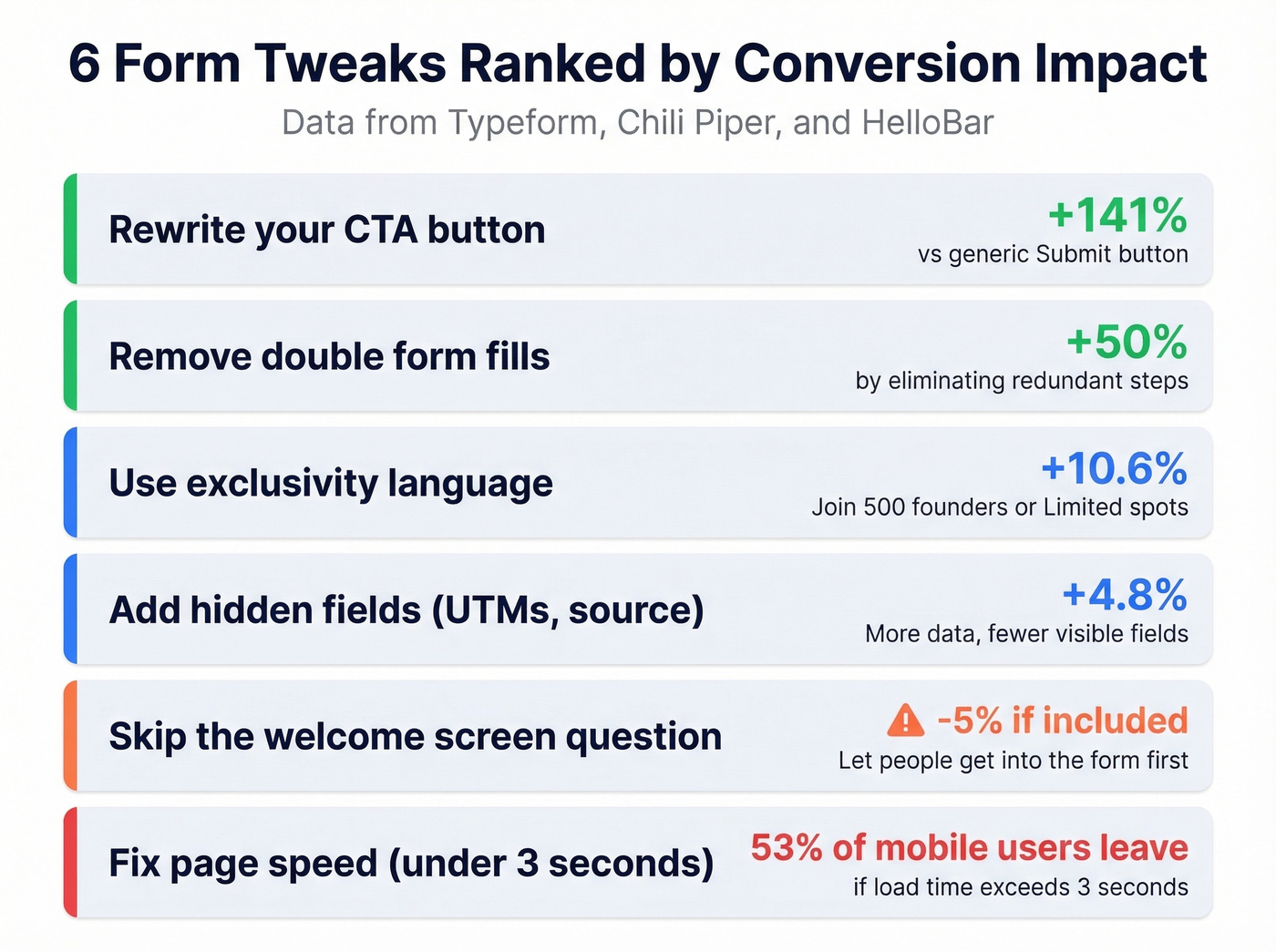
Use exclusivity language. Wording like "Join 500 founders" or "Limited spots" correlates with a 10.6% increase in form completion. People want what feels scarce.
Add hidden fields. Forms using hidden fields - UTM parameters, referral source, page URL - showed a 4.8% increase in completion rates. You collect more data without asking for it. The form feels shorter while your CRM gets richer, and since 71% of customers expect personalized interactions, hidden fields make that possible without adding visible friction.
Skip the welcome screen question. Including a question on the welcome screen correlated with a 5% decrease in completion. Let people get into the form first.
Rewrite your CTA button. A specific CTA like "Get Started Free" boosts conversion rates by 141% compared to the generic "Submit." This takes thirty seconds to change. Do it today.
Fix your page speed. If your page takes more than 3 seconds to load, 53% of mobile users leave before they see your form. Run PageSpeed Insights before you A/B test anything else. Speed is the prerequisite.
Kill the double form fill. Chili Piper's data shows that removing a second form step increases conversion by 50%. If your demo flow asks for info on the landing page and then again in the scheduling tool, you're bleeding leads at the handoff.

14.1% of your demo form fills are junk. Prospeo's 5-step verification and 98% email accuracy mean every lead that enters your CRM is real, reachable, and ready to contact - no manual cleanup required.
Stop nurturing bad data. Start with contacts that actually convert.
What Happens After Capture
You've optimized your forms, your conversion rate is climbing, and leads are flowing in. Then your SDR opens the CRM on Monday morning and finds 40 new leads - 6 are personal Gmail addresses, 3 bounced on the first email, 2 are competitors scouting your pricing, and 1 is literally "test@test.com."
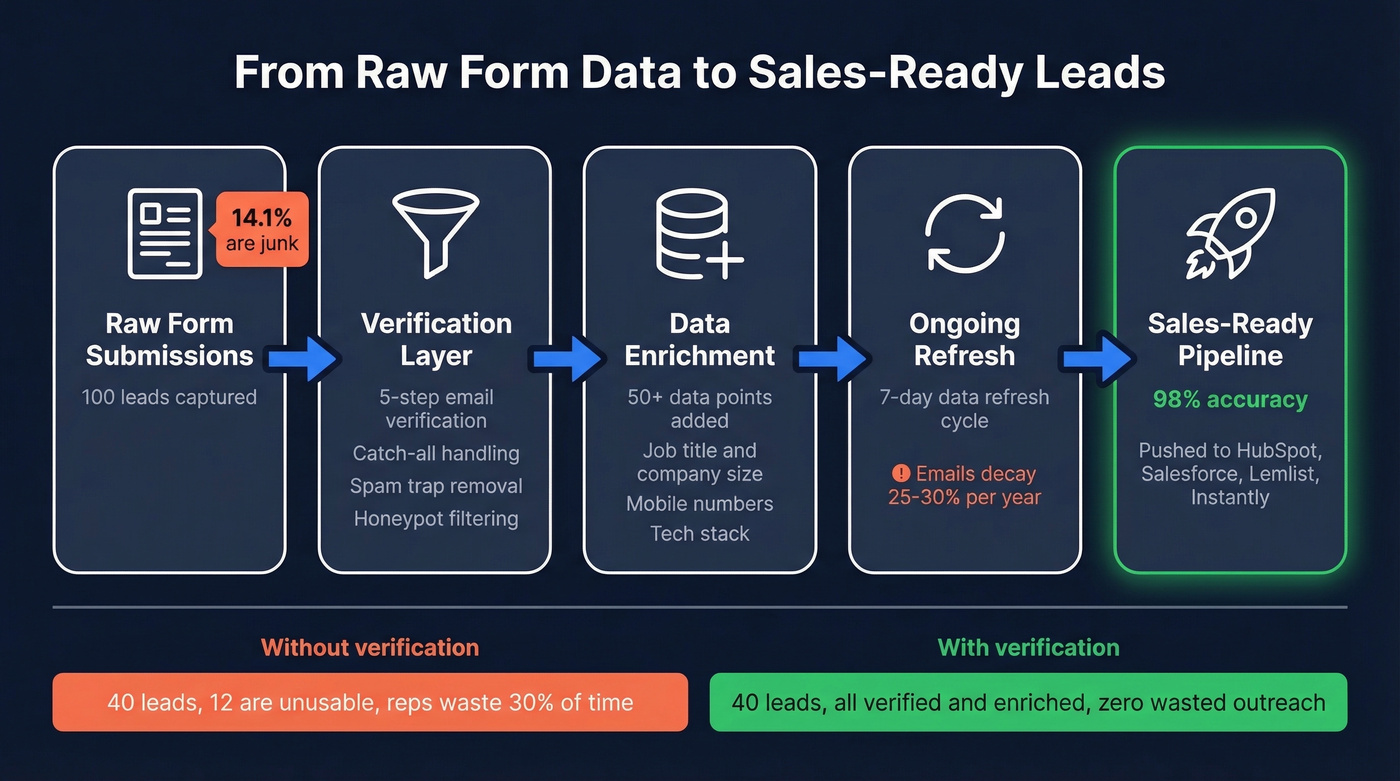
That isn't anecdotal. 14.1% of demo request form fills aren't qualified. And that's just day one - email addresses decay at 25-30% per year as people change jobs, companies rebrand, and domains go dark.
The fix is a verification and enrichment layer between your forms and your outbound sequences. Raw form data isn't ready for sales. It needs to be cleaned, verified, and enriched before anyone touches it. Without a reliable system connecting your forms to your CRM, every captured contact degrades in value the longer it sits unverified.
Prospeo handles this step. Upload a CSV of captured leads or connect via API (92% match rate), and every email runs through a 5-step verification process with catch-all handling, spam-trap removal, and honeypot filtering at 98% accuracy. Each lead comes back enriched with 50+ data points including mobile numbers, job title, company size, and tech stack. The 7-day data refresh cycle means you aren't working with stale records, and native integrations with HubSpot, Salesforce, Lemlist, and Instantly push verified data straight into your sequences.

Mistakes to Avoid
We've audited enough setups to see the same errors on repeat. The consensus on r/sales echoes what we see internally: "Our form is too long and we are wasting web traffic." That's the most common version of a broader pattern.
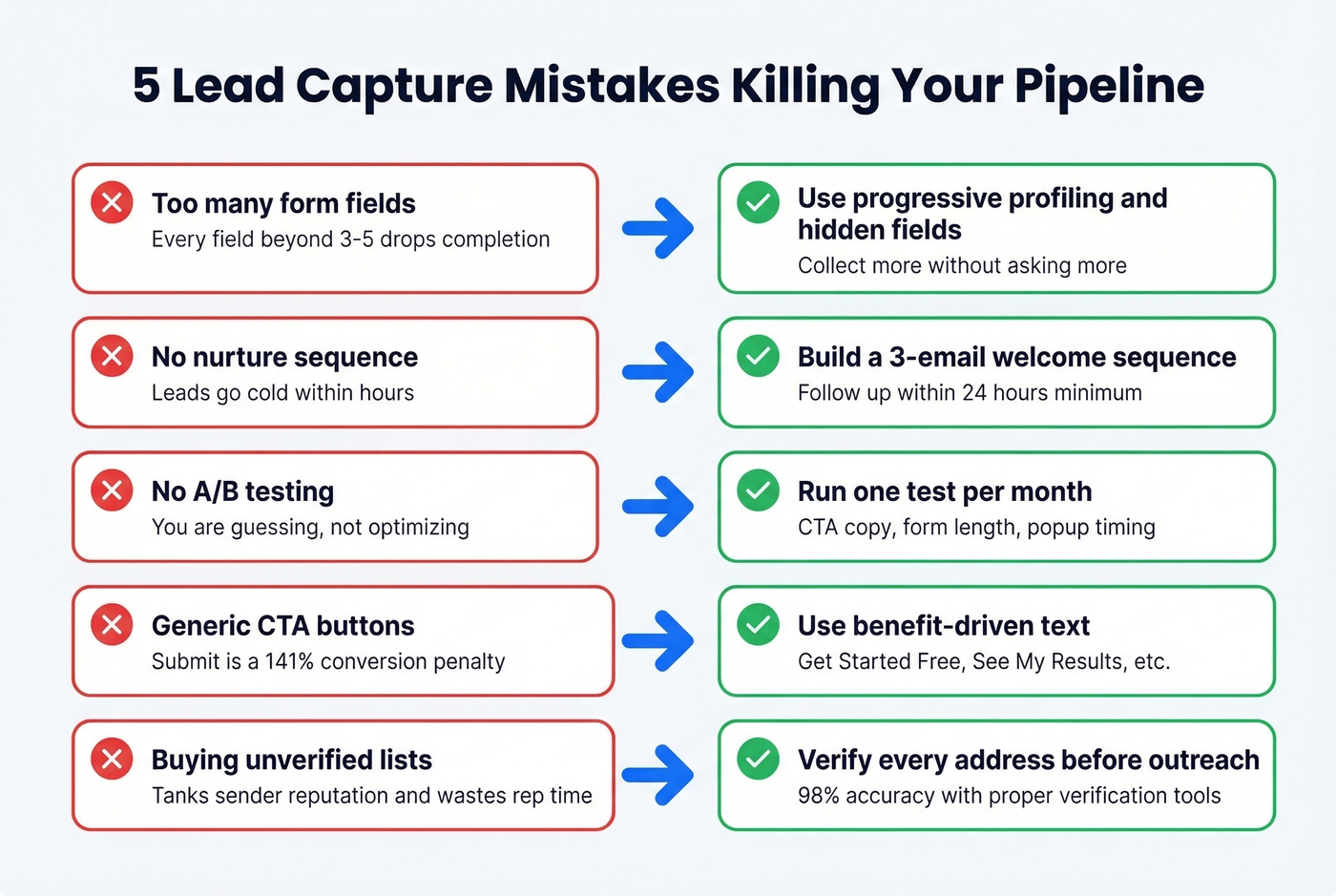
Too many form fields. Every field beyond 3-5 drops completion. Use progressive profiling and hidden fields to collect more without asking more. Your marketing team doesn't need "company size" on a newsletter signup.
No nurture sequence. Capturing a lead and not following up within 24 hours is like catching a fish and leaving it on the dock. Build at minimum a 3-email welcome sequence before you launch any new campaign. (If you need copy, start with these sales follow-up templates.)
No A/B testing. If you haven't tested your CTA copy, form length, and popup timing, you're leaving conversions on the table. Even one test per month compounds fast.
Generic CTAs. "Submit" is a 141% conversion penalty compared to specific, benefit-driven button text. Kill every "Submit" button on your site today.
Buying low-quality lists. Skip this if you don't have a verification step in place. Purchased lists with unverified data tank your sender reputation and waste rep time. If you're going to buy data, verify every address before it touches your domain.
Best Lead Capture Tools in 2026
No single tool covers the full capture-to-conversion workflow. You need a stack. Here's how it breaks down:
| Tool | Best For | Starting Price | Key Feature |
|---|---|---|---|
| Prospeo | Verification + enrichment | Free (75 emails/mo) | 98% accuracy, 50+ data fields |
| HubSpot | Forms + CRM | Free (basic) | All-in-one capture + nurture |
| Typeform | Conversational forms | ~$25/mo | Multi-step, high completion |
| OptinMonster | Popup optimization | ~$16/mo (billed annually) | Exit-intent, A/B testing |
| Chili Piper | Form scheduling (B2B) | ~$150/mo per user | Instant demo booking |
| Calendly | Meeting scheduling | Free (basic) | Simple embed, broad adoption |
| Intercom | Live chat / chatbot | ~$74/mo | Chat-based capture |
| Unbounce | Landing page builder | ~$99/mo | Drag-and-drop, A/B testing |
HubSpot Marketing Hub is the default starting point for teams that want forms, landing pages, email nurture, and CRM in one platform. The free tier is genuinely useful - paid plans scale up with automation, reporting, and testing. The tradeoff is flexibility: HubSpot forms are functional but not beautiful.
Typeform is the opposite bet. Beautiful, conversational forms that feel like a dialogue rather than data entry. Their own dataset shows measurable lifts from multi-step flows and exclusivity language, and if your strategy leans on quizzes or any form longer than 3 fields, Typeform earns its cost quickly.
OptinMonster focuses purely on popups, slide-ins, and exit-intent overlays. Chili Piper is the B2B scheduling layer that doubles demo booking rates - if your deal size justifies the per-user cost, it's a no-brainer. Calendly handles simpler scheduling for free. Intercom covers chat-based capture. Unbounce builds dedicated landing pages with built-in A/B testing.
For teams spending less than $500/mo on tools, start with HubSpot free + Typeform + Prospeo's free tier. That covers capture, conversion optimization, and data quality without a budget conversation.
Forms convert 1-3%. Meanwhile, Prospeo's database gives you direct access to 300M+ verified profiles with 30+ filters - buyer intent, job changes, tech stack, and more. Skip the form and go straight to the decision-maker.
Why wait for 170 form fills when you can build a list of 10,000 verified contacts today?
GDPR and CCPA Compliance
GDPR fines can reach EUR 20 million. If you're capturing data from EU residents or California consumers, here's the non-negotiable checklist:
- Explicit consent only. No pre-checked boxes. No bundled consent. Consent must be freely given, specific, informed, and unambiguous.
- Data minimization. Collect only what you need. Every extra field needs a justifiable purpose.
- Purpose specification. State exactly why you're collecting data. "Improving user experience" doesn't meet GDPR standards. Be specific: "We'll email you weekly marketing tips and occasional product updates."
- Easy withdrawal. Consent must be as easy to withdraw as it was to give. Visible unsubscribe link and preference center - not a buried "contact us to opt out" page.
- "Do Not Sell or Share" link (CCPA). Required if you share data with ad or analytics partners. You must also honor Global Privacy Control browser signals automatically.
Getting this wrong doesn't just risk fines - it erodes trust with the exact prospects you're trying to capture.
FAQ
What's a good conversion rate?
The average qualified lead conversion rate across fourteen industries is 2.9%, based on 100M+ data points. The average form-specific rate is 1.7%. If you're below 1.7%, start with CTA copy and form length - those two changes alone can move the needle 20-50%.
How many form fields should I use?
Three to five fields for top-of-funnel offers. Every field beyond five drops completion measurably. Use hidden fields to capture UTM parameters and referral data without adding visible friction, and progressive profiling to collect more over time.
What's the difference between lead capture and lead generation?
Lead generation is the full process of attracting prospects - content, ads, SEO, events, outbound. Lead capture is the specific moment you collect their contact information: the form submission, the popup opt-in, the chatbot interaction. Generation is the strategy; capture is the mechanism.
How do I verify leads after capturing them?
Use an email verification tool to check addresses in real-time or batch via CSV and API. A 5-step verification process catches spam traps, typos, and unqualified entries - eliminating the ~14% of demo form fills that are junk. Verify before data enters your sequences, not after your bounce rate spikes.
Do I need GDPR consent for my forms?
Yes, if you collect data from EU residents. Consent must be explicit, specific, and as easy to withdraw as it was to give. Pre-checked boxes violate GDPR. Include a clear privacy notice at the point of capture and link to your full privacy policy.