

Best Lead Extractor Tools in 2026 (Tested & Ranked)
You fired up a lead extractor last Tuesday and scraped 3,000 contacts. By Friday, your first outbound sequence had a 28% bounce rate, your domain reputation took a hit, and your ops lead was asking why nobody verified anything before hitting send. Email lists decay at roughly 22% per year. Nearly a quarter of any list you build today will be dead within twelve months - and scraped data without verification is worse from day one.
Most lead extraction tools on the market are still glorified Maps scrapers from 2018: Windows-only desktop apps that dump unverified CSVs and call it a day. That's not good enough anymore. A modern tool should give you verified emails, direct dials, and enough enrichment data to personalize your outreach.
Here's what's worth your time - and what isn't.
Our Picks (TL;DR)
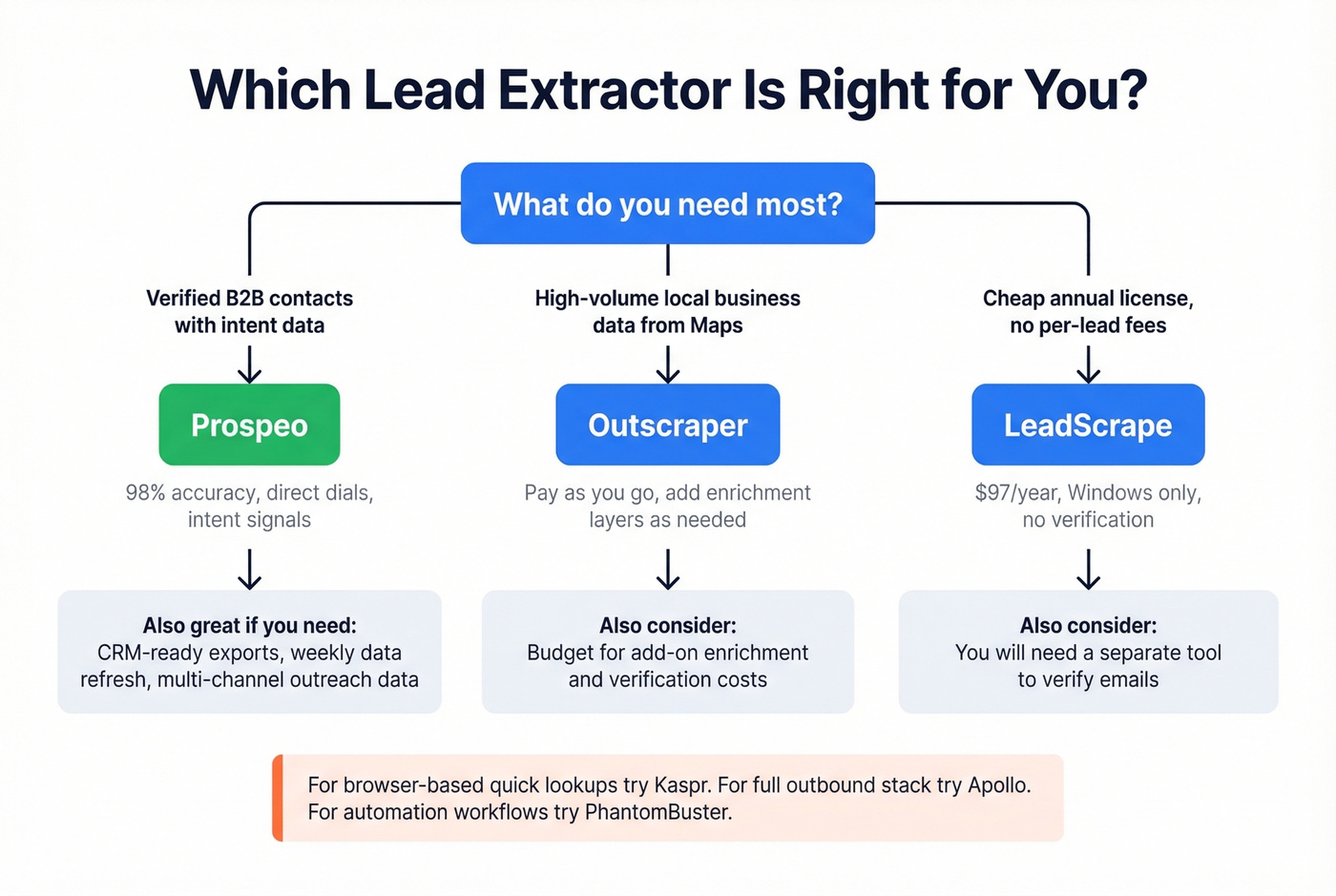
Prospeo - Best for verified B2B data. 98% email accuracy, 125M+ verified mobiles, intent data on 15,000 topics. Free tier available, paid plans from ~$0.01/email.
Outscraper - Best for high-volume Google Maps scraping on a budget. Free for the first 500 businesses, then $3/1,000 records. Watch the add-on costs.
LeadScrape - Best affordable desktop option for directory data. $97/year for the Standard plan, no per-lead fees. Windows only.
What Is a Lead Extractor?
A lead extractor is software purpose-built to find and collect business contact data - emails, phone numbers, addresses, company details - from public online sources. Unlike a general web scraper that can pull any data from any page, this type of tool gives you a user-friendly interface designed specifically for B2B contact fields. You set filters, the tool crawls sources, deduplicates results, and exports a clean CSV.
It handles one piece of the lead generation stack: the "locate and collect" phase. It sits upstream of your sequencing tool, CRM, and nurture workflows. Get this step wrong and everything downstream suffers.
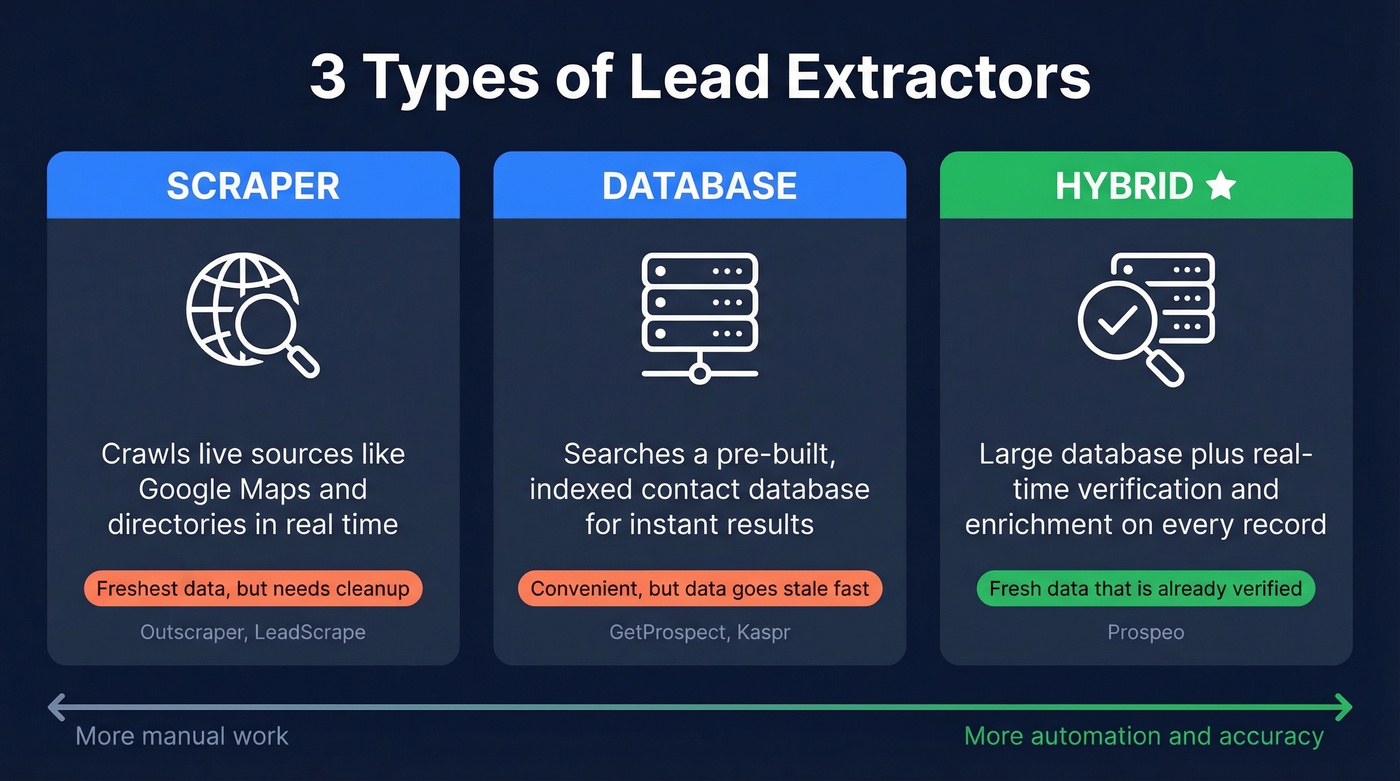
Not all extraction tools work the same way. There are three distinct categories, and understanding the differences saves you from picking the wrong one:
| Type | How It Works | Example |
|---|---|---|
| Scraper | Crawls live sources (Maps, directories) in real time | Outscraper, LeadScrape |
| Database | Searches a pre-built, indexed contact database | GetProspect, Kaspr |
| Hybrid | Combines a large database with real-time verification and enrichment | Prospeo |
Scrapers give you the freshest raw data but require cleanup. Databases are convenient but can go stale fast. Hybrids aim to deliver both - fresh data that's already verified before it hits your inbox. The tool you pick depends on whether you value volume, accuracy, or workflow integration most.
10 Best Lead Extraction Tools for 2026
Prospeo
This is what a modern lead extractor should look like - verified data, direct dials, and intent signals, not a CSV of info@ addresses. Prospeo's database covers 300M+ professional profiles with 143M+ verified emails and 125M+ verified mobile numbers. Every record runs through a 5-step verification process including catch-all handling, spam-trap removal, and honeypot filtering, which is why the platform delivers 98% email accuracy.

The 30+ search filters go well beyond basic firmographics. You can filter by buyer intent across 15,000 topics via Bombora, technographics, job changes, headcount growth, funding rounds, and revenue. Data refreshes every 7 days - the industry average is closer to 6 weeks. One proof point that stuck with us: Meritt tripled their pipeline from $100K to $300K/week after switching, and their bounce rate dropped from 35% to under 4%.
Pricing: Free tier gives you 75 emails + 100 Chrome extension credits/month. Paid plans run ~$0.01/email with no contracts. Self-serve, cancel anytime.
Best for: Sales teams and agencies who need verified contacts with direct dials, not raw scraped data that requires a separate verification step.
Outscraper
Outscraper is the go-to for high-volume Google Maps scraping. The pay-as-you-go model starts cheap: free for the first 500 businesses, then $3/1,000 records for Maps data. Volume discounts kick in after 100K records, dropping to $1/1,000.
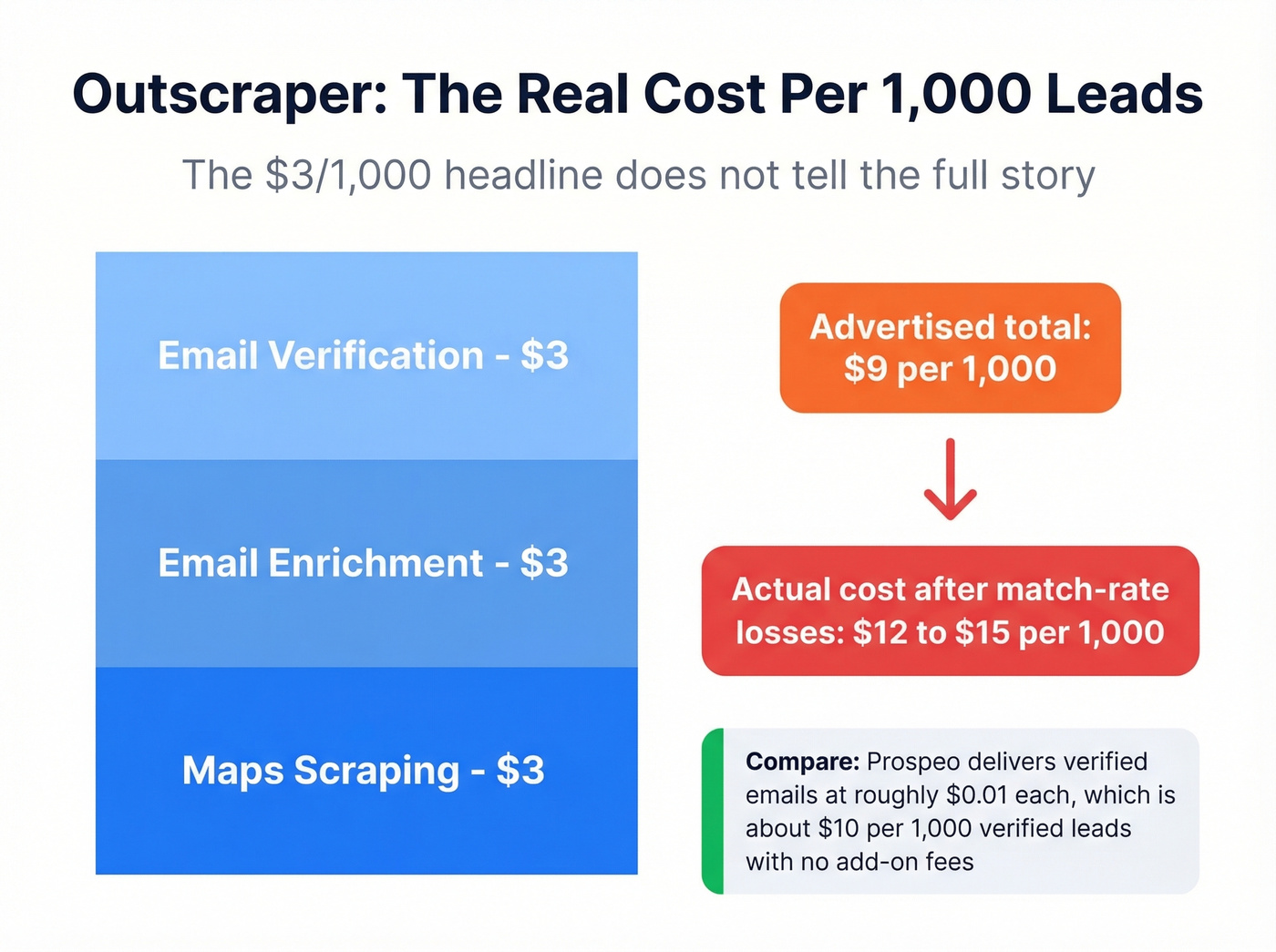
Here's where it gets tricky. That $3/1,000 is just for the raw business listing. Email enrichment costs another $3/1,000 domains. Email verification adds another $3/1,000 emails. Stack those together and you're looking at ~$9/1,000 records before accounting for match-rate losses.
Once you factor in that not every business listing yields a usable email, the true cost per verified lead lands closer to $12-15/1,000. Still cheaper than purchased lists at $200-500/1,000, but a far cry from the "$3/1,000" headline.
The AppSumo reviews tell a consistent story: 3.5/5 across 104 ratings, with recurring complaints about unclear pricing and unexpected invoices. The tool itself is powerful for raw Maps data - just go in with eyes open about the true cost.
Pricing: Free (500 businesses), then $3-9/1,000 depending on which enrichment layers you add. Volume discounts at 100K+.
Best for: High-volume local business data extraction where you need fresh Maps data and don't mind managing the enrichment stack yourself.
LeadScrape
Use this if: You're a solo operator or small team that wants a simple, affordable annual license with no per-lead fees and no subscription fatigue.
Skip this if: You're on Mac, need CRM integrations, or want built-in email verification.
LeadScrape is a Windows-only desktop tool that extracts business data from directories like Google Maps, Yellow Pages, and similar sources. The Standard plan runs $97/year with 3 data sources; Business is $247/year with 7 sources, bulk search, and additional data fields like revenue and SIC/NAICS codes. No daily or monthly limits on leads downloaded.
G2 reviewers give it 4.9/5 across 17 reviews, praising ease of use and fast list building. The recurring knock is duplicate entries - you'll want to dedupe manually after export. There's no cloud sync and no email verification built in. For the price, it's a solid workhorse for directory data. Just don't expect it to replace a modern enrichment platform.
Pricing: $97/year (Standard) or $247/year (Business). 14-day money-back guarantee.
Kaspr
Kaspr positions itself as a Chrome extension and web app with a database of 500M+ email addresses, used by 50K+ companies.
Why it wins: Fast, browser-native workflow. You see a prospect, click the extension, get an email and phone number. The Organization tier at $99/mo gives you 24,000 emails, which is reasonable volume for a mid-size team.
Key tradeoff: The Starter tier is rough. $49/mo for 60 emails works out to ~$0.82 per email - that's expensive for what you get. You really need to be on Business ($79/mo for 2,400 emails) or higher for the unit economics to make sense. G2 rating sits at 4.4/5.
Pricing: Free (5 emails), $49/mo (Starter), $79/mo (Business), $99/mo (Organization).
Best for: Individual reps who need quick email/phone lookups from the browser without switching to a separate platform.
Apollo.io
Apollo is more than a data extraction tool - it's a full outbound stack with a B2B database, sequencing, and a built-in CRM. For teams that want everything in one platform and don't want to stitch together multiple tools, it's the obvious starting point. The free tier is genuinely useful, and paid plans from ~$49-99/mo per user include both data access and outreach automation.
The tradeoff is data accuracy. We've seen Apollo's email accuracy run noticeably below platforms with proprietary verification infrastructure - and when you're sending high-volume cold email, a few percentage points of bounce rate can damage your domain reputation fast. Apollo works best when you pair it with a verification layer or use it primarily for the sequencing and CRM features rather than treating it as your single source of truth for contact data.
Pricing: Free tier available, paid from ~$49-99/mo per user.
Best for: Teams who want extraction, sequencing, and CRM in one platform and are willing to accept some data accuracy tradeoffs for convenience.
GetProspect
GetProspect is a straightforward email finder with a Chrome extension and 95% data accuracy. The free tier gives you 50 emails, Starter runs $49/mo for 1,000 emails, and Growth is $99/mo for 5,000. Verification is built in, which saves you from bolting on a separate tool. The unit economics are solid for budget-conscious teams doing moderate-volume extraction - $0.02-0.05 per verified email on the Growth plan. Skip it if you need phone numbers or intent data; it's primarily an email play.
Waalaxy
Waalaxy blends professional-network outreach automation with email extraction. It's more of an outreach tool that happens to extract contacts than a pure data collection tool, which makes it a strong pick if you're already running profile-first prospecting. The free tier gets you started, Advanced runs $56/mo, and Business is $80/mo. G2 rating is 4.6/5, with users praising the multi-channel sequence builder. The main limitation is that it's tightly coupled to professional-network workflows - if your ICP isn't active there, the extraction side loses most of its value.
PhantomBuster
PhantomBuster is an automation platform that scrapes leads from multiple sources via pre-built "Phantoms" - modular automations you can chain together. Growth hackers and technical marketers love it for building custom extraction workflows that pull from Google Maps, social platforms, and company websites in a single sequence. Pricing runs $59-399/mo depending on automation volume.
The learning curve is real: expect a few hours of setup before your first workflow runs smoothly. Not for non-technical users. But if you're comfortable with automation logic and want to combine data from 3+ sources into a single pipeline, nothing else matches its flexibility.
United Lead Scraper
Windows-only desktop tool for Maps and directory scraping. $39.99/mo for a single scraper, $119.99/mo for all scrapers. No email verification, no enrichment. Basic extraction at a basic price point. If you're already paying $40/mo for unverified data, you're better off spending that budget on a tool that verifies what it finds.
RS Lead Extractor
RS Lead Extractor is another Windows desktop scraper that pulls from Google Business listings and web directories. It differentiates with built-in proxy support and unlimited extraction on paid plans. Pricing runs ~$50-80/mo. The proxy support is useful if you're hitting rate limits on high-volume scrapes, but like most desktop scrapers, there's no verification or enrichment built in. Fine for raw directory data; not a replacement for a verified database.
Pricing Comparison
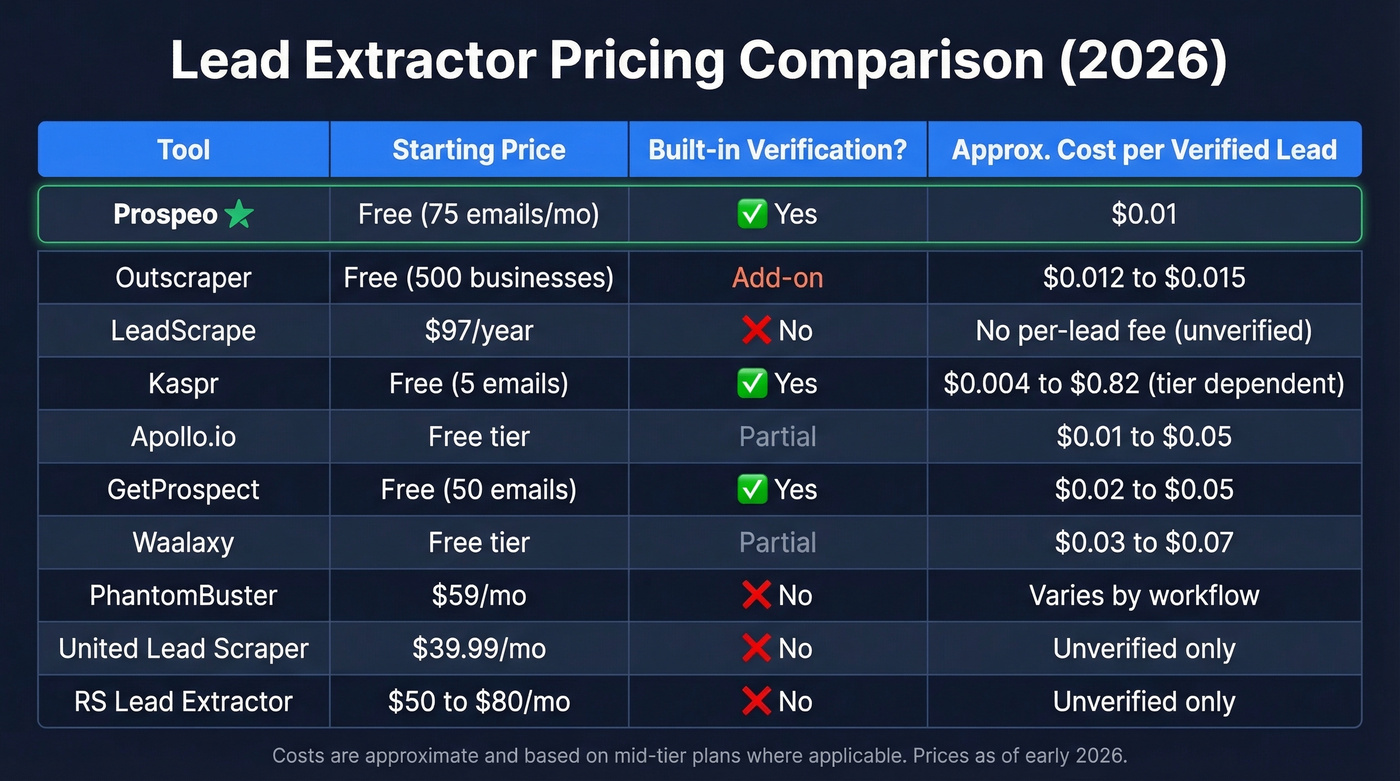
Here's what you're actually paying across all ten tools:
| Tool | Starting Price | Verification? | Cost/Verified Lead |
|---|---|---|---|
| Prospeo | Free (75 emails/mo) | Yes (built in) | ~$0.01 |
| Outscraper | Free (500 biz) | Extra ($3/1K) | ~$12-15/1K |
| LeadScrape | $97/yr | No | N/A + verifier |
| Kaspr | Free (5 emails) | Partial | $0.03-0.82 |
| Apollo.io | Free tier | Partial | ~$0.05-0.10 |
| GetProspect | Free (50 emails) | Yes | ~$0.02-0.05 |
| Waalaxy | Free tier | Partial | ~$0.05-0.07 |
| PhantomBuster | $59/mo | No | N/A + verifier |
| United Lead | $39.99/mo | No | N/A + verifier |
| RS Lead Extractor | ~$50-80/mo | No | N/A + verifier |
The "cost per verified lead" column is what actually matters. Outscraper's $3/1,000 headline looks great until you stack enrichment and verification and account for match-rate losses. Tools without built-in verification require a separate service - budget an extra $3-10/1,000 emails for that step.

Most lead extractors dump unverified CSVs and leave you to clean up the mess. Prospeo's 5-step verification - including catch-all handling, spam-trap removal, and honeypot filtering - means 98% of emails land. No separate verification tool needed.
Extract 300M+ verified contacts instead of scraping dead emails.
Scrapers vs. Databases vs. Hybrids
Let's simplify this. The decision framework isn't as complicated as most people make it.
Scrapers like Outscraper and LeadScrape give you real-time data pulled directly from live sources. Google Maps alone has 200+ million businesses worldwide. The data is fresh, but it's raw - you'll need to clean, dedupe, and verify everything before it's usable for outreach.
Databases like Kaspr and GetProspect offer convenience. Search by filters, export contacts, done. The risk is staleness - pre-compiled databases can lag behind reality, especially for fast-moving roles and startups.
Hybrids combine a large indexed database with real-time verification and enrichment. You get the convenience of a database with freshness guarantees.

Here's the play we recommend for teams doing local business prospecting: use a Maps scraper like Outscraper for the raw extraction, then run the results through a CSV enrichment tool with a high match rate. You get the breadth of Maps data with the accuracy of a verified database. Best of both worlds.
One strong opinion from our side: if your average deal size is under five figures, you probably don't need a full-stack platform like Apollo. A focused extraction tool with built-in verification will outperform an all-in-one where data accuracy is a secondary priority. The teams we've seen book the most meetings aren't the ones with the biggest databases - they're the ones with the cleanest data.
Why Unverified Data Destroys Outreach
Data decays at 20-30% per year. People change jobs, companies get acquired, email servers get reconfigured. A list you scraped six months ago has already lost a meaningful chunk of its value.
The math gets ugly fast. Purchased lists run $200-500 per 1,000 leads with roughly 60-70% accuracy. Maps scraping is cheaper at $10-30 per 1,000, but accuracy depends entirely on whether you verify afterward. Send to an unverified list and you're looking at bounce rates north of 20% - enough to wreck your domain reputation fast.
We've watched teams burn through three sending domains in a quarter because they skipped verification. It's the most expensive shortcut in outbound. You don't need a tool that pulls more leads. You need one that verifies them. 10,000 unverified records are worth less than 2,000 verified contacts with direct dials.
Post-Extraction Playbook
Extracting leads is step one. Here's the workflow that turns raw data into something you can actually use:
- Consolidate - Merge data from all sources into a single file. Multi-source extraction creates overlap.
- Standardize - Normalize formats: phone numbers, company names, job titles. "VP Sales" and "Vice President of Sales" should match.
- Dedupe - Remove exact duplicates first, then run fuzzy matching on email, phone, and company name combinations.
- Verify emails - Non-negotiable. Run every email through a verification service before any outreach.
- Validate phones - Check mobile numbers are active and correctly formatted for the target country.
- Enrich - Fill in missing fields: company size, industry, revenue, tech stack. A good enrichment platform returns 50+ data points per contact, and this is where raw scraped lists become actionable prospect data.
- Final dedupe - One more pass after enrichment, since new data can surface duplicate records.
This isn't a one-time process. With data decaying 20-30% annually, you need to re-verify and re-enrich on a regular cadence. Quarterly is the minimum; monthly is better for high-volume teams.
Stacking scraper fees, enrichment add-ons, and verification tools adds up fast. Prospeo gives you verified emails at ~$0.01 each, 125M+ direct dials, and intent data across 15,000 topics - all refreshed every 7 days, not 6 weeks.
One platform replaces your entire lead extraction stack.
Compliance Essentials
Lead extraction is legal for publicly available data - the HiQ Labs v. LinkedIn ruling (9th Circuit) supports scraping public information. But extracting data and emailing people are two different legal questions.
CAN-SPAM violations can cost $51,744-$53,088 per non-compliant message. GDPR enforcement has racked up ~EUR 5.88B in cumulative fines across 2,245 actions - and it applies extraterritorially, meaning non-EU companies processing EU residents' data are on the hook.
For B2B cold email, GDPR's "legitimate interest" (Article 6(1)(f)) is your lawful basis, but you need a documented Legitimate Interest Assessment. The practical checklist:
- Accurate sender info (real name, real company)
- Truthful subject lines - no bait-and-switch
- Clear identification as a commercial message
- Physical mailing address included
- Working opt-out mechanism in every email
- Honor unsubscribe requests within 30 days
Real talk: compliance isn't optional, and "I didn't know" isn't a defense. Build these into your workflow from day one.
If you're building a full outbound motion, pair this with a tighter sales prospecting process and a clean B2B cold email sequence so verified data actually turns into meetings. And if you're sending at scale, use email reputation tools to catch deliverability issues before they tank performance.
FAQ
What's the difference between a lead extractor and a web scraper?
A lead extractor is purpose-built for business contact data with a sales-team-friendly interface that handles deduplication and formatting automatically. A web scraper is a general-purpose tool that can pull any data from any page but requires technical setup and manual post-processing for contact fields.
Are lead extractors legal?
Yes, for publicly available data. The HiQ Labs v. LinkedIn ruling supports scraping public information. You must comply with GDPR, CAN-SPAM, and local privacy laws when contacting extracted leads - extraction and outreach are separate legal questions with different rules.
How much does a lead extractor cost?
Free tiers exist across several tools - Prospeo's 75 emails/month and Outscraper's first 500 businesses are genuinely useful for testing. Paid plans range from ~$0.01/email to $97-247/year for desktop tools to $49-99/mo for browser-based platforms. Always calculate cost per verified lead, not cost per raw record.
Do these tools verify email addresses?
Most Maps scrapers don't - they dump raw data and leave verification to you. Hybrid platforms include built-in verification with 95-98% accuracy. If your tool doesn't verify, budget $3-10/1,000 emails for a separate verification step before any outreach. Skipping this is how teams destroy domain reputation.
Can I use a lead extractor on Mac?
Cloud-based tools and Chrome extensions work on any OS. Desktop tools like LeadScrape and United Lead Scraper are Windows-only. If you're on Mac, stick with browser-based or cloud options - desktop-only scrapers are a dealbreaker for modern teams anyway.