

The Best Lead Generation Tracking Software in 2026 (And How to Build a Stack That Actually Works)
It's Monday morning. The CMO pulls up last quarter's pipeline report and asks a simple question: "Which channel actually produced revenue?" Marketing points to Google Ads. Sales says referrals. The dashboard shows "direct/none" for 40% of closed-won deals. Nobody trusts the numbers, and the budget conversation stalls.
That scene repeats everywhere, and it isn't a strategy problem. It's a tracking problem.
The right lead generation tracking software connects every touchpoint to revenue: ads, forms, calls, meetings, and the CRM stages that decide what "counts." And yes, the category's growing fast. MarketsandMarkets projects marketing attribution software will grow from $5.34B in 2026 to $10.10B by 2030: companies are spending money to get answers, because "we think it worked" doesn't survive a CFO review. https://www.marketsandmarkets.com/Market-Reports/marketing-attribution-software-market-201088125.html
Here's the thing: lead generation software and lead tracking software solve different jobs. Lead gen tools capture leads (forms, chat, landing pages, outbound). Tracking tools tell you where those leads came from, what influenced the deal, and whether the contact data is clean enough to trust. Mix those up and you end up with six overlapping platforms and still can't explain why pipeline dipped.
We've tested stacks like this across SMBs, agencies, and B2B SaaS teams. Let's break down the layers that actually matter, which tools win in each layer, and where teams usually screw it up.
Our Top Picks
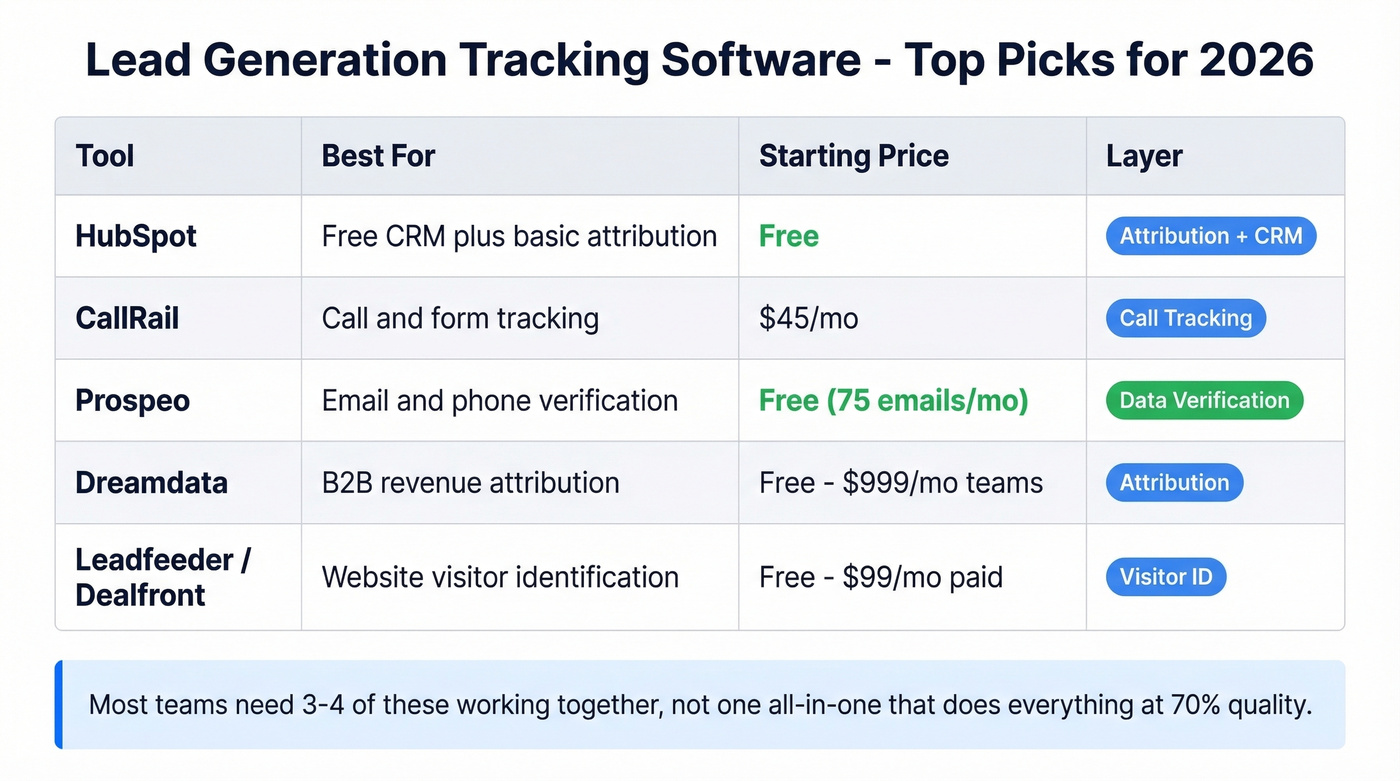
If you want the short list, start here:
| Need | Pick | Starting Price |
|---|---|---|
| Free CRM + basic attribution | HubSpot | Free |
| Call & form tracking | CallRail | $45/mo |
| Data verification layer | Prospeo | Free (75 emails/mo) |
| B2B attribution (mid-market) | Dreamdata | Free; $999/mo teams |
| Visitor identification | Leadfeeder/Dealfront | Free; $99/mo paid |
Most teams need three or four of these working together, not one "all-in-one" that does everything at 70% quality. (Real talk: the all-in-one pitch is usually just a bundle discount with a reporting layer on top.)
The 5 Layers of a Tracking Stack
Every lead tracking stack, regardless of company size, has to answer five questions. Miss one layer and your reports will have a blind spot that turns into a budget fight later.
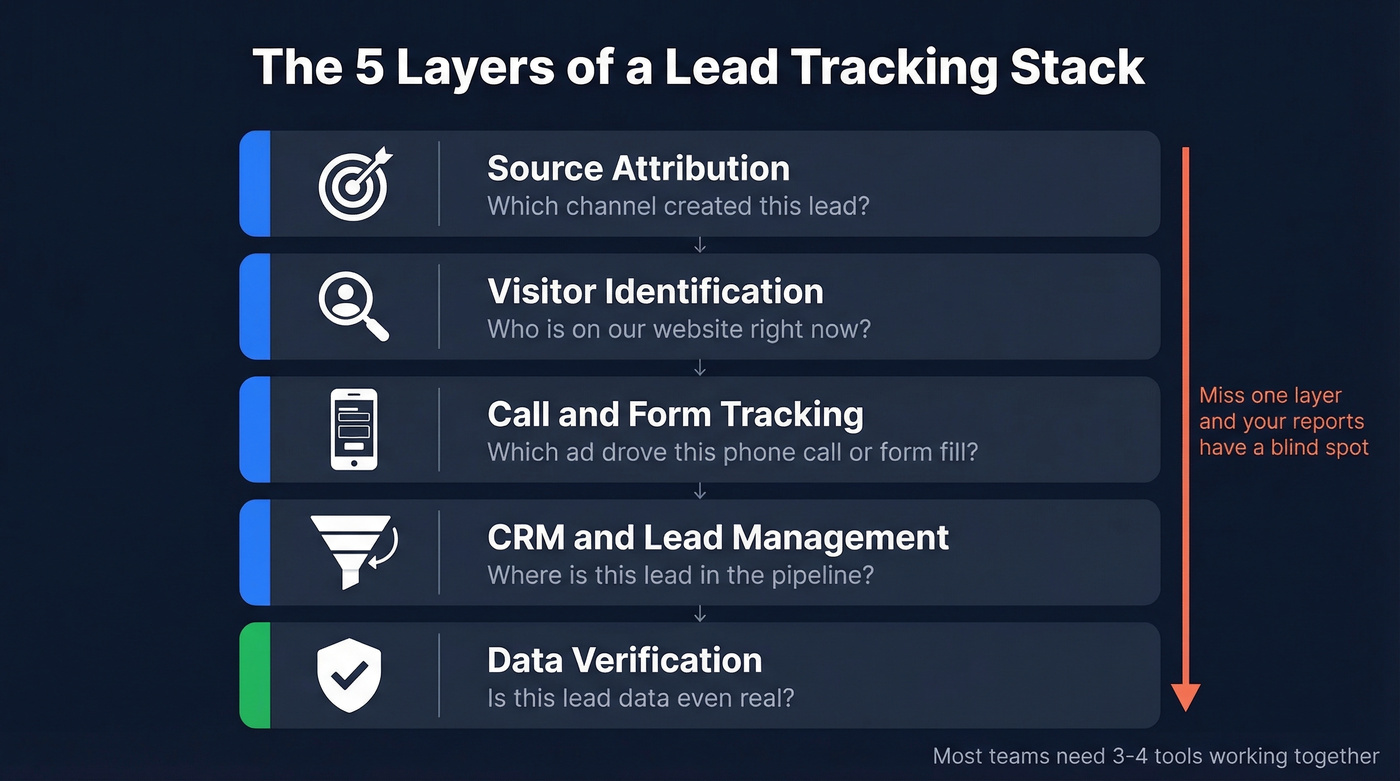
Source attribution - "Which channel and campaign created this lead?" First-touch, last-touch, or multi-touch models assign credit to the marketing activities that drove a conversion. Without it, you're guessing where to put budget.
Visitor identification - "Who's on our website right now?" IP-to-company matching and cookie-based enrichment turn anonymous traffic into identifiable accounts. It bridges the gap between "we got 10,000 visits" and "these 47 companies are actively researching us."
Call and form tracking - "Which ad drove this phone call?" Dynamic number insertion and UTM-aware form tracking connect offline conversions back to digital campaigns. Critical for any business where prospects pick up the phone.
CRM and lead management - "Where is this lead in the pipeline?" Your CRM is the system of record. Source fields, lifecycle stages, deal attribution, and lead scoring live here. If your CRM data's messy, every downstream report is wrong.
Data verification - "Is this lead data even real?" Garbage in, garbage out. If 30% of your emails bounce and half your phone numbers are disconnected, your attribution model's built on a lie. This layer verifies emails and mobile numbers before they pollute your CRM and inflate pipeline metrics.
Best Multi-Touch Attribution Platforms
Attribution is where the money arguments happen. Get this layer right and you can defend spend with data. Get it wrong and you're presenting slides full of assumptions, then acting surprised when Finance cuts your budget anyway.
HubSpot Marketing Hub
Use this if: you're under ~50 people, already on HubSpot CRM, and want attribution inside the same system where deals live. HubSpot's free CRM gives you basic source tracking out of the box, and Marketing Hub plans start at $45/mo.
Skip this if: you're spending $10K+/month across multiple paid channels and need deeper multi-touch reporting across a long, messy journey. Built-in CRM attribution is usually rules-based. It's still useful, but it's not the same as measuring influence across touchpoints.
HubSpot's real advantage is the unified data model. Contacts, companies, deals, and marketing interactions sit in one place, so you aren't duct-taping exports together every Friday afternoon.
Dreamdata
Use this if: you're B2B SaaS in the mid-market and need revenue attribution that connects marketing activity and spend to pipeline and revenue. Dreamdata has a free plan for individuals exploring the data. Team plans start at $999/mo.
Integration coverage is strong: Salesforce, HubSpot, Pipedrive, Google Ads, LinkedIn Ads, BigQuery, Snowflake, Tableau, and more. If your data lives in multiple systems, Dreamdata's built to pull it into one attribution view without you hiring a full-time analyst on day one.
Skip this if: you want a polished UI on day one. In our experience, teams love the output once it's set up, but the ramp-up is real: dashboards can feel glitchy, drilling into campaign detail isn't always smooth, and onboarding takes actual time on someone's calendar.

Other attribution options (quick hits)
- HockeyStack runs a proprietary attribution model aimed at B2B GTM teams. Pricing's custom, often in the ~$1,000-$3,000+/mo range. The common complaint in this category is trust: if numbers shift between dashboard loads and you can't audit the model, you're stuck defending a black box to a CFO who wants to see the math.
- Ruler Analytics is the opposite: straightforward rule-based attribution for inbound teams, often around $200-$500/mo. Less fancy, but it answers "what drove this form fill or call?" without a long implementation.
- Rockerbox combines multi-touch attribution, marketing mix modeling, and incrementality testing. It's typically a mid-market/enterprise buy.
- SegmentStream focuses on ML-based behavioral modeling and automated budget execution, also aimed upmarket.
- Triple Whale is a strong fit for DTC ecommerce teams that want attribution plus MMM in one place.
Attribution models: quick reference
| Model | When to Use |
|---|---|
| First-touch | Measuring awareness - which channel introduced the lead |
| Last-touch | Measuring conversion - what closed the deal |
| Linear | Equal credit across all touchpoints - simple but naive |
| Time-decay | More credit to recent interactions - good for short sales cycles |
| Data-driven/ML | Algorithmic credit based on actual influence - best for complex funnels |
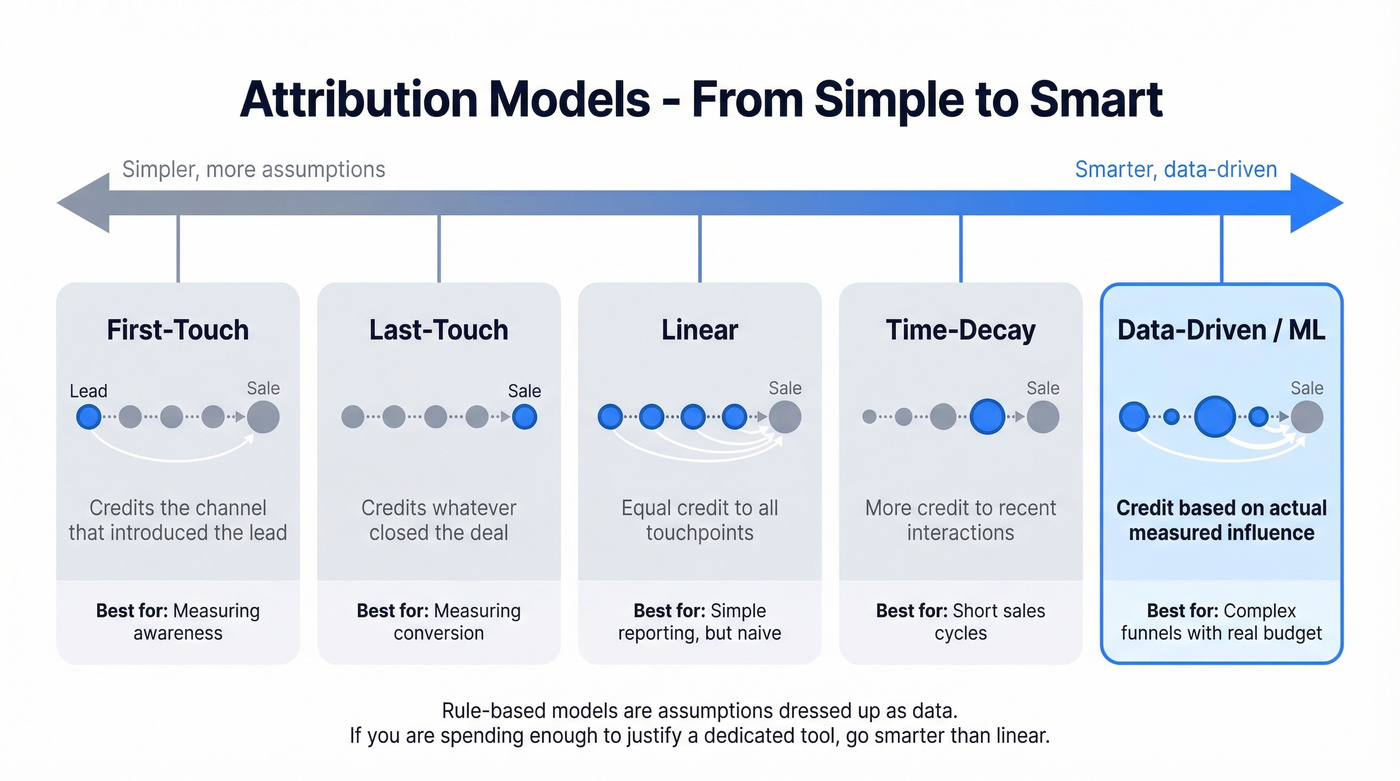
Rule-based models are assumptions dressed up as data. Sometimes that's fine. If you're spending enough to justify a dedicated attribution tool, you usually want something smarter than linear.
Best Visitor Identification Tools
Visitor ID is the layer that turns "traffic" into "accounts." It's also the layer vendors oversell the most, so go in with your eyes open.
Leadfeeder / Dealfront
Use this if: you want company-level website visitor identification, you want to start free, and you don't want a six-week implementation. Leadfeeder's free plan identifies up to 100 companies with 7-day history. Paid plans start at $99/mo (paid annually).
Setup takes about 15 minutes. You'll see company names the same day, and you can route "pricing page visitors" into your sales workflow without building a data pipeline.
Skip this if: you need person-level identification or you have strict enterprise requirements around freshness and support SLAs. A lot of teams outgrow company-only identification once they want to run targeted outbound based on specific stakeholders, not just "someone at Acme visited."
Anecdote we keep seeing: a sales manager gets excited, assigns five "hot accounts" from the visitor list, and the reps come back with "cool, but who do I email?" Company-level intent is useful, but it isn't magic.

Warmly & Factors.ai
Warmly is an enterprise play that starts around $10,000/yr and scales higher depending on the agent tier. It blends visitor identification with automated outreach, which is great if you want to act on intent signals in real time and you've got the volume to justify it.
Factors.ai sits more in the mid-market: account-level analytics and attribution, often in the ~$500-$1,500/mo range. It's a better fit for teams that want deeper account journeys, not just "who visited."
Match rate reality check
Before you buy any visitor identification tool, get clear on what "match rate" means:
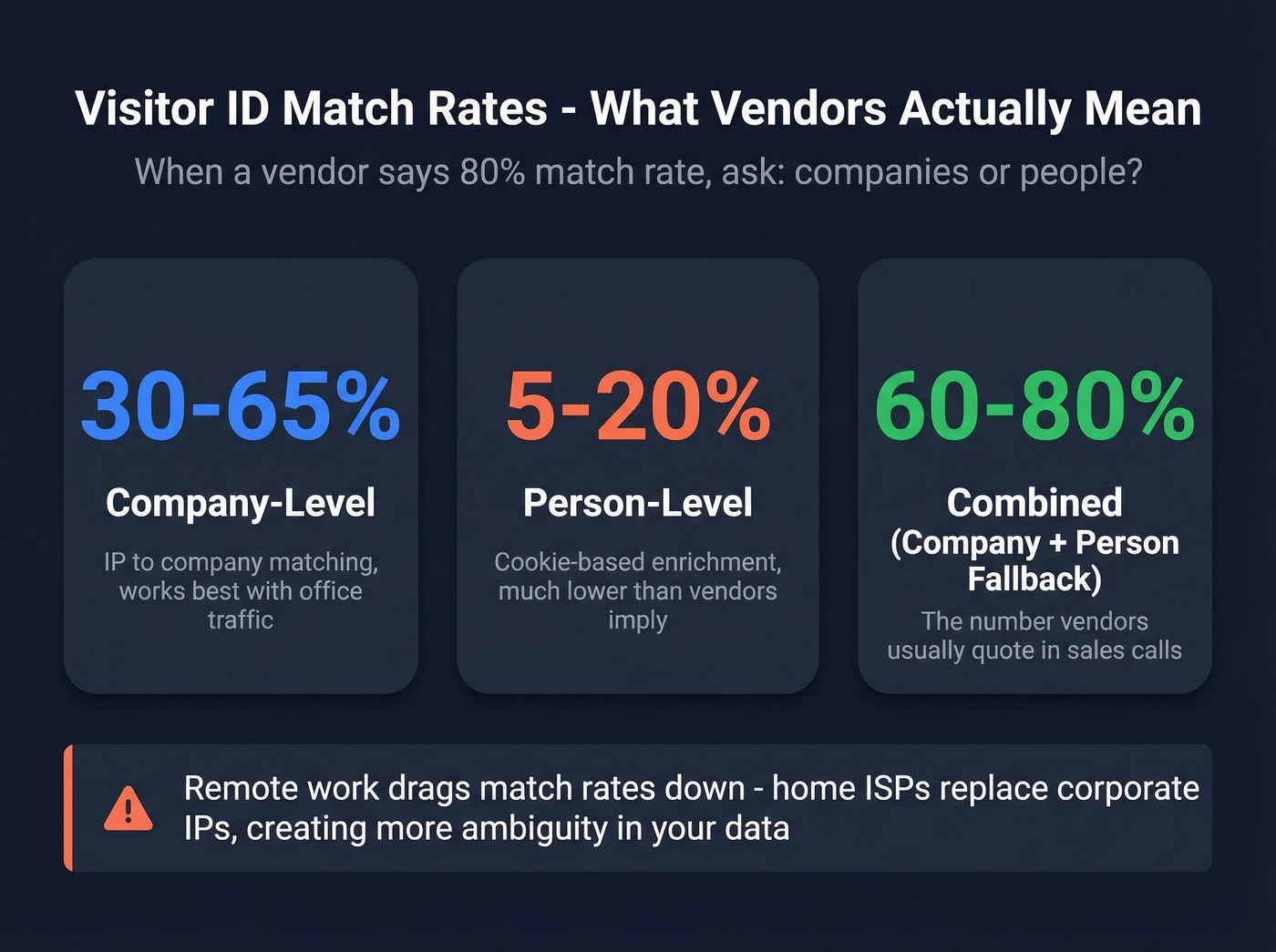
- Company-level match rate: 30-65% of traffic
- Person-level match rate: 5-20% of traffic
- Combined (company + person fallback): 60-80%
When a vendor says "80% match rate," ask one question: companies or people?
Remote work also drags match rates down because IP-based identification often sees home ISPs instead of corporate networks. Pew Research has tracked the shift to remote work, and the impact is obvious in tracking data: fewer clean corporate IP signals, more ambiguity. https://www.pewresearch.org/short-reads/2023/03/30/about-a-third-of-u-s-workers-who-can-work-from-home-do-so-all-the-time/
Best Call & Form Tracking Tools
If your business gets phone calls, you need call tracking. Otherwise you'll keep crediting "direct" for conversions that actually came from paid search, local service ads, or a retargeting campaign.
CallRail
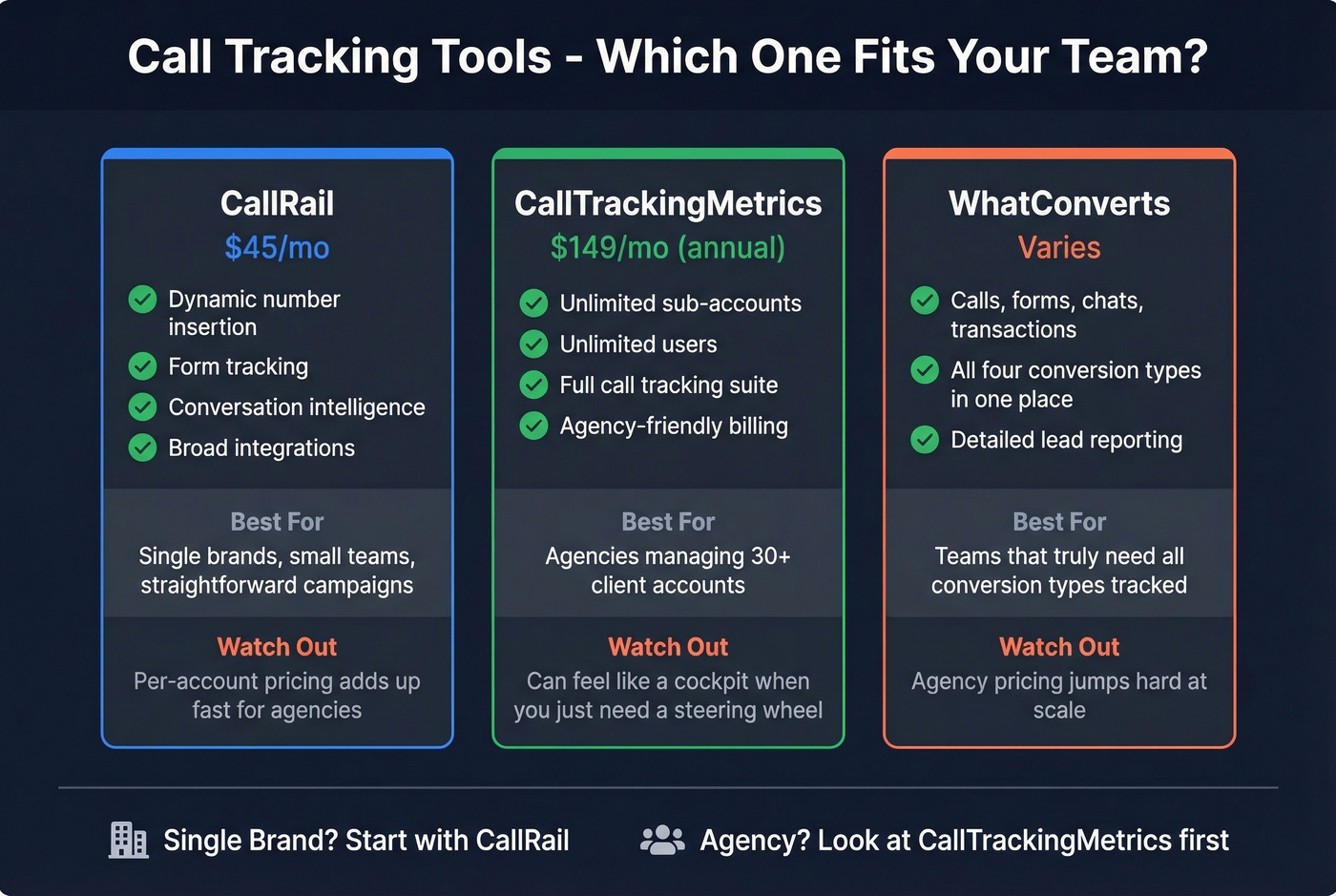
Use this if: you want a reliable call + form tracking platform and don't want to overthink it. CallRail covers dynamic number insertion, form tracking, and conversation intelligence, with broad integrations.
Pricing starts at $45/mo and scales into higher tiers as you add numbers and conversation intelligence. For a single-location business or a marketing team tracking a handful of campaigns, it's the default choice for a reason.
Skip this if: you're an agency managing 30+ client accounts. Per-account pricing adds up fast at scale, and you'll feel it once you're running dozens of sub-accounts.
CallTrackingMetrics
Agencies care about one line item: unlimited sub-accounts. CTM's Pro plan includes unlimited sub-accounts and unlimited users at $149/mo (annual), which can be a huge savings once you're past a handful of clients.
The tradeoff is complexity. If you're a single brand, CTM can feel like a cockpit when you just wanted a steering wheel.
WhatConverts
WhatConverts is the "track everything" option: calls, forms, chats, and transactions in one place. If you truly need all four conversion types, it's a great product.
The catch is pricing. Individual plans can look reasonable, but agency pricing jumps hard once you're managing scale.
Other call tracking tools (worth knowing)
| Tool | Starting Price | Best For | Key Limitation |
|---|---|---|---|
| Invoca | $1,000+/mo | Enterprise call centers, franchises | Too much for most SMBs |
| Infinity | ~$249/mo + per-call | Compliance-heavy industries | Per-call fees add up |
| Nimbata | ~$35/mo | Budget call tracking + DNI | Limited depth |
| PhoneWagon | $299/mo (agency) | Clean agency model | Calls only (no forms/chat) |
| WildJar | $39/mo + usage | Multi-country teams | Usage pricing can surprise you |
Agency cost math
If you're running a 30-client agency, here's what call tracking often looks like per year:
| Platform | Monthly Cost | Annual Cost |
|---|---|---|
| CallTrackingMetrics Pro | $149/mo | ~$1,788/yr |
| PhoneWagon Agency | $299/mo | ~$3,588/yr |
| CallRail | ~$300-$500/mo | ~$3,600-$6,000/yr |
| WhatConverts | ~$750/mo | ~$9,000/yr |
That CTM vs WhatConverts gap is real money. If you're not using chat + transaction tracking, don't pay for it.

Your attribution model is built on a lie if 30% of your emails bounce. Prospeo's 5-step verification delivers 98% email accuracy and 125M+ verified mobile numbers - refreshed every 7 days, not every 6 weeks. Clean data in, clean reports out.
Stop tracking leads that don't exist. Verify them first.
Best B2B Data Verification Tools
This is the layer teams ignore until it hurts. And then they act shocked that their dashboards lied to them for six months.
Prospeo
Here's a scenario we've watched play out: an SDR team books 200 meetings in a month. Then the post-mortem shows 60 bounced emails, 40 disconnected numbers, and a pile of "marketing-sourced pipeline" that never had a chance to convert because the contact data was wrong from the start.
Prospeo fixes that at the source. It verifies contact data before it enters your CRM, so conversion rates, CPL, and attribution reports are built on clean records instead of wishful thinking. Prospeo delivers 98% email accuracy, refreshes records on a 7-day cycle (vs a 6-week industry norm), and returns 50+ data points per contact through enrichment, with a 92% API match rate and 83% enrichment match rate.
And it isn't just verification. Prospeo includes a self-serve B2B database with 300M+ professional profiles, 143M+ verified emails, and 125M+ verified mobile numbers, plus 30+ search filters and intent data across 15,000 topics. If you want tracking you can trust, clean inputs are the whole game.
A concrete example: Snyk's 50-person AE team was running a 35-40% bounce rate. After switching to Prospeo, bounces dropped under 5%, AE-sourced pipeline jumped 180%, and the team generated 200+ new opportunities per month.
The free tier includes 75 verified emails and 100 Chrome extension lookups per month. Paid plans start around $39/mo, self-serve, cancel anytime.
Other verification tools
Hunter's a solid option for finding emails by domain and running bulk verification. It's a good fit if your main job is "find addresses and clean a list."
If you need a tighter workflow where verified records get enriched and pushed into your CRM automatically (so your attribution reports don't rot over time), prioritize tools built for verification + enrichment, not just email discovery. (If you're comparing options, see Hunter alternatives.)
The data verification layer is where most tracking stacks quietly break. Prospeo catches bad emails, dead phone numbers, and stale records at $0.01/email - before they inflate your pipeline and wreck your CRM attribution. 15,000+ companies already run this layer.
Fix your tracking stack at the source: the data itself.
CRM & Lead Management
Your CRM is the system of record for lead tracking. If source fields aren't populated, lifecycle stages aren't consistent, and deal attribution isn't configured, no amount of upstream tooling will save your reporting.
HubSpot Smart CRM
HubSpot Smart CRM gives you free lead management and tracking, including visibility into each lead's journey, lead routing, and lead scoring. For teams starting from zero, it's the baseline: contact source tracking, deal pipeline visibility, and form capture without spending a dollar.
Pair it with call tracking and data verification and you've got a stack you can actually run.
Salesforce Sales Cloud
Salesforce starts at $25/user/mo depending on edition. Campaign influence reporting, custom attribution models, and the AppExchange ecosystem make it the enterprise standard.
It's also the CRM most likely to accumulate dirty data over time if you don't enforce hygiene at the point of entry. Look, it's frustrating how often "Salesforce reporting is wrong" turns out to mean "we've been importing junk contacts for two years and nobody owned the fields."
Pipedrive, Zoho CRM, Freshsales
All three cover basic lead source tracking at accessible price points. Pipedrive starts at $14/seat/mo and shines for small sales teams that want a simple, visual pipeline. Zoho CRM and Freshsales are common picks for teams that want a lighter-weight CRM foundation than Salesforce.
Master Comparison Table
Here's every tool covered above, organized by category.
| Tool | Category | Starting Price | Free Tier? | Best For |
|---|---|---|---|---|
| Prospeo | Data verification + enrichment | Free (75 emails/mo) | Yes | Clean contact data that keeps attribution honest |
| HubSpot | CRM + attribution | Free | Yes | SMBs starting from zero |
| CallRail | Call + form tracking | $45/mo | Trial | Call + form attribution for most teams |
| Dreamdata | Attribution | Free; $999/mo teams | Yes | B2B SaaS multi-touch attribution |
| Leadfeeder | Visitor ID | Free (limited) | Yes | Fast company-level visitor ID |
| CallTrackingMetrics | Call tracking | $65/mo (annual) | No | Agencies needing sub-accounts |
| WhatConverts | Call + form tracking | $30/mo | Trial | Unified multi-channel conversion tracking |
| Salesforce | CRM | $25/user/mo | Trial | Enterprise system of record |
| Pipedrive | CRM | $14/seat/mo | Trial | Small sales teams |
| HockeyStack | Attribution | ~$1,000+/mo | No | B2B GTM teams with budget |
Benchmarks: What Good Tracking Looks Like
If your tracking stack can't tell you these numbers by channel, it isn't doing its job.
| Channel | Conversion Rate | Avg CPL |
|---|---|---|
| 6.5% | $30-$45 | |
| Webinars | 11.2% | $60-$80 |
| Google Search Ads | 4.5% | $90-$150 |
| LinkedIn Ads | 3.2% | $120-$200 |
| Content/SEO | 1.8% | $30-$60 |
| Organic Social | 1.2% | Variable |
Webinars at 11.2% conversion and $60-$80 CPL stay strong for B2B teams. LinkedIn Ads can work, but here's our blunt take: if your average contract value is under $15K, LinkedIn Ads often turn into a vanity channel. The CPL math doesn't work at that deal size, no matter how good the targeting feels.
Funnel health usually looks like this:
| Stage | Great | Average | Needs Work |
|---|---|---|---|
| Visitor -> Lead | >5% | 2-5% | <2% |
| MQL -> SQL | >60% | 40-60% | <40% |
| Lead -> Customer | >20% | 10-20% | <10% |
One tactical note: shorter forms win. HubSpot's own research has shown fewer fields generally increases conversions, and in practice we see the same thing: if your visitor-to-lead rate is under 2%, check your form length before blaming traffic quality. https://blog.hubspot.com/marketing/form-length
Recommended Stacks by Company Size
You don't need 15 tools. You need a small set that shares data cleanly.
| Stack | Tools | Monthly Cost |
|---|---|---|
| SMB | HubSpot (free) + CallRail ($45) + Prospeo (free or ~$39) | $45-$84/mo |
| Mid-market | HubSpot Marketing ($45) + CallRail (~$90) + Leadfeeder ($99) + verification/enrichment (~$39-$99) | ~$273-$333/mo |
| Enterprise | Salesforce + Dreamdata ($999) + Invoca + API enrichment | $2,000+/mo |
Under $85/mo, the SMB stack gets you CRM source tracking, call attribution, and verified contact data. That's enough to answer "which channel works?" without hand-waving.
Mid-market teams add visitor identification and multi-touch attribution. That's the jump from "we think content helps" to "we know it influenced $2.3M in pipeline last quarter, and here's the path."
Enterprise stacks add deeper attribution plus call analytics for teams managing eight-figure budgets, and they usually need API-based enrichment to keep data clean across multiple systems.
Common Lead Tracking Mistakes
- Trusting attribution without auditing data quality. If a big chunk of your emails bounce, your attribution model is counting phantom pipeline. Verify before import, not after the quarterly review. (If you need a baseline, start with email bounce rate benchmarks.)
- Confusing company-level visitor ID with person-level. "Acme visited" is useful. "The VP of Ops visited" is gold. Most tools deliver the first and imply the second.
- Using different attribution models across tools. Analytics says paid search drove 40%. CRM says 15%. Both can be "right" because they're using different rules. Pick a source of truth and align reporting.
- Over-tooling without integration. More tools doesn't mean better tracking. It usually means more silos. Every tool should push clean data into the CRM automatically. (If you're building the ops layer, use a lead generation workflow to keep handoffs clean.)
- Ignoring consent and privacy gaps. If visitors reject cookies, parts of the journey go dark. Build reporting expectations around that reality, especially in regions with stricter consent requirements.
If you want a sanity check, Reddit threads on r/marketing and r/sales consistently circle back to the same advice: pick one system of record, keep your UTMs disciplined, and stop importing unverified lists into the CRM like it's 2016. (If you're tightening your stack, it helps to understand what a tracking domain is and when you need one.)
FAQ
What's the difference between lead generation software and lead tracking software?
Lead generation software captures leads through forms, chat, landing pages, and outbound sequences. Lead tracking software tells you where those leads came from, which channels drive revenue, and whether the underlying data's accurate. Most teams need both.
Do I need a separate attribution tool or is my CRM enough?
For teams under 50, HubSpot's built-in reporting covers most needs. Once you're spending $10K+/month across three or more paid platforms, a dedicated tool like Dreamdata or Ruler Analytics usually pays for itself by showing what spend drives pipeline.
How many tools does a lead tracking stack need?
Three to four: a CRM as the source of truth, call/form tracking if you get phone leads, a data verification tool to keep records clean, and optionally a dedicated attribution platform for complex multi-channel journeys.
What's a realistic match rate for visitor identification?
Company-level identification typically matches 30-65% of traffic. Person-level identification with an actual email runs 5-20%. If someone claims 80%+, it's almost always company-level.
How do I know if my lead tracking data's accurate?
Start with bounce rate. If it's above 5%, your CRM data's already degrading every metric downstream. Run verification on new leads before they enter the CRM; if a meaningful chunk comes back invalid, your conversion rates, CPL, and attribution reports have been inflated.