

Lead Source: What It Is, Why It Breaks, and How to Fix Your Tracking
It's Q4 planning. You pull the lead source report to figure out where to put next year's budget. 35% of your closed-won opportunities say "Web." Another 20% say "Other." That tells you exactly nothing - and you're about to allocate six figures based on it.
Nearly every B2B company tracks where leads come from, and most track it wrong. Let's fix that.
What's a Lead Source, Exactly?
It's where a prospect first encountered your business. Simple concept, messy execution. In ungoverned CRMs, we've seen 30-50% of records tagged "Unknown" or left blank entirely. Below you'll find the benchmarks showing which sources actually convert and what they cost, a taxonomy template your CRM picklist should follow, and setup steps for Salesforce and HubSpot.
If your marketing attribution data is already broken, skip straight to the taxonomy section.
Definition and Meaning
A lead source answers one question: how did this person first find us? Organic search, a trade show, a cold email, a referral from an existing customer.
Don't confuse it with two related concepts. A lead channel is the broader category like "Search," while a source is the specific origin within that channel like "Google Organic." A campaign is the initiative you ran to generate the lead - "Q1 Webinar Series," for example. These three work together, but they're not interchangeable. Conflating them is how you end up with a CRM where "Webinar" is both a source and a campaign, and nobody trusts the data.
Common Lead Source Types
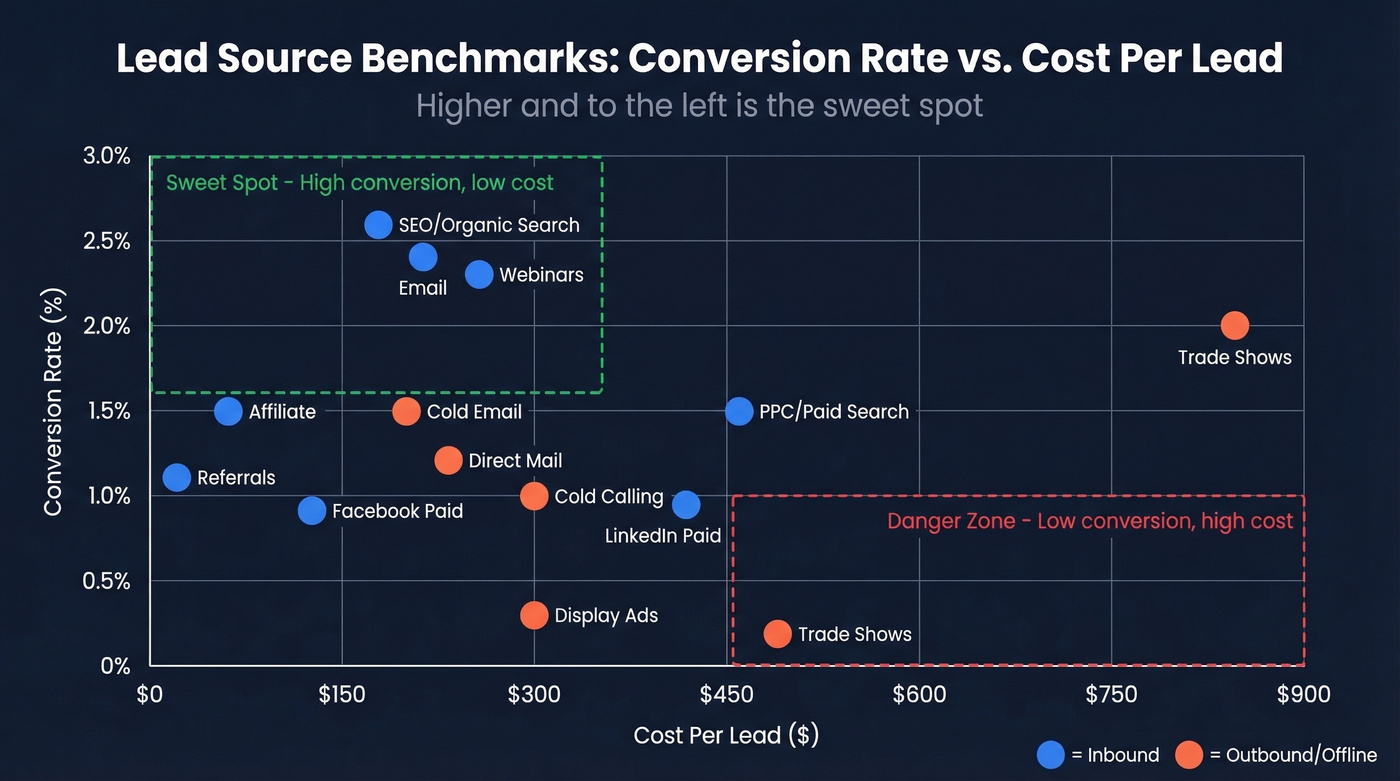
Not all types are created equal. Some convert well but cost a fortune. Others are cheap but barely move the needle. Here's how the major sources stack up, using conversion rate benchmarks from First Page Sage and CPL data from Sopro.
| Source | Category | Conv. Rate | CPL |
|---|---|---|---|
| SEO / Organic Search | Inbound | 2.6% | $206 |
| PPC / Paid Search | Inbound | 1.5% | $463 |
| Inbound | 2.4% | $225 | |
| Organic Social | Inbound | 1.7% | - |
| Paid Social (overall) | Inbound | 0.9% | - |
| Paid Social (LinkedIn) | Inbound | ~0.9% | $408 |
| Paid Social (Facebook) | Inbound | ~0.9% | $142 |
| Referrals | Inbound | 1.1% | $25 |
| Webinars | Inbound | 2.3% | $267 |
| Affiliate | Inbound | ~1.5% | $73 |
| Display Ads | Inbound | 0.3% | ~$300 |
| Cold Email | Outbound | ~1.5% | $225 |
| Cold Calling | Outbound | ~1.0% | $300 |
| Direct Mail | Offline | ~1.2% | $250 |
| Trade Shows / Events | Offline | ~2.0% | $840 |
Organic social has no direct ad spend, making CPL hard to measure - the real cost is content production time.
SEO and email offer among the best balances of conversion rate and CPL in these benchmarks. Trade shows are expensive per lead, though teams often treat them as higher-intent conversations. Referrals convert modestly but cost almost nothing. The average qualified-lead conversion rate across 14 industries is 2.9%, so anything above that for your vertical is strong.
CPL also varies dramatically by industry. Legal services average $650 per lead, software $595, and IT $501 - so a $225 cold email CPL looks very different depending on your vertical.
Here's the thing: you can't make this comparison at all if your source field is a mess. These examples should serve as a starting point, but your actual picklist values need to reflect the channels your team actively uses.
Why Tracking Matters
Tracking the origin of every lead drives three things: budget allocation, pipeline forecasting, and LTV:CAC analysis. HubSpot's widely cited heuristic puts a healthy LTV:CAC ratio at 3:1. You can't calculate that ratio by channel if half your leads are tagged "Web."
Most teams don't need more sources. They need to fix the ones they have. Adding "TikTok Organic" to your picklist doesn't help when 40% of records are blank. The governance problem is upstream of the strategy problem - fix the data first, then optimize the mix.

Your lead source reports are only as good as the data behind them. Prospeo delivers 98% verified emails and 50+ data points per contact - so every record that enters your CRM is enrichable, attributable, and ready for LTV:CAC analysis by channel.
Clean attribution starts with contacts you can actually trust.
Build Your Taxonomy
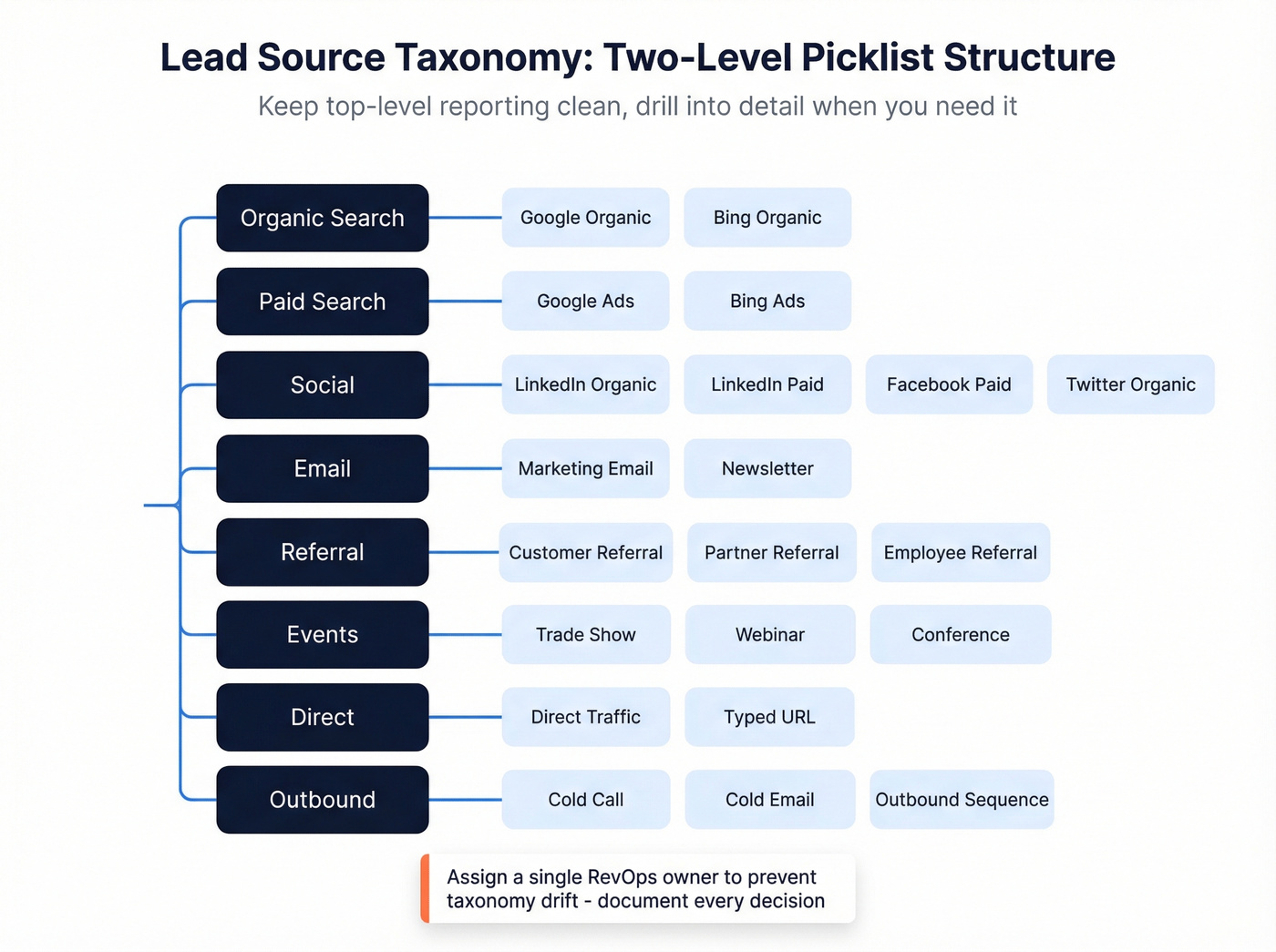
The fix starts with a two-level structure: Lead Source (the broad category) and Lead Source Detail (the specific origin). This keeps top-level reporting clean while giving you the granularity you need for optimization. A basic taxonomy plus validation rule is usually a 1-3 day build. Full multi-touch attribution with governance typically takes 2-6 weeks.
Example picklist:
- Organic Search - Google Organic, Bing Organic
- Paid Search - Google Ads, Bing Ads
- Social - LinkedIn Organic, LinkedIn Paid, Facebook Paid, Twitter Organic
- Email - Marketing Email, Newsletter
- Referral - Customer Referral, Partner Referral, Employee Referral
- Events - Trade Show, Webinar, Conference
- Direct - Direct Traffic, Typed URL
- Outbound - Cold Call, Cold Email, Outbound Sequence
Notice Cold Email could live under either Email or Outbound? That's exactly the kind of overlap your taxonomy owner - typically someone in RevOps - needs to resolve before launch. Pick one home for it and document the decision. Without a single owner, taxonomy drift starts within weeks.
"Social Media" as a single value is too generic. It tells you nothing about whether your LinkedIn Ads budget is working or whether organic Twitter posts are driving anything. Break it down.
In Salesforce, implement this as a dependent picklist where Lead Source controls Lead Source Detail. Then add a validation rule that prevents opportunities from closing without a source:
AND(ISBLANK(LeadSource), ISPICKVAL(StageName, "Closed Won"))
This single rule will clean up your data faster than any training session or Slack reminder.
One note on compliance: if you purchase lead lists, document the vendor as a distinct picklist value like "Purchased List - Vendor Name." This matters for compliance audit trails, and it lets you measure purchased-list quality separately from your organic pipeline.
CRM Setup: Salesforce & HubSpot
Salesforce Configuration
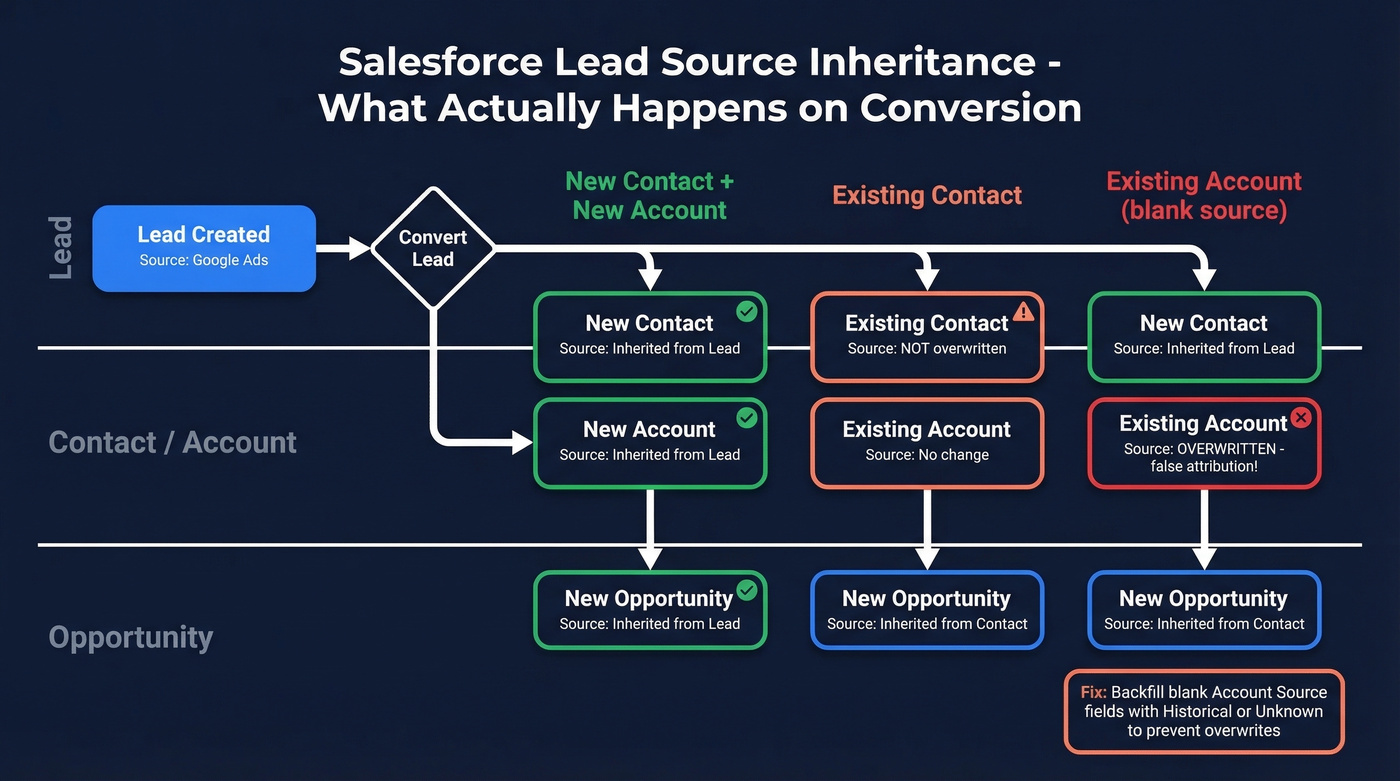
Salesforce's Lead Source field is a standard picklist, but the inheritance behavior on conversion trips up even experienced admins. Here's the decision table:
| Scenario | Contact | Account | Opportunity |
|---|---|---|---|
| New lead - convert | Inherits | Inherits | Inherits (if created during conversion) |
| Existing contact | No change | No change | Inherits from Contact |
| Existing account | Inherits | Only if blank | Inherits from Contact |
| Opp from Account page | - | - | May not inherit |
The "only if blank" behavior on Account Source is a trap. If existing accounts have blank Account Source values, a new lead conversion overwrites the account's source with whatever the new lead brought in. That's false attribution. The fix: backfill existing accounts with "Unknown" or "Historical" so they don't get overwritten.
Two more gotchas. Campaign Influence 1.0 gives 100% credit to the Primary Campaign Source - that's first-touch attribution whether you want it or not. And Web-to-Lead forms and Pardot/Account Engagement can auto-populate the source field via hidden fields or source tracking, so use them.
HubSpot Configuration
HubSpot categorizes traffic sources automatically using a priority-ordered rule system that checks UTM parameters, referring domains, and tracking codes. The rules that matter most:
utm_medium=social+ recognized social network - Organic Socialgclidpresent - Paid Searchutm_mediumcontainspaid,ppc, orcpc+ social source - Paid Social- UTM params exist but don't match any rule - Other Campaigns
That last one is where leads go to die. If your UTMs don't match HubSpot's expected patterns, everything lands in "Other Campaigns" and your reporting breaks.
A practical fix: keep your UTMs consistent. Put the network in utm_source (e.g., utm_source=linkedin) and the type in utm_medium (e.g., utm_medium=paid-social). Sounds obvious, but we've audited CRMs where the same team used "linkedin," "LinkedIn," "li," and "linked-in" across different campaigns.
UTM Naming Conventions
All lowercase, no spaces (use hyphens), consistent source/medium/campaign structure. Capture UTMs via hidden form fields so they persist through conversion. A naming convention doc shared across marketing and sales prevents the "google" vs "Google" vs "google-ads" fragmentation that ruins reports.
Attribution Models
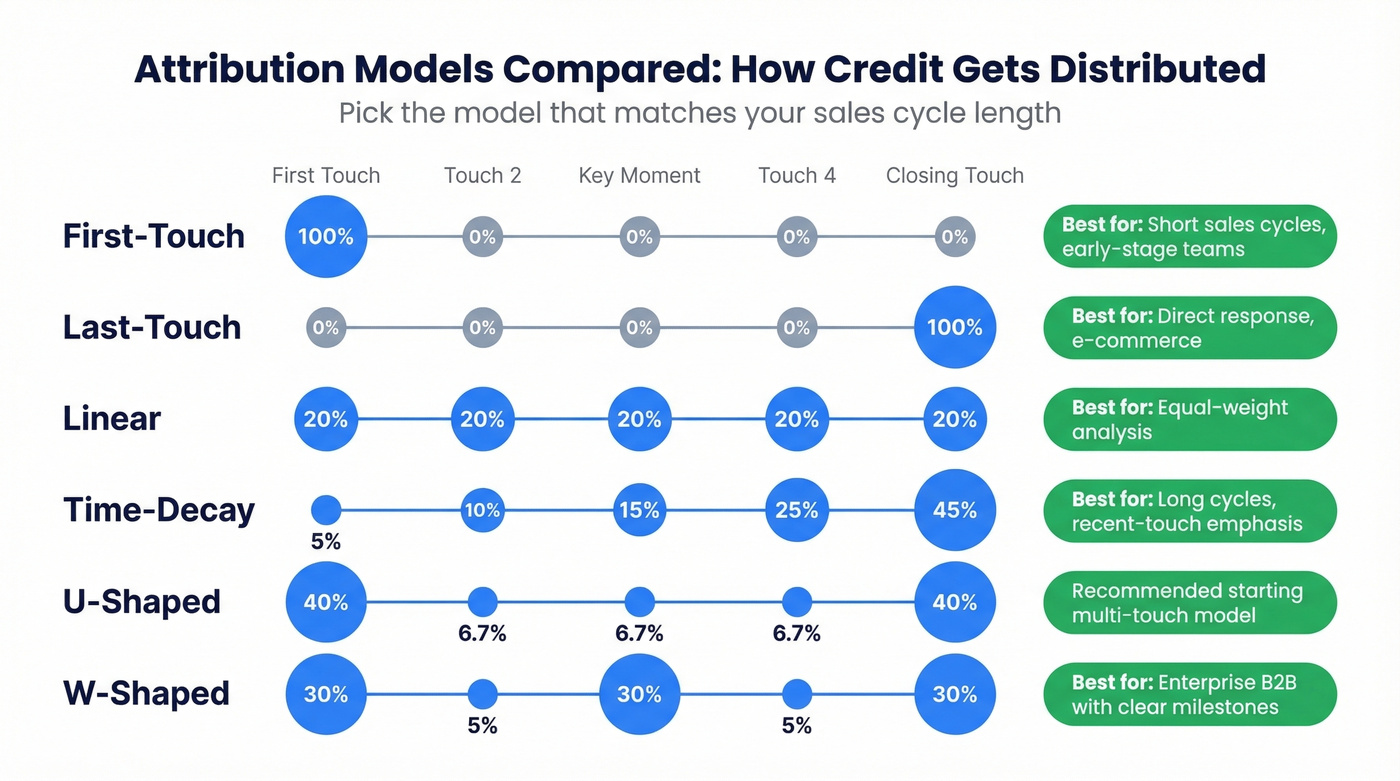
Once you're capturing sources cleanly, you need to decide how to distribute credit across touchpoints.
| Model | Logic | Credit Split |
|---|---|---|
| First-Touch | 100% to first interaction | 100% / 0% |
| Last-Touch | 100% to final interaction | 0% / 100% |
| Linear | Equal across all touches | Even split |
| Time-Decay | Weighted toward conversion | Graduated |
| U-Shaped | First + last emphasized | 40% / 20% / 40% |
| W-Shaped | Three key milestones | 30% / 30% / 30% / 10% |
| Full-Path | Four milestones | 22.5% x 4 + 10% |
First-touch is fine for short sales cycles. If someone clicks a Google Ad and buys the same week, you don't need a complex model. For enterprise B2B with 6-month cycles and 15+ touchpoints, first-touch is actively misleading - it ignores the webinar, the case study, and the SDR sequence that actually moved the deal.
Our recommendation: start with first-touch. It's simple and it works for early-stage marketing attribution. Once you have 6+ months of multi-touch data, move to U-shaped - it captures the two moments that matter most, how they found you and what closed them. Every ad platform runs its own attribution and gives itself 100% credit, which is why centralized attribution matters.
Common Tracking Mistakes
Five mistakes that show up over and over:
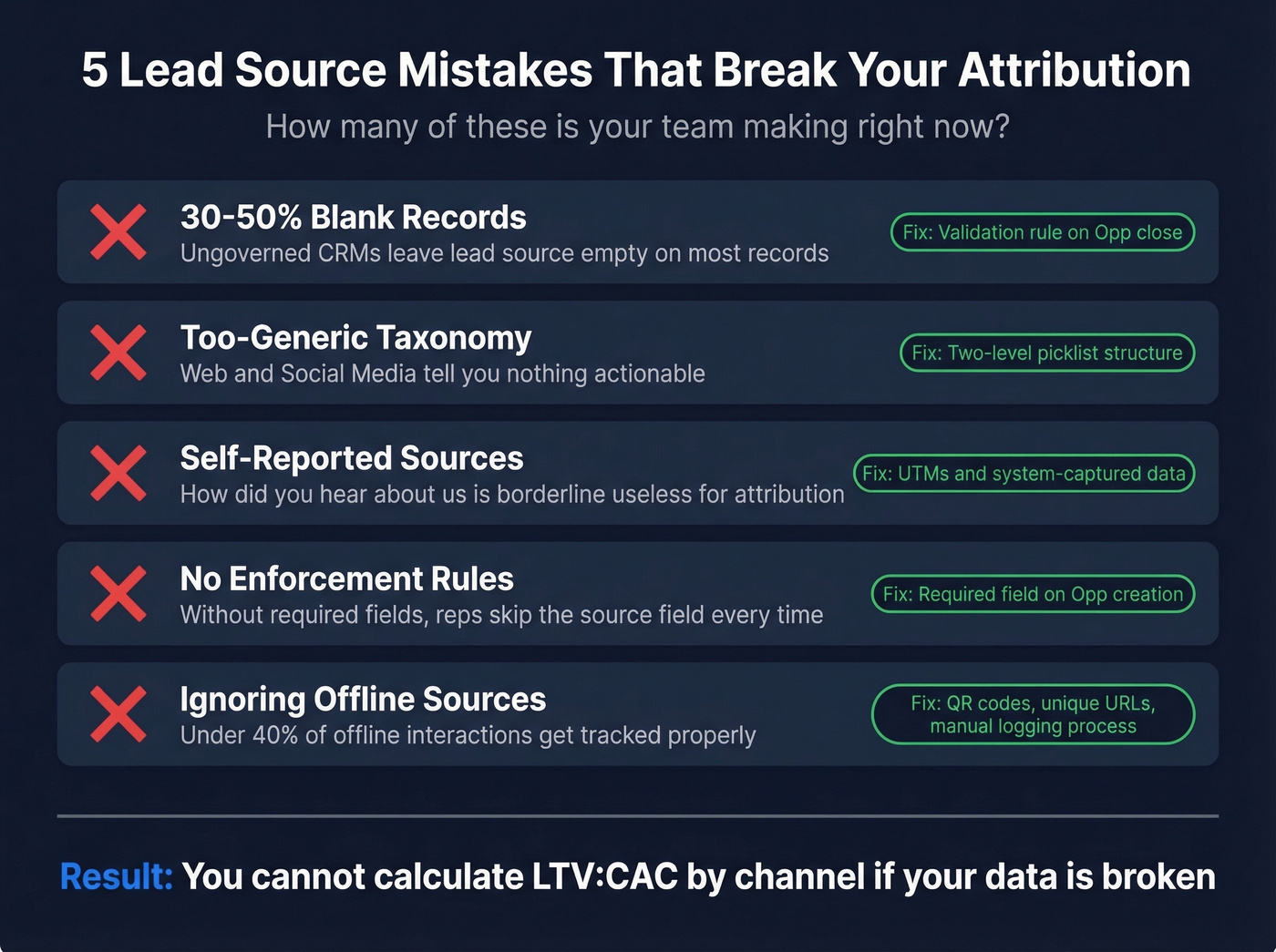
Blank or "Unknown" values. In ungoverned orgs, 30-50% of CRM records have no source. The validation rule from the taxonomy section fixes this going forward, but you'll need a backfill project for historical data.
Too-generic taxonomy. "Web" and "Social Media" aren't sources - they're categories. If you can't tell the difference between Google Organic and Google Ads from your picklist, your taxonomy is broken.
Relying on self-reported sources. That "How did you hear about us?" form field is borderline useless. People don't remember, and they definitely don't distinguish between seeing your LinkedIn ad three weeks ago and finding you on Google yesterday. Use UTMs and system-captured data instead.
No validation rules. Without enforcement, reps will skip the field. Every time. A required field on opportunity creation is the minimum.
Ignoring offline sources. Fewer than 40% of offline interactions - trade shows, phone calls, partner referrals - typically get properly tagged when there's no automation in place. If your field team runs events but nobody logs the leads with the right source, your event ROI looks terrible even when it isn't.
Let's be honest: if your average deal size is under $15k, you probably don't need multi-touch attribution at all. First-touch with clean data will get you 80% of the insight at 10% of the complexity. The companies that need W-shaped and Full-Path models are running 6-figure enterprise deals with 9-month sales cycles. Everyone else is over-engineering attribution when they should be fixing their picklist. The consensus on r/salesops tends to agree - clean first-touch beats messy multi-touch every time.
Data Quality: The Hidden Variable
Here's a scenario that plays out constantly. An SDR sends 2,000 cold emails. 400 bounce. The team reports a 3% reply rate based on 2,000 sends. But the real denominator is 1,600 delivered emails - making the actual reply rate 25% higher than reported. Cold email as a source looks worse than it is, and budget gets reallocated to channels with cleaner data instead of better performance.

Even perfect attribution is worthless if the underlying contact data is stale. Bad data makes good channels look bad. When emails bounce, calls hit disconnected numbers, and enrichment returns outdated titles, your reports reflect data quality problems - not channel performance.
This is where data hygiene tools earn their keep. Prospeo verifies emails at 98% accuracy and refreshes records every 7 days, so your reports reflect actual performance rather than bounced emails dragging down the numbers. For teams running outbound sequences, CRM enrichment returning 50+ data points per contact means the difference between "cold email doesn't work" and "cold email works great when you're actually reaching people."
If you're trying to quantify the impact, start by tracking your email bounce rate and tying it back to source-level performance.
Cold email shows a $225 CPL in the benchmarks above - but only if your emails actually land. Prospeo's proprietary 5-step verification and 7-day data refresh keep bounce rates under 4%, so your outbound source data stays accurate and your domain stays clean.
Get outbound leads that won't wreck your deliverability or your attribution.
FAQ
What is a lead source?
A lead source identifies the origin of a prospect's first interaction with your business - organic search, a paid ad, a referral, or an outbound campaign. Tracking it accurately in your CRM is the foundation of marketing attribution and budget allocation. Without it, you're guessing where to spend.
What are common examples?
Common examples include Google Organic, Google Ads, partner referrals, trade shows, webinars, and cold email outreach. Each should be a distinct value in your CRM picklist - specific enough to inform budget decisions, broad enough to keep reporting manageable.
How do I track sources in Salesforce?
Use the native Lead Source picklist, add a dependent Lead Source Detail field for granularity, and create a validation rule requiring a source before marking opportunities Closed Won. Backfill existing accounts with a default value to prevent false attribution during lead conversion.
What's a good conversion rate?
The average qualified-lead conversion rate across 14 industries is 2.9%. SEO leads convert at ~2.6%, email at ~2.4%, and paid social at ~0.9%. Anything above your industry average is strong - but only if your tracking is clean enough to trust the numbers.
How does data quality affect tracking?
Stale or unverified contact data causes bounces and failed calls, making otherwise strong channels look like underperformers. Even a small deliverability improvement can shift how an entire source performs in pipeline reports, which is why verifying your data before running attribution analysis isn't optional - it's the prerequisite.