

The Complete List of Keywords to Use When Extracting Emails
Every email extraction guide tells you to "use relevant keywords" and leaves it at that. Or worse, links to an academic PDF about natural language processing. Neither helps you build a prospect list by Friday.
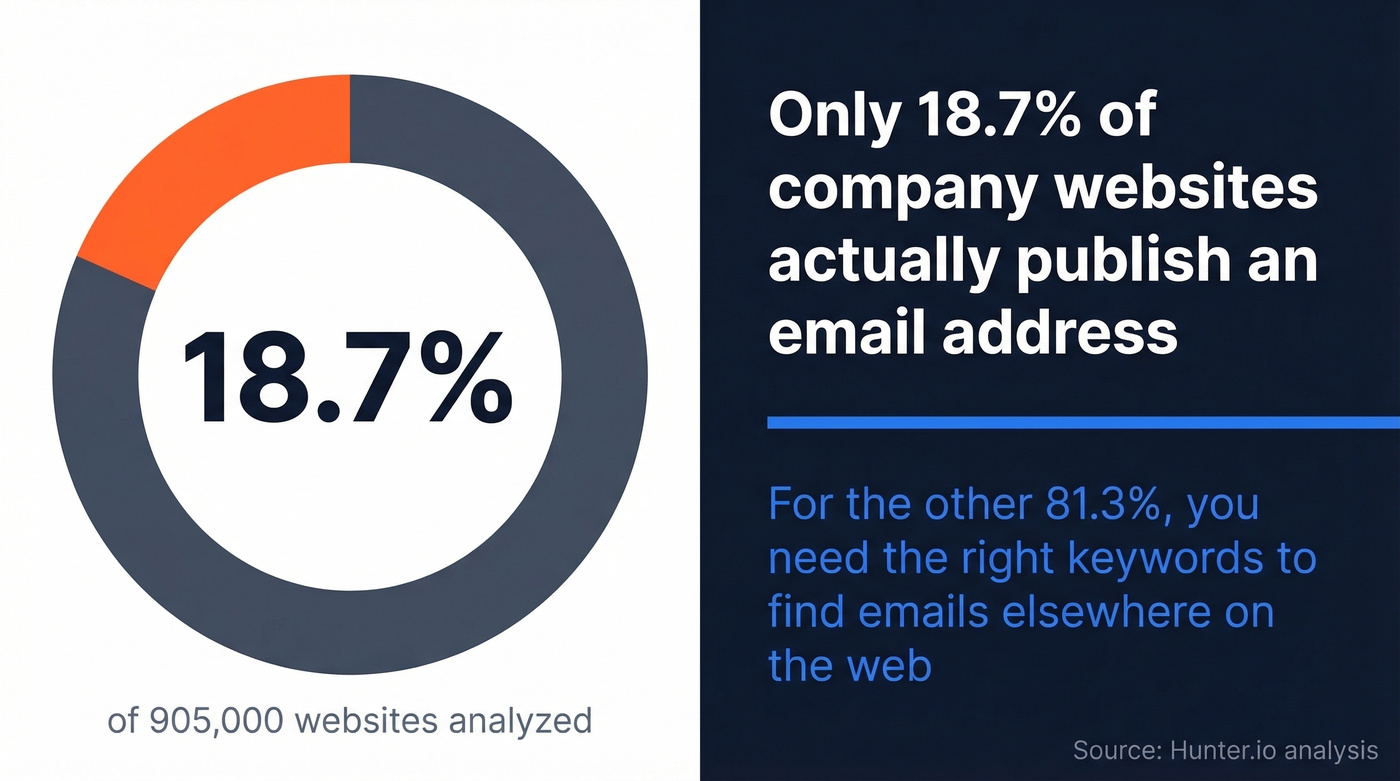
Here's the thing: having a solid list of keywords to use when extracting emails is the difference between a targeted prospect list and a pile of noise. Only 18.7% of company websites actually publish an email address - across nearly 905,000 sites analyzed. For the other 81%, you need the right keywords to find them elsewhere on the web, or a database that's already done the work.
This guide gives you both the keywords and the formulas to combine them.
What You Need (Quick Version)
Three things make email extraction actually work:
- The right keywords - role titles, industry terms, and context words that surface email addresses in search results. Full categorized lists below.
- Query formulas - patterns for combining those keywords into Google searches that return results, not noise. Five formulas in Section 4.
The Complete Keyword List for Email Extraction
This is the section every other guide skips. Instead of telling you to "search for relevant keywords," here are 100+ actual keywords organized by category. Mix and match them using the query formulas in the next section.
Role & Job Title Keywords
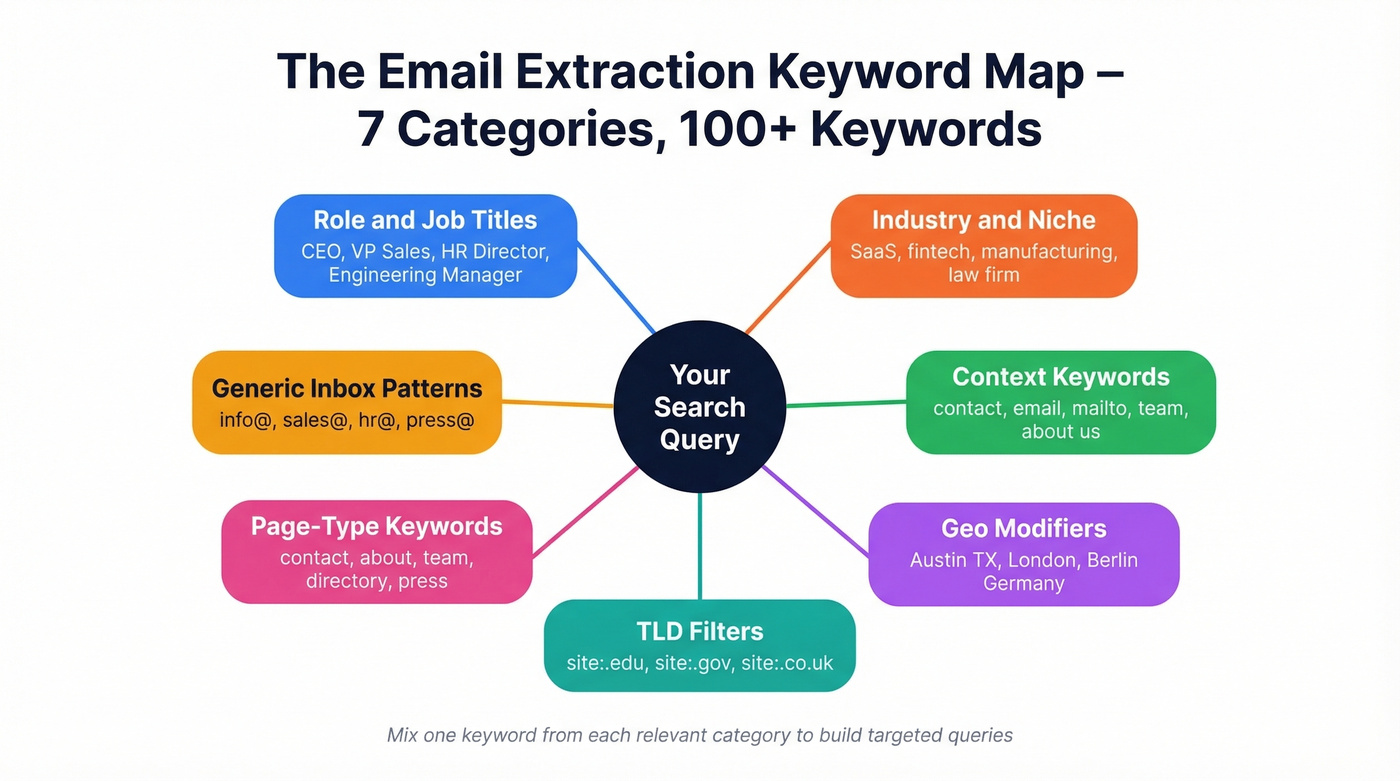
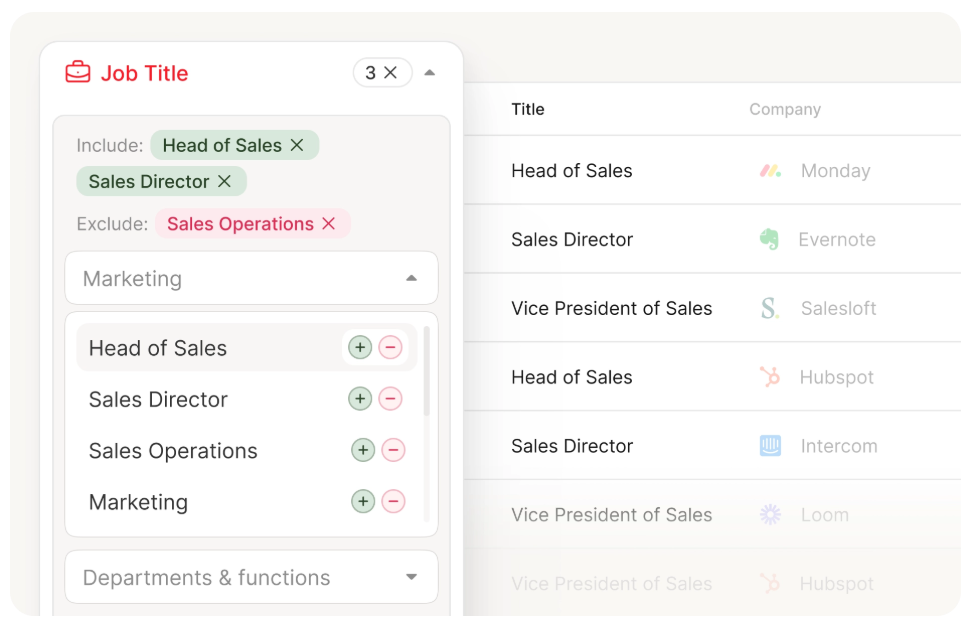
Organize by department so you're targeting the right decision-maker, not a generic inbox. Role keywords are the single highest-impact variable in any extraction query - a search for "email" + "SaaS" returns millions of useless results, but add "VP Sales" and you're suddenly looking at a manageable, targeted set.
C-Suite & Founders: CEO, COO, CFO, CTO, CMO, CRO, CPO, CISO, Founder, Co-Founder, Managing Director, President, Owner, Partner, Principal
Sales & Marketing: VP Sales, VP Marketing, Head of Sales, Head of Growth, Sales Director, Marketing Director, Business Development Manager, SDR Manager, Demand Gen Manager, Growth Lead, Revenue Operations Manager, Account Executive, Partnership Manager
Engineering & Product: VP Engineering, Head of Product, Engineering Manager, DevOps Lead, Software Architect, Product Manager, Technical Lead, Data Engineer, IT Director, CIO
HR, Finance & Admin: HR Director, Head of People, Talent Acquisition Manager, Recruiting Manager, Finance Director, Controller, Office Manager, Operations Manager, Procurement Manager, Administrative Director
Sector-Specific Roles: Dentist, Real Estate Agent, Broker, Professor, Hotel Manager, Restaurant Owner, Logistics Manager, Warehouse Manager, Nonprofit Director, Executive Director, Practice Manager, Clinic Administrator, School Principal, Superintendent
Industry & Niche Keywords
Industry keywords are your vertical filter. Without them, a search for "Marketing Director" returns millions of results across every sector imaginable. Adding "SaaS" or "fintech" cuts that to something you can actually work with. We've tested these across dozens of verticals - the more specific the industry term, the cleaner the results.
Tech & SaaS: SaaS, fintech, healthtech, edtech, martech, cybersecurity, cloud computing, AI/ML, DevOps, data analytics, IoT
Professional Services: digital agency, marketing agency, staffing agency, consulting firm, law firm, accounting firm, architecture firm, engineering firm
Traditional Industries: manufacturing, logistics, supply chain, construction, real estate, insurance, banking, financial services, healthcare, pharmaceutical
Local Services: HVAC, plumbing, electrical contractor, roofing, landscaping, salon, barbershop, restaurant, catering, auto repair, cleaning service, pest control
Other Verticals: nonprofit, government, education, hospitality, retail, ecommerce, media, publishing, entertainment, agriculture
Context Keywords
These are the words that appear on pages where email addresses actually live. They're the glue between your role and industry keywords - add them to any combination to land on contact pages, team directories, and press kits instead of random blog posts.
contact, contact us, get in touch, email, mailto, team, about us, staff, directory, press, media, careers, partners, support, helpdesk, customer service, reach out, inquiries, connect
Generic Inbox Patterns
Useful for finding departmental emails when you can't find a specific person. These won't get you a direct line to a decision-maker, but they reveal the email format a company uses - and that's often enough to guess individual addresses.
info@, hello@, admin@, office@, sales@, inquiries@, support@, hr@, press@, careers@, marketing@, billing@, help@, team@, contact@
Page-Type Keywords
Target these in intitle: or inurl: operators to land on pages most likely to contain emails.
contact, about, team, staff, directory, press, people, leadership, our-team, management, board, faculty, partners
Geo Modifier Keywords
Add location to narrow results geographically.
US patterns: city + state abbreviation - Austin TX, Denver Colorado, Miami FL
UK patterns: city, county, or region - Manchester, West Midlands, London
EU patterns: city + country - Berlin Germany, Amsterdam Netherlands, Paris France
APAC patterns: city + country - Sydney Australia, Singapore, Mumbai India
TLD Filter Keywords
Use site: to restrict results to specific domain types.
site:.edu- universities, colleges, academic institutionssite:.gov- government agencies and departmentssite:.org- nonprofits, associations, NGOssite:.co.uk- UK-based companiessite:.com.au- Australian businessessite:.de/site:.fr/site:.nl- country-specific European domains
TLD filters shine when you need emails from a specific sector or geography where the domain extension is a reliable signal.
How to Combine Keywords - 5 Query Formulas
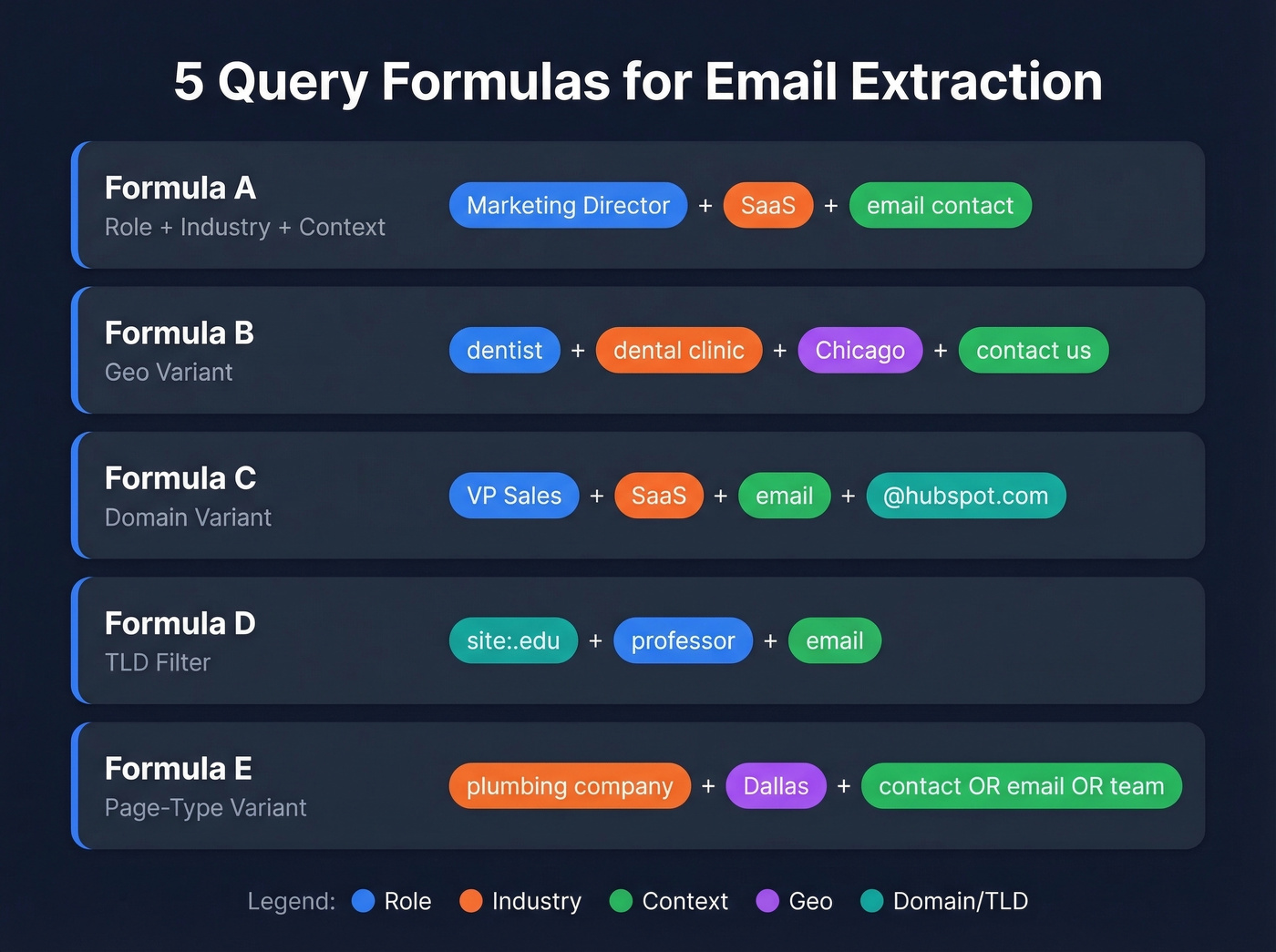
The keywords above are ingredients. These formulas are the recipes. Each one slots keyword categories together in a different pattern depending on what you're looking for. We've run these across dozens of industries, and Formula A is the workhorse that handles about 70% of use cases.
Formula A - Role + Industry + Context
"{role}" + "{industry}" + "{context keyword}"
Best for targeting a specific job title in a specific vertical.
Example: "Marketing Director" "SaaS" "email" "contact"
Formula B - Geo Variant
"{role}" + "{industry}" + "{city or country}" + "{context}"
Ideal when you're building a location-specific list.
Example: "dentist" "dental clinic" "Chicago" "contact us"
Formula C - Domain Variant
"{role}" + "{industry}" + "{context}" + "@{domain}"
Works when you already know the company domain and want to find the email pattern.
Example: "VP Sales" "SaaS" "email" "@hubspot.com"
Formula D - TLD Filter
site:.{tld} "{role}" "{context}"
Your go-to for emails from a specific domain type like .edu or .gov.
Example: site:.edu "professor" "computer science" "email"
Formula E - Page-Type Variant
"{company type}" + "{location}" + ("contact" OR "email" OR "mailto" OR "team")
Built for local lead gen - hits contact pages across small business websites.
Example: "plumbing company" "Dallas" ("contact" OR "email" OR "team")
15 Copy-Paste Google Search Queries
These are ready to paste into Google. Each one targets a different email-finding scenario.
Person-Specific Queries
Start here when you have a name, a company, or both.
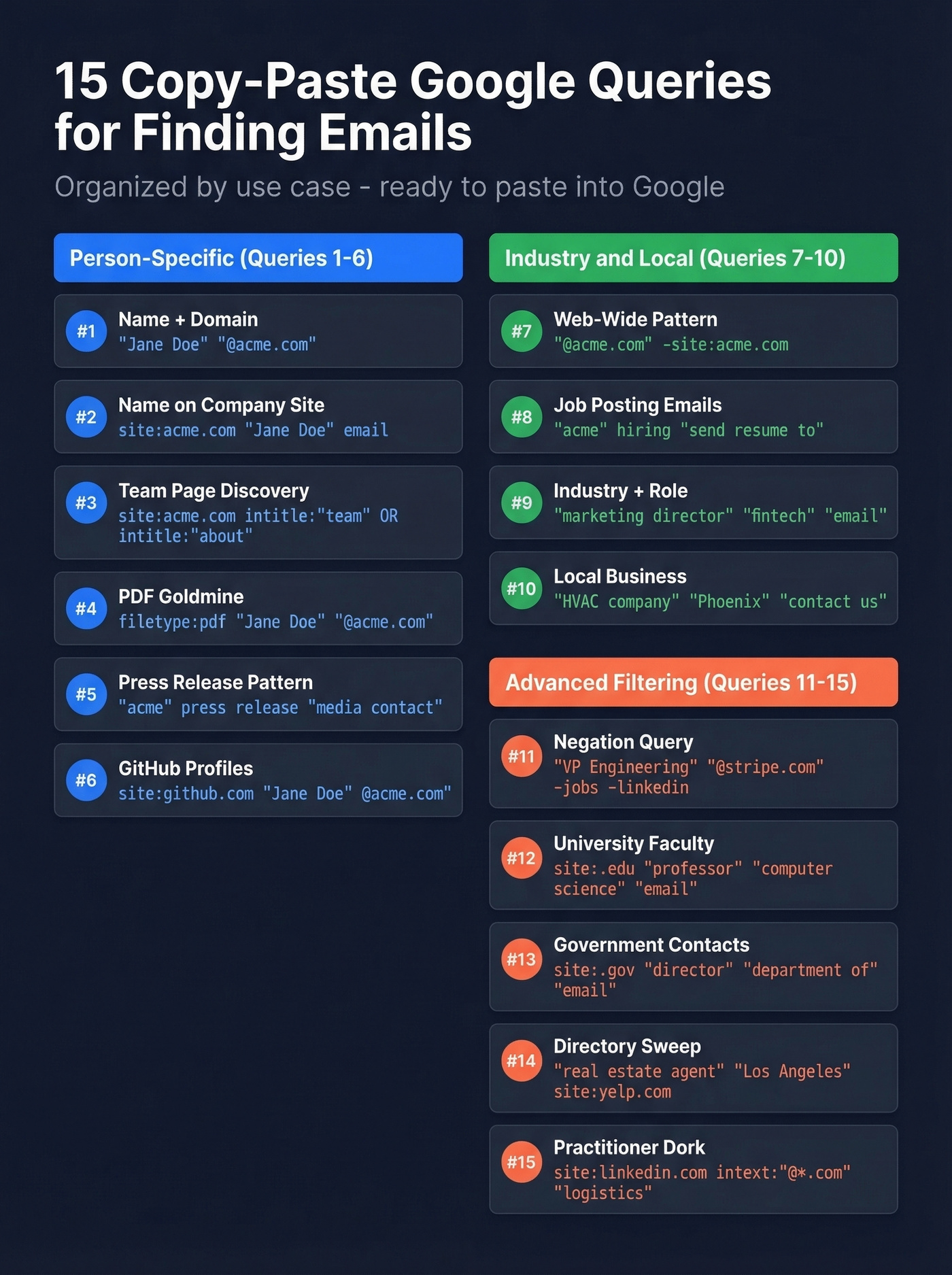
1. Name + Domain (direct hit)
"Jane Doe" "@acme.com"
The simplest query. Works roughly 35-45% of the time for professionals at mid-to-large companies.
2. Name on Company Site
site:acme.com "Jane Doe" email
Searches only the company's domain for mentions of the person alongside an email address.
3. Team Page Discovery
site:acme.com intitle:"team" OR intitle:"about" OR intitle:"people"
Finds the pages where companies list their team - and often their emails.
4. PDF Goldmine
filetype:pdf "Jane Doe" "@acme.com"
Conference papers, speaker bios, press kits, and internal docs often contain emails that aren't on the main website. This one's underrated.
5. Press Release Pattern Discovery
"acme" press release "media contact" "@acme.com"
PR contacts are almost always real, monitored inboxes. Great for finding the email format a company uses.
6. GitHub Developer Profiles
site:github.com "Jane Doe" "@acme.com"
Developers often expose their work email in commit histories and profile pages.
Industry & Local Queries
These cast a wider net across verticals and geographies.
7. Web-Wide Pattern Discovery
"@acme.com" -site:acme.com
Finds mentions of the company's email pattern across the entire web - forums, directories, conference sites, anywhere.
8. Job Posting Emails
"acme" hiring OR careers "send * resume to" "@acme.com"
Job postings frequently include a direct email for applications. The wildcard catches variations.
9. Industry + Role + Email
"marketing director" "fintech" "email" "contact"
Broad industry sweep using Formula A.
10. Local Business Contact Pages
"HVAC company" "Phoenix" ("contact us" OR "email" OR "mailto")
Local lead gen using Formula E. Swap in any service + city.
Advanced Filtering Queries
These use operators to cut noise and target specific source types.
11. Negation Query (Filter Noise)
"VP Engineering" "@stripe.com" -jobs -linkedin -twitter
Removes job boards and social media from results to surface cleaner hits.
12. University Faculty
site:.edu "professor" "computer science" "email"
TLD filter for academic contacts. Works for any department.
13. Government Contacts
site:.gov "director" "department of" "email" "contact"
Government sites are goldmines for publicly listed emails.
14. Directory Sweep
"real estate agent" "Los Angeles" "email" site:yelp.com OR site:yellowpages.com
Targets directories where business owners list contact info.
15. Practitioner Dork (From the Wild)
site:linkedin.com intext:"@*.com" OR intext:"@gmail.com" AND intext:"logistics"
This one comes straight from r/coldemail. It's messy, but it reflects how practitioners actually build queries. Pair it with a verification step - you'll get noise alongside signal.

Only 18.7% of company websites publish an email address. For the other 81%, you can spend hours combining keyword formulas in Google - or search Prospeo's 300M+ professional profiles with 30+ filters including job title, industry, and location. Every email is 98% accurate with 5-step verification, so you skip the guesswork entirely.
Trade keyword queries for a database that already found every email you need.
Google Search Operators Cheat Sheet
Not all operators work the same way they did five years ago. Here's what's confirmed working as of 2026, per Moz's operator reference.
| Operator | What It Does | Example | 2026 Status |
|---|---|---|---|
site: |
Restrict to domain | site:acme.com "email" |
Works |
filetype: |
Filter by file type | filetype:pdf "@acme.com" |
Works |
intitle: |
Word must be in title | intitle:"team" email |
Works |
inurl: |
Word must be in URL | inurl:contact "email" |
Works |
intext: |
Word must be in body | intext:"@acme.com" |
Works |
" " |
Exact match phrase | "Jane Doe" "email" |
Works |
OR |
Either term matches | "email" OR "mailto" |
Works |
- |
Exclude a term | "@acme.com" -jobs |
Works |
* |
Wildcard placeholder | "send * resume to" |
Works |
() |
Group operators | ("contact" OR "team") |
Works |
AROUND(X) |
Proximity search | "CEO" AROUND(3) "email" |
Works |
cache: |
Cached page version | N/A | Dead since 2024 |
If any guide you're reading still recommends cache:, it hasn't been updated. Same goes for + (force exact match) - Google dropped it years ago. Use quotes instead.
How B2B Extraction Tools Use These Keywords
When you use a desktop or cloud-based B2B email extraction tool, here's what happens under the hood. The tool takes your keywords and sends them to multiple search engines simultaneously - Google, Bing, Yahoo, Ask, Baidu, Yandex, and others. It collects the resulting URLs, then crawls and parses each page to extract email addresses, phone numbers, and page metadata like titles and descriptions. Practitioners commonly use tools like Outscraper for Google Maps scraping or Apify for directory scraping, but regardless of the tool, the keyword logic is the same.
Crawl depth matters. At depth 0, the tool only reads the search result page itself. At depth 1, it follows links from that page. In our testing, depth 1 consistently outperforms depth 0 without the noise that comes with depth 2+. One practitioner benchmark: a keyword set targeting dentists across three US cities pulled 211 targeted email addresses in 5 minutes at depth 1.
The economics favor DIY scraping over bought lists. Scraping runs about $0.05-0.08 per 100 records versus $0.50-1.00 for purchased lists - and the scraped data is fresher. For geo-targeting, search engines use your IP to localize results, so if you need results only from a specific country, route through a VPN or proxy in that location.

Verify Before You Send
Here's where most extraction workflows fall apart.
You've got a list of 500 emails pulled from Google queries and web scraping. You load them into your sequencer and hit send. The unverified list bounces hard - Snyk's team saw 35-40% bounce rates before switching to verified data - your domain reputation tanks, and your deliverability craters for weeks.
Bought and scraped lists decay 25-30% annually. People change jobs, companies rebrand, inboxes get deactivated. And 49.9% of companies use the {first}@domain email pattern, which means pattern-guessing without verification is a coin flip at best. One Reddit practitioner who ran 464K cold emails in a year reported a 2.1% reply rate on verified scraped data versus 0.7% from Apollo. Verification isn't optional - it's the difference between a campaign that works and one that burns your domain.
Let's be honest: if your deal sizes are small, you probably can't afford to waste time on manual keyword scraping at all. Skip straight to a B2B database with pre-verified emails and avoid the bounce-rate roulette entirely. The keyword approach in this guide is powerful for contact extraction at scale, but it's a means to an end - and the end is verified contact data.
Run your extracted list through Prospeo's email verifier. Its 5-step verification process covers syntax checks, MX lookups, catch-all detection, spam-trap removal, and honeypot filtering at 98% accuracy. The free tier gives you 75 verifications per month - enough to validate a batch from any of the queries above and see what your actual hit rate looks like.
If you want to go deeper on bounce prevention, see our email bounce rate benchmarks and fixes, plus the full email deliverability playbook.
Guessing email formats from generic inbox patterns like info@ and sales@ gets you departmental dead ends. Prospeo gives you direct, verified emails for decision-makers - 143M+ of them - at roughly $0.01 each. No Google dorking. No catch-all gambles. Just contacts that land in real inboxes.
Stop guessing email patterns. Get the verified address for $0.01.
Legal Compliance Checklist
Extracting publicly available emails is generally legal. Sending unsolicited emails to them is where the regulations kick in.
CAN-SPAM (US) operates on an opt-out model - you can email someone cold, but you must let them unsubscribe easily. The seven requirements: truthful headers, non-deceptive subject lines, identify the message as an ad, include your physical mailing address, provide a clear opt-out mechanism, honor opt-outs within 10 business days, and take responsibility for third parties sending on your behalf. Fines run up to $53,088 per violation.
GDPR (EU/UK) operates on an opt-in model. You need explicit consent or a legitimate interest basis before sending marketing emails. Pre-checked boxes don't count as consent. Recipients have the right to access their data and request erasure. Fines reach EUR 20M or 4% of global annual turnover, whichever is higher.
Look - if you're sending cold email to US prospects with a clear opt-out and your physical address, CAN-SPAM gives you room to operate. For EU prospects, you need a legitimate interest basis or explicit consent. One complaint to the wrong regulator can cost more than your entire outbound program.
If you're unsure about list sourcing, read our guide on buy email lists before you scale.
FAQ
What are the best keywords for extracting B2B emails?
Combine role keywords (CEO, VP Sales, Marketing Director) with industry keywords (SaaS, fintech, real estate) and context keywords (contact, email, team, about us). The categorized list above gives you 100+ terms across six categories, ready to plug into Google queries or extraction tools.
Do Google search operators still work for finding emails in 2026?
Yes - site:, filetype:, intitle:, inurl:, quotes, OR, and - all work reliably. The cache: operator was discontinued in 2024, so ignore any guide that still recommends it. See the full cheat sheet table above for every working operator.
How many emails can keyword-based scraping yield?
Volume depends on niche specificity and crawl depth. One practitioner benchmark: 211 targeted emails in 5 minutes for a local dentist search across three US cities at depth 1. Broader industry queries with automation can yield thousands per hour, though quality drops as volume increases.
Is there a free tool to verify extracted emails?
Prospeo's free tier includes 75 email verifications per month - enough to validate a test batch from any query in this guide. Its 5-step process covers syntax checks, MX lookups, catch-all detection, spam-trap removal, and honeypot filtering at 98% accuracy. Hunter and NeverBounce also offer limited free tiers.
Is it legal to extract emails from websites?
Extracting publicly available emails is generally legal, but sending unsolicited messages is regulated. CAN-SPAM (US) requires opt-out mechanisms and fines up to $53,088 per violation. GDPR (EU) requires explicit opt-in consent and fines up to EUR 20M or 4% of global turnover. Always include a physical address and honor unsubscribe requests within 10 business days.