

Email Crawlers: How They Work, When They Fail, and What to Use Instead
Your boss just dropped a spreadsheet with 8,000 target company domains and wants contact emails by Friday. An email crawler sounds like the answer - and it might be, if you're comfortable with a CSV full of info@ addresses, spam traps, and emails that haven't been active since 2019.
53% of SMBs rank email as their top marketing channel, so everyone's hunting for contact data. The problem: most people grab an email harvester, blast the results, and torch their domain within a week.
We've watched this play out dozens of times. This piece covers how crawlers actually work under the hood, why raw crawled data destroys sender reputation, the legal landmines you need to know about, and when you should skip crawling entirely.
Quick Recommendations
Need bulk extraction from a big domain list? Outscraper. Fast and cheap, but verify before sending.
Need quick, single-site extraction with no signup? Mailmeteor's free email extractor. It crawls a site's internal pages and pulls emails, but doesn't verify them.
Need pre-verified B2B emails without the crawl-clean-verify pipeline? Prospeo - 143M+ verified emails searchable by job title, company, and buyer intent topics. No crawling required.
Need a free finder plus outreach tool? Hunter or Snov.io. Both have free tiers and built-in sequencing depending on plan.
What Is an Email Crawler?
The term gets thrown around loosely. Three distinct approaches exist, and they're not interchangeable.
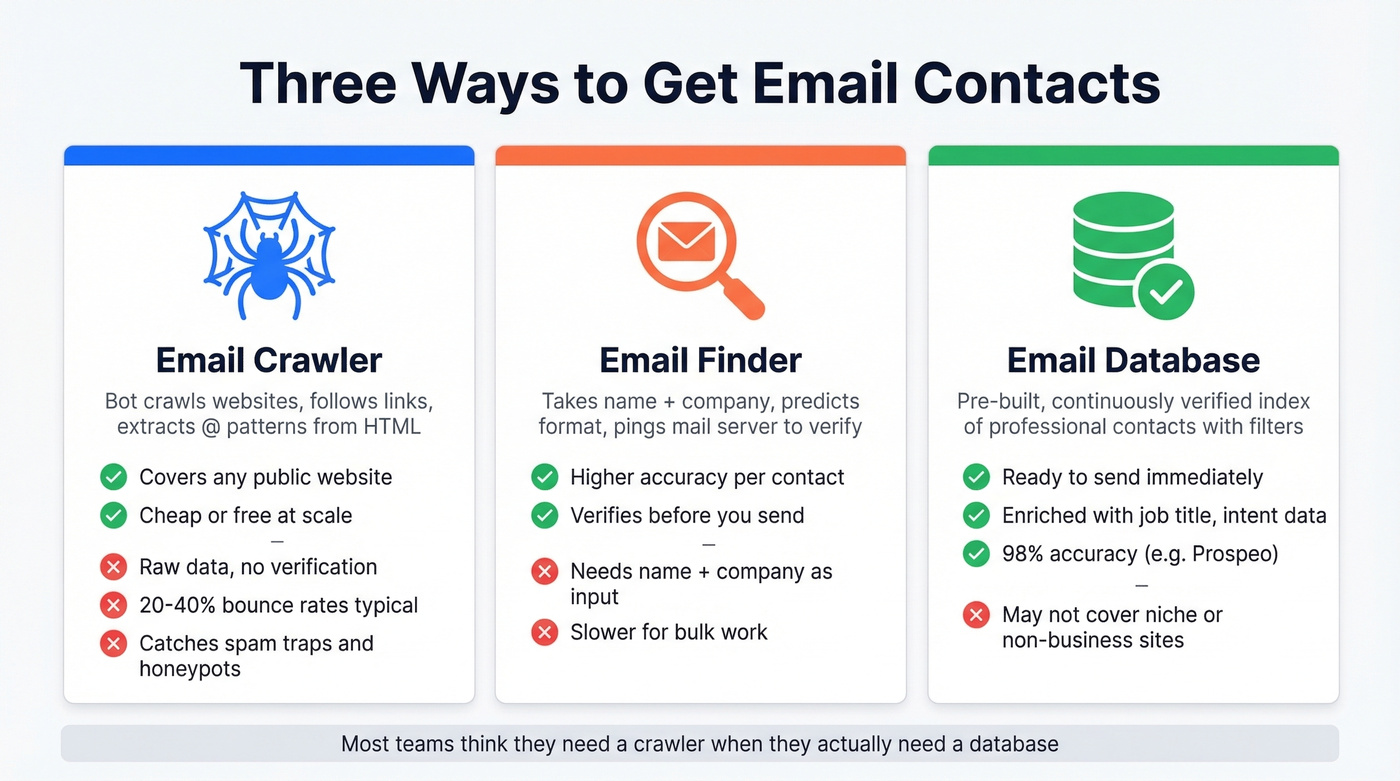
An email crawler - also called a web scraper or email harvester - is a bot that starts at a seed URL, follows internal links to pages like /about and /contact, and scans raw HTML for anything matching an email pattern. It's automated browsing, the same thing Google does to index pages, except it hunts for @ symbols instead of content.
An email finder takes a person's name and company, predicts the likely format (firstname.lastname@company.com), then verifies the address by pinging the mail server. No web crawling involved.
An email database skips both steps. It maintains a pre-built, continuously verified index of professional contacts you search by filters and export.
Two less common categories round things out: text extractors that parse email addresses from pasted content or uploaded documents, and document parsers that pull contacts from PDFs, business cards, and email signatures. Most tools marketed as "email extractors" are actually simple regex parsers scanning page source code for patterns - real crawlers follow links, handle pagination, and navigate site structures automatically. Some modern tools also layer AI to infer seniority levels and buying roles beyond what regex alone can detect.
How Email Crawlers Work
The crawl pipeline follows a predictable five-step sequence.
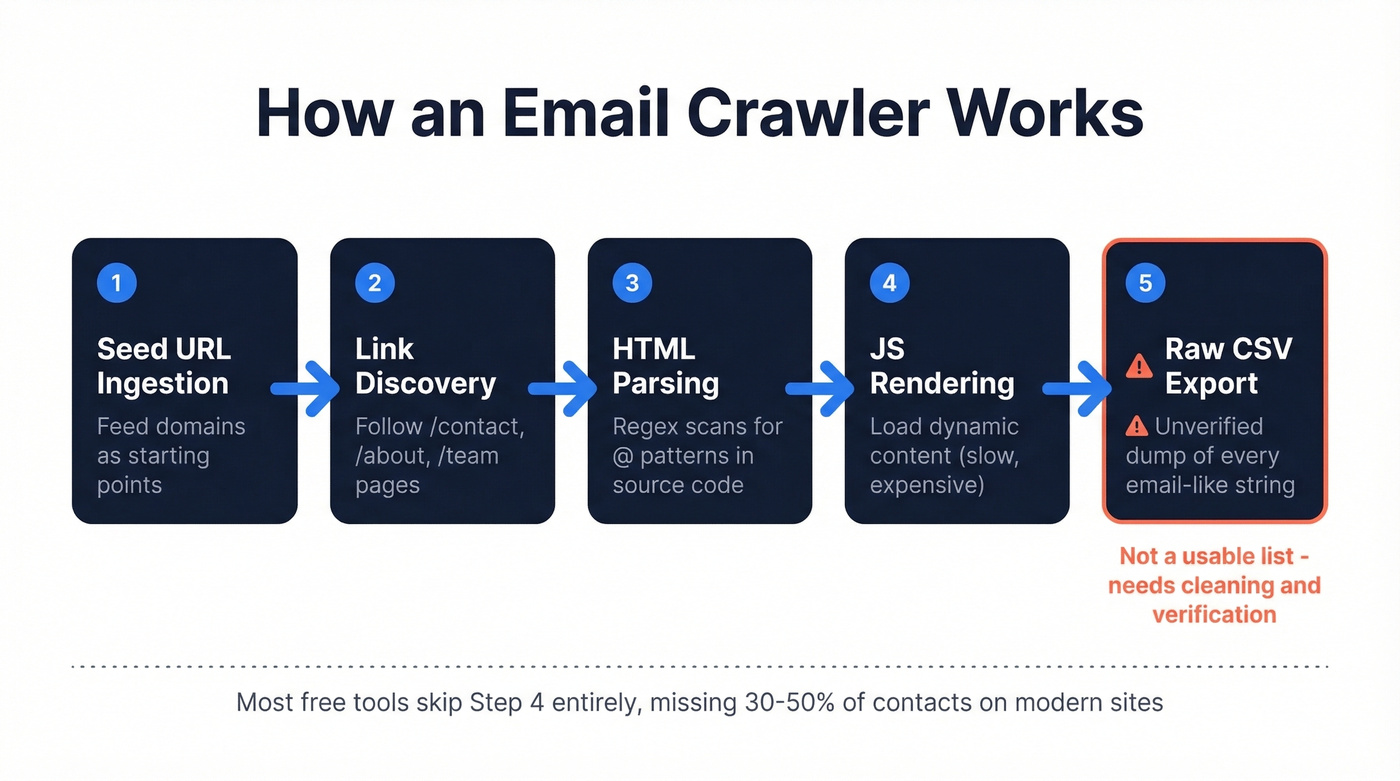
Step 1: Seed URL Ingestion
You feed the crawler a list of domains. Each becomes a starting point.
Step 2: Link Discovery
The crawler loads each homepage, extracts internal links, and prioritizes pages likely to contain contact information - URLs with /contact, /about, /team, or /people. Contact info is rarely on the homepage itself, so crawlers have to traverse internal pages to find it. Responsible crawlers also check robots.txt directives before going deeper.
Step 3: HTML Parsing
The crawler scans raw HTML using regular expressions. A basic regex like \w+@\w+\.{1}\w+ catches obvious addresses but misses valid ones containing dots, hyphens, or plus signs. It also catches false positives - image filenames, encoded strings, and JavaScript variables that happen to contain @ symbols. More sophisticated crawlers use multiple regex patterns and validate against known TLDs.
Step 4: JavaScript Rendering
Modern websites load contact information dynamically. Basic crawlers that only read static HTML miss these entirely. Some scraping setups can render JavaScript to capture what a human user would see, but it's slower and more resource-intensive. This is where cheap free tools fall apart.
Step 5: Export
Results get dumped to CSV - every email-like string found, with duplicates, role-based addresses like info@ and support@, and invalid entries all mixed together.
What comes out of step 5 isn't a usable prospecting list. It's raw material that needs serious cleaning.
Common Use Cases
Bulk B2B prospecting is the classic scenario - thousands of target domains, need contact emails. Sales teams, agencies, and SDR orgs hit this wall constantly (see sales prospecting techniques for what to do after you have the list).
Local SMB lead generation means scraping directories like Google Maps for small businesses. PhantomBuster is popular here, though you're dancing on platform ToS lines.
Recruiting involves crawling company team pages and conference speaker lists. Low volume, high value per contact.
Link building and PR outreach targets editor and journalist emails from blogs and publications. Usually small-batch work where a free tool is perfectly fine.

Email crawlers dump raw data that nukes your sender reputation. Prospeo skips the entire crawl-clean-verify pipeline. Search 143M+ pre-verified emails by job title, company, and buyer intent - with 98% accuracy and a 7-day refresh cycle. No regex. No spam traps. No bounced domains.
Get verified contacts at $0.01 each instead of crawling your way onto a blacklist.
Raw Crawled Emails Destroy Your Domain
Here's where most people learn the hard way.
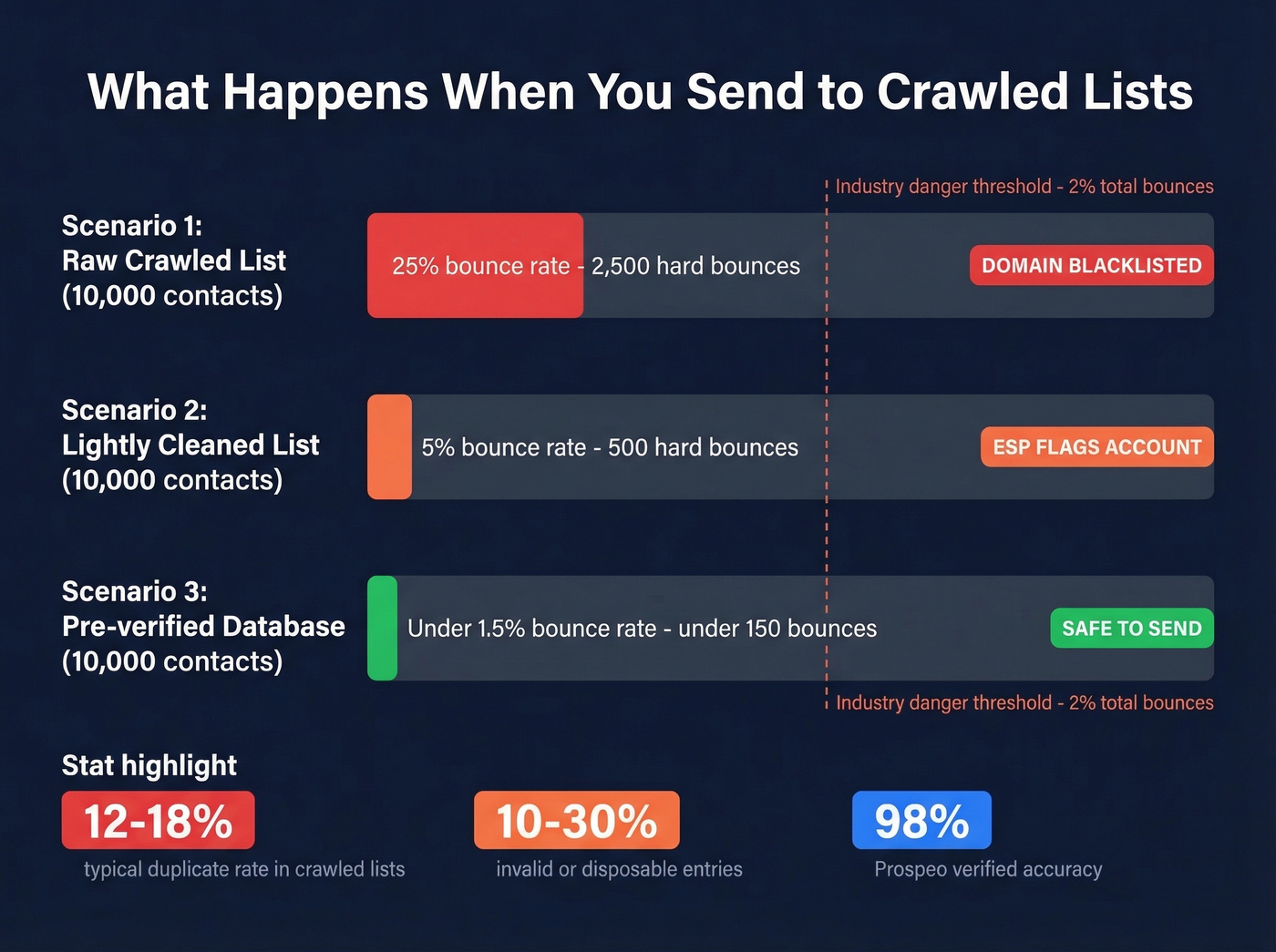
You crawl 10,000 websites, extract 6,000 addresses, load them into your sequencer, and hit send. Sending to unverified scraped lists typically produces 20-40% bounce rates. Typical extracted lists also contain 12-18% duplicate addresses and 10-30% invalid or disposable entries. The industry threshold for maintaining good sender reputation is under 2% total bounces (more on bounce benchmarks in email bounce rate).

Consider two scenarios. Worst case: you send to 10,000 crawled contacts with a 25% bounce rate - that's 2,500 hard bounces, your ESP flags you immediately, and Gmail starts routing everything to spam, including replies to existing customers. Even the "cleaned" scenario is dangerous: 10,000 contacts at just 2% bounce means 200 hard bounces, still enough to trigger reputation damage at most ESPs.
The damage compounds because crawled lists contain spam traps and honeypot addresses - emails that look real but exist solely to catch scrapers. Hit enough of them and you'll land on blacklists that take weeks to escape (see spam trap removal and Spamhaus blacklist removal). We've seen agencies lose entire sending domains this way, and the recovery process is brutal.
Cold email practitioners treat bounce rate as an infrastructure metric: once you're consistently above ~1.5%, you're already in the danger zone (pair this with a real email deliverability guide).
Is Email Crawling Legal?
Short answer: it depends on where your targets are and how you use the data.
Under GDPR (EU/UK), email addresses are personal data. The fact that an email is publicly visible on a website doesn't constitute consent to receive marketing. You can argue "legitimate interest" for B2B outreach, but that requires a documented balancing test, a clear opt-out mechanism, and a defensible reason for contact. Fines run up to EUR20M or 4% of global annual revenue.
Under CAN-SPAM (US), collection is less regulated but sending rules are strict: truthful headers, physical address, working unsubscribe link, and opt-outs honored within 10 business days.
The hiQ Labs v. LinkedIn case established that scraping publicly available data doesn't violate the Computer Fraud and Abuse Act. But that's a narrow ruling - it doesn't override GDPR, CCPA, or platform terms of service.
Look, if you're scraping at scale for commercial outreach, talk to a lawyer. "I found it on a website" isn't a defense that holds up well (related: is it illegal to buy email lists).
The Full Workflow: Crawl to Campaign
Practitioners who make cold email work at scale treat it as a four-layer stack, not a one-step process.
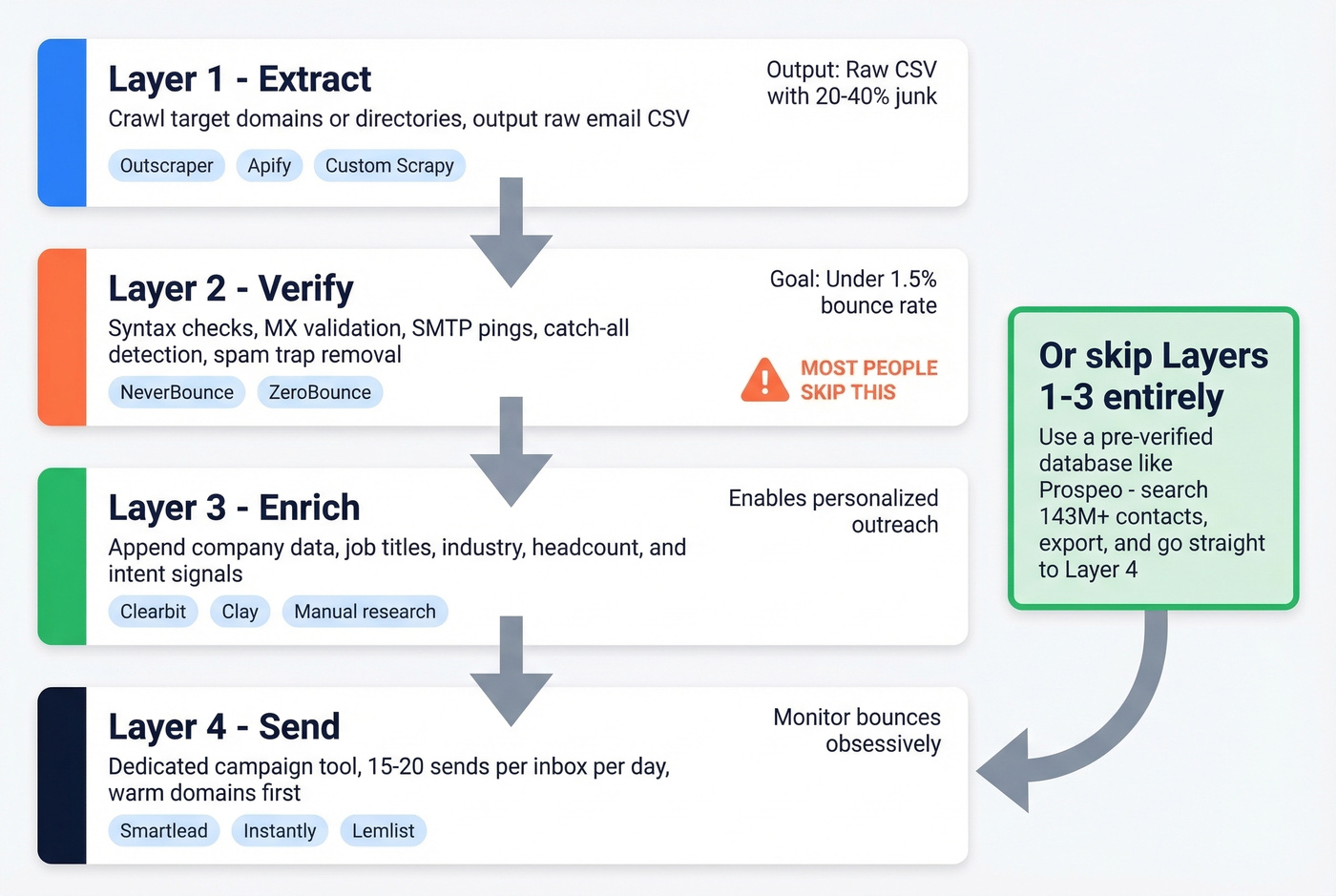
Layer 1 - Extract. Crawl your target domains or directories using Outscraper, Apify, or a custom Scrapy spider. Output: raw email list in CSV.
Layer 2 - Verify. Not optional. Run every address through syntax checks, MX record validation, SMTP pings, catch-all detection, and spam-trap removal. The goal is getting below that ~1.5% bounce threshold and staying under 2% total bounces. NeverBounce and ZeroBounce are popular standalone verification tools (see more options in bouncer alternatives).
Layer 3 - Enrich. Raw emails without context are nearly useless for personalized outreach. Append company data, job titles, industry, headcount, and intent signals so you know who's actually in-market (compare providers in data enrichment services).
Layer 4 - Send. Use a dedicated campaign tool with proper inbox infrastructure. Keep daily sends to 15-20 per inbox. Warm your domains first. Monitor bounces obsessively (see email velocity and best way to send bulk email without getting blacklisted).
Skip any layer and the whole thing falls apart. Most people skip layer 2. That's why most people burn their domains.
Best Email Crawler Tools for 2026
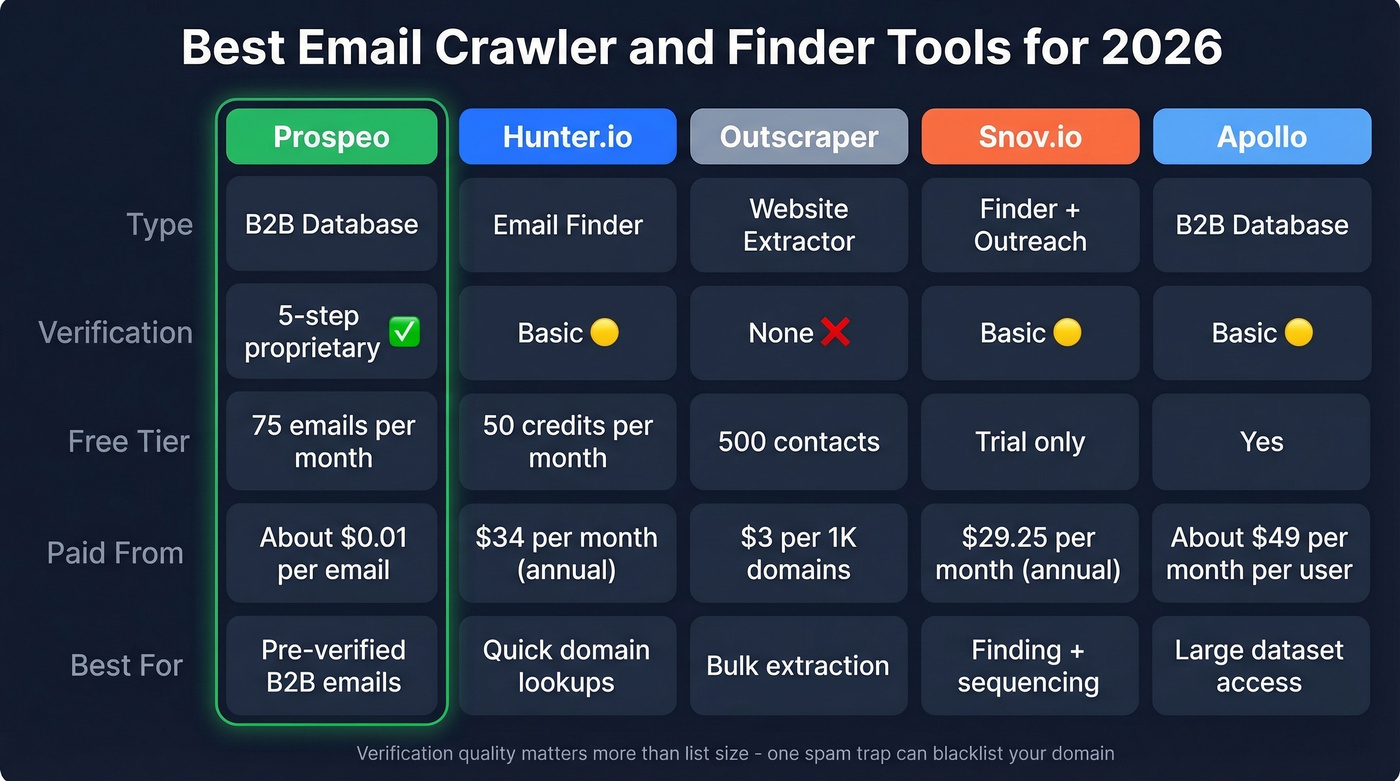
| Tool | Type | Verification | Free Tier | Paid From | Best For |
|---|---|---|---|---|---|
| Prospeo | B2B Database | 5-step | 75 emails/mo | ~$0.01/email | Pre-verified B2B emails |
| Hunter.io | Email Finder | Basic | 50 credits/mo | $34/mo (annual) | Quick domain lookups |
| Outscraper | Website Extractor | None | 500 contacts | $3/1K domains | Bulk extraction |
| Snov.io | Finder + Outreach | Basic | Trial | $29.25/mo (annual) | Finding + sequencing |
| Apollo | B2B Database | Basic | Yes | ~$49/mo/user | Large dataset |
Prospeo
Prospeo eliminates the crawl-clean-verify pipeline entirely. Instead of scraping websites and hoping for valid addresses, you search 300M+ professional profiles using 30+ filters - job title, company size, industry, technographics, and buyer intent across 15,000 topics powered by Bombora.
Every email goes through a proprietary 5-step verification process with catch-all handling, spam-trap removal, and honeypot filtering. The result: 98% email accuracy and a 7-day data refresh cycle (the industry average is 6 weeks). You also get access to 125M+ verified mobile numbers with a 30% pickup rate.
At ~$0.01 per email with 75 free emails per month, it's cheaper than running the full extraction-verification-enrichment stack - and dramatically safer for your domain. Native integrations with Salesforce, HubSpot, Smartlead, Instantly, and Lemlist mean data flows straight into your workflow. One of our agency clients, Stack Optimize, built from $0 to $1M ARR using this approach - maintaining 94%+ deliverability, sub-3% bounce rates, and zero domain flags across all their clients.
Use this if you're doing B2B outreach and want contacts you can send to immediately.
Skip this if you're scraping niche directories or non-business websites that no database covers.
Hunter.io
Hunter built its reputation on one thing: type in a domain, get every email associated with it. The domain search is still one of the cleanest options for quick lookups - paste a company URL and see the email pattern plus individual addresses with confidence scores.

The free tier gives you 50 credits per month, and paid plans start at $34/mo billed annually or $49/mo monthly for 2,000 credits. For targeted outreach where you're researching 10-20 companies, it's hard to beat.
Skip this if you're building pipeline at scale. Hunter's strength is precision lookups, not bulk prospecting. At higher volumes, you'll burn through credits fast and accuracy drops enough to require a separate verification step (see hunter alternatives).
Outscraper
This is the tool for the "8,000 websites by Friday" scenario. Outscraper is built for bulk extraction - paste thousands of domains, run the job, and export the emails and phones it finds from public sources.
Free usage covers the first 500 contacts. After that, pricing is $3 per 1,000 domains up to 100,000 domains and as low as $1 per 1,000 domains beyond that.
The tradeoff is clear: you get raw data with no built-in verification, no job titles, and no company enrichment. You'll need to pair it with a verification tool and an enrichment layer, which adds cost and time. For pure extraction speed, though, nothing we've tested matches it.
Snov.io
Snov.io bundles email finding with outreach sequencing, which makes it appealing for solo founders who don't want to stitch together multiple tools. Starter plan runs $29.25/mo annually for 1,000 credits with 3 warm-up slots. Pro at $74.25/mo for 5,000 credits and unlimited warm-ups.
The weak link is accuracy. In real-world usage, a significant portion of results come back unverified, which means you're spending credits on uncertain data. The consensus on r/sales threads is that Snov.io works fine for small batches but needs a separate verification pass before you send at scale.
Apify
Best moment to use Apify: when you need to crawl a niche directory with unusual page structures that off-the-shelf tools can't handle. It's a web scraping platform for teams with technical chops - build custom crawlers or use pre-built actors from the community. Free tier available, paid plans from ~$49/mo. You'll need someone comfortable with JavaScript, but the flexibility is unmatched for edge cases.
Apollo
Apollo's database is massive and the free tier is genuinely useful for getting started. Paid plans run around $49-99/mo per user.
The data freshness concern comes up constantly in practitioner discussions: a common pattern is strong open rates but weak replies, which often points to outdated contacts or misaligned targeting. Verify Apollo contacts through a separate tool before sending at scale.
Free Options Worth Knowing
Mailmeteor offers a 100% free web-based email extractor with no signup - paste a URL, get emails found across the site's pages. It's the most accessible free option for quick extraction. DeBounce pairs a free extraction tool with paid verification from $0.00045 per check, extremely cheap if you just need to clean a list. Skrapp.io gives you 100 free credits and is positioned around B2B email finding plus AI-powered verification.
All three are lightweight utilities, not primary prospecting tools. They'll get you started, but don't expect the data quality to match a verified database (see free lead generation tools for more options).
When to Skip the Crawler Entirely
Let's be honest: email crawlers are a 2018 solution to a 2026 problem. They made sense when B2B databases were expensive, inaccurate, and locked behind enterprise contracts. That's no longer the reality.
The only legitimate use case for crawling today is niche websites that no database covers - industry-specific directories, local business listings, conference speaker pages. If your targets live exclusively on those kinds of sites, a web scraper makes sense (more on this in web scraping lead generation).
For standard B2B prospecting - reaching decision-makers by job title, industry, and company size - a verified database is faster, cheaper when you factor in the full crawl-clean-verify pipeline, and far safer for your domain reputation. Every free extractor promises unlimited emails. What they actually deliver is a handful of generic addresses and invalid strings that'll bounce.
The crawl-to-campaign pipeline has four layers of work. A database collapses it to one.
Crawled lists average 20-40% bounce rates. Prospeo users stay under 4%. That's because every email in our database passes a 5-step verification process with catch-all handling, spam-trap removal, and honeypot filtering - refreshed every 7 days, not every 6 weeks.
Replace your entire scrape-and-pray workflow with data that actually connects.
FAQ
Is email crawling legal?
It depends on jurisdiction. Under GDPR, scraped emails are personal data - "publicly visible" doesn't equal consent. Under CAN-SPAM, collection is loosely regulated but sending rules require truthful headers, a physical address, and a working unsubscribe link. Consult legal counsel before scraping at scale for commercial outreach.
How accurate are free email crawlers?
Most return 20-40% invalid addresses. Without verification, expect bounce rates that damage sender reputation within days. A free extractor will get addresses onto a spreadsheet quickly, but the cleanup cost in time and domain risk often exceeds what you'd spend on a verified source.
What's the difference between a crawler and a finder?
A crawler extracts email patterns from HTML source code across web pages. A finder predicts addresses using name-plus-domain patterns and verifies via SMTP - no website scraping involved. Finders are more accurate for B2B prospecting because they target specific individuals rather than harvesting whatever appears on a page.
Can I get verified emails without crawling?
Yes. B2B data platforms maintain pre-verified databases with millions of emails searchable by job title, company, industry, and buyer intent - delivering send-ready contacts without any extraction or verification steps on your end.