

The List-Unsubscribe Header: What It Is, How to Implement It, and Why Gmail Rejects You Without It
It's newsletter day. Your campaign hits 50,000 inboxes, and your monitoring lights up with 421 temporary failures. A week later, those 421s turn into 550 permanent rejections - your emails aren't just delayed, they're dead on arrival. Since Gmail ramped up bulk-sender enforcement in late 2025, missing the list-unsubscribe header can trigger outright rejection. With global inbox placement averaging around 84%, you can't afford to lose ground on something this fixable.
We've watched this enforcement timeline unfold in real time across dozens of sending setups. Here's everything you need to get it right.
What You Need (Quick Version)
Every sender pushing promotional email in 2026 needs three things:
- Both
List-UnsubscribeandList-Unsubscribe-Postheaders on every promotional message - An HTTPS endpoint that accepts POST requests for one-click unsubscribe
- A valid DKIM signature covering both headers
If you use a major ESP - SendGrid, Postmark, ActiveCampaign - this is already handled for you. If you self-host, run a custom mail stack, or use a lesser-known platform, keep reading.
What Does the List-Unsubscribe Header Do?
This header is an email header field, invisible in the message body, that tells inbox providers how a recipient can opt out. It was originally defined in RFC 2369 as part of a family of List-* headers designed for mailing lists.
When Gmail, Yahoo, or Apple Mail detects this header, they render an unsubscribe button or link directly in the inbox UI - often near the sender details or at the top of the message. The recipient never has to scroll to the footer or hunt for a tiny link. The whole point is making opting out frictionless so people unsubscribe instead of hitting "Report Spam."
The header itself is just a line in the email's raw source. But what it signals to inbox providers - "this sender plays by the rules" - is what makes it critical for deliverability.
Why It Matters in 2026
The enforcement timeline has been a slow squeeze, and we're now past the point of warnings.
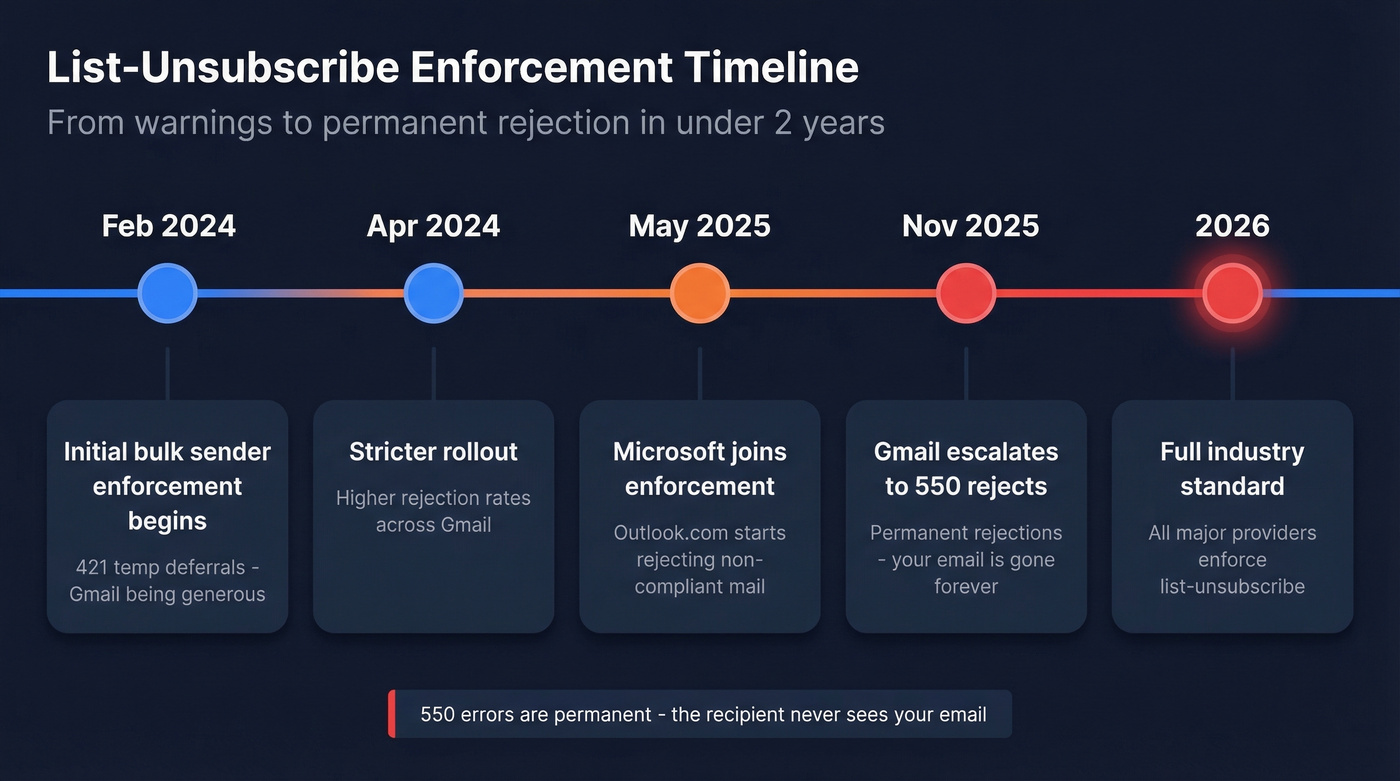
| Date | What Happened | Impact |
|---|---|---|
| Feb 2024 | Initial bulk-sender enforcement begins | 421 temp deferrals |
| Apr 2024 | Stricter rollout | Higher rejection rates |
| May 2025 | Microsoft enforcement begins | Outlook.com rejects |
| Nov 2025 | Gmail escalates | 550 permanent rejects |
| 2026 | Industry standard | Full enforcement everywhere |
Here's the thing: those 421 errors from early 2024 were Gmail being generous. They were saying "fix this and try again." The 550 errors that started in November 2025 are permanent rejections - your message is gone, and the recipient never sees it.
The per-provider numbers make the stakes concrete. Gmail inbox placement sits at 87.2%, Yahoo at 86.0%, and Apple Mail at 76.3%. Microsoft is the harshest at just 75.6%, which makes their May 2025 enforcement especially punishing - a quarter of your messages to Outlook.com recipients were already at risk before compliance entered the picture.
The spam complaint threshold is the other lever. Gmail and Yahoo want you below 0.1% complaint rate, and anything above 0.3% triggers active filtering. At scale, that's a razor-thin margin. A properly implemented unsubscribe header gives frustrated recipients a clean exit that doesn't count as a spam complaint. Without it, every annoyed subscriber becomes a deliverability risk.
Most deliverability problems aren't authentication problems - they're list quality problems. You can have perfect headers, perfect DKIM, perfect DMARC, and still land in spam if 5% of your list is dead addresses. Headers are table stakes. Clean data is the actual game.
On the legal side, CAN-SPAM violations can run up to $53,088 per email. Not per campaign. Per email.
How the Header Works
There are two base mechanisms, plus the one-click POST signaling used for bulk-sender compliance.
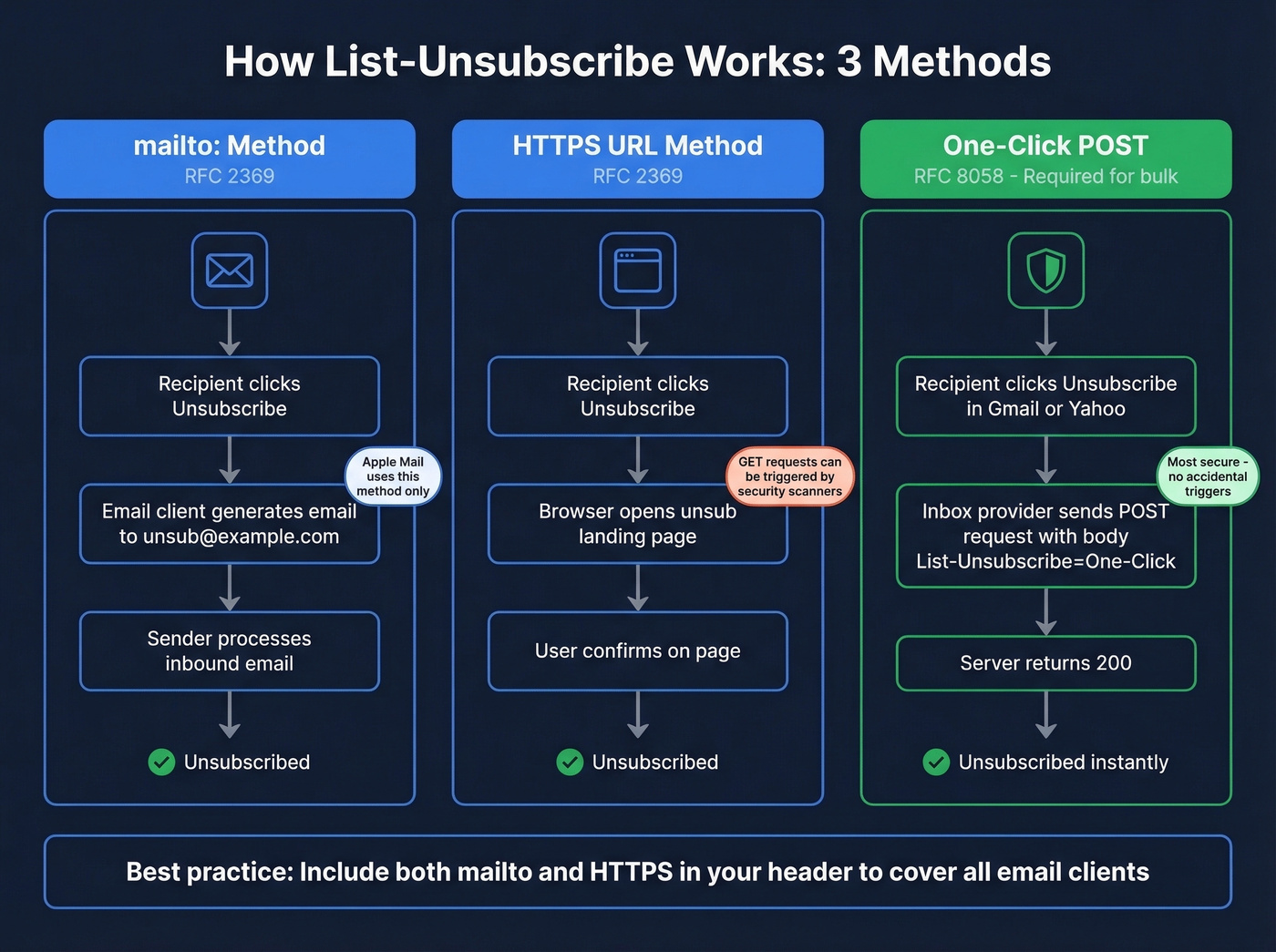
| Method | How It Works | Provider Support |
|---|---|---|
| mailto: | Generates an email to the sender's unsub address | Widely supported |
| HTTPS URL | Links to a web-based unsub page | Common in major inboxes |
| One-Click POST (RFC 8058) | Sends a POST request to an HTTPS endpoint - no confirmation page | Required by Gmail/Yahoo for bulk |
RFC 2369 defined the original mailto approach. RFC 8058 added the HTTPS POST method because automated link scanners and security crawlers were accidentally triggering GET-based unsubscribe URLs. The POST requirement ensures only deliberate, receiver-initiated actions process the unsubscribe.
For bulk senders hitting 5,000+ messages per day to Gmail or Yahoo, one-click POST isn't optional. You need both the mailto and HTTPS methods in your header to cover all clients, because Apple Mail still only supports mailto.
Exact Header Syntax
Here's the copy-paste version. Both headers go into your email's raw headers together:
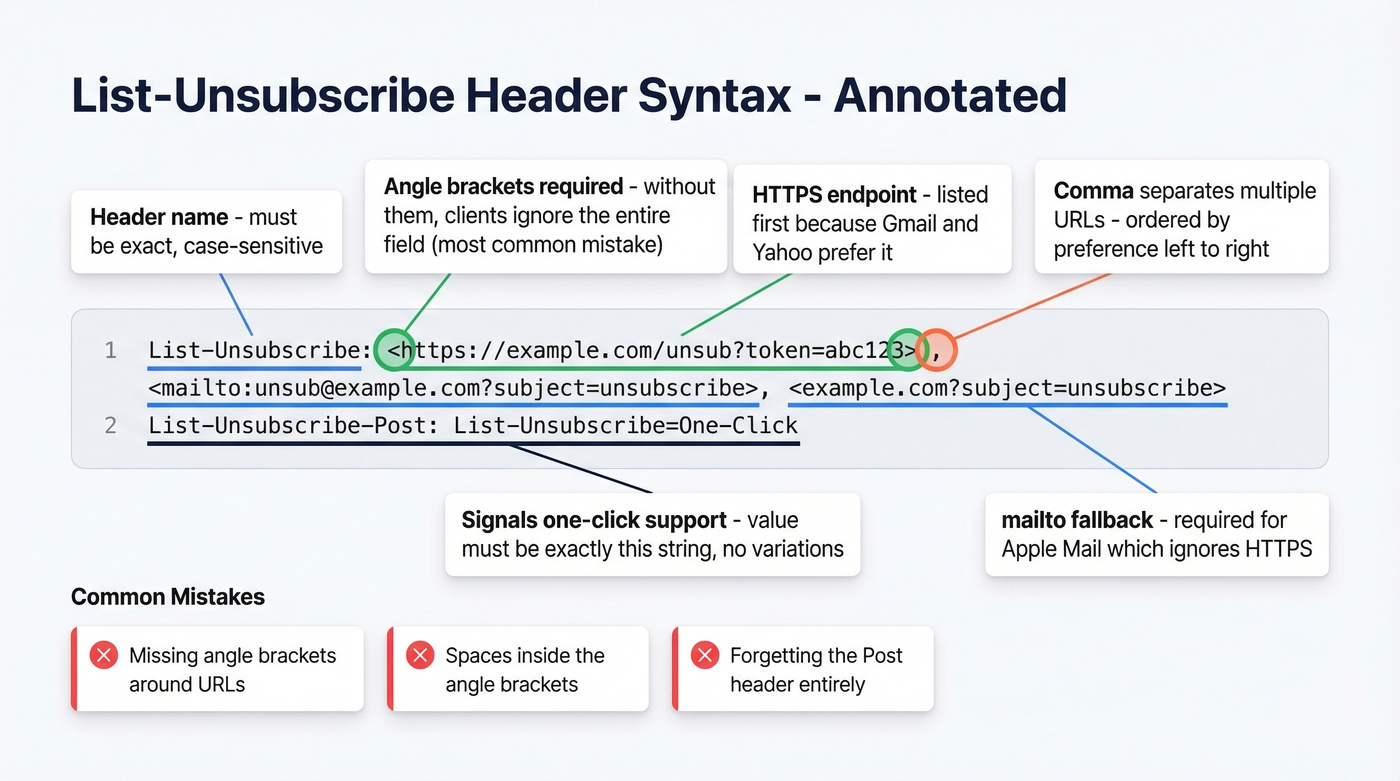
List-Unsubscribe: <https://example.com/unsub?token=abc123>, <mailto:unsub@example.com?subject=unsubscribe>

List-Unsubscribe-Post: List-Unsubscribe=One-Click
A few syntax rules that trip people up:
- Every URL must be wrapped in angle brackets (
< >). If the content doesn't start with<, compliant clients ignore the field entirely. - Multiple URLs are comma-separated, ordered by preference left-to-right. Put your HTTPS URL first since Gmail and Yahoo will use it for one-click.
List-Unsubscribe-Postmust contain exactly the valueList-Unsubscribe=One-Click. No variations, no extra parameters.- No whitespace inside the angle brackets. MTAs must not insert spaces or line breaks within
< >. Whitespace between items is fine.
The mistakes we see most often: missing angle brackets - the #1 cause of "my header is there but nothing happens" - extra spaces inside brackets from copy-paste errors, and forgetting List-Unsubscribe-Post entirely, which means you have the header but not the one-click signal Gmail and Yahoo require for bulk.

You just read it: headers are table stakes, but clean data is the actual game. Prospeo's 5-step email verification delivers 98% accuracy - so your perfectly configured list-unsubscribe headers protect a list that's actually worth protecting.
Stop losing inbox placement to dead addresses. Fix your list first.
Email Client Support
| Client | mailto | HTTPS | One-Click POST | Notes |
|---|---|---|---|---|
| Gmail | ✓ | ✓ | ✓ (required for bulk) | Bulk-sender enforcement escalated to 550s in Nov 2025 |
| Yahoo Mail | ✓ | ✓ | ✓ (required for bulk) | Aligned with Gmail rules |
| Outlook.com / New Outlook | ✓ | ✓ | ✓ | Microsoft enforcement began May 2025 |
| Apple Mail | ✓ | ✗ | ✗ | mailto only |
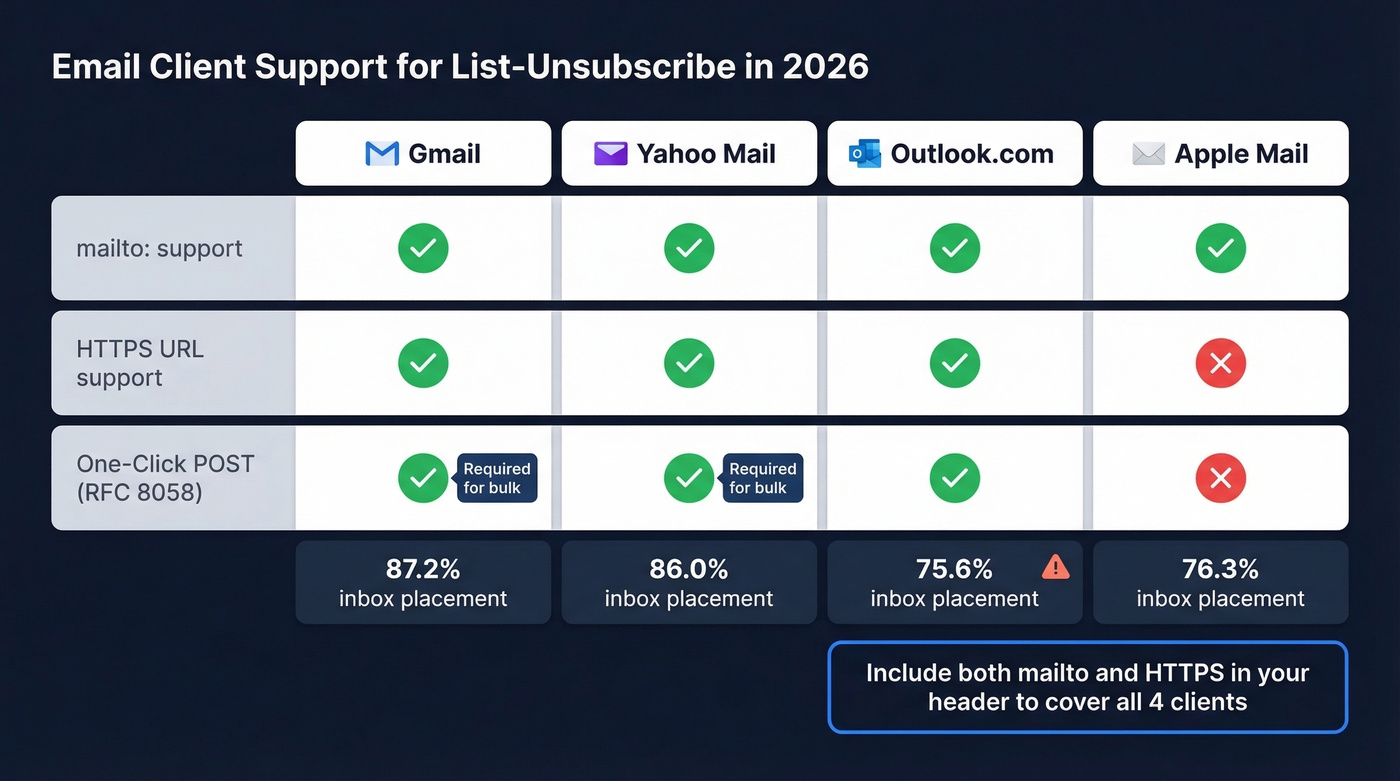
Apple Mail's mailto-only behavior is why you need both methods in your header. Apple renders an "Unsubscribe" banner that generates an email to your mailto address, ignoring HTTPS URLs entirely and skipping POST. This won't change your Gmail compliance, but it means your unsubscribe flow needs to handle both inbound emails and POST requests.
One-Click Unsubscribe Deep Dive
RFC 8058 defines three hard requirements for one-click:
- The message must include both
List-UnsubscribeandList-Unsubscribe-Postheaders List-Unsubscribemust contain at least one HTTPS URI (it can also include mailto)- The message must have a valid DKIM signature that covers both headers
That third requirement is the one that catches people. DKIM coverage of both headers prevents anyone in the delivery chain from tampering with your unsubscribe URL. If your DKIM signature doesn't cover List-Unsubscribe-Post, Gmail treats the one-click mechanism as unverified and won't render the button.
When a recipient clicks "Unsubscribe" in Gmail, the inbox provider sends a POST request to your HTTPS URL with the body List-Unsubscribe=One-Click. No confirmation page, no redirect - just a POST. Your endpoint processes it and returns a 200. The whole security model exists because GET requests from link scanners and email security tools were triggering accidental unsubscribes at scale, which was a nightmare for senders who couldn't tell the difference between a real opt-out and a bot crawling their links.
How to Add an Unsubscribe Link to Email
Pre-Send Checklist
Before any campaign goes out, verify all six:
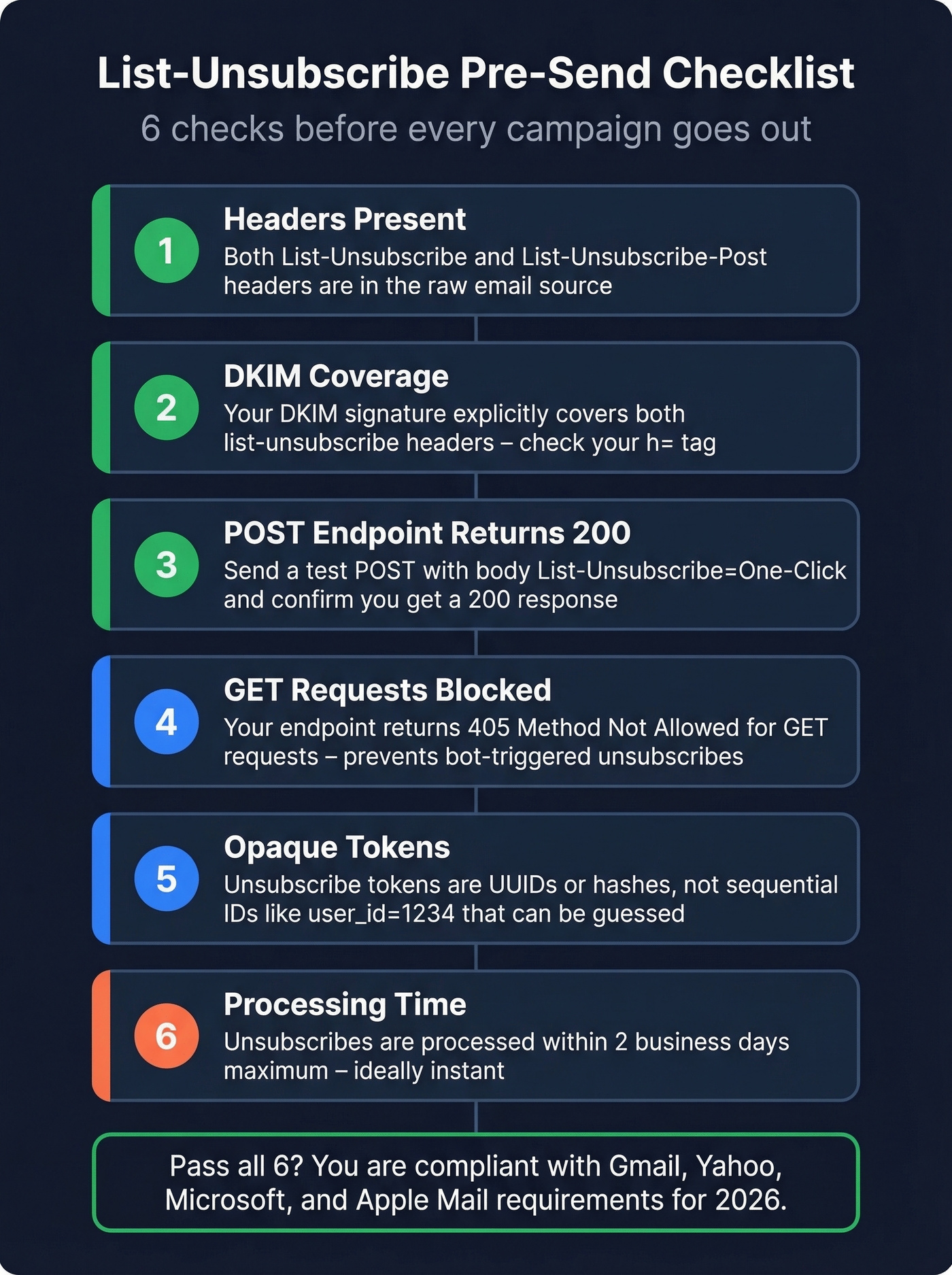
- ☐ Both
List-UnsubscribeandList-Unsubscribe-Postheaders present - ☐ DKIM signature covers both headers
- ☐ POST endpoint returns 200 on valid requests
- ☐ GET requests are rejected (return 405)
- ☐ Unsubscribe token is opaque (UUID or hash, not sequential ID)
- ☐ Unsubscribe processed within 2 business days
Code Samples
Here's a minimal Go endpoint using Echo:
e.POST("/unsubscribe", func(c echo.Context) error {
    token := c.QueryParam("token")
    body := c.FormValue("List-Unsubscribe")
    if body != "One-Click" {
        return c.NoContent(http.StatusBadRequest)
    }
    err := unsubscribeByToken(token)
    if err != nil {
        return c.NoContent(http.StatusInternalServerError)
    }
    return c.NoContent(http.StatusOK)
})
And a PHP (Laravel) equivalent:
Route::post('/unsubscribe', function (Request $request) {
    if ($request->input('List-Unsubscribe') !== 'One-Click') {
        abort(400);
    }
    $token = $request->query('token');
    $subscriber = Subscriber::where('unsub_token', $token)->firstOrFail();
    $subscriber->update(['subscribed' => false]);
    return response('', 200);
});
Both examples validate the POST body, look up the subscriber by an opaque token, and return a clean 200. That's all Gmail needs.
If You Use an ESP
Most major ESPs handle these headers automatically. SendGrid, Postmark, and ActiveCampaign inject the headers and manage the one-click endpoint on your behalf. If you're on one of these platforms, you don't need to write any code - just verify in your email's raw headers that both List-Unsubscribe and List-Unsubscribe-Post are present.
If You Run Postfix
For self-hosted senders on Postfix, add the headers via header_checks in your configuration:
/^Subject:/ PREPEND List-Unsubscribe: <https://example.com/unsub>, <mailto:unsub@example.com?subject=unsubscribe>
/^Subject:/ PREPEND List-Unsubscribe-Post: List-Unsubscribe=One-Click
For dynamic per-recipient tokens, you'll need a milter or custom content filter that injects headers before Postfix hands off to the MTA. The static approach above works for testing, but production setups should generate unique tokens per subscriber.
Securing Your Unsubscribe Endpoint
Your unsubscribe endpoint is publicly accessible by design. Using opaque, per-subscriber tokens is the foundation of a secure setup. Lock it down further:
POST only. Reject all GET requests. Crawlers, link scanners, and email security tools will GET every URL they find - you don't want those triggering unsubscribes.
Opaque tokens. Don't use sequential IDs or predictable patterns. Encode a hash or UUID that maps to the subscriber record. If someone can guess token #1002 after seeing token #1001, you've got a mass-unsubscribe vulnerability.
Rate limiting. Protect against brute-force token guessing. A few hundred requests per minute per IP is reasonable.
Crawler detection. Some security tools POST requests too. Log user agents and watch for patterns, but don't block legitimate inbox providers - Gmail and Yahoo's POST requests come from their own infrastructure and must go through cleanly.
Troubleshooting
Gmail's unsubscribe button doesn't appear. Even with correct headers, Gmail uses additional signals. New sending domains or subdomains typically need about a week of consistent sending before the button shows up - it's a warmup period. Test emails sent from ESP dashboards often don't include the headers, so you can't validate button display that way. Send a real campaign to a test Gmail account instead.
DKIM doesn't cover List-Unsubscribe-Post. This is a known gotcha with PHPMailer. PHPMailer's built-in DKIM signing doesn't reliably include List-Unsubscribe-Post in the signature, even when you add it to DKIM_extraHeaders. The fix: skip PHPMailer's DKIM and use openDKIM at the server level, configured to sign both headers. (If you want a quick sanity check, see our guide on how to verify DKIM is working.)
"My ESP doesn't let me set custom headers." This comes up constantly on r/emaildeliverability. You've got three options: switch ESPs, use the ESP's API instead of their UI to inject headers programmatically, or route through a relay that adds them. There's no workaround that avoids touching the headers. Skip any ESP that won't give you header access - it's a dealbreaker in 2026.
Spam complaint rate exceeding thresholds. Check Google Postmaster Tools' compliance dashboard. If you're above 0.1%, the unsubscribe button alone won't save you. Look at list hygiene, sending frequency, and engagement patterns.
Sender reputation tanking despite correct headers. If your authentication and headers are solid but deliverability keeps dropping, check your bounce rate. Sending to invalid addresses destroys sender reputation independently of everything else. Prospeo's real-time email verification - 98% accuracy with catch-all handling and spam-trap removal - prevents bad addresses from reaching your send list in the first place. Clean data and correct headers work together; neither fixes the other.

Legal Compliance
Real talk: the list-unsubscribe header doesn't satisfy CAN-SPAM's unsubscribe requirement on its own. CAN-SPAM requires a visible, working unsubscribe mechanism in the email body. The header is an additional signal for inbox providers, not a legal substitute for the footer link. You still need a clickable unsubscribe link in the body of every promotional message.
CAN-SPAM gives you 10 business days to process opt-outs, and your mechanism must remain functional for at least 30 days after sending. Google and Yahoo are stricter - they require you to honor unsubscribe requests within two business days.
Under GDPR, the rules are tighter still. European regulations are consent-based rather than opt-out, so the header is a deliverability best practice layered on top of stricter consent requirements.
If you're trying to keep deliverability stable long-term, pair compliance with a real email deliverability guide and ongoing spam trap removal processes.
Bouncing 5% of your list destroys sender reputation faster than a missing header ever will. Prospeo refreshes 300M+ contacts every 7 days - not every 6 weeks - so your campaigns hit real inboxes with sub-4% bounce rates from day one.
Clean headers plus clean data equals inbox placement. Get both right.
FAQ
Does the List-Unsubscribe Header Replace the Body Unsubscribe Link?
No. CAN-SPAM still requires a visible, working unsubscribe link in the email body. The header is a deliverability mechanism that inbox providers use to render their own unsubscribe UI. You need both: the header for provider compliance and the body link for legal compliance.
Do I Need This Header on Transactional Emails?
Gmail and Yahoo's bulk sender requirements apply to promotional messages sent to 5,000+ recipients per day. Transactional emails like receipts and password resets are exempt. Adding the header to transactional messages won't hurt, but it isn't required and can confuse recipients who see an "Unsubscribe" button on their order confirmation.
How Do I Create an Unsubscribe Link in Gmail?
Gmail doesn't provide a built-in unsubscribe link generator. Set up your own HTTPS endpoint, inject the List-Unsubscribe and List-Unsubscribe-Post headers into outgoing messages using a sending library or ESP, and Gmail will detect the header and render its native unsubscribe button automatically.
My Headers Are Correct but Emails Still Land in Spam
Bounce rate from invalid addresses is the most common hidden cause. Verify your list before sending - tools like Prospeo handle catch-all domains and strip spam traps, which are the two categories most verification services miss. Beyond that, check SPF/DKIM/DMARC alignment in your DNS records and monitor complaint rates through Google Postmaster Tools. Authentication, headers, and list quality all need to work together.