

How to Locate Any Email Address: 7 Methods That Work
Locating an email address shouldn't require a 20-minute scavenger hunt. You've got a name, a company, and a browser tab - and the company website has a generic "info@" address that might as well be a black hole. Method matters more than luck.
Here's the uncomfortable truth: nearly 28% of emails in commercial databases are invalid or risky. One in four addresses from any tool you try might bounce. The difference between productive outreach and a torched sender domain comes down to how you find and verify those addresses before you hit send.
Fastest method: Use an email finder tool - verified result in seconds.
Free method: Guess the format using pattern data, then verify before sending.
Golden rule: Never send to an unverified address. Keep your bounce rate under 2%.
Every Method at a Glance
| Method | Speed | Success Rate | Cost |
|---|---|---|---|
| Email finder tool | Instant | 90-98% | Paid (free tiers) |
| Format guess + verify | 5-10 min | 70-85% | Free |
| Google operators | 5-10 min | Low | Free |
| Company websites | 2-5 min | Low-Medium | Free |
| Professional profiles | 2-5 min | Low-Medium | Free |
| WHOIS/DNS records | 5 min | Low | Free |
| OSINT identity pivoting | 10-20 min | Low | Free |
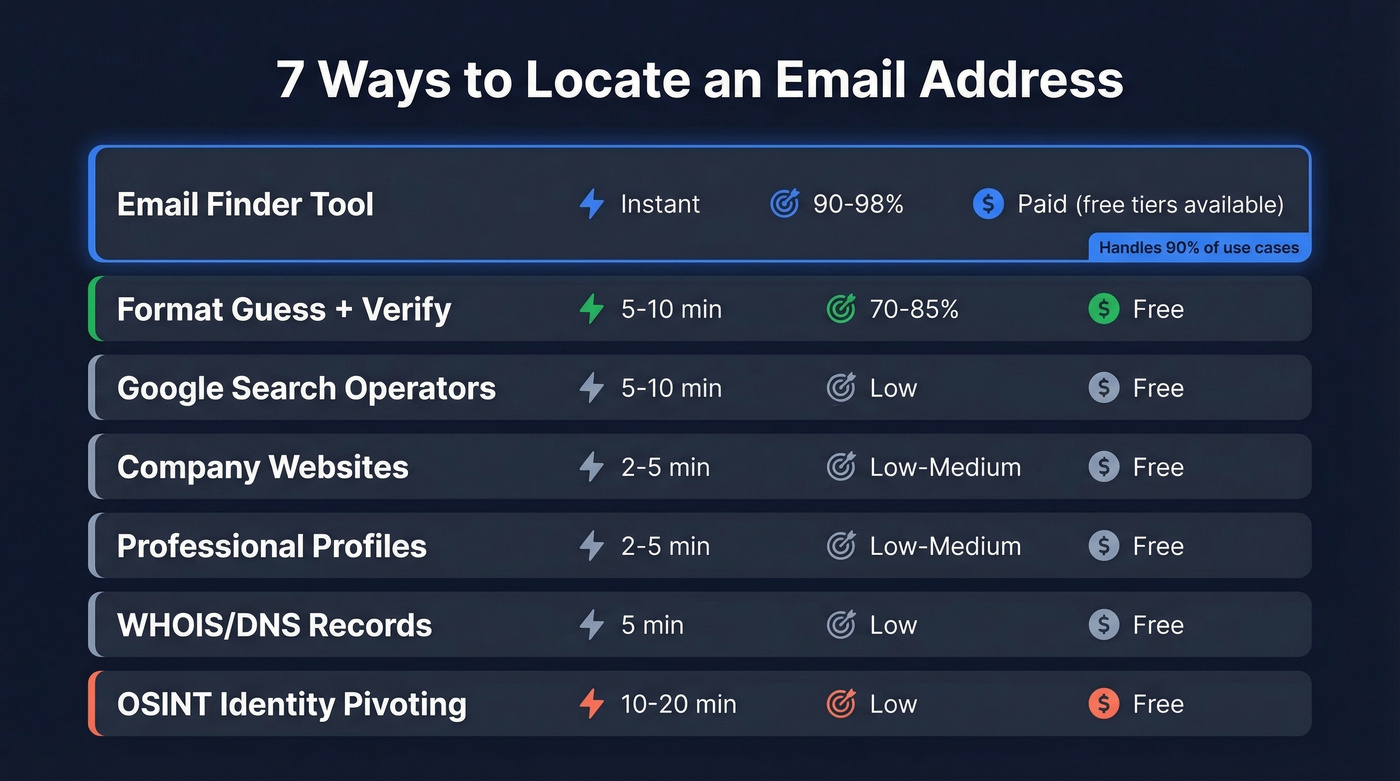
The first method handles 90% of use cases. The rest are fallbacks for when the finder comes up empty or you're working without a budget.
Use an Email Finder Tool
This is the default for anyone doing outreach at scale. You enter a name and company, the tool finds or deduces likely emails, and you verify the result before sending.
But accuracy varies wildly. A 100-contact benchmark test by Saleshandy showed results ranging from 79% to 98% depending on the provider. That 19-point spread is the difference between a clean campaign and a domain reputation crisis. We've tested most of these ourselves, and the gaps are real.

Prospeo
Prospeo pulls from 300M+ professional profiles and runs every result through a proprietary 5-step verification process - syntax checks, DNS/MX lookups, SMTP handshake, catch-all handling, and spam-trap removal. The platform delivers 98% email accuracy. Because Prospeo runs its own email-finding infrastructure with no reliance on third-party data providers, data refreshes every 7 days compared to the 6-week industry average. That freshness gap matters: job changes and domain migrations make stale data the #1 source of bounces.
Pricing runs about $0.01 per email on paid plans, with a free tier of 75 verified emails per month. No contracts, no sales calls. Meritt saw their bounce rate drop from 35% to under 4% after switching, and their pipeline tripled from $100K to $300K per week.
Hunter.io
Use this if: You need domain-level search (find all emails at a company) plus a built-in verification layer.
Skip this if: You need a large primary database. Hunter's index is smaller than it looks, and agency operators on r/agency consistently describe it as better for verification than discovery.
Hunter hit 90% accuracy in the Saleshandy benchmark. Starter plans run $34/mo with 2,000 searches, and you get 50 free searches per month.

Apollo.io
Apollo's the volume play. The database covers 275M+ contacts, and the free tier gives you roughly 100 credits per month - the most generous in the space. Accuracy came in at 91% in benchmark testing, and paid plans start at $49/user/mo.
Here's the thing: big database doesn't mean accurate database. The Reddit consensus on Apollo is that data "feels bad sometimes," especially on older contacts. Apollo works best when you pair it with a separate verification step - don't trust it blindly.
Skrapp.io
At $37/mo billed annually with 100 free credits, Skrapp hit 93% accuracy in benchmarks - punching above its price point. It's a solid pick if you're cost-conscious and don't need a massive database. Skip it if you need advanced automation workflows or coverage beyond a few million contacts. Skrapp is a specialist, not a Swiss Army knife.
Snov.io
Reddit practitioners consistently flag Snov as the strongest pick for non-US outreach, and that tracks with its international database coverage. At $39/mo it's affordable, though accuracy came in at 79% in the Saleshandy benchmark - the lowest in our comparison set. If your prospects are primarily in the US, other tools will serve you better. Selling into EMEA or APAC? Snov deserves a look.

Tool Comparison
| Tool | Accuracy | Starting Price | Free Tier | Best For |
|---|---|---|---|---|
| Prospeo | 98% | ~$0.01/email | 75 emails/mo | Verified accuracy, self-serve teams |
| Hunter | 90% | $34/mo | 50/mo | Domain search |
| Apollo | 91% | $49/user/mo | ~100/mo | Volume + free tier |
| Skrapp | 93% | $37/mo | 100/mo | Budget-friendly |
| Snov | 79% | $39/mo | Trial | International leads |
| Lusha | - | ~$22/user/mo | Free plan | Quick lookups |
| UpLead | 95% | $74/mo | 5 credits | US B2B data |
| RocketReach | 83% | $249/user/mo | Trial | Enterprise teams |
| Cognism | - | Custom (enterprise) | Demo only | EU/UK data |
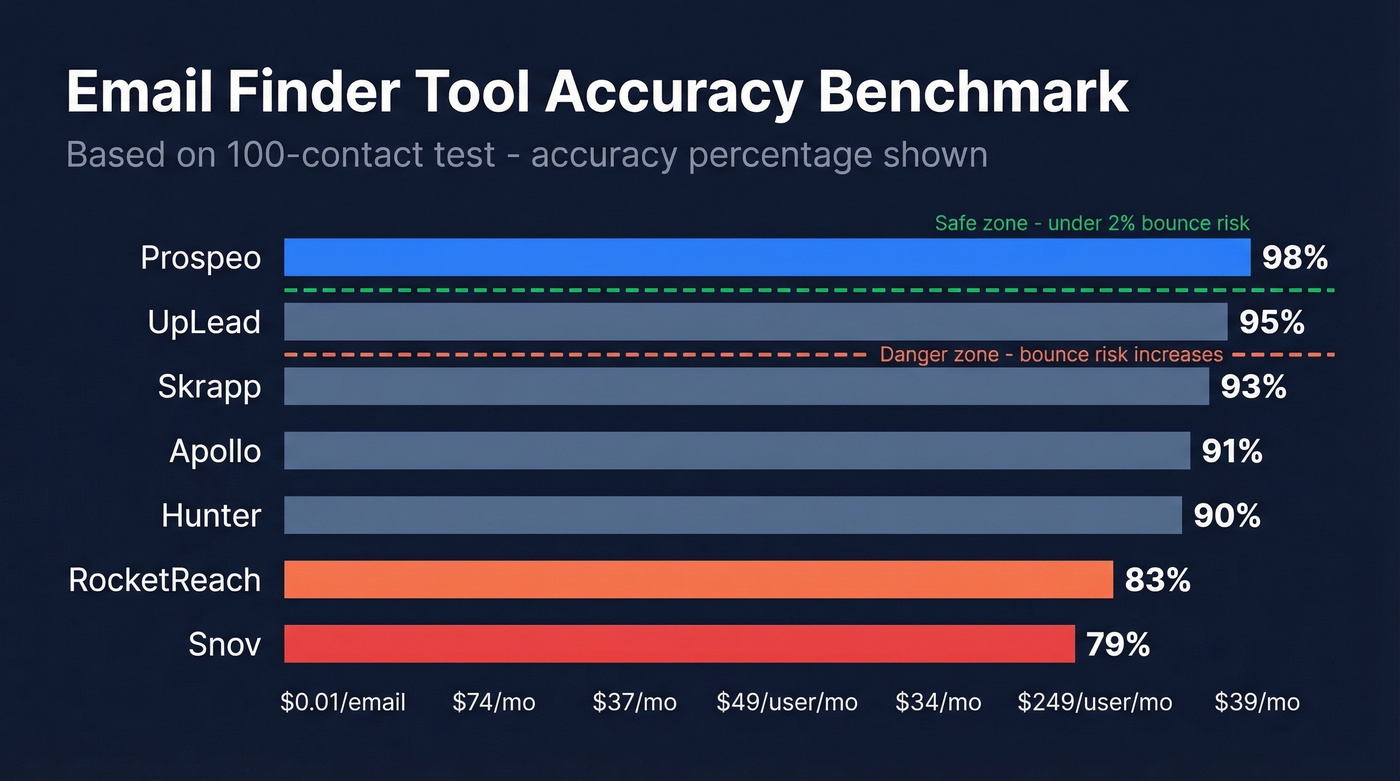
Let's be honest: if you have to "book a demo" to learn what something costs, budget for sticker shock. The tools worth using publish their pricing.
You don't need five email finder tools. You need one good finder and one verification step. The "stack five tools" advice is how agencies end up spending $500/month on data that still bounces.
Guess the Format and Verify
When a finder tool comes up empty, you can reverse-engineer the email yourself. Corporate email formats are surprisingly predictable - and a dataset of over 5 million companies from Interseller proves it.
Pattern Prevalence by Company Size
| Pattern | Overall | 1-10 Employees | 51-200 | 10,001+ |
|---|---|---|---|---|
| {first} | 61% | 71% | - | - |
| {f}{last} | 14.5% | - | 42% | 22% |
| {first}.{last} | 13.5% | - | 30% | 56% |
| {first}{last} | 4% | - | - | - |
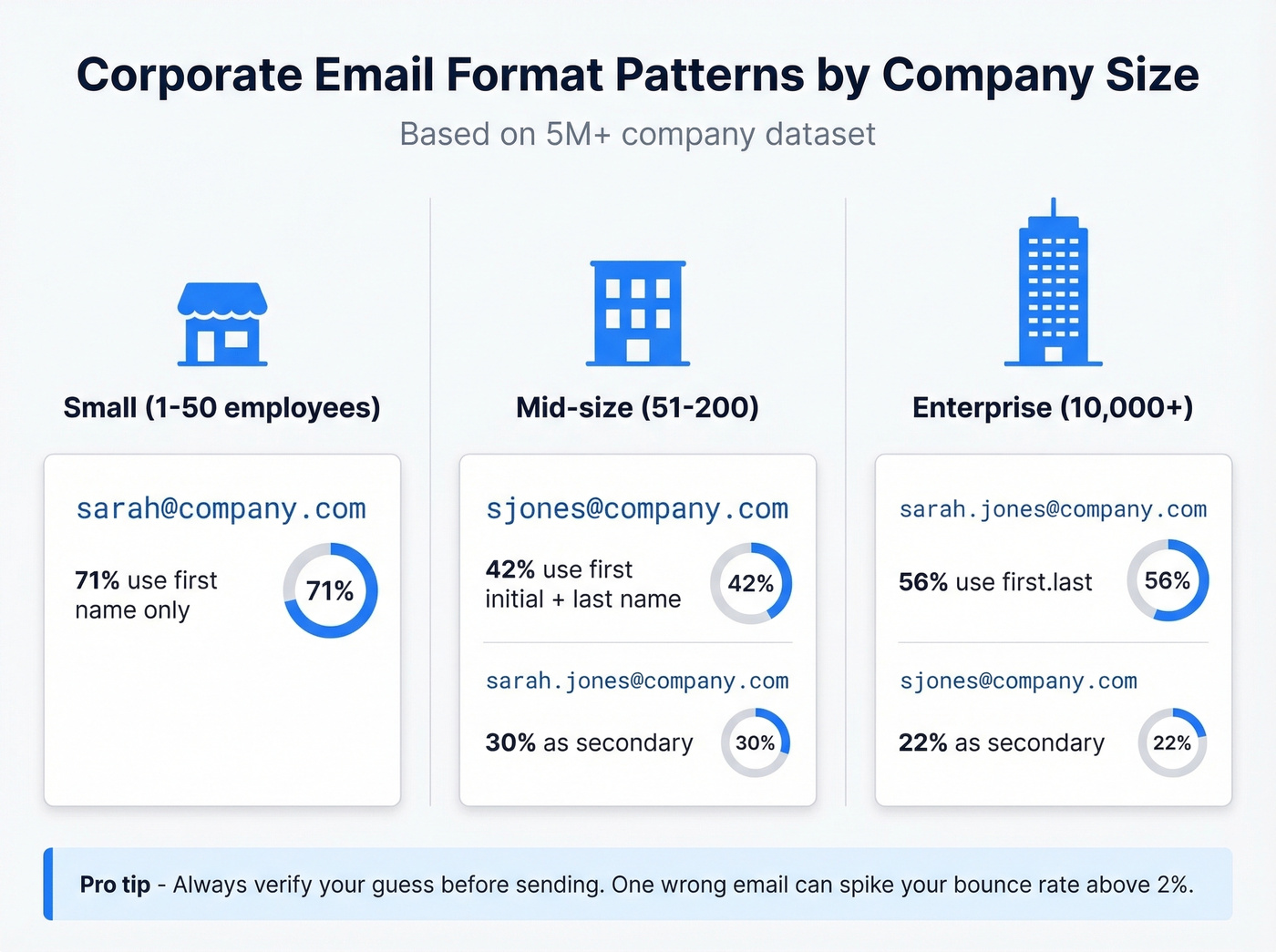
Small companies overwhelmingly use first-name-only formats (sarah@company.com). Mid-size companies lean toward first-initial-last-name (sjones@company.com). Enterprises almost always use first.last (sarah.jones@company.com). In our experience, this pattern holds up remarkably well across industries.
The Three-Step Workflow
Step 1: Identify the likely format. Targeting a 5,000-person company? Start with {first}.{last}@domain.com. For a 10-person startup, try {first}@domain.com first.
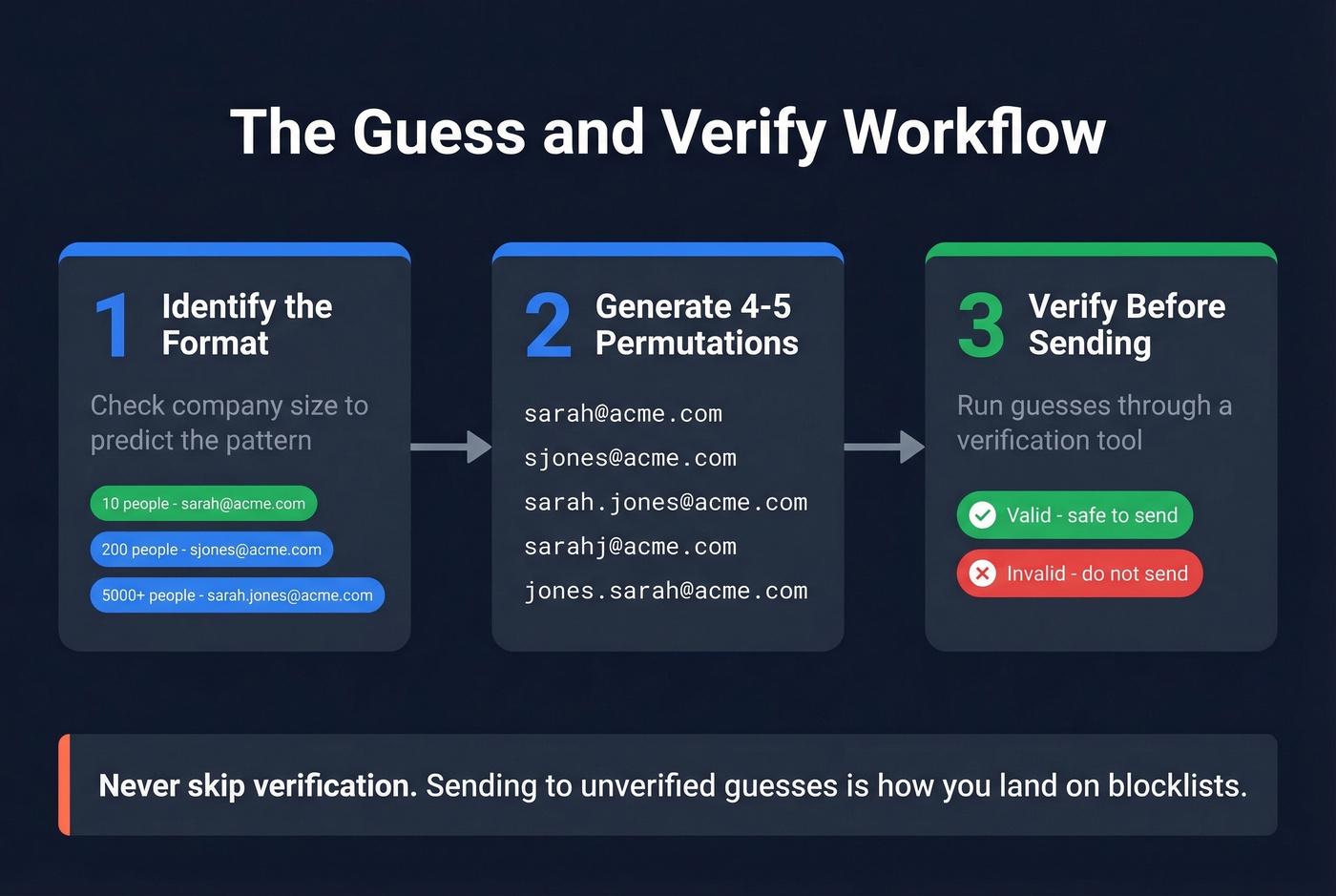
Step 2: Generate 4-5 permutations. For "Sarah Jones" at Acme Corp, that's sarah@acme.com, sjones@acme.com, sarah.jones@acme.com, sarahj@acme.com, and jones.sarah@acme.com.
Step 3: Verify before sending. Run your best guesses through a free verification tool. Most finder tools offer free validation tiers - never skip this step. Sending to an unverified guess is how you land on blocklists.
Google Search Operators
Google indexes more email addresses than you'd expect - in press releases, conference speaker pages, PDF whitepapers, and old blog posts. These queries are a solid free starting point when you're trying to track down a specific person's contact details.
Find emails on a company domain:
site:acme.com "Sarah Jones" email
Find a specific email format:
"Sarah Jones" "@acme.com"
Search documents and PDFs:
"Sarah Jones" email OR contact filetype:pdf
Cast a wider net:
"Sarah Jones" "acme" email -site:linkedin.com
These queries work best for executives, speakers, and authors who've been quoted or published. For rank-and-file employees, you'll rarely find anything. Treat Google operators as a supplement, not a primary method.

You just read that email accuracy across tools ranges from 79% to 98%. That gap destroys sender domains. Prospeo sits at the top - 98% accuracy from a proprietary 5-step verification process, refreshed every 7 days.
Locate any email address for $0.01 - start with 75 free.
Check Websites and Profiles
Before firing up any tool, spend two minutes checking the obvious places. Company About and Team pages frequently list email addresses for leadership - especially at startups where accessibility is part of the brand. Blog author bios sometimes include a direct email. Press releases almost always have a media contact.
Some professional profiles show email addresses in the Contact info section - check there first. Conference speaker pages and podcast guest bios are underrated sources too. Speakers want to be reachable. When you're looking up someone in a public-facing role, these pages often deliver faster than any paid tool.
Advanced Manual Tactics
When standard methods fail, these OSINT-style techniques can surface an address through indirect paths. They're especially useful for locating an email address that isn't indexed by major finder tools.
WHOIS domain records. For small companies where the founder registered the domain, a WHOIS lookup can reveal their business email. Privacy protection has reduced reliability, but it's worth a 30-second check.
Newsletter signup trick. Subscribe to the target company's newsletter. The reply-to header often reveals the email format - marketing@acme.com tells you less than sarah.jones@acme.com in the reply-to field.
Identity pivoting. Use a tool like idcrawl.com to search usernames across platforms. People reuse handles - finding someone's GitHub or personal site can surface a work email.
Wayback Machine. Deleted team pages and old company websites often live on in web archives. If someone scrubbed their email from the current site, an older cached version might still have it. I've personally found emails this way that no tool could surface.

Why Verification Matters
Finding an email is half the job. Verifying it protects your domain.
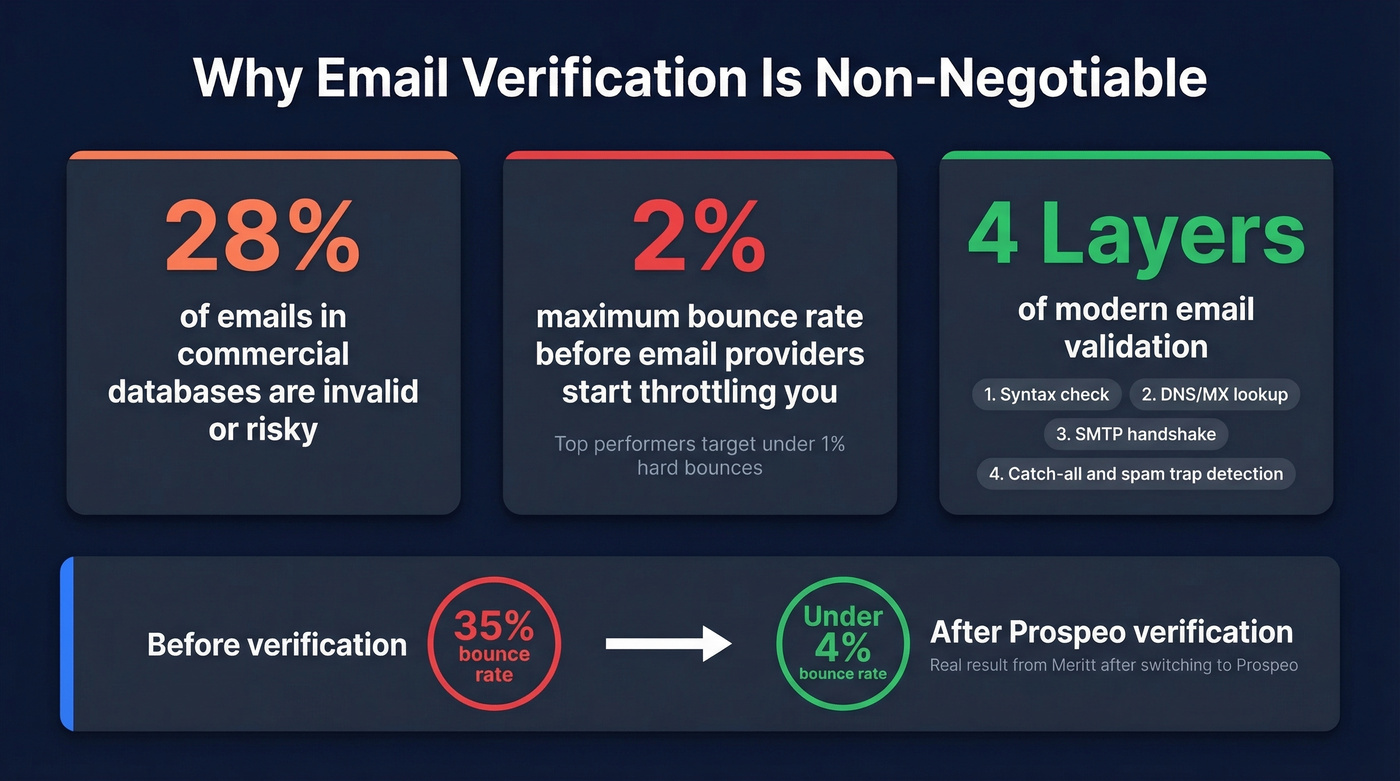
Remember that 28% invalid/risky stat from earlier? That's why the industry benchmark is clear: keep total bounces below 2%, with top performers targeting hard bounces under 1%. Exceed that threshold and email providers start throttling your inbox placement - or blocking you entirely. We've seen teams lose months of sender reputation from a single unverified batch send.
Modern email validation runs through four layers. Syntax checks catch formatting errors like missing @ symbols. DNS/MX lookups confirm the domain exists and has mail servers configured. The SMTP handshake is where real validation happens - the tool connects to the mail server and issues a RCPT TO command, essentially asking "does this mailbox exist?" before disconnecting without sending anything. Finally, catch-all and disposable filtering handles the trickiest cases: catch-all domains accept mail to any address (even fake ones), and disposable services like Mailinator indicate throwaway addresses. Both get flagged as "risky."
Guessing formats and running manual permutations works - until it doesn't. Prospeo searches 300M+ profiles and verifies every result before you see it. No third-party data providers, no stale records, no bounces.
Skip the scavenger hunt. Get verified emails in seconds.
Legal Compliance Checklist
Locating an email address is legal. Sending unsolicited email to it requires following specific rules depending on where your recipient sits.
US: CAN-SPAM
CAN-SPAM allows unsolicited commercial email as long as you play by the rules: use an accurate "From" name and address, avoid deceptive subject lines, include a working unsubscribe mechanism, honor opt-outs within 10 business days, and include a valid physical mailing address.
EU: GDPR + ePrivacy
GDPR is stricter. You need legitimate interest or consent before emailing, must clearly identify yourself and how you obtained their information, provide an easy opt-out, include your postal address, and have a Data Processing Agreement with any tools handling EU data. Document your legitimate interest assessment.
The practical rule: targeted, relevant outreach to business addresses is fine in both jurisdictions. Mass blasts to scraped lists are where you get into trouble. If you can't articulate why this specific person would benefit from your email, don't send it.
If you're building lists at scale, use a repeatable lead generation workflow and keep your email deliverability fundamentals tight.
FAQ
Can I find someone's email for free?
Yes. Google operators, company websites, and professional profiles cost nothing. Most finder tools also offer free tiers - Prospeo gives 75 verified emails per month, Hunter offers 50 searches. Free methods are slower but work perfectly for one-off lookups.
How do I verify an email without sending a message?
Use a verification tool that runs syntax checks, DNS/MX lookups, and an SMTP handshake - stopping before actually delivering a message. This confirms whether the mailbox exists without triggering a bounce or alerting the recipient.
What's a catch-all domain and why does it matter?
A catch-all domain accepts mail sent to any address at that domain, even completely fake ones. Verification tools can't confirm individual mailboxes on catch-all domains, so results get marked "risky." Send to these addresses cautiously and in small batches to protect deliverability.
How accurate are email finder tools in 2026?
Accuracy ranges from 79% to 98% depending on the provider, based on a 100-contact benchmark test. The gap is significant - always verify before sending, even with top-tier tools, because some invalid results slip through at scale.
Is cold emailing someone whose address I found online legal?
In the US, yes - CAN-SPAM allows it if you include an unsubscribe link, physical address, and honest subject line. In the EU, GDPR requires legitimate interest or consent. Keep outreach targeted, relevant, and easy to opt out of.