

Mail Merge in Salesforce Is (Mostly) Dead - Here's What to Use in 2026
Your sales manager wants 200 personalized renewal letters pulled straight from Salesforce. You search for "mail merge Salesforce," and every result points to Help articles referencing Connect for Office and Standard Mail Merge - both retired years ago. You click through three more links. One redirects to Classic-only documentation. Another describes a feature that requires an add-in Salesforce discontinued. The third is a community post from 2019 with no accepted answer.
The feature you're looking for barely exists anymore. But the need hasn't gone anywhere, and here's what most guides won't tell you: the alternatives are genuinely better than what Salesforce took away. Native mail merge was always clunky - limited objects, Word dependency, Classic-only workflows. The modern stack of Lightning templates, AppExchange doc-gen tools, and verified CRM data gives you more control, better output, and fewer broken merges.
What You Need (Quick Version)
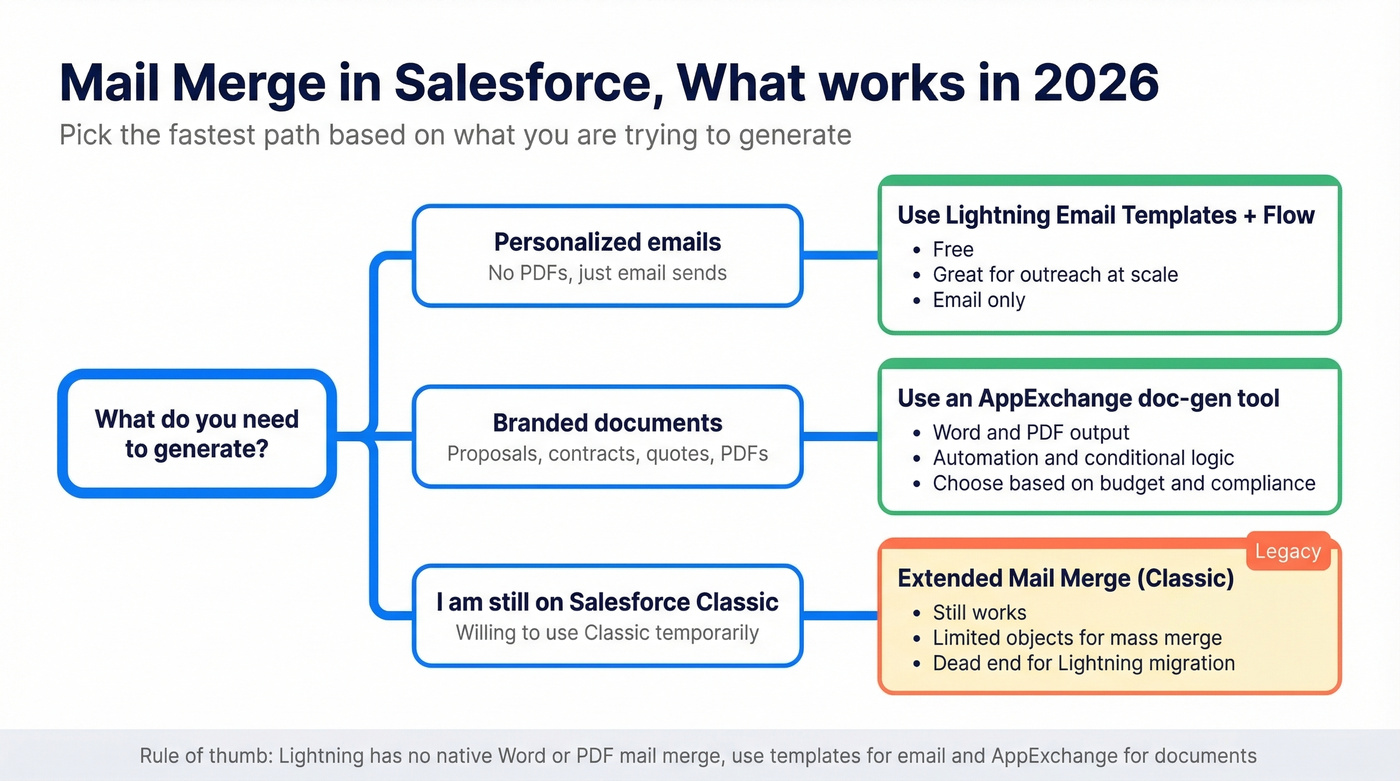
| What You're Trying to Do | Best Path |
|---|---|
| Personalized emails (free) | Lightning Email Templates + Flow |
| Branded proposals or contracts | AppExchange doc-gen tool |
| Budget-friendly doc generation | Docomotion ($10/user/mo) or Titan ($12/user/mo) |
| Enterprise doc automation | Conga Composer or S-Docs |
What Salesforce Has Deprecated
Salesforce has been quietly dismantling its native merge capabilities for years. Here's the timeline that matters.
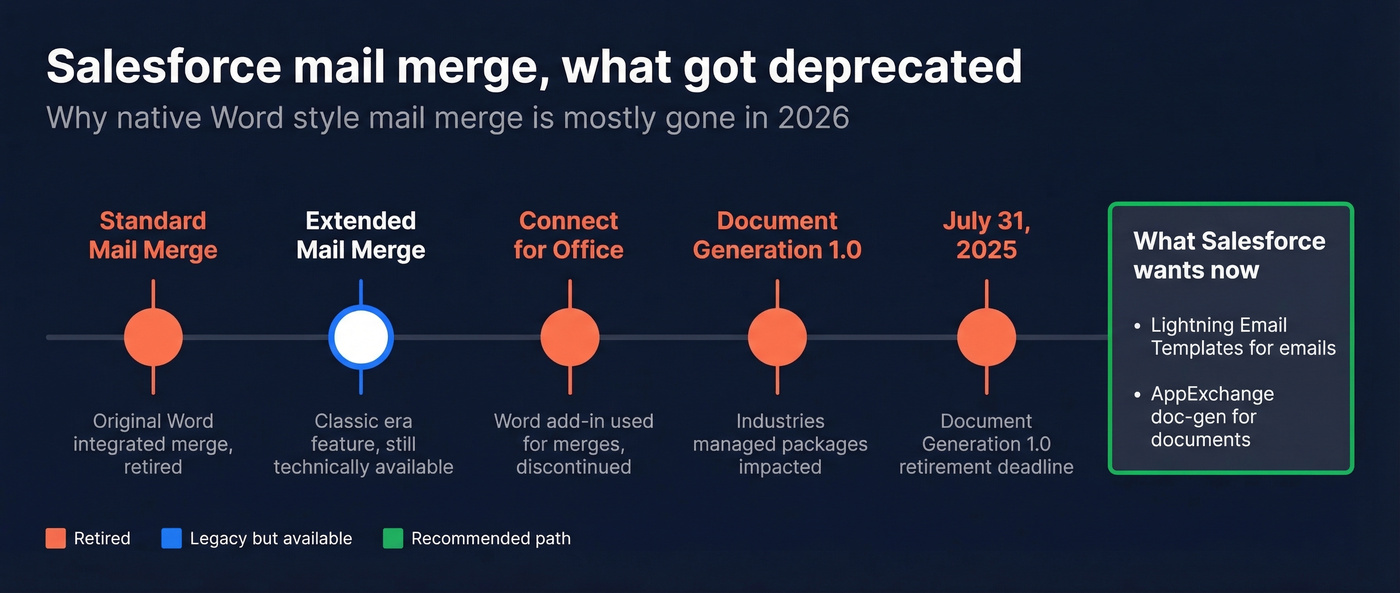
Standard Mail Merge - the original Word-integrated merge - is retired. Extended Mail Merge is the Classic-era option that still technically exists. Connect for Office, the add-in that let you merge from Word directly, is gone. And Document Generation 1.0, which impacted teams using Industries managed packages like CME, Insurance, Vlocity Government, and OmniStudio, was retired on July 31, 2025. If you haven't upgraded to the Spring '25 managed package versions, you're past the deadline and need to migrate now.
The trajectory is unmistakable: Salesforce wants you on Lightning, and Lightning doesn't have a native merge feature. The replacement strategy is Lightning Email Templates for simple personalized emails and AppExchange tools for everything else.
One Salesforce admin on Reddit described maintaining roughly 20 quote templates across languages, each requiring manual deployment because Salesforce Quote Templates aren't treated as metadata. That's the kind of operational debt that accumulates silently - and it's exactly the pain that pushes teams toward dedicated AppExchange tools.
The frustrating part? Searching Salesforce Help for "mail merge" still returns pages referencing features that no longer exist or redirect to Classic-only documentation. It's a maze of dead ends.
Classic Mail Merge (Still Works)
If you're still running Salesforce Classic - or willing to route users there temporarily - Extended Mail Merge is technically alive.
Setup path: Go to Setup, then User Interface, then Enable Extended Mail Merge. Once enabled, users launch single merges from a record's Activity History via the Mail Merge button.
Here's the quirk most people don't expect: Word doesn't open when you hit Generate. Salesforce emails the output as an attachment or posts it to the Documents tab. It's not the "click and Word pops up" experience people remember from older CRMs. In our experience, this disconnect causes more confusion than any other aspect of the feature.
Mass Mail Merge adds a wizard for bulk operations, but it's limited to Accounts, Contacts, and Leads. You pick a list view, select records, choose your output type - documents, envelopes, or labels - and assign templates. If your request exceeds the max size, Salesforce prompts you to reduce the record count or simplify your template.
Use this if you're on Classic, need occasional document output for a small team, and don't want to pay for an AppExchange tool. It works, and it's free.
Skip this if you're on Lightning or planning to migrate. Your merge workflow doesn't come with you - there's no equivalent feature, no migration path, and no workaround that doesn't involve switching back to Classic via a custom button. That's a dead end.

Mail merge breaks when your CRM data is stale. Prospeo enriches your Salesforce contacts with 50+ verified data points per record - 98% email accuracy, 7-day refresh cycle, and an 83% match rate on bulk enrichment. No more broken merge fields or bounced emails from outdated records.
Fix your Salesforce data before you merge another document.
Lightning Email Templates + Flow
For teams that primarily need personalized emails - not Word documents or PDFs - Lightning has a workable solution that costs nothing extra. It won't generate contracts or branded proposals, but it handles the "personalized outreach at scale" use case that most people actually mean when they search for Salesforce merge solutions.
If you're doing this for outbound, pair it with a proper email workflow so templates, triggers, and follow-ups don't sprawl.
How Merge Fields Work
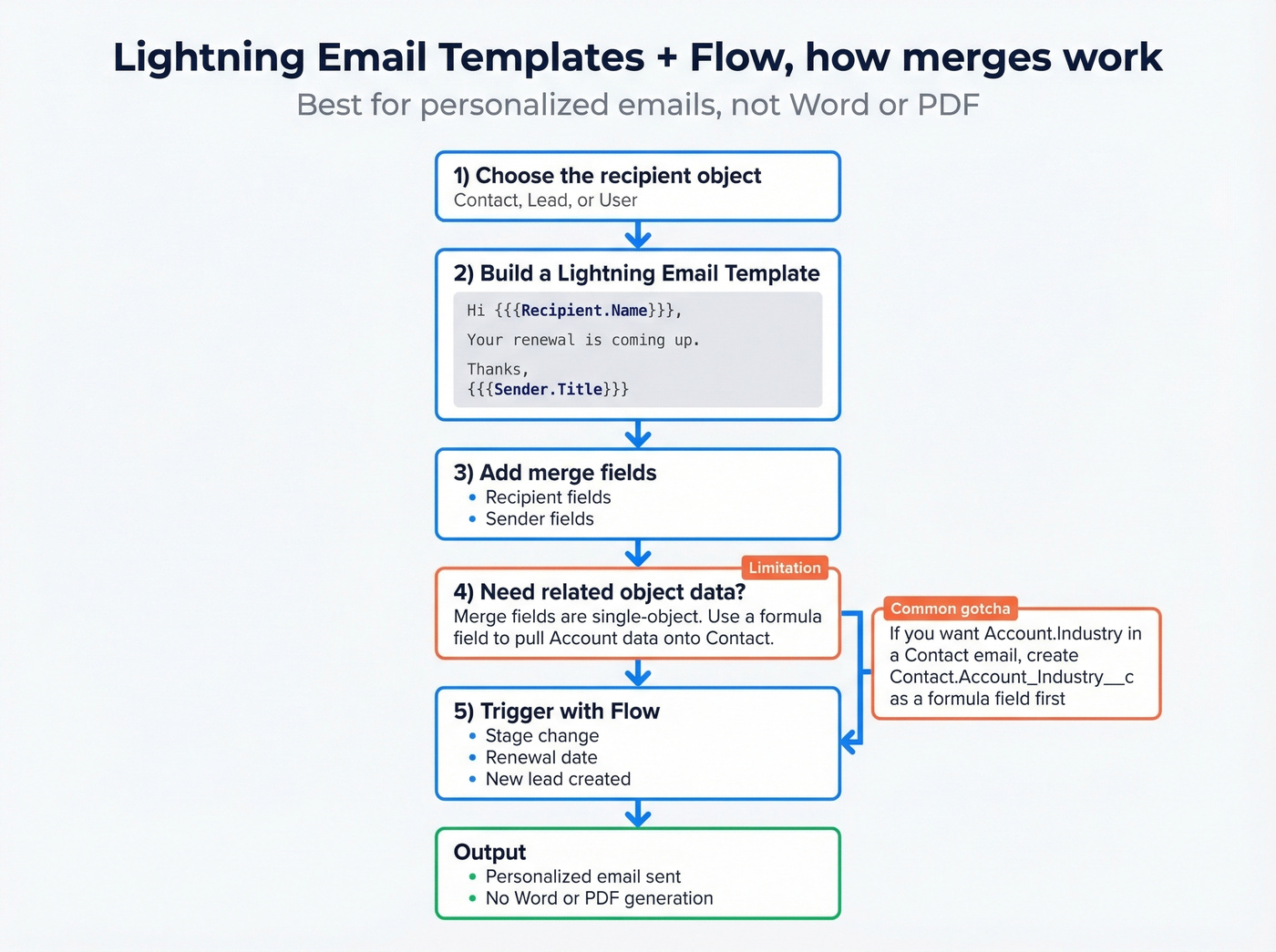
Lightning Email Templates use curly-brace syntax for merge fields: {{{Recipient.Name}}}, {{{Sender.Title}}}, and so on. You can reference fields from the recipient's record and the sender's profile, and Salesforce Ben's template guide walks through the builder in detail.
The catch is that merge fields are limited to a single object. If you need data from a related object - say, pulling the Account's industry onto a Contact email - you'll need to create a formula field on the Contact that references the parent Account. It's an extra step, but it works. Build the formula field, then reference it in your template like any other Contact field.
Limitations Worth Knowing
Cross-object constraints are real. Without formula fields as a bridge, you're stuck with single-object data. Even when you can reference related records, merge fields often don't give you everything you want from lookup relationships without surfacing it via formula fields first.
And there's no path to Word or PDF output. This is email only.
When This Is Enough
Let's be honest: most teams searching for Salesforce document merge don't actually need document generation. They need personalized email at scale. If that's you, stop here. Lightning Templates + Flow is the answer, and you don't need to spend a dime. Pair it with a Flow for triggered sends - welcome emails, renewal reminders, follow-ups based on stage changes - and you've got a solid automation layer without touching the AppExchange.
If you're sending sequences, it's worth aligning with email automation best practices and watching email pacing and sending limits so you don't trip deliverability issues.
AppExchange Doc-Gen Tools
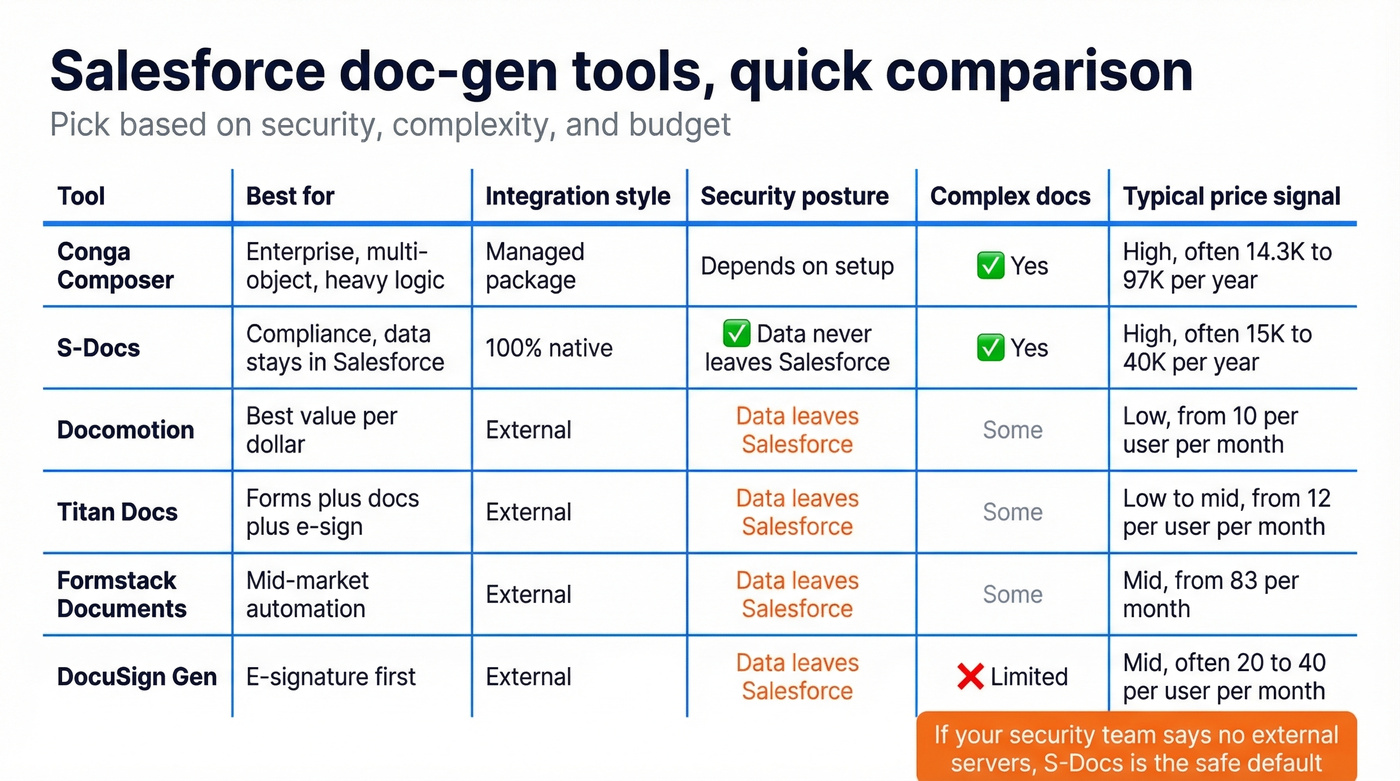
When you need actual documents - branded proposals, contracts, quotes, onboarding packets - you're in AppExchange territory. We've evaluated these tools across dozens of Salesforce orgs, and the right choice depends almost entirely on budget and complexity.
| Tool | Starting Price | Salesforce Integration | Best For | Output Formats |
|---|---|---|---|---|
| Conga Composer | ~$14.3K-$97K/yr | Managed package | Enterprise complex docs | Word, PDF, Excel, PPT, HTML |
| S-Docs | ~$15K-$40K/yr | 100% native | Security / compliance | Word, PDF, Excel |
| Docomotion | $10/user/mo | External | Budget-conscious teams | Word, PDF |
| Titan Docs | $12/user/mo (annual) | External | Broader platform needs | Word, PDF |
| Formstack Docs | $83/mo | External | Mid-market | Word, PDF |
| DocuSign Gen | ~$20-$40/user/mo | External | E-signature-first | Word, PDF |

Conga Composer
Conga is the 800-pound gorilla of Salesforce document generation. It supports Word, PDF, Excel, PowerPoint, and HTML output with deep conditional logic, report-driven mail merges, and complex multi-object data pulls. It's powerful. It's also complex, commonly starts around 10 users, and typically lands in the $14,300-$97,000/year range depending on your configuration.
Look - if you just need personalized emails or basic proposals, you're paying for a Ferrari to drive to the grocery store. Conga earns its price tag when you're generating hundreds of multi-object documents with conditional logic across business units. For anything simpler, it's overkill.
S-Docs: The Compliance Pick
S-Docs is the only option on this list that's 100% native to Salesforce - no external servers, period. Data never leaves the Salesforce environment, which makes it the default choice for teams with strict security or compliance requirements. If your infosec team won't approve data leaving Salesforce, S-Docs is your only serious option.
The tradeoff is a steeper learning curve on template creation. Pricing requires a sales conversation - expect roughly $15K-$40K/year based on org size. Multi-language support is solid, but building complex templates takes more effort than you'd expect.
Docomotion: Best Value Per Dollar
Here's what you get at each tier:
- Starter ($10/user/month) - Straightforward document generation: merge Salesforce data into Word or PDF templates with basic conditional logic.
- Gold ($20/user/month) - Adds more advanced template features and automation options.
- Platinum ($30/user/month) - Full feature set for teams with complex document workflows.
For most mid-market teams, Starter covers the job. It won't match Conga's depth on complex multi-object documents, but most teams don't need that depth - and the price difference is staggering.
Titan, Formstack, DocuSign Gen
Titan Docs is really a broader platform spanning forms, surveys, and e-signatures that happens to include doc generation. At $12/user/month billed annually or $17 monthly, it hooks into Flow, Process Builder, and Apex for automation and supports RTL languages like Arabic and Hebrew. Skip Titan if document generation is your primary need - you'll pay for platform features you never touch.
Formstack Documents is a solid mid-market option at $83/month for teams that need document automation without Conga-level complexity or pricing.
DocuSign Gen makes sense when e-signature is the primary driver and document generation is secondary. At roughly $20-$40/user/month with Word and PDF output only, it's a natural add-on if you're already in the DocuSign ecosystem.
Your Data Is the Real Bottleneck
Here's the thing nobody talks about when evaluating merge tools: the output is only as good as the data feeding it. If 15% of your contact emails are wrong, your beautifully formatted proposal lands in a dead inbox. Stale phone numbers make your merged call sheets useless.
This is also why teams that care about deliverability obsess over quality email lists and run a quick audit with a free email verifier online before any big send.
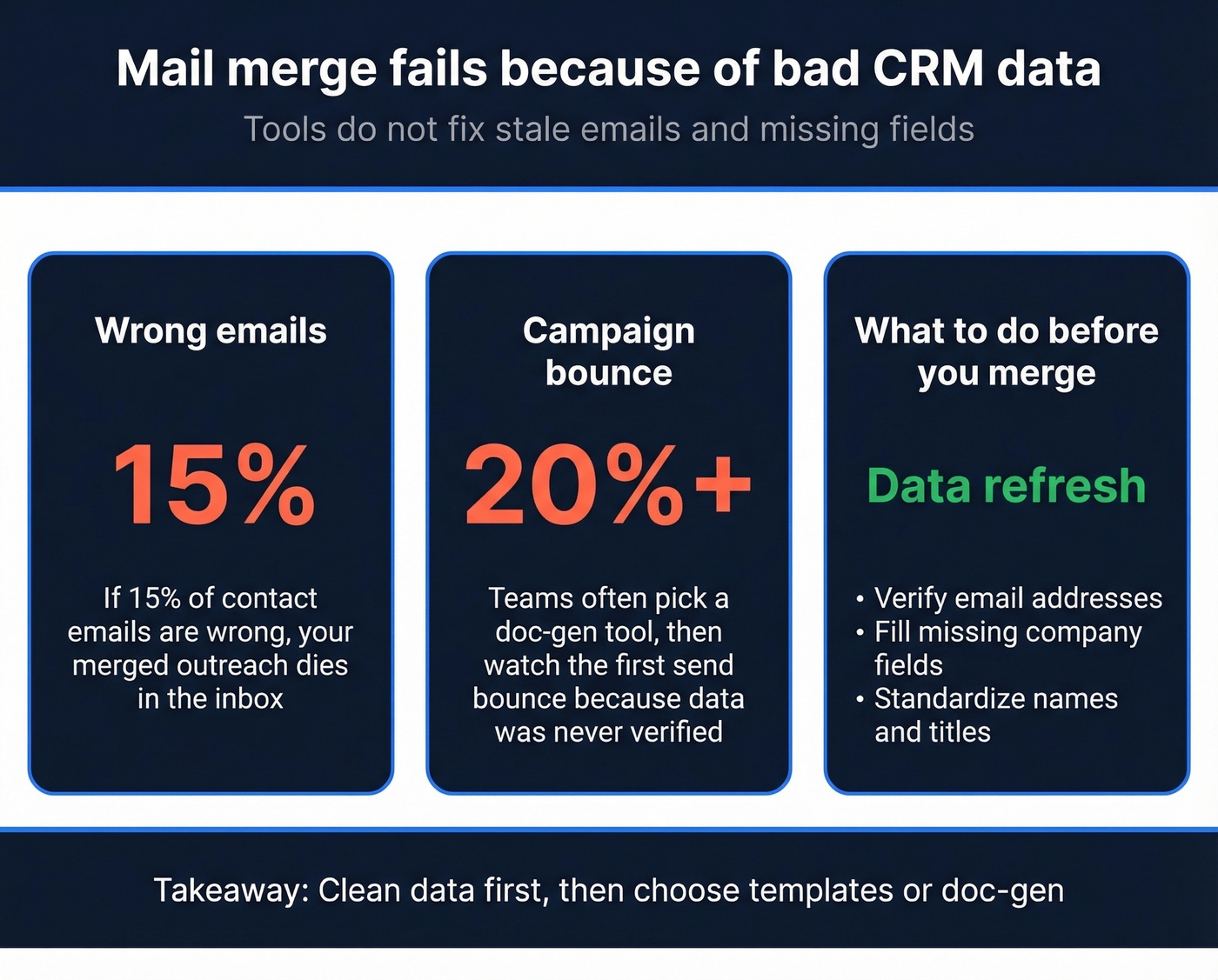
We've seen teams invest weeks choosing the perfect doc-gen tool, then watch their first campaign bounce at 20%+ because nobody verified the underlying data. That's not a tool problem. It's a data problem, and it's the one that actually kills campaigns.
Prospeo's native Salesforce integration addresses this directly - enrich and verify contacts inside your CRM before you run any merge. With 98% email accuracy, an 83% enrichment match rate, and a 7-day data refresh cycle, it catches stale records before they become bounced emails. The free tier covers 75 email verifications per month, enough to audit a segment before a major send.

You're building Lightning templates and Flows to send personalized emails at scale - but every merge field that pulls a blank or outdated email tanks your deliverability. Prospeo's native Salesforce integration fills those gaps automatically. 143M+ verified emails, 92% API match rate, $0.01 per lead.
Every merge field deserves verified data behind it.
Picking the Right Path
Personalized emails only? Lightning Email Templates + Flow. Free, native, handles 80% of use cases.
Branded documents like proposals, contracts, or quotes? Pick a doc-gen tool based on budget. Docomotion for under $15/user/month, Conga or S-Docs for enterprise complexity.
E-signature-first workflow? DocuSign Gen, especially if you're already paying for DocuSign.
Still on Classic with light needs? Extended Mail Merge works today, but plan your migration. Salesforce isn't investing in Classic.
A $10/user/month doc-gen tool paired with verified data outperforms a $50K/year platform running on stale records. We've seen 20%+ bounce rates from teams using Conga with unverified contact lists - the tool wasn't the bottleneck, the data was.
If your real goal is outreach (not PDFs), you'll get more leverage from cold email automation tools and a clean cold email sequence than from any Word merge workflow.
FAQ
Does Salesforce Lightning support mail merge?
No - there's no native mail merge in Lightning. Extended Mail Merge is Classic-only with no migration path. For personalized emails, use Lightning Email Templates with Flow. For document generation, you need an AppExchange tool like Docomotion, S-Docs, or Conga Composer.
What's the cheapest Salesforce document generation tool?
Docomotion starts at $10/user/month. Titan Docs runs $12/user/month billed annually. For email-only personalization, Lightning Email Templates with Flow cost nothing beyond your existing Salesforce license.
How do I verify contact data before running a merge?
Use a verification tool to validate emails and enrich records directly in Salesforce before any merge. Prospeo's native Salesforce integration delivers 98% email accuracy with a 7-day refresh cycle, flagging stale records before they tank your campaign. The free tier covers 75 verifications per month.
Is Salesforce Document Generation 1.0 still available?
No. Document Generation 1.0 was retired on July 31, 2025, primarily impacting teams on Industries managed packages - CME, Insurance, Vlocity Government, and OmniStudio. If you haven't upgraded to the Spring '25 managed package versions, you need to migrate immediately.
Can I use mass mail merge in Salesforce?
Mass Mail Merge in Classic supports Accounts, Contacts, and Leads only, with record-count limits that vary by template complexity. For modern bulk email, Lightning Email Templates with list views or Flow-triggered sends are more reliable and don't require switching to Classic. Daily send limits range from hundreds to a few thousand depending on your edition.