

The Complete Guide to Email Workflows: Strategy, Examples & Tools for 2026
Every guide on email workflows tells you to "personalize your emails" without mentioning that personalization is impossible when half your contact data is wrong. That's the gap nobody talks about - the upstream data problem that makes beautifully designed automations land in spam folders or bounce entirely. Let's fix that, starting with what actually matters: clean data, smart triggers, and three workflows instead of fifteen.
What Is an Email Workflow?
An email workflow is a sequence of automated emails triggered by a specific action or condition, then guided by logic until it reaches a defined goal. Think of it as a decision tree that runs while you sleep.
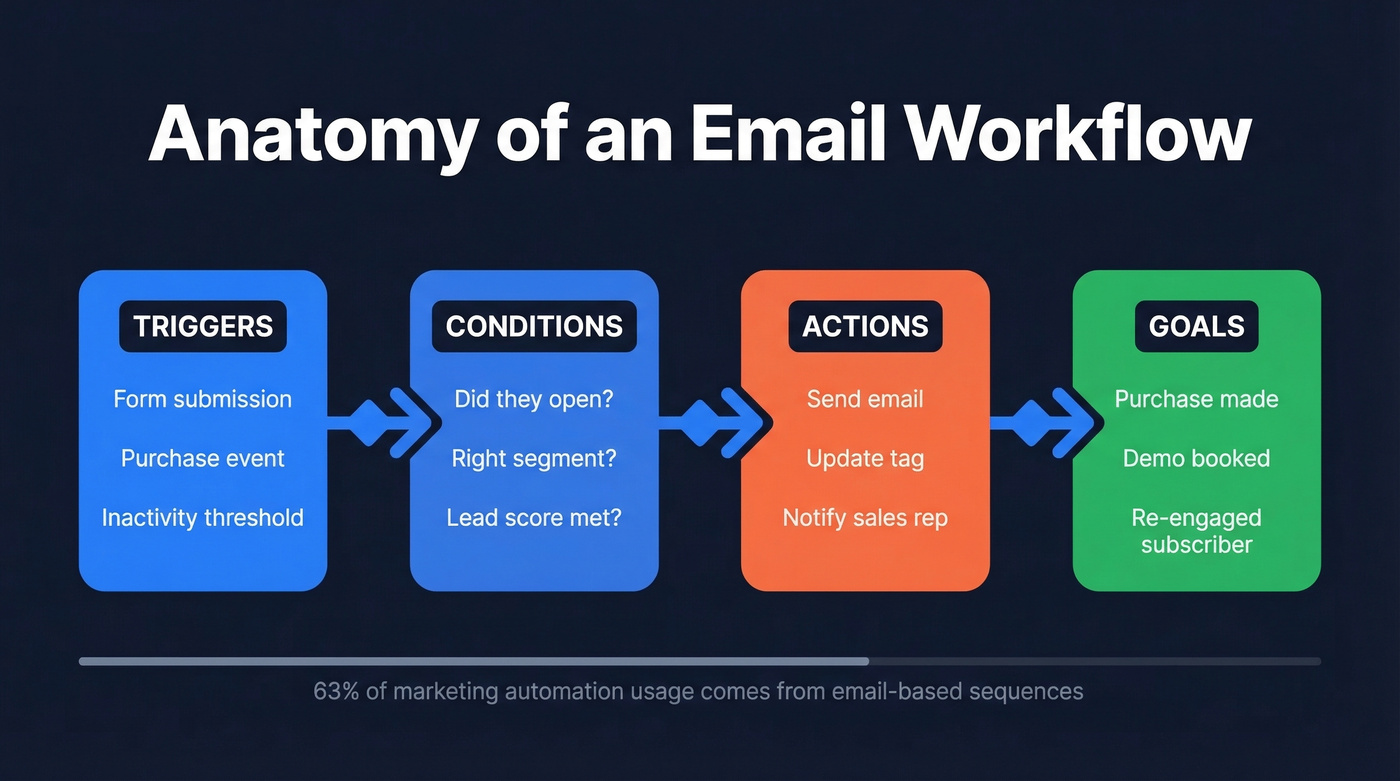
The anatomy breaks down into four components. Triggers start the sequence - a form submission, a purchase, a period of inactivity. Conditions filter who moves forward: did they open the last email? Are they in the right segment? Actions are what happens next - send an email, update a tag, notify a rep. And goals define the exit - a purchase, a booked demo, a re-engaged subscriber.
63% of marketing automation usage comes from email-based sequences. They're the backbone of the stack, not a nice-to-have.
Why Workflows Beat Manual Campaigns
The performance gap between triggered automations and manual blasts isn't subtle. Triggered emails generate $0.95 in revenue per send versus $0.04 for batch-and-blast campaigns](https://encharge.io/automated-email-templates/) - a 24x difference. They also see 47% higher open rates than autoresponders and 115% higher open rates than newsletters.
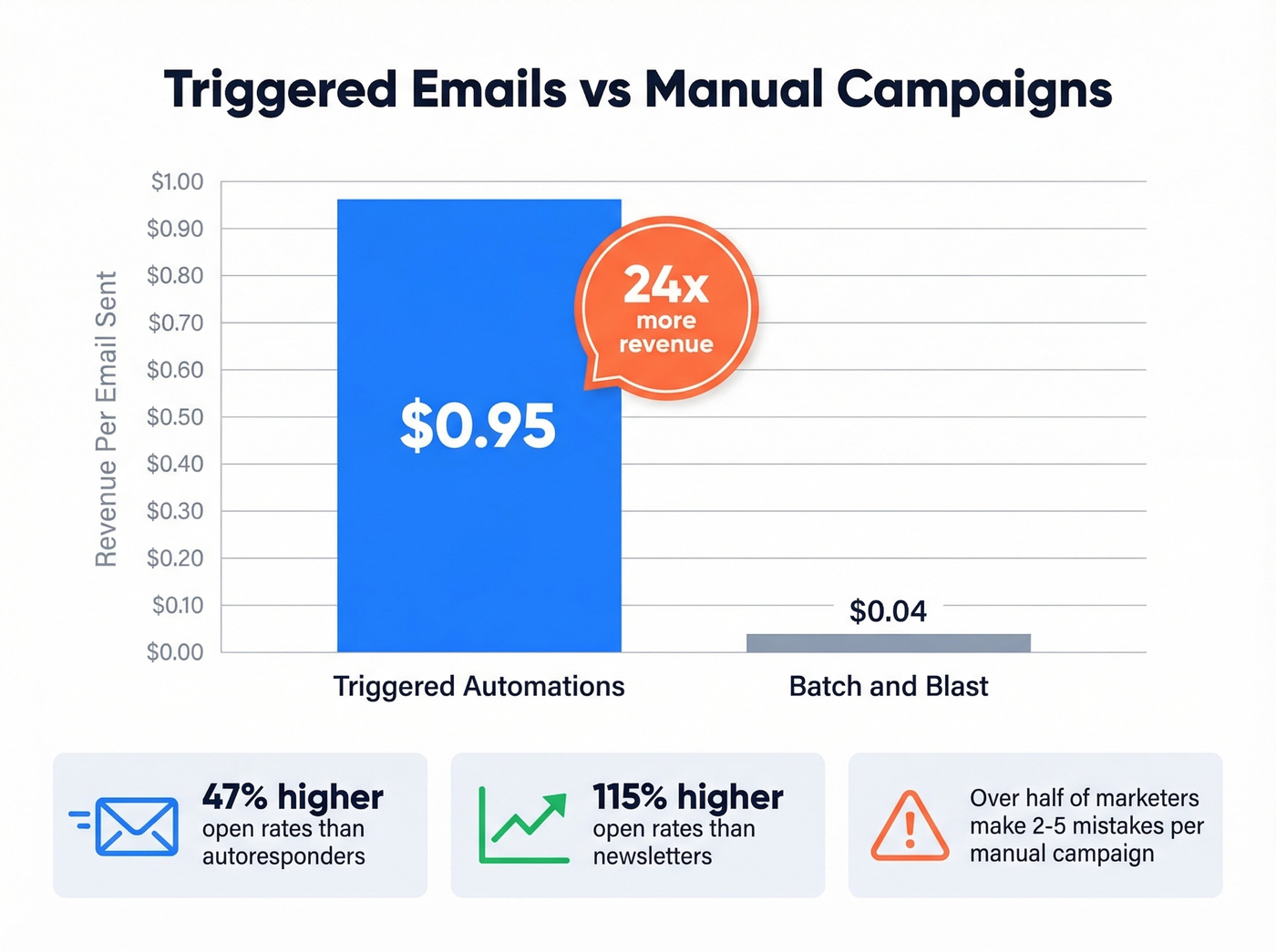
Why? Relevance and timing. A welcome email that fires the moment someone subscribes catches them at peak interest. A cart abandonment email sent within an hour hits while the purchase intent is still warm. Manual campaigns arrive on your schedule, not the recipient's.
There's an operational argument too. We've seen SaaS marketing teams burn entire quarters on manual segmentation, scheduling, and send management - and more than half of marketers admit to making 2-5 mistakes per campaign when doing it by hand. Email sequence automation reclaims that time and eliminates the human errors: wrong segments, broken links, duplicate sends.
Quick ROI formula worth bookmarking: ROI = (Revenue Gained - Workflow Cost) / Workflow Cost x 100. Run this quarterly on every active sequence. If a workflow can't justify its existence with this math, kill it.
What You Need (Quick Version)
You don't need 15 workflows. You need three that work, plus clean data underneath them.
- Three workflows capture 80% of the value: a welcome series, one conversion flow (cart abandonment for ecommerce, lead nurture for B2B), and a re-engagement sequence. Start there. Add complexity later.
- Verify your contact data before you automate anything. High bounce rates tank your sender reputation. Run your list through a verification tool first - this step is non-negotiable. (If you want deeper benchmarks and fixes, see bounce rates.)
- Your tool stack is two things: one automation platform and one data quality tool. That's it.
Email Workflow Examples That Convert
Welcome Series
One of the highest-performing emails you'll ever send is the first one. Welcome emails average a 50% open rate. The window matters: 74% of subscribers expect a welcome email immediately after signing up.
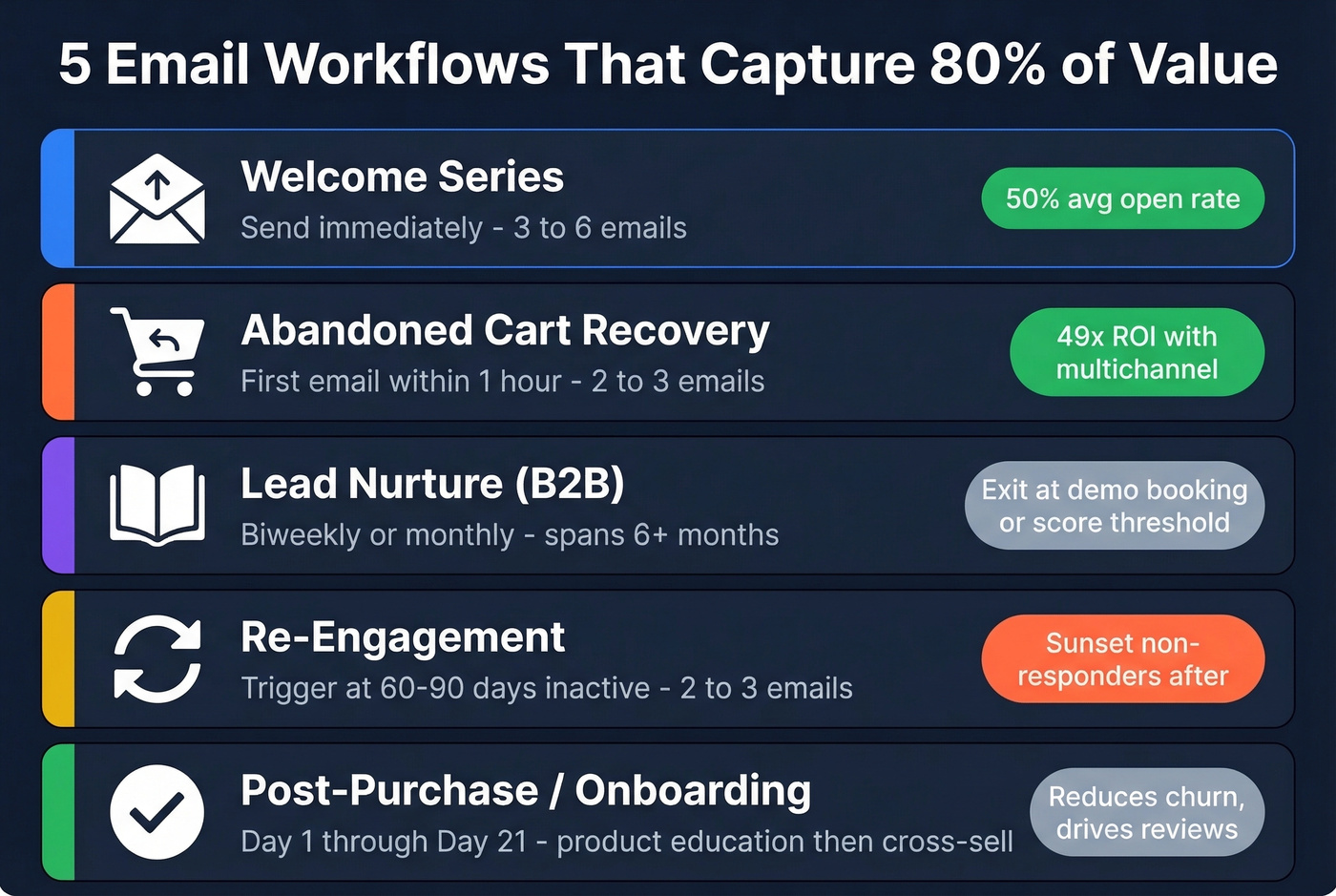
A strong welcome series runs 3-6 emails. The first delivers on whatever promise got them to subscribe - the lead magnet, the discount, the account confirmation. Emails two through four build trust: introduce your brand story, highlight top products or content, and set expectations for future emails. Remix ran a 3-step welcome sequence with a purchase prompt for non-converters after one week and saw a 104% jump in first purchases versus the prior quarter. If you need ideas for testing, pull from these email subject lines.
Abandoned Cart Recovery
Speed is everything here. Fire the first email within one hour of abandonment. A common sequence runs 2-3 emails: a reminder, a social proof nudge, and a final urgency play with limited stock or an expiring discount.
The best results come from pairing email with other channels. Slazenger combined email and SMS for cart recovery and hit 49x ROI in 8 weeks. Marks & Spencer recovered 15.1% of carts with push notifications versus a 3% industry average for abandoned cart emails alone. If you're only using one channel for cart recovery, you're leaving money on the table.
Lead Nurture (B2B)
B2B nurture looks nothing like B2C. Where an ecommerce cart recovery runs in hours, a B2B lead nurture sequence can span 6+ months. The cadence is slower - biweekly or monthly - and the content shifts from educational material like blog posts and guides, to proof-based assets like case studies and ROI calculators, to authority touchpoints like webinars and analyst reports.
The goal isn't an immediate purchase. It's staying top-of-mind until the buying window opens. Exit criteria matter here: when a lead books a demo or reaches a lead score threshold, pull them out of nurture and into a sales sequence. Many teams layer cold email workflows into this motion, running separate sequences for inbound leads versus outbound prospects so messaging stays relevant to each audience. If you're building that outbound layer, start with a B2B cold email sequence.
Re-Engagement
Trigger this when a contact goes 60-90 days without opening or clicking. The sequence is short - 2-3 emails max. Ask if they still want to hear from you. Offer a preference center. Make the unsubscribe easy.
Here's the part most teams skip: sunsetting the non-responders. Contacts who ignore your re-engagement sequence are dead weight. Keeping them on your list inflates your send volume, drags down engagement metrics, and damages sender reputation. Remove them. (For a deeper remediation playbook, see spam trap removal.)
Post-Purchase / Onboarding
The post-purchase window is underutilized. A well-timed onboarding sequence - product education, setup tips, a feedback request at day 7 - reduces churn and sets up cross-sell opportunities. For ecommerce, a product review request at day 10-14 followed by a complementary product recommendation at day 21 is a proven pattern.
How to Build an Email Workflow
The end-to-end framework that works, compressed into eight steps.
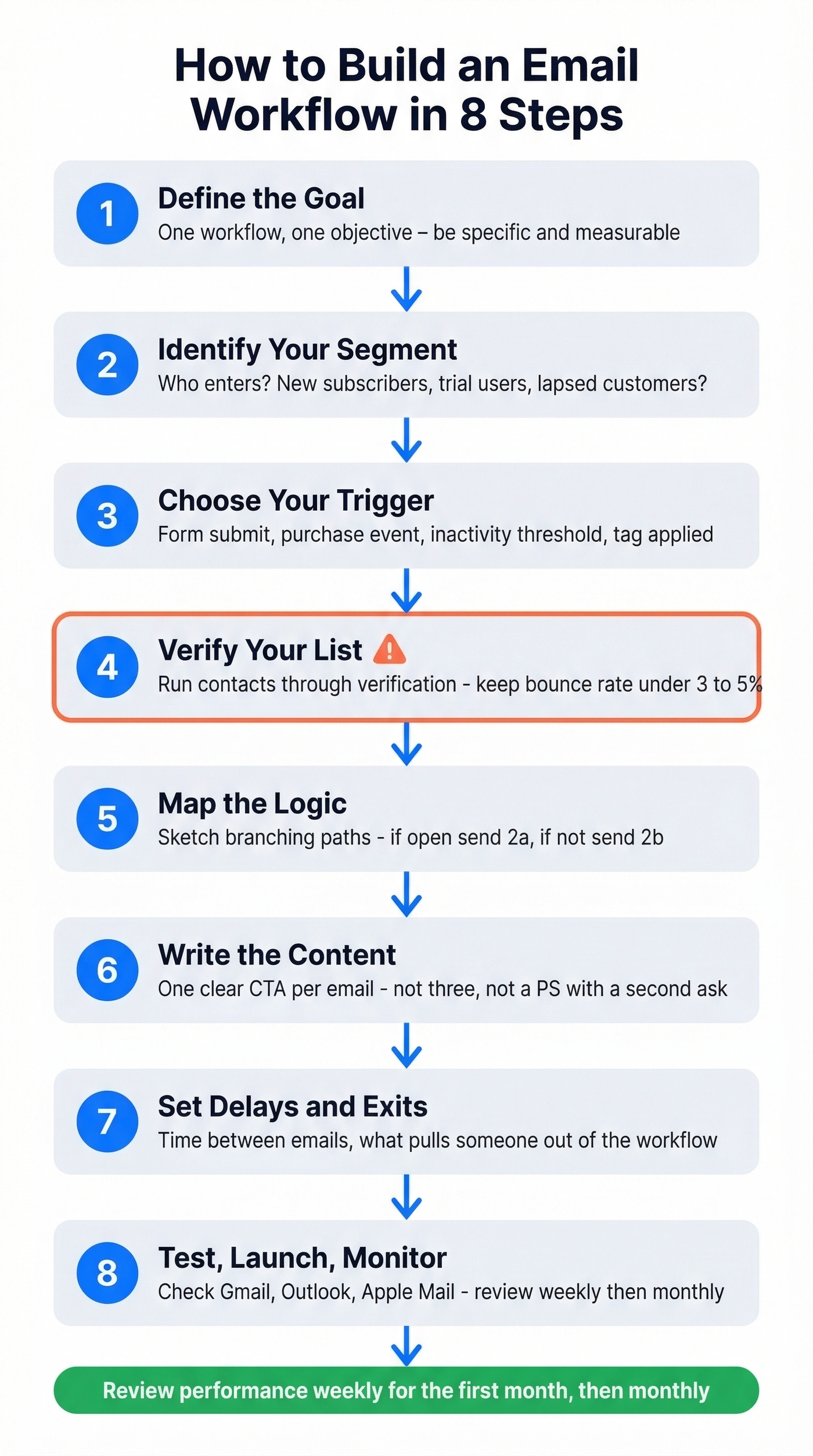
- Define the goal. One workflow, one objective. "Increase trial-to-paid conversion by 15%" is a goal. "Engage new users" isn't.
- Identify your audience segment. Who enters this workflow? New subscribers? Trial users on day 3? Customers who haven't purchased in 90 days? (If you need a practical framework, use intent based segmentation.)
- Choose your trigger. Form submission, purchase event, inactivity threshold, tag applied - the trigger starts the clock.
- Verify your list. Before activating anything, run your contacts through a verification tool to keep bounce rates under 3-5%. This step alone prevents most deliverability disasters. If you want the technical checklist, use this email deliverability guide.
- Map the logic. Sketch the branching paths on paper or a whiteboard first. If they open email 1, send email 2a. If they don't, send 2b. Define every fork.
- Write the content. Each email needs one clear CTA. Not three. Not a "PS" with a second ask. One action per email. (More rules + examples: email call to action.)
- Set delays and exit criteria. How long between emails? What pulls someone out of the workflow - a purchase, a demo booking, a manual override? Define these before launch.
- Test, launch, and monitor. Send test emails to yourself across Gmail, Outlook, and Apple Mail. Check rendering, links, and personalization tokens. After launch, review performance weekly for the first month, then monthly.

You just read that high bounce rates tank sender reputation - and that verifying contacts before automating is non-negotiable. Prospeo's 5-step verification delivers 98% email accuracy with catch-all handling and spam-trap removal. At $0.01 per email, cleaning your list costs less than a single bounced send costs your domain.
Fix the upstream data problem before it wrecks your workflows.
Benchmarks for 2026
MailerLite's benchmark study analyzed 3.6 million campaigns across 181,000 accounts. Here are the medians worth knowing.
| Metric | All Industries | Ecommerce | Software & Apps |
|---|---|---|---|
| Open rate | 43.46% | 32.67% | 39.31% |
| Click rate | 2.09% | 1.07% | 1.15% |
| Unsub rate | 0.22% | - | - |
Apple Mail Privacy Protection inflates open rates by pre-loading tracking pixels. Real open rates are lower than what your dashboard shows. Click rate is the more reliable metric in 2026 - if you're optimizing for one number, optimize for clicks. (If you want the math and benchmarks, use this click rate formula.)
These are campaign-level benchmarks, not workflow-specific. Welcome sequences will outperform these numbers significantly - expect 45-55% opens. Cart abandonment and re-engagement flows tend to land closer to the all-industry average. Use these as a floor, not a ceiling.
Deliverability Rules Your Workflows Must Follow
Building a gorgeous automated sequence means nothing if your emails land in spam. And 70% of emails show at least one spam-related issue. Let's be specific about what's required.
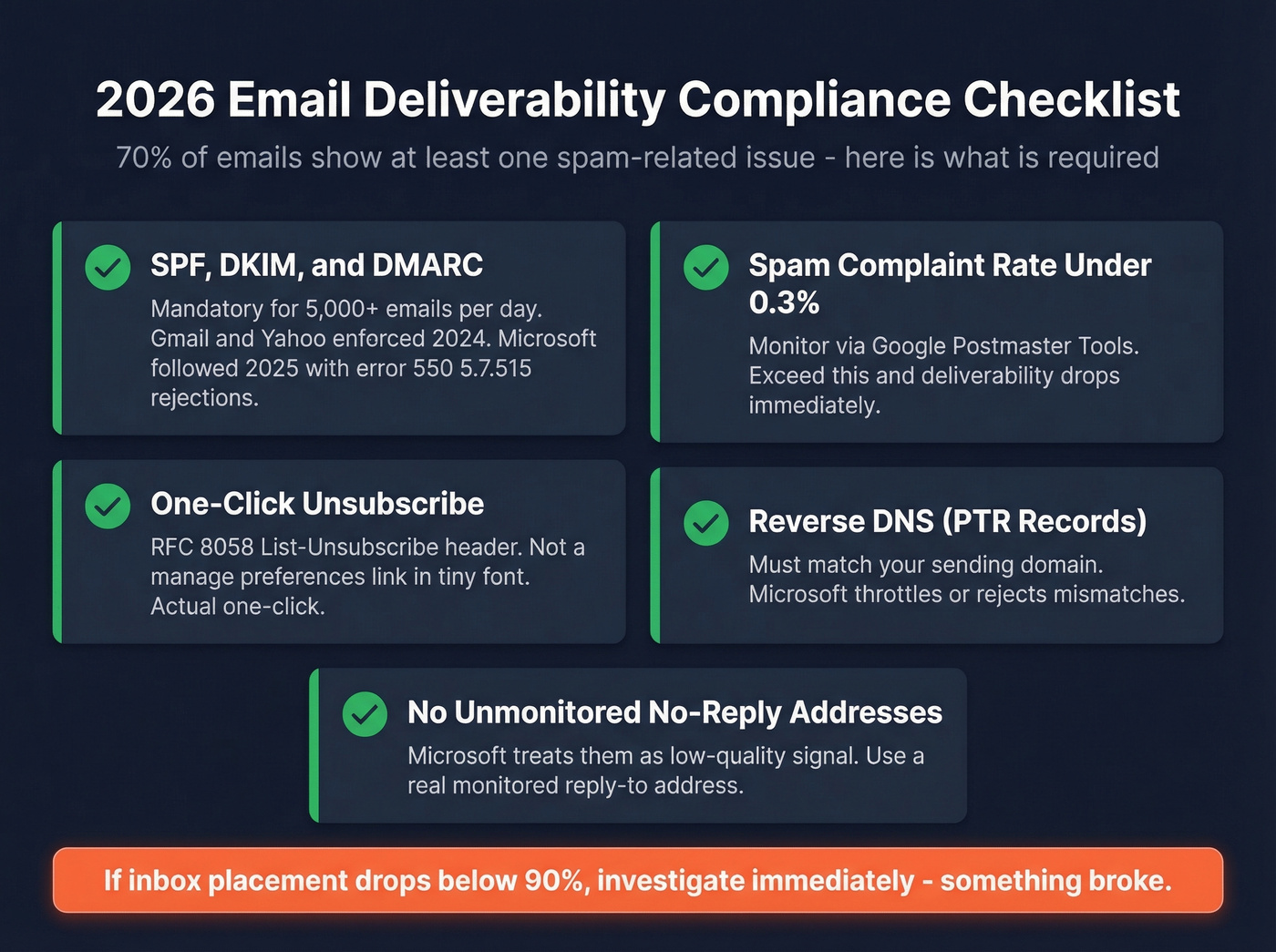
First, understand the distinction: delivery means the server accepted your email and it didn't bounce. Deliverability means it reached the inbox, not the spam folder or promotions tab. You can have 98% delivery and 40% deliverability. They're different problems.
Your 2026 compliance checklist:
- SPF, DKIM, and DMARC are mandatory for senders pushing 5,000+ emails/day. Gmail and Yahoo enforced this in 2024. Microsoft followed in 2025, rejecting unauthenticated mail with error 550 5.7.515. (If you need to validate your setup, see how to verify DKIM is working.)
- Spam complaint rate under 0.3%. Google Postmaster Tools is where you monitor this. Exceed the threshold and you'll see immediate deliverability drops.
- One-click unsubscribe via RFC 8058 List-Unsubscribe header. Not a "click here to manage preferences" link buried in size-8 font. An actual one-click mechanism.
- Reverse DNS (PTR records) must match your sending domain. Microsoft specifically throttles or rejects mismatches.
- Avoid unmonitored "no-reply" addresses. Microsoft treats them as a low-quality signal. Use a real, monitored reply-to address.
If your inbox placement drops below 90%, investigate immediately. That's not a gradual decline - it's a signal that something broke. (More tactics: improve sender reputation.)
Mistakes That Kill Workflow Performance
You spent two weeks building a welcome sequence. Open rates are 12%. You check your list - 30% bounced. Here are the seven mistakes that cause this.
No segmentation. Sending the same workflow to your entire list is a batch-and-blast with extra steps. Studio Bloom saw a +47% open rate increase after implementing conditional triggers and proper segmentation. The fix isn't complicated - it just requires doing the work upfront.
Set-and-forget. Workflows aren't crockpots. Content goes stale, offers expire, links break. Review every active automation quarterly at minimum.
Overwhelming frequency. Three emails in two days from the same sequence is a fast track to unsubscribes. Space your sends. Respect the inbox.
No clear CTAs. Each email should drive one action. If you're asking them to read a blog post, watch a video, AND book a demo, you're asking them to do nothing.
Missing exit criteria. Someone buys your product on day 2 and still gets the "why haven't you bought yet?" email on day 5. This is embarrassingly common and completely preventable.
Broken triggers and logic loops. A misconfigured condition can trap contacts in an infinite loop or route them down the wrong branch. Test every path before launch - not just the happy path.
Launching on unverified data. In our experience, this is the single most common reason workflows underperform. It's the upstream mistake that ruins everything downstream. Run your contact list through a verification tool before activating any email workflow. Prospeo checks 143M+ verified emails at 98% accuracy with a 7-day refresh cycle, so your verification stays current week to week. At roughly $0.01 per email, list verification is one of the cheapest deliverability wins you can buy.

B2B lead nurture workflows only convert when they reach real inboxes. Prospeo refreshes 300M+ profiles every 7 days - not every 6 weeks like competitors. That means your nurture sequences hit verified, current emails, not job-changers and dead addresses that silently destroy deliverability.
Stop nurturing contacts who left the company three months ago.
Best Tools for Email Workflow Automation
Your stack needs two things: an automation platform that sends the emails, and a data quality tool that makes sure they reach real inboxes.
| Tool | Best For | Starting Price | Key Strength | Limitation |
|---|---|---|---|---|
| Prospeo | Data verification | Free (75/mo); ~$0.01/email | 98% email accuracy, 7-day refresh | Verification/data only - not an ESP |
| ActiveCampaign | Advanced automations | ~$15-$19/mo (1K contacts) | Deep workflow builder | Steep learning curve |
| Brevo | Budget teams | Free (300/day); ~$8/mo paid | Strong free tier + SMS | Basic email editor |
| Klaviyo | Shopify/ecommerce | ~$20/mo (500 contacts) | Native ecommerce data | Overpriced outside ecom |
| HubSpot | Enterprise CRM teams | Free CRM; workflows on Pro+ | Deep CRM integration | Workflows locked behind Pro |
| MailerLite | Simplicity | ~$9-$15/mo (1K subs) | Clean UI, fair pricing | Limited advanced logic |
| Mailchimp | Beginners | ~$13/mo (free plan limited) | Easy templates | Automations very limited on free |
ActiveCampaign
A common take on r/MarketingAutomation is that ActiveCampaign has one of the deepest workflow builders in the mid-market. Behavioral targeting, site tracking, lead scoring, CRM - it's all there. The tradeoff is a learning curve that Reddit users consistently call "brutal." Pricing ramps with contact count: 5,000 contacts on the Plus plan runs around ~$145/mo. If you need advanced branching logic and you're willing to invest the setup time, it's a top option at this price point.
Brevo
Use this if you're bootstrapped and need email automation plus SMS in one platform. The free tier of 300 emails/day is genuinely useful for small lists, and paid plans start around ~$8/mo. Skip this if you care about email design - the template editor is basic, and the drag-and-drop builder feels a generation behind ActiveCampaign or Klaviyo. For teams where deliverability and cost matter more than design polish, Brevo punches above its weight.
Klaviyo
The obvious choice for Shopify or WooCommerce stores. Native ecommerce data flows into segmentation and predictive analytics without any middleware. Outside ecommerce, though, it's overpriced and the editor feels dated. Starts at ~$20/mo for 500 contacts.
MailerLite
Best when your workflows are straightforward - welcome series, basic nurture, re-engagement - and you don't need advanced branching. It's a strong value pick for teams that want clean UI without bloat. You'll outgrow it once you need multi-branch automations with lead scoring or CRM-level logic, at which point you're looking at ActiveCampaign.
Mailchimp
Fine for beginners who want nice templates and a familiar interface. The catch: automations are very limited on the free plan. You're paying around $13/mo minimum for more complete functionality, and pricing scales with list size. For what you get, it's not the best value anymore - MailerLite and Brevo both deliver more for less.
Here's a hot take: HubSpot locks workflow automation behind its Professional and Enterprise tiers. If you're already deep in the HubSpot CRM ecosystem, the integration works well - but if you're choosing a tool from scratch, there are better options at every price point. Most teams don't need an enterprise platform to send a welcome series.
Email Workflow FAQ
What's the difference between an email workflow and a drip campaign?
A drip campaign sends a fixed sequence on a predetermined schedule regardless of behavior. An email workflow adds branching logic - it reacts to opens, clicks, and purchases, routing contacts down different paths. Workflows are smarter; drips are simpler but less effective for conversion-focused sequences.
How many emails should a welcome workflow include?
Three to six. Send the first immediately upon signup, then space follow-ups 1-3 days apart. Front-load your best content - welcome emails average ~50% open rates, so the first two messages get the most attention.
How do I keep my workflows from landing in spam?
Authenticate your domain with SPF, DKIM, and DMARC. Keep spam complaints under 0.3%. Include a one-click unsubscribe header per RFC 8058. And verify your contact list before launching - catching invalid addresses before they bounce is the single easiest way to protect your sender reputation.
When should I use a drip sequence versus a full workflow?
Drip sequences work for simple, linear content where every contact gets the same emails on the same schedule - a five-part educational series or a product launch countdown. Switch to a full workflow when you need branching logic based on recipient behavior, like routing openers and non-openers down different paths.
How do I measure email workflow ROI?
Use this formula: ROI = (Revenue Gained - Workflow Cost) / Workflow Cost x 100. Track revenue attributed to each workflow separately - most automation platforms tag conversions by sequence. Run this calculation quarterly and kill any workflow that can't justify its cost.