


Mails.ai Review 2026: Pricing, Pros, Cons & What Users Actually Say
You've seen Mails.ai listed at $24/month. Then $49. Then $59 on a different site. Three prices for the same tool, and none of them are wrong - they're just measuring different things.
This breakdown covers Mails.ai pricing, reviews, pros and cons so you can decide whether it deserves your money. We'll untangle the actual plan costs, look at what users say on Trustpilot and G2, and weigh the alternatives.
30-Second Verdict
Mails.ai is a budget-friendly cold email sender with unlimited inboxes and built-in warmup. That $24/month price you've seen everywhere? It's the annual-billed rate. Month-to-month starts at $49.
User reviews are polarized: G2 shows 4.9/5 from just 5 reviews, while Trustpilot shows 3.7/5 from 33. Support and cancellation friction are the biggest pain points. If responsive support matters to you, look at SmartReach or Lemlist instead. And regardless of which sender you pick, you'll need a separate data provider - Mails.ai doesn't find contacts for you.
Pricing Breakdown for 2026
Here's what Mails.ai actually costs, with both billing options side by side:
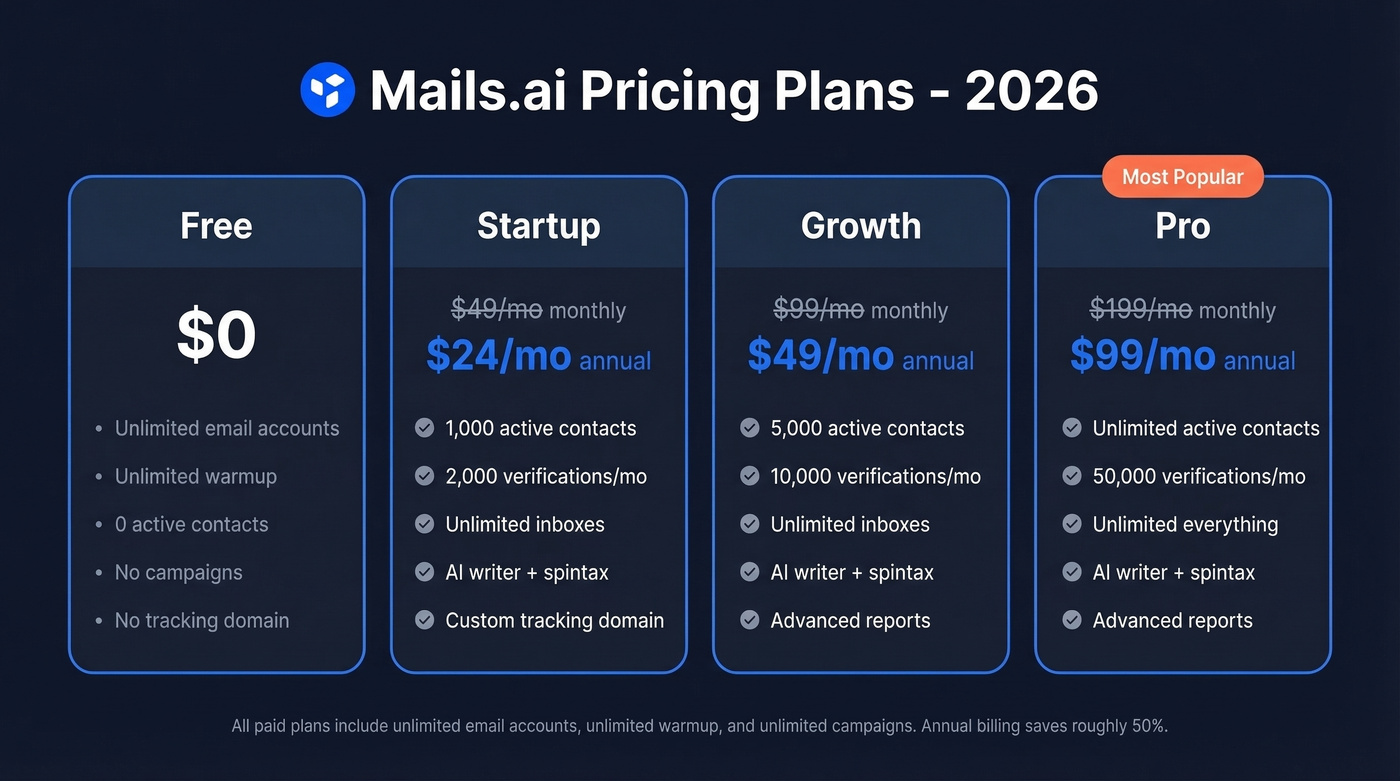
| Plan | Monthly | Annual | Active Contacts | Verifications/mo |
|---|---|---|---|---|
| Free | $0 | $0 | 0 | - |
| Startup | $49/mo | $24/mo | 1,000 | 2,000 |
| Growth | $99/mo | $49/mo | 5,000 | 10,000 |
| Pro | $199/mo | $99/mo | Unlimited | 50,000 |
All paid plans include unlimited email accounts, unlimited warmup, unlimited campaigns, AI writer, spintax, custom tracking domain, and advanced reports. The free plan gives you unlimited accounts and warmup but zero active contacts - you can warm up inboxes but can't actually send campaigns.
Why do other sites show different prices? Woodpecker's comparison lists Growth at $59 and Pro at $99, which conflicts with Mails.ai's help center pricing and likely reflects outdated numbers or mixed billing terms. ColdEmailKit shows $24/month as a "starting price" without explaining it's the annual-billed equivalent. The official help center is the only source worth trusting for current plan limits and billing terms.
What Mails.ai Does Well
The standout value prop is simple: unlimited email accounts and unlimited warmup on every plan, including free.
The Startup plan at $49/month - or $24/month when paid annually - with unlimited inboxes is aggressive pricing if you're scaling across lots of sending accounts. Most competitors charge per seat or per inbox, which adds up fast when you're running 10+ domains. We've tested setups where per-inbox pricing at competitors hit $200/month for the same volume that Mails.ai covers at $49.
The AI writer and inbox rotation are frequently mentioned as useful in reviews. Campaigns run in the background, spintax handles variation at scale, and setup is straightforward. For a team that already has clean lead data and just needs a sending engine, the economics are hard to beat.
If you're building a full outbound stack, it also helps to understand the broader category of SDR tools and how they fit together.
What Users Complain About
Support is the #1 issue, and it's not close.
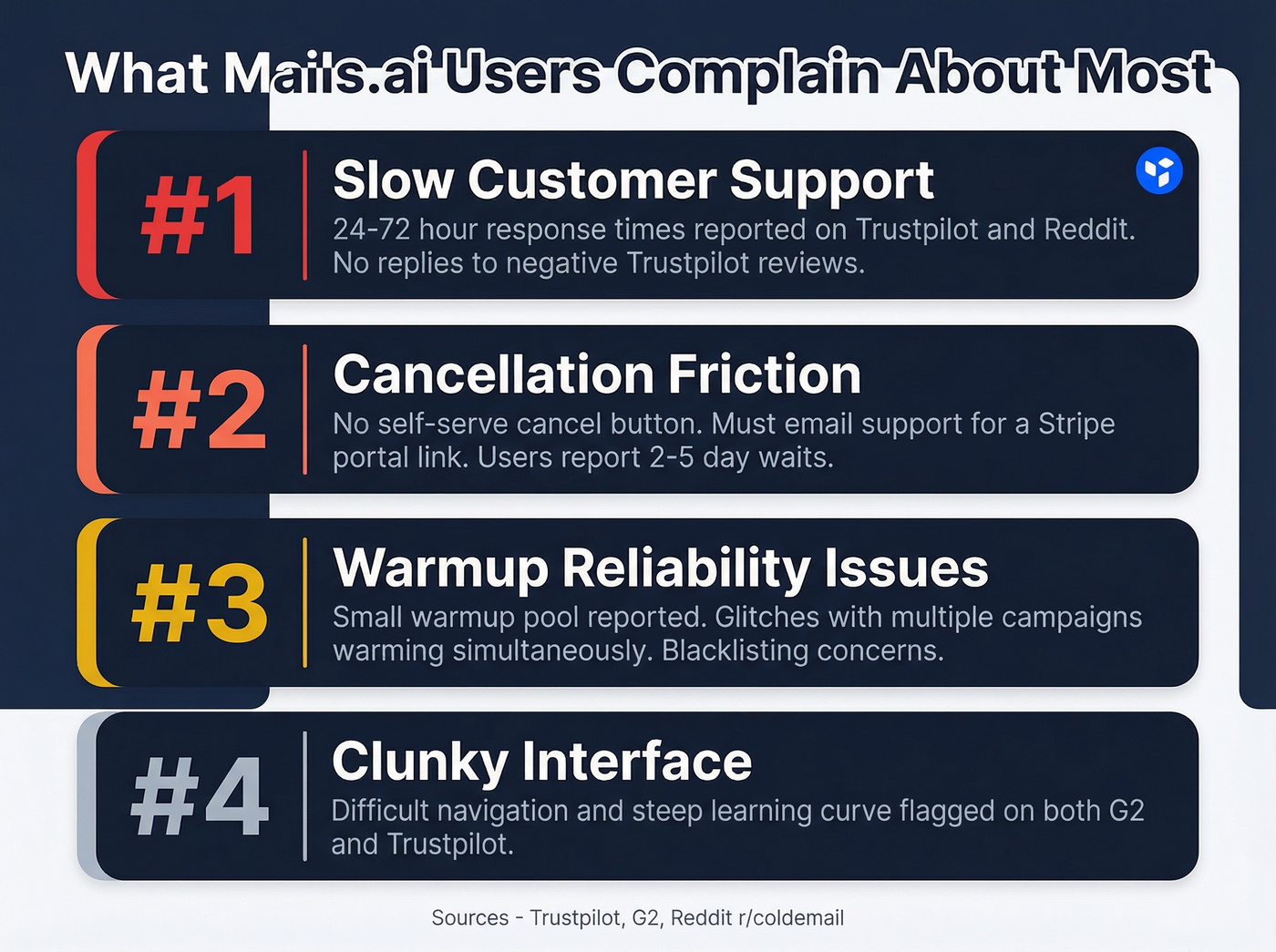
Trustpilot reviewers describe 24-72 hour response times as the norm. One Reddit user on r/coldemail said support only replied after they'd already canceled. Trustpilot also shows that Mails.ai hasn't replied to negative reviews, which doesn't inspire confidence.
Cancellation is the second biggest frustration. Multiple users report there's no self-serve cancel button - you have to email support to get a Stripe portal link. When support takes days to respond, that means you're stuck paying for a tool you've already decided to leave. Here's the thing: if a company makes it hard to cancel, that tells you something about how they think about retention.
Warmup reliability gets mixed marks too. One detailed Trustpilot reviewer who uses the tool exclusively for warming described a "tiny warmup pool" and a glitch that causes warmup to send too many emails when more than one campaign is warming up simultaneously. Other users mention blacklisting fears, and warmup skepticism is a category-wide issue - there's a popular r/coldemail thread arguing that many AI warmup tools eventually get flagged by ISPs.
The UI draws criticism as well. G2's con list flags difficult navigation and a steep learning curve, and Trustpilot reviews repeatedly describe the interface as clunky.
If you're trying to avoid deliverability landmines, it’s worth understanding email velocity and the email deliverability guide basics before you scale.

Mails.ai doesn't include contact data - so your results depend entirely on the list you import. Prospeo gives you 143M+ verified emails at 98% accuracy with a 7-day refresh cycle, so every contact you load into your sending tool is current and deliverable.
Stop feeding bad data into a good sending engine.
Why G2 and Trustpilot Disagree
G2 shows 4.9/5 stars - but from just 5 reviews, all 5-star. G2 itself flags that the profile "hasn't been active for over a year."
If you want to sanity-check review-driven decisions, it helps to compare against other vendor writeups like our Mailshake reviews breakdown.
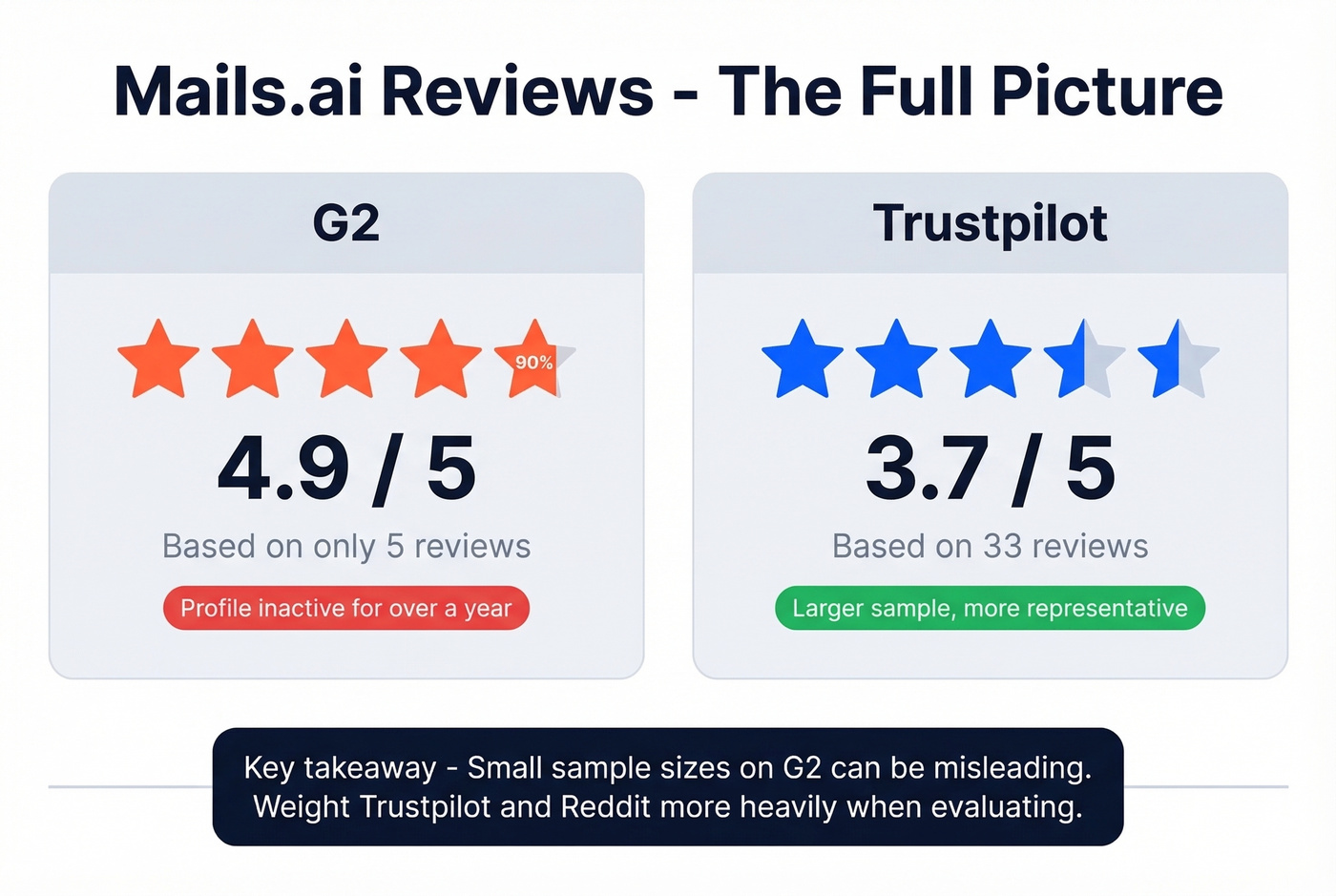
Trustpilot shows 3.7/5 from 33 reviews, with a mix of genuine praise and sharp criticism. With a much larger sample size, Trustpilot is the more representative number.
We've seen this pattern before with other tools: a product looks incredible on G2 with a handful of early reviews, then the real picture emerges on platforms with more volume. If you're evaluating Mails.ai, weight Trustpilot and Reddit heavily and treat G2 as a small-sample snapshot.
Who Should (and Shouldn't) Use It
Use it if:
- You already have clean, verified lead data and just need a sending engine
- You want to scale across many inboxes without per-seat pricing eating your budget
- You can tolerate slow support and a rough UI in exchange for low cost
Skip it if:
- Responsive support matters to your workflow - look at SmartReach or Lemlist instead
- You want easy, self-serve cancellation without emailing anyone
- You need a tool that also provides contact data - Mails.ai is send-only
Let's be honest: Mails.ai is one of the cheapest ways to run an unlimited-inbox setup. But "cheap" only matters if you never need help. The moment something breaks - a warmup bug, a deliverability drop, a billing issue - you could be waiting days for a reply.
If you're improving your outbound process end-to-end, these sales prospecting techniques can help you get more out of the same sending volume.
You Still Need Contact Data
Mails.ai is a sending engine, not a data provider. There's no lead database, no email finder, no phone numbers. You're importing contacts from somewhere else. And if that "somewhere else" gives you bad data, all the warmup in the world won't save your deliverability. Bounced emails destroy sender reputation faster than cold starts do.
To reduce bounces, it helps to track email bounce rate and use a dedicated verifier (see our picks for Bouncer alternatives).
Bounced emails destroy sender reputation faster than slow warmup fixes it. Prospeo's 5-step verification and catch-all handling keep your bounce rate under control - at roughly $0.01 per email, with no contracts and no sales calls required.
Protect the inboxes you're paying to warm up.
Alternatives Worth a Look
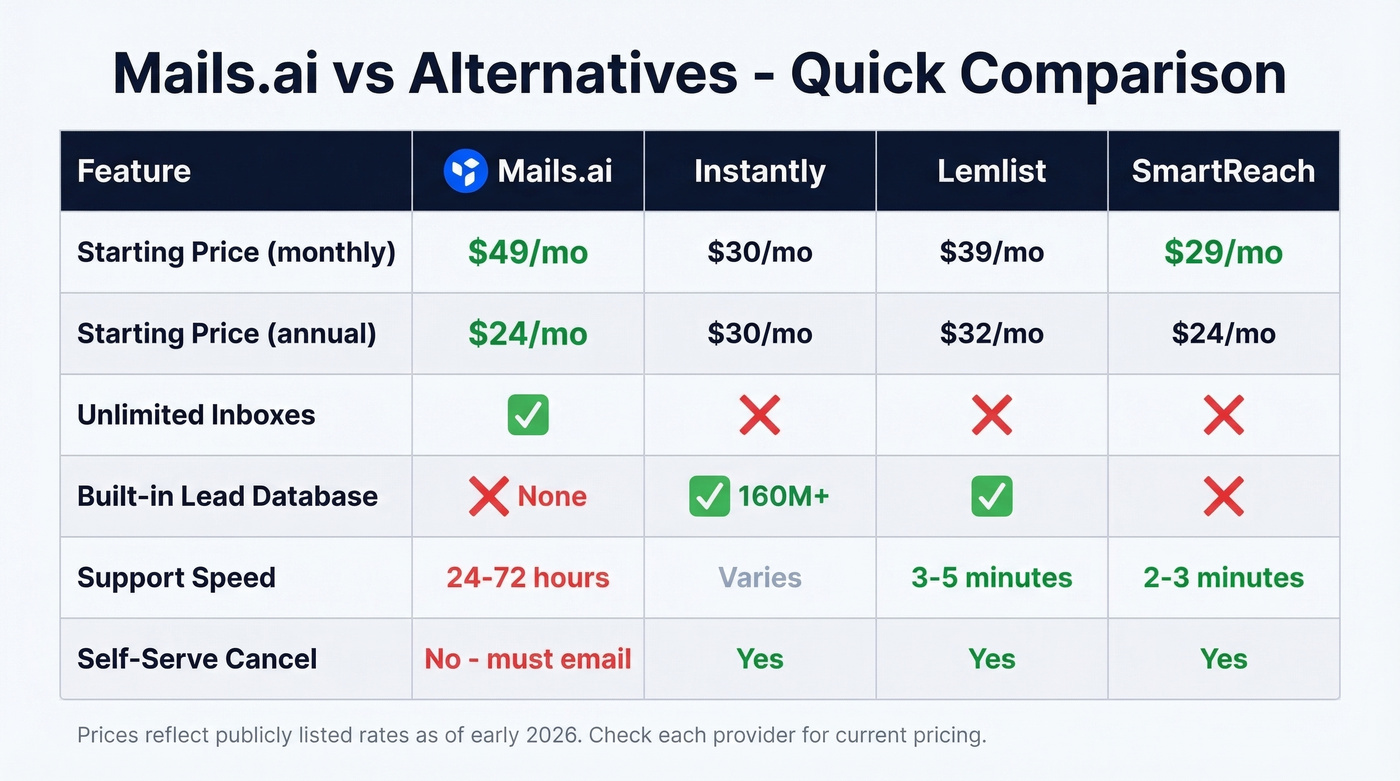
Instantly is a common pick if you want sending and data in one place. Its built-in database sits around 160M contacts, and fully loaded setups run $200-400/month. For teams that don't want to stitch together separate tools, it's the path of least resistance.
If you're comparing warmup-first tools, start with our list of unlimited email warmup options.
Smartlead is often positioned for agencies running high-volume campaigns across multiple clients, with white-labeling and sub-account management built in.
Lemlist is frequently praised for support responsiveness in a Reddit comparison post, with claimed 3-5 minute response times - the polar opposite of the experience described in Trustpilot complaints about Mails.ai. If you've been burned by slow support before, Lemlist is worth the premium.
SmartReach also gets strong support feedback in that same Reddit thread, with claimed 2-3 minute responses and a willingness to jump on a call when chat back-and-forth drags on.
FAQ
Is the Free Plan Worth Using?
Yes, but only for warmup. You get unlimited email accounts and unlimited warmup at no cost, which is genuinely useful for prepping new domains before launching campaigns. But the free plan has zero active contacts - you can't send campaigns - and no custom tracking domain. One Reddit user reported that sending without a custom tracking domain landed them on a spam list, so keep that in mind if you're tempted to hack around the limitation.
Can You Cancel Without Contacting Support?
As of early 2026, multiple users report you can't self-cancel. You must email support to receive a Stripe portal link. Several Trustpilot and Reddit users say support took 2-5 days to respond to cancellation requests, meaning you could get billed for an extra cycle while waiting.
Do You Need a Separate Lead Tool?
Yes. Mails.ai sends emails but doesn't include a lead database or email finder. You'll need a data provider like Prospeo or another B2B data tool to build your prospect list before importing.
How Does Mails.ai Compare to Instantly on Price?
For sending only, Mails.ai is cheaper - $24-49/month vs. Instantly's $30-97/month for comparable tiers. But Instantly bundles a lead database, which Mails.ai doesn't. Once you factor in a separate data provider, total costs land in a similar $150-250/month range for a real outbound stack.