

Fix "Message Rejected: Email Address Is Not Verified" in AWS SES
Every guide says "verify your email." That's unhelpfully vague. The "message rejected: email address is not verified" error has a few specific causes, and the fix depends on which one you're hitting. Let's actually diagnose this.
Quick version:
- Most likely cause: You're in the SES sandbox and haven't verified the recipient, the sender, or both.
- Second most likely: Your identity is verified in a different AWS Region than the one you're sending from.
- Quick fix: Verify the exact identity named in the error, in the Region named in the error - or request production access to stop verifying recipients entirely.
Why SES Rejects Unverified Addresses
The full error reads something like: Message rejected: Email address is not verified. The following identities failed the check in region US-EAST-1...
Over SMTP, this surfaces as a 554 response code, while the API returns a 400 error - same root cause, different wrappers. SES doesn't just check the visible "From" header. It checks From, Source, Sender, and Return-Path, and the failing identity plus the failing Region are spelled out in the error message itself. Read it carefully. The answer is usually right there.
Diagnostic Checklist for the 554 Error
These six checks cover most cases. Work through them in order.
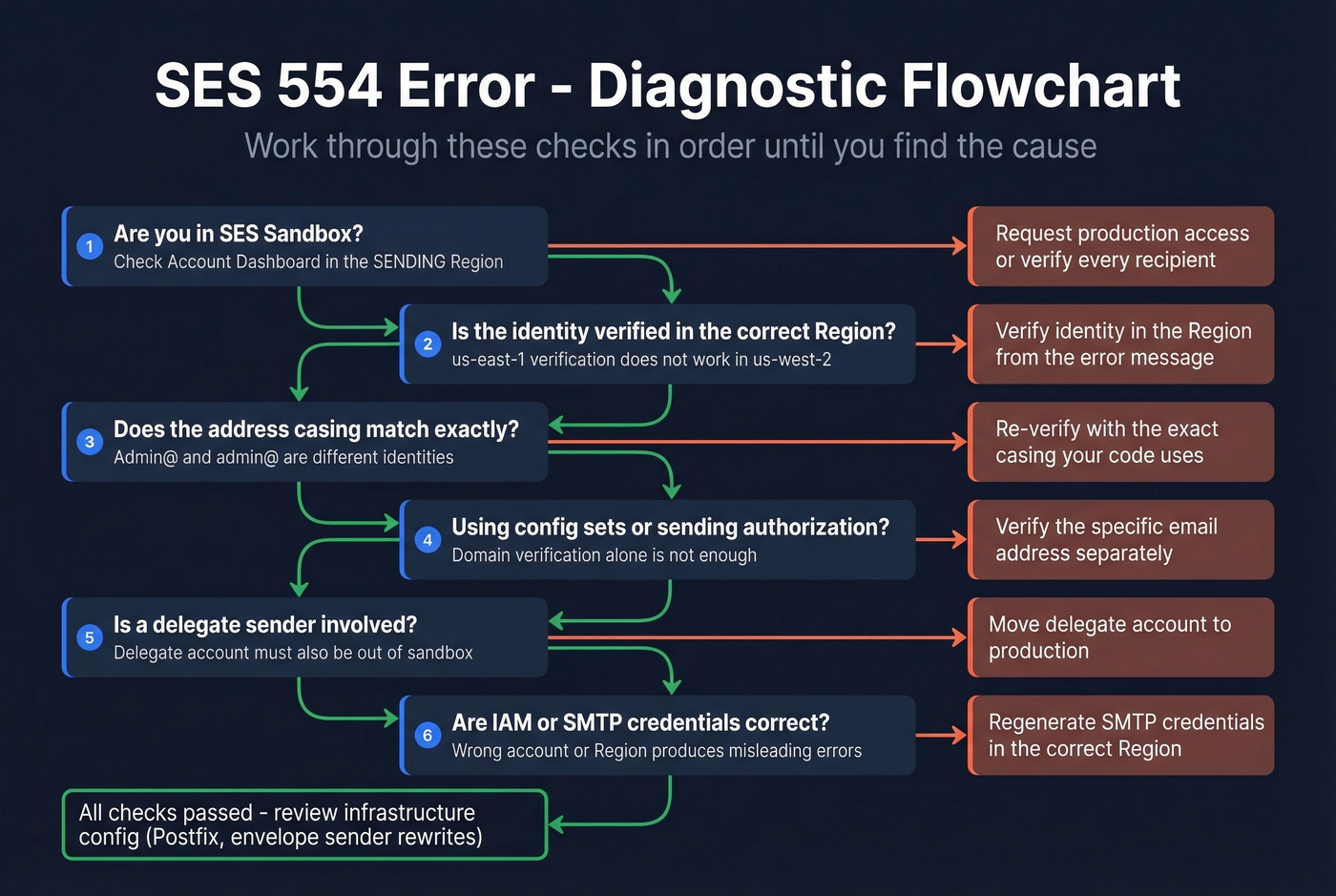
Check Sandbox Status
This is the #1 cause, and we've seen it trip up even experienced AWS users. New SES accounts start in sandbox mode in every Region, meaning you can only send to verified recipients - not just from verified senders. Sandbox also caps you at 200 messages per 24 hours and 1 message per second.
Here's the thing people miss: sandbox status is per-Region. You might be in production in us-east-1 but still sandboxed in eu-west-1. Check the account dashboard in the Region where sending fails. For testing without verifying real recipients, use the SES mailbox simulator addresses - they work even in sandbox mode.
Verify the Identity in the Correct Region
SES verification doesn't carry across Regions. If you verified noreply@yourapp.com in us-east-1 but your application sends via the us-west-2 endpoint, SES rejects the message. Match your SDK or SMTP endpoint to the Region in the error, or verify the identity in both.
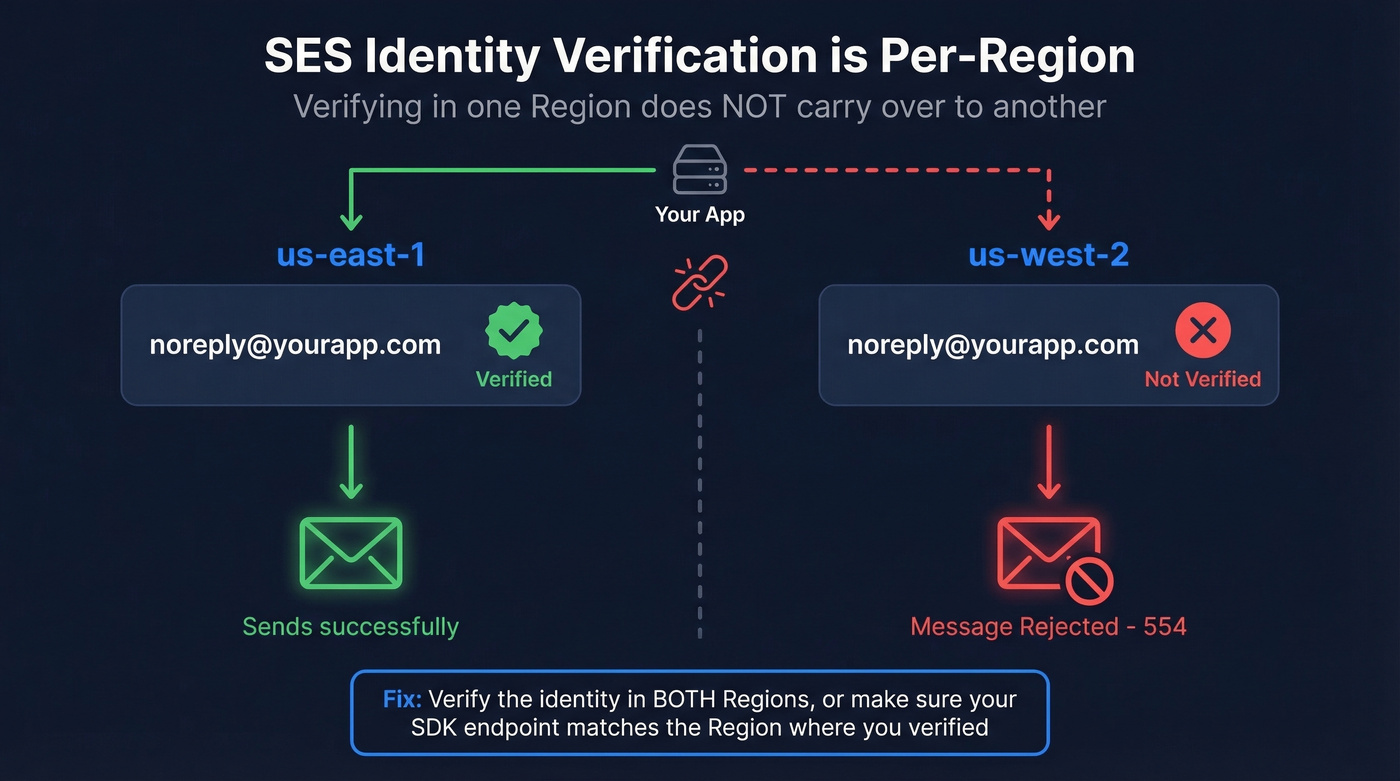
Here's a Node.js example showing how to set the Region explicitly:
// Region must match where your identity is verified
const ses = new SESClient({ region: "us-east-1" });

const command = new SendEmailCommand({
  Source: "noreply@yourapp.com",       // Must be verified in us-east-1
  Destination: { ToAddresses: ["recipient@example.com"] },
  Message: {
    Subject: { Data: "Test" },
    Body: { Text: { Data: "Hello from SES" } },
  },
});

await ses.send(command);
The most common mistake: your environment variable sets one Region, but your SES identity lives in another. Always double-check AWS_REGION or the explicit region parameter.
Match the Exact Address
Email addresses in SES are case-sensitive. Admin@example.com and admin@example.com are different identities. Domains are case-insensitive. Plus-addressing works: if sender@example.com is verified, sender+tag@example.com sends fine.
Domain vs. Email Verification
Verifying a domain covers all addresses under it for basic sending. But configuration sets, sending authorization policies, and domain setting overrides require the specific email address to be verified separately.
For basic transactional email, domain verification is the right default. For sending authorization or configuration sets, verify the individual address too. Skip this step if you're only doing straightforward transactional sends from your own domain - you won't need it.
Check for Delegate Sender Issues
Using sending authorization so another AWS account can send on your behalf? The delegate sender's account must also be out of sandbox. Your account is in production, the delegate's is still sandboxed, and SES rejects the message. This catches people off guard because the error points at the identity, not the delegate's sandbox status.
Confirm IAM Credentials
Wrong IAM user or credentials from the wrong AWS account can surface as a misleading verification error. If everything else checks out, confirm:
- Your SMTP credentials were generated for the correct Region you're sending from
- Your API access keys belong to the correct AWS account
This is a common gotcha on Stack Overflow - the error message doesn't tell you it's actually a credentials problem. We've burned hours on this one ourselves.

You just fixed SES rejections - now make sure the emails you're sending to are real. Bad recipient data triggers bounces that tank your SES sender reputation and push you right back into sandbox. Prospeo's 5-step verification delivers 98% email accuracy, so your bounce rate stays under the thresholds AWS cares about.
Protect your SES reputation with emails verified before you hit send.
How to Request Production Access
Once you've confirmed sandbox is the issue:
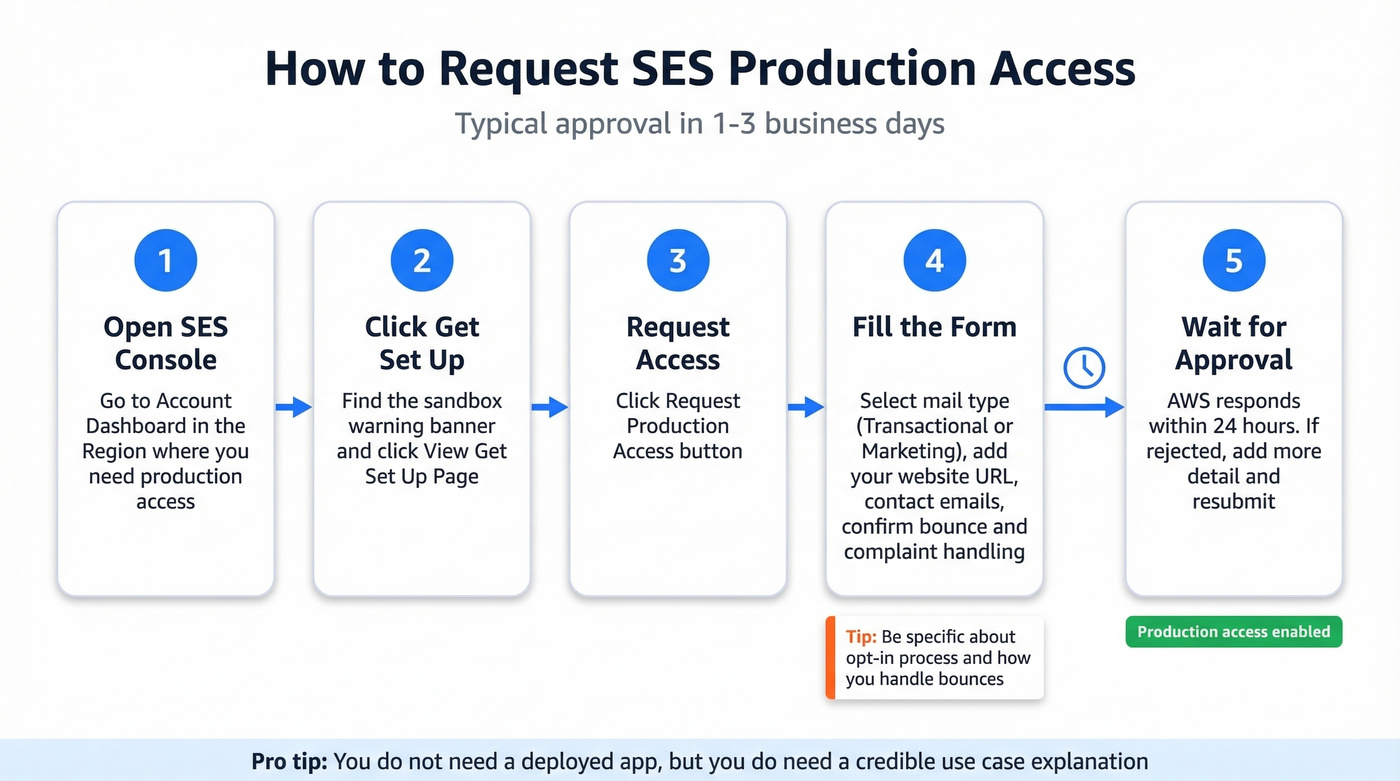
SES Console -> Account dashboard -> warning banner -> View Get set up page -> Request production access.
The form asks for mail type (Marketing or Transactional), your website URL, up to four additional contact emails, a language preference, and acknowledgement that you handle opt-in, bounces, and complaints. Via CLI:
aws sesv2 put-account-details \
  --production-access-enabled \
  --mail-type TRANSACTIONAL \
  --website-url "https://yourapp.com" \
  --additional-contact-email-addresses "ops@yourapp.com"
Straightforward requests with a real website and clear use case typically get approved in 1-3 business days. AWS provides an initial response within 24 hours. The approval process can feel opaque - if you get rejected, add more detail about your opt-in process and bounce handling, then resubmit. You don't need a deployed app, but you do need a credible explanation of your use case.
Edge Cases When Everything Looks Right
The phantom envelope sender. Your code sets From: noreply@yourapp.com, but SES rejects noreply@yourapp.us-west-2.elasticbeanstalk.com. Postfix on Elastic Beanstalk rewrote the envelope sender to the Beanstalk hostname. Fix it by setting your domain explicitly in Postfix's main.cf via your .platform config so the MAIL FROM matches your verified domain.
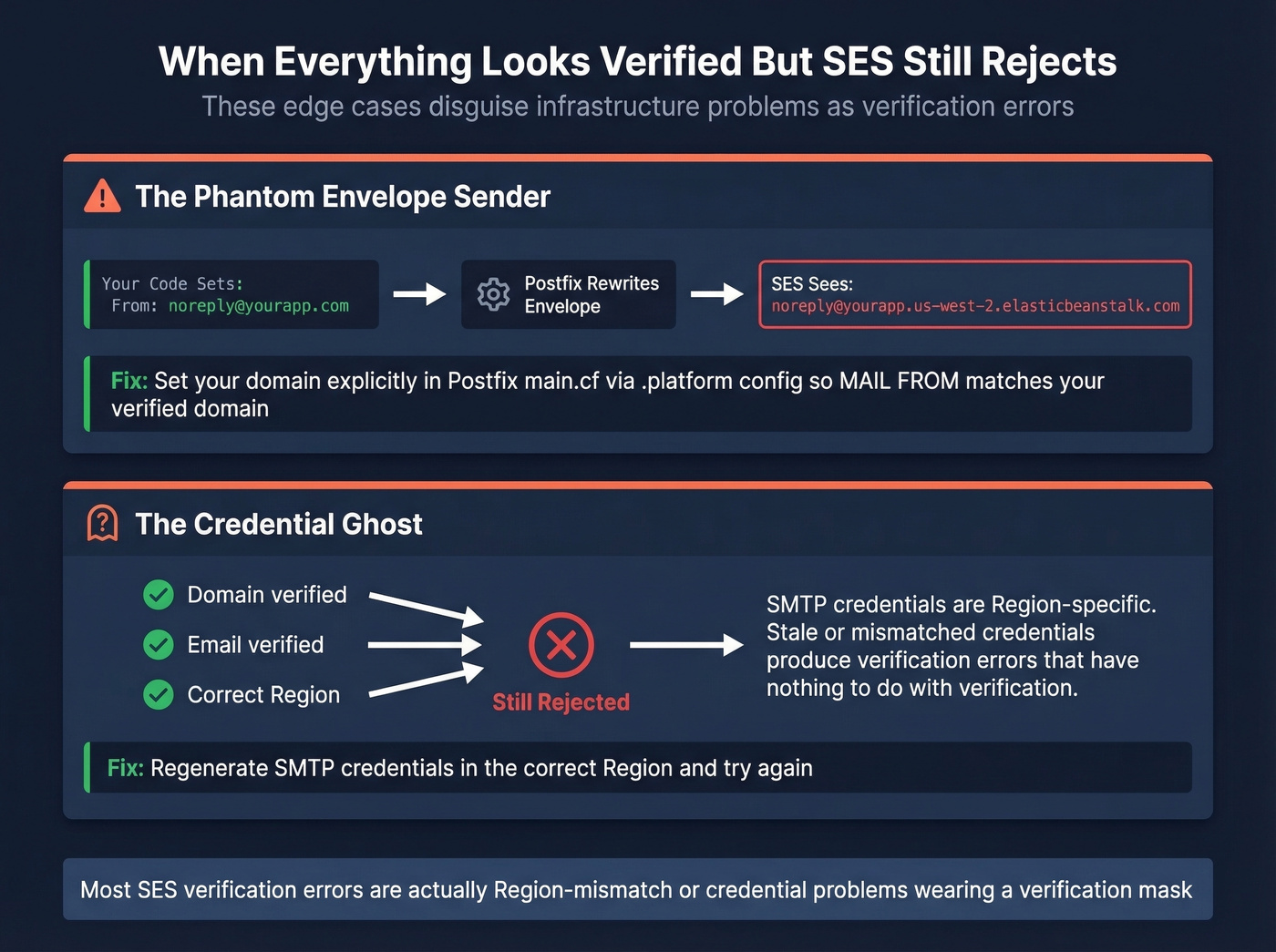
The credential ghost. Domain verified, email verified, correct Region - still rejected. We've resolved this by regenerating SMTP credentials. SES SMTP credentials are Region-specific, and stale or mismatched credentials can produce verification errors that have nothing to do with verification. Create a fresh SMTP user/password in the correct Region and try again.
Let's be honest: most SES "verification" errors aren't verification problems at all. They're Region-mismatch or credential problems wearing a verification mask. If you've verified everything and it still fails, stop re-verifying and start checking your infrastructure config.
Prevent Bounces After Fixing SES
Getting SES out of sandbox is step one. Step two is making sure you're not sending to invalid addresses - SES pauses sending if your bounce rate exceeds 5%. On small volume, it doesn't take many bad addresses to hit that threshold. We've seen accounts get suspended after just a few hundred sends to a stale list.
Before you send, verify your recipient list. Prospeo's 5-step email verification handles catch-all domains and removes spam traps - 98% accuracy across 143M+ verified emails, with a free tier of 75 verifications per month.

SES penalizes accounts that bounce above 5%. If you're sending outbound through SES, every unverified recipient email is a risk to your sending quota. Prospeo verifies 143M+ emails with catch-all handling, spam-trap removal, and a 7-day refresh cycle - so your list never goes stale.
Keep your SES bounce rate under 2% with data that's refreshed weekly.
FAQ
Does SES verification carry across AWS Regions?
No. Verification is per-Region - you must verify each identity separately in every Region you send from. There's no global verification option, and this Region mismatch is the second most common cause of the "message rejected" error.
Can I send from any address if my domain is verified?
For basic sending, yes - any address under the verified domain works. Configuration sets and sending authorization policies require the specific email address to be verified separately.
How long does production access approval take?
AWS responds within 24 hours. Straightforward requests with a real website URL and clear bounce-handling explanation typically get approved in 1-3 business days. If rejected, add detail about opt-in and complaint handling, then resubmit.
Why does the error show an address I never set?
Your platform or MTA is rewriting the envelope sender. Postfix on Elastic Beanstalk is a common culprit - it substitutes the Beanstalk hostname for your domain. Check the MAIL FROM header in the error message, not just your code's "From" field.
How do I keep my SES bounce rate under 5%?
Validate recipient addresses before sending. Tools like Prospeo offer 75 free verifications per month at 98% accuracy, and Amazon's own mailbox simulator works for testing. SES suspends accounts that exceed a 5% bounce rate, so pre-send verification isn't optional at scale.