

Catch-All Domain: What It Is & How to Handle It in 2026
Your email verification tool just flagged 200 addresses as "catch-all/accept-all." Your campaign launches tomorrow. Do you send, suppress, or delay? That question is exactly why catch-all domains cause so much confusion - and why getting the answer wrong can tank your sender reputation overnight.
What Does Catch-All Mean?
A catch-all domain is configured to accept every email sent to it, regardless of whether the specific mailbox exists. Send a message to typo@company.com, asdfgh@company.com, or ceo-who-left-two-years-ago@company.com - the server says "yes" to all of them.
Say your sales rep means to email sarah@acme.com but types sarha@acme.com. On a normal domain, that bounces back immediately. On a catch-all domain, the server accepts it. Whether anyone actually reads it is a different question entirely.
This creates a fundamental problem for anyone doing outbound email: the server's acceptance tells you nothing about whether a real person sits behind that address. For domain owners, it's a safety net. For marketers, it's a black box.
What You Need (Quick Version)
If you own a domain and you're deciding whether to enable catch-all: It's a useful safety net for small teams and freelancers. For larger organizations, structured aliases like support@, billing@, and sales@ give you the same coverage without the spam flood. Use aliases if you can.
If you're a marketer or sales rep staring at "catch-all" results in your verification report: Don't send blindly. Segment those addresses out, run them through a verification tool that specifically handles accept-all domains, and send in small batches while monitoring bounces (see cold email bounce rate benchmarks).
If you're privacy-conscious: A custom domain with catch-all beats plus-addressing for tracking which services leak your email.
How Catch-All Domains Work
The mechanics happen at the SMTP level. When an email arrives, the receiving server checks whether the recipient address exists. Normal servers reject unknown addresses with a 550 error - "user not found." Catch-all servers return an SMTP 250 response for every address, essentially saying "accepted" regardless of whether the mailbox is real. (If you need a refresher, see what SMTP is.)
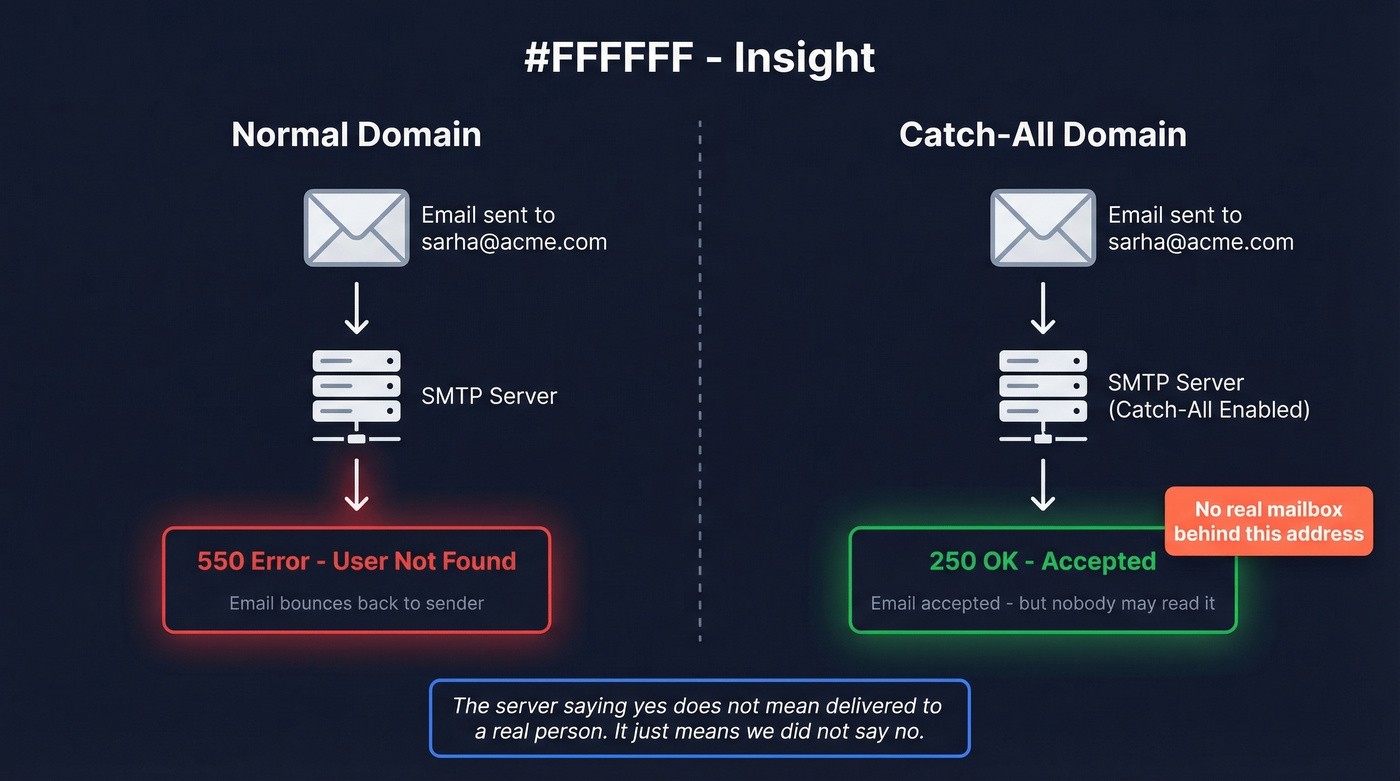
Some servers accept the message at SMTP time and then generate a bounce later - a delayed or "silent" bounce. This is actually worse than rejecting upfront because it wastes bandwidth on both sides and confuses verification tools that rely on SMTP responses.
In practice, the server's "yes" doesn't mean "delivered to a real person." It means "we didn't say no."
How Common Are They?
More common than most people expect, especially in B2B. MailerCheck's historical verification data shows 8.6% of all verified emails carry the catch-all label, with a median of 15.25% per customer list - roughly 541 catch-all addresses in a typical upload.
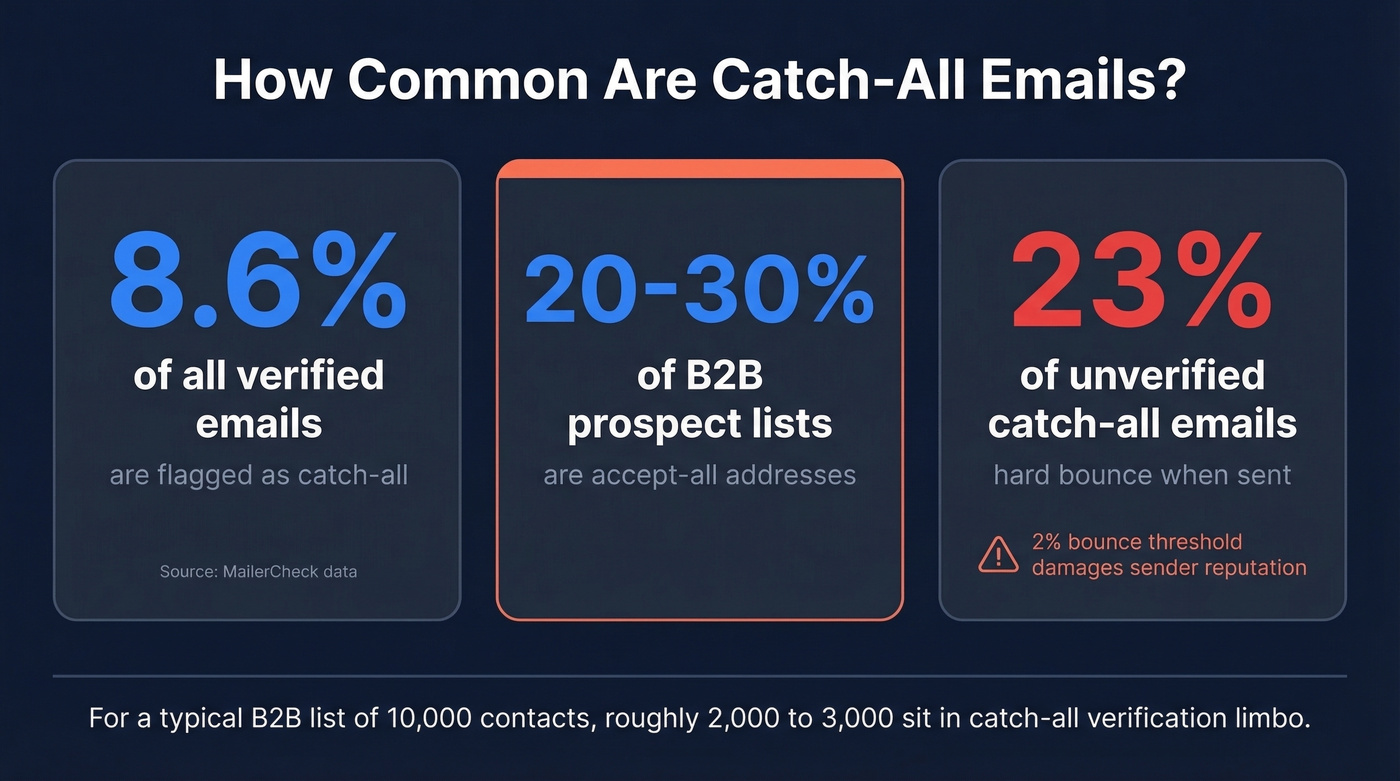
B2B lists skew higher. 20-30% is typical, and practitioners on Reddit put it around 30% of business domains accepting any address at the SMTP level. We've seen B2B prospect lists where accept-all addresses account for a full third of the total. That's not a rounding error - it's a significant chunk of your pipeline sitting in verification limbo.

If 20-30% of your B2B list is catch-all, that's a third of your pipeline in limbo. Prospeo's 5-step verification includes dedicated catch-all handling, spam-trap removal, and honeypot filtering - delivering 98% email accuracy where other tools just shrug and say "unverifiable."
Stop suppressing good leads because your verification tool gave up.
Catch-All vs. Aliases vs. Plus Addressing
These three approaches solve similar problems but work very differently.
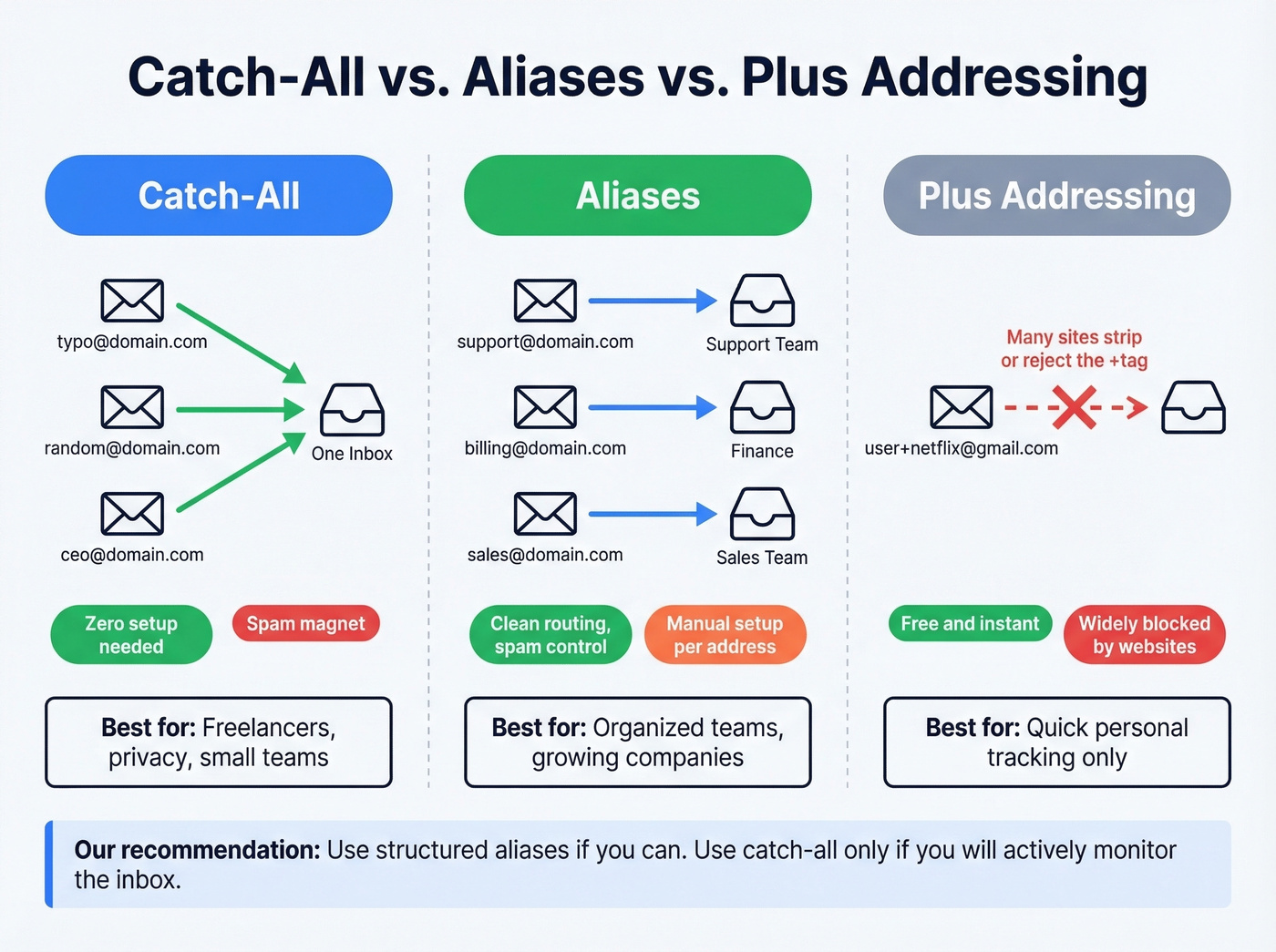
| Method | How It Works | Pros | Cons | Best For |
|---|---|---|---|---|
| Catch-all | Accepts all mail to domain | Zero setup, catches typos | Spam magnet, no routing | Small teams, privacy |
| Aliases | Specific forwarding rules | Clean routing, spam control | Manual setup per address | Orgs with structure |
| Plus addressing | user+tag@gmail.com | Free, instant | Sites strip or reject +tag | Quick personal use |
Plus addressing sounds elegant in theory. In practice, it's a half-measure. Many websites strip the +tag or reject the address entirely, which forces you to expose your base address anyway.
If you're serious about tracking which services leak your email, a custom domain with per-service aliases like social@yourdomain.com and newsletter@yourdomain.com is the better approach. Alias-forwarding services like SimpleLogin and addy.io offer a managed middle ground - you get unique addresses without running your own mail server. A catch-all setup makes this effortless since you don't need to create each alias in advance, but you'll need to manage the spam that comes with it.
Benefits and Risks
Benefits
Catch-all works well as a safety net. Typos in your email address don't result in lost messages - they land in a shared inbox where you can spot and redirect them. For freelancers and startups with small teams, this flexibility matters. Staff turnover doesn't mean missed leads if departed employees' addresses still route somewhere.
The privacy angle is real too. Creating unique addresses per service lets you trace exactly which company sold or leaked your data. When spam starts arriving at bankofamerica@yourdomain.com, you know who's responsible.
Risks
Here's the thing: once bots discover your domain, they can spray random local-parts and every single message gets accepted. A catch-all configuration can multiply inbound spam volume because there's no "user not found" rejection to slow attackers down.
Security is a broader concern. 79% of organizations experienced at least one email-related cybersecurity incident in the past year, and accept-all domains expand the attack surface by accepting phishing attempts to any address. Directory harvest attacks become trivial - attackers don't even need to guess valid addresses.
For senders, the deliverability risk is concrete. 23% of unverified catch-all emails hard bounce when sent, which can blow past the 2% bounce threshold that damages sender reputation (and can trigger domain blacklisting if you keep pushing volume).
Should You Enable It?
Enable it if you're a freelancer, early-stage startup, or running a personal privacy domain. The typo-catching and flexibility benefits outweigh the risks when your email volume is low and you're actively monitoring the inbox. Most email providers support catch-all via routing rules or alias settings in the admin console.
Skip it if you're a larger organization with high email volume and no plan to monitor the inbox. The spam will pile up, the security surface expands, and nobody will notice when legitimate messages get buried.
Let's be honest: catch-all is a safety net that becomes a liability without active management. Most teams that enable it never check the inbox. If you can't commit to regularly reviewing what lands there, structured aliases give you the same typo protection with far less noise. Turn it off.
Handling Catch-All Emails in Outbound
The internet will tell you catch-all domains are "unverifiable." That's true at the mailbox level via SMTP alone - you can detect accept-all behavior, but you can't confirm whether a specific inbox exists just from the server accepting the recipient.
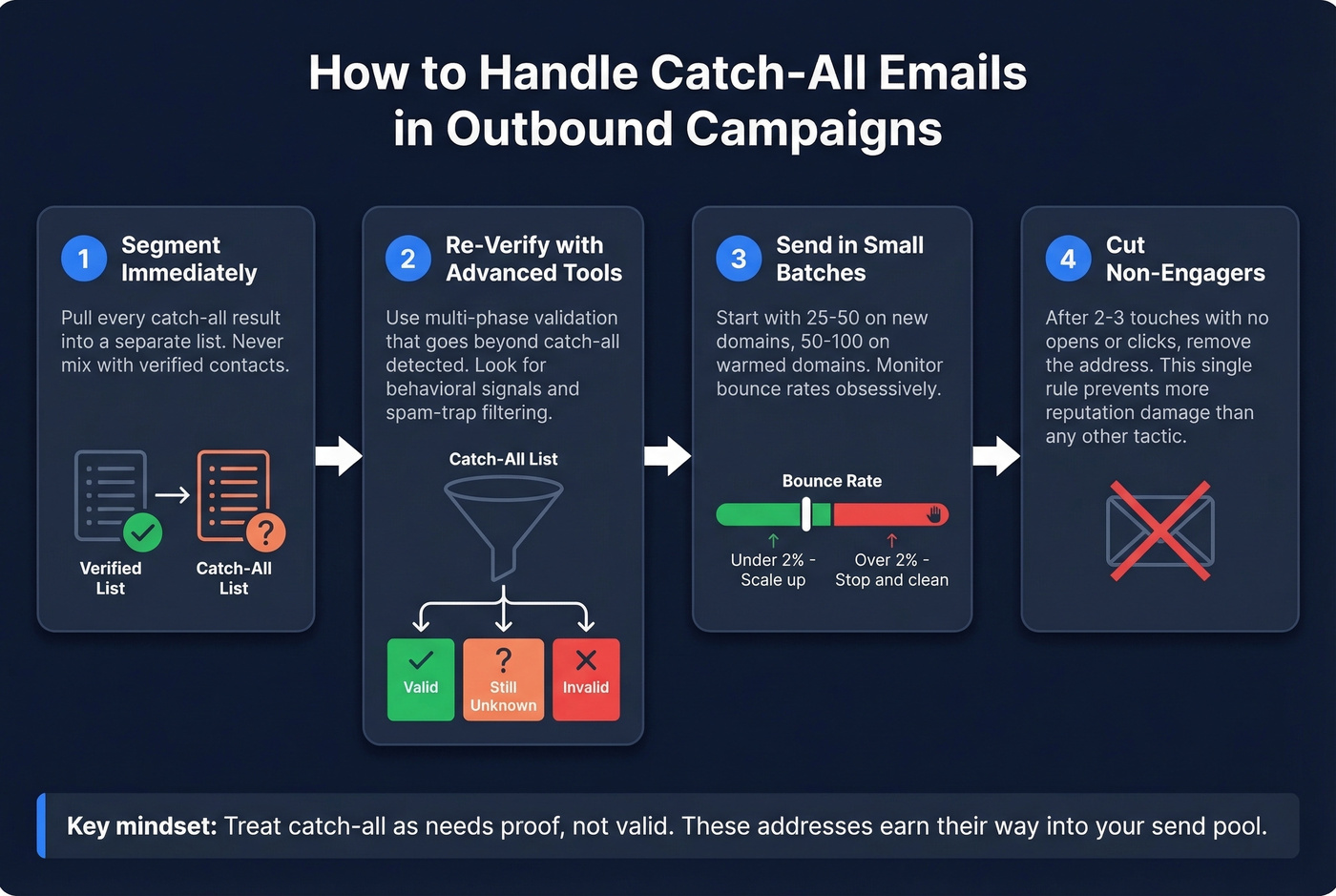
That said, some verification platforms go beyond "catch-all detected." Tools with multi-phase validation can reclassify a portion of those results into Valid or Invalid based on additional signals (more detail in our guide to catch-all email verification).
The right mental model comes straight from practitioners on r/emaildeliverability: treat catch-all as "needs proof," not "valid." Never mix these addresses into your main send pool.
1. Segment immediately. Pull every catch-all result into a separate list. Don't suppress them entirely - that's leaving pipeline on the table - but don't send alongside your verified contacts either.
2. Verify with a tool that handles accept-all domains. Most verification services flag "catch-all detected" and leave you to figure it out. Prospeo's 5-step verification reclassifies catch-all addresses using behavioral signals, spam-trap removal, and honeypot filtering, delivering 98% email accuracy with a 7-day data refresh cycle. Addresses don't just get a label - they get re-evaluated against real deliverability indicators (and should be part of your broader email bounce handling process).
For Microsoft 365 domains specifically, some practitioners use the Entra "GetCredentialType" API to check whether a mailbox exists behind catch-all behavior.
3. Send in small batches. Start with 50-100 catch-all addresses. If you're on a new or recently warmed domain, be even more conservative - start with 25-50. Monitor bounce rates obsessively. If you stay under 2%, scale up gradually (use a bounce rate calculator to keep the math honest).
4. Watch engagement, not just delivery. An accept-all address that takes your email but never opens or clicks is dragging down your domain reputation over time. Cut non-engagers after 2-3 touches. We've found this single rule prevents more reputation damage than any other tactic in our outbound playbooks (especially when paired with a real email warmup plan).
Migrating to Structured Aliases
If you've decided a catch-all domain has outlived its usefulness:
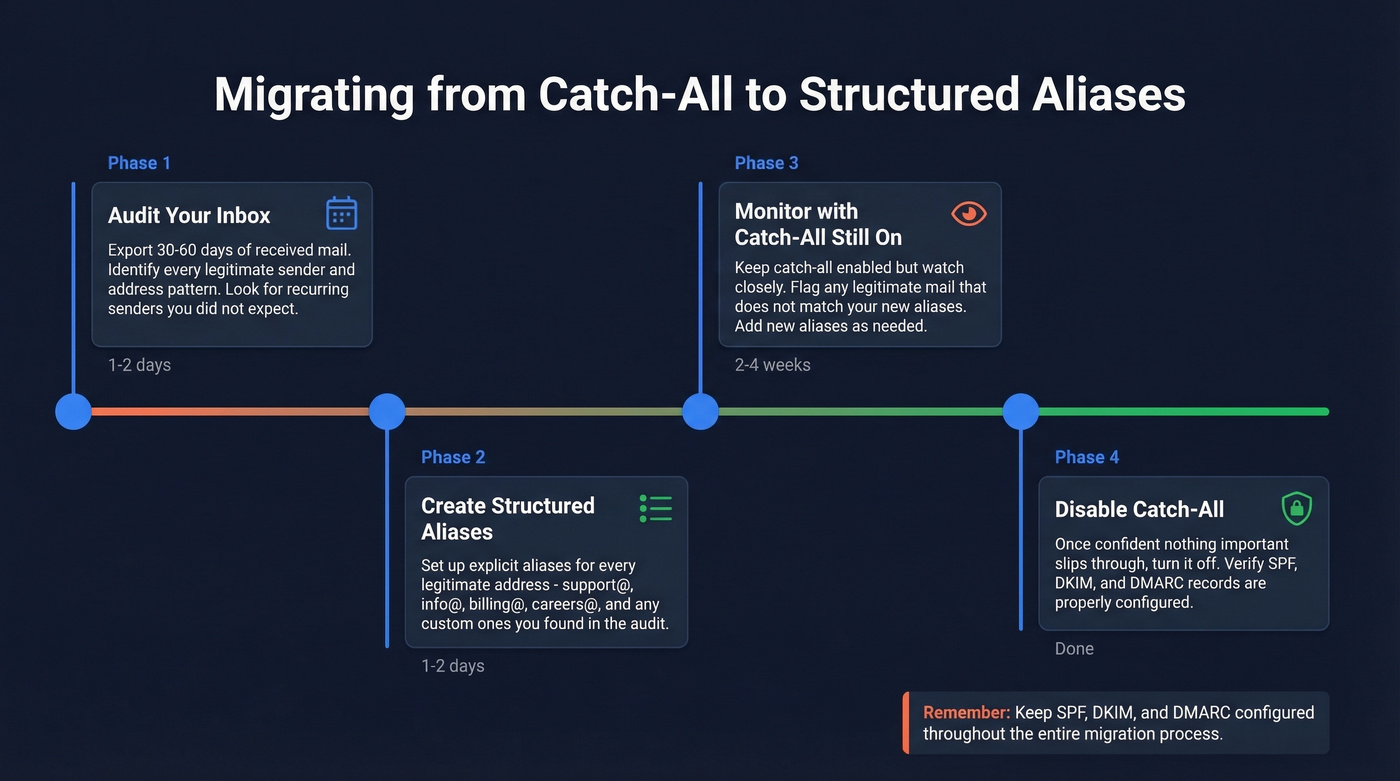
- Audit your catch-all inbox. Export 30-60 days of received mail and identify every legitimate sender and address pattern.
- Create structured aliases. Set up explicit aliases for every legitimate address you found - support@, info@, billing@, careers@.
- Monitor for 2-4 weeks. Keep catch-all enabled but watch for legitimate mail that doesn't match your new aliases.
- Disable catch-all. Once you're confident nothing important is slipping through, turn it off.
Make sure your SPF, DKIM, and DMARC records are properly configured throughout this process. These are your baseline anti-spoofing controls regardless of whether catch-all is on or off (start with DKIM vs SPF vs DMARC).
Sending blindly to catch-all domains risks blowing past the 2% bounce threshold. Prospeo verifies every email through proprietary infrastructure with catch-all domain handling built in - not bolted on. At $0.01 per email, cleaning your list costs less than a single bounced campaign.
Protect your sender reputation with data that's refreshed every 7 days.
FAQ
Can you verify emails on a catch-all domain?
Standard SMTP verification can't confirm individual mailboxes because the server accepts everything. Advanced tools use multi-phase validation with behavioral signals and provider-specific checks to reclassify catch-all addresses as valid or invalid - going well beyond the basic "catch-all detected" label.
Is a catch-all domain the same as a wildcard email?
Functionally yes - both terms mean the domain accepts mail to any local-part. "Catch-all" is more common in email marketing and deliverability contexts, while "wildcard" appears more in DNS and server administration. The behavior is identical.
Does enabling catch-all hurt sender reputation?
Not directly - catch-all affects inbound mail handling, not outbound. But if your inbox fills up and starts bouncing, or if spammers exploit your domain in backscatter attacks, it can indirectly damage reputation. Pair any catch-all configuration with SPF, DKIM, and DMARC to protect your sending domain.
What bounce rate should I expect from catch-all addresses?
Unverified catch-all emails hard bounce at roughly 23%, well above the 2% threshold that triggers ISP penalties. After running them through a multi-phase verification tool, expect 3-6% bounce rates - manageable if you send in small, monitored batches and cut non-engagers quickly.