

Bounce Rate Calculator: Website + Email Formulas for 2026
You're staring at a GA4 report showing 78% bounce rate on your best blog post - the one averaging four minutes of read time. Something doesn't add up. Here's the short answer: the way bounce rate gets calculated changed when Google killed Universal Analytics, and most guides haven't caught up.
Classic formula: Single-page sessions / Total sessions x 100. GA4 formula: Unengaged sessions / Total sessions x 100. Email formula: Bounced emails / Total emails sent x 100. Formulas, GA4 steps, benchmarks, and fixes - all below.
Quick Reference
- Website bounce rate (UA): Single-page sessions / Total sessions x 100
- GA4 bounce rate: Unengaged sessions / Total sessions x 100
- Email bounce rate: Bounced emails / Total emails sent x 100
A "good" website bounce rate generally falls between 30-60% depending on your industry and page type. For email, stay under 2%. Above 5% means your list needed cleaning last week.
The Bounce Rate Formula
Take the number of single-page sessions, divide by total sessions, multiply by 100. That's it. Your homepage gets 500 sessions in a week, and 325 of those visitors view only that page before leaving. Bounce rate: 325 / 500 x 100 = 65%.
That's the Universal Analytics definition - a "bounce" meant any single-page session, regardless of time spent. Someone could read your entire 3,000-word guide, nod approvingly, close the tab, and still count as a bounce. If you see rates under 20%, it usually points to a tracking problem like duplicate analytics tags rather than genuinely sticky content.
How GA4 Changed the Calculation
GA4 flipped the concept. Instead of measuring bounces directly, it measures engagement and treats bounce rate as the leftovers. A session counts as "engaged" if it meets any one of three criteria: the visitor stays 10+ seconds, views 2+ pages, or triggers a key event like a form submission.
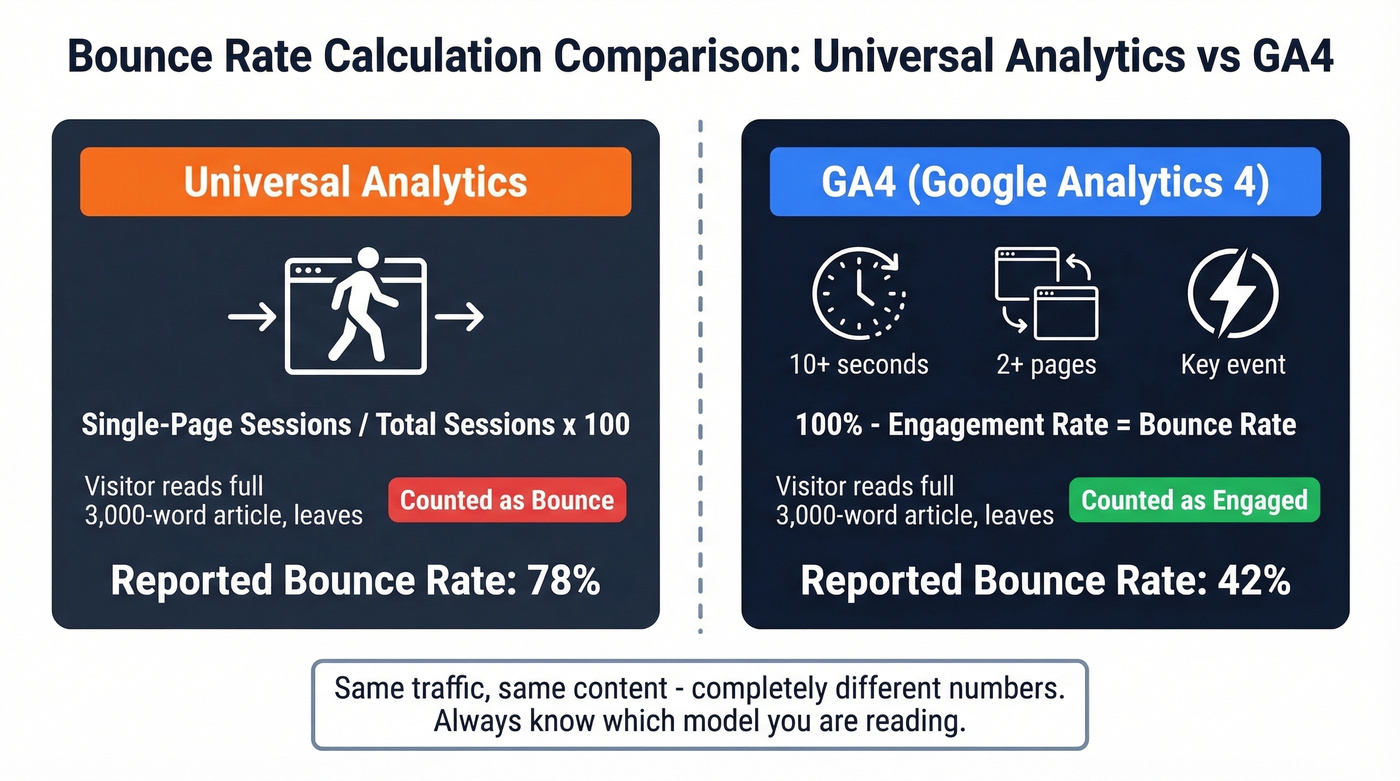
GA4 Bounce Rate = 100% - Engagement Rate.
This changes numbers dramatically. A blog post showing 75-90% bounce rate in Universal Analytics might show 35-55% in GA4 - same traffic, same content, completely different metric. We've watched teams panic over "high" rates that were perfectly healthy once you looked at engagement time. You need to know which model you're reading before drawing any conclusions.
GA4 hides bounce rate by default and makes you manually add it to reports. Peak Google.
Finding Bounce Rate in GA4
Here's the exact click path:
- Go to Reports > Engagement > Pages and screens
- Click the pencil icon (Customize report) in the upper right
- Click Metrics, then + Add metric
- Search for "Bounce rate" and select it
- Click Apply, then Save
Most guides stop there. They shouldn't. You can adjust what counts as "engaged" by going to Admin > Data Streams > your stream > Configure tag settings > Show more > Adjust session timeout. The engaged-session timer ranges from 10 to 60 seconds. For long-form content sites, bumping it to 30 seconds makes the metric stricter and more meaningful - and it can shift your reported bounce rate by 10-15 points.
Benchmarks by Industry
Most benchmark tables cite "industry estimate" with zero methodology. These ranges pull from AgencyAnalytics' dataset of real client accounts:
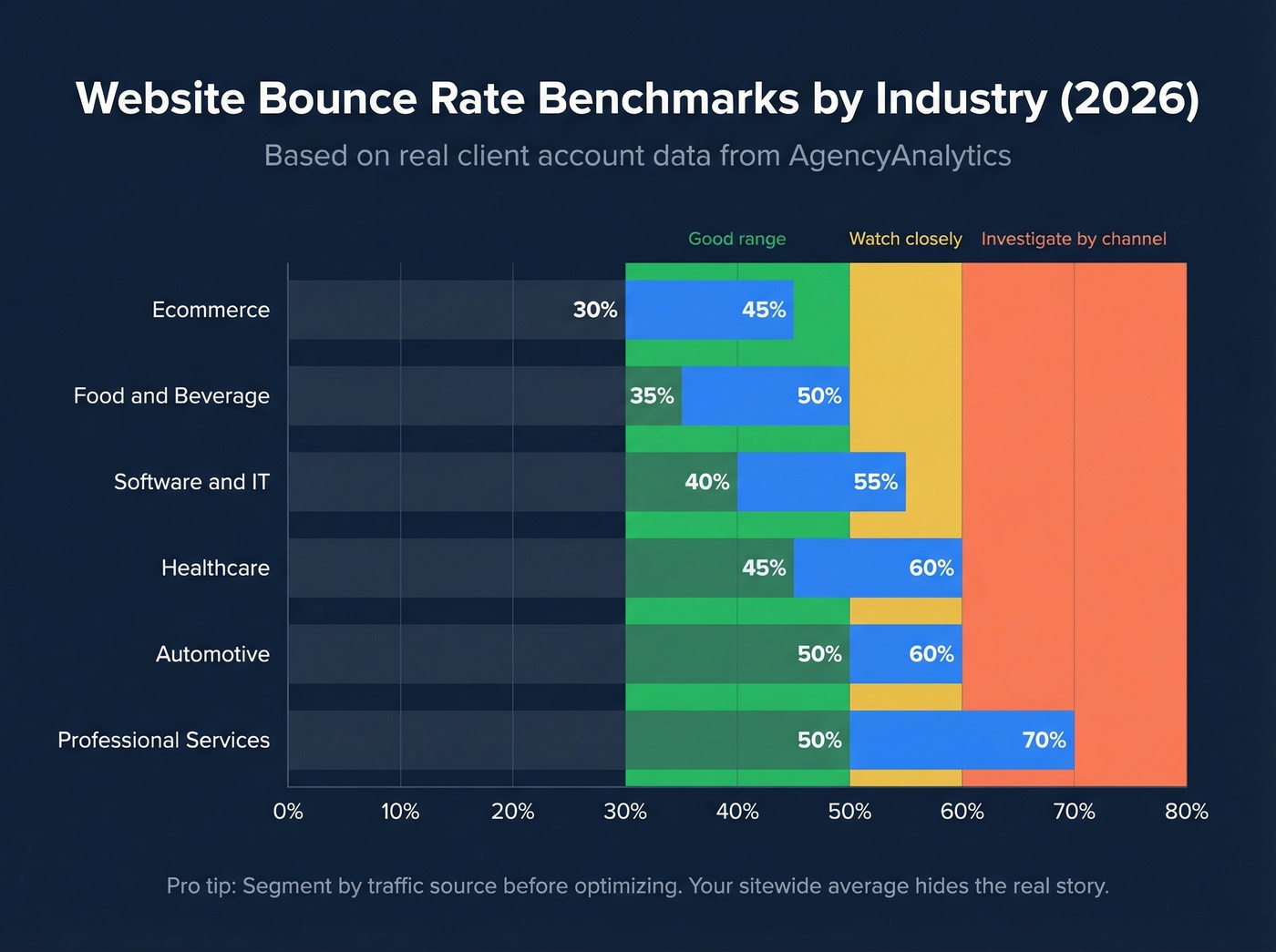
| Industry | Bounce Rate Range |
|---|---|
| Ecommerce | 30-45% |
| Food & Beverage | 35-50% |
| Software & IT | 40-55% |
| Healthcare | 45-60% |
| Automotive | 50-60% |
| Professional Services | 50-70% |
In our experience, the channel-level breakdown matters 10x more than the sitewide average. A SaaS founder on r/marketing reported 70% overall - but 80% from paid social and 57% from organic. If your paid social traffic bounces at 80%, that's not a content problem. That's a targeting problem. Use GA4's exploration reports to segment by traffic source before making optimization decisions.

You just learned that anything above 5% email bounce rate damages your sender reputation. Prospeo's 5-step verification - with catch-all handling, spam-trap removal, and honeypot filtering - delivers 98% email accuracy. Snyk's 50 AEs dropped from 35-40% bounce to under 5% and grew AE-sourced pipeline 180%.
Stop calculating bounce rates you could have prevented entirely.
Bounce Rate vs. Exit Rate vs. Engagement Rate
| Metric | Formula | Applies To |
|---|---|---|
| Bounce Rate | Single-page sessions starting on the page / total sessions starting on the page | Entry pages only |
| Exit Rate | Sessions ending on page / total pageviews of page | All pages |
| Engagement Rate | Engaged sessions / total sessions | All sessions (GA4) |
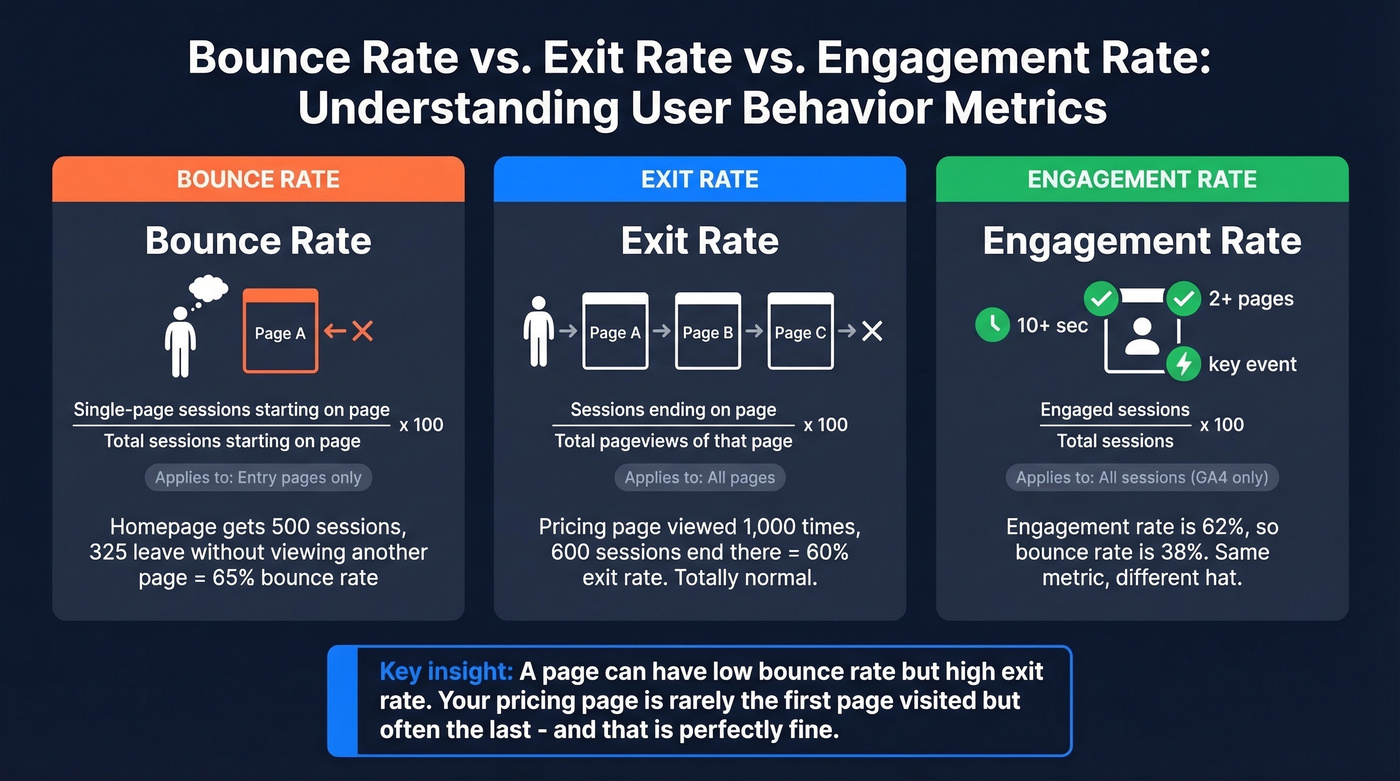
A page can have low bounce rate but high exit rate. Your pricing page might rarely be the first page someone visits but frequently be the last - they got the info they needed and left. That's normal. In GA4, bounce rate and engagement rate are the same metric wearing different hats: if engagement rate is 62%, bounce rate is 38%.
If you want the deeper GA4 breakdown, see our bounce rate analysis guide.
How to Calculate Email Bounce Rate
Email bounce rate = Bounced emails / Total emails sent x 100. Send 1,000 emails, 45 bounce back - that's 4.5%, well above the comfort zone. Most ESPs apply this formula automatically per campaign, so you rarely need a standalone calculator for email.
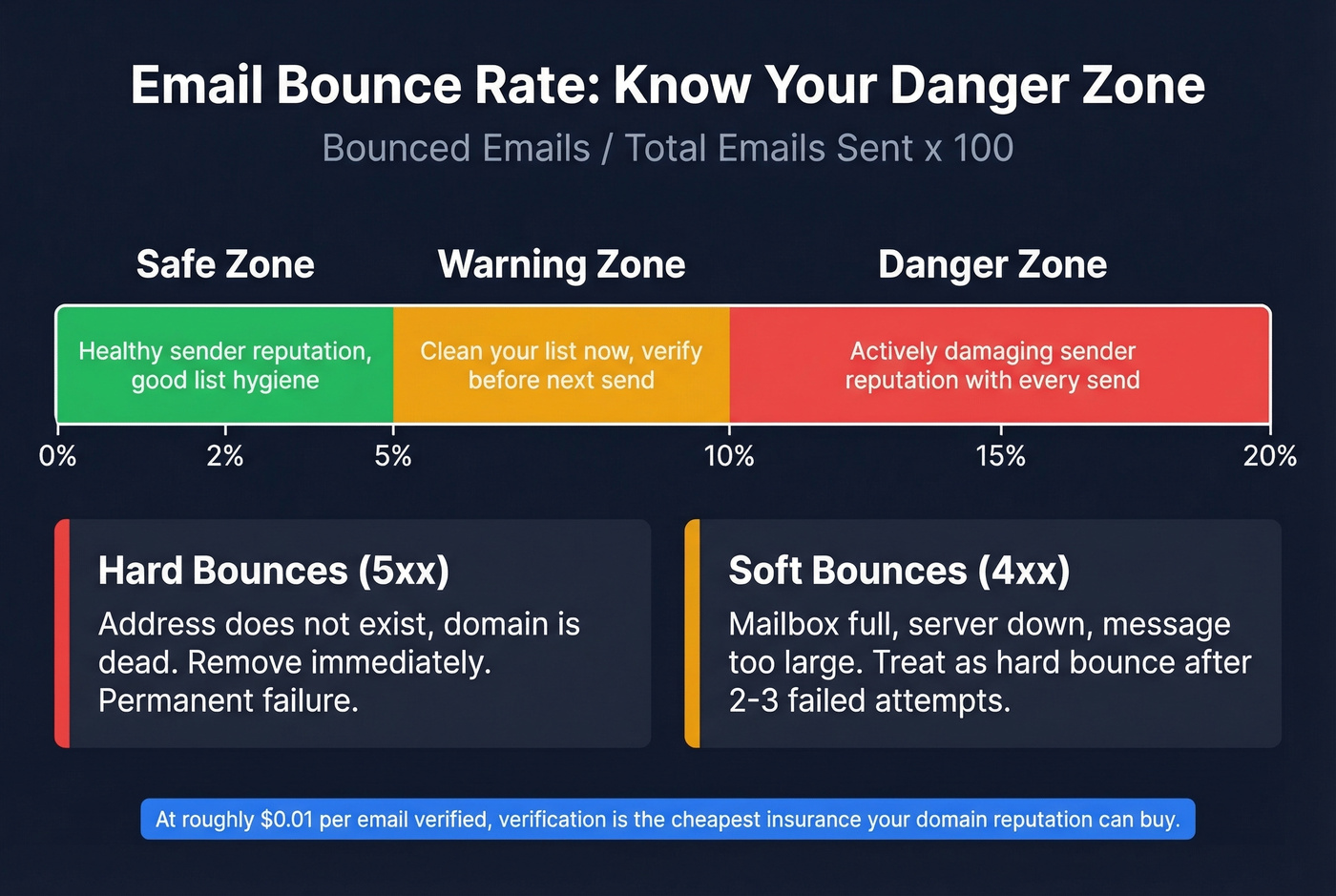
Hard bounces are permanent failures signaled by SMTP 5xx codes: the address doesn't exist, the domain is dead. Soft bounces (SMTP 4xx codes) are temporary: mailbox full, server down, message too large. Repeated soft bounces should be treated as hard bounces after 2-3 attempts. The safe threshold is under 2%. Above 5% and you're actively damaging your email sender reputation with every send.
If you're seeing lots of SMTP 550s, start with 550 Recipient Rejected.
Why This Matters for Outbound
Here's the thing: bad data compounds. One poster on r/salestechniques reported 18-22% bounce rates on cold outreach. After adding a verification workflow, they dropped to ~7% in three weeks and saw call connect rates jump from 12% to 19%.

Run your list through a verification tool before every send. Prospeo's 5-step verification catches invalid addresses, spam traps, and honeypots - delivering 98% email accuracy. If you're comparing options, start with our roundup of email check APIs or these email bounce back checkers.
How to Reduce Bounce Rate
Website: Improve page speed on mobile, match content to search intent, add internal links that pull readers deeper, and use clear CTAs above the fold. Let's be honest - stop obsessing over bounce rate as an isolated number. Engagement rate is the metric that actually matters in GA4. Focus on making sessions more engaged and bounce rate takes care of itself. For a prioritized list, use our how to reduce bounce rate guide.
Email: Verify every address before sending, remove hard bounces immediately after each campaign, authenticate with SPF/DKIM/DMARC, and never buy lists. At roughly $0.01 per email verified, verification is the cheapest insurance your domain reputation can buy. Skip this step if you enjoy explaining to your VP why half your outbound lands in spam. If you’re running cold outreach specifically, use these cold email bounce rate benchmarks and fixes.
At ~$0.01 per verified email, cleaning your list costs less than one bounced campaign costs your domain reputation. Prospeo refreshes 300M+ profiles every 7 days - not every 6 weeks - so the addresses you pull today are still valid tomorrow.
Verification is the cheapest fix on this entire page. Use it.
Common Bounce Rate Myths
"Bounce rate is a Google ranking factor." It isn't. Google's own documentation doesn't list it, and John Mueller has said as much repeatedly.
"High bounce rate is always bad." A blog post with 70% bounce rate and 4-minute engagement time is performing well. A product page with 70% bounce rate is a different story entirely.
"GA4 and UA bounce rates should match." Different definitions, different numbers. Comparing them is meaningless - like comparing kilometers to miles and wondering why the numbers don't line up.
FAQ
What is a good bounce rate for a website?
Blog posts typically run 60-80%, and that's normal. Ecommerce product pages should aim for 30-45%. Compare against your own historical trend rather than arbitrary benchmarks, and always segment by traffic source. Your organic bounce rate and your paid social bounce rate are telling you very different things.
Why is my GA4 bounce rate lower than Universal Analytics?
GA4 counts sessions as "engaged" after 10+ seconds, 2+ pages, or a key event. UA counted every single-page session as a bounce regardless of time spent. Same traffic, different definitions - expect GA4 rates 20-40 points lower.
How do I keep my email bounce rate under 2%?
Verify every address before sending and remove hard bounces immediately. Use double opt-in for inbound lists. For outbound, we've seen teams consistently stay under threshold by running verification before every campaign - no manual scrubbing required.
Do I need a separate tool to calculate bounce rate?
No. GA4 applies the engaged-session formula automatically, and email platforms like Mailchimp or Instantly display bounce rate per campaign. To run numbers manually, use: bounces / total sessions x 100. The formulas above work in any spreadsheet.