

What Is SPF? Sender Policy Framework Guide (2026)
Not the sunscreen. If you're here, you probably just watched a cold email campaign land in spam and started Googling why. SPF - Sender Policy Framework - is the DNS record that tells inbox providers which servers are allowed to send email on your domain's behalf. Get it wrong, and your messages don't arrive. Simple as that.
Setting it up takes five minutes. Maintaining it as your sending stack changes is the real challenge, and that's where most teams trip up.
How Sender Policy Framework Works
Email, by default, has no built-in way to verify that a message actually came from who it says it came from. Anyone can forge a "From" address. SPF was designed to close that gap.
Your domain publishes a DNS TXT record listing every IP address and mail server authorized to send email on its behalf. When a receiving server gets a message claiming to be from your domain, it checks that record. If the sending server's IP matches the list, the check passes. If not, the message gets flagged, quarantined, or rejected depending on the receiver's policy.
Here's the thing most people miss: SPF checks the envelope sender (the Return-Path domain), not the visible "From" address your recipients see. A spoofed "From" address can still pass if the envelope sender is different. This is exactly why you need DMARC on top - but we'll get there.
Phishing accounts for 15% of all data breaches, and email spoofing is a primary delivery mechanism. SPF is the first layer of defense.
SPF Authentication Step by Step
The validation flow happens in three steps, using SMTP-session details and the envelope sender domain.
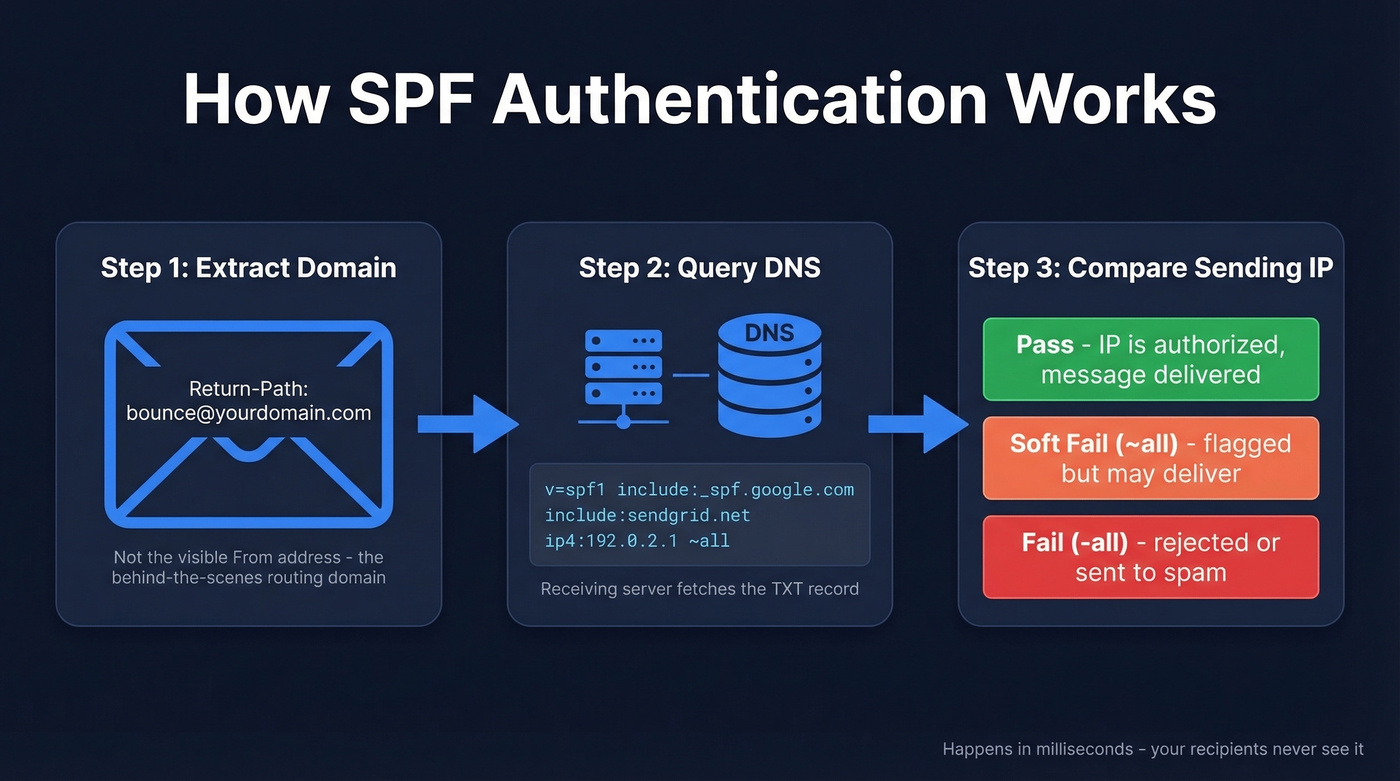
Step 1: Extract the domain. The receiving mail server looks at the Return-Path of the incoming message and extracts the domain. This isn't the "From" field your recipient sees - it's the behind-the-scenes routing address.
Step 2: Query DNS. The receiving server queries DNS for a TXT record on that domain, looking for one that starts with v=spf1. This record contains the full list of authorized senders.
Step 3: Compare the sending IP. The server checks whether the IP address that delivered the message appears in the authorized list. Three outcomes are possible:
- Pass - the IP is authorized. Message proceeds normally.
- Soft fail (~all) - the IP isn't authorized, but the domain owner hasn't set a hard policy. The message may be delivered but flagged.
- Fail (-all) - the IP isn't authorized. Most receivers will reject it or route it to spam.
The entire check happens in milliseconds. Your recipients never see it. But it determines whether your carefully crafted outreach lands in the inbox or vanishes into a spam folder.
How to Read an SPF Record
Let's break down a real-world SPF record.
v=spf1 [include:_spf.google.com](https://knowledge.workspace.google.com/admin/security/set-up-spf) [include:sendgrid.net](https://www.twilio.com/docs/sendgrid/glossary/spf) ip4:192.0.2.1 ~all
Every record starts with v=spf1 - that's the version tag. Everything after it defines who's allowed to send. The record ends with a qualifier that sets the default policy for unlisted senders.
| Mechanism | What It Does |
|---|---|
ip4 |
Authorizes a specific IPv4 address or range |
ip6 |
Authorizes a specific IPv6 address or range |
include |
References another domain's SPF record |
a |
Authorizes the IP in the domain's A record |
mx |
Authorizes the domain's mail exchange servers |
The qualifier at the end is where most mistakes happen:
~all(soft fail) - unauthorized senders get flagged but not necessarily blocked. Safer starting point.-all(fail) - unauthorized senders fail authentication. More secure, but can cause issues if you've missed a legitimate sending source.+all- never use this. It authorizes every server on the internet to send as your domain. It's the equivalent of leaving your front door open with a sign that says "help yourself."
The record above authorizes Google Workspace, SendGrid, and one specific IP address. Everything else gets a soft fail.
How to Set Up SPF Records
Setting up your record is straightforward. Maintaining it is where teams stumble.
Inventory every sending source. List every service that sends email from your domain - your email provider, your marketing platform, your sales tools, transactional senders, and any web apps that fire off notifications. Miss one, and those emails fail authentication silently.
Build your record. Combine the
include:statements for each service with any direct IP addresses. Your ESP's documentation will tell you exactly what to add.Add the DNS TXT record. In your DNS provider, create a new TXT record: Type
TXT, Host@(root domain), Value is your SPF string, TTL3600.Verify propagation. DNS changes typically propagate within a few hours but can take up to 48 hours. Check with MXToolbox before sending any campaigns.
Set up DKIM next, then DMARC. SPF alone isn't enough. The recommended order is SPF, then DKIM, then DMARC - each building on the previous layer. (If you want to confirm your DKIM setup, use this DKIM verification guide.)
SPF vs DKIM vs DMARC
These three protocols get lumped together constantly, but they do very different things.
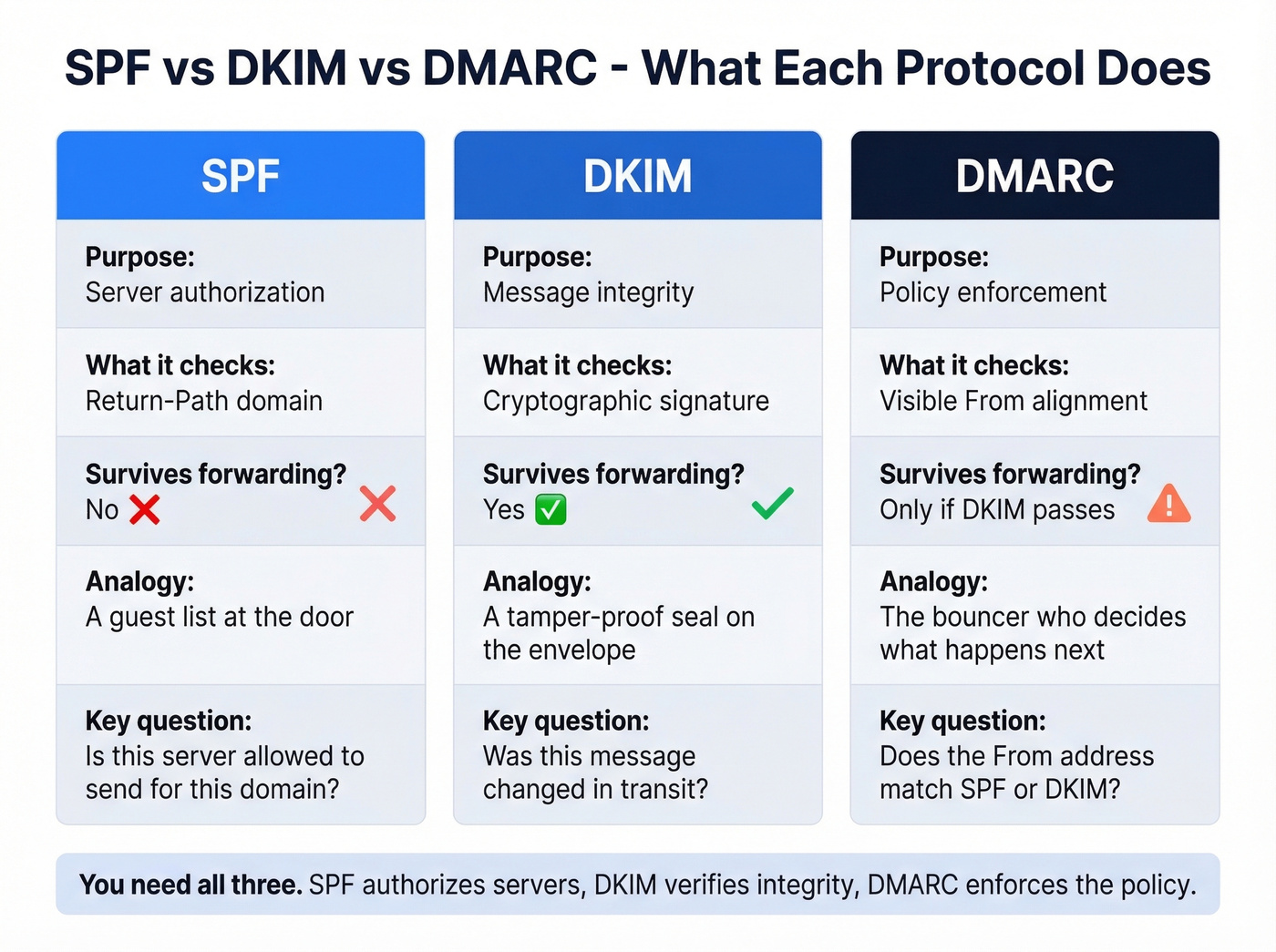
| SPF | DKIM | DMARC | |
|---|---|---|---|
| Purpose | Server authorization | Message integrity | Policy enforcement |
| Checks | Return-Path domain | Cryptographic signature | Visible From alignment |
| Survives forwarding? | No | Yes | Only if DKIM passes |
| Record type | DNS TXT | DNS TXT | DNS TXT |
SPF answers: "Is this server allowed to send for this domain?" It validates the sending IP against a published list. It often breaks when emails are forwarded because the forwarding server's IP won't be in the original domain's record, unless the forwarder uses techniques like SRS. For forwarded messages, ARC (Authenticated Received Chain) can preserve the original authentication results through the forwarding chain so receivers have more context.
DKIM answers: "Was this message tampered with in transit?" It attaches a cryptographic signature to the email headers. The receiving server verifies the signature against a public key published in DNS. Unlike SPF, DKIM survives forwarding because the signature travels with the message.
DMARC ties everything together. It checks whether the visible "From" address aligns with either the SPF domain or the DKIM signing domain. If neither aligns, DMARC tells the receiving server what to do: p=none (monitor only), p=quarantine (send to spam), or p=reject (block entirely). DMARC passes when either SPF or DKIM passes AND aligns with the From domain - you don't need both, but you need at least one.
We recommend starting with p=none to collect reports for at least two weeks, then moving to p=quarantine, and eventually p=reject once you're confident everything's configured correctly. Once you've enforced DMARC at p=reject, you can implement BIMI to display your verified brand logo in recipients' inboxes - a nice trust signal that few senders take advantage of.

You just spent time locking down SPF so your emails don't bounce or hit spam. But authentication only works if you're sending to real addresses. Prospeo's 5-step verification and 98% email accuracy mean sub-4% bounce rates - the same standard your SPF record is designed to protect.
Don't let bad data undo your authentication work.
2026 Authentication Requirements
SPF, DKIM, and DMARC aren't optional anymore. Skip them and your emails get blocked.
Google and Yahoo enforce strict requirements for bulk senders sending 5,000+ messages per day:
- SPF and DKIM alignment required on every message
- DMARC published at minimum
p=none - Spam complaint rate below 0.3% (ideally under 0.1%)
- One-click unsubscribe honored within two business days
- Non-compliant bulk messages can be rejected at the SMTP level
PCI DSS v4.0 also requires DMARC for organizations handling credit card data - so this isn't just a deliverability play. It's a compliance requirement.
A 2023 Mailgun survey found that only 55.4% of senders use SPF, and just 42.5% use DMARC. Adoption has improved since then, but the gap is still significant. If you haven't set these up, you're in the group whose emails are increasingly getting blocked.
The 10 DNS Lookup Limit
This is where things get annoying.
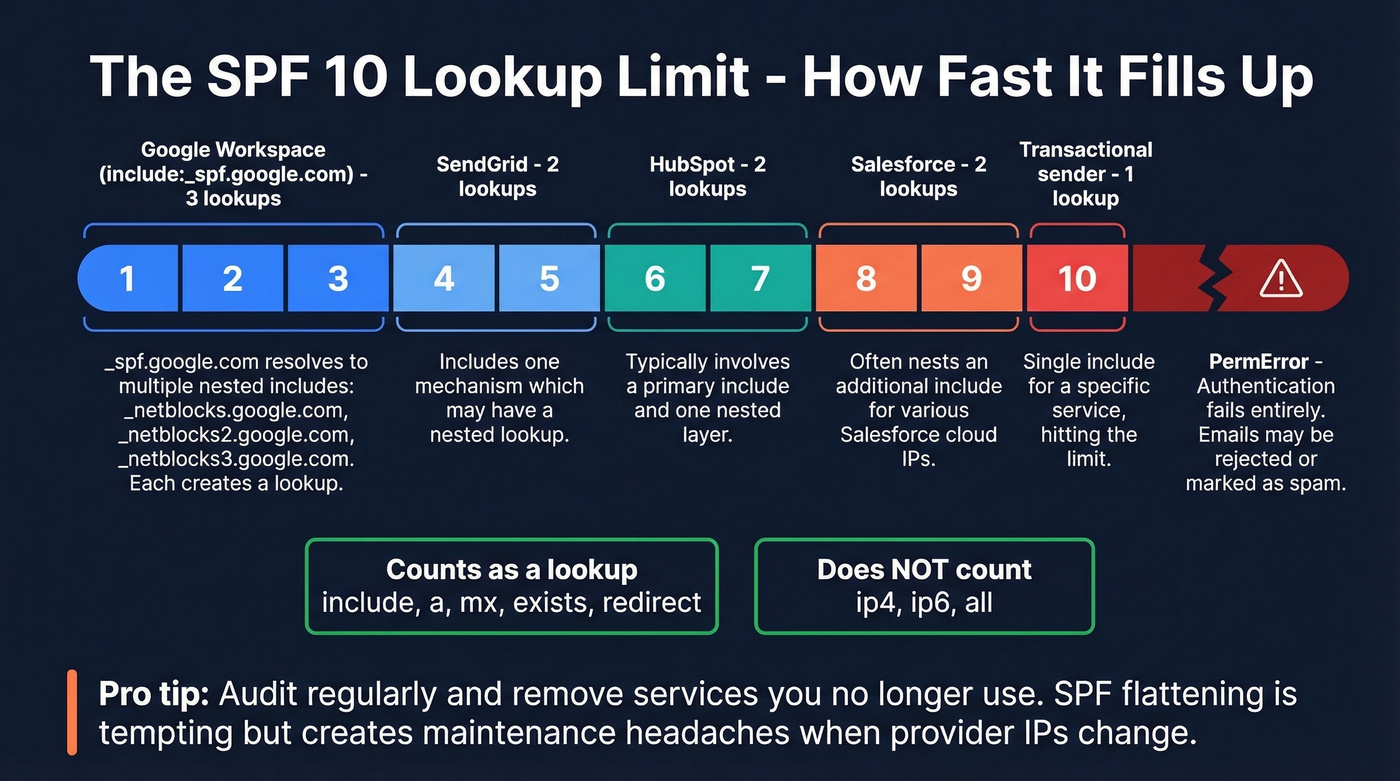
RFC7208 enforces a hard limit of 10 DNS lookups per SPF evaluation. Exceed it, and your record throws a PermError - which means authentication fails entirely. If you've got DMARC set to quarantine or reject, your emails don't arrive.
Not every mechanism counts as a lookup. include, a, mx, exists, and redirect all count. ip4, ip6, and all don't. Every include: statement triggers at least one lookup, and the included record might contain its own nested include: statements. A typical stack - Google Workspace plus a marketing platform plus a sales tool plus a transactional sender - can eat through 10 lookups fast.
Look, the 10-lookup limit is a 20-year-old design constraint that hasn't aged well. In practice, include:spf.protection.outlook.com alone can push evaluations to 11 lookups once you factor in nested includes. When a major provider's include nearly exceeds the limit by itself, the system has a design problem. But it's the system we have, so you work within it.
The common fix is SPF flattening - resolving include: statements to their underlying IP addresses. But dmarcian explicitly advises against this, arguing it creates vendor lock-in and over-authorizes IPs that change without notice. The better approach: audit your record regularly and remove services you no longer use.
Five Mistakes That Kill Deliverability
We see SPF issues on roughly 20-30% of domains we audit. Mistake #1 is by far the most common.
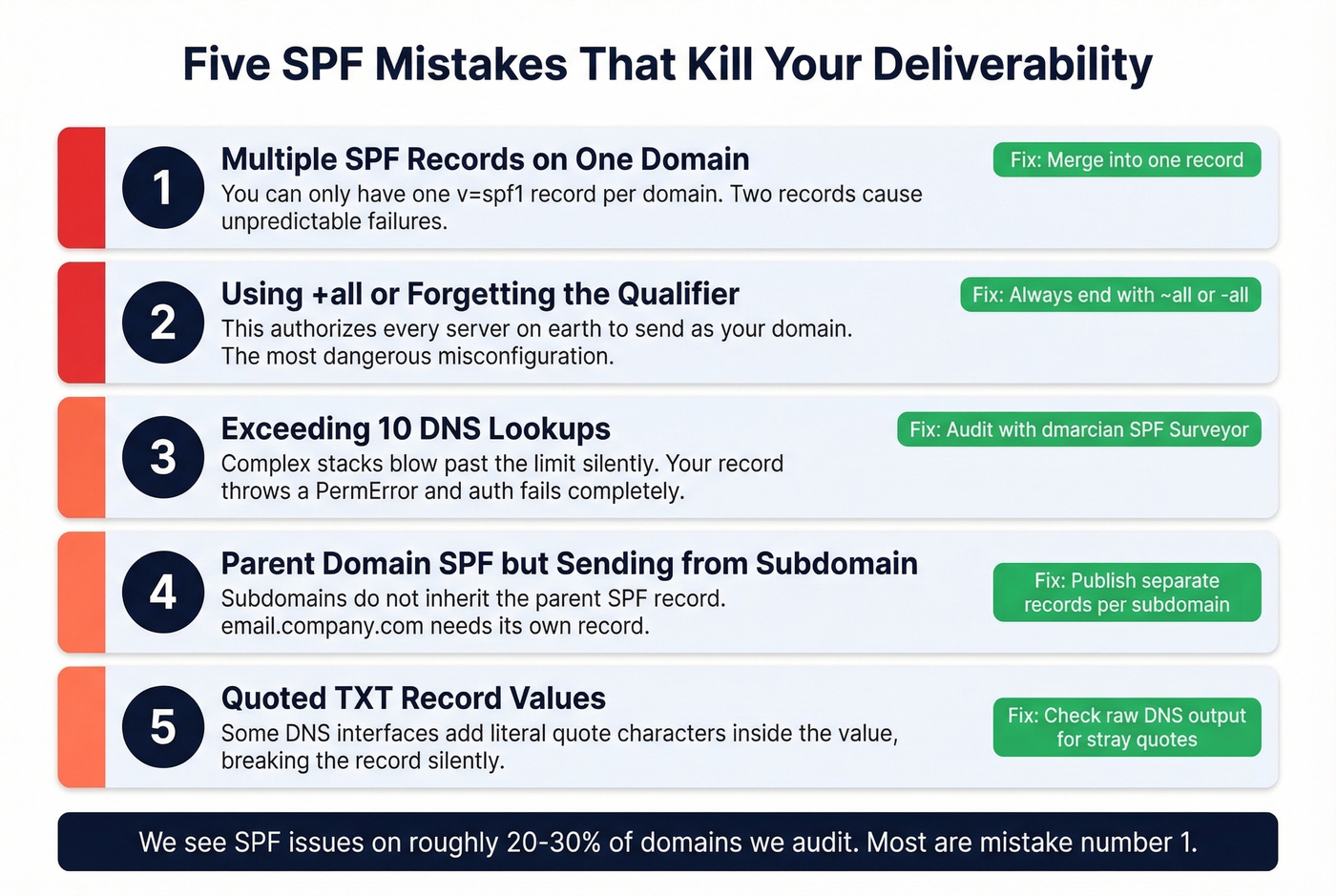
1. Multiple SPF records on the same domain. You're only allowed one TXT record starting with v=spf1 per domain. Two records cause inconsistent behavior. Merge all authorized senders into a single record.
2. Using +all or forgetting the qualifier. The +all qualifier authorizes every server on earth to send as your domain. It's the most dangerous misconfiguration possible. Always end with ~all or -all.
3. Exceeding 10 DNS lookups. Every include: adds lookups. Complex stacks blow past the limit without warning. Audit your record with dmarcian's SPF Surveyor, replace unnecessary include: statements with ip4 entries where possible, and remove defunct services.
4. SPF on the parent domain while sending from a subdomain. Teams set up authentication on company.com but send marketing emails from email.company.com. Subdomains don't inherit the parent's record. Publish a separate record on each subdomain you send from.
5. Quoted TXT record values. Some DNS interfaces auto-wrap values in quotes, resulting in a record that literally starts with "v=spf1 - including the quote character as part of the value. DNS parsers choke on this silently. After saving your record, query it with dig TXT yourdomain.com and confirm the value starts cleanly with v=spf1.
How to Check Your SPF Record
You don't need paid tools for this.
MXToolbox is the quick-and-dirty check. Enter your domain, and it shows your record, flags syntax errors, counts DNS lookups, and detects duplicate records. It's the first place to go when something breaks.

dmarcian SPF Surveyor gives you a visual expansion of your entire SPF tree - every nested include:, every IP range, and a running lookup count. It's the better tool for diagnosing why you're hitting the 10-lookup limit.
For checking individual messages, open any email in Gmail and click "Show Original." Search the headers for spf=pass, dkim=pass, and dmarc=pass. A header snippet looks something like:
spf=pass (google.com: domain of bounce@yourdomain.com designates 192.0.2.1 as permitted sender)
If you see spf=fail or spf=softfail, your record needs attention.
Why Authentication Alone Isn't Enough
SPF handles the authentication layer - it proves your domain is who it says it is. But authentication is only half the deliverability equation. The other half is data quality.
We've seen this pattern repeatedly: a team spends hours configuring SPF, DKIM, and DMARC perfectly, then launches a cold email campaign with a list that bounces at 12%. Their domain reputation craters within days. All that authentication work, wasted. (If you're troubleshooting bounces, start with these bounce rate benchmarks and fixes.)
Fixing authentication commonly improves inbox placement rates by 5-20 percentage points depending on your baseline. But if a significant chunk of your list is invalid, no amount of email authentication saves you. The harder problem is sending to email addresses that don't exist anymore.
Prospeo verifies emails in real time with 98% accuracy across 143M+ verified addresses, so your authenticated messages actually reach real inboxes. Pair proper authentication with clean data, and you've covered both sides of deliverability. For the full picture, see our email deliverability guide and how to improve sender reputation.

SPF, DKIM, and DMARC protect your domain reputation. Dirty contact data destroys it. Teams using Prospeo cut bounce rates from 35%+ down to under 4% - because every email is verified before it leaves your outbox. At $0.01 per email, protecting your sender reputation costs almost nothing.
Your authentication is only as good as your data.
FAQ
Does SPF prevent phishing?
Not on its own. SPF checks the envelope sender (Return-Path), not the visible From address recipients see. Attackers can spoof the From field while passing authentication on a different domain. You need DMARC to enforce alignment between the two and actually block spoofed emails.
Is SPF enough by itself?
No. Google, Yahoo, and Microsoft require SPF + DKIM + DMARC for reliable inbox delivery in 2026. SPF handles server authorization, but without DKIM for message integrity and DMARC for policy enforcement, spoofed From addresses can still get through.
How long does SPF take to propagate?
DNS changes typically propagate within a few hours but can take up to 48 hours. Use MXToolbox or dmarcian's SPF Surveyor to confirm your record is live before launching any email campaigns. Don't assume it's working - verify it.
What happens when SPF fails?
With -all, the message is more likely to be rejected or spammed. With ~all, it may be delivered but flagged as suspicious. If DMARC is configured, the DMARC policy (p=quarantine or p=reject) determines the final outcome when alignment doesn't pass.
Can bad email data hurt deliverability even with SPF configured?
Absolutely. High bounce rates from invalid addresses damage your domain reputation regardless of authentication setup. Tools like Prospeo verify emails before you send, keeping bounce rates under control so your SPF, DKIM, and DMARC investment actually pays off.