

Cold Email Bounce Rate: 2026 Benchmarks and How to Fix It
8% of your emails just bounced. Your sending tool paused the campaign, and your next sequence fires in three hours. That's not a minor inconvenience - it's domain reputation damage happening in real time. With the average cold email reply rate sitting at 3.43%, every bounced email is a lost shot at an already razor-thin funnel. Understanding your cold email bounce rate - and fixing it fast - is the difference between a healthy pipeline and a blacklisted domain.
We've audited dozens of outbound setups, and the pattern is always the same: bad data, not bad authentication.
What You Need (Quick Version)
Here's the operational threshold most cold email teams run with: keep total bounces under 2% and hard bounces under 1%. Fix it in this order:
- Upgrade your data source. Stale, scraped lists are the root cause. Verified and enriched lists typically see 0.5-1.5% hard bounces; scraped or unverified lists run 2-5%+. (If you're evaluating providers, start with data enrichment and email list providers.)
- Verify before sending. Even if your provider claims accuracy, run a verification pass. Catch-all domains fool most tools. (Use a dedicated AI email checker or learn how to check if an email will bounce.)
- Authenticate your domain. SPF, DKIM, and DMARC are the baseline, not the fix. (If you're stuck on policy details, DMARC alignment is usually the missing piece.)
What Does Bounce Rate Mean in Cold Email?
The formula: (bounced emails / emails sent) x 100. Send 1,000 emails, 30 bounce - that's 3%.
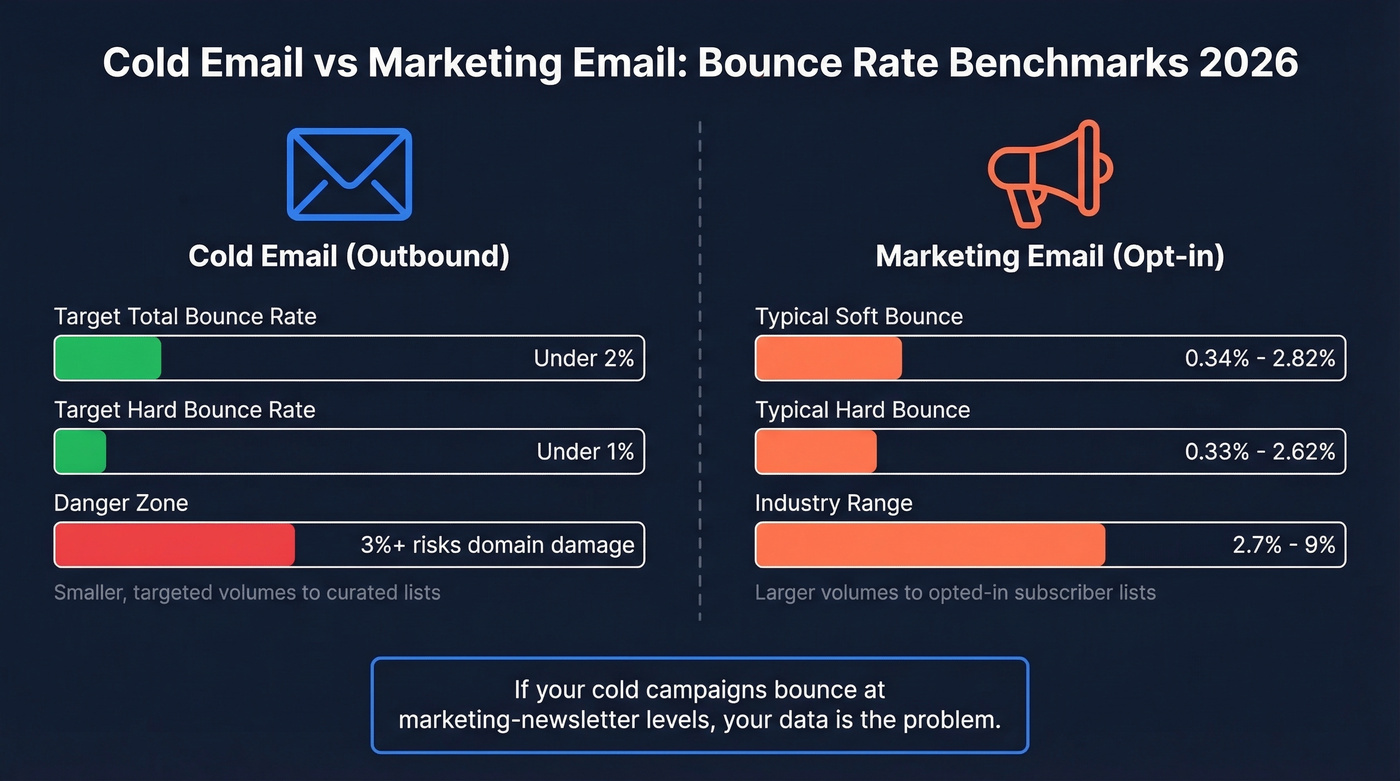
Don't confuse cold email benchmarks with email marketing benchmarks. Opt-in newsletters often see bounce rates in the 2.7% to 9% range depending on industry. Cold outreach should be lower because you're sending smaller, targeted volumes to curated lists. If your cold campaigns bounce at marketing-newsletter levels, your data is the problem. (For the broader baseline, see email bounce rate.)
Hard Bounce vs Soft Bounce vs Reject
Most people lump all bounces together. That's a mistake - the type tells you what's broken.
| Type | Cause | Action |
|---|---|---|
| Hard bounce | Invalid address, dead domain | Remove immediately |
| Soft bounce | Full mailbox, server down | Monitor; remove after 2-3 attempts |
| Reject/Refuse | Policy-driven server block | Fix auth or sending pattern |
Mailchimp's published ranges put soft bounces at 0.34-2.82% and hard bounces at 0.33-2.62%, but that's opt-in marketing email. For cold outreach, you should be well below those floors.
One claim that circulates on deliverability blogs: hard bounces don't matter if you're sending under 200 emails per day. Sounds comforting. It's a bad operating assumption. If your list is throwing off hard bounces, fix the data immediately - even at low volume, because ESPs track your sender reputation cumulatively, not per-campaign. (If you're scaling, email velocity matters as much as list quality.)

The Rules Changed in 2024-2026
Four policy shifts reshaped what "acceptable" means:
| Date | Provider | What Changed |
|---|---|---|
| 2024 | Gmail/Yahoo | Bulk sender enforcement: SPF, DKIM, DMARC required |
| May 2025 | Microsoft | Rejection code 550; 5.7.515 for non-compliant senders |
| Oct 2025 | Postmaster Tools v1 dashboard retired/changed | |
| Nov 2025 | Gmail | Active 5xx rejection of non-compliant traffic |
Spam complaint thresholds are non-negotiable: stay under 0.10% ideal, and anything at or above 0.30% means you're done. Authenticate everything and warm up for at least two weeks before scaling. That's the baseline now, not a best practice. (For a deeper remediation plan, use this email deliverability guide.)

Bad data is the #1 cause of high bounce rates - not authentication, not warm-up. Prospeo refreshes 300M+ profiles every 7 days and runs 5-step verification with catch-all handling and spam-trap removal. The result: 98% email accuracy at $0.01 per email.
Stop bouncing. Start landing in inboxes with verified data.
How to Diagnose Your Bounces
The SMTP code tells you exactly what's wrong. Stop guessing.
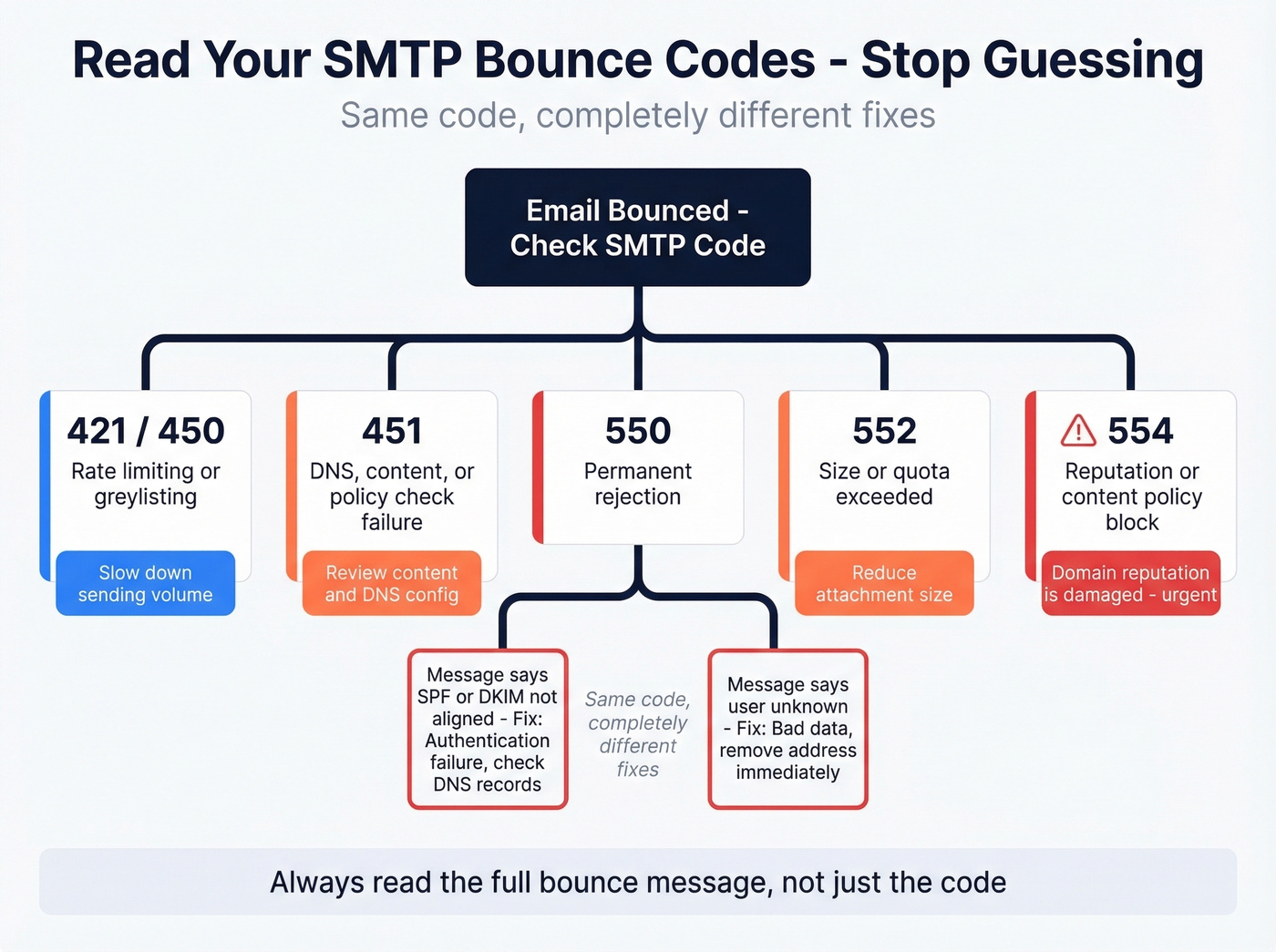
| SMTP Code | Meaning | Likely Fix |
|---|---|---|
| 421/450 | Rate limiting, greylisting | Slow down sending volume |
| 451 | DNS, content, or policy check | Review content + DNS config |
| 550 | Permanent rejection | Bad address or failed auth |
| 552 | Size or quota exceeded | Reduce attachment size |
| 554 | Reputation or content policy | Domain reputation is damaged |
A 550 with "SPF or DKIM not aligned" is authentication failure. A 550 with "user unknown" is bad data. Same code, completely different fixes - and we've seen teams waste weeks chasing the wrong one because they didn't read the full bounce message.
Beyond bounce rate, track inbox placement rate: the percentage of delivered emails that actually reach the primary inbox, not just avoid bouncing. Monitor your reputation signals in Google Postmaster Tools, and use tools like MXToolbox and mail-tester.com to spot DNS/auth and content issues fast. (If you're actively repairing reputation, follow a step-by-step plan to improve sender reputation.)
How to Reduce Bounces on Cold Email
Here's the thing: most teams troubleshoot bounces backwards. They start with authentication, then warm-up, then - maybe - look at their data. Flip that order.
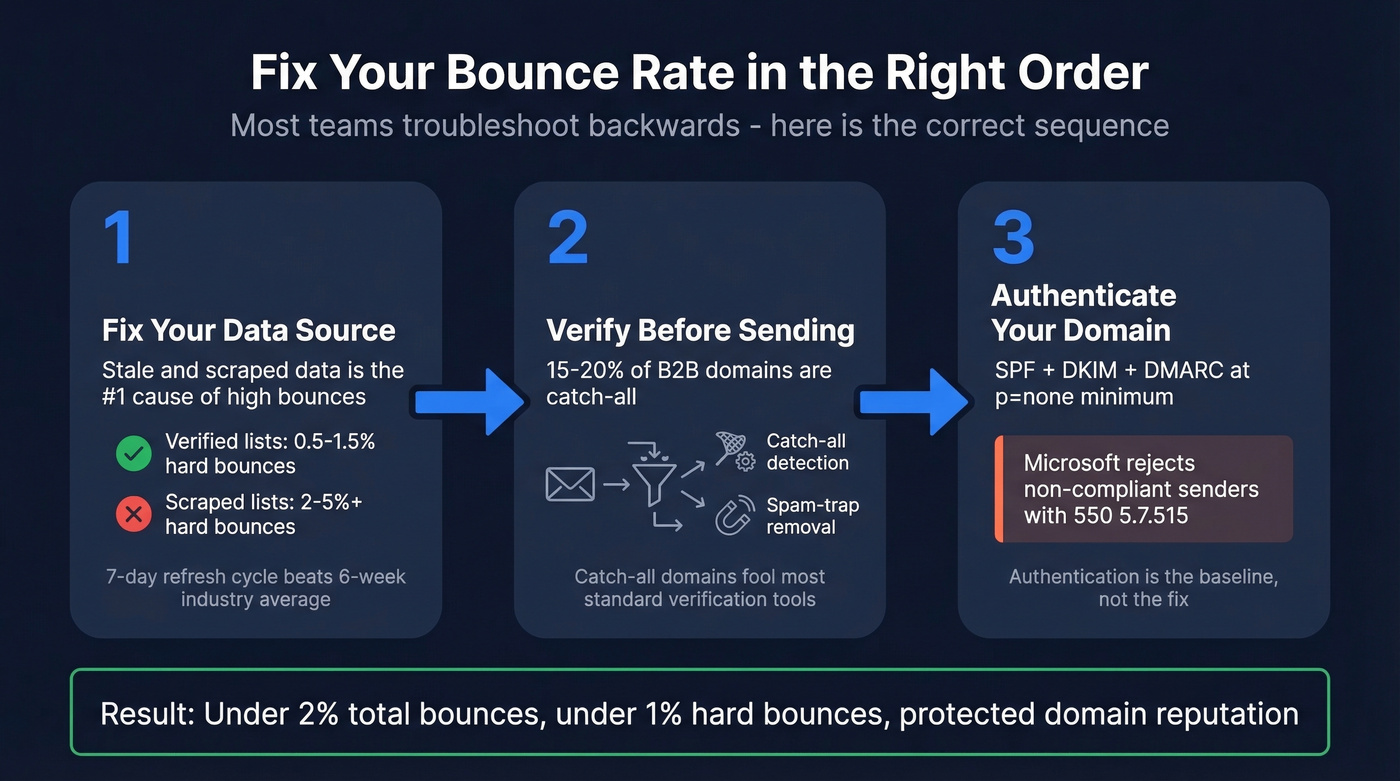
Step 1: Fix your data source. Stale and scraped data is the number-one cause of high bounce rates. Not SPF records. Not warm-up schedules. Bad data. Prospeo refreshes its database every 7 days - compared to the 6-week industry average - and runs a 5-step verification process that includes catch-all handling and spam-trap removal. The results back this up: Meritt dropped from a 35% bounce rate to under 4%, and Snyk went from 35-40% to under 5% across 50 AEs. (If you're building lists from scratch, how to generate an email list helps avoid the usual traps.)
Step 2: Verify before sending. Roughly 15-20% of B2B domains are catch-all, meaning verification tools return "valid" for addresses that don't actually exist. If your verification tool doesn't handle catch-alls specifically, you're flying blind on a significant chunk of your list. The r/coldemail community brings this up constantly - catch-all domains are the silent killer of otherwise clean campaigns.
Step 3: Authenticate your domain. SPF, DKIM, and DMARC at p=none minimum. If you haven't done this, nothing else matters - Microsoft will reject you outright with a 550; 5.7.515. Check your SPF record doesn't exceed 10 DNS lookups, a common misconfiguration that causes silent failures. But don't mistake authentication for a bounce-rate fix. We've seen teams with perfect DMARC records still bouncing at 8% because their contact data was garbage. (If you need a reference, use these SPF record examples.)
Verification Tools Compared
If your data source requires a separate verification layer, that's a red flag about the data source itself. Here's how the verification options break down:
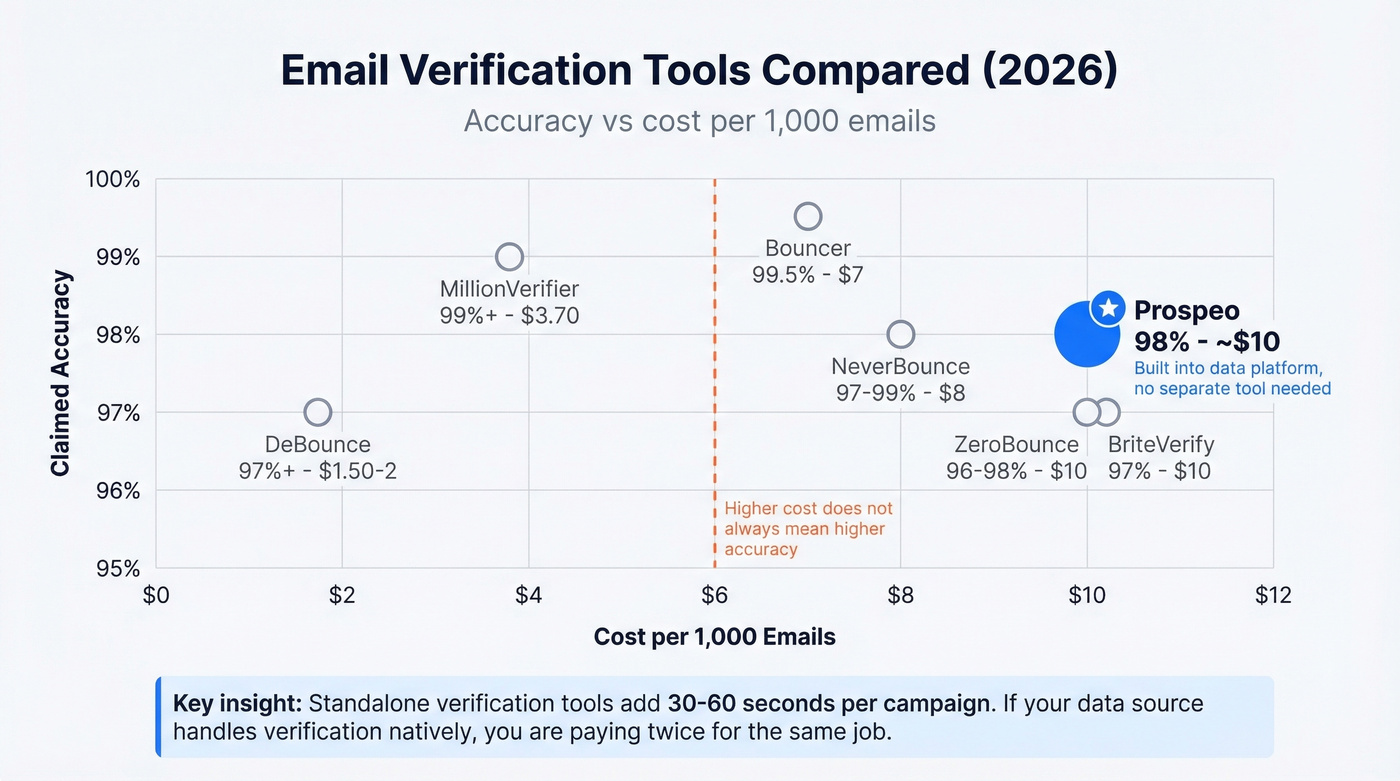
| Tool | Accuracy | Cost per 1,000 | Notes |
|---|---|---|---|
| Prospeo | 98% | ~$10 ($0.01/email) | Built into data platform |
| DeBounce | 97%+ | $1.50-2 | Budget standalone option |
| MillionVerifier | 99%+ | ~$3.70 | Good accuracy, no frills |
| Bouncer | 99.5% | $7 | Strong standalone accuracy |
| NeverBounce | 97-99% | $8 | Well-known, reliable |
| ZeroBounce | 96-98% | $10 | Feature-rich, pricier |
| BriteVerify | 97% | $10 | Enterprise-oriented |
In our testing, standalone verification tools add 30-60 seconds per campaign that you don't need if your data source handles it natively. The standalone tools above are solid for cleaning purchased or scraped lists, but layering them on top of a stale database is treating the symptom. Skip standalone verification if your data provider already includes it - you're paying twice for the same job.
What High Bounces Cost Your Pipeline
Let's put real numbers on this. At a 5% bounce rate on a 1,000-email campaign, that's 50 fewer emails delivered - roughly 2 lost replies per campaign based on the 3.43% average reply rate. Over a month of weekly sends, that's 8 lost replies, or 3-4 fewer meetings. (If you're trying to improve the rest of the funnel too, start with a tighter B2B cold email sequence.)
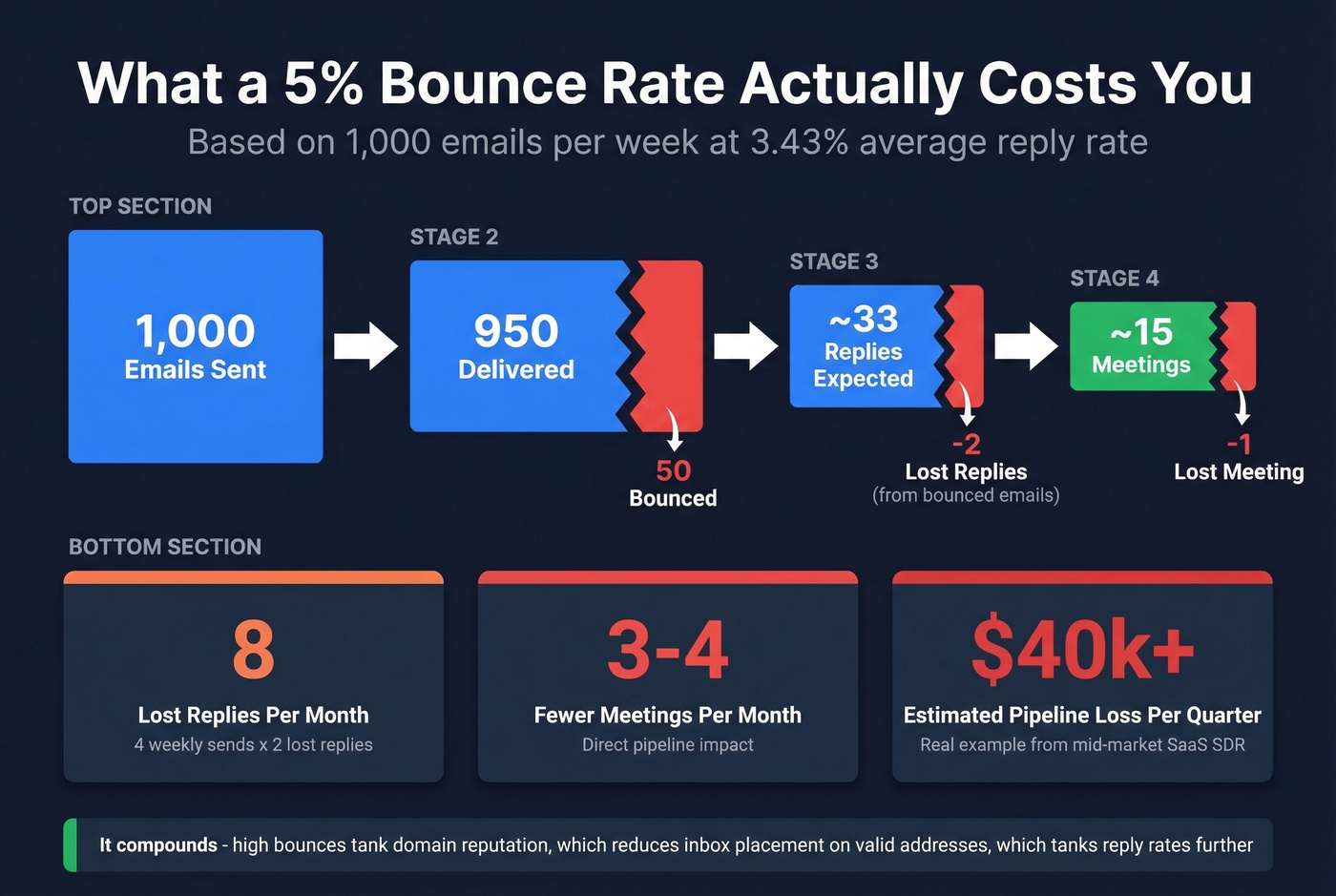
And it compounds. High bounces tank your domain reputation, which reduces inbox placement on valid addresses, which tanks reply rates further. Your bounce rate isn't a sending problem. It's a data quality problem with a direct line to your pipeline. (To keep the rest of your outbound engine healthy, track pipeline health alongside deliverability.)
For teams closing deals under $15k, you probably can't afford not to fix your data. At that deal size, every lost meeting from bad contacts is a proportionally massive hit to your quarter. One SDR we talked to at a mid-market SaaS company estimated they'd lost roughly $40k in pipeline over a single quarter from a 6% bounce rate they didn't catch for three weeks.
Paying for a separate verification tool on top of a stale database? That's treating the symptom. Prospeo bakes verification into the data source - catch-all detection, honeypot filtering, and a 7-day refresh cycle that makes standalone cleaners redundant.
Kill your bounce rate at the source for $0.01 per email.
FAQ
What's a good cold email bounce rate in 2026?
Under 2% total bounces and under 1% hard bounces. After Gmail, Yahoo, and Microsoft tightened enforcement in 2024-2025, anything above 3% risks permanent domain reputation damage. With verified data, most teams land under 1%.
Why do verified emails still bounce?
Catch-all domains are the main culprit. They accept all inbound mail at the server level, so verification tools return "valid" even when the specific mailbox doesn't exist. Roughly 15-20% of B2B domains are catch-all. Use a provider with dedicated catch-all handling to flag these before you send.
Should I use a separate verification tool?
Only if your data provider doesn't include verification. Paying twice - once for data, once to clean it - means your data source isn't doing its job. Standalone tools like NeverBounce or ZeroBounce make sense for cleaning legacy or scraped lists, but they shouldn't be a permanent line item if your source data is fresh.
How fast can I fix a high bounce rate?
Most teams see results within one campaign cycle, typically a week. Switch to a verified data source, run a verification pass on your existing list, and remove all hard-bounce addresses. Stack Optimize went from scratch to 94%+ deliverability and under 3% bounces across all clients using this approach.