

What Is SMTP? The Protocol Behind Every Email You Send
Your cold email campaign just launched. Two hours later, 15% of your list bounced, your domain reputation took a hit, and half the remaining emails landed in spam. The root cause? You didn't understand what happened between clicking "send" and the email arriving - or not arriving. That's the Simple Mail Transfer Protocol at work, and five minutes understanding it will save you weeks of deliverability headaches.
Quick Summary
- SMTP is the protocol that sends email across the internet. It doesn't receive - that's IMAP or POP3.
- Use port 587 (STARTTLS) or port 465 (implicit TLS) for sending. Never port 25 for client submission.
- Set up SPF, DKIM, and DMARC - Google and Yahoo now require them for bulk senders, plus one-click unsubscribe.
- Verify recipient addresses before sending. Every bounce chips away at your sender reputation, and that damage compounds fast.
SMTP Defined
SMTP stands for Simple Mail Transfer Protocol. It's the standard method computers use to send email across the internet, and it's been doing that job since 1982 when RFC 821 defined the original spec. The short answer: it's the conversation two servers have when one says "I have mail for you" and the other says "OK, send it."
The protocol has evolved since then. ESMTP (Extended SMTP), introduced via RFC 1869, added the EHLO command and a framework for extensions. Later extensions brought SMTP authentication (SMTP-AUTH) and TLS encryption via STARTTLS, while MIME (RFC 2045) enabled attachments, HTML email, and non-ASCII characters. But the core handshake? Hasn't changed.
SMTP only handles sending. Retrieving email from a server is handled by IMAP or POP3 - push vs. pull, real-time relay vs. on-demand access. People mix these up constantly.
How Email Delivery Works Step by Step
Here's what actually happens when you hit send on an email to a colleague at another company.
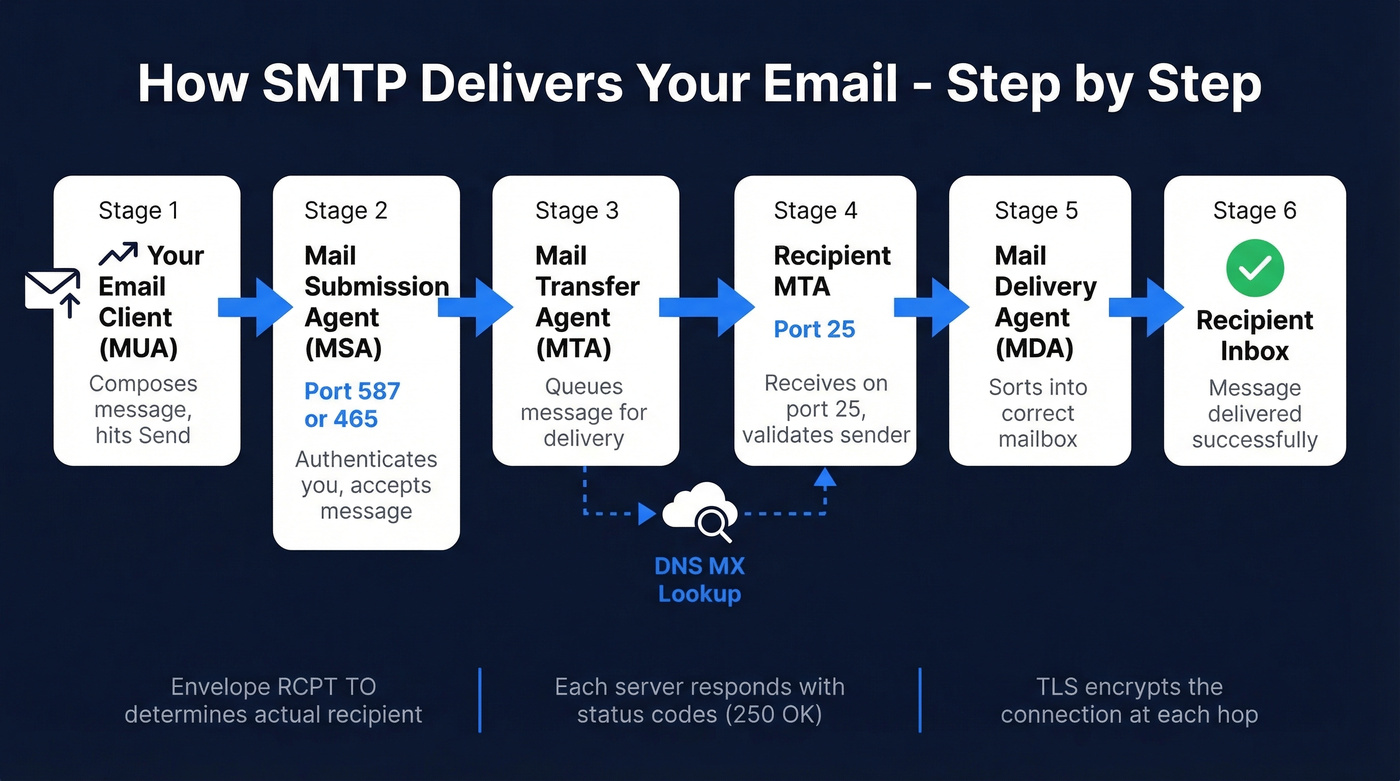
Your email client - technically called a Mail User Agent, or MUA - connects to your outgoing server's Mail Submission Agent (MSA) on port 587 or 465. The MSA authenticates you, accepts the message, and hands it to the MTA (mail transfer agent), which queues it for delivery. The MTA performs a DNS MX lookup to find the recipient's mail server, opens a connection on port 25 to that server's MTA, and once the message is accepted, the recipient's Mail Delivery Agent drops it into the inbox.
One detail worth knowing: the actual recipient is determined by the RCPT TO command in the envelope, not the To: header inside the message body. They're usually the same, but they don't have to be - which is how BCC works, and also how spoofing works.
Here's the server conversation in practice:
S: 220 mail.example.com ESMTP ready

C: EHLO sender.example.org

S: 250-mail.example.com Hello

S: 250 STARTTLS

C: MAIL FROM:<alice@sender.example.org>

S: 250 OK

C: RCPT TO:<bob@example.com>

S: 250 OK

C: DATA

S: 354 Start mail input

C: Subject: Meeting tomorrow

C: Hey Bob, confirming 2pm works.

C: .

S: 250 OK: queued

C: QUIT

S: 221 Bye
Every response code (220, 250, 354, 221) tells the sending server exactly what happened. No ambiguity.

Every bounce in that SMTP conversation chips away at your sender reputation. Prospeo's 5-step email verification - including catch-all handling, spam-trap removal, and honeypot filtering - keeps bounce rates under 4%. That's 98% accuracy across 143M+ verified emails.
Fix deliverability at the source: send only to verified addresses.
Commands, Ports, and Protocols
Core SMTP Commands
| Command | What It Does |
|---|---|
| EHLO | Identifies the sender; requests extended features |
| MAIL FROM | Declares the sender's address (envelope) |
| RCPT TO | Declares the recipient's address |
| DATA | Signals the start of the message body |
| RSET | Resets the current transaction |
| QUIT | Closes the connection |
Which Port to Use
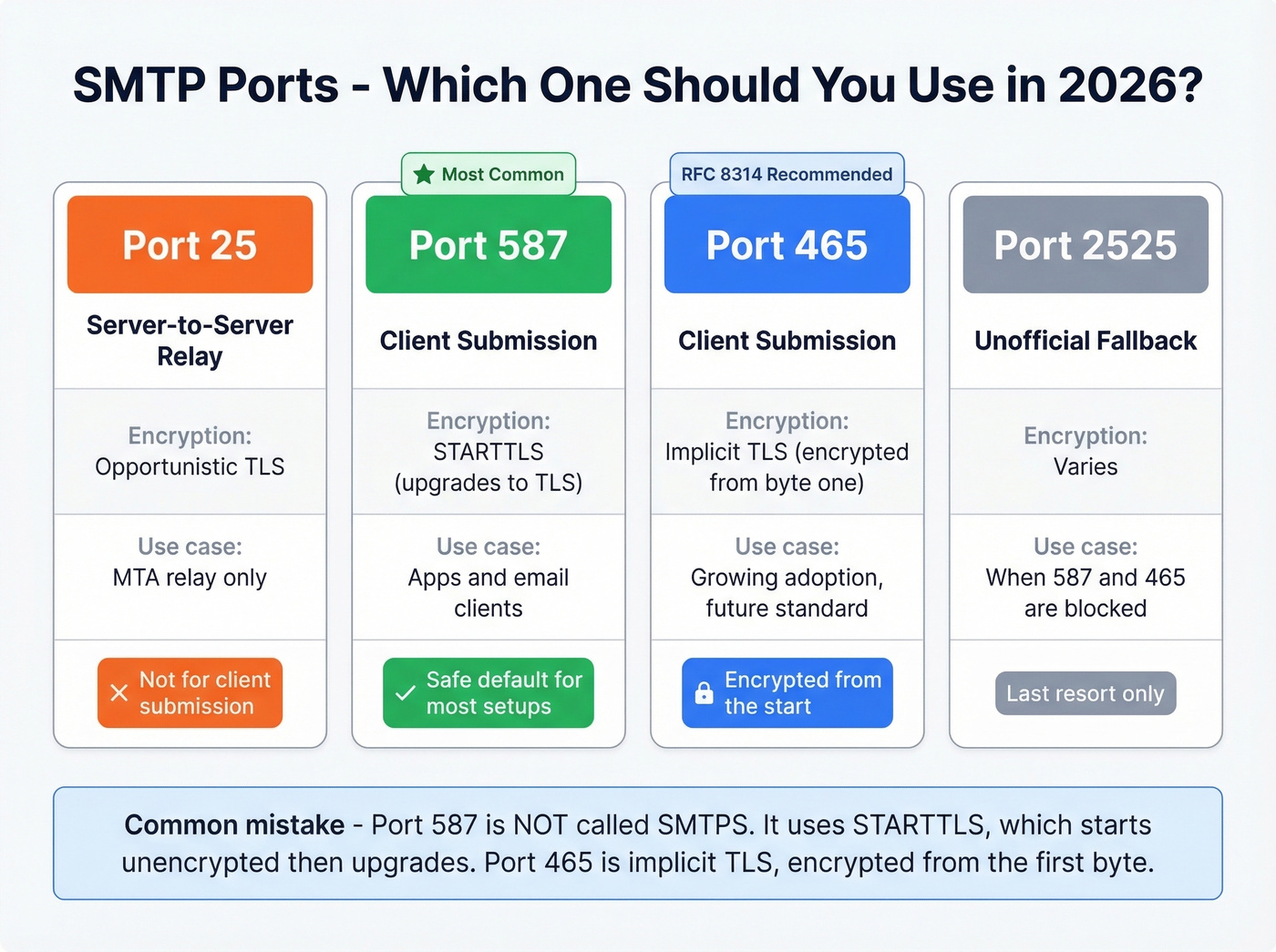
Port guidance online is frequently wrong. Let's set the record straight for 2026.
| Port | Purpose | Encryption | When to Use |
|---|---|---|---|
| 25 | Server-to-server relay | Opportunistic TLS | MTA relay only; often blocked by ISPs on residential networks |
| 587 | Client submission | STARTTLS (upgrades to TLS) | Default for apps and clients |
| 465 | Client submission | Implicit TLS (encrypted from start) | RFC 8314 recommended; growing adoption |
| 2525 | Unofficial fallback | Varies | When 587/465 are blocked |
A common mistake: calling port 587 "SMTPS." It isn't. Port 587 uses STARTTLS, which starts unencrypted and upgrades. Port 465 is implicit TLS - encrypted from the first byte. Both are secure in practice, but they work differently. For most setups, 587 with STARTTLS is the safe default.
SMTP vs. IMAP vs. POP3
| Protocol | Direction | Default Port | Use Case |
|---|---|---|---|
| SMTP | Send | 587 / 465 | Outgoing mail delivery |
| IMAP | Receive | 143 / 993 (TLS) | Sync mail across devices |
| POP3 | Receive | 110 / 995 (TLS) | Download mail to one device |
Authentication: SPF, DKIM, and DMARC
SMTP by itself has no way to verify that the sender is who they claim to be. Zero. SPF, DKIM, and DMARC fix that - three layers of authentication that stop spoofing and improve deliverability.
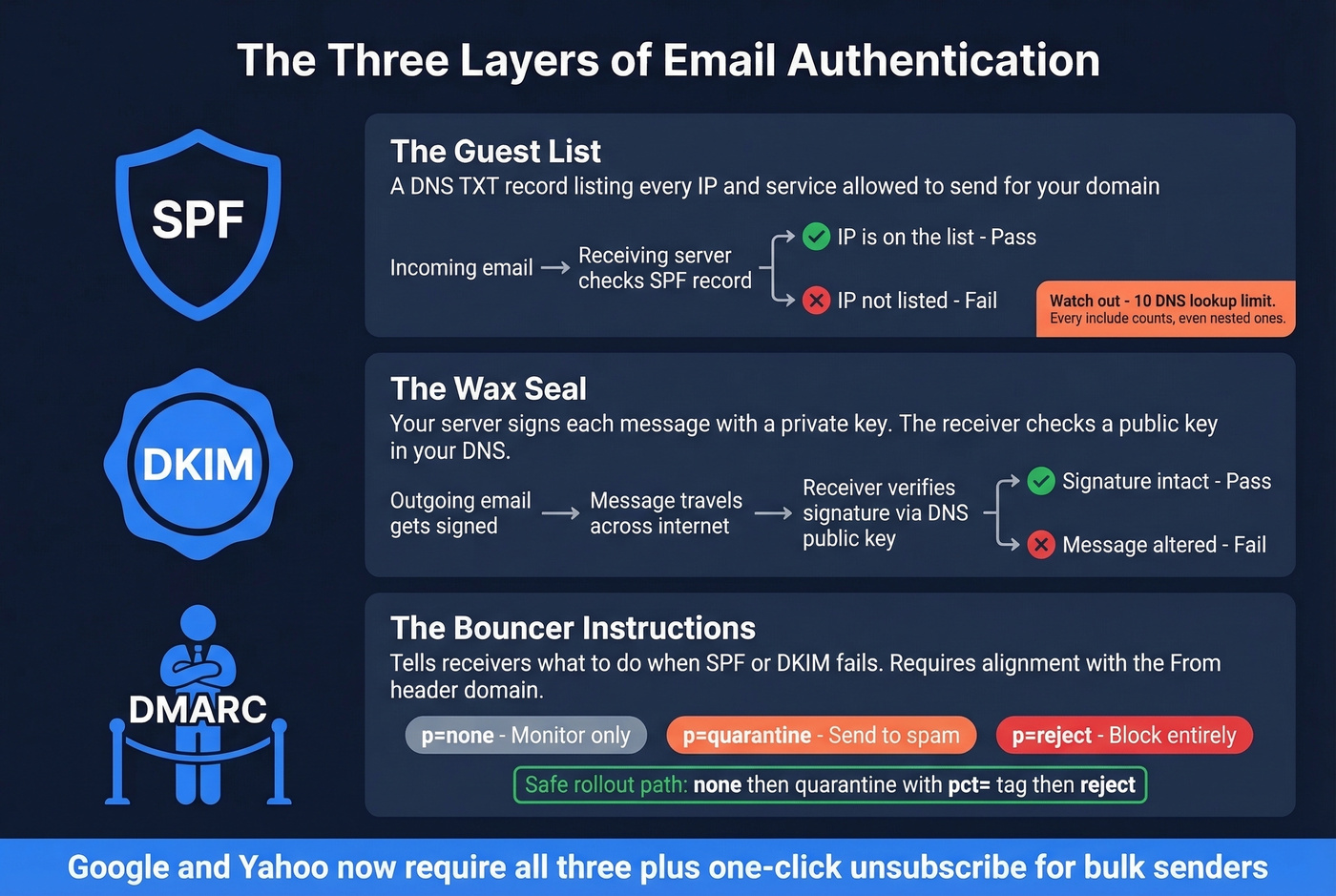
SPF is a guest list. You publish a DNS TXT record listing every IP address and service authorized to send email for your domain. When a receiving server gets mail claiming to be from your domain, it checks the list. The gotcha: SPF has a 10 DNS lookup limit. Every include: directive counts, including nested ones. Exceed 10 and your SPF record throws a permanent error and stops working entirely. (If you need examples and syntax patterns, see our SPF record guide.)
DKIM is a wax seal. Your outgoing server signs each message with a private cryptographic key, and the receiving server verifies the signature using a public key in your DNS. If the message was altered in transit, the seal breaks. If you're troubleshooting, use a quick checklist to verify DKIM.
DMARC is the bouncer's instructions. It tells receiving servers what to do when SPF or DKIM fails: deliver anyway (none), quarantine it, or reject it outright. Here's the thing most guides skip - the critical requirement is alignment. SPF and DKIM must align with the same domain that appears in the visible From: header. Passing DKIM for sendgrid.net doesn't help if your From address is yourcompany.com. (More detail: DMARC alignment.)
The safe rollout path: start with p=none to collect reports without affecting delivery, move to quarantine with a pct= tag to phase in gradually, then switch to reject once you're confident everything's aligned. Google and Yahoo now require SPF, DKIM, DMARC, and one-click unsubscribe for bulk senders. This isn't optional anymore - Google's bulk sender guidelines spell it out plainly.
Error Codes and Troubleshooting
When email delivery fails, the error code tells you where it broke. We use a 5-stage triage model before even reading the code:
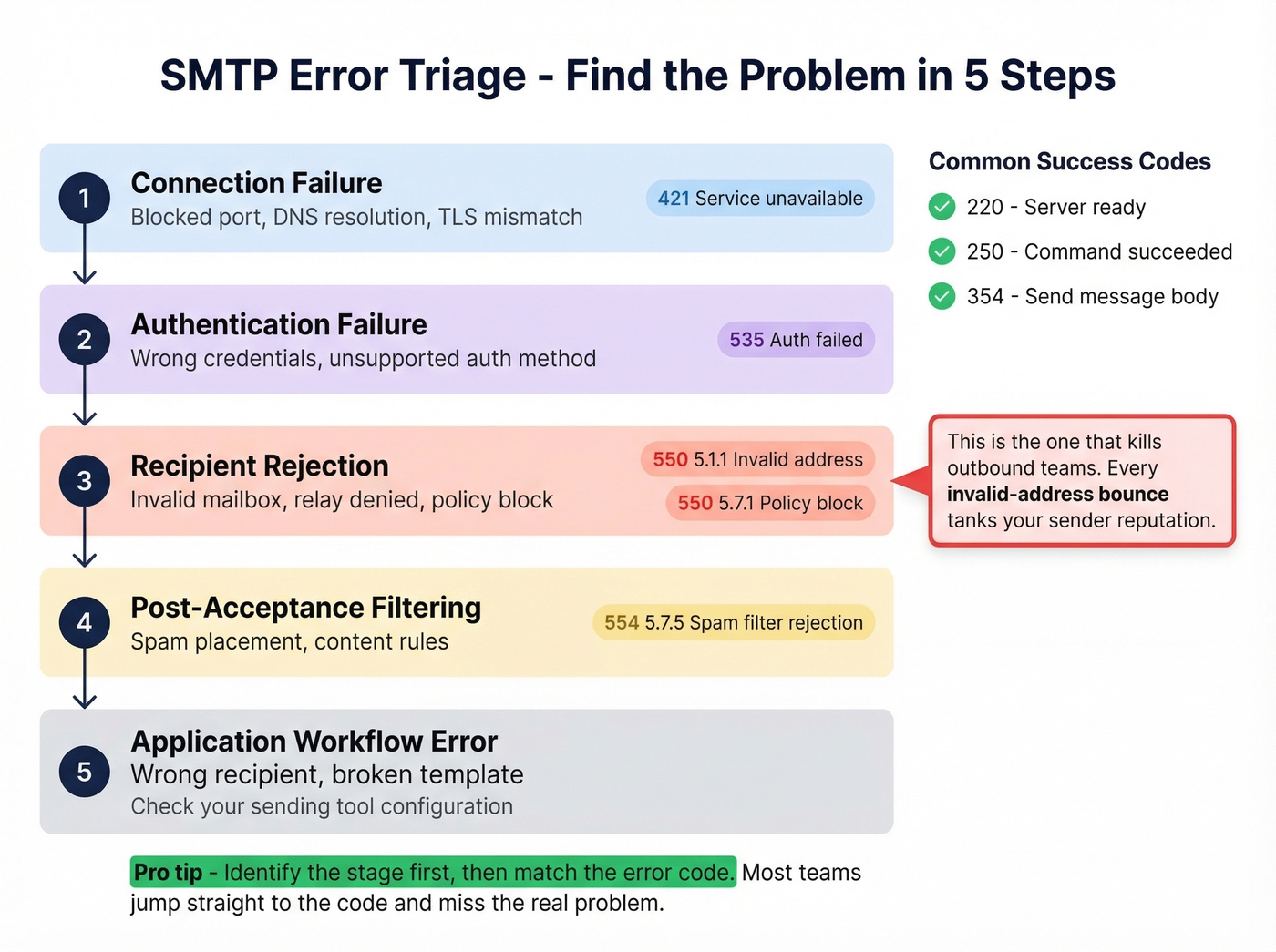
- Connection failure - blocked port, DNS resolution, TLS mismatch
- Authentication failure - wrong credentials, unsupported auth method
- Recipient rejection - invalid mailbox, relay denied, policy block
- Post-acceptance filtering - spam placement, content rules
- Application workflow error - wrong recipient, broken template
Identify the stage first, then match the code:
| Code | Meaning | What to Do |
|---|---|---|
| 220 | Server ready | Normal - connection established |
| 250 | Request completed | Normal - command succeeded |
| 421 | Service unavailable | Rate-limited; slow down or retry |
| 450 | Mailbox unavailable (temp) | Mailbox full or disabled; retry later |
| 550 5.1.1 | Invalid address | Remove from list immediately |
| 550 5.7.1 | Policy/reputation block | Check blocklists and reputation |
| 554 5.7.5 | Spam filter rejection | Authentication or content triggered filter |
The 550 5.1.1 is the one that kills outbound teams. Every invalid-address bounce signals to mailbox providers that you aren't maintaining your list, and your sender reputation drops accordingly. The fix is verifying your list before it ever touches your mail server - Prospeo's 5-step verification catches invalid addresses, catch-all domains, and spam traps at 98% accuracy before you send a single email. (If you want bounce benchmarks and deeper fixes, see email bounce rate.)
For ongoing monitoring, Google Postmaster Tools and Microsoft SNDS are free and give you direct visibility into your domain's reputation and complaint rates. Check both weekly if you're sending any volume of outbound email.
SMTP and Deliverability
Here's our hot take: most deliverability problems aren't deliverability problems. They're data problems.
We've watched the same death spiral play out dozens of times. A team sends to an unverified list, 8-12% of addresses bounce, mailbox providers flag the domain, future emails land in spam even for valid addresses, open rates crater, and the team blames "email not working anymore." The consensus on r/coldemail echoes this - thread after thread of people troubleshooting SPF records and warming schedules when the real issue was garbage data from the start. (If you're scaling volume, also watch your email velocity.)
The fix is straightforward: verify every address before it enters your sending workflow. Prospeo runs every email through syntax checks, domain validation, mailbox pings, catch-all handling, and spam-trap removal. Real results: Meritt went from a 35%+ bounce rate to under 4% after switching their verification, tripling their pipeline from $100K to $300K per week.
Skip the verification step if you enjoy rebuilding domain reputation from scratch. Otherwise, clean your list first and save yourself the headache.
You just learned how SPF, DKIM, and DMARC protect your domain. Now protect your list. Bad recipient data triggers hard bounces that tank your reputation faster than any authentication gap. Prospeo refreshes every record on a 7-day cycle - not the 6-week industry average - so you're never sending to stale addresses.
Your authentication stack is only as good as the data you're sending to.
FAQ
Is SMTP secure by default?
No. Base SMTP transmits in plaintext with zero authentication. Modern implementations layer on TLS encryption (STARTTLS on port 587 or implicit TLS on port 465) plus SPF, DKIM, and DMARC to verify senders and protect message integrity.
What's an SMTP server?
An SMTP server is software that accepts outgoing email from your client or application and routes it toward the recipient's mail server. When you configure an email client, the server address you enter - like smtp.gmail.com - tells your client where to deliver outbound messages. Every email provider gives you one; run your own only if you need full control over sending infrastructure and IP reputation.
Which port should I use?
Use port 587 with STARTTLS - it's the most widely supported option in 2026. Port 465 with implicit TLS is the RFC 8314 recommendation and gaining adoption. Avoid port 25 for client submission; it's meant for server-to-server relay and is often blocked by ISPs.
How do I prevent bounces from hurting sender reputation?
Verify every email address before sending. The 5-step process - syntax, domain, mailbox, catch-all, and spam-trap checks - catches bad addresses before they ever reach your outgoing server. Even a small percentage of hard bounces compounds quickly, so this isn't something to skip on any list over a few hundred contacts.
What's the difference between SMTP and ESMTP?
ESMTP introduced the EHLO command and a framework for protocol extensions like authentication and encryption. Every modern mail server uses ESMTP. When people say "SMTP" today, they functionally mean ESMTP - the original HELO-only version is a historical footnote.