

DKIM vs SPF vs DMARC: What They Do & How to Set Them Up
Only ~20% of the top 10 million domains have a DMARC record published. That means eighty percent of domains are sending email without full authentication - and the window for getting away with that is closed. Understanding DKIM vs SPF vs DMARC isn't optional anymore; it's the baseline for reaching any inbox.
Google and Yahoo started enforcing SPF, DKIM, and DMARC for bulk senders in February 2024. Outlook followed with new requirements for high-volume senders in May 2025. Over 500,000 domains published DMARC records by the end of February 2024, and more than 10,000 domains per month have moved to enforcement since. Unauthenticated bulk email now routinely bounces or lands in spam.
If you're still fuzzy on what these three protocols do, how they differ, and how to roll them out without breaking legitimate mail - this is the guide.
What Each Protocol Does
SPF authorizes which servers can send on behalf of your domain. DKIM cryptographically signs your messages so the receiver can verify they weren't tampered with. DMARC tells mailbox providers what to do when SPF or DKIM fail - and sends reports back to you.
One verifies the sender's IP. The other verifies the message itself. The third enforces policy on both.
You need all three. SPF first because it's the fastest to implement, DKIM second because it requires generating a key pair, DMARC last because it depends on both. Here's the thing: if you're running outbound without all three configured, your messages are landing in spam. That's not a scare tactic - it's how Gmail, Yahoo, and Outlook work now.
How SPF, DKIM, and DMARC Compare
The biggest source of confusion is that each protocol checks a different domain identifier. SPF looks at the Return-Path (envelope sender). DKIM looks at the d= value in its signature header. DMARC ties them together by checking whether either one aligns with the visible Header From - the address your recipient actually sees.
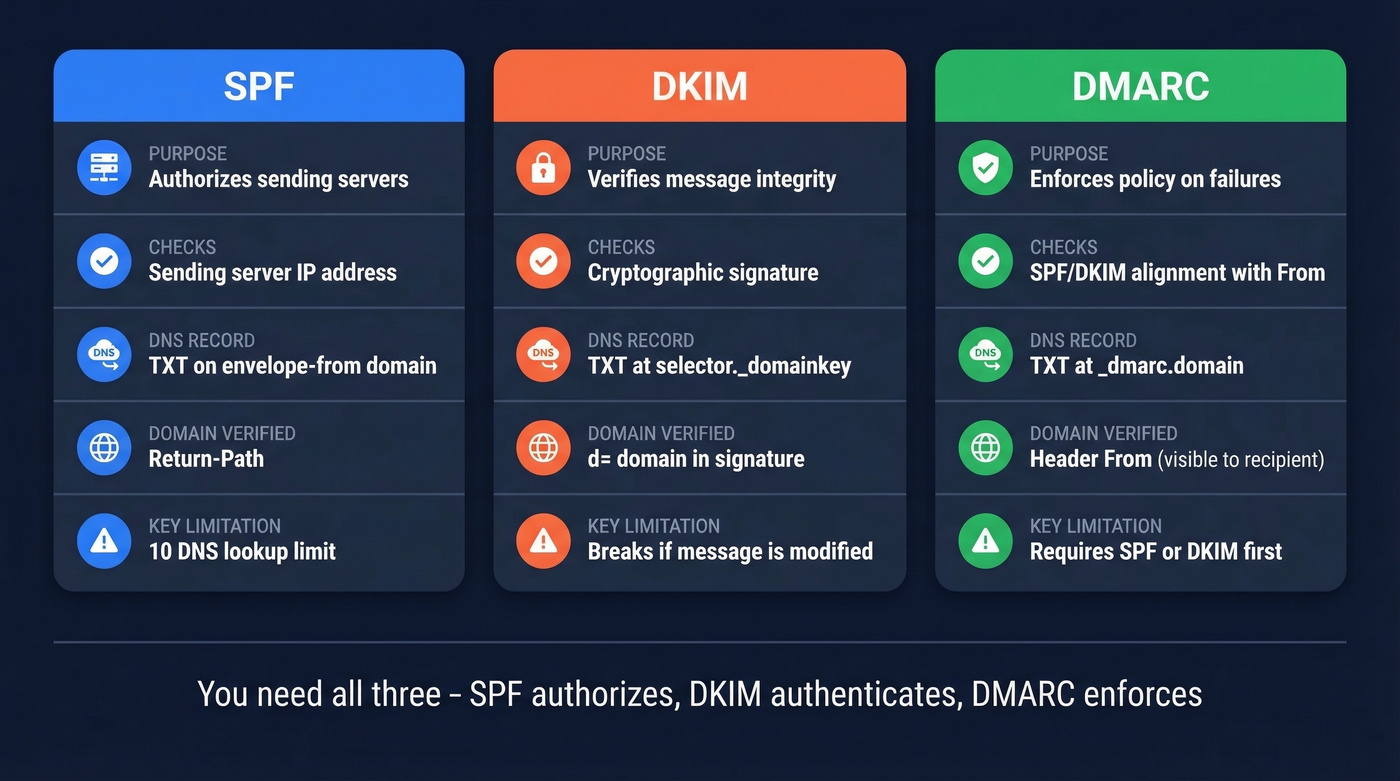
| Protocol | What It Checks | DNS Record | Domain Verified | Key Limitation |
|---|---|---|---|---|
| SPF | Sending server IP | TXT on the envelope-from domain | Return-Path | 10 DNS lookup limit |
| DKIM | Message signature | TXT at selector._domainkey |
d= domain |
Can break if intermediaries modify headers/body |
| DMARC | Alignment of SPF/DKIM | TXT at _dmarc.domain |
Header From | Needs SPF or DKIM first |
The 10-DNS-lookup limit for SPF trips up more teams than you'd expect. Every include: mechanism triggers additional lookups, and once you exceed 10, the whole record returns a PermError - SPF fails entirely.
How Each Protocol Works
SPF - Who's Allowed to Send
SPF is a TXT record listing every server authorized to send email on your behalf. When a receiving server gets a message, it checks the sending IP against your SPF record. Match? Pass. No match? Fail.
A typical SPF record:
v=spf1 include:_spf.google.com include:sendgrid.net ~all
Each include: adds authorized senders. The ~all is a soft fail - it tells receivers that anything not listed is probably unauthorized but shouldn't be hard-rejected. Switch to -all for a hard fail once you've confirmed every legitimate sender.
Two rules that bite people constantly: you can only have one SPF record per hostname (duplicates cause failures), and you can't exceed 10 DNS lookups total. If you're using Google Workspace, SendGrid, HubSpot, and a couple of other services, you're already close to that limit. In our experience, this is the single most common SPF failure we see teams run into - and it's almost always because someone added a new tool without checking the lookup count.
If you want more syntax patterns and provider-specific examples, see our SPF record guide.
DKIM - Is the Message Authentic
DKIM uses a public/private key pair. Your mail server signs outgoing messages with the private key. The receiving server looks up the public key in DNS and verifies the signature matches. If someone altered the message in transit, the signature breaks and DKIM fails.
The public key lives at a specific DNS location:
selector._domainkey.yourdomain.com
The "selector" is a label your email provider assigns - Google uses google, SendGrid uses something like s1. Use 2048-bit keys whenever your provider supports them. 1024-bit still works but is increasingly considered weak.
DKIM's critical advantage over SPF: it survives forwarding. When someone forwards your email, the sending IP changes and SPF breaks, but the DKIM signature stays intact unless the forwarder modifies the message. This is the main reason DKIM matters for forwarded mail, and it's the key practical difference between the two authentication methods.
After publishing keys, it’s worth running a quick check - here’s how to verify DKIM is working.
DMARC - What Happens When They Fail
DMARC is the policy layer. It tells receiving servers what to do when SPF and DKIM both fail to align with the Header From domain, and it sends you reports showing who's sending email as your domain.
Your DMARC record lives at _dmarc.yourdomain.com:
v=DMARC1; p=quarantine; adkim=r; aspf=r; rua=mailto:dmarc@yourdomain.com; pct=100; sp=quarantine
The alignment tags are where most confusion lives:
| Mode | Tag Value | What It Means |
|---|---|---|
| Relaxed | adkim=r / aspf=r |
Subdomains align with parent |
| Strict | adkim=s / aspf=s |
Exact match required |
Start with relaxed alignment. Most orgs have legitimate senders using subdomains, and strict mode will break those flows until you've mapped every sender. The pct= tag controls what percentage of failing messages get the policy applied, and sp= sets the policy for subdomains specifically - if you don't set sp=, subdomains follow the parent domain's policy.
Policy values: none (monitor only), quarantine (send to spam), reject (block entirely).
If you want a deeper breakdown of alignment edge cases, read our DMARC alignment guide.
How the Three Work Together
When a receiving server gets your email, it checks SPF first - does the sending IP match the Return-Path domain's SPF record? Then it verifies the DKIM signature using the public key at the d= domain. Finally, it evaluates DMARC alignment: does the domain that passed SPF or DKIM match the Header From?
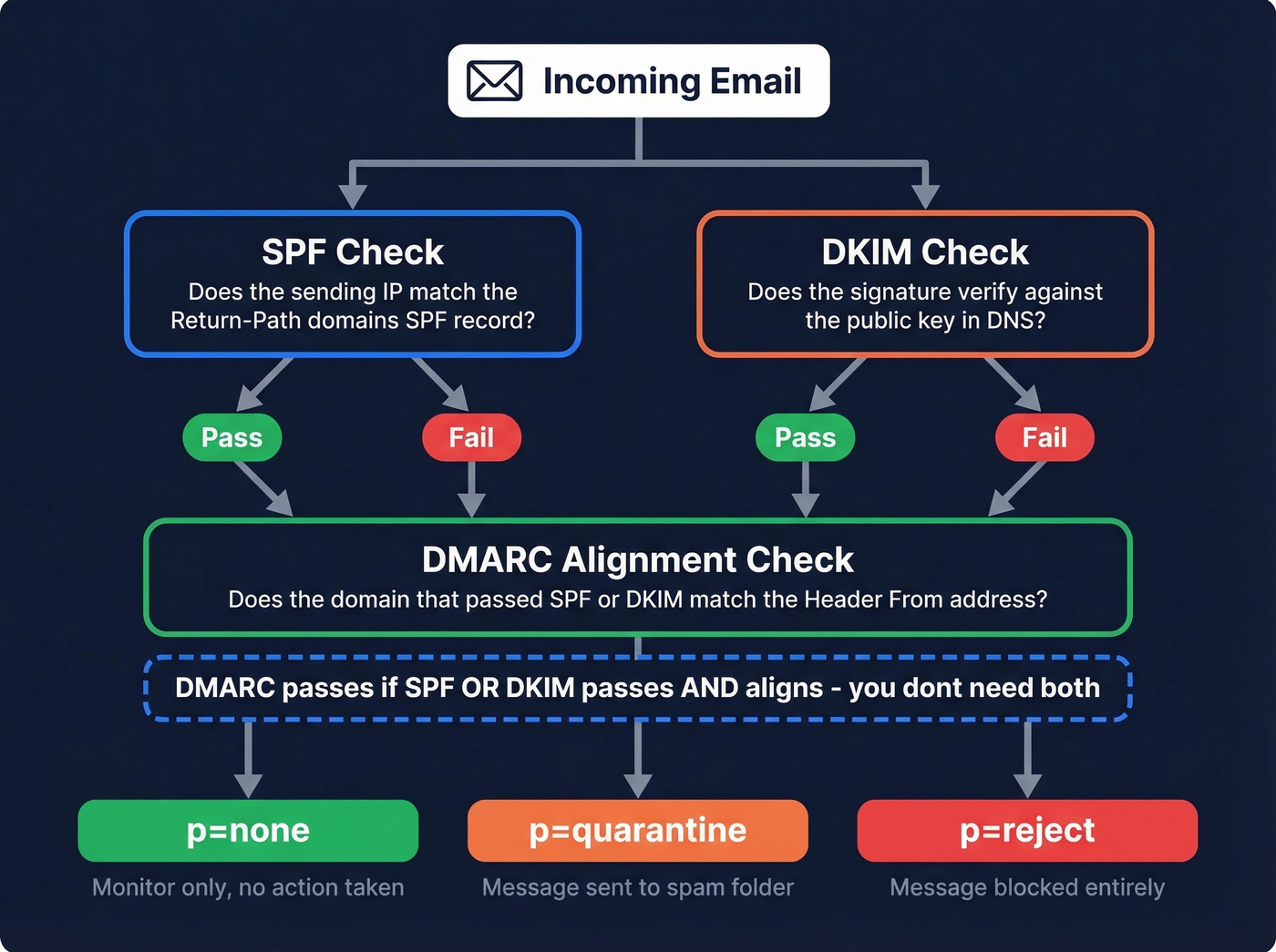
Here's the insight most guides bury: DMARC passes if SPF OR DKIM passes AND aligns. You don't need both to pass - just one with alignment. This is why DKIM is so valuable for forwarded messages. SPF will fail because the IP changed, but DKIM can still carry the authentication.
Think of SPF as the bouncer checking IDs at the door, DKIM as the tamper-proof seal on the envelope, and DMARC as the manager who decides what happens when someone fails the check.

Authentication keeps you out of spam. Bad data puts you right back in. Teams using Prospeo cut bounce rates from 35% to under 4% - because every email passes a 5-step verification with catch-all handling, spam-trap removal, and honeypot filtering before it ever hits your list.
Don't let bad data undo your SPF, DKIM, and DMARC work.
Phased Rollout Plan
Don't go from zero to p=reject in a day. Here's the timeline that works:
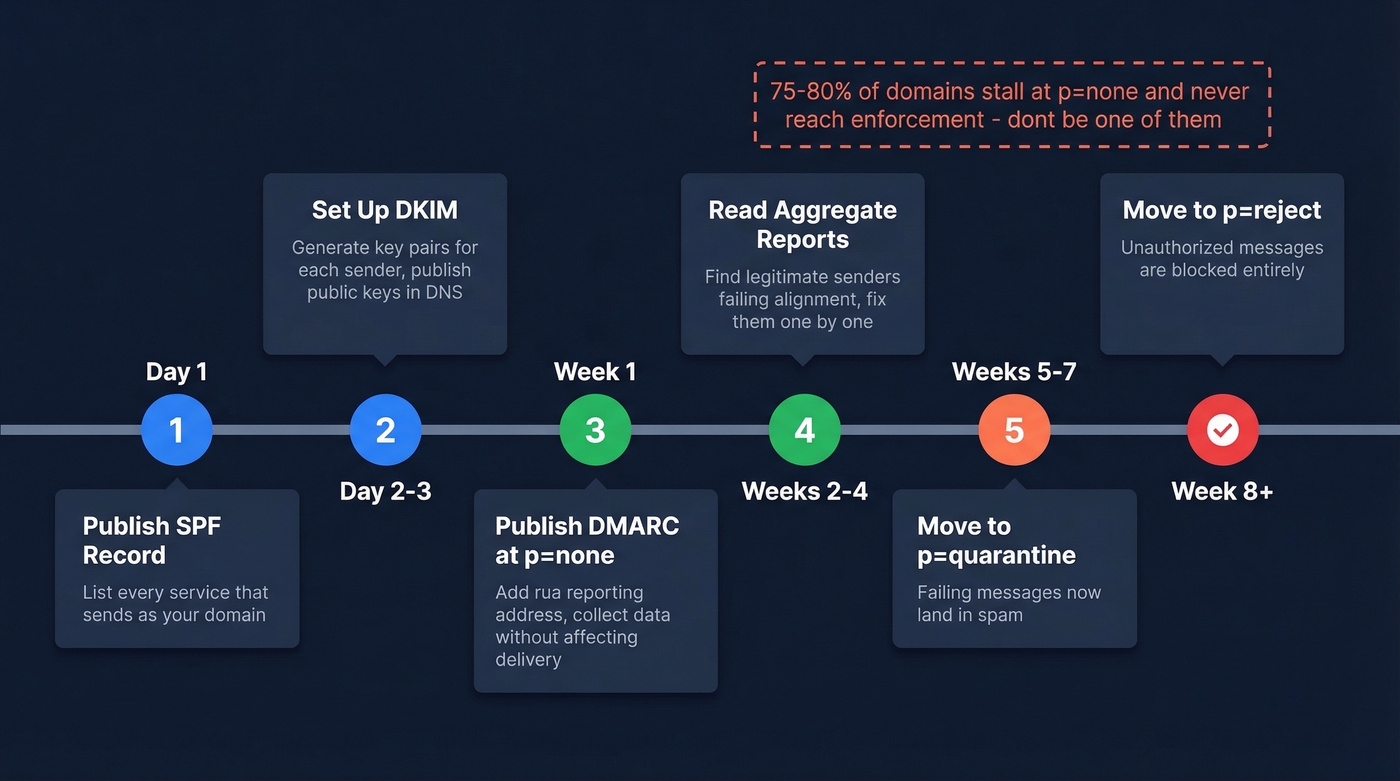
- Day 1: Publish your SPF record. List every service that sends email as your domain.
- Day 2-3: Generate DKIM keys for each sending service. Publish the public keys in DNS.
- Week 1: Publish DMARC at
p=nonewith anruareporting address. This collects data without affecting delivery. - Weeks 2-4: Read your aggregate reports. Identify legitimate senders that aren't passing alignment. Fix them.
- Weeks 5-7: Move to
p=quarantine. Failing messages now go to spam. - Week 8+: Move to
p=reject. Unauthorized messages get blocked entirely.
Here's the uncomfortable stat: 75-80% of domains that publish DMARC stall at p=none and never reach enforcement. We've seen teams sit in monitoring mode for months because nobody owns the DMARC reports. Valimail has observed 5-10% higher marketing delivery rates after moving to enforcement - mailbox providers trust enforced domains more.
Let's be honest: most teams don't need a paid DMARC tool to get to enforcement. Valimail Monitor (free) and Google Postmaster Tools give you enough visibility. MXToolbox handles quick DNS lookups. Save the paid tools for when you're managing dozens of domains.
If you’re also working on overall inbox placement, our email deliverability guide covers the non-DNS factors that still matter.
Mistakes That Break Authentication
Leaving p=none indefinitely. It's a diagnostic phase, not a permanent setting. Set a calendar reminder to move to quarantine after 4 weeks.
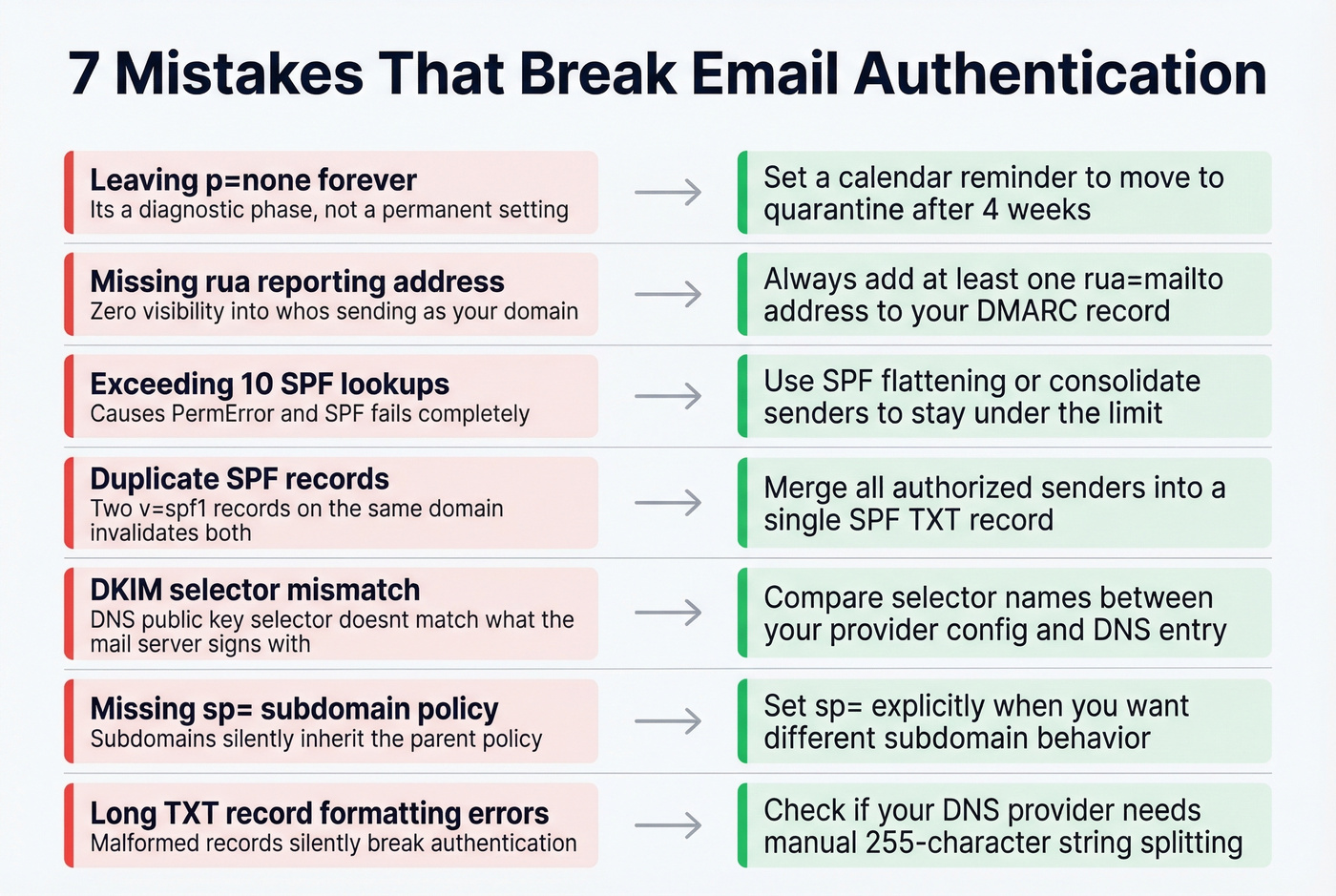
Missing rua reporting addresses. Without them, DMARC gives you zero visibility into who's sending as your domain. Always add at least an rua address.
Exceeding 10 SPF lookups. Use an SPF flattening tool or consolidate senders. A PermError means SPF fails completely. Threads on r/dns and r/sysadmin flag this as one of the most common real-world failures.
Duplicate SPF records. Two TXT records starting with v=spf1 on the same domain? Both are invalid. Merge them into one.
DKIM selector mismatch. Your DNS has the public key at s1._domainkey but your mail server signs with selector s2. Double-check selector names match between provider config and DNS. I've personally debugged this exact issue for a team that spent two weeks blaming their ESP before someone thought to compare selectors.
Missing sp= subdomain policy. If you don't set sp=, subdomains follow the parent domain's policy. Set it explicitly when you want different behavior for subdomains.
Long TXT record formatting errors. DNS providers handle long TXT records differently - some split into 255-character strings automatically, others need manual splitting. A malformed record silently breaks authentication and you won't know until you check.
If bounces are still high even after authentication, use this email bounce rate breakdown to diagnose what’s actually happening.
2026 Compliance Requirements
These requirements were enacted in 2024-2025 and remain in full force. All three major mailbox providers now enforce authentication for high-volume senders.
Google: Bulk senders sending 5,000+ messages per day need SPF, DKIM, and a DMARC record on the From domain. DMARC must pass alignment.
Yahoo: Bulk senders need SPF, DKIM, and a valid DMARC policy with DMARC passing. Requirements also include a spam complaint rate below 0.3%, List-Unsubscribe with one-click support (RFC 8058), and unsubscribe honors within 2 days. Yahoo also officially recommends ARC for anyone forwarding email.
Outlook: Stronger authentication expectations for high-volume senders, introduced May 2025.
Authentication gets your domain trusted, but it doesn't fix bad data. If you're sending to invalid addresses, your bounce rate spikes and sender reputation tanks regardless of how perfect your records are. Prospeo's bulk email verification catches bad addresses before they become bounces - 98% accuracy across 143M+ verified emails. Authentication and clean data work together; skip either one and you're leaving inbox placement on the table.
To keep reputation stable over time, follow a simple process to improve sender reputation alongside authentication.
What Enforcement Unlocks - BIMI
Once you've reached DMARC enforcement, you unlock BIMI - Brand Indicators for Message Identification. Your brand logo appears next to your emails in the recipient's inbox.
The DNS record lives at default._bimi.yourdomain.com:
v=BIMI1; l=https://yourdomain.com/bimi-logo.svg; a=https://yourdomain.com/your-bimi.pem
The a= tag points to your VMC or CMC certificate file - omit it if your target providers don't require one. Gmail requires either a VMC (Verified Mark Certificate) for the blue checkmark or a CMC (Common Mark Certificate) for logo display without the checkmark. Yahoo displays BIMI logos without requiring a certificate. Your logo must be SVG Tiny-PS format, square, 32KB or smaller, and hosted over HTTPS.
BIMI isn't vanity. In crowded inboxes, a recognizable logo increases open rates. But it's gated behind enforcement - another reason not to stall at p=none.
What's Next - ARC and DKIM2
Forwarding remains email authentication's unsolved problem. ARC (Authenticated Received Chain, RFC 8617) was supposed to fix it by preserving authentication through forwarding chains. After roughly a decade of experimentation, an IETF draft recommends marking ARC as obsolete. The core issue: there's no internet-wide trust system for intermediaries, so ARC's chain-of-custody model never scaled.
The useful elements of ARC are expected to inform DKIM2, a successor concept still in development. For now, make sure DKIM is configured correctly so it survives most forwarding scenarios, and monitor your DMARC reports for legitimate forwarding failures.
If you’re sending at scale, keep an eye on email velocity so you don’t trigger provider throttling while you roll out enforcement.
You just spent hours configuring DNS records to protect your domain reputation. One batch of unverified emails wrecks it. Prospeo delivers 98% email accuracy at $0.01 per lead - with data refreshed every 7 days, not the 6-week industry average that lets stale contacts pile up and bounce rates climb.
Protect the deliverability you just built - send only to verified contacts.
FAQ
Do I need all three protocols?
Yes. SPF and DKIM handle authentication; DMARC enforces policy and sends reports. Google, Yahoo, and Outlook require all three for bulk senders - there's no partial-credit option. Deploying one without the others leaves gaps that attackers exploit and mailbox providers penalize.
What's the difference between SPF and DKIM?
SPF validates the sending server's IP against a DNS-published list. DKIM validates message integrity using a cryptographic signature. SPF breaks when email is forwarded because the IP changes; DKIM survives forwarding as long as signed headers and body stay intact. You need both because they cover different failure modes.
Does DMARC at p=none stop spoofing?
No. p=none only monitors and reports - spoofed emails still reach inboxes normally. Move to quarantine or reject to actually block unauthorized senders. Most teams should reach quarantine within 4-6 weeks of publishing their first DMARC record.
Authentication is set up but emails still land in spam - why?
Authentication proves your domain is legitimate, but sending to invalid addresses spikes your bounce rate and tanks sender reputation. Verify your contact list before sending. Bad data undoes good authentication every time.
How do I check if my records are configured correctly?
Use MXToolbox or Google Admin Toolbox for free DNS lookups. Send a test email to yourself and inspect the Authentication-Results header - it shows SPF, DKIM, and DMARC pass/fail status for that specific message. Check all three; a passing SPF with a broken DKIM selector still leaves you exposed.