

Domain Blacklisting: Detection, Removal, and Prevention
Your open rates dropped from 30% to 5% overnight. Bounce notifications are flooding your inbox. Domain blacklisting is the most likely culprit, and you're not alone. Spam placement nearly doubled from 4.5% to 8.6% over the course of 2024, and global inbox placement now sits at just 83.5%. Gmail delivers 87.2% of messages to the inbox; Microsoft manages only 75.6%. The margin for error is razor-thin.
What You Need (Quick Version)
Check Spamhaus first - it's the only Tier 1 blacklist and it can tank deliverability fast. Use MxToolbox for broad coverage across 100+ lists. Fix the root cause before requesting delisting (authentication, list hygiene, compromised infrastructure) or you'll be relisted within days. If both checkers show clean but emails still bounce, the problem isn't a public blacklist - it's domain/URL reputation or enterprise-level content filtering.
What Is Domain Blacklisting?
Domain blacklisting isn't one thing. It's three distinct problems that get lumped together, and confusing them wastes your remediation effort.
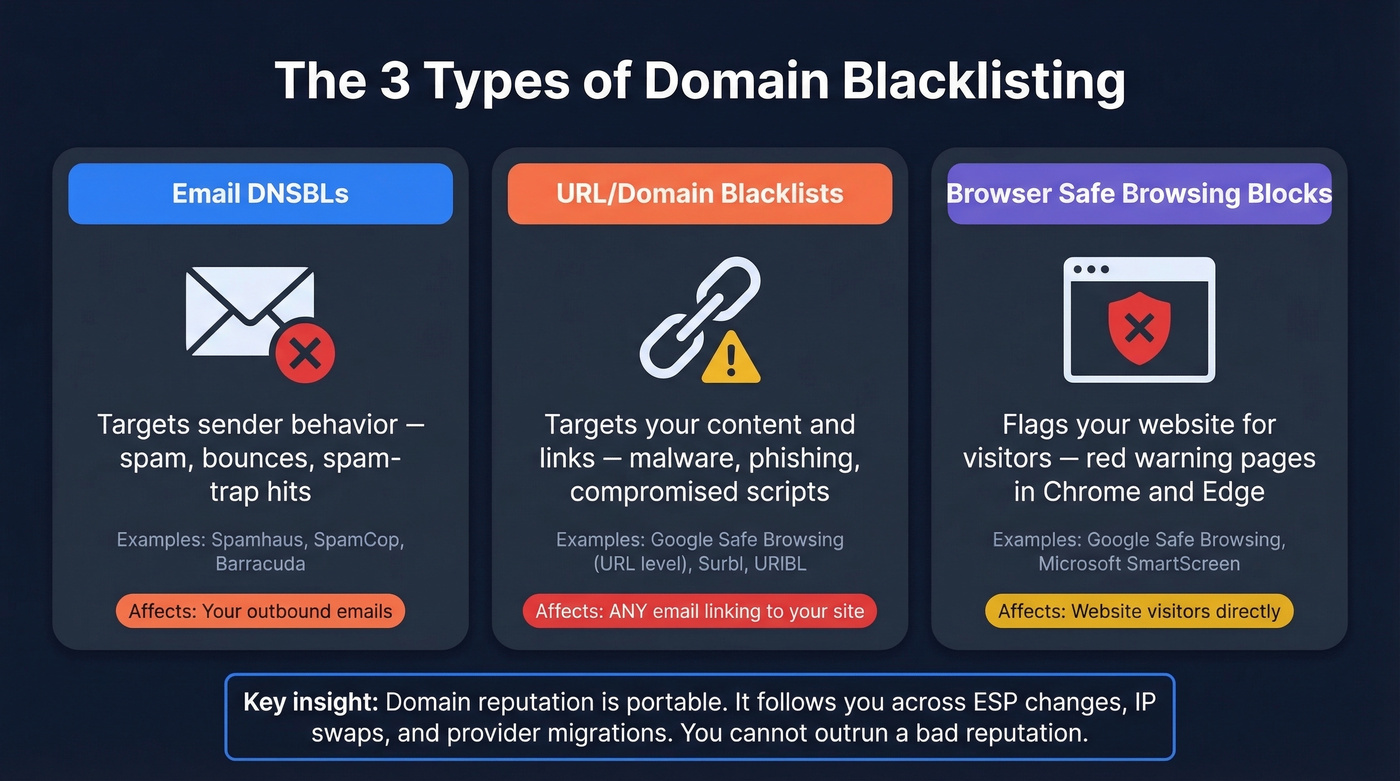
Email DNSBLs target sender behavior. If your domain or sending IP gets flagged for spam, high bounce rates, or spam-trap hits, you end up on lists like Spamhaus or SpamCop. These directly affect whether your emails reach inboxes.
URL/domain blacklists target what's in your content, not how you send it. If your website hosts malware, phishing pages, or compromised scripts, your domain URL gets flagged. Any email containing a link to your domain - even someone else's email - can get blocked. This form of domain-based blocklisting is especially damaging because it affects every message that references your site, regardless of who sends it.
Browser safe-browsing blocks are the most visible. Google Safe Browsing or Microsoft SmartScreen flags your site, and visitors see a red warning page. This is about site reputation, not email sending.
Each type has different causes, different detection methods, and different remediation paths. Here's what matters most: domain reputation is portable. It follows you across ESP changes, IP swaps, and infrastructure migrations. You can't outrun a bad reputation by switching providers.
Common Causes of Blocklisting
Most blacklistings trace back to one of these root causes. Run through this checklist before you do anything else.
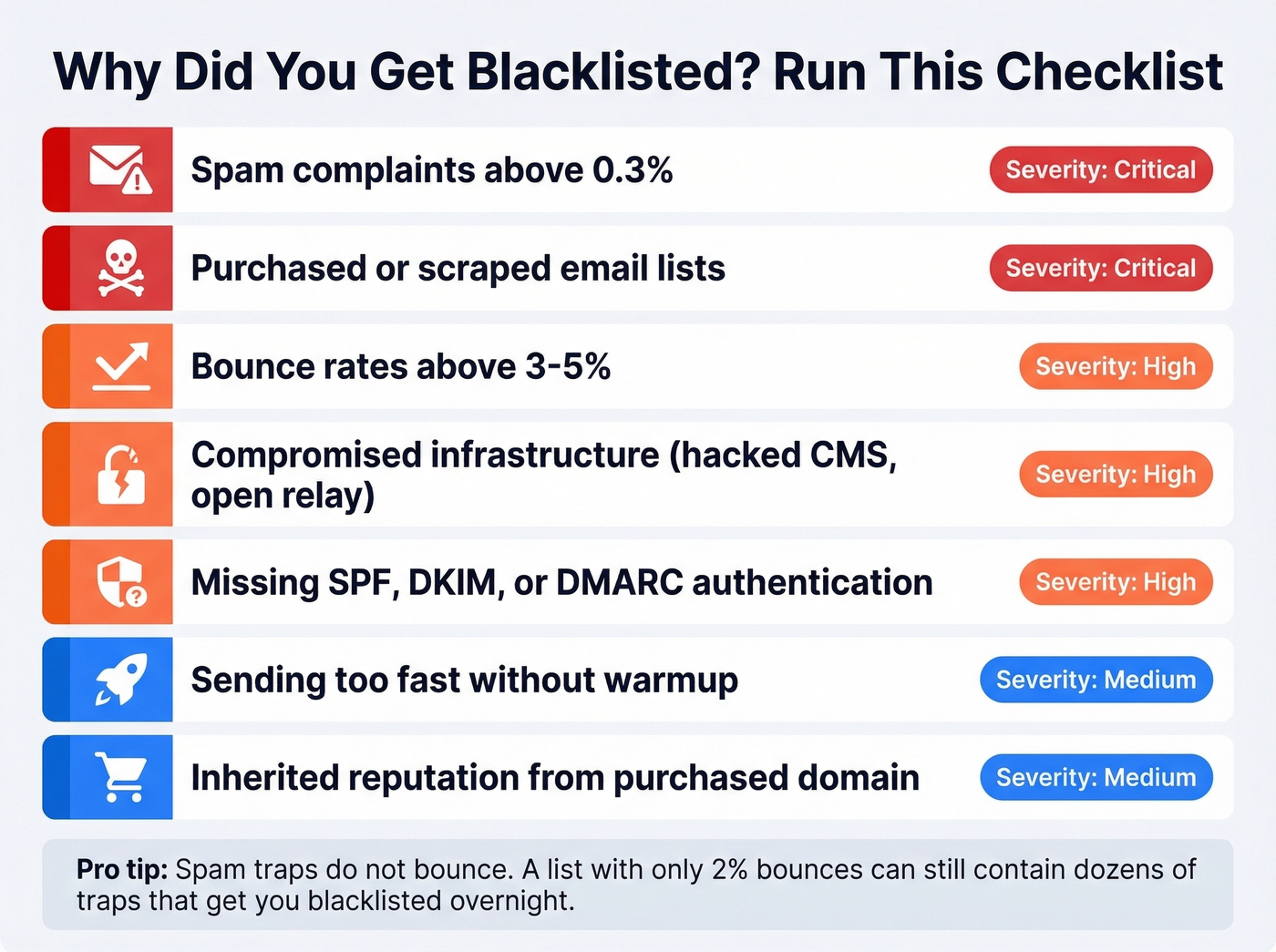
Spam complaints above threshold. This is the fastest way to get listed. Providers draw hard lines on complaint rates:
| Complaint Rate | Status |
|---|---|
| < 0.1% | Gold standard |
| 0.1% - 0.3% | Acceptable, not optimal |
| > 0.3% | Danger zone - blocks likely |
Gmail's preferred threshold is under 0.1%. Exceed 0.3% consistently and you're asking for trouble.
High bounce rates from bad data. Anything above 3-5% signals poor list quality to mailbox providers. Purchased lists and scraped contacts are the usual culprits - they're loaded with spam traps, honeypots, and dead addresses. (If you need to benchmark and diagnose bounces, see bounce rate spikes.)
Purchased or scraped lists specifically. This deserves its own callout because purchased lists can destroy your domain even when bounce rates look low. Spam traps don't bounce - they silently report you. A list that "only" bounces at 2% can still contain dozens of traps that get you blacklisted overnight. (If you're unsure about the compliance risk, read Is It Illegal to Buy Email Lists?.)
Compromised infrastructure. A hacked WordPress site, an open relay, or stolen SMTP credentials can turn your domain into a spam cannon overnight. One Reddit sysadmin discovered their entire deliverability problem traced back to a WordPress compromise they didn't even know about.
Missing authentication. No SPF, DKIM, or DMARC means anyone can spoof your domain. Mailbox providers treat unauthenticated senders with suspicion, and blacklist operators treat them as negligent. (If you want a deeper DMARC nuance, start with DMARC alignment.)
Sending too fast without warmup. Blasting 2,000 emails from a brand-new domain on day one is a guaranteed way to get flagged. Reputation takes weeks to build and seconds to destroy. (More on safe ramping in email velocity.)
Inherited domain reputation. Bought a domain on the secondary market? It might come with baggage. Always check reputation before sending from a newly acquired domain.
How to Check If You're Blacklisted
You typically won't be notified when your domain lands on a blocklist. You have to go looking.
Step 1: Check Spamhaus. Go to check.spamhaus.org and search your domain and sending IP. The checker supports IPv4, IPv6, domains, and email addresses in one search field, and it shows listings in the required removal order.
Step 2: Run MxToolbox. The free blacklist check at mxtoolbox.com/blacklists.aspx queries 100+ blacklists in one sweep. It catches the long tail of smaller lists that Spamhaus doesn't cover. Monitoring starts at $129/mo for ongoing alerts.
Step 3: Cross-reference with multirbl.valli.org. Different checkers cover different lists. Running two or three gives you confidence in the results.
Step 4: Monitor your metrics. An open rate drop from 30% to 5% is a red flag. Bounce rate spikes above 5% are another. Don't wait for a blacklist check - your sending metrics are the earliest warning system you have. (For a full diagnostic workflow, use this email deliverability guide.)
Step 5: Run seed tests. Send to test addresses across Gmail, Outlook, and Yahoo to see where you're actually landing. Metrics alone don't tell you if you're hitting spam folders. Tools like GlockApps (from $59/mo) automate this process.

High bounce rates from bad data are the #2 cause of domain blacklisting. Prospeo's 5-step email verification - with catch-all handling, spam-trap removal, and honeypot filtering - delivers 98% accuracy. Teams that switch cut bounce rates from 35%+ to under 4%.
Stop feeding your domain to blacklists. Start with verified data.
Which Blacklists Actually Matter
Seeing your domain on a blacklist doesn't necessarily mean you have a problem. A Reddit user recently posted about finding their brand-new domain flagged on multiple obscure blacklists, wondering if they should panic. Almost always, the answer is no.
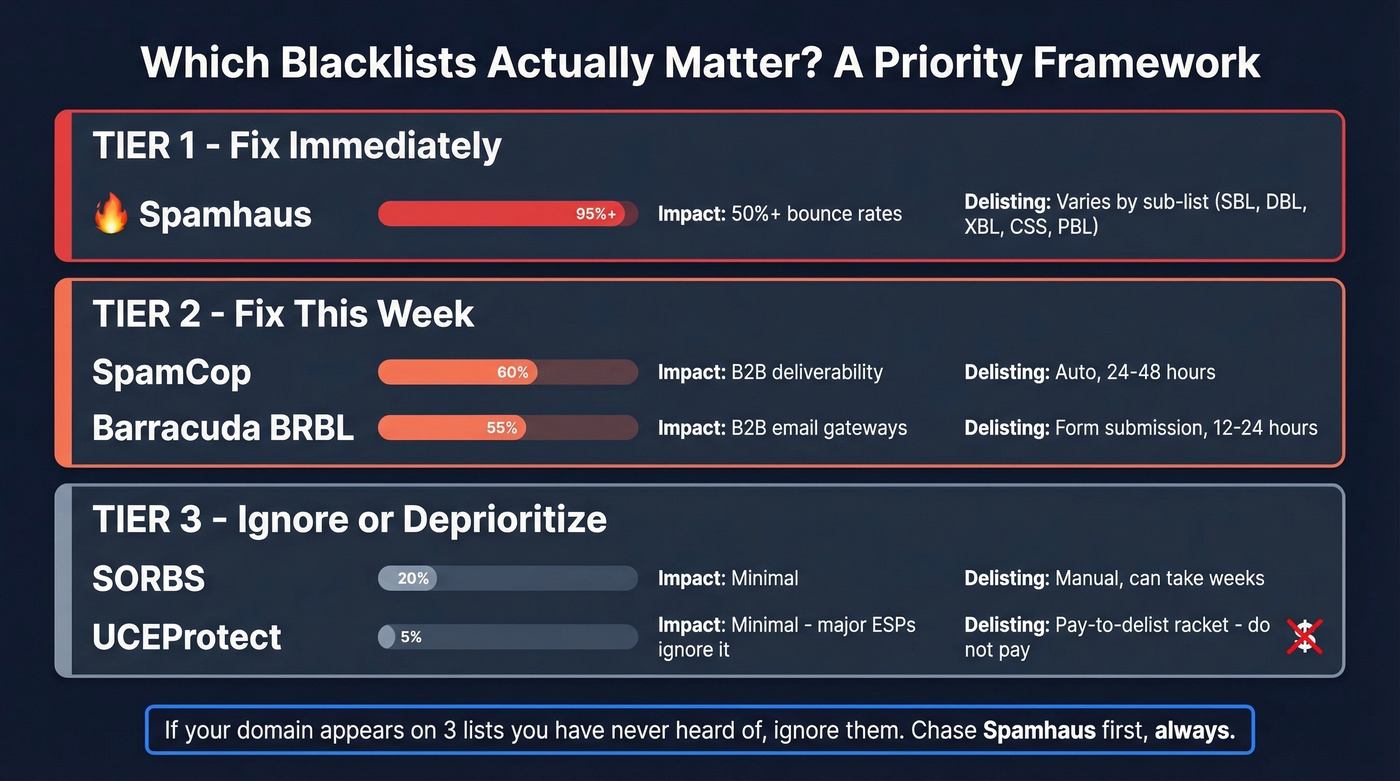
Here's the tiered framework documented by Marketo/Adobe for prioritizing blacklist remediation:
| Tier | Blacklist | Impact | Delisting |
|---|---|---|---|
| 1 | Spamhaus | 50%+ bounce rates | Depends on list (SBL/DBL/XBL/CSS/PBL) |
| 2 | SpamCop | B2B impact | Auto, within 24-48h |
| 2 | Barracuda (BRBL) | B2B gateways | Form, ~12-24h after approval |
| 3 | SORBS | Minimal | Manual, weeks |
| 3 | UCEProtect | Minimal | Auto 7d / paid |
Tier 1: Spamhaus
Spamhaus is the only Tier 1 blacklist and can cause bounce rates over 50%. Listings are often triggered by Spamhaus-owned spam traps. If you're on Spamhaus, fix this first. Always. Everything else is secondary. (If you need the step-by-step, use our Spamhaus listing removal guide.)
Tier 2: SpamCop and Barracuda
SpamCop isn't used by major North American ISPs for blocking decisions, but it hits B2B deliverability. Listings are dynamic and typically resolve within 24-48 hours. Barracuda (BRBL) is used by many B2B email gateways - if you're selling to companies, this one matters. Expect ~12-24 hour delisting after your removal request is approved.
Tier 3: SORBS and UCEProtect
SORBS has minimal impact, and delisting can take weeks. Not worth losing sleep over.
UCEProtect is a pay-to-delist racket. Major ESPs ignore it. Marketo explicitly disregards UCEProtect listings because removal requires payment and reach is limited. Don't give them money.
Let's be honest: if your domain appears on three lists you've never heard of, ignore them. Most obscure blacklist listings are noise. We've seen teams spend weeks chasing SORBS delistings while their Spamhaus listing - the one actually destroying their deliverability - sat unaddressed. Prioritize ruthlessly.
Why Clean Checks Still Mean Blocked Emails
A clean blacklist check doesn't mean your emails are reaching inboxes. We've seen this pattern repeatedly, and it confuses people every time.
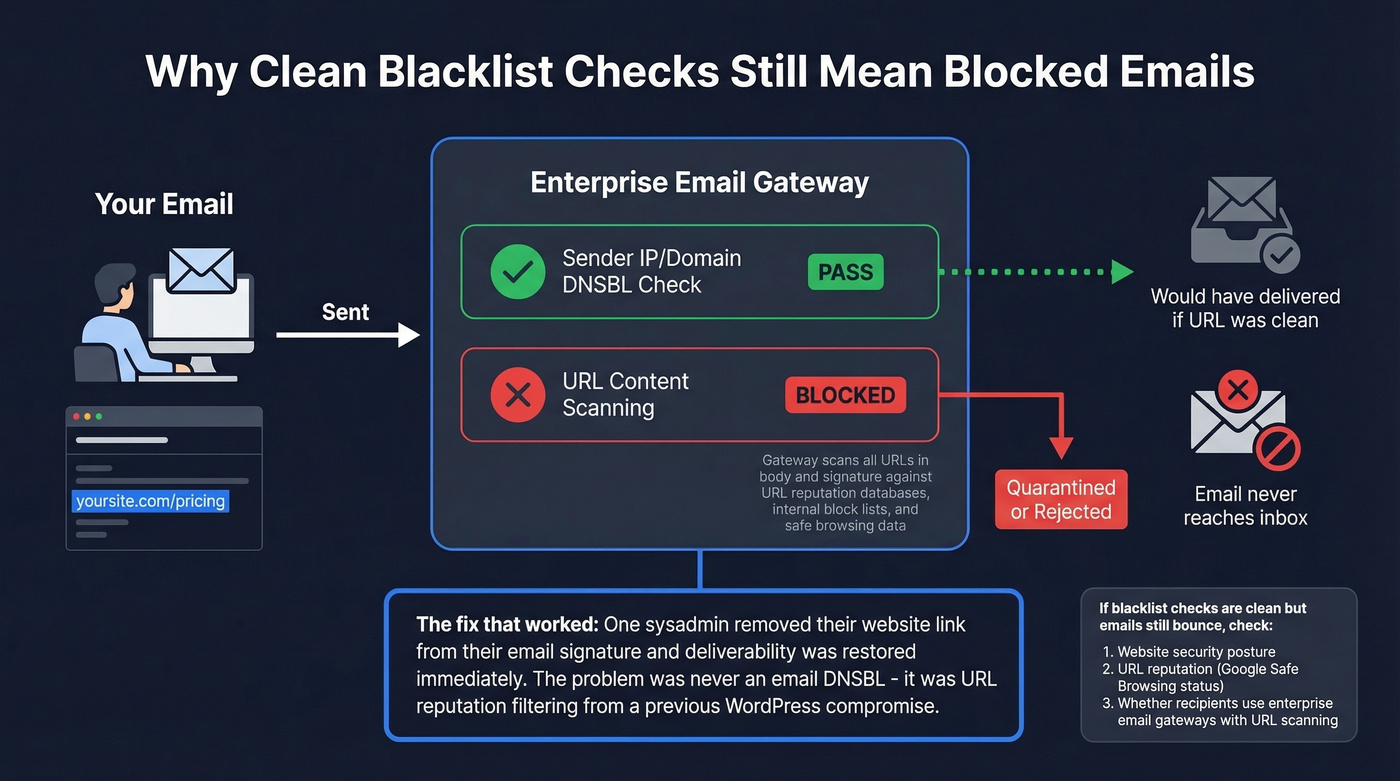
One sysadmin on r/sysadmin reported that after a WordPress compromise, emails to two companies were blocked before delivery. Every blacklist scanner came back clean. The fix? Removing the website link from their email signature restored deliverability. The problem wasn't an email DNSBL - it was URL/site reputation filtering.
Enterprise email gateways scan email content for suspicious URLs, not just sender reputation. If your website domain has been flagged for malware or phishing - even briefly - links to your site in email bodies or signatures can trigger blocks that no public blacklist checker will detect. Some organizations also maintain internal block lists that filter URLs independently of any public DNSBL.
If your blacklist checks are clean but deliverability is tanked, look at your website's security posture and URL reputation. The problem is almost certainly there. (To reduce future risk, see how to improve sender reputation.)
How to Get Delisted
Before You Request Anything
Stop sending. Continuing to send while listed worsens your reputation and delays removal. Then fix the root cause:
- Audit and correct SPF, DKIM, and DMARC records (use these SPF record examples to sanity-check syntax)
- Clean your list - remove hard bounces, suppress unengaged contacts, delete purchased lists
- If compromised: isolate infected files, restore clean backups, patch CMS/plugins, rotate all credentials
- Document everything with timestamps - blacklist operators want evidence of remediation
Spamhaus Removal by List Type
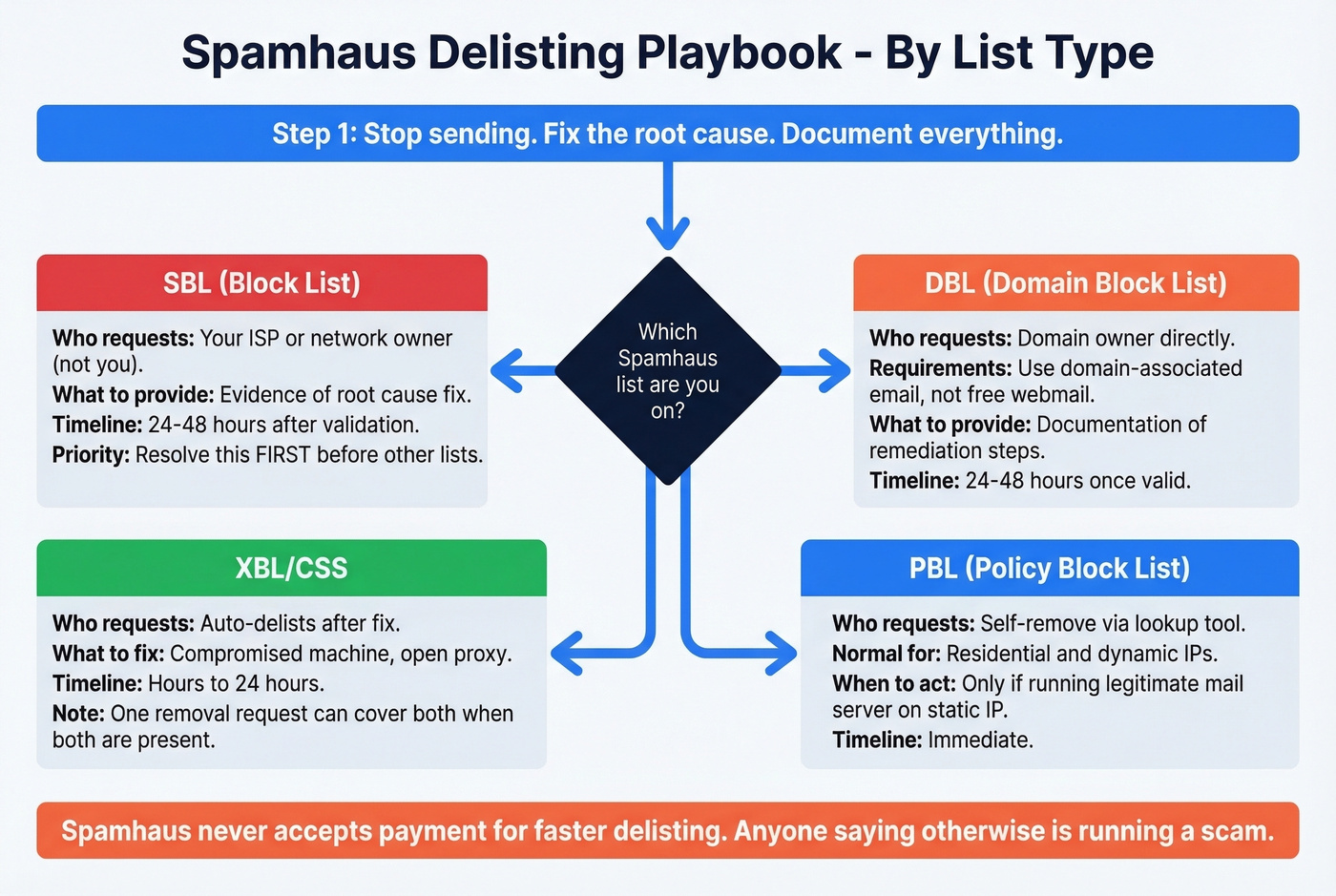
Spamhaus has multiple lists, each with a different removal path. The checker at check.spamhaus.org shows listings in the required removal order - follow it.
SBL (Spamhaus Block List): Your ISP or network owner must submit the removal request. Spamhaus doesn't accept end-user requests for SBL. Provide your ISP with evidence of the root cause fix. Expect 24-48 hours after validation. Resolve this first before addressing other listings.
DBL (Domain Block List): Domain owners can request removal directly using an email address associated with the domain - not a free webmail address. Submit through the Spamhaus form with documentation of your remediation steps. Often 24-48 hours once the request is valid.
XBL/CSS: These auto-delist after you correct the underlying issue, usually a compromised machine or open proxy. Hours to 24 hours. When both are present, one removal request can cover both.
PBL (Policy Block List): Being on the PBL is normal for residential and dynamic IPs. If you're running a legitimate mail server on a static IP, you can self-remove via the lookup tool. Immediate.
Spamhaus doesn't accept payment for faster delisting. Anyone telling you otherwise is running a scam.

Barracuda, SpamCop, and Others
Barracuda: Submit via the barracudacentral.org removal form. Domain or IP owner can request. 12-24 hours after approval.
SpamCop: Dynamic listings that typically resolve within 24-48 hours. No manual delisting needed or available. Just fix the behavior that triggered it.
SORBS: Manual request required. Can take days to weeks. Low priority given minimal impact.
UCEProtect: Level 1 auto-delists after 7 days. Levels 2 and 3 require your hosting provider or network operator to act. They offer a paid "express" option - skip it.
Delisting Summary
| Blacklist | Who Submits | Method | Timeline |
|---|---|---|---|
| Spamhaus SBL | ISP/network owner | Manual form | 24-48h |
| Spamhaus DBL | Domain owner | Manual form | 24-48h |
| Spamhaus XBL/CSS | Self | Auto after fix | Hours-24h |
| Spamhaus PBL | Self | Lookup tool | Immediate |
| Barracuda | Domain/IP owner | Removal form | 12-24h |
| SpamCop | N/A | Auto-resolves | 24-48h |
| SORBS | Domain owner | Manual request | Days-weeks |
| UCEProtect L1 | N/A | Auto after 7 days | 7 days |
How to Prevent Domain Blacklisting
Getting delisted is the emergency room. Prevention is the gym membership. Only 60% of sent emails reach a visible mailbox location - the other 40% land in spam, get filtered, or vanish entirely. Prevention isn't optional. It's the difference between a functioning email channel and shouting into a void.
Authentication Setup
Gmail and Yahoo mandated SPF + DKIM + DMARC + one-click unsubscribe (RFC 8058) for bulk senders (5,000+/day) starting February 2024. Microsoft followed with similar requirements for Outlook.com/Hotmail/Live effective May 2025. Gmail tightened enforcement in November 2025 - non-compliant mail now gets 4xx/5xx SMTP errors and outright rejection.
SPF: stay under 10 DNS lookups. DKIM: use 2048-bit keys. DMARC: start at p=none for monitoring, then progress to quarantine, then reject. This isn't a best practice - it's a requirement. (If you want to validate your setup, see how to verify DKIM is working.)
Set up Google Postmaster Tools to monitor your domain reputation, spam rate, and authentication status with Gmail. It's free and provides the most direct signal of how Google views your domain. If you aren't checking Postmaster Tools weekly, you're flying blind.
Sending Volume and Warmup
New domains need a slow ramp. Safe sending limits vary dramatically by provider:
| Provider | Technical Limit | Safe Cold Limit |
|---|---|---|
| Google Workspace | 2,000/day | 100-150/day |
| Microsoft 365 | 10,000 recipients | 100-150/day |
| GoDaddy | 250 recipients | 50-75/day |
| Free Gmail | 500/day | Don't use |
Warmup schedule for new domains: Week 1 at 10-20/day, Week 2 at 20-40, Week 3 at 40-60, Week 4 at 60-80. Full warmup takes 2-4 weeks minimum, up to 12 weeks for a fully mature reputation. Patience here saves you months of recovery later. (If you need tooling options, see unlimited email warmup.)
List Hygiene and Suppression
Here's the thing: high bounce rates from bad email data are the fastest path to getting blocklisted. Keep bounce rates under 3%. Maintain a domain suppression list of known spam traps, honeypots, and invalid domains so they never enter your outbound sequences. Suppress unengaged contacts after 90 days. Delete purchased lists - they're loaded with traps. Enforce double opt-in for marketing. Verify every email before sending for cold outreach. (If you suspect traps are involved, start with spam trap removal.)
For teams running outbound at scale, Prospeo's 5-step verification catches spam traps, honeypots, and catch-all domains before they ever hit your sending queue. Stack Optimize built from $0 to $1M ARR using that verification across all their clients: 94%+ deliverability, under 3% bounce, zero domain flags.
Subdomain Isolation
Use dedicated subdomains for cold outreach - something like outreach.yourdomain.com - to isolate reputation risk from your primary domain. If your outbound campaigns take a reputation hit, your transactional emails (order confirmations, password resets) keep flowing from the root domain. (If you're setting this up, it helps to understand what a tracking domain is and how it’s used.)
Skip this if you're only sending low-volume marketing to opted-in subscribers. But for anyone doing cold outreach or high-volume campaigns, it's cheap insurance that too many teams ignore.

Purchased lists destroy domains because spam traps don't bounce - they silently report you. Prospeo refreshes 300M+ profiles every 7 days and removes invalid contacts before you ever see them. That's why agencies like Stack Optimize send at 94%+ deliverability with zero domain flags.
Replace risky lists with data you can actually trust at $0.01 per email.
Recovery Timeline
Getting delisted is step one. Rebuilding reputation is the longer game.
| Reputation Type | Recovery Time | Key Factor |
|---|---|---|
| IP reputation | 2-4 weeks | Volume consistency |
| Domain reputation | 6-12 weeks | Portable across ESPs |
Domain reputation recovery is harder because it follows you everywhere. Switch ESPs, change IPs, migrate infrastructure - your domain reputation comes along for the ride. Modern inbox providers increasingly weight domain reputation over IP reputation, which means you can't just hop to a new sending service and start fresh.
Post-delisting, rerun seed tests across Gmail, Outlook, and Yahoo. Monitor bounce rates and complaint ratios for at least 4 weeks. Separate your transactional email stream from marketing using different subdomains or IPs so a marketing reputation hit doesn't take down your order confirmations.
We've seen teams try to shortcut recovery by spinning up a new domain. It works temporarily, but you lose all the equity in your original domain and you're starting warmup from zero. Fix the root cause and rebuild. Slower, but sustainable.
FAQ
How long does it take to get off a blacklist?
SpamCop resolves within 24-48 hours automatically. Spamhaus takes 24-48 hours after a valid manual request - SBL removals must go through your ISP or network owner. Barracuda is typically 12-24 hours after approval. SORBS can take weeks. The real variable is how quickly you fix the root cause; request removal before fixing the problem and you'll be relisted immediately.
Can I check if my domain is blacklisted for free?
Yes. Spamhaus at check.spamhaus.org covers the most impactful blocklists. MxToolbox checks 100+ lists in a single sweep. Use both - they cover different lists, and running two checkers takes under five minutes.
What's the difference between domain and IP blacklisting?
IP blacklisting targets a specific sending IP and recovers in 2-4 weeks. Domain blacklisting targets your domain name, persists across IP and ESP changes, and takes 6-12 weeks to recover. The domain-level problem is more serious because it poisons reputation across every IP you touch.
Will changing my ESP fix the problem?
No. Domain reputation follows you across ESP and IP changes. Switching providers without fixing the root cause will just get you blocklisted again from the new infrastructure. Fix authentication, clean your lists, and address any compromised infrastructure first.
How do I keep my bounce rate low enough to avoid blocklisting?
Stay under 3%. Verify emails before sending - tools with multi-step verification filter out invalid addresses, spam traps, and honeypots before they ever reach your outbound sequence. Remove hard bounces immediately after every send. Suppress contacts who haven't engaged in 90+ days. Never use purchased or scraped lists.