

Email Bounce Handling: Stop Reacting, Start Preventing
Your sequence went out Monday morning. By Tuesday, your bounce rate's sitting at 6%, your ESP is flagging the domain, and reply rates are unreadable. Most email bounce handling advice tells you to suppress hard bounces and retry soft ones. That's incomplete - and it's costing you pipeline.
Here's the thing: most bounces aren't a sending problem. They're a data quality problem. Learn the SMTP codes so you stop treating all bounces the same, and verify emails before sending - not after. The goal isn't just bounce management after the fact; it's eliminating bounce risks before your campaign ever leaves the outbox.
Hard vs. Soft Bounces: The SRI Triage Model
Everyone learns the binary: hard bounces are permanent, soft bounces are temporary. True but incomplete.
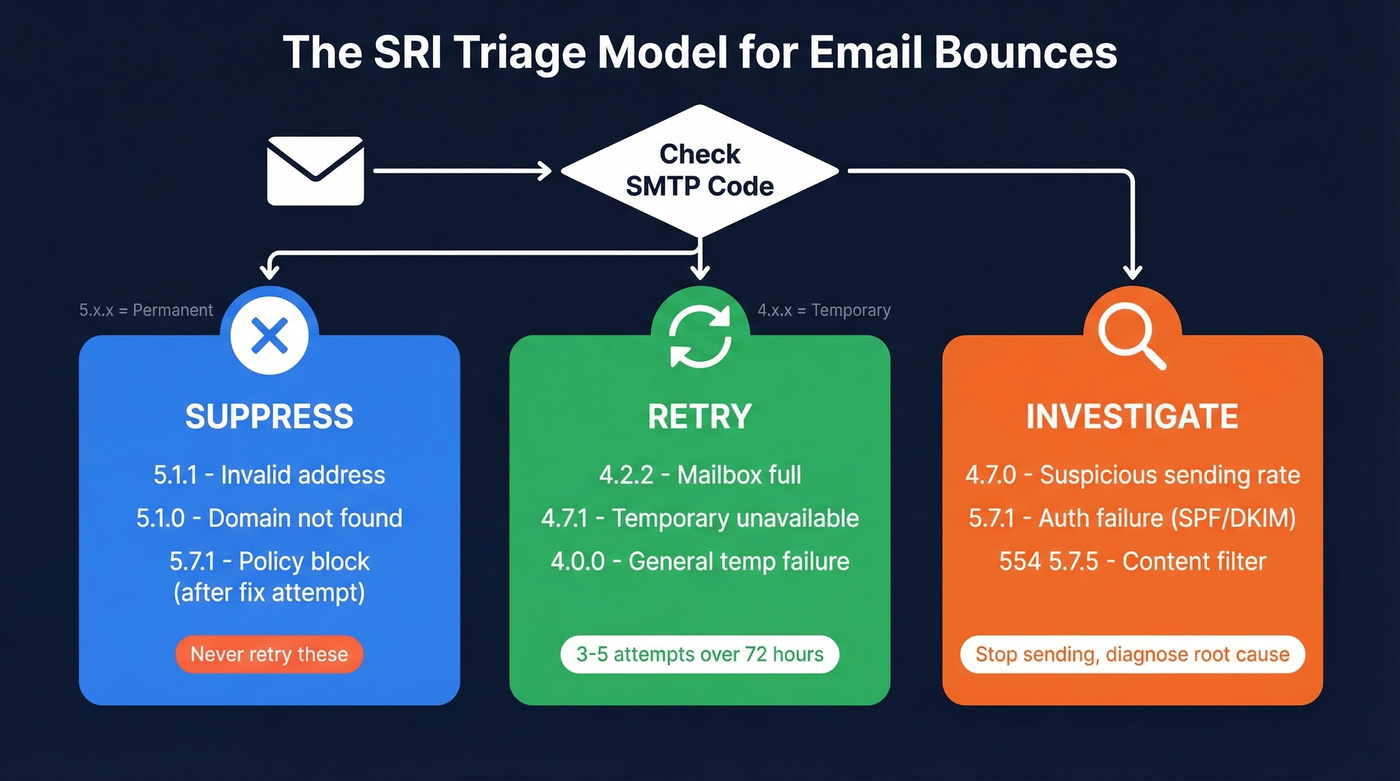
A 4.2.2 (mailbox full) is genuinely temporary - retry in 24-48 hours and you'll probably get through. A 4.7.0 (suspicious sending rate) means the receiving server doesn't trust you. Blasting retries will make it worse. The real framework is Suppress, Retry, or Investigate. The SMTP enhanced status code tells you which bucket each bounce belongs in. The first digit - 4 for temporary, 5 for permanent - is just the starting point. The second and third digits tell you why, and that's where the actionable intelligence lives.
SMTP Bounce Code Cheat Sheet
You'll reference this more than you think.
| Code | Meaning | Action |
|---|---|---|
| [5.1.1 | Invalid address](https://learn.microsoft.com/en-us/troubleshoot/exchange/email-delivery/ndr/fix-error-code-550-5-1-1-through-5-1-20-in-exchange-online) (doesn't exist) | Suppress - never retry |
| 5.7.1 | Blocked by policy (reputation) | Fix SPF/DKIM/DMARC, check blacklists |
| 554 5.7.5 | Spam/content filter rejection | Review email content, remove spam triggers |
| 4.2.2 | Mailbox over quota | Retry in 24-48 hrs; if repeated, treat as abandoned |
| 4.7.0 | Unusual sending rate/suspicious | Slow down sending immediately |
| 4.7.1 | Temporary service unavailable | Retry automatically; Apple often clears these quickly |
Real bounce strings from logs: Gmail returns smtp;550 5.1.1 ... does not exist - hard suppress. Gmail quota looks like smtp;452 4.2.2 ... over quota. Apple's temporary failures come back as smtp;451 4.7.1 Service unavailable - try again later, often just load-balancing noise that resolves on its own.
What to Do When Emails Bounce
Print this, tape it to your monitor, whatever works.
- Hard bounce (5.x.x): Suppress immediately. Never retry. Removing hard bounces from your active list should happen in real time, not during a weekly cleanup.
- Soft bounce (4.x.x): Retry 3-5 times over up to 72 hours. If it's still bouncing after that window, move it to your block/deferral list.
- Auth failure (5.7.1): Stop sending and fix your SPF/DKIM/DMARC records. This isn't a contact problem - it's your infrastructure.
- Rate limit (4.7.0): Reduce volume immediately. Spread sends across a longer window.
The single most underused diagnostic we've seen is segmenting bounce rate by ISP. Your overall rate might be 2%, but if Gmail is bouncing at 15% while Outlook sits at 0.5%, you've got a Gmail-specific reputation problem. Use Google Postmaster Tools and Microsoft SNDS to monitor provider-level health.

Most bounces are a data problem, not a sending problem. Prospeo's 5-step verification - with catch-all handling, spam-trap removal, and honeypot filtering - delivers 98% email accuracy at ~$0.01/email. Data refreshes every 7 days, not the 6-week industry average.
Stop suppressing bad emails. Start with emails that never bounce.
Bounce Rate Benchmarks by Industry
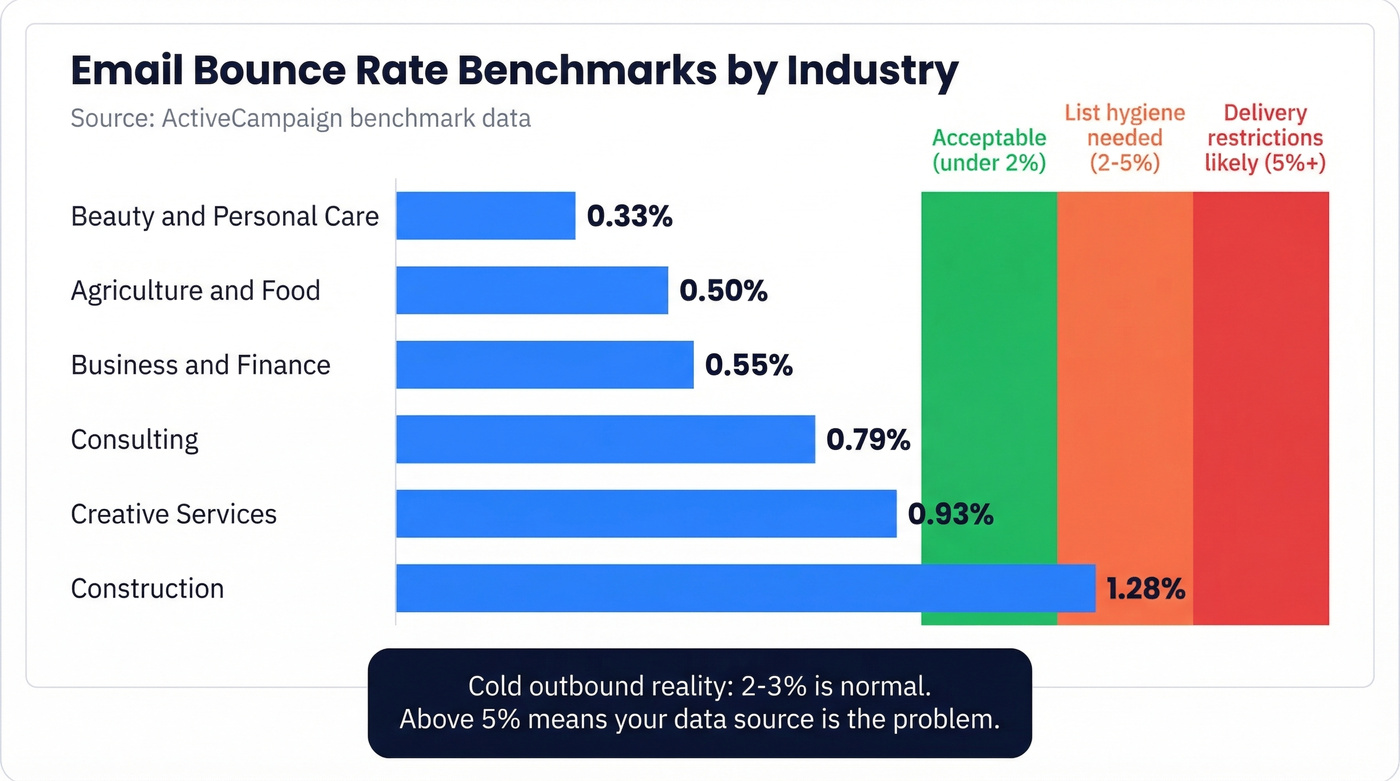
ActiveCampaign's benchmark data tells a useful story:
| Industry | Avg Bounce Rate |
|---|---|
| Beauty & personal care | 0.33% |
| Agriculture & food | 0.50% |
| Business & finance | 0.55% |
| Consulting | 0.79% |
| Creative services | 0.93% |
| Construction | 1.28% |
Operational thresholds are straightforward: under 2% is acceptable, above 2% means your list hygiene needs work, and above 5% can trigger delivery restrictions. Mailchimp's benchmarks based on billions of emails show bounce rates typically sitting in the low single digits for healthy programs, and Brevo's data based on 44+ billion emails confirms the same pattern at scale.
For complaint rates, the tiers are tighter - review at 0.02%, warning at 0.05%, stop sending at 0.1%.
Let's be honest: if you're running cold outbound, those industry averages are irrelevant. Cold lists hitting 2-3% is normal. Anything above 5% means your data source is the problem, not your sending infrastructure.
Prevent Bounces Before They Happen
Pre-send email verification is the highest-ROI action you can take. The consensus on r/coldemail is clear - catch-all domains are the main pain point, and users testing validators on catch-all-heavy domains consistently run into the same issue: catch-all results still leave too much uncertainty. Prospeo's 5-step verification handles catch-all domains with spam-trap and honeypot removal, delivers 98% email accuracy, and refreshes data every 7 days instead of the 6-week industry average. At roughly $0.01 per email, it's the cheapest insurance against domain damage.
If you're building lists from scratch, start with a workflow that prioritizes verified contacts (see name to email and email list providers).
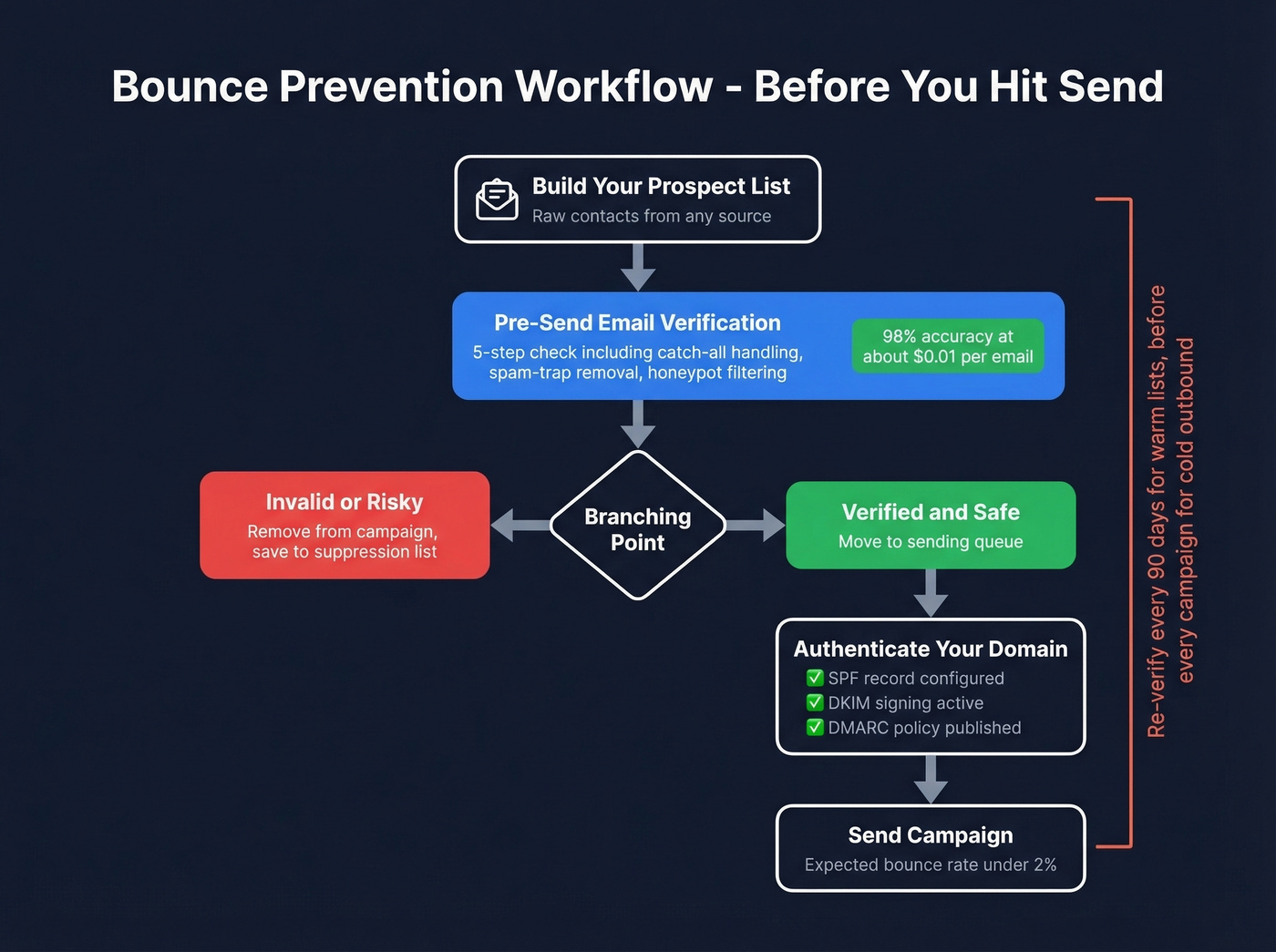
Teams using Prospeo cut bounce rates from 35%+ to under 4% - consistently. When your data is verified before every send, bounce handling becomes a safety net, not your entire workflow.
Kill your bounce problem at the source for $0.01 per email.
Authentication is non-negotiable. Google and Yahoo's bulk sender requirements are now fully enforced - SPF, DKIM, and DMARC are mandatory for anyone sending 5,000+ daily emails. You also need one-click unsubscribe honored within two days and a spam complaint rate under 0.3%. (If you're troubleshooting, use an email deliverability guide and validate DMARC alignment.)
List hygiene cadence matters more than most teams realize. Re-verify your entire active list every 90 days minimum. For cold lists, verify before every campaign. Email addresses decay fast - people change jobs, companies restructure, domains expire. We've seen teams lose perfectly good sending domains because they skipped a single verification cycle on a list they'd been using for months.
Automating Bounce Management for Outreach
Manual bounce management doesn't scale past a few hundred sends. If you're running any kind of outreach workflow, automation is the only way to keep your suppression lists current without burning hours every week.
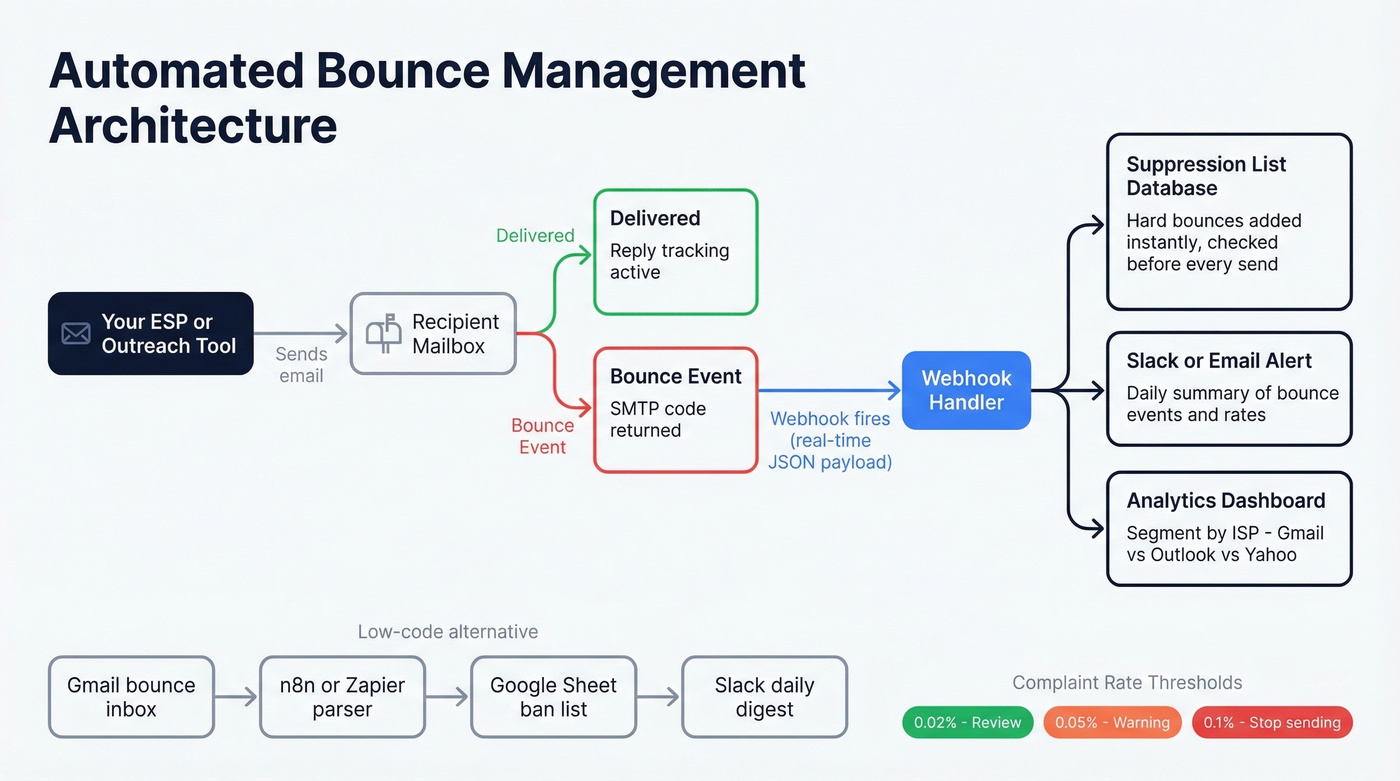
Webhook-based suppression is the gold standard. Most ESPs push bounce events via webhooks in real time - Postmark's bounce webhook delivers JSON payloads the moment a bounce is processed. The minimum viable logic: when you receive a bounce event, save the recipient to a ban list and check against it before every send. You'll only bounce once on any given address.
For teams not yet on webhook-based infrastructure, there's a low-code alternative that works surprisingly well. We've run an n8n workflow that parses Gmail bounce notifications, matches bounced addresses against a Google Sheet, updates their status, and sends a daily Slack summary. Not elegant, but it catches what manual review misses. Routing bounce replies to a dedicated inbox and parsing them programmatically is another solid approach.
Complaint handling needs its own automation. Suppress complainers within 15 minutes. Register for feedback loops with Microsoft SNDS (3-5 business days) and Yahoo (3-7 business days). Gmail doesn't offer traditional FBLs, so use Google Postmaster Tools instead. If you're hitting a 0.1% complaint rate, your list or your content has a fundamental problem that throttling won't fix.
FAQ
What's a good bounce rate?
Under 2% is acceptable for most senders; under 1% is ideal. Above 5% can trigger delivery restrictions and damage your sender reputation with major mailbox providers. Cold outbound teams should expect slightly higher rates but still aim to stay below 3%.
Should I delete bounced contacts?
Never delete - suppress instead. The person may update their email, reach out through another channel, or re-engage via a different touchpoint. Deleting means losing context, and context is what makes follow-up effective. Keep the record, just block future sends to that address.
How often should I re-verify my list?
Every 90 days minimum for warm lists; before every campaign for cold outbound. The faster your list decays - job-change-heavy industries like tech are the worst offenders - the more frequently you need to verify.
Skip this if you're only sending a handful of emails a month, but for real outbound volume?
Pre-send verification isn't optional. Free tools exist, but they typically cap at 25-50 lookups and skip catch-all handling entirely. For teams running actual campaigns, you need a tool that handles catch-all domains and refreshes data frequently enough to keep pace with address decay.